# harmonyos-imageEdit
**Repository Path**: liuchaoya/harmonyos-imageEdit
## Basic Information
- **Project Name**: harmonyos-imageEdit
- **Description**: No description available
- **Primary Language**: TypeScript
- **License**: Apache-2.0
- **Default Branch**: master
- **Homepage**: None
- **GVP Project**: No
## Statistics
- **Stars**: 0
- **Forks**: 0
- **Created**: 2025-06-11
- **Last Updated**: 2025-06-11
## Categories & Tags
**Categories**: Uncategorized
**Tags**: None
## README
# imageEdit
# V1.0.1(API12)
--------------------------------------------------------------------------------
## 📚简介
`imageEdit`是一个功能丰富的`兼容API12`的**图片编辑库**,旨在帮助开发者快速、便捷地完成编辑图片任务。
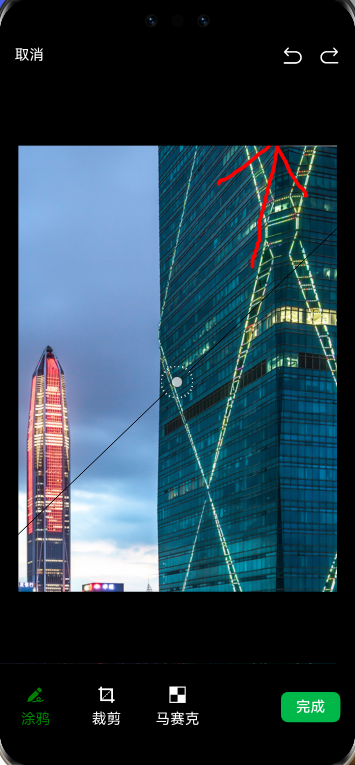
该库涵盖了裁剪、涂鸦、马赛克、撤销、重做等一系列操作。
-------------------------------------------------------------------------------
## 快照(涂鸦、马赛克、裁剪、撤销重做、缩放等功能)



## 开源库地址
https://github.com/zhongjhATC/harmonyos-imageEdit
## 🛠️版本说明
> - 1.0.x版本系列兼容**API12**
## 📦安装
### 🍊ohpm
执行安装命令
```
ohpm install @zhongjh/image_edit
```
## 📦使用
### 1.在项目中引入插件
```
import { ImageEdit, CropMoveType, xxxx } from "@zhongjh/image_edit";
import { CropMoveType } from "@zhongjh/image_edit/src/main/ets/common/ImageEditType";
```
### 2.基础组件使用API
#### 1.在EntryAbility.ets初始化
需要在EntryAbility初始化,获取状态栏等宽高信息,这样才能在后续打开编辑图片界面时进行ui布置
```
import { ImageEditManager } from '@zhongjh/image_edit';
export default class EntryAbility extends UIAbility {
onWindowStageCreate(windowStage: window.WindowStage) {
windowClass.on('windowStatusChange', (status) => {
ImageEditManager.getInstance()
.init(windowClass, status, StatusUtils.getInstance().statusBarHeight,
StatusUtils.getInstance().navigationBarHeight);
});
}
}
```
#### 2.自定义ImageEditPage
考虑到目前打开page有很多方式,不太适合统一的情况下,最终还是决定imageEdit库以组件的方式开放,后续会设置更多api提供使用
该例子是假设使用navPathStack打开page,请根据你项目打开page的方式修改
```
import { image } from "@kit.ImageKit";
import { ImageEditView, CropMoveType } from "@zhongjh/image_edit";
@Builder
export function RegisterBuilder() {
ImageEditPage()
}
/**
* 编辑图片界面,具体如何使用根据自身场景调用
*/
@Entry
@Component
struct ImageEditPage {
navPathStack: NavPathStack = new NavPathStack();
/**
* 图片数据源
*/
pixelMap: image.PixelMap = undefined!;
/**
* 监控保存后,返回一个新的图片数据源
*/
@Provide @Watch('listenNewBase64') mergedPixelMap: image.PixelMap | undefined = undefined;
build() {
NavDestination() {
Row() {
if (this.pixelMap) {
ImageEditView({
pixelMap: this.pixelMap,
onCancel: () => {
this.navPathStack?.pop({ isCancel: true }, true);
},
apiModel: {
cropMoveType: CropMoveType.All,
isScale: true
}
})
}
}
}
.onReady((context: NavDestinationContext) => {
this.navPathStack = context.pathStack;
this.pixelMap = this.navPathStack.getParamByName('ImageEditPage')[0] as image.PixelMap;
})
.onBackPressed(() => {
this.navPathStack?.pop({ isCancel: true }, true);
return true;
})
.hideTitleBar(true)
}
/**
* 监控保存后,返回一个新的Base64数据
*/
async listenNewBase64() {
if (this.mergedPixelMap) {
this.navPathStack?.pop(this.mergedPixelMap);
}
}
}
```
## star`imageEdit`希望您可以动一动小手点点小⭐⭐
## 👴希望大家如有好的需求踊跃提交,如有问题请前往github提交issue,我闲暇时间会扩充与修复优化