# AndroidSlidingUpPanel
**Repository Path**: liustar2017/AndroidSlidingUpPanel
## Basic Information
- **Project Name**: AndroidSlidingUpPanel
- **Description**: No description available
- **Primary Language**: Java
- **License**: Apache-2.0
- **Default Branch**: 3.1
- **Homepage**: None
- **GVP Project**: No
## Statistics
- **Stars**: 0
- **Forks**: 0
- **Created**: 2019-03-01
- **Last Updated**: 2020-12-19
## Categories & Tags
**Categories**: Uncategorized
**Tags**: None
## README
[](https://maven-badges.herokuapp.com/maven-central/com.sothree.slidinguppanel/library)
Android Sliding Up Panel
=========================
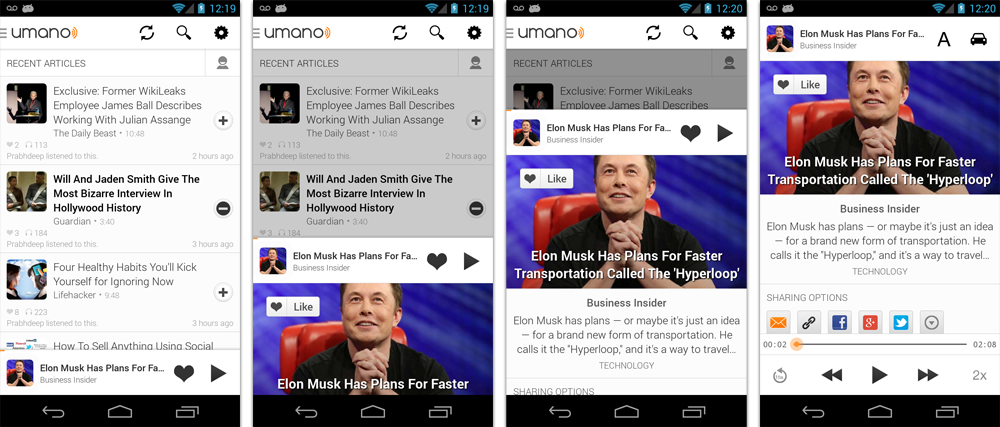
This library provides a simple way to add a draggable sliding up panel (popularized by Google Music, Google Maps and Rdio) to your Android application. Umano Team <3 Open Source.
As seen in [Umano](http://umanoapp.com) [Android app](https://play.google.com/store/apps/details?id=com.sothree.umano):
### Importing the library
#### Eclipse
Download the [latest release](https://github.com/umano/AndroidSlidingUpPanel/releases) and include the `library` project as a dependency in Eclipse.
#### Android Studio
Simply add the following dependency to your `build.gradle` file to use the latest version:
```groovy
dependencies {
repositories {
mavenCentral()
}
compile 'com.sothree.slidinguppanel:library:3.0.0'
}
```
### Usage
* Include `com.sothree.slidinguppanel.SlidingUpPanelLayout` as the root element in your activity layout.
* The layout must have `gravity` set to either `top` or `bottom`.
* Make sure that it has two children. The first child is your main layout. The second child is your layout for the sliding up panel.
* The main layout should have the width and the height set to `match_parent`.
* The sliding layout should have the width set to `match_parent` and the height set to either `match_parent`, `wrap_content` or the max desireable height.
* By default, the whole panel will act as a drag region and will intercept clicks and drag events. You can restrict the drag area to a specific view by using the `setDragView` method or `umanoDragView` attribute.
For more information, please refer to the sample code.
```xml
```
For smooth interaction with the ActionBar, make sure that `windowActionBarOverlay` is set to `true` in your styles:
```xml
```
However, in this case you would likely want to add a top margin to your main layout of `?android:attr/actionBarSize`
or `?attr/actionBarSize` to support older API versions.
### Caveats, Additional Features and Customization
* If you are using a custom `umanoDragView`, the panel will pass through the click events to the main layout. Make your second layout `clickable` to prevent this.
* You can change the panel height by using the `setPanelHeight` method or `umanoPanelHeight` attribute.
* If you would like to hide the shadow above the sliding panel, set `shadowHeight` attribute to 0.
* Use `setEnabled(false)` to completely disable the sliding panel (including touch and programmatic sliding)
* Use `setTouchEnabled(false)` to disables panel's touch responsiveness (drag and click), you can still control the panel programatically
* Use `getPanelState` to get the current panel state
* Use `setPanelState` to set the current panel state
* You can add paralax to the main view by setting `umanoParalaxOffset` attribute (see demo for the example).
* You can set a anchor point in the middle of the screen using `setAnchorPoint` to allow an intermediate expanded state for the panel (similar to Google Maps).
* You can set a `PanelSlideListener` to monitor events about sliding panes.
* You can also make the panel slide from the top by changing the `layout_gravity` attribute of the layout to `top`.
* By default, the panel pushes up the main content. You can make it overlay the main content by using `setOverlayed` method or `umanoOverlay` attribute. This is useful if you would like to make the sliding layout semi-transparent. You can also set `umanoClipPanel` to false to make the panel transparent in non-overlay mode.
* By default, the main content is dimmed as the panel slides up. You can change the dim color by changing `umanoFadeColor`. Set it to `"@android:color/transparent"` to remove dimming completely.
### Implementation
This library was initially based on the opened-sourced [SlidingPaneLayout](http://developer.android.com/reference/android/support/v4/widget/SlidingPaneLayout.html) component from the r13 of the Android Support Library. Thanks Android team!
### Requirements
Tested on Android 2.2+
### Other Contributors
* Jan 21, 14 - ChaYoung You ([@yous](https://github.com/yous)) - Slide from the top support
* Aug 20, 13 - ([@gipi](https://github.com/gipi)) - Android Studio Support
* Jul 24, 13 - Philip Schiffer ([@hameno](https://github.com/hameno)) - Maven Support
* Oct 20, 13 - Irina Preșa ([@iriina](https://github.com/iriina)) - Anchor Support
* Dec 1, 13 - ([@youchy](https://github.com/youchy)) - XML Attributes Support
* Dec 22, 13 - Vladimir Mironov ([@MironovNsk](https://github.com/nsk-mironov)) - Custom Expanded Panel Height
If you have an awesome pull request, send it over!
### Changelog
* 3.0.0
* Added `umano` prefix for all attributes
* Added `clipPanel` attribute for supporting transparent panels in non-overlay mode.
* `setEnabled(false)` - now completely disables the sliding panel (touch and programmatic sliding)
* `setTouchEnabled(false)` - disables panel's touch responsiveness (drag and click), you can still control the panel programatically
* `getPanelState` - is now the only method to get the current panel state
* `setPanelState` - is now the only method to modify the panel state from code
* 2.0.2 - Allow `wrap_content` for sliding view height attribute. Bug fixes.
* 2.0.1 - Bug fixes.
* 2.0.0 - Cleaned up various public method calls. Added animated `showPanel`/`hidePanel` methods.
* 1.0.1 - Initial Release
### Licence
> Licensed under the Apache License, Version 2.0 (the "License");
> you may not use this work except in compliance with the License.
> You may obtain a copy of the License in the LICENSE file, or at:
>
> [http://www.apache.org/licenses/LICENSE-2.0](http://www.apache.org/licenses/LICENSE-2.0)
>
> Unless required by applicable law or agreed to in writing, software
> distributed under the License is distributed on an "AS IS" BASIS,
> WITHOUT WARRANTIES OR CONDITIONS OF ANY KIND, either express or implied.
> See the License for the specific language governing permissions and
> limitations under the License.