# zerobrew
**Repository Path**: liyu2015/zerobrew
## Basic Information
- **Project Name**: zerobrew
- **Description**: No description available
- **Primary Language**: Unknown
- **License**: BSD-2-Clause
- **Default Branch**: main
- **Homepage**: None
- **GVP Project**: No
## Statistics
- **Stars**: 0
- **Forks**: 0
- **Created**: 2026-11-11
- **Last Updated**: 2026-11-11
## Categories & Tags
**Categories**: Uncategorized
**Tags**: None
## README
zerobrew
English ·
中文
[](https://github.com/zerobrewhq/zerobrew/actions/workflows/ci.yml)
[](https://github.com/zerobrewhq/zerobrew/actions/workflows/test.yml)
[](https://github.com/zerobrewhq/zerobrew/releases)
[](https://discord.gg/ZaPYwm9zaw)
[](./LICENSE-MIT.md)
[](./LICENSE-APACHE.md)

zerobrew 为 macOS 和 Linux 上的 Homebrew 软件包带来了类似 uv 的架构。
## 安装 (Install)
```bash
curl -fsSL https://zerobrew.rs/install | bash
```
安装程序会更新你的 shell 配置。完成后,重启终端,或运行它打印的 `source` 命令。
或通过 Homebrew 安装:
```bash
brew install zerobrewhq/tap/zerobrew
```
## 更新 zerobrew (Update zerobrew)
如果使用独立安装脚本,重新运行:
```bash
curl -fsSL https://zerobrew.rs/install | bash
zb --version
```
如果通过 Homebrew 安装:
```bash
brew update && brew upgrade zerobrew
```
如果你是从旧的 `lucasgelfond/zerobrew` tap 安装的,它已不再更新。请切换到新的 tap:
```bash
brew uninstall zerobrew
brew untap lucasgelfond/zerobrew
brew install zerobrewhq/tap/zerobrew
```
`cachebag/zerobrew` 和 `zerobrewhq/zerobrew` 这两个 tap 已迁移到 `zerobrewhq/tap`,会继续更新,无需任何操作。
`zb update` 只刷新软件包元数据。`zb upgrade` 升级通过 zerobrew 安装的软件包。它们都不会更新 `zb` 二进制文件本身。
## 快速开始 (Quick start)
需要使用 `brew` 命令时,可以手动启用兼容入口:
```bash
zb install-alias brew
brew install jq
zb install-alias brew --remove
```
启用后会在 `zb` 所在目录创建 `brew -> zb-brew`,该目录需要在 PATH 中。
也可以在安装时启用:
```bash
curl -fsSL https://zerobrew.rs/install | bash -s -- --brew-compat
```
如果 PATH 或 Homebrew 的标准安装位置已有 Homebrew 或其他 `brew` 入口,
启用会被拒绝,不会覆盖已有文件。移除命令只删除 zerobrew 自己创建的软链接。
缺少 `zb-brew` 时,需要重新安装 zerobrew。
兼容入口支持 `install`、`uninstall`、`list`、`info`、`outdated`、`upgrade`、
`doctor`、`bundle` 和 `update`,参数与输出沿用 `zb`。
`cleanup` 对应 `zb gc`,只清理未引用的 store 条目;`update` 只刷新软件包索引,
不会更新 zerobrew 本身。`search`、`services`、`tap` 等命令,以及 `--cask`、
`list --formula` 等参数暂不支持,会明确报错。
`zb migrate` 需要 PATH 中的真实 Homebrew,不能通过该兼容入口执行迁移。
```bash
zb install jq # 安装单个软件包
zb install wget git # 安装多个软件包
zb bundle # 从 Brewfile 安装
zb bundle install -f myfile # 从自定义文件安装
zb bundle dump # 将已安装的软件包导出到 Brewfile
zb bundle dump -f out --force # 导出到自定义文件(覆盖)
zb uninstall jq # 卸载单个软件包
zb outdated # 列出有新版本可用的软件包
zb upgrade # 升级所有已过期的软件包
zb upgrade jq wget # 升级指定的软件包
zb reset # 卸载所有内容
zb gc # 垃圾回收未使用的存储条目
zbx jq --version # 在不链接的情况下运行
```
自动初始化(`--auto-init` 或 `ZEROBREW_AUTO_INIT=true`)和 `zb reset`
会创建数据目录,不会修改 shell 配置。需要配置 shell 时,显式运行 `zb init`;
传入 `zb init --no-modify-path` 则保留现有配置。
## 性能快照 (Performance snapshot)
| 软件包 | Homebrew (冷启动) | ZB (冷启动) | 冷启动加速 | Homebrew (热启动) | ZB (热启动) | 热启动加速 |
|---------|-----------------|-----------|--------------|-----------------|-----------|--------------|
| **总体 (100 个软件包)** | 853s | 109s | **7.8x** | 756s | 29.9s | **25x** |
| python@3.14 | 17.85s | 1.86s | 9.6x | 17.10s | 624ms | 27.4x |
| node | 32.46s | 2.08s | 15.6x | 31.18s | 889ms | 35.1x |
| tesseract | 39.87s | 4.37s | 9.1x | 38.24s | 2.86s | 13.4x |
| openjdk | 34.14s | 6.09s | 5.6x | 31.67s | 2.81s | 11.3x |
| llvm | 17.09s | 6.09s | 2.8x | 10.51s | 172ms | 61.1x |
测试于 2026-10-23,使用 zerobrew 0.4.2 和 Homebrew 7.0.10,环境为 macOS 26.6.2、MacBook Pro(M3 Pro,18 GB 内存),有线网络,下载带宽约 436 Mbit/s。测试开始时 Homebrew 中未安装任何软件包。
- **冷启动**:该软件包及其所有依赖均已卸载,下载缓存为空。
- **热启动**:该软件包及其所有依赖均已卸载,保留冷启动时的下载缓存。
- 按中位数计算,单个软件包冷启动快 7.5 倍,热启动快 62 倍。按软件包看,冷启动加速从 1.7 倍(go)到 27 倍(certifi),热启动从 4.0 倍(fontconfig)到 275 倍(p11-kit)。100 个软件包中有 86 个冷启动至少快 5 倍,19 个热启动快 100 倍以上。
- 两个工具都会运行 post-install 步骤。ca-certificates 的步骤会根据系统钥匙串构建 CA 证书包,Homebrew 大约要花 8 秒,此前 zerobrew 在每个依赖它的软件包上也要花同样的时间,也就是表中的大部分软件包。从 0.4.2 起 zerobrew 在进程内构建这个证书包,字节完全一致,用时远不到一秒;在此之前的测试([results/2026-10-12](results/2026-10-12/benchmark.md))冷启动为 3.6 倍。fontconfig 的 `fc-cache` 是同类步骤,尚未移植([#448](https://github.com/zerobrewhq/zerobrew/issues/448)),这也是 fontconfig、harfbuzz、cairo 和 pango 热启动不到 10 倍的原因。
- 冷启动受网络带宽限制。两天前同一测试在约 80 Mbit/s 的网络上([results/2026-10-21](results/2026-10-21/benchmark.md))总体冷启动为 3.7 倍,go 和 llvm 的速度就是下载速度,但中位数仍有 6.2 倍。Homebrew 的总耗时几乎不随带宽变化;zerobrew 的耗时主要就是带宽。
- 热启动会占用更多磁盘。卸载后 brew 只保留 bottle,我们则同时保留 bottle 和存储区中已解压的 keg。这正是重新安装只需克隆而不必重建的原因。`zb gc` 会清理它。
完整结果
| 软件包 | Homebrew (冷启动) | ZB (冷启动) | 冷启动加速 | Homebrew (热启动) | ZB (热启动) | 热启动加速 |
|---------|-----------------|-----------|--------------|-----------------|-----------|--------------|
| **总体 (100 个软件包)** | 852.82s | 108.73s | **7.84x** | 755.53s | 29.91s | **25.26x** |
| ca-certificates | 8.35s | 361ms | 23.13x | 7.69s | 29ms | 265.28x |
| openssl@3 | 11.44s | 1.15s | 9.92x | 10.58s | 63ms | 167.95x |
| xz | 2.43s | 391ms | 6.22x | 1.62s | 28ms | 57.93x |
| sqlite | 3.10s | 450ms | 6.90x | 2.31s | 27ms | 85.44x |
| readline | 2.40s | 524ms | 4.57x | 1.62s | 26ms | 62.23x |
| icu4c@78 | 3.00s | 871ms | 3.44x | 1.94s | 27ms | 71.96x |
| python@3.14 | 17.85s | 1.86s | 9.61x | 17.10s | 624ms | 27.40x |
| awscli | 31.02s | 3.05s | 10.17x | 29.72s | 884ms | 33.62x |
| node | 32.46s | 2.08s | 15.58x | 31.18s | 889ms | 35.07x |
| harfbuzz | 25.17s | 4.16s | 6.05x | 23.51s | 2.80s | 8.40x |
| ncurses | 3.04s | 779ms | 3.90x | 2.28s | 48ms | 47.54x |
| gh | 2.33s | 584ms | 3.98x | 1.47s | 36ms | 40.83x |
| pcre2 | 2.54s | 484ms | 5.25x | 1.75s | 33ms | 52.91x |
| libpng | 2.46s | 348ms | 7.06x | 1.69s | 27ms | 62.41x |
| zstd | 3.93s | 431ms | 9.13x | 3.14s | 34ms | 92.32x |
| glib | 6.91s | 924ms | 7.48x | 5.89s | 98ms | 60.09x |
| lz4 | 2.41s | 311ms | 7.75x | 1.68s | 26ms | 64.65x |
| gettext | 4.53s | 951ms | 4.76x | 3.66s | 65ms | 56.25x |
| libngtcp2 | 12.29s | 1.50s | 8.22x | 11.43s | 516ms | 22.15x |
| libnghttp3 | 2.42s | 351ms | 6.89x | 1.67s | 26ms | 64.04x |
| pkgconf | 2.47s | 311ms | 7.95x | 1.68s | 27ms | 62.07x |
| libunistring | 2.45s | 421ms | 5.81x | 1.69s | 27ms | 62.63x |
| mpdecimal | 2.46s | 314ms | 7.84x | 1.67s | 26ms | 64.27x |
| brotli | 2.48s | 375ms | 6.61x | 1.69s | 27ms | 62.41x |
| jpeg-turbo | 2.51s | 420ms | 5.97x | 1.71s | 28ms | 60.96x |
| xorgproto | 2.14s | 360ms | 5.95x | 1.36s | 29ms | 46.79x |
| ffmpeg | 22.61s | 1.73s | 13.04x | 21.20s | 592ms | 35.81x |
| cmake | 3.19s | 1.02s | 3.12x | 1.89s | 80ms | 23.56x |
| libnghttp2 | 2.46s | 313ms | 7.87x | 1.67s | 26ms | 64.04x |
| go | 4.79s | 2.77s | 1.73x | 3.50s | 169ms | 20.74x |
| uv | 2.37s | 606ms | 3.91x | 1.44s | 26ms | 55.23x |
| gmp | 2.46s | 446ms | 5.51x | 1.69s | 27ms | 62.44x |
| libtiff | 8.00s | 541ms | 14.78x | 7.17s | 54ms | 132.81x |
| fontconfig | 10.75s | 3.60s | 2.98x | 9.79s | 2.47s | 3.96x |
| python@3.13 | 15.95s | 1.60s | 9.97x | 15.26s | 189ms | 80.74x |
| git | 6.93s | 1.17s | 5.92x | 5.52s | 103ms | 53.56x |
| little-cms2 | 8.76s | 546ms | 16.05x | 8.00s | 56ms | 142.79x |
| dav1d | 2.48s | 330ms | 7.52x | 1.71s | 26ms | 65.62x |
| openexr | 11.36s | 638ms | 17.80x | 10.40s | 66ms | 157.59x |
| c-ares | 2.50s | 330ms | 7.56x | 1.73s | 33ms | 52.42x |
| tesseract | 39.87s | 4.37s | 9.13x | 38.24s | 2.86s | 13.38x |
| p11-kit | 10.11s | 446ms | 22.68x | 9.34s | 34ms | 274.65x |
| imagemagick | 17.23s | 3.10s | 5.57x | 16.23s | 84ms | 193.27x |
| zlib | 2.42s | 307ms | 7.87x | 1.66s | 26ms | 63.69x |
| libx11 | 6.10s | 828ms | 7.37x | 5.32s | 184ms | 28.91x |
| freetype | 3.94s | 438ms | 9.00x | 3.20s | 32ms | 100.03x |
| protobuf | 4.06s | 576ms | 7.06x | 3.30s | 62ms | 53.19x |
| gnupg | 25.70s | 1.07s | 23.95x | 24.34s | 189ms | 128.76x |
| openjph | 8.81s | 554ms | 15.90x | 8.00s | 56ms | 142.82x |
| libtasn1 | 2.45s | 338ms | 7.25x | 1.71s | 28ms | 61.00x |
| ruby | 18.05s | 3.84s | 4.70x | 17.75s | 1.34s | 13.28x |
| gnutls | 18.21s | 978ms | 18.62x | 16.46s | 139ms | 118.40x |
| expat | 2.48s | 310ms | 8.01x | 1.67s | 27ms | 61.93x |
| libsodium | 2.49s | 337ms | 7.39x | 1.71s | 27ms | 63.44x |
| simdjson | 2.49s | 405ms | 6.15x | 1.69s | 26ms | 65.08x |
| gemini-cli | 33.61s | 2.25s | 14.91x | 32.56s | 917ms | 35.50x |
| libarchive | 5.44s | 464ms | 11.73x | 4.74s | 37ms | 128.08x |
| pyenv | 15.43s | 1.69s | 9.16x | 14.56s | 544ms | 26.76x |
| pixman | 2.64s | 345ms | 7.64x | 1.71s | 27ms | 63.33x |
| curl | 19.71s | 1.61s | 12.20x | 18.61s | 570ms | 32.65x |
| opus | 2.43s | 345ms | 7.05x | 1.69s | 26ms | 65.12x |
| unbound | 14.67s | 1.54s | 9.51x | 13.73s | 554ms | 24.79x |
| cairo | 22.24s | 4.03s | 5.52x | 20.97s | 2.77s | 7.56x |
| pango | 28.60s | 4.10s | 6.97x | 27.39s | 2.79s | 9.80x |
| leptonica | 10.53s | 624ms | 16.88x | 9.85s | 65ms | 151.58x |
| libxcb | 5.18s | 755ms | 6.86x | 4.39s | 139ms | 31.55x |
| jpeg-xl | 15.14s | 720ms | 21.03x | 14.04s | 72ms | 194.96x |
| coreutils | 13.36s | 1.60s | 8.37x | 12.38s | 529ms | 23.41x |
| certifi | 9.07s | 342ms | 26.54x | 8.34s | 37ms | 225.51x |
| krb5 | 12.54s | 1.50s | 8.33x | 11.66s | 510ms | 22.86x |
| docker | 2.25s | 533ms | 4.21x | 1.39s | 27ms | 51.48x |
| libheif | 12.14s | 736ms | 16.49x | 11.27s | 66ms | 170.77x |
| webp | 4.68s | 432ms | 10.84x | 3.95s | 35ms | 112.74x |
| libxext | 6.97s | 804ms | 8.67x | 6.20s | 189ms | 32.80x |
| libxau | 2.86s | 346ms | 8.26x | 2.15s | 32ms | 67.31x |
| gcc | 11.91s | 2.48s | 4.80x | 9.94s | 72ms | 138.01x |
| bzip2 | 2.10s | 300ms | 7.01x | 1.31s | 26ms | 50.54x |
| libxdmcp | 2.89s | 349ms | 8.28x | 2.14s | 34ms | 63.03x |
| abseil | 3.02s | 545ms | 5.54x | 2.18s | 54ms | 40.37x |
| xcbeautify | 2.13s | 371ms | 5.74x | 1.35s | 27ms | 49.93x |
| libuv | 2.50s | 340ms | 7.34x | 1.71s | 27ms | 63.30x |
| giflib | 2.43s | 293ms | 8.31x | 1.69s | 27ms | 62.67x |
| utf8proc | 2.46s | 313ms | 7.88x | 1.68s | 26ms | 64.62x |
| libxrender | 6.94s | 798ms | 8.69x | 6.14s | 182ms | 33.74x |
| m4 | 2.11s | 292ms | 7.21x | 1.31s | 26ms | 50.42x |
| graphite2 | 2.42s | 304ms | 7.97x | 1.68s | 26ms | 64.77x |
| openjdk | 34.14s | 6.09s | 5.60x | 31.67s | 2.81s | 11.26x |
| uvwasi | 3.20s | 328ms | 9.75x | 2.45s | 29ms | 84.52x |
| libffi | 2.47s | 329ms | 7.50x | 1.67s | 26ms | 64.31x |
| libdeflate | 2.47s | 330ms | 7.47x | 1.68s | 26ms | 64.73x |
| llvm | 17.09s | 6.09s | 2.81x | 10.51s | 172ms | 61.10x |
| aom | 3.35s | 529ms | 6.33x | 2.50s | 32ms | 78.19x |
| lzo | 2.48s | 289ms | 8.57x | 1.69s | 27ms | 62.74x |
| libevent | 12.35s | 1.47s | 8.38x | 11.50s | 507ms | 22.69x |
| libgpg-error | 5.26s | 861ms | 6.11x | 4.45s | 71ms | 62.68x |
| libidn2 | 5.28s | 765ms | 6.90x | 4.41s | 72ms | 61.29x |
| berkeley-db@5 | 3.96s | 1.44s | 2.75x | 2.84s | 57ms | 49.81x |
| deno | 11.83s | 1.08s | 10.97x | 10.80s | 59ms | 183.03x |
| libedit | 2.46s | 329ms | 7.47x | 1.68s | 26ms | 64.69x |
| oniguruma | 2.49s | 328ms | 7.60x | 1.68s | 26ms | 64.62x |
如需复现,请在 Homebrew 中未安装任何软件包的机器上运行 `just bench --full results/`。该命令会重置 zerobrew,卸载其在 Homebrew 中安装的所有软件包,并将表格写入 `results/benchmark.md`。
CI 中会运行一个较小的版本:[parity workflow](https://github.com/zerobrewhq/zerobrew/actions/workflows/parity.yml) 在同一台 runner 上用两个工具安装一组固定的 formula,并逐字节比较生成的 prefix;[timing workflow](https://github.com/zerobrewhq/zerobrew/actions/workflows/timing.yml) 则对这些 formula 以及 node 和 python@3.14 分别用两个工具和上一个 zerobrew 发布版计时冷启动和热启动。
每晚的计时运行中,如果 zerobrew 在任一 formula 上冷启动不到 Homebrew 的 1.5 倍快、热启动不到 3 倍快,或整体比上一个发布版慢 20% 以上,就会失败。
## 关于这些速度是怎么来的 (A note on how we are achieving these speeds)
关于 Homebrew,我想说清楚:`brew` 和 `zerobrew` 安装的是来自 *Homebrew 构建农场* 的同一批 bottle。
区别在于下载之后:Homebrew 运行 Ruby 来求值 formula、解压、用 `install_name_tool` 重写路径,并逐个重新签名每个二进制文件;而 zerobrew **在进程内完成重定位**,并从内容寻址存储中链接,所以下载只付一次代价,之后几乎不再有开销。
**我想说清楚,没有 Homebrew 的 bottle 构建农场,我们基本什么都不是**。zerobrew 安装的每一个软件包都是他们构建、测试并发布的。我们不编译任何东西,不维护 formula,没有他们的工作就没有上面这些数字。速度来自工件的安装方式,而不是工件本身。
如果你想了解 zerobrew 是什么、不是什么,这篇文章值得一读:Andrew Nesbitt 的 [Standing on the shoulders of Homebrew](https://nesbitt.io/2026/04/14/standing-on-the-shoulders-of-homebrew.html)。他说得比我好。
**nanobrew:**
[nanobrew](https://github.com/justrach/nanobrew) 公布的数字计的是已安装软件包的"热安装",那是提前退出而不是安装,而且对比的是 zerobrew 0.1.0。
上面的每一个数字都是从未安装状态开始的真实安装,脚本和完整日志都在本仓库中,你可以自己跑。
## 与 Homebrew 的关系 (Relationship with Homebrew)
zerobrew 更像是一个针对 Homebrew 生态系统进行性能优化的客户端。我们依赖于:
- Homebrew 的 formula 定义 (homebrew-core)
- Homebrew 提供的预构建 bottle(如果可用)
- Homebrew 的软件包元数据和基础设施
我们的创新重点在于:
- 用于去重的基于内容的寻址存储 (Content-addressable storage)
- 用于零开销复制的 APFS clonefiles
- 使用 Homebrew 的 Ruby DSL 的源码编译回退 (Source build fallback)
zerobrew 处于实验阶段。我们建议将其与 Homebrew 并行运行,而不是作为替代品。除非您完全确定其影响,否则**不**建议清除 Homebrew 并将其替换为 zerobrew。
## 项目状态 (Project status)
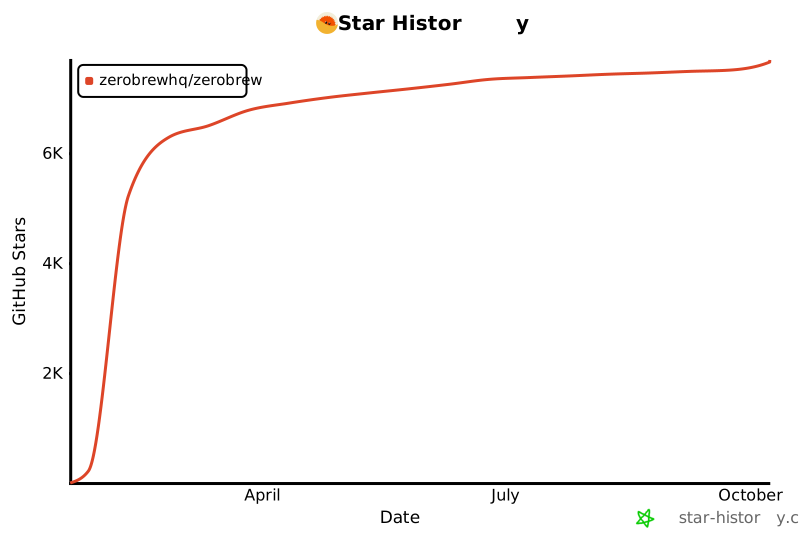
- **状态:** 处于实验阶段,但相当好用。我([@cachebag](https://github.com/cachebag))每天都在用它。
- **反馈:** 如果遇到不兼容问题,请提出 issue 或 PR。
- **许可证:** 根据您的选择,在 [Apache 2.0](./LICENSE-APACHE.md) 或 [MIT](./LICENSE-MIT.md) 下获得双重许可。源码编译 shim 和 post-install 运行器派生自 Homebrew,适用其 [BSD 2-Clause 许可证](./LICENSE-HOMEBREW)。