# CrystalQuartz
**Repository Path**: lizhanglong/CrystalQuartz
## Basic Information
- **Project Name**: CrystalQuartz
- **Description**: pluggable UI for Quartz.NET
- **Primary Language**: C#
- **License**: MIT
- **Default Branch**: master
- **Homepage**: None
- **GVP Project**: No
## Statistics
- **Stars**: 1
- **Forks**: 0
- **Created**: 2018-02-06
- **Last Updated**: 2022-07-01
## Categories & Tags
**Categories**: Uncategorized
**Tags**: None
## README
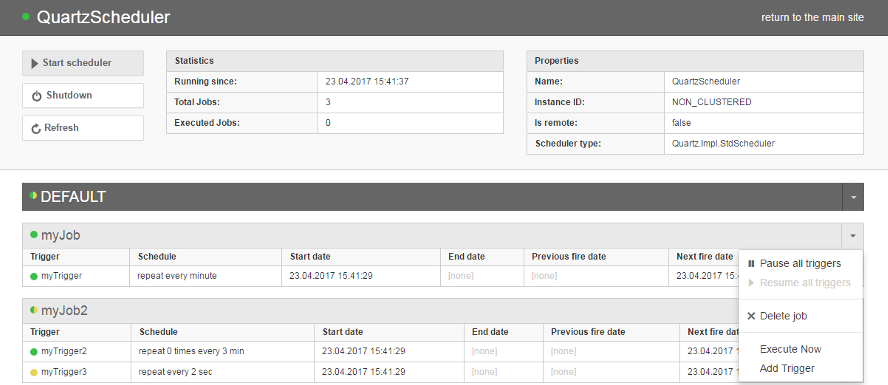
Crystal Quartz Panel is a lightweight, completely pluggable module for displaying Quartz.NET scheduler jobs information.
[](https://travis-ci.org/guryanovev/CrystalQuartz)
[](https://gitter.im/guryanovev/CrystalQuartz?utm_source=badge&utm_medium=badge&utm_campaign=pr-badge&utm_content=badge)
# Features #
* simple and lightweight, could be embedded into existing application:
* supports OWIN-based web or standalone applications;
* supports non-OWIN web applications;
* displays basic scheduler information:
* scheduler state and properties;
* triggers by jobs and groups;
* job properties (`JobDataMap`);
* ability to perform basic scheduler actions:
* pause/resume triggers jobs and groups;
* start/shutdown a scheduler;
* delete (unschedule) job;
* execute a job on demand ("Trigger Now").
* easy integration with a *remote scheduler* (see [examples](https://github.com/guryanovev/CrystalQuartz/tree/master/examples));
# Getting started #
CrystalQuartzPanel is implemented as a module that can be embedded into an existing application. Getting started strategy depends on a kind of environment you use.
## Option 1: OWIN ##
**UPDATE 2017:** Default panel url for OWIN is `/quartz` instead of `/CrystalQuartsPanel.axd` now. It helps to avoid issues with routing and `runAllManagedModulesForAllRequests` configuration. **OWIN-based approach is the preferred way of configuring CrystalQuartz panel now** as it allows to setup Simple, Remote or Self-Hosted scenarios in a clean, code-only manner.
Please check [complete OWIN setup guide](//github.com/guryanovev/CrystalQuartz/wiki/CrystalQuartz-OWIN-Configuration) for getting started.
**Examples**
- [OWIN Self-hosted console app example](//github.com/guryanovev/CrystalQuartz/tree/master/examples/01_Owin_SelfHosted)
- [OWIN Simple site](//github.com/guryanovev/CrystalQuartz/tree/master/examples/02_Owin_Web_Simple)
- [OWIN Web site + remote](//github.com/guryanovev/CrystalQuartz/tree/master/examples/03_Owin_Web_Remote)
## Option 2: Non-OWIN ##
Non-owin CrystalQuartzPanel implemented as an http module. It can work in web-applications only and requires some configuration to be added to the `web.config` file. There are two NuGet packages aimed to help in case of non-owin application, the choice depends on the type of scheduler you use.
**Option 2.1: If Quartz Scheduler works in the app domain of your web application:**
1. Install [CrystalQuartz.Simple](http://nuget.org/List/Packages/CrystalQuartz.Simple) NuGet package.
```Install-Package CrystalQuartz.Simple```
2. Customize `SimpleSchedulerProvider` class that has been added by NuGet package
```C#
public class SimpleSchedulerProvider : StdSchedulerProvider
{
protected override System.Collections.Specialized.NameValueCollection GetSchedulerProperties()
{
var properties = base.GetSchedulerProperties();
// Place custom properties creation here:
// properties.Add("test1", "test1value");
return properties;
}
protected override void InitScheduler(IScheduler scheduler)
{
// Put jobs creation code here
}
}
```
3. Run you application and go to `YOUR_APP_URL/CrystalQuartzPanel.axd`
**Option 2.2: If Quartz Scheduler works in a separate application (remote scheduler):**
1. Install [CrystalQuartz.Remote](http://nuget.org/List/Packages/CrystalQuartz.Remote) NuGet package.
```Install-Package CrystalQuartz.Remote```
2. Customize url of the remote scheduler in web config file:
```XML
```
3. Run you application and go to `YOUR_APP_URL/CrystalQuartzPanel.axd`
**Examples**
- [Simple Scheduler Example](https://github.com/guryanovev/CrystalQuartz/tree/owin/examples/04_SystemWeb_Simple)
- [Remote Scheduler Example](https://github.com/guryanovev/CrystalQuartz/tree/owin/examples/05_SystemWeb_Remote)
# Custom styles #
It is possible to apply some custom css to CrystalQuartz UI. To do so you need:
1. create a css file somewhere in your web application;
2. add a reference to this css file in CrystalQuartz config:
```xml
```
See [custom styles example](//github.com/guryanovev/CrystalQuartz/tree/master/examples/06_CustomStyles) for details.
# Building from source #
Please use `Build.bat` script to build the project locally. **Rebuilding directly from Visual Studio would not work correctly** because some client-side assets should be regenerated. `Build.bat` is a bootstrapper for [Rosalia build tool](https://github.com/rosaliafx/Rosalia). Prerquirements:
* Typescript should be installed on your machine and `tsc` command should be globally available
Once the build completes successfully, you can Run the VS project as usually.
# Collaboration #
Please use [gitter](https://gitter.im/guryanovev/CrystalQuartz?utm_source=badge&utm_medium=badge&utm_campaign=pr-badge&utm_content=badge) to ask questions. Fill free to report issues and open pull requests.
# Changelog #
**Latest update:**
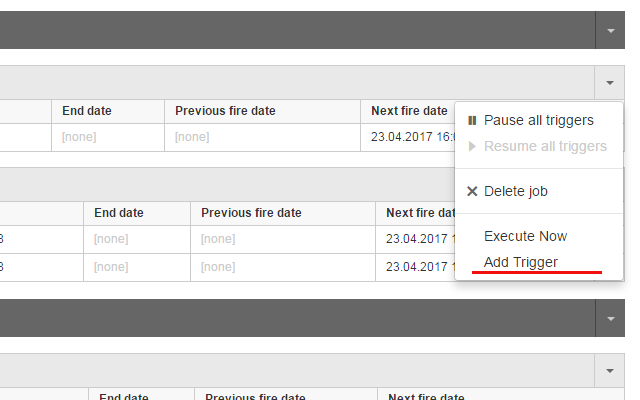
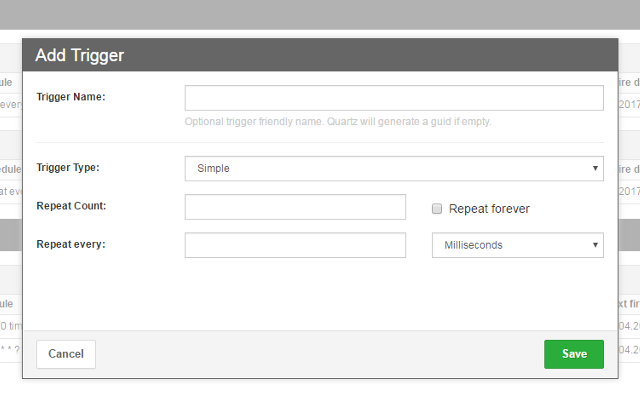
Added an ability to add triggers for existing Jobs
Add Trigger option in Job dropdown:
 Add Trigger form:
 [See full changelog](//github.com/guryanovev/CrystalQuartz/wiki/Changelog)