# flutter_ali_auth
**Repository Path**: lysmbetter/flutter_ali_auth
## Basic Information
- **Project Name**: flutter_ali_auth
- **Description**: https://github.com/CodeGather/flutter_ali_auth
- **Primary Language**: Unknown
- **License**: Apache-2.0
- **Default Branch**: master
- **Homepage**: None
- **GVP Project**: No
## Statistics
- **Stars**: 0
- **Forks**: 0
- **Created**: 2023-01-31
- **Last Updated**: 2023-02-22
## Categories & Tags
**Categories**: Uncategorized
**Tags**: None
## README
# ali_auth
[](https://github.com/CodeGather/flutter_ali_auth/blob/master/LICENSE)
[](https://github.com/CodeGather/flutter_ali_auth/issues)
[](https://github.com/CodeGather/flutter_ali_auth/network)
[](https://github.com/CodeGather/flutter_ali_auth/stargazers)
[](https://github.com/CodeGather/flutter_ali_auth)
[](https://github.com/CodeGather/flutter_ali_auth/releases)
## :large_blue_circle: 国际化
[English](README.md) | 中文文档
这是一个阿里云号码认证服务中的一键登录的插件
由于项目的其他功能都采用阿里云的服务,在一键登录的功能上也采用阿里云利于后期的更好维护。
本插件免费开源,高定制,如果在使用中有什么问题,欢迎反馈,如果觉得本插件还不够好可以提供您的宝贵意见,
如果你想在自己项目中定制,请将本插件clone为本地进行修改,但是通过本插件进行修改后发布其他版本的插件也欢迎,
但是在使用或者参考了本插件的思路或者相关内容,
# 请注明出处并且链接到本插件,谢谢您的配合。
## 为了解决大部分问题以及修复大量BUG,从1.0.0开始使用重构版本,api使用时可能会有调整,希望各位伙伴都能更新新版本,后期持续维护。
## 重构版本1.0.0 - 重点关注!!!!!!!请将该部分放到app的清单文件中,具体参照demo设置
```
```
## 相关支持
| 平台 | 支持 |
| :------:|:----:|
| Android | YES |
| Ios | YES |
## 授权⻚点击事件响应码
| 响应码 | 响应码描述 |
| :--------:|:----------:|
| 700000 | 点击返回按钮,⽤户取消免密登录(android 物理按钮/虚拟返回按钮暂未实现)请自行使用flutter替代 |
| 700001 | 点击切换按钮,⽤户取消免密登录 |
| 700002 | 点击登录按钮事件 |
| 700003 | 点击check box事件 |
| 700004 | 点击协议富⽂本⽂字事件 |
| 700005 | 点击点击第三方按钮事件 |
#https://www.jianshu.com/p/88d45977d482
#https://github.com/flutter/flutter/issues/35784
## 步骤
- 1、配置APP的签名安装于手机
- 2、获取签名APK文件下载地址:[点击下载快速获取签名工具](https://docs-aliyun.cn-hangzhou.oss.aliyun-inc.com/assets/attach/87870/cn_zh/1534313766610/AppSignGet.apk)
- 3、使用签名APP获取签名
- 4、配置appid+秘钥,阿里云后台配置签名,注意签名要和APP配置的签名一致,否则无法使用
- [帮助文档](https://help.aliyun.com/product/75010.html)
- [前往添加号码认证方案-获取秘钥](https://dypns.console.aliyun.com/?spm=5176.12818093.favorites.ddypns.488716d0ttKe13#/)
- 使用秘钥初始化环境 AliAuthPlugin.initSdk()
## 注意事项
董敬龙:异常动画在个别机型会有 效果不明显 如果你想要全屏和弹窗同时使用那就避免不了
董敬龙:或者你们可以选择不设置动画
1、 针对移动闪退问题:
在示范工程,pods -> TARGETS -> ali_auth -> Build Settings -> Linking -> Other Linker Flags 里面加上 -ObjC(因为AuthSDK是通过pod依赖进去的,所有对应的target里面要加这个配置,不然移动网络会crash)
如下图所示:
 2、该插件已添加ATAuthSDK.framework,在编译时请勿将ATAuthSDK.framework重复添加,以免出现未知错误
如下图所示添加的为错误操作
2、该插件已添加ATAuthSDK.framework,在编译时请勿将ATAuthSDK.framework重复添加,以免出现未知错误
如下图所示添加的为错误操作
 ## 实验安装
```
dependencies:
ali_auth:
git:
url: https://github.com/CodeGather/flutter_ali_auth.git
```
## DEMO截图
## 实验安装
```
dependencies:
ali_auth:
git:
url: https://github.com/CodeGather/flutter_ali_auth.git
```
## DEMO截图


 ## 演示
## 演示
 ## 如果你觉得不错欢迎打赏

 ## QQ交流群
 ## 关注趋势
[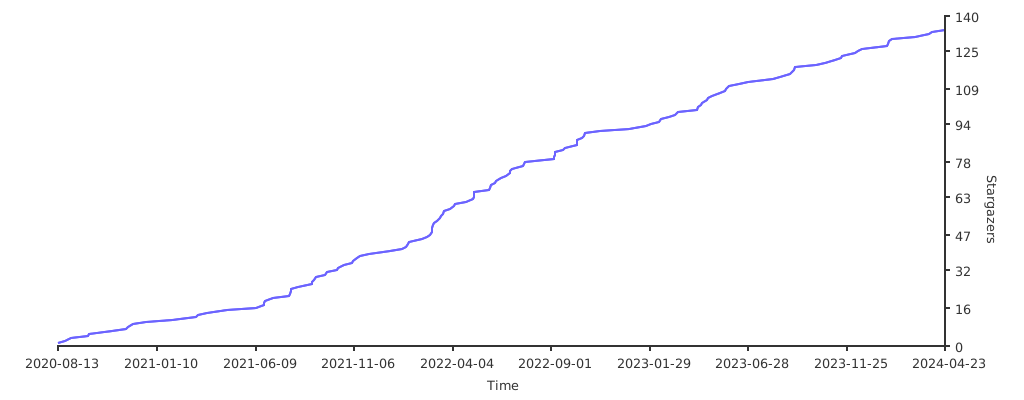](https://starchart.cc/CodeGather/flutter_ali_auth)
## 关注趋势
[](https://starchart.cc/CodeGather/flutter_ali_auth)