# FastAdapter
**Repository Path**: mangoluoyao/FastAdapter
## Basic Information
- **Project Name**: FastAdapter
- **Description**: No description available
- **Primary Language**: Unknown
- **License**: Apache-2.0
- **Default Branch**: develop
- **Homepage**: None
- **GVP Project**: No
## Statistics
- **Stars**: 0
- **Forks**: 0
- **Created**: 2025-10-10
- **Last Updated**: 2025-10-10
## Categories & Tags
**Categories**: Uncategorized
**Tags**: None
## README
# FastAdapter
The FastAdapter is here to simplify creating adapters for RecyclerViews. Don't worry about the adapter anymore. Just write the logic for how your view/item should look like, and you are done.
It's blazing fast, minimizing the code you need to write, and is easy to extend.
-------
What's included 🚀 •
Setup 🛠️ •
Migration Guide 🧬 •
Used by •
Sample App
-------
### What's included 🚀
- Core module 100% in Kotlin
- Click / Long-Click listeners
- Selection / Multi-Selection ([MultiselectSample](https://github.com/mikepenz/FastAdapter/blob/develop/app/src/main/java/com/mikepenz/fastadapter/app/MultiselectSampleActivity.kt), [CheckBoxSample](https://github.com/mikepenz/FastAdapter/blob/develop/app/src/main/java/com/mikepenz/fastadapter/app/CheckBoxSampleActivity.kt), [RadioButtonSample](https://github.com/mikepenz/FastAdapter/blob/develop/app/src/main/java/com/mikepenz/fastadapter/app/RadioButtonSampleActivity.kt))
- Expandable items ([ExpandableSample](https://github.com/mikepenz/FastAdapter/blob/develop/app/src/main/java/com/mikepenz/fastadapter/app/ExpandableSampleActivity.kt), [IconGridSample](https://github.com/mikepenz/FastAdapter/blob/develop/app/src/main/java/com/mikepenz/fastadapter/app/IconGridActivity.kt) ,[AdvancedSample](https://github.com/mikepenz/FastAdapter/blob/develop/app/src/main/java/com/mikepenz/fastadapter/app/AdvancedSampleActivity.kt))
- Write less code, get better results
- Highly optimized code
- Simple Drag & Drop ([SimpleItemListSample](https://github.com/mikepenz/FastAdapter/blob/develop/app/src/main/java/com/mikepenz/fastadapter/app/SimpleItemListActivity.kt))
- Headers ([StickyHeaderSample](https://github.com/mikepenz/FastAdapter/blob/develop/app/src/main/java/com/mikepenz/fastadapter/app/StickyHeaderSampleActivity.kt), [AdvancedSample](https://github.com/mikepenz/FastAdapter/blob/develop/app/src/main/java/com/mikepenz/fastadapter/app/AdvancedSampleActivity.kt))
- Footers
- Filter ([SimpleItemListSample](https://github.com/mikepenz/FastAdapter/blob/develop/app/src/main/java/com/mikepenz/fastadapter/app/SimpleItemListActivity.kt))
- Includes suggestions from the Android Team
- Easily extensible
- Endless Scroll ([EndlessScrollSample](https://github.com/mikepenz/FastAdapter/blob/develop/app/src/main/java/com/mikepenz/fastadapter/app/EndlessScrollListActivity.kt))
- "Leave-Behind"-Pattern ([SwipeListSample](https://github.com/mikepenz/FastAdapter/blob/develop/app/src/main/java/com/mikepenz/fastadapter/app/SwipeListActivity.kt))
- Split item view and model ([ModelItem](https://github.com/mikepenz/FastAdapter/blob/develop/app/src/main/java/com/mikepenz/fastadapter/app/ModelItemActivity.kt), [MultiTypeModelItem](https://github.com/mikepenz/FastAdapter/blob/develop/app/src/main/java/com/mikepenz/fastadapter/app/MultiTypeModelItemActivity.kt))
- Chain other Adapters ([SimpleItemListSample](https://github.com/mikepenz/FastAdapter/blob/develop/app/src/main/java/com/mikepenz/fastadapter/app/SimpleItemListActivity.kt), [StickyHeaderSample](https://github.com/mikepenz/FastAdapter/blob/develop/app/src/main/java/com/mikepenz/fastadapter/app/StickyHeaderSampleActivity.kt))
- Comes with useful Helpers
- ActionModeHelper ([MultiselectSample](https://github.com/mikepenz/FastAdapter/blob/develop/app/src/main/java/com/mikepenz/fastadapter/app/MultiselectSampleActivity.kt))
- UndoHelper ([MultiselectSample](https://github.com/mikepenz/FastAdapter/blob/develop/app/src/main/java/com/mikepenz/fastadapter/app/MultiselectSampleActivity.kt))
- FastScroller (external lib) ([SimpleItemListSample](https://github.com/mikepenz/FastAdapter/blob/develop/app/src/main/java/com/mikepenz/fastadapter/app/SimpleItemListActivity.kt))
- Paging (via Jetpack paging lib) ([PagedActivity](https://github.com/mikepenz/FastAdapter/blob/develop/app/src/main/java/com/mikepenz/fastadapter/app/PagedActivity.kt))
- More to come...
# Preview
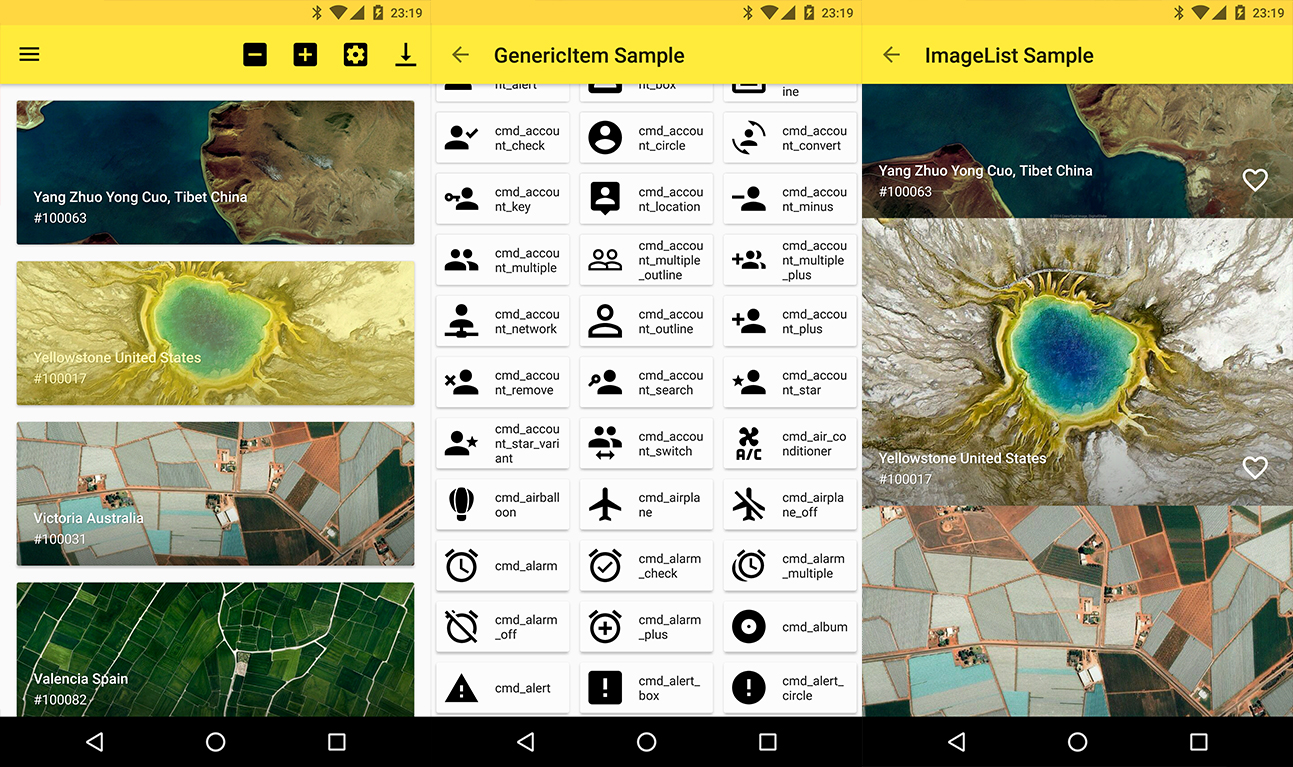
## Screenshots 🎉
# Setup
## Latest releases 🛠
- Kotlin | [v5.7.0](https://github.com/mikepenz/FastAdapter/tree/v5.7.0)
- [Deprecated] Java && AndroidX | [v3.3.1](https://github.com/mikepenz/FastAdapter/tree/v3.3.1)
- [Deprecated] Java && AppCompat | [v3.2.9](https://github.com/mikepenz/FastAdapter/tree/v3.2.9)
## Provide the gradle dependency
The library is split up into core, commons, and extensions. The core functions are included in the following dependency.
```gradle
implementation "com.mikepenz:fastadapter:${latestFastAdapterRelease}"
implementation "androidx.appcompat:appcompat:${androidX}"
implementation "androidx.recyclerview:recyclerview:${androidX}"
```
Expandable support is included and can be added via this
```gradle
implementation "com.mikepenz:fastadapter-extensions-expandable:${latestFastAdapterRelease}"
```
Many helper classes are included in the following dependency.
```gradle
implementation "com.mikepenz:fastadapter-extensions-binding:${latestFastAdapterRelease}" // view binding helpers
implementation "com.mikepenz:fastadapter-extensions-diff:${latestFastAdapterRelease}" // diff util helpers
implementation "com.mikepenz:fastadapter-extensions-drag:${latestFastAdapterRelease}" // drag support
implementation "com.mikepenz:fastadapter-extensions-paged:${latestFastAdapterRelease}" // paging support
implementation "com.mikepenz:fastadapter-extensions-scroll:${latestFastAdapterRelease}" // scroll helpers
implementation "com.mikepenz:fastadapter-extensions-swipe:${latestFastAdapterRelease}" // swipe support
implementation "com.mikepenz:fastadapter-extensions-ui:${latestFastAdapterRelease}" // pre-defined ui components
implementation "com.mikepenz:fastadapter-extensions-utils:${latestFastAdapterRelease}" // needs the `expandable`, `drag` and `scroll` extension.
// required for the ui components and the utils
implementation "com.google.android.material:material:${androidX}"
```
## How to use
### 1. Implement your item
#### 1a. Implement your item as usual (the easy way)
Just create a class which extends the `AbstractItem` as shown below. Implement the methods, and your item is ready.
```kotlin
open class SimpleItem : AbstractItem() {
var name: String? = null
var description: String? = null
/** defines the type defining this item. must be unique. preferably an id */
override val type: Int
get() = R.id.fastadapter_sample_item_id
/** defines the layout which will be used for this item in the list */
override val layoutRes: Int
get() = R.layout.sample_item
override fun getViewHolder(v: View): ViewHolder {
return ViewHolder(v)
}
class ViewHolder(view: View) : FastAdapter.ViewHolder(view) {
var name: TextView = view.findViewById(R.id.material_drawer_name)
var description: TextView = view.findViewById(R.id.material_drawer_description)
override fun bindView(item: SimpleItem, payloads: List) {
name.text = item.name
description.text = item.name
}
override fun unbindView(item: SimpleItem) {
name.text = null
description.text = null
}
}
}
```
#### 1b. Implement item with ViewBinding (the easiest way)
```kotlin
class BindingIconItem : AbstractBindingItem() {
var name: String? = null
override val type: Int
get() = R.id.fastadapter_icon_item_id
override fun bindView(binding: IconItemBinding, payloads: List) {
binding.name.text = name
}
override fun createBinding(inflater: LayoutInflater, parent: ViewGroup?): IconItemBinding {
return IconItemBinding.inflate(inflater, parent, false)
}
}
```
Use the `binding` extension dependency in your application for this.
### 2. Set the Adapter to the RecyclerView
```kotlin
//create the ItemAdapter holding your Items
val itemAdapter = ItemAdapter()
//create the managing FastAdapter, by passing in the itemAdapter
val fastAdapter = FastAdapter.with(itemAdapter)
//set our adapters to the RecyclerView
recyclerView.setAdapter(fastAdapter)
//set the items to your ItemAdapter
itemAdapter.add(ITEMS)
```
### 3. Extensions
By default the `FastAdapter` only provides basic functionality, which comes with the abstraction of items as `Item` and `Model`.
And the general functionality of adding/removing/modifying elements. To enable *selections*, or *expandables* the provided extensions need to be activated.
#### 3.1. SelectExtension
```kotlin
// Gets (or creates and attaches if not yet existing) the extension from the given `FastAdapter`
val selectExtension = fastAdapter.getSelectExtension()
// configure as needed
selectExtension.isSelectable = true
selectExtension.multiSelect = true
selectExtension.selectOnLongClick = false
// see the API of this class for more options.
```
#### 3.2. ExpandableExtension
> This requires the `fastadapter-extensions-expandable` extension.
```kotlin
// Gets (or creates and attaches if not yet existing) the extension.
val expandableExtension = fastAdapter.getExpandableExtension()
// configure as needed
expandableExtension.isOnlyOneExpandedItem = true
```
For further details scroll down to the `ExpandableItems` (under advanced usage) section.
### 3. Click listener
```kotlin
fastAdapter.onClickListener = { view, adapter, item, position ->
// Handle click here
false
}
```
### 4. Click listeners for views inside your item
```kotlin
// just add an `EventHook` to your `FastAdapter` by implementing either a `ClickEventHook`, `LongClickEventHook`, `TouchEventHook`, `CustomEventHook`
fastAdapter.addEventHook(object : ClickEventHook() {
override fun onBind(viewHolder: RecyclerView.ViewHolder): View? {
//return the views on which you want to bind this event
return if (viewHolder is SimpleImageItem.ViewHolder) {
viewHolder.viewWhichReactsOnClick
} else {
null
}
}
override fun onClick(v: View, position: Int, fastAdapter: FastAdapter, item: SimpleImageItem) {
//react on the click event
}
})
```
### 5. Filter
```kotlin
// Call this in onQueryTextSubmit() & onQueryTextChange() when using SearchView
itemAdapter.filter("yourSearchTerm")
itemAdapter.itemFilter.filterPredicate = { item: SimpleItem, constraint: CharSequence? ->
item.name?.text.toString().contains(constraint.toString(), ignoreCase = true)
}
```
`filter()` should return true for items to be retained and false for items to be removed.
### 6. Drag and drop
> This requires the `fastadapter-extensions-drag` extension.
First, attach `ItemTouchHelper` to RecyclerView.
```kotlin
val dragCallback = SimpleDragCallback()
val touchHelper = ItemTouchHelper(dragCallback)
touchHelper.attachToRecyclerView(recyclerView)
```
Implement `ItemTouchCallback` interface in your Activity, and override the `itemTouchOnMove()` method.
```kotlin
override fun itemTouchOnMove(oldPosition: Int, newPosition: Int): Boolean {
DragDropUtil.onMove(fastItemAdapter.itemAdapter, oldPosition, newPosition) // change position
return true
}
```
### 7. Using different ViewHolders (like HeaderView)
Start by initializing your adapters:
```kotlin
// Header is a model class for your header
val headerAdapter = ItemAdapter()
```
Initialize a Model FastAdapter:
```kotlin
val itemAdapter = GenericItemAdapter()
```
Finally, set the adapter:
```kotlin
val fastAdapter: GenericFastAdapter = FastAdapter.with(headerAdapter, itemAdapter) //the order defines in which order the items will show up
// alternative the super type of both item adapters can be used. e.g.:
recyclerView.setAdapter(fastAdapter)
```
### 8. Infinite (endless) scrolling
Create a FooterAdapter. We need this to display a loading ProgressBar at the end of our list. (Don't forget to pass it into `FastAdapter.with(..)`)
```kotlin
val footerAdapter = ItemAdapter()
```
Keep in mind that ProgressItem is provided by FastAdapter’s extensions.
```kotlin
recyclerView.addOnScrollListener(object : EndlessRecyclerOnScrollListener(footerAdapter) {
override fun onLoadMore(currentPage: Int) {
footerAdapter.clear()
footerAdapter.add(ProgressItem())
// Load your items here and add it to FastAdapter
itemAdapter.add(NEWITEMS)
}
})
```
For the complete tutorial and more features such as multi-select and CAB check out the [sample app](https://github.com/mikepenz/FastAdapter/tree/develop/app).
## Advanced Usage
### Proguard
* As of v2.5.0 there are no more known requirements to use the `FastAdapter` with Proguard
### ExpandableItems
The `FastAdapter` comes with support for expandable items. After adding the dependency set up the `Expandable` extension via:
```kotlin
val expandableExtension = fastAdapter.getExpandableExtension()
```
Expandable items have to implement the `IExpandable` interface, and the sub items the `ISubItem` interface. This allows better support.
The sample app provides sample implementations of those. (Those in the sample are kept Model which allows them to be used with different parent / subitems)
As of the way how `SubItems` and their state are handled it is highly recommended to use the `identifier` based `StateManagement`. Just add `withPositionBasedStateManagement(false)` to your `FastAdapter` setup.
A simple item just needs to extend from the `AbstractExpandableItem` and provide the `ViewHolder` as type.
```kotlin
open class SimpleSubExpandableItem : AbstractExpandableItem() {
/**
* BASIC ITEM IMPLEMENTATION
*/
}
```
// See the `SimpleSubExpandableItem.kt` of the sample application for more details.
## Articles
- [RecyclerView Adapter made easy](https://blog.iamsuleiman.com/recyclerview-adapter-android-made-fast-easy/) (FastAdapter v2.x)
## Used by
Mike Penz:
- AboutLibraries https://github.com/mikepenz/AboutLibraries
- Android-Iconics https://github.com/mikepenz/Android-Iconics
- ItemAnimators https://github.com/mikepenz/ItemAnimators
- MaterialDrawer https://github.com/mikepenz/MaterialDrawer
# Developed By
- Mike Penz
- [mikepenz.dev](https://mikepenz.dev) - [blog.mikepenz.dev](https://blog.mikepenz.dev) -
- [paypal.me/mikepenz](http://paypal.me/mikepenz)
- [Automatic changelog generation action](https://github.com/marketplace/actions/release-changelog-builder)
- Fabian Terhorst
- [github.com/FabianTerhorst](https://github.com/FabianTerhorst) -
- [paypal.me/fabianterhorst](http://paypal.me/fabianterhorst)
# Contributors
This free, open source software was also made possible by a group of volunteers that put many hours of hard work into it. See the [CONTRIBUTORS.md](CONTRIBUTORS.md) file for details.
## Special mentions
A special thanks to the very active contributors who added many improvements to this library.
* **[Allan Wang](https://github.com/AllanWang)**
* **[MFlisar](https://github.com/MFlisar)**
* **[RobbWatershed](https://github.com/RobbWatershed)**
# License
Copyright 2021 Mike Penz
Licensed under the Apache License, Version 2.0 (the "License");
you may not use this file except in compliance with the License.
You may obtain a copy of the License at
http://www.apache.org/licenses/LICENSE-2.0
Unless required by applicable law or agreed to in writing, software
distributed under the License is distributed on an "AS IS" BASIS,
WITHOUT WARRANTIES OR CONDITIONS OF ANY KIND, either express or implied.
See the License for the specific language governing permissions and
limitations under the License.