# lispy
**Repository Path**: marshalyyx/lispy
## Basic Information
- **Project Name**: lispy
- **Description**: No description available
- **Primary Language**: Unknown
- **License**: Not specified
- **Default Branch**: master
- **Homepage**: None
- **GVP Project**: No
## Statistics
- **Stars**: 0
- **Forks**: 1
- **Created**: 2023-10-04
- **Last Updated**: 2023-10-04
## Categories & Tags
**Categories**: Uncategorized
**Tags**: None
## README
[![License GPL 3][badge-license]](http://www.gnu.org/licenses/gpl-3.0.txt)
[](https://travis-ci.org/abo-abo/lispy)
[](https://coveralls.io/r/abo-abo/lispy?branch=master)
[](http://melpa.org/#/lispy)
[](http://stable.melpa.org/#/lispy)

> short and sweet LISP editing
**Table of Contents**
- [Introduction](#introduction)
- [Relation to vi](#relation-to-vi)
- [Features](#features)
- [Function reference](#function-reference)
- [Getting Started](#getting-started)
- [Installation instructions](#installation-instructions)
- [via MELPA](#via-melpa)
- [via el-get](#via-el-get)
- [Configuration instructions](#configuration-instructions)
- [Customization instructions](#customization-instructions)
- [Operating on lists](#operating-on-lists)
- [How to get into list-editing mode (special)](#how-to-get-into-list-editing-mode-special)
- [Digit keys in special](#digit-keys-in-special)
- [How to get out of special](#how-to-get-out-of-special)
- [List commands overview](#list-commands-overview)
- [Inserting pairs](#inserting-pairs)
- [Reversible commands](#reversible-commands)
- [Keys that modify whitespace](#keys-that-modify-whitespace)
- [Command chaining](#command-chaining)
- [Navigating with `avy`-related commands](#navigating-with-ace-jump-mode-related-commands)
- [Operating on regions](#operating-on-regions)
- [Ways to activate region](#ways-to-activate-region)
- [Move region around](#move-region-around)
- [Switch to the other side of the region](#switch-to-the-other-side-of-the-region)
- [Grow/shrink region](#growshrink-region)
- [Commands that operate on region](#commands-that-operate-on-region)
- [IDE-like features](#ide-like-features)
- [Demos](#demos)
- [[Demo 1: Practice generating code](http://abo-abo.github.io/lispy/demo-1)](#demo-1-practice-generating-codehttpabo-abogithubiolispydemo-1)
- [[Demo 2: The substitution model for procedure application](http://abo-abo.github.io/lispy/demo-2)](#demo-2-the-substitution-model-for-procedure-applicationhttpabo-abogithubiolispydemo-2)
- [[Demo 3: Down the rabbit hole](http://abo-abo.github.io/lispy/demo-3)](#demo-3-down-the-rabbit-holehttpabo-abogithubiolispydemo-3)
- [[Demo 4: Project Euler p100 and Clojure](http://abo-abo.github.io/lispy/demo-4)](#demo-4-project-euler-p100-and-clojurehttpabo-abogithubiolispydemo-4)
- [[Demo 5: ->>ification](http://abo-abo.github.io/lispy/demo-5)](#demo-5--ificationhttpabo-abogithubiolispydemo-5)
- [[Demo 6: cond->if->cond](http://abo-abo.github.io/lispy/demo-6)](#demo-6-cond-if-condhttpabo-abogithubiolispydemo-6)
- [Screencasts](#screencasts)
# Introduction
This package reimagines Paredit - a popular method to navigate and
edit LISP code in Emacs.
The killer-feature are the short bindings:
| command | binding | binding | command
|:-----------------------------|:----------------:|:------------:|:------------------
|`paredit-forward` | C-M-f | j | `lispy-down`
|`paredit-backward` | C-M-b | k | `lispy-up`
|`paredit-backward-up` | C-M-u | h | `lispy-left`
|`paredit-forward-up` | C-M-n | l | `lispy-right`
|`paredit-raise-sexp` | M-r | r | `lispy-raise`
|`paredit-convolute-sexp` | M-? | C | `lispy-convolute`
|`paredit-forward-slurp-sexp` | C-) | > | `lispy-slurp`
|`paredit-forward-barf-sexp` | C-} | < | `lispy-barf`
|`paredit-backward-slurp-sexp` | C-( | > | `lispy-slurp`
|`paredit-backward-barf-sexp` | C-{ | < | `lispy-barf`
Most of more than 100 interactive commands that `lispy` provides are
bound to a-z and A-Z in
`lispy-mode`. You can see the full command reference with many
examples [here](http://abo-abo.github.io/lispy/).
The price for these short bindings is that they are only active when:
- the point is before an open paren: `(`, `[` or `{`
- the point is after a close paren: `)`, `]` or `}`
- the region is active
The advantage of short bindings is that you are more likely to use
them. As you use them more, you learn how to combine them, increasing
your editing efficiency.
To further facilitate building complex commands from smaller commands,
`lispy-mode` binds `digit-argument` to 0-9. For
example, you can mark the third element of the list with
3m. You can then mark third through fifth element (three
total) with 2> or >>. You can then move the
selection to the last three elements of the list with 99j.
If you are currently using Paredit, note that `lispy-mode` and
`paredit-mode` can actually coexist with very few conflicts, although
there would be some redundancy.
## Relation to vi
The key binding method is influenced by vi, although this isn't modal
editing *per se*.
Here's a quote from Wikipedia on how vi works, in case you don't know:
> vi is a modal editor: it operates in either insert mode (where typed
> text becomes part of the document) or normal mode (where keystrokes
> are interpreted as commands that control the edit session). For
> example, typing i while in normal mode switches the editor to insert
> mode, but typing i again at this point places an "i" character in
> the document. From insert mode, pressing ESC switches the editor
> back to normal mode.
Here's an illustration of Emacs, vi and lispy bindings for inserting a
char and calling a command:
| | insert "j" | forward-list
|------------------|:--------------:|:-------------:
|Emacs | j | C-M-n
|vi in insert mode | j | impossible
|vi in normal mode | impossible | j
|lispy | j | j
Advantages/disadvantages:
- Emacs can both insert and call commands without switching modes (since it has none),
but the command bindings are long
- vi has short command bindings, but you have to switch modes between inserting and calling commands
- lispy has short command bindings and doesn't need to switch modes
Of course it's not magic, lispy needs to have normal/insert mode to
perform both functions with j. The difference from vi is
that the mode is **explicit** instead of **implicit** - it's
determined by the point position or the region state:
- you are in normal mode when the point is before/after paren or the
region is active
- otherwise you are in insert mode
So people who generally like Emacs bindings (like me) can have the
cake and eat it too (no dedicated insert mode + shorter key bindings).
While people who like vi can still get an experience that's reasonably
close to vi for LISP editing (since vi's line-based approach isn't
very appropriate for LISP anyway).
But if you ask:
> What if I want to insert when the point is before/after paren or the region is active?
The answer is that because of the LISP syntax you don't want to write
this:
```cl
j(progn
(forward-char 1))k
```
Also, Emacs does nothing special by default when the region is active
and you press a normal key, so new commands can be called in that
situation.
## Features
- Basic navigation by-list and by-region:
- h moves left
- j moves down
- k moves up
- l moves right
- f steps inside the list
- b moves back in history for all above commands
- Paredit transformations, callable by plain letters:
- > slurps
- < barfs
- r raises
- C convolutes
- s moves down
- w moves up
- IDE-like features for Elisp, Clojure, Scheme, Common Lisp, Hy, Python and Julia:
- e evals
- E evals and inserts
- g jumps to any tag in the current directory with semantic
- G jumps to any tag in the current file
- M-. jumps to symbol, M-, jumps back
- F jumps to symbol, D jumps back
- C-1 shows documentation in an overlay
- C-2 shows arguments in an overlay
- [Z](http://abo-abo.github.io/lispy/#lispy-edebug-stop) breaks
out of `edebug`, while storing current function's arguments
Some pictures [here](#ide-like-features).
- Code manipulation:
- i prettifies code (remove extra space, hanging parens ...)
- xi transforms `cond` expression to equivalent `if` expressions
- xc transforms `if` expressions to an equivalent `cond` expression
- x> transforms expressions from/to an equivalent `thread-last` expression
- xf flattens function or macro call (extract body and substitute arguments)
- xr evals and replaces
- xl turns current `defun` into a `lambda`
- xd turns current `lambda` into a `defun`
- O formats the code into one line
- M formats the code into multiple lines
- Misc. bindings:
- outlines navigation/folding (J, K, I, i)
- narrow/widen (N, W)
- `ediff` (b, B)
- `ert` (T)
- `edebug` (xe)
## Function reference
Most functions are cataloged and described at http://abo-abo.github.io/lispy/.
# Getting Started
## Installation instructions
### via MELPA
It's easiest/recommended to install from [MELPA](http://melpa.org/).
Here's a minimal MELPA configuration for your `~/.emacs`:
```cl
(package-initialize)
(add-to-list 'package-archives '("melpa" . "http://melpa.org/packages/"))
```
Afterwards, M-x package-install RET lispy RET (you might
want to M-x package-refresh-contents RET beforehand if
you haven't done so recently).
### via el-get
[el-get](https://github.com/dimitri/el-get) also features a lispy recipe.
Use M-x el-get-install RET lispy RET to install.
## Configuration instructions
**Enable lispy automatically for certain modes**
After installing, you can call M-x lispy-mode for any
buffer with a LISP dialect source. To have `lispy-mode` activated
automatically, use something like this:
```cl
(add-hook 'emacs-lisp-mode-hook (lambda () (lispy-mode 1)))
```
**Enable lispy for `eval-expression`**
Although I prefer to eval things in `*scratch*`, sometimes
M-: - `eval-expression` is handy. Here's how to use lispy
in the minibuffer during `eval-expression`:
```cl
(defun conditionally-enable-lispy ()
(when (eq this-command 'eval-expression)
(lispy-mode 1)))
(add-hook 'minibuffer-setup-hook 'conditionally-enable-lispy)
```
## Customization instructions
If you want to replace some of the `lispy-mode`'s bindings you can do
it like this:
```cl
(eval-after-load "lispy"
`(progn
;; replace a global binding with own function
(define-key lispy-mode-map (kbd "C-e") 'my-custom-eol)
;; replace a global binding with major-mode's default
(define-key lispy-mode-map (kbd "C-j") nil)
;; replace a local binding
(lispy-define-key lispy-mode-map "s" 'lispy-down)))
```
## Compatibility with other modes
Use the `lispy-compat` variable to enable compatibility with modes that could otherwise conflict. These currently include:
- god-mode
- magit-blame-mode
- edebug
- cider
- macrostep
The default setting only enables compatibility with `edebug`.
# Operating on lists
## How to get into list-editing mode (special)
The plain keys will call commands when:
- the point is positioned before paren
- the point is positioned after paren
- the region is active
When one of the first two conditions is true, I say that the point is
special. When the point is special, it's very clear to which sexp the
list-manipulating command will be applied to, what the result be and
where the point should end up afterwards. You can enhance this effect
with `show-paren-mode` or similar.
Here's an illustration to this effect, with `lispy-clone` (here, `|`
represents the point):
|before | key | after
|:-------------------|:------------:|:-----------------------
|`(looking-at "(")\|` | c | `(looking-at "(")`
| | | `(looking-at "(")\|`
|before | key | after
|:-------------------|:------------:|:-----------------------
|`\|(looking-at "(")` | c | `\|(looking-at "(")`
| | | ` (looking-at "(")`
You can use plain Emacs navigation commands to get into special, or you can use
some of the dedicated commands:
Key Binding | Description
----------------|-----------------------------------------------------------
] | `lispy-forward` - move to the end of the closest list, analogous to C-M-n (`forward-list`)
[| `lispy-backward` - move to the start of the closest list, analogous to C-M-p (`backward-list`)
C-3 | `lispy-right` - exit current list forwards, analogous to `up-list`
) | `lispy-right-nostring` exit current list forwards, but self-insert in strings and comments
These are the few lispy commands that don't care whether the point is
special or not. Other such bindings are DEL, C-d, C-k.
Special is useful for manipulating/navigating lists. If you want to
manipulate symbols, use [region selection](#operating-on-regions)
instead.
## Digit keys in special
When special, the digit keys call `digit-argument` which is very
useful since most lispy commands accept a numeric argument.
For instance, 3c is equivalent to ccc (clone sexp 3 times), and
4j is equivalent to jjjj (move point 4 sexps down).
Some useful applications are 9l and 9h - they exit list forwards
and backwards respectively at most 9 times which makes them
effectively equivalent to `end-of-defun` and `beginning-of-defun`. Or
you can move to the last sexp of the file with 999j.
## How to get out of special
To get out of the special position, you can use any of the good-old
navigational commands such as C-f or C-n.
Additionally SPC will break out of special to get around the
situation when you have the point between the open parens like this
(|(
and want to start inserting; SPC will change the code to
this:
(| (
## List commands overview
### Inserting pairs
Here's a list of commands for inserting [pairs](http://abo-abo.github.io/lispy/#lispy-pair):
key | command
------------------|-------------------------------------------------------------------
( | [`lispy-parens`](http://abo-abo.github.io/lispy/#lispy-parens)
{ | [`lispy-braces`](http://abo-abo.github.io/lispy/#lispy-braces)
} | [`lispy-brackets`](http://abo-abo.github.io/lispy/#lispy-brackets)
" | [`lispy-quotes`](http://abo-abo.github.io/lispy/#lispy-quotes)
### Reversible commands
A lot of Lispy commands come in pairs - one reverses the other:
key | command | key | command
----------------|-------------------------------|----------------------------------|----------------------
j | `lispy-down` | k | `lispy-up`
s | `lispy-move-down` | w | `lispy-move-up`
> | `lispy-slurp` | < | `lispy-barf`
c | `lispy-clone` | C-d or DEL |
C | `lispy-convolute` | C | reverses itself
d | `lispy-different` | d | reverses itself
M-j | `lispy-split` | + | `lispy-join`
O | `lispy-oneline` | M | `lispy-multiline`
S | `lispy-stringify` | C-u " | `lispy-quotes`
; | `lispy-comment` | C-u ; | `lispy-comment`
xi | `lispy-to-ifs` | xc | `lispy-to-cond`
x> | `lispy-toggle-thread-last` | x> | reverses itself
### Keys that modify whitespace
These commands handle whitespace in addition to inserting the expected
thing.
key | command
----------------|---------------------------
SPC | `lispy-space`
: | `lispy-colon`
^ | `lispy-hat`
C-m | `lispy-newline-and-indent`
### Command chaining
Most special commands will leave the point special after they're
done. This allows to chain them as well as apply them
continuously by holding the key. Some useful hold-able keys are
jkf<>cws;.
Not so useful, but fun is /: start it from `|(` position and hold
until all your Lisp code is turned into Python :).
### Navigating with `avy`-related commands
key | command
----------------|--------------------------
q | `lispy-ace-paren`
Q | `lispy-ace-char`
a | `lispy-ace-symbol`
H | `lispy-ace-symbol-replace`
- | `lispy-ace-subword`
q - `lispy-ace-paren` jumps to a "(" character within current
top-level form (e.g. `defun`). It's much faster than typing in the
`avy` binding + selecting "(", and there's less candidates,
since they're limited to the current top-level form.
a - `lispy-ace-symbol` will let you select which symbol to
mark within current form. This can be followed up with e.g. eval,
describe, follow, raise etc. Or you can simply m to
deactivate the mark and edit from there.
- - `lispy-ace-subword` is a niche command for a neat combo. Start with:
(buffer-substring-no-properties
(region-beginning)|)
Type c, -, b and C-d to get:
(buffer-substring-no-properties
(region-beginning)
(region-|))
Fill `end` to finish the statement.
# Operating on regions
Sometimes the expression that you want to operate on isn't bounded by parens.
In that case you can mark it with a region and operate on that.
## Ways to activate region
While in special:
- Mark a sexp with m - `lispy-mark-list`
- Mark a symbol within sexp a - `lispy-ace-symbol`.
While not in special:
- C-SPC - `set-mark-command`
- mark a symbol at point with M-m - `lispy-mark-symbol`
- mark containing expression (list or string or comment) with C-M-, - `lispy-mark`
## Move region around
The arrow keys j/k will move the region up/down within the current
list. The actual code will not be changed.
## Switch to the other side of the region
Use d - `lispy-different` to switch between different sides
of the region. The side is important since the grow/shrink operations
apply to current side of the region.
## Grow/shrink region
Use a combination of:
- > - `lispy-slurp` - extend by one sexp from the current side. Use digit
argument to extend by several sexps.
- < - `lispy-barf` - shrink by one sexp from the current side. Use digit
argument to shrink by several sexps.
The other two arrow keys will mark the parent list of the current region:
- h - `lispy-left` - mark the parent list with the point on the left
- l - `lispy-right` - mark the parent list with the point on the right
To do the reverse of the previous operation, i.e. to mark the first
child of marked list, use i - `lispy-tab`.
## Commands that operate on region
- m - `lispy-mark-list` - deactivate region
- c - `lispy-clone` - clone region and keep it active
- s - `lispy-move-down` - move region one sexp down
- w - `lispy-move-up` - move region one sexp up
- u - `lispy-undo` - deactivate region and undo
- t - `lispy-teleport` - move region inside the sexp you select with `lispy-ace-paren`
- C - `lispy-convolute` - exchange the order of application of two sexps that contain region
- n - `lispy-new-copy` - copy region as kill without deactivating the mark
- P - `lispy-paste` - replace region with current kill
# IDE-like features
These features are specific to the Lisp dialect used. Currently Elisp
and Clojure (via `cider`) are supported. There's also basic
evaluation support for:
- Scheme (via `geiser`)
- Common lisp (via `slime` or `sly`).
- Hy (via `comint`).
- Python (via `comint` and `jedi`).
- Julia (via `julia-shell`).
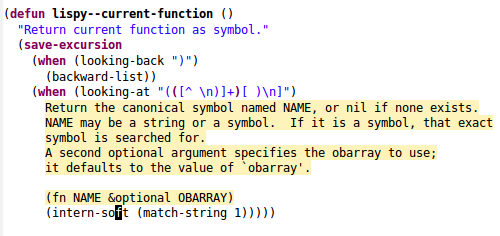
**`lispy-describe-inline`**
Bound to C-1. Show the doc for the current function inline.
C-h f is fine, but the extra buffer, and having to navigate to a symbol
is tiresome. C-1 toggles on/off the inline doc for current function.
No extra buffer necessary:
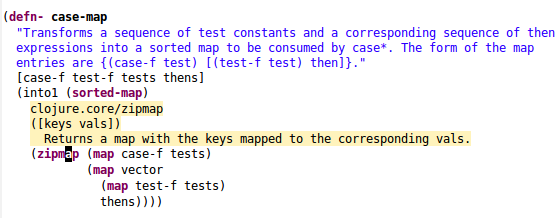
Here's how it looks for Clojure:
**`lispy-arglist-inline`**
Bound to C-2. Show arguments for current function inline.
`eldoc-mode` is cool, but it shows you arguments *over there* and
you're writing *over here*!. No problem, C-2 fixes that:
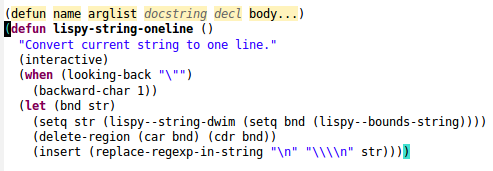
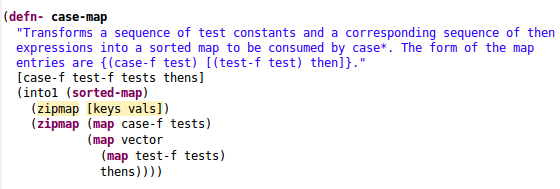
As you see, normal, &optional and &rest arguments have each a
different face. Here's how it looks for Clojure:
**`lispy-goto`**
Bound to g.
Use completion to select a symbol to jump to from all top-level symbols in the in current directory.
Works out of the box for Elisp, Scheme and Common Lisp.
[clojure-semantic](https://github.com/kototama/clojure-semantic) is
required for Clojure.
**`lispy-eval`**
There's a feature similar to `ipython-notebook`. Evaluating an Emacs
outline will evaluate all of the outline's code and echo the result of
the last expression. When an outline ends with a colon (`:`), the
result will instead be inserted into the buffer. If the evaluation
result changes for whatever reason, it will be replaced after each
subsequent e.
Python, Clojure, and Julia currently have a slightly better notebook
support, pressing e on the parent outline will evaluate all
the children outlines sequentially. This allows to arrange scripts
hierarchically, with relatively few top-level outlines and relatively
many total outlines. Each outline's output can be examined by adding a
`:` to the title of the outline.
The following example shows a buffer before and after pressing e.

There is one top-level outline, with one level-2 child, which in turn
has a four level-3 children. Three of these children end in `:`, so
their output will be updated after the eval.
# Demos
## [Demo 1: Practice generating code](http://abo-abo.github.io/lispy/demo-1)
## [Demo 2: The substitution model for procedure application](http://abo-abo.github.io/lispy/demo-2)
## [Demo 3: Down the rabbit hole](http://abo-abo.github.io/lispy/demo-3)
## [Demo 4: Project Euler p100 and Clojure](http://abo-abo.github.io/lispy/demo-4)
## [Demo 5: ->>ification](http://abo-abo.github.io/lispy/demo-5)
## [Demo 6: cond->if->cond](http://abo-abo.github.io/lispy/demo-6)
# Screencasts
- The older stuff can be found on [vimeo](http://vimeo.com/user24828177/videos).
- The newer stuff is on https://www.youtube.com/user/abo5abo/videos.
[badge-license]: https://img.shields.io/badge/license-GPL_3-green.svg