# M5Stack-Camera
**Repository Path**: matt0124/M5Stack-Camera
## Basic Information
- **Project Name**: M5Stack-Camera
- **Description**: M5Stack Cam 镜像
- **Primary Language**: Unknown
- **License**: Not specified
- **Default Branch**: master
- **Homepage**: None
- **GVP Project**: No
## Statistics
- **Stars**: 1
- **Forks**: 1
- **Created**: 2020-10-29
- **Last Updated**: 2021-02-02
## Categories & Tags
**Categories**: Uncategorized
**Tags**: None
## README
# Camera unit description
English | [中文](https://github.com/m5stack/m5stack-cam-psram/blob/master/README_zh_CN.md)
## Note
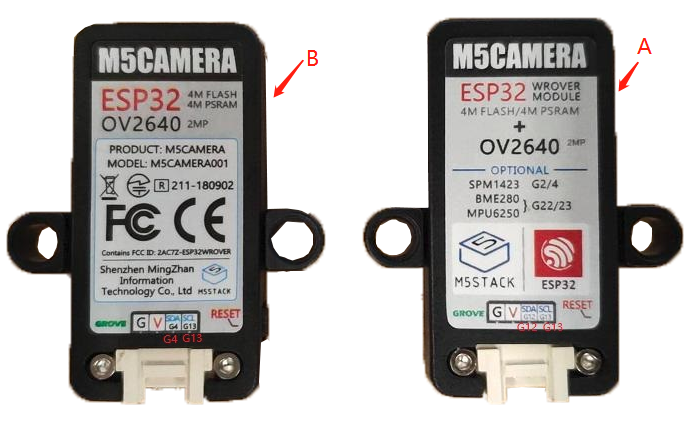
Now, M5Stack has four types of camera units, there are respectively [ESP32CAM](https://docs.m5stack.com/#/en/unit/esp32cam), [M5Camera (A Model)](https://docs.m5stack.com/#/en/unit/m5camera), [M5Camera (B Model)](https://docs.m5stack.com/#/en/unit/m5camera), M5CameraX, [M5CameraF](https://docs.m5stack.com/#/en/unit/m5camera_f).
 The main differences between these cameras are **memory**, **interface**, **lens**, **optional hardware** and **camera shell**。
## Firmware description
The code for this repository is for these boards, and each folder corresponds to a function.
- [mpu6050](https://github.com/m5stack/m5stack-cam-psram/tree/master/mpu6050) -> Gyro routine after soldering MPU6050 chip (idf-3.3)
- [qr](https://github.com/m5stack/m5stack-cam-psram/tree/master/qr) -> QR code recognition (idf-3.3)
- [uart](https://github.com/m5stack/m5stack-cam-psram/tree/master/uart) -> 与 [M5Core](https://docs.m5stack.com/#/zh_CN/core/basic) Routine for serial communication (idf-3.3)
- [wifi](https://github.com/m5stack/m5stack-cam-psram/tree/master/wifi) -> Routine for transferring images (idf-4.0)
- [face_recognize](https://github.com/m5stack/m5stack-cam-psram/tree/master/face_recognize) -> Face recognition routine (idf-3.3)
**Please note that before compiling the downloaded code, you need to do the following to configure the appropriate board.**
Step 1:build an ESP-IDF development environment
- [https://docs.espressif.com/projects/esp-idf/en/latest/get-started/index.html](https://docs.espressif.com/projects/esp-idf/en/latest/get-started/index.html)
Step 2:After setting up the ESP-IDF environment, execute `make menuconfig` in the terminal.
Step 3:Configure camera model
The main differences between these cameras are **memory**, **interface**, **lens**, **optional hardware** and **camera shell**。
## Firmware description
The code for this repository is for these boards, and each folder corresponds to a function.
- [mpu6050](https://github.com/m5stack/m5stack-cam-psram/tree/master/mpu6050) -> Gyro routine after soldering MPU6050 chip (idf-3.3)
- [qr](https://github.com/m5stack/m5stack-cam-psram/tree/master/qr) -> QR code recognition (idf-3.3)
- [uart](https://github.com/m5stack/m5stack-cam-psram/tree/master/uart) -> 与 [M5Core](https://docs.m5stack.com/#/zh_CN/core/basic) Routine for serial communication (idf-3.3)
- [wifi](https://github.com/m5stack/m5stack-cam-psram/tree/master/wifi) -> Routine for transferring images (idf-4.0)
- [face_recognize](https://github.com/m5stack/m5stack-cam-psram/tree/master/face_recognize) -> Face recognition routine (idf-3.3)
**Please note that before compiling the downloaded code, you need to do the following to configure the appropriate board.**
Step 1:build an ESP-IDF development environment
- [https://docs.espressif.com/projects/esp-idf/en/latest/get-started/index.html](https://docs.espressif.com/projects/esp-idf/en/latest/get-started/index.html)
Step 2:After setting up the ESP-IDF environment, execute `make menuconfig` in the terminal.
Step 3:Configure camera model

 Step 4:Open psram

 Step 5:In the terminal Terminal, execute `make` to ensure that the compilation is correct
Step 6:In the terminal Terminal, execute `make flash` to download the program.
Step 7:In the terminal terminal, execute `make monitor` to open the serial port monitoring.
### Comparison of different versions of cameras
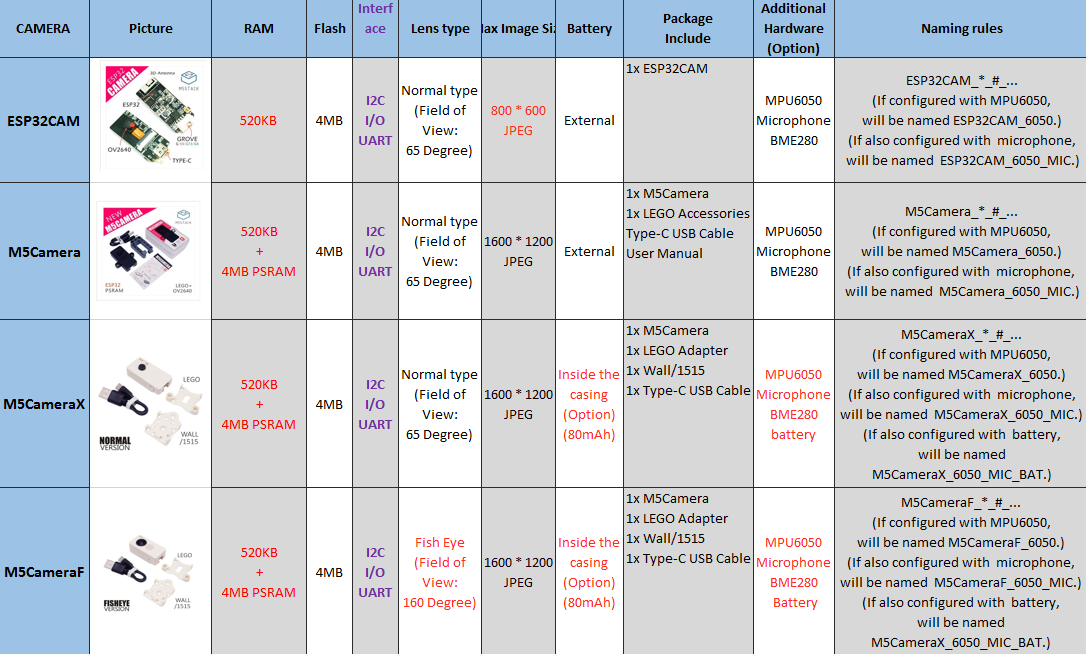
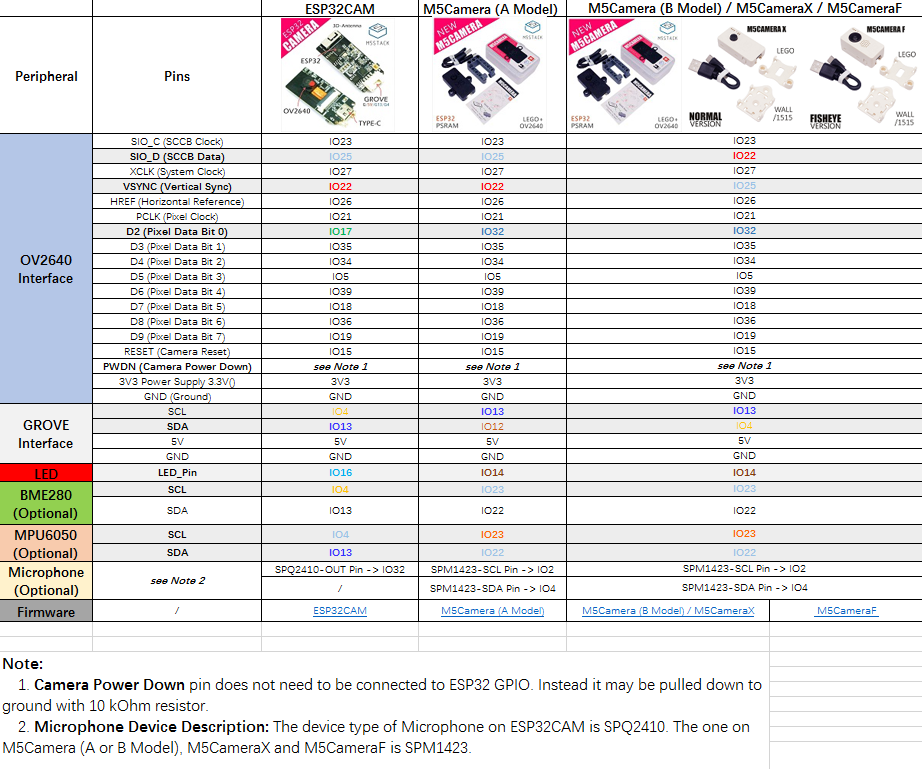
The picture below is their comparison table. (Note: Because the interface has many different pins, so I have made a separate table to compare.)
- If you want to **view** the detailed defference with them, please click [here](https://shimo.im/sheets/gP96C8YTdyjGgKQC).
- If you want to **download** the detailed defference with them, please click [here](https://github.com/m5stack/M5-Schematic/blob/master/Units/m5camera/M5%20Camera%20Detailed%20Comparison.xlsx).
Step 5:In the terminal Terminal, execute `make` to ensure that the compilation is correct
Step 6:In the terminal Terminal, execute `make flash` to download the program.
Step 7:In the terminal terminal, execute `make monitor` to open the serial port monitoring.
### Comparison of different versions of cameras
The picture below is their comparison table. (Note: Because the interface has many different pins, so I have made a separate table to compare.)
- If you want to **view** the detailed defference with them, please click [here](https://shimo.im/sheets/gP96C8YTdyjGgKQC).
- If you want to **download** the detailed defference with them, please click [here](https://github.com/m5stack/M5-Schematic/blob/master/Units/m5camera/M5%20Camera%20Detailed%20Comparison.xlsx).
 #### The picture of A model and B model
 ### Interface Comparison
 #### Interface Difference
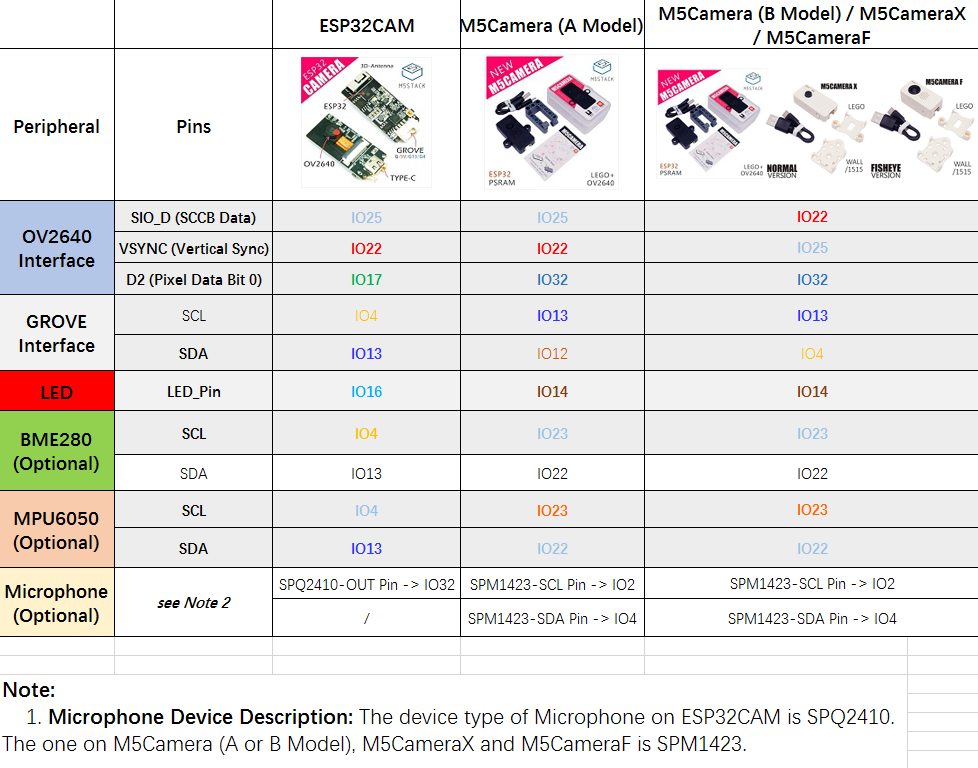
The following table shows interface difference between those camera boads based on the `Interface Comparison` table.
#### Interface Difference
The following table shows interface difference between those camera boads based on the `Interface Comparison` table.
 ## Important to Remember
- Except when using CIF or lower resolution with JPEG, the driver requires PSRAM to be installed and activated.
- Using YUV or RGB puts a lot of strain on the chip because writing to PSRAM is not particularly fast. The result is that image data might be missing. This is particularly true if WiFi is enabled. If you need RGB data, it is recommended that JPEG is captured and then turned into RGB using `fmt2rgb888` or `fmt2bmp`/`frame2bmp`.
- When 1 frame buffer is used, the driver will wait for the current frame to finish (VSYNC) and start I2S DMA. After the frame is acquired, I2S will be stopped and the frame buffer returned to the application. This approach gives more control over the system, but results in longer time to get the frame.
- When 2 or more frame bufers are used, I2S is running in continuous mode and each frame is pushed to a queue that the application can access. This approach puts more strain on the CPU/Memory, but allows for double the frame rate. Please use only with JPEG.
## Installation Instructions
- Clone or download and extract the repository to the components folder of your ESP-IDF project
- `Make`
## API
### Get img data
```c
camera_fb_t * fb = NULL;
// will get a img frame
fb = esp_camera_fb_get();
// img buf
uint8_t *buf = fb->buf;
// img buf len
unit32_t buf_len = fb->len;
/* --- do some something --- */
// need return img buf
esp_camera_fb_return(fb);
```
### Set ov2640 config
```c
sensor_t *s = esp_camera_sensor_get();
s->set_framesize(s, FRAMESIZE_VGA);
s->set_quality(s, 10);
...
```
Detailed view [sensor.h](components/esp32-camera/driver/include/sensor.h)
## Examples
### Initialization
```c
#include "esp_camera.h"
static camera_config_t camera_config = {
.pin_reset = CAM_PIN_RESET,
.pin_xclk = CAM_PIN_XCLK,
.pin_sscb_sda = CAM_PIN_SIOD,
.pin_sscb_scl = CAM_PIN_SIOC,
.pin_d7 = CAM_PIN_D7,
.pin_d6 = CAM_PIN_D6,
.pin_d5 = CAM_PIN_D5,
.pin_d4 = CAM_PIN_D4,
.pin_d3 = CAM_PIN_D3,
.pin_d2 = CAM_PIN_D2,
.pin_d1 = CAM_PIN_D1,
.pin_d0 = CAM_PIN_D0,
.pin_vsync = CAM_PIN_VSYNC,
.pin_href = CAM_PIN_HREF,
.pin_pclk = CAM_PIN_PCLK,
//XCLK 20MHz or 10MHz
.xclk_freq_hz = 20000000,
.ledc_timer = LEDC_TIMER_0,
.ledc_channel = LEDC_CHANNEL_0,
.pixel_format = PIXFORMAT_JPEG,//YUV422,GRAYSCALE,RGB565,JPEG
.frame_size = FRAMESIZE_UXGA,//QQVGA-UXGA Do not use sizes above QVGA when not JPEG
.jpeg_quality = 12, //0-63 lower number means higher quality
.fb_count = 1 //if more than one, i2s runs in continuous mode. Use only with JPEG
};
esp_err_t camera_init(){
//power up the camera if PWDN pin is defined
if(CAM_PIN_PWDN != -1){
pinMode(CAM_PIN_PWDN, OUTPUT);
digitalWrite(CAM_PIN_PWDN, LOW);
}
//initialize the camera
esp_err_t err = esp_camera_init(&camera_config);
if (err != ESP_OK) {
ESP_LOGE(TAG, "Camera Init Failed");
return err;
}
return ESP_OK;
}
esp_err_t camera_capture(){
//acquire a frame
camera_fb_t * fb = esp_camera_fb_get();
if (!fb) {
ESP_LOGE(TAG, "Camera Capture Failed");
return ESP_FAIL;
}
//replace this with your own function
process_image(fb->width, fb->height, fb->format, fb->buf, fb->len);
//return the frame buffer back to the driver for reuse
esp_camera_fb_return(fb);
return ESP_OK;
}
```
### JPEG HTTP Capture
```c
#include "esp_camera.h"
#include "esp_http_server.h"
#include "esp_timer.h"
typedef struct {
httpd_req_t *req;
size_t len;
} jpg_chunking_t;
static size_t jpg_encode_stream(void * arg, size_t index, const void* data, size_t len){
jpg_chunking_t *j = (jpg_chunking_t *)arg;
if(!index){
j->len = 0;
}
if(httpd_resp_send_chunk(j->req, (const char *)data, len) != ESP_OK){
return 0;
}
j->len += len;
return len;
}
esp_err_t jpg_httpd_handler(httpd_req_t *req){
camera_fb_t * fb = NULL;
esp_err_t res = ESP_OK;
size_t fb_len = 0;
int64_t fr_start = esp_timer_get_time();
fb = esp_camera_fb_get();
if (!fb) {
ESP_LOGE(TAG, "Camera capture failed");
httpd_resp_send_500(req);
return ESP_FAIL;
}
res = httpd_resp_set_type(req, "image/jpeg");
if(res == ESP_OK){
res = httpd_resp_set_hdr(req, "Content-Disposition", "inline; filename=capture.jpg");
}
if(res == ESP_OK){
if(fb->format == PIXFORMAT_JPEG){
fb_len = fb->len;
res = httpd_resp_send(req, (const char *)fb->buf, fb->len);
} else {
jpg_chunking_t jchunk = {req, 0};
res = frame2jpg_cb(fb, 80, jpg_encode_stream, &jchunk)?ESP_OK:ESP_FAIL;
httpd_resp_send_chunk(req, NULL, 0);
fb_len = jchunk.len;
}
}
esp_camera_fb_return(fb);
int64_t fr_end = esp_timer_get_time();
ESP_LOGI(TAG, "JPG: %uKB %ums", (uint32_t)(fb_len/1024), (uint32_t)((fr_end - fr_start)/1000));
return res;
}
```
### JPEG HTTP Stream
```c
#include "esp_camera.h"
#include "esp_http_server.h"
#include "esp_timer.h"
#define PART_BOUNDARY "123456789000000000000987654321"
static const char* _STREAM_CONTENT_TYPE = "multipart/x-mixed-replace;boundary=" PART_BOUNDARY;
static const char* _STREAM_BOUNDARY = "\r\n--" PART_BOUNDARY "\r\n";
static const char* _STREAM_PART = "Content-Type: image/jpeg\r\nContent-Length: %u\r\n\r\n";
esp_err_t jpg_stream_httpd_handler(httpd_req_t *req){
camera_fb_t * fb = NULL;
esp_err_t res = ESP_OK;
size_t _jpg_buf_len;
uint8_t * _jpg_buf;
char * part_buf[64];
static int64_t last_frame = 0;
if(!last_frame) {
last_frame = esp_timer_get_time();
}
res = httpd_resp_set_type(req, _STREAM_CONTENT_TYPE);
if(res != ESP_OK){
return res;
}
while(true){
fb = esp_camera_fb_get();
if (!fb) {
ESP_LOGE(TAG, "Camera capture failed");
res = ESP_FAIL;
} else {
if(fb->format != PIXFORMAT_JPEG){
bool jpeg_converted = frame2jpg(fb, 80, &_jpg_buf, &_jpg_buf_len);
if(!jpeg_converted){
ESP_LOGE(TAG, "JPEG compression failed");
esp_camera_fb_return(fb);
res = ESP_FAIL;
}
} else {
_jpg_buf_len = fb->len;
_jpg_buf = fb->buf;
}
}
if(res == ESP_OK){
size_t hlen = snprintf((char *)part_buf, 64, _STREAM_PART, _jpg_buf_len);
res = httpd_resp_send_chunk(req, (const char *)part_buf, hlen);
}
if(res == ESP_OK){
res = httpd_resp_send_chunk(req, (const char *)_jpg_buf, _jpg_buf_len);
}
if(res == ESP_OK){
res = httpd_resp_send_chunk(req, _STREAM_BOUNDARY, strlen(_STREAM_BOUNDARY));
}
if(fb->format != PIXFORMAT_JPEG){
free(_jpg_buf);
}
esp_camera_fb_return(fb);
if(res != ESP_OK){
break;
}
int64_t fr_end = esp_timer_get_time();
int64_t frame_time = fr_end - last_frame;
last_frame = fr_end;
frame_time /= 1000;
ESP_LOGI(TAG, "MJPG: %uKB %ums (%.1ffps)",
(uint32_t)(_jpg_buf_len/1024),
(uint32_t)frame_time, 1000.0 / (uint32_t)frame_time);
}
last_frame = 0;
return res;
}
```
### BMP HTTP Capture
```c
#include "esp_camera.h"
#include "esp_http_server.h"
#include "esp_timer.h"
esp_err_t bmp_httpd_handler(httpd_req_t *req){
camera_fb_t * fb = NULL;
esp_err_t res = ESP_OK;
int64_t fr_start = esp_timer_get_time();
fb = esp_camera_fb_get();
if (!fb) {
ESP_LOGE(TAG, "Camera capture failed");
httpd_resp_send_500(req);
return ESP_FAIL;
}
uint8_t * buf = NULL;
size_t buf_len = 0;
bool converted = frame2bmp(fb, &buf, &buf_len);
esp_camera_fb_return(fb);
if(!converted){
ESP_LOGE(TAG, "BMP conversion failed");
httpd_resp_send_500(req);
return ESP_FAIL;
}
res = httpd_resp_set_type(req, "image/x-windows-bmp")
|| httpd_resp_set_hdr(req, "Content-Disposition", "inline; filename=capture.bmp")
|| httpd_resp_send(req, (const char *)buf, buf_len);
free(buf);
int64_t fr_end = esp_timer_get_time();
ESP_LOGI(TAG, "BMP: %uKB %ums", (uint32_t)(buf_len/1024), (uint32_t)((fr_end - fr_start)/1000));
return res;
}
```
## Important to Remember
- Except when using CIF or lower resolution with JPEG, the driver requires PSRAM to be installed and activated.
- Using YUV or RGB puts a lot of strain on the chip because writing to PSRAM is not particularly fast. The result is that image data might be missing. This is particularly true if WiFi is enabled. If you need RGB data, it is recommended that JPEG is captured and then turned into RGB using `fmt2rgb888` or `fmt2bmp`/`frame2bmp`.
- When 1 frame buffer is used, the driver will wait for the current frame to finish (VSYNC) and start I2S DMA. After the frame is acquired, I2S will be stopped and the frame buffer returned to the application. This approach gives more control over the system, but results in longer time to get the frame.
- When 2 or more frame bufers are used, I2S is running in continuous mode and each frame is pushed to a queue that the application can access. This approach puts more strain on the CPU/Memory, but allows for double the frame rate. Please use only with JPEG.
## Installation Instructions
- Clone or download and extract the repository to the components folder of your ESP-IDF project
- `Make`
## API
### Get img data
```c
camera_fb_t * fb = NULL;
// will get a img frame
fb = esp_camera_fb_get();
// img buf
uint8_t *buf = fb->buf;
// img buf len
unit32_t buf_len = fb->len;
/* --- do some something --- */
// need return img buf
esp_camera_fb_return(fb);
```
### Set ov2640 config
```c
sensor_t *s = esp_camera_sensor_get();
s->set_framesize(s, FRAMESIZE_VGA);
s->set_quality(s, 10);
...
```
Detailed view [sensor.h](components/esp32-camera/driver/include/sensor.h)
## Examples
### Initialization
```c
#include "esp_camera.h"
static camera_config_t camera_config = {
.pin_reset = CAM_PIN_RESET,
.pin_xclk = CAM_PIN_XCLK,
.pin_sscb_sda = CAM_PIN_SIOD,
.pin_sscb_scl = CAM_PIN_SIOC,
.pin_d7 = CAM_PIN_D7,
.pin_d6 = CAM_PIN_D6,
.pin_d5 = CAM_PIN_D5,
.pin_d4 = CAM_PIN_D4,
.pin_d3 = CAM_PIN_D3,
.pin_d2 = CAM_PIN_D2,
.pin_d1 = CAM_PIN_D1,
.pin_d0 = CAM_PIN_D0,
.pin_vsync = CAM_PIN_VSYNC,
.pin_href = CAM_PIN_HREF,
.pin_pclk = CAM_PIN_PCLK,
//XCLK 20MHz or 10MHz
.xclk_freq_hz = 20000000,
.ledc_timer = LEDC_TIMER_0,
.ledc_channel = LEDC_CHANNEL_0,
.pixel_format = PIXFORMAT_JPEG,//YUV422,GRAYSCALE,RGB565,JPEG
.frame_size = FRAMESIZE_UXGA,//QQVGA-UXGA Do not use sizes above QVGA when not JPEG
.jpeg_quality = 12, //0-63 lower number means higher quality
.fb_count = 1 //if more than one, i2s runs in continuous mode. Use only with JPEG
};
esp_err_t camera_init(){
//power up the camera if PWDN pin is defined
if(CAM_PIN_PWDN != -1){
pinMode(CAM_PIN_PWDN, OUTPUT);
digitalWrite(CAM_PIN_PWDN, LOW);
}
//initialize the camera
esp_err_t err = esp_camera_init(&camera_config);
if (err != ESP_OK) {
ESP_LOGE(TAG, "Camera Init Failed");
return err;
}
return ESP_OK;
}
esp_err_t camera_capture(){
//acquire a frame
camera_fb_t * fb = esp_camera_fb_get();
if (!fb) {
ESP_LOGE(TAG, "Camera Capture Failed");
return ESP_FAIL;
}
//replace this with your own function
process_image(fb->width, fb->height, fb->format, fb->buf, fb->len);
//return the frame buffer back to the driver for reuse
esp_camera_fb_return(fb);
return ESP_OK;
}
```
### JPEG HTTP Capture
```c
#include "esp_camera.h"
#include "esp_http_server.h"
#include "esp_timer.h"
typedef struct {
httpd_req_t *req;
size_t len;
} jpg_chunking_t;
static size_t jpg_encode_stream(void * arg, size_t index, const void* data, size_t len){
jpg_chunking_t *j = (jpg_chunking_t *)arg;
if(!index){
j->len = 0;
}
if(httpd_resp_send_chunk(j->req, (const char *)data, len) != ESP_OK){
return 0;
}
j->len += len;
return len;
}
esp_err_t jpg_httpd_handler(httpd_req_t *req){
camera_fb_t * fb = NULL;
esp_err_t res = ESP_OK;
size_t fb_len = 0;
int64_t fr_start = esp_timer_get_time();
fb = esp_camera_fb_get();
if (!fb) {
ESP_LOGE(TAG, "Camera capture failed");
httpd_resp_send_500(req);
return ESP_FAIL;
}
res = httpd_resp_set_type(req, "image/jpeg");
if(res == ESP_OK){
res = httpd_resp_set_hdr(req, "Content-Disposition", "inline; filename=capture.jpg");
}
if(res == ESP_OK){
if(fb->format == PIXFORMAT_JPEG){
fb_len = fb->len;
res = httpd_resp_send(req, (const char *)fb->buf, fb->len);
} else {
jpg_chunking_t jchunk = {req, 0};
res = frame2jpg_cb(fb, 80, jpg_encode_stream, &jchunk)?ESP_OK:ESP_FAIL;
httpd_resp_send_chunk(req, NULL, 0);
fb_len = jchunk.len;
}
}
esp_camera_fb_return(fb);
int64_t fr_end = esp_timer_get_time();
ESP_LOGI(TAG, "JPG: %uKB %ums", (uint32_t)(fb_len/1024), (uint32_t)((fr_end - fr_start)/1000));
return res;
}
```
### JPEG HTTP Stream
```c
#include "esp_camera.h"
#include "esp_http_server.h"
#include "esp_timer.h"
#define PART_BOUNDARY "123456789000000000000987654321"
static const char* _STREAM_CONTENT_TYPE = "multipart/x-mixed-replace;boundary=" PART_BOUNDARY;
static const char* _STREAM_BOUNDARY = "\r\n--" PART_BOUNDARY "\r\n";
static const char* _STREAM_PART = "Content-Type: image/jpeg\r\nContent-Length: %u\r\n\r\n";
esp_err_t jpg_stream_httpd_handler(httpd_req_t *req){
camera_fb_t * fb = NULL;
esp_err_t res = ESP_OK;
size_t _jpg_buf_len;
uint8_t * _jpg_buf;
char * part_buf[64];
static int64_t last_frame = 0;
if(!last_frame) {
last_frame = esp_timer_get_time();
}
res = httpd_resp_set_type(req, _STREAM_CONTENT_TYPE);
if(res != ESP_OK){
return res;
}
while(true){
fb = esp_camera_fb_get();
if (!fb) {
ESP_LOGE(TAG, "Camera capture failed");
res = ESP_FAIL;
} else {
if(fb->format != PIXFORMAT_JPEG){
bool jpeg_converted = frame2jpg(fb, 80, &_jpg_buf, &_jpg_buf_len);
if(!jpeg_converted){
ESP_LOGE(TAG, "JPEG compression failed");
esp_camera_fb_return(fb);
res = ESP_FAIL;
}
} else {
_jpg_buf_len = fb->len;
_jpg_buf = fb->buf;
}
}
if(res == ESP_OK){
size_t hlen = snprintf((char *)part_buf, 64, _STREAM_PART, _jpg_buf_len);
res = httpd_resp_send_chunk(req, (const char *)part_buf, hlen);
}
if(res == ESP_OK){
res = httpd_resp_send_chunk(req, (const char *)_jpg_buf, _jpg_buf_len);
}
if(res == ESP_OK){
res = httpd_resp_send_chunk(req, _STREAM_BOUNDARY, strlen(_STREAM_BOUNDARY));
}
if(fb->format != PIXFORMAT_JPEG){
free(_jpg_buf);
}
esp_camera_fb_return(fb);
if(res != ESP_OK){
break;
}
int64_t fr_end = esp_timer_get_time();
int64_t frame_time = fr_end - last_frame;
last_frame = fr_end;
frame_time /= 1000;
ESP_LOGI(TAG, "MJPG: %uKB %ums (%.1ffps)",
(uint32_t)(_jpg_buf_len/1024),
(uint32_t)frame_time, 1000.0 / (uint32_t)frame_time);
}
last_frame = 0;
return res;
}
```
### BMP HTTP Capture
```c
#include "esp_camera.h"
#include "esp_http_server.h"
#include "esp_timer.h"
esp_err_t bmp_httpd_handler(httpd_req_t *req){
camera_fb_t * fb = NULL;
esp_err_t res = ESP_OK;
int64_t fr_start = esp_timer_get_time();
fb = esp_camera_fb_get();
if (!fb) {
ESP_LOGE(TAG, "Camera capture failed");
httpd_resp_send_500(req);
return ESP_FAIL;
}
uint8_t * buf = NULL;
size_t buf_len = 0;
bool converted = frame2bmp(fb, &buf, &buf_len);
esp_camera_fb_return(fb);
if(!converted){
ESP_LOGE(TAG, "BMP conversion failed");
httpd_resp_send_500(req);
return ESP_FAIL;
}
res = httpd_resp_set_type(req, "image/x-windows-bmp")
|| httpd_resp_set_hdr(req, "Content-Disposition", "inline; filename=capture.bmp")
|| httpd_resp_send(req, (const char *)buf, buf_len);
free(buf);
int64_t fr_end = esp_timer_get_time();
ESP_LOGI(TAG, "BMP: %uKB %ums", (uint32_t)(buf_len/1024), (uint32_t)((fr_end - fr_start)/1000));
return res;
}
```