# actlist
**Repository Path**: maybemirracle/actlist
## Basic Information
- **Project Name**: actlist
- **Description**: No description available
- **Primary Language**: Java
- **License**: LGPL-3.0
- **Default Branch**: dev
- **Homepage**: None
- **GVP Project**: No
## Statistics
- **Stars**: 0
- **Forks**: 0
- **Created**: 2022-04-23
- **Last Updated**: 2022-12-08
## Categories & Tags
**Categories**: Uncategorized
**Tags**: None
## README
 Actlist
Execute your own action list easily and simply
[](https://actlist.io/archives/)
[](https://app.travis-ci.com/actlist/actlist)
[](https://app.fossa.com/projects/git%2Bgithub.com%2Fsilentsoft%2Factlist?ref=badge_shield)


[](https://hits.sh/github.com/silentsoft/actlist/)
[](https://discord.silentsoft.org/actlist)
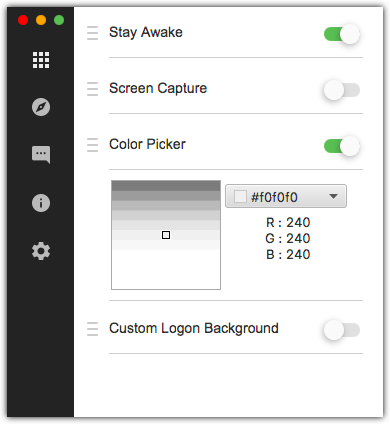
## Installation
Windows:
> [download exe or zip file](https://actlist.io/archives/) and launch.
macOS:
> [download dmg file](https://actlist.io/archives/) and launch.
## Documentation
* https://actlist.io/docs/quick-start/
## Prerequisites For Development
* [OpenJDK 1.8 with JavaFx binary distribution](https://www.azul.com/downloads/?version=java-8-lts&package=jdk-fx#download-openjdk)
* [Scene Builder](https://gluonhq.com/products/scene-builder/#download) for graphic design
## Actlist Application Development Setup Guide
1. Fork this repository into your GitHub Account
2. Clone & import as a Maven project into your favorite IDE
3. Launch
```
src/main/java/org/silentsoft/actlist/application/App.java
```
## Actlist Plugin Development Setup Guide
There are two ways to create an Actlist plugin. the first one is using starter-kit(which is highly recommended) and the second one is creating Maven project using Maven archetype.
### Getting started with GitHub
1. [Generate repository](https://github.com/actlist/actlist-plugin-starter-kit/generate)
2. Clone & import as a Maven project into your favorite IDE
- If you are using `IntelliJ IDEA`, you need to enable `Add dependencies with "provided" scope to classpath` in the Run Configuration dialog
4. Launch
```
src/main/java/sample/Plugin.java
```
### Getting started with Maven
1. Execute following command:
```shell
$ mvn archetype:generate \
-DarchetypeGroupId=org.silentsoft \
-DarchetypeArtifactId=actlist-plugin-archetype \
-DarchetypeVersion=1.0.0 \
-Dactlist-plugin-sdk-version=2.2.0 \
-DgroupId=sample \
-DartifactId=starter \
-Dversion=1.0.0
```
`Tip` - If you are behind a proxy server then you should use one of the following
Details
- Windows
```shell
$ set MAVEN_OPTS=-Dhttps.proxyHost=10.20.30.40 -Dhttps.proxyPort=8080
```
- macOS
```shell
$ export MAVEN_OPTS=-Dhttps.proxyHost=10.20.30.40 -Dhttps.proxyPort=8080
```
- `Note` - The proxy host `10.20.30.40` and proxy port `8080` is up to you.