# editor-markdown
**Repository Path**: merryyou/editor-markdown
## Basic Information
- **Project Name**: editor-markdown
- **Description**: springbooe使用editor.md实现Markdown编辑器
- **Primary Language**: CSS
- **License**: Not specified
- **Default Branch**: master
- **Homepage**: None
- **GVP Project**: No
## Statistics
- **Stars**: 1
- **Forks**: 0
- **Created**: 2018-03-16
- **Last Updated**: 2022-12-12
## Categories & Tags
**Categories**: Uncategorized
**Tags**: None
## README
> Markdown是一种可以使用普通文本编辑器编写的标记语言,通过简单的标记语法,它可以使普通文本内容具有一定的格式。
## 前言
[Editor.md](https://github.com/pandao/editor.md) 是一款开源的、可嵌入的 Markdown 在线编辑器(组件),基于 CodeMirror、jQuery 和 Marked 构建。本章将使用`SpringBoot`整合`Editor.md`构建Markdown编辑器。
### 下载插件
项目地址:[Editor.md](https://github.com/pandao/editor.md)
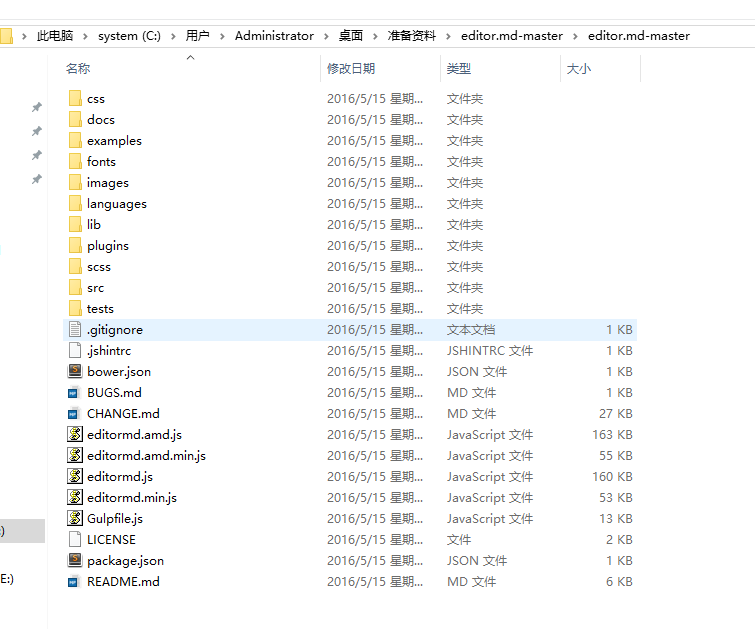
解压目录结构:
[](https://raw.githubusercontent.com/longfeizheng/longfeizheng.github.io/master/images/springboot/springboot03.png "https://raw.githubusercontent.com/longfeizheng/longfeizheng.github.io/master/images/springboot/springboot03.png")
### 配置Editor.md
将exapmles文件夹中的simple.html放置到项目中,并配置对应的css和js文件
#### 配置编辑器
```html
......
......
```
#### 初始化编辑器
```javascript
var testEditor;
$(function () {
testEditor = editormd("test-editormd", {
width: "90%",
height: 640,
syncScrolling: "single",
path: "${re.contextPath}/editor/lib/",
imageUpload: true,
imageFormats: ["jpg", "jpeg", "gif", "png", "bmp", "webp"],
imageUploadURL: "/file",
//这个配置在simple.html中并没有,但是为了能够提交表单,使用这个配置可以让构造出来的HTML代码直接在第二个隐藏的textarea域中,方便post提交表单。
saveHTMLToTextarea: true
// previewTheme : "dark"
});
});
```
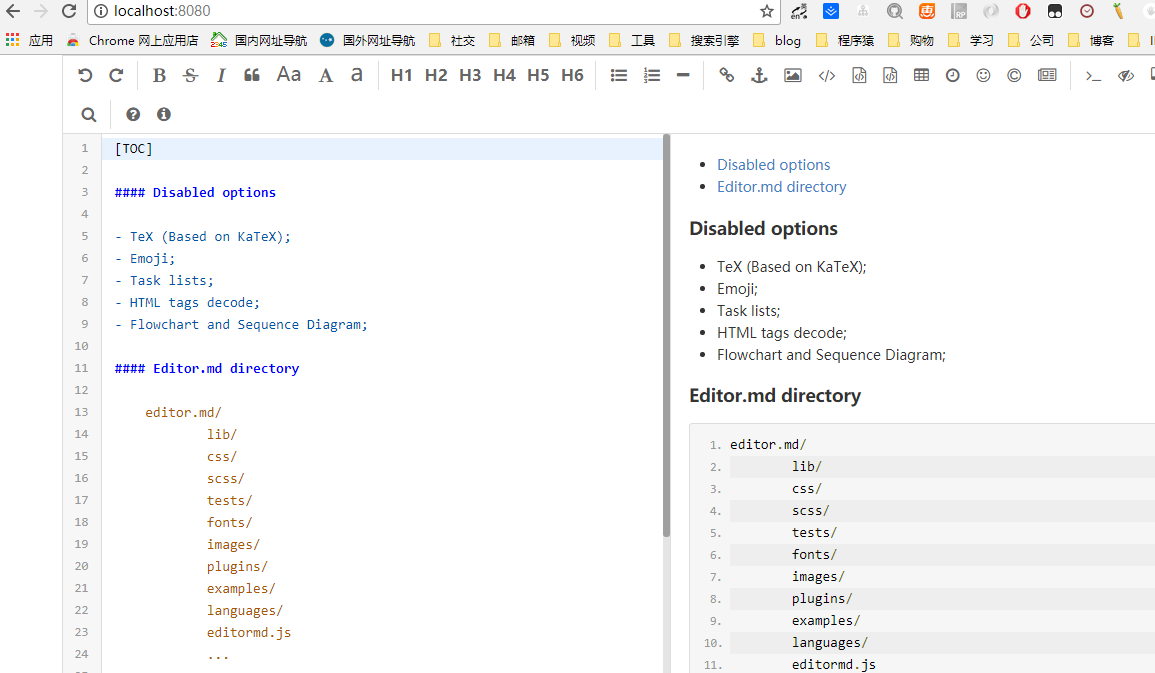
这样就实现了最简单的editor.md编辑器,效果如下:
[](https://raw.githubusercontent.com/longfeizheng/longfeizheng.github.io/master/images/springboot/springboot05.png "https://raw.githubusercontent.com/longfeizheng/longfeizheng.github.io/master/images/springboot/springboot05.png")
- 访问地址:[http://localhost:8080/](http://localhost:8080/)
### 图片上传
由于在初始化编辑器中配置的图片上传地址为`imageUploadURL: "/file",`,与之对应,我们在`/file`处理文件上传即可
```java
@RestController
@RequestMapping("/file")
@Slf4j
public class FileController {
// @Value("")
// String folder = System.getProperty("user.dir")+File.separator+"upload"+File.separator;
/**
* 在配置文件中配置的文件保存路径
*/
@Value("${img.location}")
private String folder;
@PostMapping
public FileInfo upload(HttpServletRequest request, @RequestParam(value = "editormd-image-file", required = false) MultipartFile file) throws Exception {
log.info("【FileController】 fileName={},fileOrginNmae={},fileSize={}", file.getName(), file.getOriginalFilename(), file.getSize());
log.info(request.getContextPath());
String fileName = file.getOriginalFilename();
String suffix = fileName.substring(fileName.lastIndexOf(".") + 1);
String newFileName = new Date().getTime() + "." + suffix;
File localFile = new File(folder, newFileName);
file.transferTo(localFile);
log.info(localFile.getAbsolutePath());
return new FileInfo(1, "上传成功", request.getRequestURL().substring(0,request.getRequestURL().lastIndexOf("/"))+"/upload/"+newFileName);
}
@GetMapping("/{id}")
public void downLoad(@PathVariable String id, HttpServletRequest request, HttpServletResponse response) {
try (InputStream inputStream = new FileInputStream(new File(folder, id + ".txt"));
OutputStream outputStream = response.getOutputStream();) {
response.setContentType("application/x-download");
response.setHeader("Content-Disposition", "attachment;filename=test.txt");
IOUtils.copy(inputStream, outputStream);
outputStream.flush();
} catch (Exception e) {
}
}
}
```
### 文件预览
表单POST提交时,editor.md将我们的markdown语法文档翻译成了HTML语言,并将html字符串提交给了我们的后台,后台将这些HTML字符串持久化到数据库中。具体在页面显示做法如下:
```html
Editor.md examples
${editor.content!''}
```
- 预览地址:[http://localhost:8080/editorWeb/preview/{id}](http://localhost:8080/editorWeb/preview/{id})
- 编辑地址:[http://localhost:8080/editorWeb/edit/{id}](http://localhost:8080/editorWeb/edit/{id})
## 代码下载 ##
从我的 github 中下载,[https://github.com/longfeizheng/editor-markdown](https://github.com/longfeizheng/editor-markdown)
---
[](https://raw.githubusercontent.com/longfeizheng/longfeizheng.github.io/master/images/wechat/xiaochengxu.png "https://raw.githubusercontent.com/longfeizheng/longfeizheng.github.io/master/images/wechat/xiaochengxu.png")
> 🙂🙂🙂关注微信小程序**java架构师历程**
上下班的路上无聊吗?还在看小说、新闻吗?不知道怎样提高自己的技术吗?来吧这里有你需要的java架构文章,1.5w+的java工程师都在看,你还在等什么?