# blazork8s
**Repository Path**: mes/blazork8s
## Basic Information
- **Project Name**: blazork8s
- **Description**: 使用C# Blazor 编写的kubernetes管理工具,集成了ChatGPT智能检测能力,用简单易用的操作界面,提升k8s管理效率。
- **Primary Language**: C#
- **License**: MIT
- **Default Branch**: main
- **Homepage**: None
- **GVP Project**: No
## Statistics
- **Stars**: 0
- **Forks**: 10
- **Created**: 2024-04-09
- **Last Updated**: 2024-04-09
## Categories & Tags
**Categories**: Uncategorized
**Tags**: None
## README
[](https://github.com/weibaohui/blazork8s/actions/workflows/server.yml)
Blazor k8s
A Kubernetes management tool written in C# Blazor, integrating the ChatGPT large models.
It features a user-friendly interface for easy and efficient Kubernetes administration.
Particularly suitable for beginners, it offers various convenient functionalities to help novices grasp Kubernetes knowledge.
* Colorful and intuitive display of Kubernetes resources.
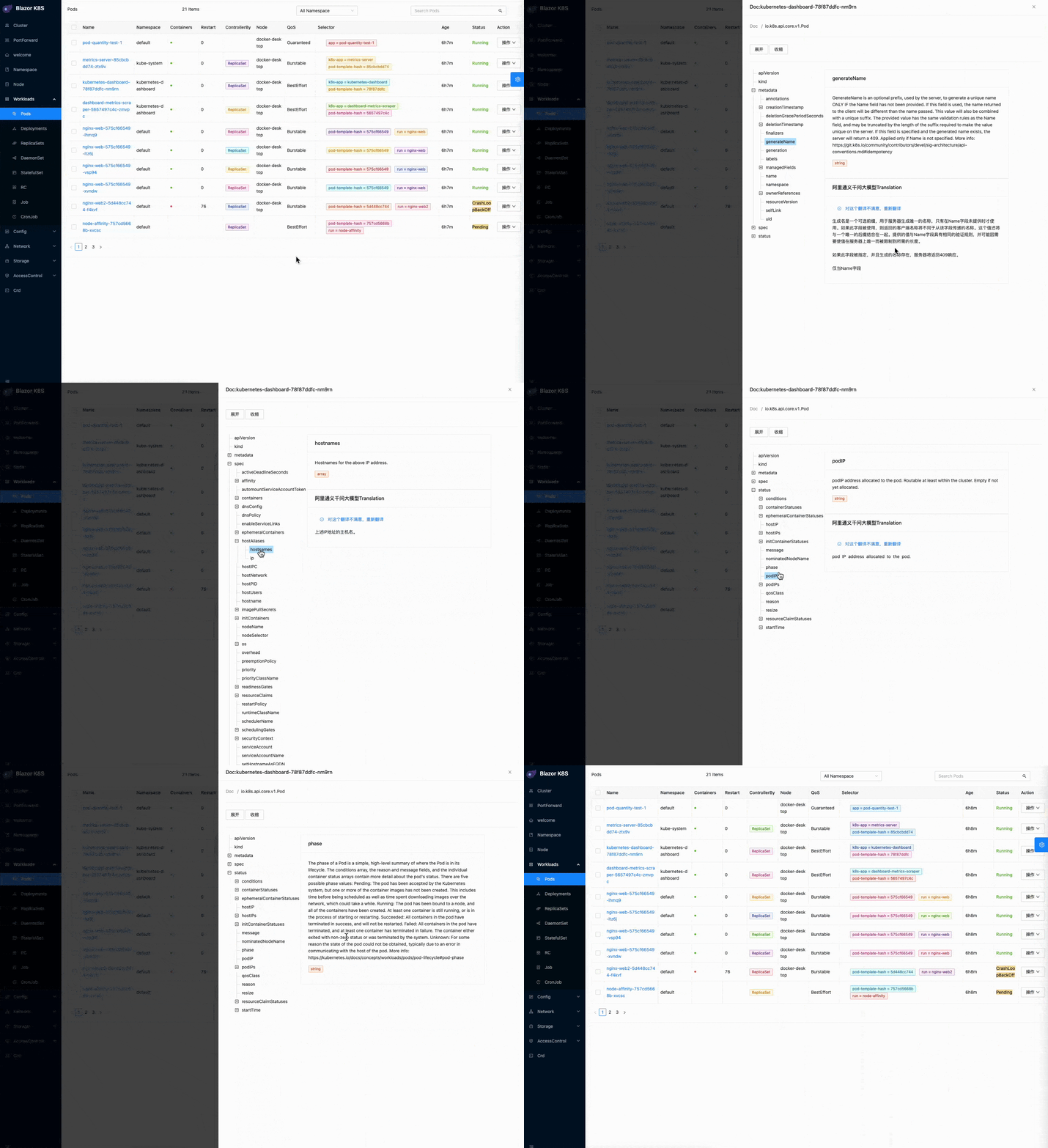
* Yaml-defined fields are analyzed and displayed in a tree structure, accompanied by documentation. Additionally, translation using a large model is available, eliminating concerns about forgetting definitions.
* Detailed explanations of Kubernetes resource fields, ensuring no ambiguity about the number of options and their meanings.Official documentation with clickable links.
* Integration of official examples in a directory tree format, allowing easy browsing, reference, and field copying.
* Generation of Yaml using a large model.
* Problem analysis using a large model.
* Security checks using a large model.
* Dynamic display of resource usage (requires installation of the metric server).
* Integration of page functionalities such as kubectl Describe, kubectl explain, and other high-frequency commands. These can be accessed with a simple click on the user interface.
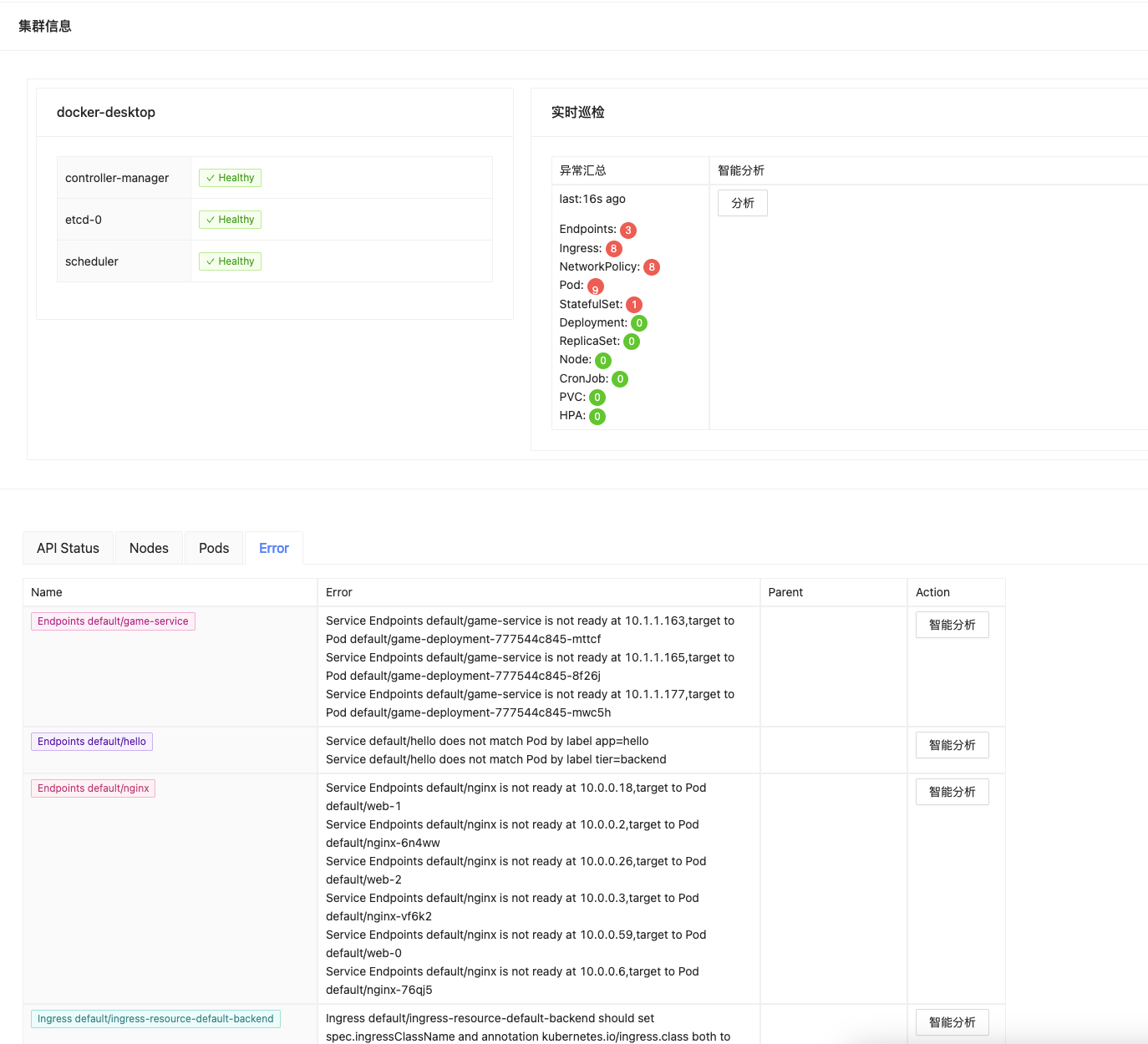
* Inspection functionality added to the cluster page, conducting common error checks on major resource objects and providing detailed lists.
## ☀️ License
[](https://github.com/weibaohui/blazork8s/blob/master/LICENSE)
# k8s install
Create a small Kubernetes cluster using [KinD](https://kind.sigs.k8s.io/docs/user/quick-start/)、[MiniKube](https://minikube.sigs.k8s.io/docs/start/)
## KinD way
* install KinD on mac with `brew`.
```
brew install kind
```
* Create a new Kubernetes cluster.
```
kind create cluster --name k8sgpt-demo
```
# Deploy BlazorK8s to a cluster and experience it:
## kubectl apply yaml
```docker
kubectl apply -f https://raw.githubusercontent.com/weibaohui/blazork8s/main/deploy/deployment.yaml
```
* View the ui:
By default, it uses NodePort for access. Please visit port 31999, or configure Ingress on your own.
http://NodePortIP:31999
## Start a Docker image to experience it
### x86 Run
Note: When using Docker Desktop, you need to handle the access domain address of the API server yourself. Ensure that it is accessible within the Docker environment.
```docker
docker run -it --rm -v ~/.kube/:/root/.kube/ -p 4000:8080 ghcr.io/weibaohui/blazork8s:0.1.6
```
### ARM Run (Mac M1/2/3)
```docker
docker run -it --rm -v ~/.kube/:/root/.kube/ -p 4000:8080 ghcr.io/weibaohui/blazork8s:0.1.6-arm
```
* View:http://IP:4000 (!Do not use 127.0.0.1/localhost!)
# Debug
```
git clone git@github.com:weibaohui/blazork8s.git
cd blazork8s/BlazorApp
dotnet watch run
```
# ChatGPT config
* √ [MoonShot AI](https://kimi.moonshot.cn/)
* √ [Ollama](https://ollama.com/)
* √ [Google Gemini](https://gemini.google.com/)
* √ [Ali Qwen](https://tongyi.aliyun.com/qianwen/)
* √ [iFlytek Spark](https://xinghuo.xfyun.cn/spark)
* √ [OpenAI](https://openai.com/)
* √ [One-API](https://github.com/songquanpeng/one-api) same as OpenAI
Modify the appsettings.json in the BlazorApp directory or /app/ directory of the image.
```
"AI": {
"Enable": true, //enabled
"Select": "QwenAI" //choose a model
},
"QwenAI": {
"APIKey": "sk-xxxxxxx7dd3494880a7920axxxxxxxxx",
"Prompt": {
"error": "Concisely, in the role of a Kubernetes expert, assess the provided output for any issues. Clearly list the problematic components, potential causes, and recommend appropriate actions:",
"security": "Concisely, in the role of a Kubernetes expert, assess the provided output for any issues. Clearly list the problematic components, potential causes, and recommend appropriate actions:"
}
},
"XunFeiAI": {
"APPID": "xxxxxx",
"APISecret": "XXXjYzgzY2E0ZTkwxxxxxxYxMDJkYTBl",
"APIKey": "xxxxxxx7dd3494880a7920axxxxxxxxx",
"Prompt": {
"error": "Concisely, in the role of a Kubernetes expert, assess the provided output for any issues. Clearly list the problematic components, potential causes, and recommend appropriate actions:",
"security": "Concisely, in the role of a Kubernetes expert, assess the provided output for any issues. Clearly list the problematic components, potential causes, and recommend appropriate actions:"
}
},
```
## Effectiveness
### DocTree expands YAML definitions in a tree-like structure, no longer worry about forgetting the definitions.
### Explanation of Field Meanings
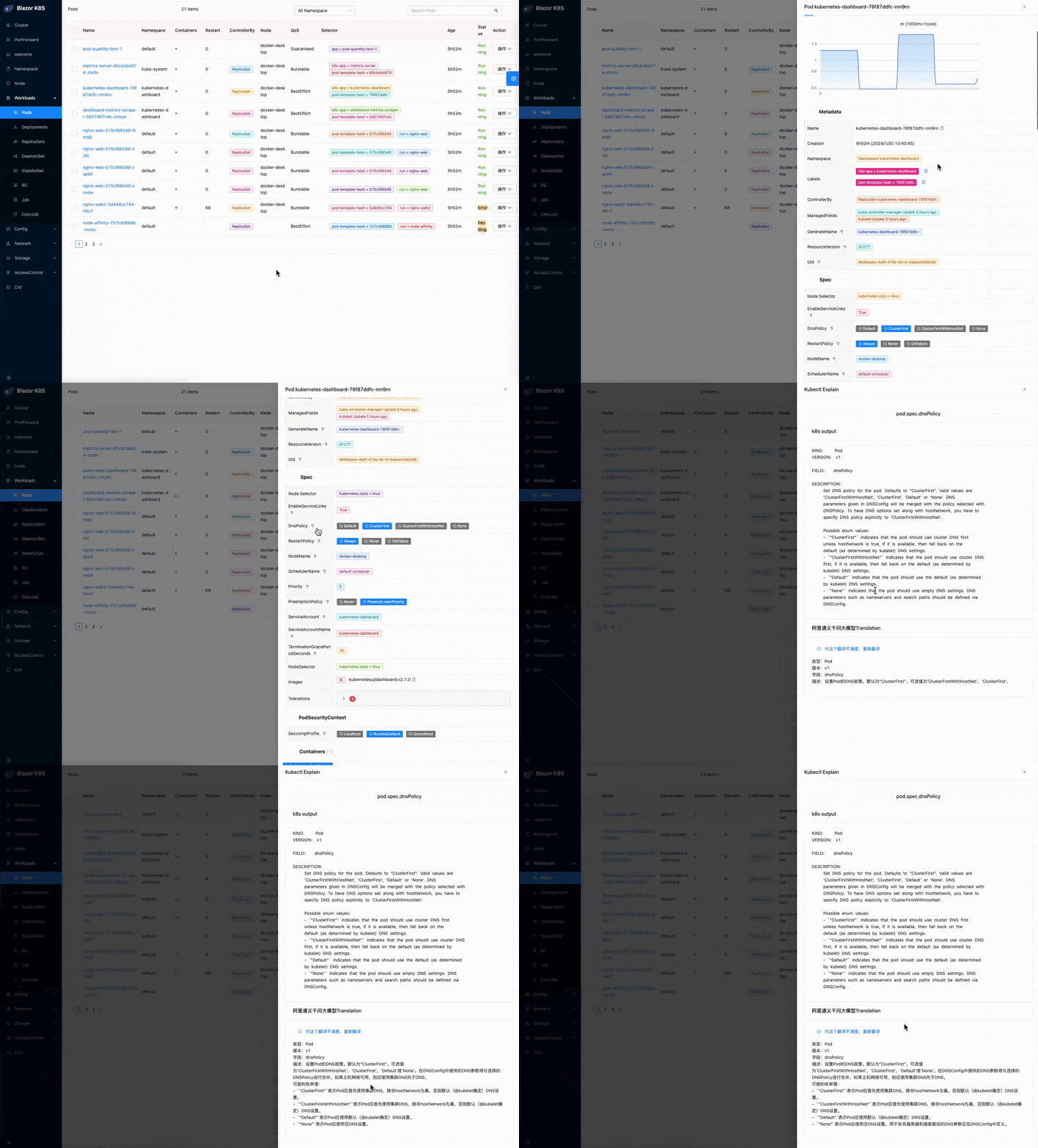
#### Click on the question mark next to the field on the resource details page.
* Use kubectl to obtain Kubernetes explanations
* Using a configured AI large model for intelligent interpretation, the results are as follows:
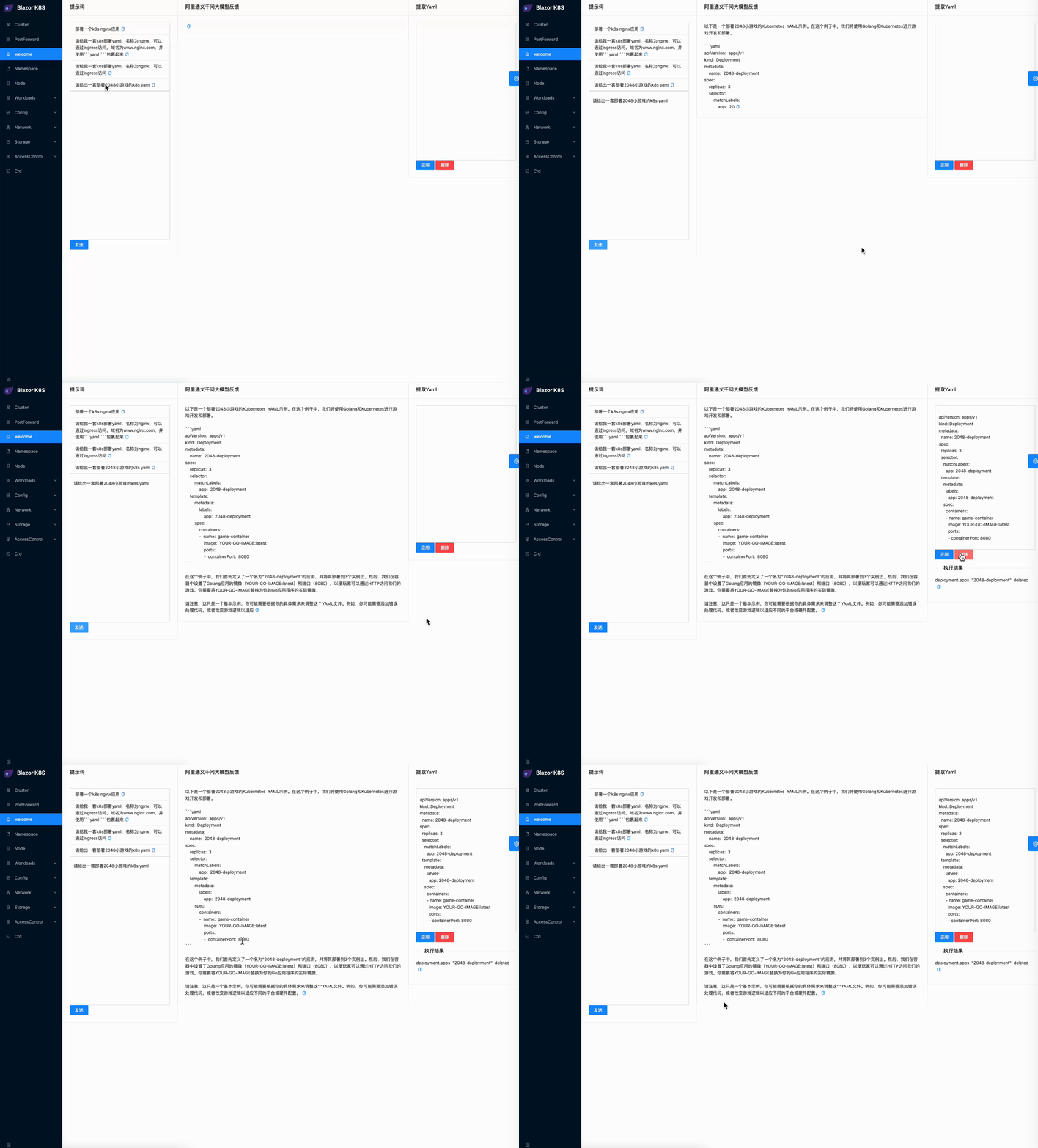
### Generate deployment YAML
Obtain k8s deployment YAML through prompts and execute
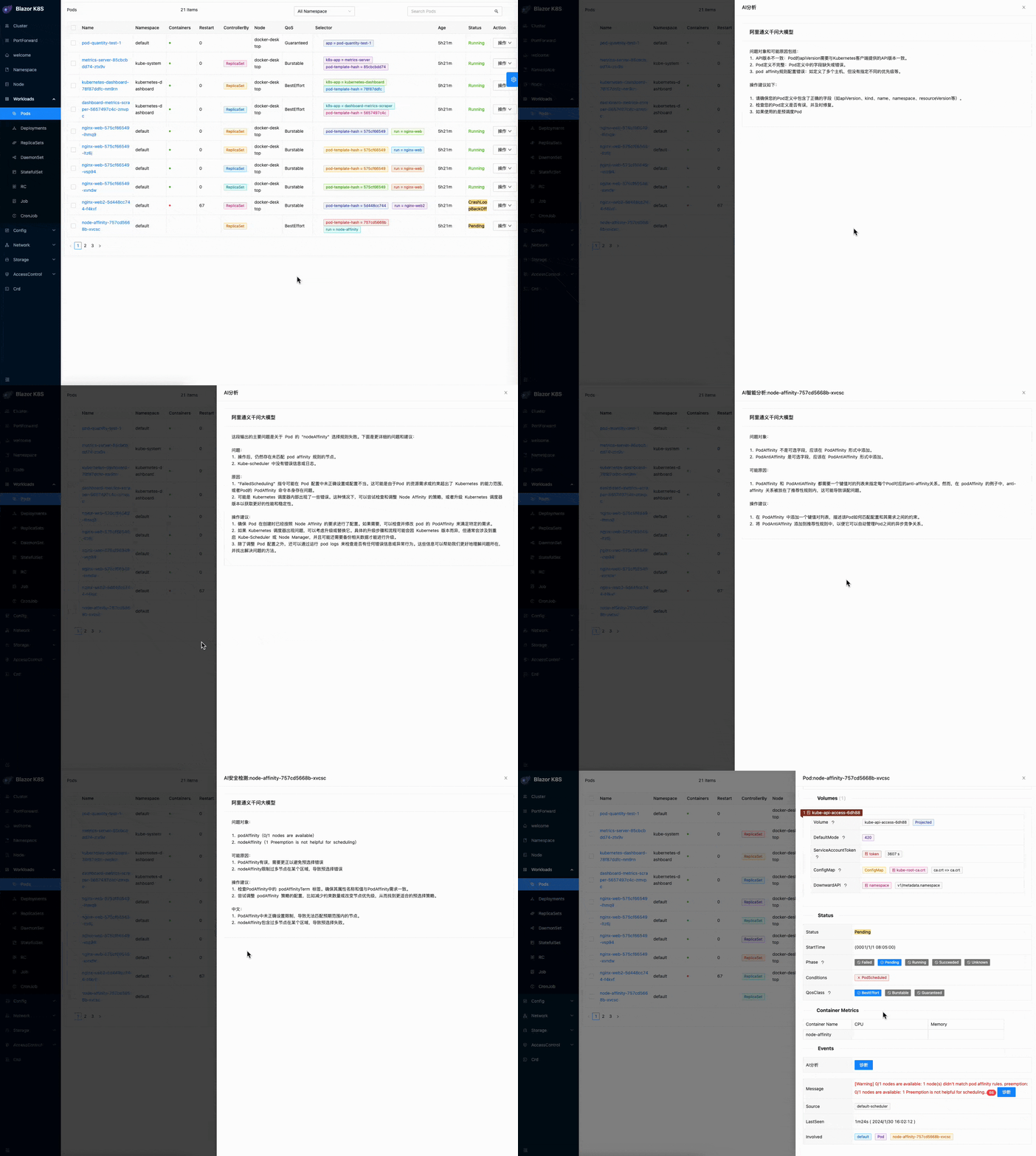
### Intelligent Analysis
Added intelligent analysis and security analysis buttons on each resource.
## List of inspectable resources
* Node
* Pod
* Deployment
* StatefulSet
* ReplicaSet
* CronJob
* Ingress
* Service/Endpoints
* PersistentVolumeClaim
* NetworkPolicy
* HorizontalPodAutoscaler
## UI preview
[click me](docs/ui.md)