# table_transformer
**Repository Path**: michaelzhang93/table_transformer
## Basic Information
- **Project Name**: table_transformer
- **Description**: microsoft/table-transformer
- **Primary Language**: Unknown
- **License**: MIT
- **Default Branch**: master
- **Homepage**: None
- **GVP Project**: No
## Statistics
- **Stars**: 0
- **Forks**: 0
- **Created**: 2023-02-16
- **Last Updated**: 2023-02-16
## Categories & Tags
**Categories**: Uncategorized
**Tags**: None
## README
# PubTables-1M
This repository contains code and links to data for the papers:
- ["PubTables-1M: Towards comprehensive table extraction from unstructured documents"](https://openaccess.thecvf.com/content/CVPR2022/html/Smock_PubTables-1M_Towards_Comprehensive_Table_Extraction_From_Unstructured_Documents_CVPR_2022_paper.html)
- ["GriTS: Grid table similarity metric for table structure recognition"](https://arxiv.org/pdf/2203.12555.pdf)
*Note: Updates to the code and papers (and documentation) are currently ongoing and we will announce when each of these is ready for a stable release.*
The goal of PubTables-1M is to create a large, detailed, high-quality dataset for training and evaluating a wide variety of models for the tasks of **table detection**, **table structure recognition**, and **functional analysis**.
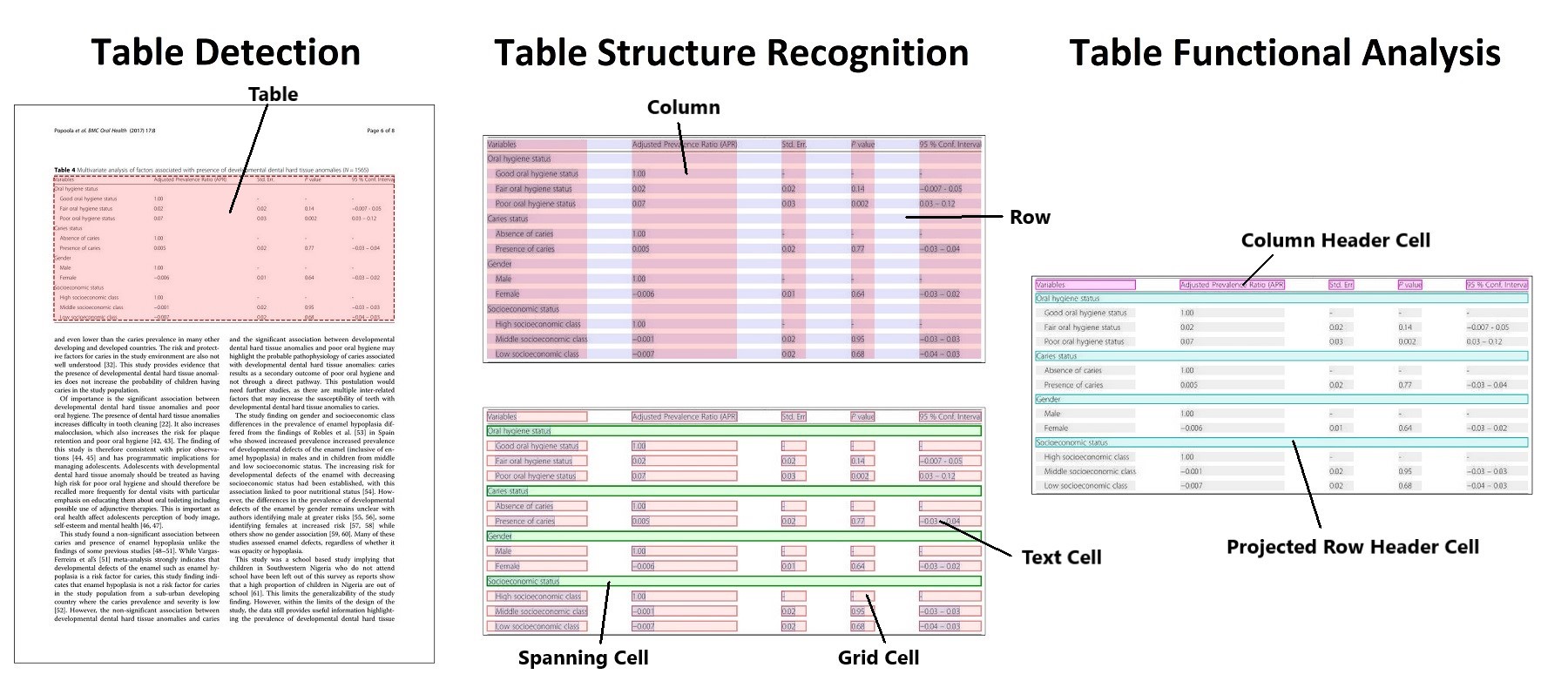
It contains:
- 575,305 annotated document pages containing tables for table detection.
- 947,642 fully annotated tables including text content and complete location (bounding box) information for table structure recognition and functional analysis.
- Full bounding boxes in both image and PDF coordinates for all table rows, columns, and cells (including blank cells), as well as other annotated structures such as column headers and projected row headers.
- Rendered images of all tables and pages.
- Bounding boxes and text for all words appearing in each table and page image.
- Additional cell properties not used in the current model training.
Additionally, cells in the headers are *canonicalized* and we implement multiple *quality control* steps to ensure the annotations are as free of noise as possible. For more details, please see [our paper](https://arxiv.org/pdf/2110.00061.pdf).
## News
`11/25/2022`: We have also made [the full PubTables-1M dataset](https://huggingface.co/datasets/bsmock/pubtables-1m) available for download from Hugging Face.\
`05/05/2022`: We have released the pre-trained weights for the table structure recognition model trained on PubTables-1M.\
`03/23/2022`: Our paper "GriTS: Grid table similarity metric for table structure recognition" is now available on [arXiv](https://arxiv.org/pdf/2203.12555.pdf)\
`03/04/2022`: We have released the pre-trained weights for the table detection model trained on PubTables-1M.\
`03/03/2022`: "PubTables-1M: Towards comprehensive table extraction from unstructured documents" has been accepted at [CVPR 2022](https://cvpr2022.thecvf.com/).\
`11/21/2021`: Our updated paper "PubTables-1M: Towards comprehensive table extraction from unstructured documents" is available on [arXiv](https://arxiv.org/pdf/2110.00061.pdf).\
`10/21/2021`: The full PubTables-1M dataset has been officially released on [Microsoft Research Open Data](https://msropendata.com/datasets/505fcbe3-1383-42b1-913a-f651b8b712d3).\
`06/08/2021`: Initial version of the table-transformer project is released.
## Model Weights
We provide the pre-trained models for table detection and table structure recognition trained for 20 epochs on PubTables-1M.
Table Detection:
| Model |
Schedule |
AP50 |
AP75 |
AP |
AR |
File |
Size |
| DETR R18 |
20 Epochs |
0.995 |
0.989 |
0.970 |
0.985 |
Weights |
110 MB |
Table Structure Recognition:
| Model |
Schedule |
AP50 |
AP75 |
AP |
AR |
GriTSTop |
GriTSCon |
GriTSLoc |
AccCon |
File |
Size |
| DETR R18 |
20 Epochs |
0.970 |
0.941 |
0.902 |
0.935 |
0.9849 |
0.9850 |
0.9786 |
0.8243 |
Weights |
110 MB |
## Training and Evaluation Data
[PubTables-1M](https://msropendata.com/datasets/505fcbe3-1383-42b1-913a-f651b8b712d3) is available for download from [Microsoft Research Open Data](https://msropendata.com/).
We have also uploaded [the full set of archives](https://huggingface.co/datasets/bsmock/pubtables-1m) to Hugging Face.
The dataset on Microsoft Research Open Data comes in 5 tar.gz files:
- PubTables-1M-Image_Page_Detection_PASCAL_VOC.tar.gz: Training and evaluation data for the detection model
- ```/images```: 575,305 JPG files; one file for each page image
- ```/train```: 460,589 XML files containing bounding boxes in PASCAL VOC format
- ```/test```: 57,125 XML files containing bounding boxes in PASCAL VOC format
- ```/val```: 57,591 XML files containing bounding boxes in PASCAL VOC format
- PubTables-1M-Image_Page_Words_JSON.tar.gz: Bounding boxes and text content for all of the words in each page image
- One JSON file per page image (plus some extra unused files)
- PubTables-1M-Image_Table_Structure_PASCAL_VOC.tar.gz: Training and evaluation data for the structure (and functional analysis) model
- ```/images```: 947,642 JPG files; one file for each page image
- ```/train```: 758,849 XML files containing bounding boxes in PASCAL VOC format
- ```/test```: 93,834 XML files containing bounding boxes in PASCAL VOC format
- ```/val```: 94,959 XML files containing bounding boxes in PASCAL VOC format
- PubTables-1M-Image_Table_Words_JSON.tar.gz: Bounding boxes and text content for all of the words in each cropped table image
- One JSON file per cropped table image (plus some extra unused files)
- PubTables-1M-PDF_Annotations_JSON.tar.gz: Detailed annotations for all of the tables appearing in the source PubMed PDFs. All annotations are in PDF coordinates.
- 401,733 JSON files; one file per source PDF
To download from the command line:
1. Visit the [dataset home page](https://msropendata.com/datasets/505fcbe3-1383-42b1-913a-f651b8b712d3) with a web browser and click Download in the top left corner. This will create a link to download the dataset from Azure with a unique access token for you that looks like `https://msropendataset01.blob.core.windows.net/pubtables1m?[SAS_TOKEN_HERE]`.
2. You can then use the command line tool [azcopy](https://docs.microsoft.com/en-us/azure/storage/common/storage-use-azcopy-v10) to download all of the files with the following command:
```
azcopy copy "https://msropendataset01.blob.core.windows.net/pubtables1m?[SAS_TOKEN_HERE]" "/path/to/your/download/folder/" --recursive
```
Then unzip each of the archives from the command line using:
```
tar -xzvf yourfile.tar.gz
```
## Code Installation
Create a conda environment from the yml file and activate it as follows
```
conda env create -f environment.yml
conda activate tables-detr
```
## Model Training
The code trains models for 2 different sets of table extraction tasks:
1. Table Detection
2. Table Structure Recognition + Functional Analysis
For a detailed description of these tasks and the models, please refer to the paper.
To train, you need to ```cd``` to the ```src``` directory and specify: 1. the path to the dataset, 2. the task (detection or structure), and 3. the path to the config file, which contains the hyperparameters for the architecture and training.
To train the detection model:
```
python main.py --data_type detection --config_file detection_config.json --data_root_dir /path/to/detection_data
```
To train the structure recognition model:
```
python main.py --data_type structure --config_file structure_config.json --data_root_dir /path/to/structure_data
```
## Evaluation
The evaluation code computes standard object detection metrics (AP, AP50, etc.) for both the detection model and the structure model.
When running evaluation for the structure model it also computes grid table similarity (GriTS) metrics for table structure recognition.
GriTS is a measure of table cell correctness and is defined as the average correctness of each cell averaged over all tables.
GriTS can measure the correctness of predicted cells based on: 1. cell topology alone, 2. cell topology and the reported bounding box location of each cell, or 3. cell topology and the reported text content of each cell.
For more details on GriTS, please see our papers.
To compute object detection metrics for the detection model:
```
python main.py --mode eval --data_type detection --config_file detection_config.json --data_root_dir /path/to/pascal_voc_detection_data --model_load_path /path/to/detection_model
```
To compute object detection and GriTS metrics for the structure recognition model:
```
python main.py --mode eval --data_type structure --config_file structure_config.json --data_root_dir /path/to/pascal_voc_structure_data --model_load_path /path/to/structure_model --table_words_dir /path/to/json_table_words_data
```
Optionally you can add flags for things like controlling parallelization, saving detailed metrics, and saving visualizations:\
```--device cpu```: Change the default device from cuda to cpu.\
```--batch_size 4```: Control the batch size to use during the forward pass of the model.\
```--eval_pool_size 4```: Control the worker pool size for CPU parallelization during GriTS metric computation.\
```--eval_step 2```: Control the number of batches of processed input data to accumulate before passing all samples to the parallelized worker pool for GriTS metric computation.\
```--debug```: Create and save visualizations of the model inference. For each input image "PMC1234567_table_0.jpg", this will save two visualizations: "PMC1234567_table_0_bboxes.jpg" containing the bounding boxes output by the model, and "PMC1234567_table_0_cells.jpg" containing the final table cell bounding boxes after post-processing. By default these are saved to a new folder "debug" in the current directory.\
``` --debug_save_dir /path/to/folder```: Specify the folder to save visualizations to.\
```--test_max_size 500```: Run evaluation on a randomly sampled subset of the data. Useful for quick verifications and checks.
## Fine-tuning and Other Model Training Scenarios
If model training is interrupted, it can be easily resumed by using the flag ```--model_load_path /path/to/model.pth``` and specifying the path to the saved dictionary file that contains the saved optimizer state.
If you want to restart training by fine-tuning a saved checkpoint, such as ```model_20.pth```, use the flag ```--model_load_path /path/to/model_20.pth``` and the flag ```--load_weights_only``` to indicate that the previous optimizer state is not needed for resuming training.
Whether fine-tuning or training a new model from scratch, you can optionally create a new config file with different training parameters than the default ones we used. Specify the new config file using: ```--config_file /path/to/new_structure_config.json```. Creating a new config file is useful, for example, if you want to use a different learning rate ```lr``` during fine-tuning.
Alternatively, many of the arguments in the config file can be specified as command line arguments using their associated flags. Any argument specified as a command line argument overrides the value of the argument in the config file.
## Citing
Our work can be cited using:
```
@inproceedings{smock2022pubtables,
title={Pub{T}ables-1{M}: Towards comprehensive table extraction from unstructured documents},
author={Smock, Brandon and Pesala, Rohith and Abraham, Robin},
booktitle={Proceedings of the IEEE/CVF Conference on Computer Vision and Pattern Recognition (CVPR)},
pages={4634-4642},
year={2022},
month={June}
}
```
```
@article{smock2022grits,
author={Smock, Brandon and Pesala, Rohith and Abraham, Robin},
title={Gri{TS}: Grid table similarity metric for table structure recognition},
journal={arXiv preprint arXiv:2203.12555},
year={2022}
}
```
## Contributing
This project welcomes contributions and suggestions. Most contributions require you to agree to a
Contributor License Agreement (CLA) declaring that you have the right to, and actually do, grant us
the rights to use your contribution. For details, visit https://cla.opensource.microsoft.com.
When you submit a pull request, a CLA bot will automatically determine whether you need to provide
a CLA and decorate the PR appropriately (e.g., status check, comment). Simply follow the instructions
provided by the bot. You will only need to do this once across all repos using our CLA.
This project has adopted the [Microsoft Open Source Code of Conduct](https://opensource.microsoft.com/codeofconduct/).
For more information see the [Code of Conduct FAQ](https://opensource.microsoft.com/codeofconduct/faq/) or
contact [opencode@microsoft.com](mailto:opencode@microsoft.com) with any additional questions or comments.
## Trademarks
This project may contain trademarks or logos for projects, products, or services. Authorized use of Microsoft
trademarks or logos is subject to and must follow
[Microsoft's Trademark & Brand Guidelines](https://www.microsoft.com/en-us/legal/intellectualproperty/trademarks/usage/general).
Use of Microsoft trademarks or logos in modified versions of this project must not cause confusion or imply Microsoft sponsorship.
Any use of third-party trademarks or logos are subject to those third-party's policies.