# DKImagePickerController
**Repository Path**: mirrors/DKImagePickerController
## Basic Information
- **Project Name**: DKImagePickerController
- **Description**: DKImagePickerController 是一个 Facebook 风格的图片选择器控件
- **Primary Language**: Swift
- **License**: MIT
- **Default Branch**: develop
- **Homepage**: https://www.oschina.net/p/dkimagepickercontroller
- **GVP Project**: No
## Statistics
- **Stars**: 0
- **Forks**: 0
- **Created**: 2020-09-17
- **Last Updated**: 2025-12-13
## Categories & Tags
**Categories**: Uncategorized
**Tags**: None
## README
DKImagePickerController
=======================
[](http://travis-ci.org/zhangao0086/DKImagePickerController) [][docsLink] [][mitLink] [](https://github.com/Carthage/Carthage)
 ---
---
 ---
## Description
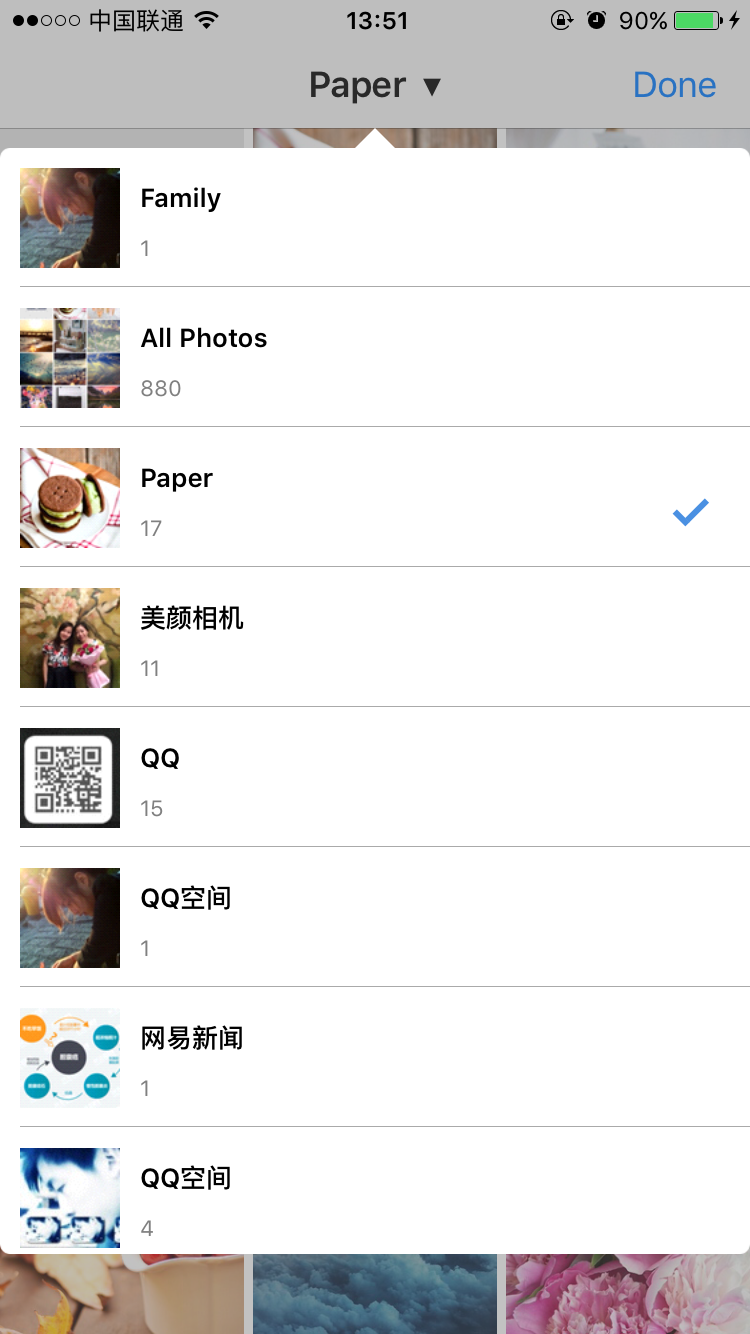
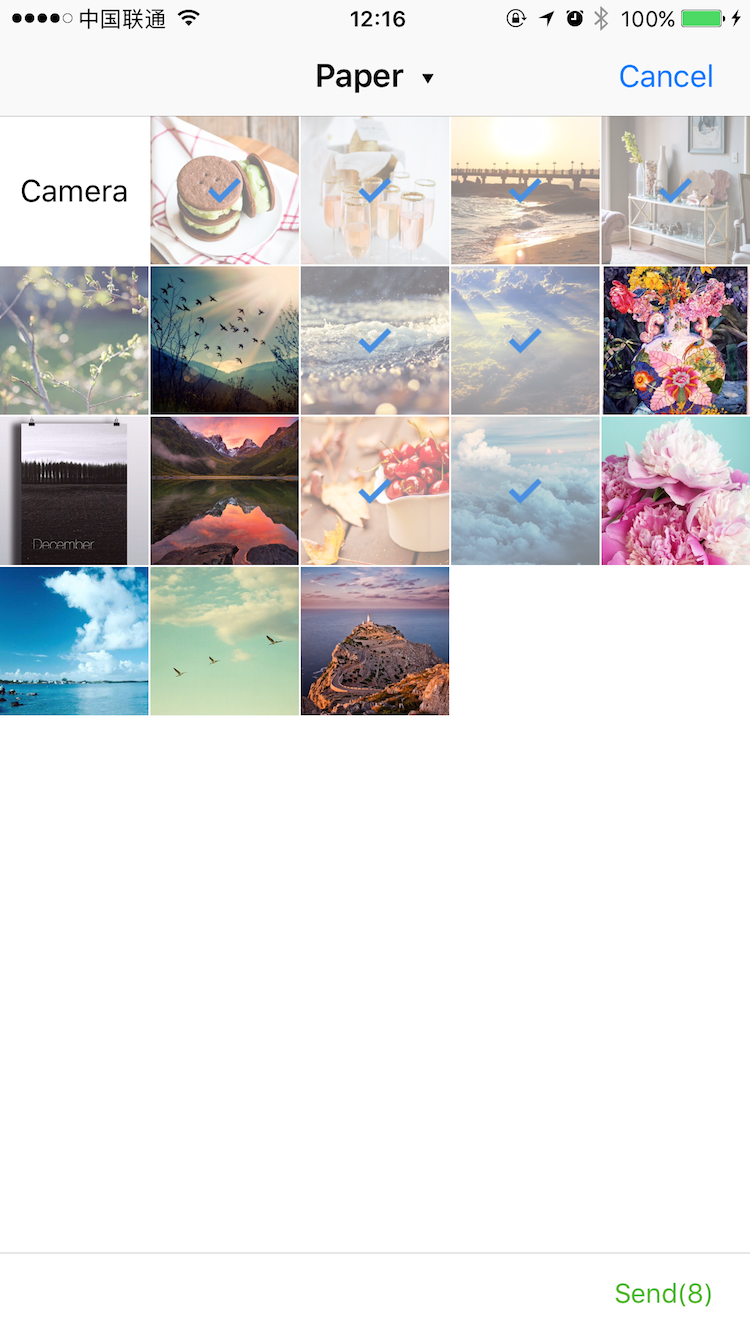
`DKImagePickerController` is a highly customizable, Pure-Swift library.
### Features
* Supports both single and multiple selection.
* Supports filtering albums and sorting by type.
* Supports landscape, iPad, and orientation switching.
* iCloud Support.
* Supports batch exports `PHAsset` to lcoal files.
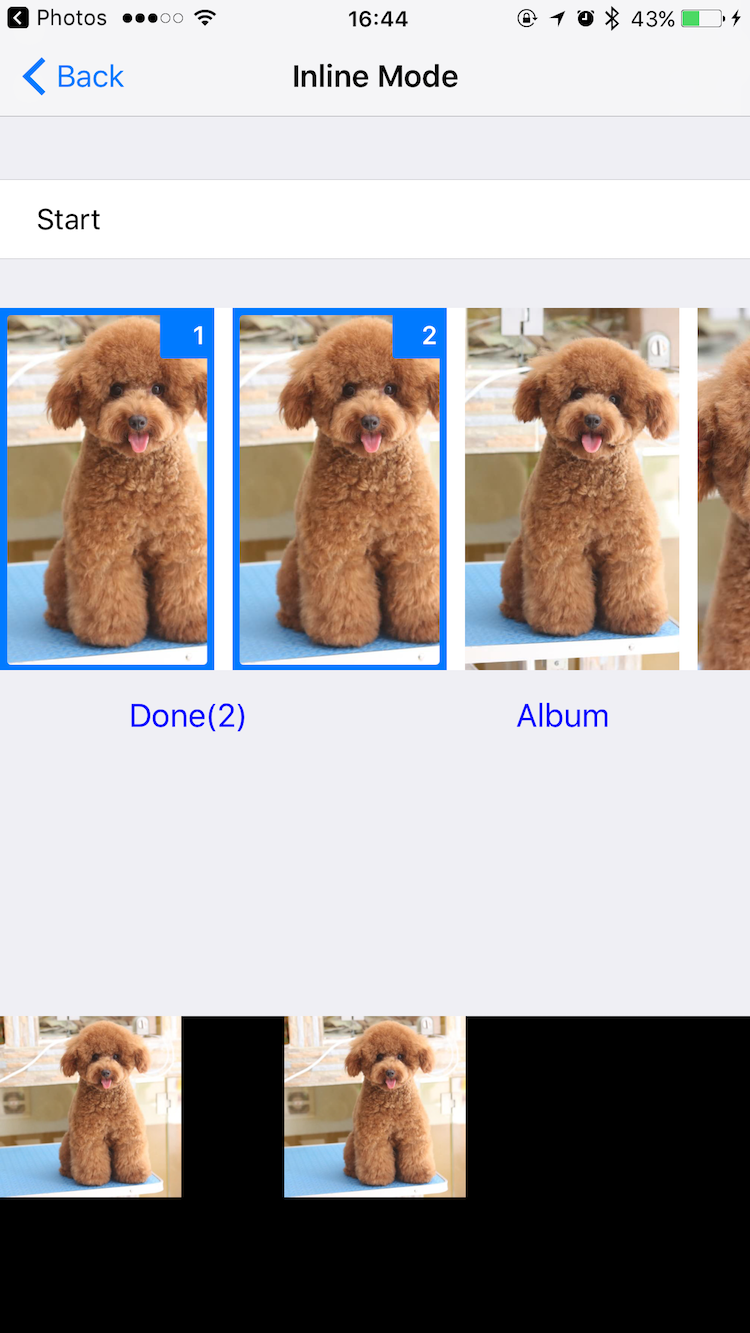
* Inline mode Support.
* Customizable `UICollectionViewLayout`.
* Customizable `camera`, `photo gallery` and `photo editor`.
* Dark Mode Support
## Requirements
* iOS 9.0+ (Drop support for iOS 8 in 4.3.0 or above)
* ARC
* Swift 4 & 5
## Installation
### CocoaPods
#### iOS 9 and newer
DKImagePickerController is available on CocoaPods. Simply add the following line to your podfile:
```
# For latest release in cocoapods
pod 'DKImagePickerController'
```
#### For Swift 4.1
```
pod 'DKImagePickerController', :git => 'https://github.com/zhangao0086/DKImagePickerController.git', :branch => 'Swift4'
```
#### For iOS 8
```
pod 'DKImagePickerController', :git => 'https://github.com/zhangao0086/DKImagePickerController.git', :branch => 'iOS8'
```
#### Subspecs
There are 7 subspecs available now:
| Subspec | Description |
|---|---|
| Core | Required. |
| ImageDataManager | Required. The subspec provides data to `DKImagePickerController`. |
| Resource | Required. The subspec provides resource management and internationalization. |
| PhotoGallery | Optional. The subspec provides preview feature for PHAsset. |
| Camera | Optional. The subspec provides camera feature. |
| InlineCamera | Optional. The subspec should be pushed by `UINavigationController`, like `UIImagePickerController` with `UIImagePickerControllerSourceType.camera`. |
| PhotoEditor | Optional. The subspec provides basic image editing features. |
This means you can install only some of the `DKImagePickerController` modules. By default, you get all subspecs.
If you need to use your own photo editor, simply specify subspecs other than `PhotoEditor`:
```ruby
pod 'DKImagePickerController', :subspecs => ['PhotoGallery', 'Camera', 'InlineCamera']
```
More information, see [Extensions](#extensions).
### Carthage
```
github "zhangao0086/DKImagePickerController"
```
If you use Carthage to build your dependencies, make sure you have added `CropViewController.framework`, `DKCamera.framework`, `DKImagePickerController.framework`, `DKPhotoGallery.framework` and `SDWebImage.framework` to the _"Linked Frameworks and Libraries"_ section of your target, and have included them in your Carthage framework copying build phase.
## Getting Started
#### Initialization and presentation
```swift
let pickerController = DKImagePickerController()
pickerController.didSelectAssets = { (assets: [DKAsset]) in
print("didSelectAssets")
print(assets)
}
self.presentViewController(pickerController, animated: true) {}
````
#### Configurations
```swift
/// Use UIDelegate to Customize the picker UI.
@objc public var UIDelegate: DKImagePickerControllerBaseUIDelegate!
/// Forces deselect of previous selected image. allowSwipeToSelect will be ignored.
@objc public var singleSelect = false
/// Auto close picker on single select
@objc public var autoCloseOnSingleSelect = true
/// The maximum count of assets which the user will be able to select, a value of 0 means no limit.
@objc public var maxSelectableCount = 0
/// Photos will be tagged with the location where they are taken.
/// If true, your Info.plist should include the "Privacy - Location XXX" tag.
open var containsGPSInMetadata = false
/// Set the defaultAssetGroup to specify which album is the default asset group.
public var defaultAssetGroup: PHAssetCollectionSubtype?
/// Allow swipe to select images.
@objc public var allowSwipeToSelect: Bool = false
/// Allow select all
@objc public var allowSelectAll: Bool = false
/// A Bool value indicating whether the inline mode is enabled.
@objc public var inline: Bool = false
/// The type of picker interface to be displayed by the controller.
@objc public var assetType: DKImagePickerControllerAssetType = .allAssets
/// If sourceType is Camera will cause the assetType & maxSelectableCount & allowMultipleTypes & defaultSelectedAssets to be ignored.
@objc public var sourceType: DKImagePickerControllerSourceType = .both
/// A Bool value indicating whether allows to select photos and videos at the same time.
@objc public var allowMultipleTypes = true
/// A Bool value indicating whether to allow the picker auto-rotate the screen.
@objc public var allowsLandscape = false
/// Set the showsEmptyAlbums to specify whether or not the empty albums is shown in the picker.
@objc public var showsEmptyAlbums = true
/// A Bool value indicating whether to allow the picker shows the cancel button.
@objc public var showsCancelButton = false
/// The block is executed when the user presses the cancel button.
@objc public var didCancel: (() -> Void)?
/// The block is executed when the user presses the select button.
@objc public var didSelectAssets: ((_ assets: [DKAsset]) -> Void)?
/// The block is executed when the number of selected assets is changed.
@objc public var selectedChanged: (() -> Void)?
/// A Bool value indicating whether to allow the picker to auto-export the selected assets to the specified directory when done is called.
/// picker will creating a default exporter if exportsWhenCompleted is true and the exporter is nil.
@objc public var exportsWhenCompleted = false
@objc public var exporter: DKImageAssetExporter?
/// Indicates the status of the exporter.
@objc public private(set) var exportStatus = DKImagePickerControllerExportStatus.none {
willSet {
if self.exportStatus != newValue {
self.willChangeValue(forKey: #keyPath(DKImagePickerController.exportStatus))
}
}
didSet {
if self.exportStatus != oldValue {
self.didChangeValue(forKey: #keyPath(DKImagePickerController.exportStatus))
self.exportStatusChanged?(self.exportStatus)
}
}
}
/// The block is executed when the exportStatus is changed.
@objc public var exportStatusChanged: ((DKImagePickerControllerExportStatus) -> Void)?
/// The object that acts as the data source of the picker.
@objc public private(set) lazy var groupDataManager: DKImageGroupDataManager
```
## Inline Mode
```swift
let groupDataManagerConfiguration = DKImageGroupDataManagerConfiguration()
groupDataManagerConfiguration.fetchLimit = 10
groupDataManagerConfiguration.assetGroupTypes = [.smartAlbumUserLibrary]
let groupDataManager = DKImageGroupDataManager(configuration: groupDataManagerConfiguration)
self.pickerController = DKImagePickerController(groupDataManager: groupDataManager)
pickerController.inline = true
pickerController.UIDelegate = CustomInlineLayoutUIDelegate(imagePickerController: pickerController)
pickerController.assetType = .allPhotos
pickerController.sourceType = .photo
let pickerView = self.pickerController.view!
pickerView.frame = CGRect(x: 0, y: 170, width: self.view.bounds.width, height: 200)
self.view.addSubview(pickerView)
```
## Customizable UI
For example, see [CustomUIDelegate](https://github.com/zhangao0086/DKImagePickerController/tree/develop/Example/DKImagePickerControllerDemo/CustomUIDelegate).
## Customizable Layout
---
## Description
`DKImagePickerController` is a highly customizable, Pure-Swift library.
### Features
* Supports both single and multiple selection.
* Supports filtering albums and sorting by type.
* Supports landscape, iPad, and orientation switching.
* iCloud Support.
* Supports batch exports `PHAsset` to lcoal files.
* Inline mode Support.
* Customizable `UICollectionViewLayout`.
* Customizable `camera`, `photo gallery` and `photo editor`.
* Dark Mode Support
## Requirements
* iOS 9.0+ (Drop support for iOS 8 in 4.3.0 or above)
* ARC
* Swift 4 & 5
## Installation
### CocoaPods
#### iOS 9 and newer
DKImagePickerController is available on CocoaPods. Simply add the following line to your podfile:
```
# For latest release in cocoapods
pod 'DKImagePickerController'
```
#### For Swift 4.1
```
pod 'DKImagePickerController', :git => 'https://github.com/zhangao0086/DKImagePickerController.git', :branch => 'Swift4'
```
#### For iOS 8
```
pod 'DKImagePickerController', :git => 'https://github.com/zhangao0086/DKImagePickerController.git', :branch => 'iOS8'
```
#### Subspecs
There are 7 subspecs available now:
| Subspec | Description |
|---|---|
| Core | Required. |
| ImageDataManager | Required. The subspec provides data to `DKImagePickerController`. |
| Resource | Required. The subspec provides resource management and internationalization. |
| PhotoGallery | Optional. The subspec provides preview feature for PHAsset. |
| Camera | Optional. The subspec provides camera feature. |
| InlineCamera | Optional. The subspec should be pushed by `UINavigationController`, like `UIImagePickerController` with `UIImagePickerControllerSourceType.camera`. |
| PhotoEditor | Optional. The subspec provides basic image editing features. |
This means you can install only some of the `DKImagePickerController` modules. By default, you get all subspecs.
If you need to use your own photo editor, simply specify subspecs other than `PhotoEditor`:
```ruby
pod 'DKImagePickerController', :subspecs => ['PhotoGallery', 'Camera', 'InlineCamera']
```
More information, see [Extensions](#extensions).
### Carthage
```
github "zhangao0086/DKImagePickerController"
```
If you use Carthage to build your dependencies, make sure you have added `CropViewController.framework`, `DKCamera.framework`, `DKImagePickerController.framework`, `DKPhotoGallery.framework` and `SDWebImage.framework` to the _"Linked Frameworks and Libraries"_ section of your target, and have included them in your Carthage framework copying build phase.
## Getting Started
#### Initialization and presentation
```swift
let pickerController = DKImagePickerController()
pickerController.didSelectAssets = { (assets: [DKAsset]) in
print("didSelectAssets")
print(assets)
}
self.presentViewController(pickerController, animated: true) {}
````
#### Configurations
```swift
/// Use UIDelegate to Customize the picker UI.
@objc public var UIDelegate: DKImagePickerControllerBaseUIDelegate!
/// Forces deselect of previous selected image. allowSwipeToSelect will be ignored.
@objc public var singleSelect = false
/// Auto close picker on single select
@objc public var autoCloseOnSingleSelect = true
/// The maximum count of assets which the user will be able to select, a value of 0 means no limit.
@objc public var maxSelectableCount = 0
/// Photos will be tagged with the location where they are taken.
/// If true, your Info.plist should include the "Privacy - Location XXX" tag.
open var containsGPSInMetadata = false
/// Set the defaultAssetGroup to specify which album is the default asset group.
public var defaultAssetGroup: PHAssetCollectionSubtype?
/// Allow swipe to select images.
@objc public var allowSwipeToSelect: Bool = false
/// Allow select all
@objc public var allowSelectAll: Bool = false
/// A Bool value indicating whether the inline mode is enabled.
@objc public var inline: Bool = false
/// The type of picker interface to be displayed by the controller.
@objc public var assetType: DKImagePickerControllerAssetType = .allAssets
/// If sourceType is Camera will cause the assetType & maxSelectableCount & allowMultipleTypes & defaultSelectedAssets to be ignored.
@objc public var sourceType: DKImagePickerControllerSourceType = .both
/// A Bool value indicating whether allows to select photos and videos at the same time.
@objc public var allowMultipleTypes = true
/// A Bool value indicating whether to allow the picker auto-rotate the screen.
@objc public var allowsLandscape = false
/// Set the showsEmptyAlbums to specify whether or not the empty albums is shown in the picker.
@objc public var showsEmptyAlbums = true
/// A Bool value indicating whether to allow the picker shows the cancel button.
@objc public var showsCancelButton = false
/// The block is executed when the user presses the cancel button.
@objc public var didCancel: (() -> Void)?
/// The block is executed when the user presses the select button.
@objc public var didSelectAssets: ((_ assets: [DKAsset]) -> Void)?
/// The block is executed when the number of selected assets is changed.
@objc public var selectedChanged: (() -> Void)?
/// A Bool value indicating whether to allow the picker to auto-export the selected assets to the specified directory when done is called.
/// picker will creating a default exporter if exportsWhenCompleted is true and the exporter is nil.
@objc public var exportsWhenCompleted = false
@objc public var exporter: DKImageAssetExporter?
/// Indicates the status of the exporter.
@objc public private(set) var exportStatus = DKImagePickerControllerExportStatus.none {
willSet {
if self.exportStatus != newValue {
self.willChangeValue(forKey: #keyPath(DKImagePickerController.exportStatus))
}
}
didSet {
if self.exportStatus != oldValue {
self.didChangeValue(forKey: #keyPath(DKImagePickerController.exportStatus))
self.exportStatusChanged?(self.exportStatus)
}
}
}
/// The block is executed when the exportStatus is changed.
@objc public var exportStatusChanged: ((DKImagePickerControllerExportStatus) -> Void)?
/// The object that acts as the data source of the picker.
@objc public private(set) lazy var groupDataManager: DKImageGroupDataManager
```
## Inline Mode
```swift
let groupDataManagerConfiguration = DKImageGroupDataManagerConfiguration()
groupDataManagerConfiguration.fetchLimit = 10
groupDataManagerConfiguration.assetGroupTypes = [.smartAlbumUserLibrary]
let groupDataManager = DKImageGroupDataManager(configuration: groupDataManagerConfiguration)
self.pickerController = DKImagePickerController(groupDataManager: groupDataManager)
pickerController.inline = true
pickerController.UIDelegate = CustomInlineLayoutUIDelegate(imagePickerController: pickerController)
pickerController.assetType = .allPhotos
pickerController.sourceType = .photo
let pickerView = self.pickerController.view!
pickerView.frame = CGRect(x: 0, y: 170, width: self.view.bounds.width, height: 200)
self.view.addSubview(pickerView)
```
## Customizable UI
For example, see [CustomUIDelegate](https://github.com/zhangao0086/DKImagePickerController/tree/develop/Example/DKImagePickerControllerDemo/CustomUIDelegate).
## Customizable Layout
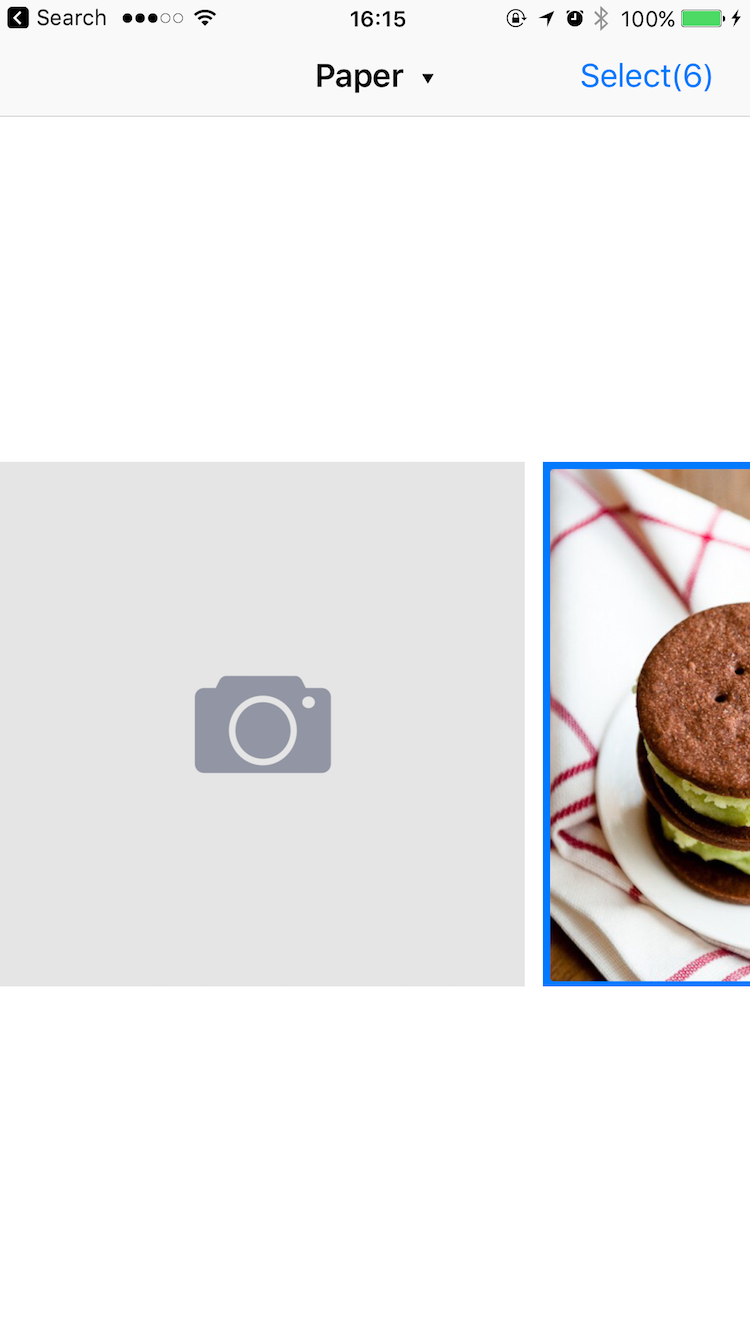 For example, see [CustomLayoutUIDelegate](https://github.com/zhangao0086/DKImagePickerController/tree/develop/Example/DKImagePickerControllerDemo/CustomLayoutUIDelegate).
### Conforms UIAppearance protocol
For example, see [CustomLayoutUIDelegate](https://github.com/zhangao0086/DKImagePickerController/tree/develop/Example/DKImagePickerControllerDemo/CustomLayoutUIDelegate).
### Conforms UIAppearance protocol
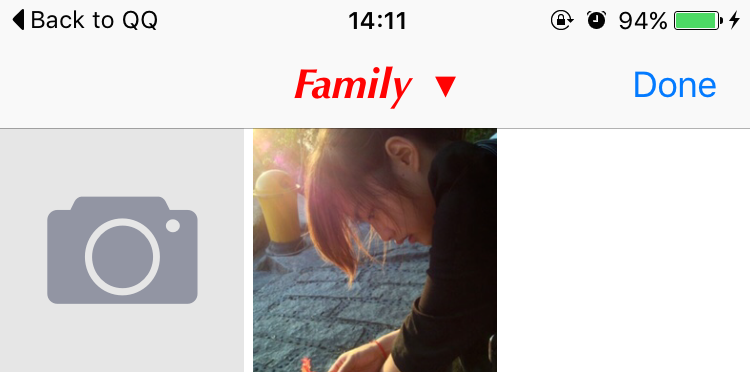 You can easily customize the appearance of the navigation bar using the appearance proxy.
```swift
UINavigationBar.appearance().titleTextAttributes = [
NSFontAttributeName : UIFont(name: "Optima-BoldItalic", size: 21)!,
NSForegroundColorAttributeName : UIColor.redColor()
]
```
## Exporting to file
By default, the picker uses a singleton object of `DKImageAssetExporter` to export `DKAsset` to local files.
```swift
/*
Configuration options for a DKImageAssetExporter. When an exporter is created,
a copy of the configuration object is made - you cannot modify the configuration
of an exporter after it has been created.
*/
@objc
public class DKImageAssetExporterConfiguration: NSObject, NSCopying {
@objc public var imageExportPreset = DKImageExportPresent.compatible
/// videoExportPreset can be used to specify the transcoding quality for videos (via a AVAssetExportPreset* string).
@objc public var videoExportPreset = AVAssetExportPresetHighestQuality
#if swift(>=4.0)
@objc public var avOutputFileType = AVFileType.mov
#else
@objc public var avOutputFileType = AVFileTypeQuickTimeMovie
#endif
@objc public var exportDirectory = URL(fileURLWithPath: NSTemporaryDirectory()).appendingPathComponent("DKImageAssetExporter")
}
/*
A DKImageAssetExporter object exports DKAsset(PHAsset) from album (or iCloud) to the app's tmp directory (by default).
It automatically deletes the exported directories when it receives a UIApplicationWillTerminate notification.
*/
@objc
open class DKImageAssetExporter: DKBaseManager {
/// This method starts an asynchronous export operation of a batch of asset.
@discardableResult
@objc public func exportAssetsAsynchronously(assets: [DKAsset], completion: ((_ info: [AnyHashable : Any]) -> Void)?) -> DKImageAssetExportRequestID
}
```
This exporter can automatically convert HEIF to JPEG:
```swift
@objc
public enum DKImageExportPresent: Int {
case
compatible, // A preset for converting HEIF formatted images to JPEG.
current // A preset for passing image data as-is to the client.
}
```
You also can observe the export progress of each asset:
```swift
@objc
public protocol DKImageAssetExporterObserver {
@objc optional func exporterWillBeginExporting(exporter: DKImageAssetExporter, asset: DKAsset)
/// The progress can be obtained from the DKAsset.
@objc optional func exporterDidUpdateProgress(exporter: DKImageAssetExporter, asset: DKAsset)
/// When the asset's error is not nil, it indicates that an error occurred while exporting.
@objc optional func exporterDidEndExporting(exporter: DKImageAssetExporter, asset: DKAsset)
}
extension DKAsset {
/// The exported file will be placed in this location.
/// All exported files can be automatically cleaned by the DKImageAssetDiskPurger when appropriate.
@objc public var localTemporaryPath: URL?
@objc public var fileName: String?
/// Indicates the file's size in bytes.
@objc public var fileSize: UInt
/// If you export an asset whose data is not on the local device, and you have enabled downloading with the isNetworkAccessAllowed property, the progress indicates the progress of the download. A value of 0.0 indicates that the download has just started, and a value of 1.0 indicates the download is complete.
@objc public var progress: Double
/// Describes the error that occurred if the export has failed or been cancelled.
@objc public var error: Error?
}
```
For example, see `Export automatically` and `Export manually`.
## Extensions
This picker uses `DKImageExtensionController` manages all extensions, you can register it with a `DKImageBaseExtension` and a specified `DKImageExtensionType` to customize `camera`, `photo gallery` and `photo editor`:
```swift
/// Registers an extension for the specified type.
public class func registerExtension(extensionClass: DKImageBaseExtension.Type, for type: DKImageExtensionType)
public class func unregisterExtension(for type: DKImageExtensionType)
```
The `perform` function will be called with a dictionary providing current context information when an extension is triggered:
```swift
/// Starts the extension.
func perform(with extraInfo: [AnyHashable: Any])
/// Completes the extension.
func finish()
```
The `extraInfo` will provide different information for different `DKImageExtensionType`:
##### Camera
```swift
let didFinishCapturingImage = extraInfo["didFinishCapturingImage"] as? ((UIImage, [AnyHashable : Any]?) -> Void)
let didCancel = extraInfo["didCancel"] as? (() -> Void)
```
For a custom camera example, see [CustomCameraExtension](https://github.com/zhangao0086/DKImagePickerController/tree/develop/Example/DKImagePickerControllerDemo/CustomCamera).
##### InlineCamera
The `extraInfo` is the same as for `Camera`.
##### Photo Gallery
```swift
let groupId = extraInfo["groupId"] as? String
let presentationIndex = extraInfo["presentationIndex"] as? Int
let presentingFromImageView = extraInfo["presentingFromImageView"] as? UIImageView
```
##### Photo Editor
```swift
let image = extraInfo["image"] as? UIImage
let didFinishEditing = extraInfo["didFinishEditing"] as? ((UIImage, [AnyHashable : Any]?) -> Void)
let metadata = extraInfo["metadata"] as? [AnyHashable : Any]
```
## How to use in Objective-C
#### If you use [CocoaPods](http://cocoapods.org/)
* Add the following two lines into your `Podfile`:
```
pod 'DKImagePickerController'
use_frameworks!
```
* Import the library into your Objective-C file:
```objective-c
#import
```
#### If you use it directly in your project
> See also:[Swift and Objective-C in the Same Project](https://developer.apple.com/library/ios/documentation/Swift/Conceptual/BuildingCocoaApps/MixandMatch.html)
* Drag and drop the [DKCamera][DKCamera], `DKImageManager` and `DKImagePickerController` to your project
* Import the library into your Objective-C file:
```objective-c
#import "YourProductModuleName-Swift.h"
```
---
then you can:
```objective-c
DKImagePickerController *pickerController = [DKImagePickerController new];
[pickerController setDidSelectAssets:^(NSArray * __nonnull assets) {
NSLog(@"didSelectAssets");
}];
[self presentViewController:pickerController animated:YES completion:nil];
```
## Localization
The default supported languages:
> en, es, da, de, fr, hu, ja, ko, nb-NO, pt_BR, ru, tr, ur, vi, ar, it, zh-Hans, zh-Hant
You can also add a hook to return your own localized string:
```swift
DKImagePickerControllerResource.customLocalizationBlock = { title in
if title == "picker.select.title" {
return "Test(%@)"
} else {
return nil
}
}
```
or images:
```swift
DKImagePickerControllerResource.customImageBlock = { imageName in
if imageName == "camera" {
return DKImagePickerControllerResource.photoGalleryCheckedImage()
} else {
return nil
}
}
```
## Contributing to this project
If you have feature requests or bug reports, feel free to help out by sending pull requests or by creating new issues.
## License
DKImagePickerController is released under the MIT license. See LICENSE for details.
[mitLink]:http://opensource.org/licenses/MIT
[docsLink]:http://cocoadocs.org/docsets/DKImagePickerController
[DKCamera]:https://github.com/zhangao0086/DKCamera
You can easily customize the appearance of the navigation bar using the appearance proxy.
```swift
UINavigationBar.appearance().titleTextAttributes = [
NSFontAttributeName : UIFont(name: "Optima-BoldItalic", size: 21)!,
NSForegroundColorAttributeName : UIColor.redColor()
]
```
## Exporting to file
By default, the picker uses a singleton object of `DKImageAssetExporter` to export `DKAsset` to local files.
```swift
/*
Configuration options for a DKImageAssetExporter. When an exporter is created,
a copy of the configuration object is made - you cannot modify the configuration
of an exporter after it has been created.
*/
@objc
public class DKImageAssetExporterConfiguration: NSObject, NSCopying {
@objc public var imageExportPreset = DKImageExportPresent.compatible
/// videoExportPreset can be used to specify the transcoding quality for videos (via a AVAssetExportPreset* string).
@objc public var videoExportPreset = AVAssetExportPresetHighestQuality
#if swift(>=4.0)
@objc public var avOutputFileType = AVFileType.mov
#else
@objc public var avOutputFileType = AVFileTypeQuickTimeMovie
#endif
@objc public var exportDirectory = URL(fileURLWithPath: NSTemporaryDirectory()).appendingPathComponent("DKImageAssetExporter")
}
/*
A DKImageAssetExporter object exports DKAsset(PHAsset) from album (or iCloud) to the app's tmp directory (by default).
It automatically deletes the exported directories when it receives a UIApplicationWillTerminate notification.
*/
@objc
open class DKImageAssetExporter: DKBaseManager {
/// This method starts an asynchronous export operation of a batch of asset.
@discardableResult
@objc public func exportAssetsAsynchronously(assets: [DKAsset], completion: ((_ info: [AnyHashable : Any]) -> Void)?) -> DKImageAssetExportRequestID
}
```
This exporter can automatically convert HEIF to JPEG:
```swift
@objc
public enum DKImageExportPresent: Int {
case
compatible, // A preset for converting HEIF formatted images to JPEG.
current // A preset for passing image data as-is to the client.
}
```
You also can observe the export progress of each asset:
```swift
@objc
public protocol DKImageAssetExporterObserver {
@objc optional func exporterWillBeginExporting(exporter: DKImageAssetExporter, asset: DKAsset)
/// The progress can be obtained from the DKAsset.
@objc optional func exporterDidUpdateProgress(exporter: DKImageAssetExporter, asset: DKAsset)
/// When the asset's error is not nil, it indicates that an error occurred while exporting.
@objc optional func exporterDidEndExporting(exporter: DKImageAssetExporter, asset: DKAsset)
}
extension DKAsset {
/// The exported file will be placed in this location.
/// All exported files can be automatically cleaned by the DKImageAssetDiskPurger when appropriate.
@objc public var localTemporaryPath: URL?
@objc public var fileName: String?
/// Indicates the file's size in bytes.
@objc public var fileSize: UInt
/// If you export an asset whose data is not on the local device, and you have enabled downloading with the isNetworkAccessAllowed property, the progress indicates the progress of the download. A value of 0.0 indicates that the download has just started, and a value of 1.0 indicates the download is complete.
@objc public var progress: Double
/// Describes the error that occurred if the export has failed or been cancelled.
@objc public var error: Error?
}
```
For example, see `Export automatically` and `Export manually`.
## Extensions
This picker uses `DKImageExtensionController` manages all extensions, you can register it with a `DKImageBaseExtension` and a specified `DKImageExtensionType` to customize `camera`, `photo gallery` and `photo editor`:
```swift
/// Registers an extension for the specified type.
public class func registerExtension(extensionClass: DKImageBaseExtension.Type, for type: DKImageExtensionType)
public class func unregisterExtension(for type: DKImageExtensionType)
```
The `perform` function will be called with a dictionary providing current context information when an extension is triggered:
```swift
/// Starts the extension.
func perform(with extraInfo: [AnyHashable: Any])
/// Completes the extension.
func finish()
```
The `extraInfo` will provide different information for different `DKImageExtensionType`:
##### Camera
```swift
let didFinishCapturingImage = extraInfo["didFinishCapturingImage"] as? ((UIImage, [AnyHashable : Any]?) -> Void)
let didCancel = extraInfo["didCancel"] as? (() -> Void)
```
For a custom camera example, see [CustomCameraExtension](https://github.com/zhangao0086/DKImagePickerController/tree/develop/Example/DKImagePickerControllerDemo/CustomCamera).
##### InlineCamera
The `extraInfo` is the same as for `Camera`.
##### Photo Gallery
```swift
let groupId = extraInfo["groupId"] as? String
let presentationIndex = extraInfo["presentationIndex"] as? Int
let presentingFromImageView = extraInfo["presentingFromImageView"] as? UIImageView
```
##### Photo Editor
```swift
let image = extraInfo["image"] as? UIImage
let didFinishEditing = extraInfo["didFinishEditing"] as? ((UIImage, [AnyHashable : Any]?) -> Void)
let metadata = extraInfo["metadata"] as? [AnyHashable : Any]
```
## How to use in Objective-C
#### If you use [CocoaPods](http://cocoapods.org/)
* Add the following two lines into your `Podfile`:
```
pod 'DKImagePickerController'
use_frameworks!
```
* Import the library into your Objective-C file:
```objective-c
#import
```
#### If you use it directly in your project
> See also:[Swift and Objective-C in the Same Project](https://developer.apple.com/library/ios/documentation/Swift/Conceptual/BuildingCocoaApps/MixandMatch.html)
* Drag and drop the [DKCamera][DKCamera], `DKImageManager` and `DKImagePickerController` to your project
* Import the library into your Objective-C file:
```objective-c
#import "YourProductModuleName-Swift.h"
```
---
then you can:
```objective-c
DKImagePickerController *pickerController = [DKImagePickerController new];
[pickerController setDidSelectAssets:^(NSArray * __nonnull assets) {
NSLog(@"didSelectAssets");
}];
[self presentViewController:pickerController animated:YES completion:nil];
```
## Localization
The default supported languages:
> en, es, da, de, fr, hu, ja, ko, nb-NO, pt_BR, ru, tr, ur, vi, ar, it, zh-Hans, zh-Hant
You can also add a hook to return your own localized string:
```swift
DKImagePickerControllerResource.customLocalizationBlock = { title in
if title == "picker.select.title" {
return "Test(%@)"
} else {
return nil
}
}
```
or images:
```swift
DKImagePickerControllerResource.customImageBlock = { imageName in
if imageName == "camera" {
return DKImagePickerControllerResource.photoGalleryCheckedImage()
} else {
return nil
}
}
```
## Contributing to this project
If you have feature requests or bug reports, feel free to help out by sending pull requests or by creating new issues.
## License
DKImagePickerController is released under the MIT license. See LICENSE for details.
[mitLink]:http://opensource.org/licenses/MIT
[docsLink]:http://cocoadocs.org/docsets/DKImagePickerController
[DKCamera]:https://github.com/zhangao0086/DKCamera