# cq
**Repository Path**: mirrors/cq
## Basic Information
- **Project Name**: cq
- **Description**: No description available
- **Primary Language**: JavaScript
- **License**: MIT
- **Default Branch**: master
- **Homepage**: https://www.oschina.net/p/cq
- **GVP Project**: No
## Statistics
- **Stars**: 0
- **Forks**: 0
- **Created**: 2017-04-03
- **Last Updated**: 2026-02-14
## Categories & Tags
**Categories**: Uncategorized
**Tags**: None
## README
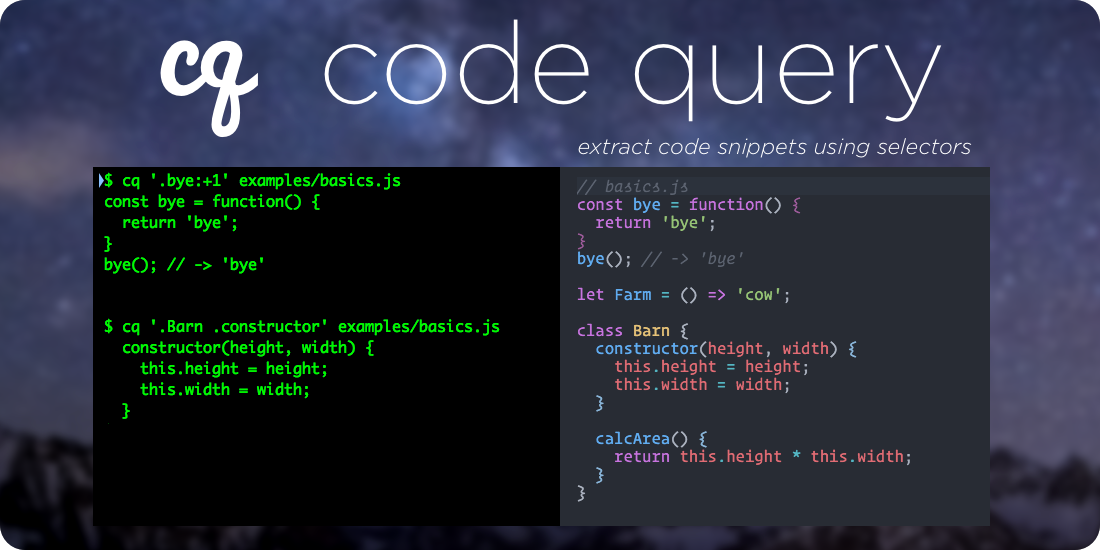
# cq: Code Query [](https://www.npmjs.com/package/@fullstackio/cq) [](https://www.fullstackreact.com)
> A query language and toolkit to query lines of code for blogs and documentation - without copying and pasting or using manual line numbers
>
> **[Try the demo](https://cq-demo.now.sh/)**
>
> Supports JavaScript ES5, ES6, JSX, and TypeScript as well as any [Treesitter](https://tree-sitter.github.io/tree-sitter/) language: Python, Ruby, Rust, C, Java, etc.
>
> `cq` supports sophisticated, production-ready selectors and is used for all of the [newline Books](https://newline.co)
>
> If you're a developer and you're interested in writing a programming book, but you're not sure where to start, then [read here](https://www.fullstack.io/write-a-book/)
## Online Demo
**[Try the demo](https://cq-demo.now.sh/)**
## cq Suite
- [`cq`](./packages/cq) - The core cq library -- given a code string and a query, returns the lines of code
- [`cqmd`](./packages/cqmd) - CLI tool to pre-process markdown with `cq`. (Used to [generate the current README](./packages/cq/doc/readme/README.cq.md))
- [`remark-cq`](./packages/remark-cq) - a [remark](https://github.com/remarkjs/remark) (rehype-compatible) plugin to slurp code snippets with cq - (e.g. load code snippets into Docusaurus)
- [`cq-treesitter-engine`](./packages/cq-treesitter-engine) - an engine for using [treesitter](https://tree-sitter.github.io/tree-sitter/) with cq, meaning you can query any language treesitter supports (Python, Rust, C, Java, Ruby)
## Install
$ npm install --global @fullstackio/cq
## Usage
$ cq
# or
$ cat file | cq
## Examples
Say we have a file `examples/basics.js` with the following code:
```javascript
const bye = function() {
return 'bye';
}
bye(); // -> 'bye'
let Farm = () => 'cow';
class Barn {
constructor(height, width) {
this.height = height;
this.width = width;
}
calcArea() {
return this.height * this.width;
}
}
```
#### Get the `bye()` function:
Query:
```bash
$ cq '.bye' examples/basics.js
```
Result:
```javascript
const bye = function() {
return 'bye';
}
```
#### Get the `calcArea()` function on the `Barn` class:
Query:
```bash
$ cq '.Barn .calcArea' examples/basics.js
```
Result:
```javascript
calcArea() {
return this.height * this.width;
}
```
#### Get the `bye()` function plus the line after:
This example uses an operator `context`.
The API is: `context(identifier, linesBefore, linesAfter)`
Query:
```bash
$ cq 'context(.bye,0,1)' examples/basics.js
```
Result:
```javascript
const bye = function() {
return 'bye';
}
bye(); // -> 'bye'
```
#### Get the _range_ of `constructor` through `calcArea`, inclusive, of the `Barn` class
```bash
$ cq '.Barn .constructor-.calcArea' examples/basics.js
```
```javascript
constructor(height, width) {
this.height = height;
this.width = width;
}
calcArea() {
return this.height * this.width;
}
```
#### `json` flag
If you pass `--json` you'll get the results in JSON, which can be useful for further processing:
```javascript
$ cq --json 'context(.bye,0,1)' examples/basics.js
{
"code": "const bye = function() {\n return 'bye';\n}\nbye(); // -> 'bye'",
"start": 598,
"end": 659,
"start_line": 25,
"end_line": 28
}
```
#### TypeScript Support
`cq` works with TypeScript as well. Say we had the following TypeScript File `AuthService.ts`:
```typescript
import {Injectable, provide} from '@angular/core';
@Injectable()
export class AuthService {
login(user: string, password: string): boolean {
if (user === 'user' && password === 'password') {
localStorage.setItem('username', user);
return true;
}
return false;
}
logout(): any {
localStorage.removeItem('username');
}
getUser(): any {
return localStorage.getItem('username');
}
isLoggedIn(): boolean {
return this.getUser() !== null;
}
}
export var AUTH_PROVIDERS: Array = [
provide(AuthService, {useClass: AuthService})
];
```
#### Get the `AUTH_PROVIDERS` export:
Query:
```bash
$ cq '.AUTH_PROVIDERS' examples/AuthService.ts
```
Result:
```typescript
export var AUTH_PROVIDERS: Array = [
provide(AuthService, {useClass: AuthService})
];
```
#### Get the `isLoggedIn()` function through `AUTH_PROVIDERS`
Query:
```bash
$ cq '(.AuthService .isLoggedIn)-.AUTH_PROVIDERS' examples/AuthService.ts
```
Result:
```typescript
isLoggedIn(): boolean {
return this.getUser() !== null;
}
}
export var AUTH_PROVIDERS: Array = [
provide(AuthService, {useClass: AuthService})
];
```
#### Searching for strings
`cq` can search for strings as well as identifiers. Say we have the following test:
```javascript
import chai from 'chai';
const assert = chai.assert;
describe('My First Test', () => {
it('basic assert', () => {
assert.equal(1, 1);
});
});
describe('My Second Test', () => {
it('basic assert', () => {
// this is the second one
assert.equal(2, 2);
});
});
```
We can get the first test:
Query:
```bash
$ cq "'My First Test'" examples/mocha.test.js
```
Result:
```javascript
describe('My First Test', () => {
it('basic assert', () => {
assert.equal(1, 1);
});
});
```
Or get the `it` block in the second test:
Query:
```bash
$ cq "'My Second Test' 'basic assert'" examples/mocha.test.js
```
Result:
```javascript
it('basic assert', () => {
// this is the second one
assert.equal(2, 2);
});
```
#### `comments()` operator
Sometimes we want to pull the comments before a selection. `cq` supports this using the `comments()` operator:
File `comments.js`:
```javascript
function hello() {
return 'hi';
}
/*
* @function bye
*/
function bye() {
return 'see ya';
}
```
Get the `bye()` function with comments:
Query:
```bash
$ cq 'comments(.bye)' comments.js
```
Result:
```javascript
/*
* @function bye
*/
function bye() {
return 'see ya';
}
```
> This file was itself [generated using `cq`](./packages/cq/doc/readme/README.cq.md).
>
> See _many_ more examples in the [`/examples`](./packages/cq/examples) directory
## Features
- Extract chunks of code from text using robust selectors (vs. brittle line numbers)
- Locate ranges of code using identifiers
- Parses ES6 & JSX (with [babylon](https://github.com/babel/babylon))
- Parses TypeScript
## Operators
`cq` supports a number of operators that modify the selection:
- [`context`](#context)
- [`window`](#window)
- [`upto`](#upto)
- [`after`](#after)
- [`comments`](#comments)
- [`decorators`](#decorators)
## Motivation
When writing blog posts, tutorials, and books about programming there's a tension between code that gets copied and pasted into the text and runnable code on disk.
If you copy and paste your code into the copy, then you're prone to typos, missing steps. When things change, you have to update all of the copypasta and eyeball it to make sure you didn't miss anything. Mistakes are really easy to make because you can't really test code that's in your manuscript without it's context.
A better solution is to keep your code (or steps of your code) as runnable examples on disk. You can then load the code into your manuscript with some pre-processing.
The problem with the code-on-disk approach is how to designate the ranges of code you wish to import. Line numbers are the most obvious approach, but if you add or remove a line of code, then you have to adjust all line numbers accordingly.
`cq` is a tool that lets you specify selectors to extract portions of code. Rather than using brittle line numbers, instead `cq` lets you query your code. It uses `babylon` to understand the semantics of your code and will extract the appropriate lines.
## Query Grammar
### _.Identifier_
**Examples**:
- `.Simple`
- `.render`
A dot `.` preceding JavaScript identifier characters represents an identifier.
In this code:
```jsx
const Simple = React.createClass({
render() {
return {this.renderName()}
;
}
});
```
The query `.Simple` would find the whole `const Simple = ...` variable declaration.
Searches for identifiers traverse the whole tree, relative to the parent, and return the first match. This means that you do _not_ have to start at the root. In this case you could query for `.render` and would receive the `render()` function. That said, creating more specific queries can help in the case where you want to disambiguate.
### _[space]_
**Examples**:
- `.Simple .render`
- `.foo .bar .baz`
The space in a query selection expression designates a parent for the next identifier. For instance, the query `.Simple .render` will first look for the identifier `Simple` and then find the `render` function that is a child of `Simple`.
The space indicates to search for the next identifier anywhere within the parent. That is, it does **not** require that the child identifier be a _direct child_ the parent.
> In this way the space is analogous to the space in a CSS selector. E.g. search for any child that matches.
> `cq` does not yet support the `>` notation (which would require the identifier to be a direct child), but we may in the future.
You can write child selection in parenthesis `()` if there is ambiguity. E.g.: `(.foo .bar)` .
### _Range_
**Examples**:
- `.constructor-.calcArea`
- `.Barn .constructor-.calcArea`
- `1-(.AuthService .login)`
- `.foo-EOF`
Given:
```javascript
class Barn {
constructor(height, width) {
this.height = height;
this.width = width;
}
calcArea() {
return this.height * this.width;
}
}
```
A pair of selections (e.g. identifiers) joined by a dash `-` form a _range_. A range will emit the code from the beginning of the match of the first identifier to the end of the match of the last.
You can use a parent identifier to limit the scope of the search of the range as in the query: `.Barn .constructor-.calcArea`
If you'd like to specify a line number, you can use a number (instead of an identifier) in a range. For example the query: `30-35` will give lines 30 through 35, inclusive.
If you want to specify a child selector at the end of a range, use parenthesis as in this query: `1-(.AuthService .login)`. The previous query will return the lines from line 1 to the end of the `login()` function on `AuthService`.
You can use the special line number `EOF` to select until the end-of-file.
### _'String'_
**Examples**:
- `'My Test'`
- `'My Test' 'my should'`
- `2-'My Test'`
You can use a single-quoted string as a selection and `cq` will search for that string. When a string is found, `cq` will emit the statement / block associated with that string.
For instance, given:
```javascript
describe("My First Test", () => {
it("basic assert", () => {
assert.equal(1, 1);
});
});
```
You could search for the strings `'My First Test'` or `'basic assert'` and receive the appropriate selection.
### _Operators_
**Examples**:
- `context(.bye,1,1)`
- `upto(.bye)`
- `comments(.bye)`
Given:
```javascript
// here is the bye function
const bye = function() {
return "bye";
};
bye(); // -> 'bye'
```
Operators allow you to change the result of the inner selection.
#### `context()`
- `context(selection, numLinesBeforeStart, numLinesAfterEnd)`
The `context()` operation takes line numbers before and after the selection. For example, `context(.foo, 2, 2)` will give two lines before and two lines after the `.foo` node.
Keep in mind that the `selection` denotes a node which can span multiple lines. With that in mind, positive numbers "expand" the selection and negative numbers "contract". That is, if `numLinesBeforeStart` is negative, then it can be interpreted as moving the _start_ forward (increasing line numbers). Similarly, if `numLinesAfterEnd` is negative, the _end_ is moved backwards (decreasing line numbers, towards the top of the document).
`context()` modifies the range that would be returned from `selection`. If you'd like to specify a **specific number of lines range** relative to a `selection`, then see the `window()` operator.
#### `window()`
- `window(selection, startNumLinesAfter, endNumLinesAfter, reverse=false)`
`window()` returns a specific number of lines relative to `selection`. For example, `window(.foo, 0, 4)` would give 5 lines, the `foo` identifier and the four lines following.
It differs from `context()` in that both arguments to `window()` are relative to the _start_ of the `selection`.
`window()` is useful for extracting a specific range of lines near a particular `selection`. The `selection` is considered to start at index `0`, which means negative numbers denote the lines before the start of the selection.
If `reverse` is true, start the window at the _end_ of the selection.
#### `firstLineOf()`
- `firstLineOf(selection)`
Sugar - same as `window(selection, 0, 0)`
#### `lastLineOf()`
- `lastLineOf(selection)`
Sugar - same as `window(selection, 0, 0, true)`
#### `upto()`
- `upto(selection)`
The `upto()` operation will return the code up-to, but not including, the selection. A convenient (but potentially confusing) default is that **the `upto()` operation trims whitespace**. This is normally what you want, but you have to be careful when using `upto()` and `context()` together (because `upto()` may trim lines).
#### `choose()`
- `choose(selection, matchIdx)`
It's possible for a `selection` to match more than one node. While you can often disambiguate with child selections, the `choose()` operator lets you specify a particular match by index.
`matchIdx` starts at `0`. Without the `choose` operator, the default behavior of any `selection` is: `choose(selection, 0)`. Say you had two instances of the identifier `.foo` then you could grab the second by using `choose(.foo, 1)`.
`choose` can be a bit brittle in that it specifies a specific `matchIdx`. A potentially better choice is the `after()` operator which finds the first `selection` that occurs after a companion selector.
#### `after()`
- `after(selection, afterSelection)`
`after` finds the first `selection` that occurs after `afterSelection`.
#### `comments()`
- `comments(selection)`
The `comments()` operation will return the selection plus the leading comments before the selection.
#### `decorators()`
- `decorators(selection)`
The `decorators()` operation will return the selection plus the decorators.
Say we have the following code:
```typescript
import { Component } from "@angular/core";
@Component({
selector: "home",
template: `
Welcome!
`
})
export class HomeComponent {}
```
When we grab the selection `.HomeComponent` we'll get just the class
```typescript
$ cq '.HomeComponent' examples/HomeComponent.ts
export class HomeComponent {
}
```
We use `decorators()` to get the whole thing:
```typescript
$ cq 'decorators(.HomeComponent)' examples/HomeComponent.ts
@Component({
selector: 'home',
template: `Welcome!
`
})
export class HomeComponent {
}
```
One thing to keep in mind is that decorations are actually considered children of the node they are attached to. The `@Component` decoration is also an identifier. This means we get the `@Component` decoration by itself like this:
```typescript
$ cq '.HomeComponent .Component' examples/HomeComponent.ts
@Component({
selector: 'home',
template: `Welcome!
`
})
```
## Other Features
### Multiple Queries with Gap Filling
You can have multiple queries and any if they are not contiguous they can be filled with a gap filler:
```typescript
$ cq '(firstLineOf(.AuthService),.logout,.isLoggedIn,lastLineOf(.AuthService))' examples/AuthService.ts
{lang=typescript,crop-query=(firstLineOf(.AuthService),.logout,.isLoggedIn,lastLineOf(.AuthService))}
<<[](examples/AuthService.ts)
```
This gap filler can be customized with the `--gapFiller` option on the commandline.
## CLI Usage
To pre-process your markdown on the CLI use the [cqmd utility](https://github.com/fullstackio/cqmd).
## Library Usage
```javascript
var cq = require("@fullstackio/cq").default;
var results = cq(codeString, query);
console.log(results.code);
```
## Future
- Add queries for header information such as comments, `import`s, and `require`s
- Add the ability to extract several sections in a single query
- Create a [remark](https://github.com/wooorm/remark) plugin to pull code into Markdown using queries
- Support extracting lines of HTML (using regular CSS selectors)
## Limitations
- It's possible to specify invalid queries and the error messages are not helpful
- Only one selector is possible per query
- Some sections of code are not directly selectable (because the query language is not yet expressive enough)
- You can only select whole lines (e.g. comments on the same line after an expression are captured) - this is by design, but it should be configurable
## Query API Stability
The query API may change (see [Future](#future)). Any breaking API changes (query or otherwise) will result in a major version bump.
## Contributing
Please feel free to submit pull requests!
## Authors
Originally written by [Nate Murray](https://twitter.com/eigenjoy).
## Related
- [`cqmd`](./packages/cqmd) - CLI tool to pre-process markdown with `cq`. (Used to [generate the current README](./packages/cq/doc/readme/README.cq.md))
- [`remark-cq`](./packages/remark-cq) - a remark plugin to slurp code snippets with cq - works with Docusaurus
- [GraspJS](http://www.graspjs.com/) - another tool to search JavaScript code based on structure
- [Pygments](http://pygments.org/) - a handy tool to colorize code snippets on the command line
- [ASTExplorer](https://astexplorer.net/) - an online tool to explore the AST of your code
## Dependencies
- `babel-polyfill`
## Fullstack React Book
 This repo was written and is maintained by the [Fullstack React](https://fullstackreact.com) team. If you're looking to learn React, there's no faster way than by spending a few hours with the Fullstack React book.
## License
[MIT](/LICENSE.md)
This repo was written and is maintained by the [Fullstack React](https://fullstackreact.com) team. If you're looking to learn React, there's no faster way than by spending a few hours with the Fullstack React book.
## License
[MIT](/LICENSE.md)