# eda
**Repository Path**: mirrors/eda
## Basic Information
- **Project Name**: eda
- **Description**: EDA(Enterprise Data Analytics企业数据分析) 是一个网页应用,它可以通过一个简单、清晰的界面来获取信息
- **Primary Language**: TypeScript
- **License**: AGPL-3.0
- **Default Branch**: master
- **Homepage**: https://www.oschina.net/p/eda
- **GVP Project**: No
## Statistics
- **Stars**: 4
- **Forks**: 0
- **Created**: 2021-04-19
- **Last Updated**: 2026-01-31
## Categories & Tags
**Categories**: Uncategorized
**Tags**: None
## README
# EDALITICS
Edalitics (previously Enterprise Data Analytics) is an open-source analytics and dashboarding platform created by Jortilles. Its purpose is to make data exploration and visualization extremely easy — even for non-technical users — while still offering powerful features for advanced analysts.
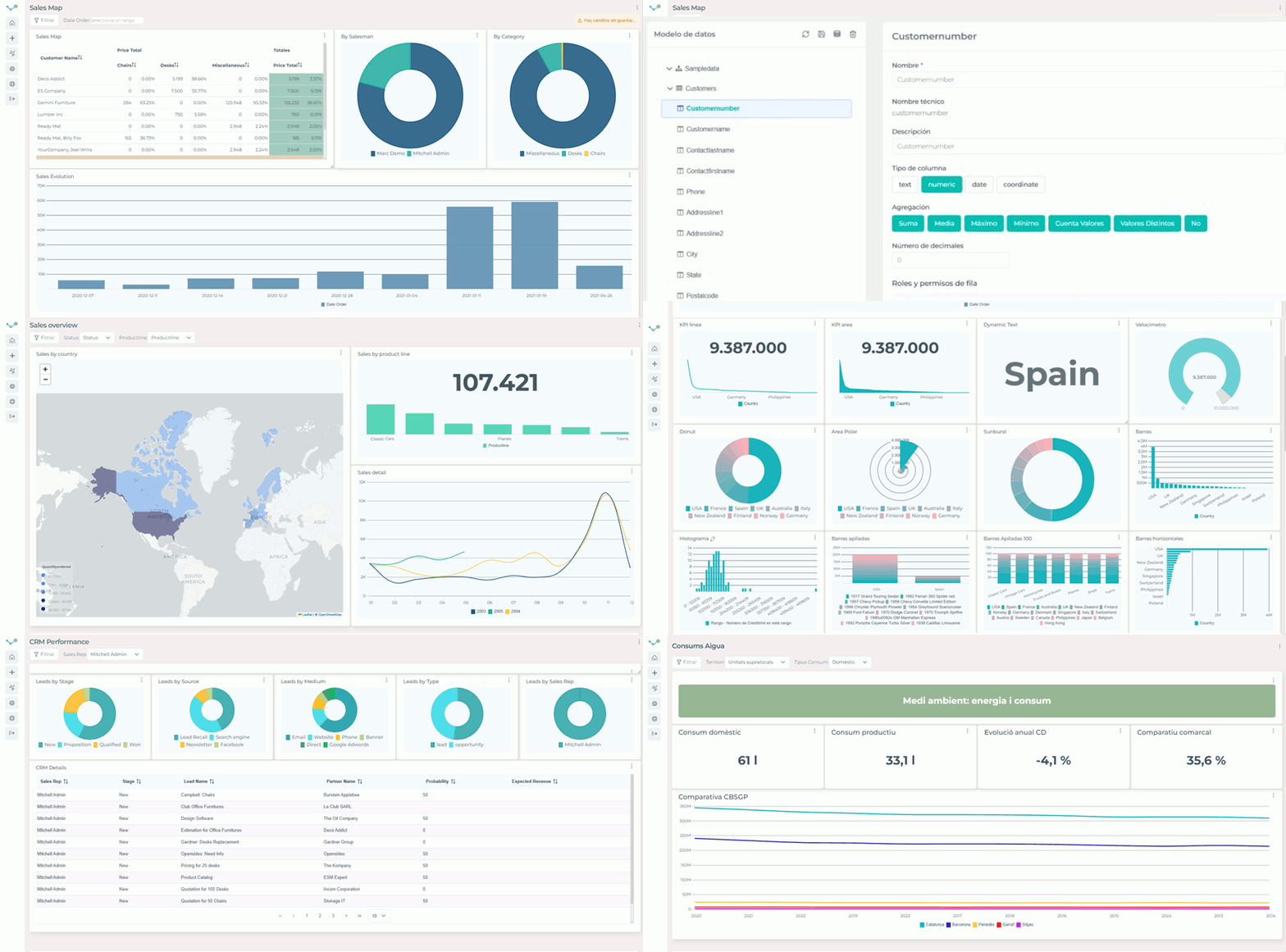
Edalitics is a metadata-driven analytical tool:
1. Create a [data model](https://youtu.be/Px709s0ftiI)
2. Create nice [reports](https://youtu.be/RFznLe9kxHU)
# Why Edalitics?
Edalitics was built with a clear mission:
To be the simplest analytics system to use, even for users without technical skills. To be the faster analytital tool for advanced users. To allow the creation of rich dashboards without writing code and in a matter of minutes.
If you want to try edalitics you always can check the [free.edalitics](https://free.edalitics.com) service or run the docker: **docker run -p 80:80 jortilles/eda:latest**
# Key Features
* No-code dashboard creation.
* Advanced SQL query mode for power users.
* Tree mode to explore logical data models.
* KPI definitions and automatic e-mail alerts.
* Public dashboards shareable via [url](https://demoeda.jortilles.com/es/#/public/61a0f5fdb9314109a45ff077).
* Row Level Security (RLS) for controlled data access.
* Clean, modern, responsive UI.
# Technology Stack
Edalitics is built using modern and widely adopted technologies:
* Node.js, TypeScript, Angular.
* MongoDB for metadata and configuration storage
* A lightweight, extensible backend + intuitive frontend
# Installation & Local Development
You can use Edalicits as a SAS service at https://www.edaitics.com.
Or you can deploy a local instance of edalitics in your environment. To do this you should:
## Clone the repository
```bash
git clone github.com/jortilles/EDA.git
```
## Configure the database
Edit the MongoDB connection in: **EDA/eda/eda_api/config/database.config.js**
```
module.exports = {
url: "mongodb://127.0.0.1:27017/EDA"
};
```
## Configure the backend URL in the UI
In: **EDA/eda/eda_app/src/app/config/config.ts**
```
export const URL_SERVICES = 'http://localhost:8666';
```
## Run the backend and frontend
Backend API:
```bash
cd EDA/eda/eda_api
npm install
npm start
```
Frontend App
```bash
cd EDA/eda/eda_app
npm install
npm start
```
The application will be available in your browser at:
👉 http://localhost:4200
## 🐳 Run edalitics with Docker (recommended)
This is the siplest way to run edalitics locally
To get the latests buld:
```bash
docker run -p 80:80 jortilles/eda:latest
```
To get a manual deploy:
```bash
docker run -p 80:80 jortilles/eda:manual_latest
```
Then open:
👉 http://localhost
Default credentials:
**User:** eda@jortilles.com
**Password:** default
# ⚡ One-Click Deploy
| Cloud Provider | Deploy Button |
|----------------|---------------|
| AWS |  |
| DigitalOcean |
|
| DigitalOcean |  |
| Render |
|
| Render |  |
| Helm | `helm repo add deploystack https://deploystackio.github.io/deploy-templates/`
|
| Helm | `helm repo add deploystack https://deploystackio.github.io/deploy-templates/`
`helm repo update`
`helm install jortilles-eda deploystack/jortilles-eda` |
Change or add deploy options at [awesome-docker-run](https://github.com/deploystackio/awesome-docker-run/tree/main/commands/EDA)
Generated by DeployStack.io
# Documentation
Full documentation, tutorials, and guides are available at:
👉 http://doc.edalitics.com
# 🤝 Contributing
Contributions are welcome! You can:
Report issues
Submit pull requests
Improve documentation
Suggest new features
Check the repository issues tab to get started.
# 📄 License
Edalitics is released under the AGPL-3.0 license.