# gorush
**Repository Path**: mirrors/gorush
## Basic Information
- **Project Name**: gorush
- **Description**: A push notification server written in Go (Golang).
- **Primary Language**: Unknown
- **License**: MIT
- **Default Branch**: master
- **Homepage**: None
- **GVP Project**: No
## Statistics
- **Stars**: 0
- **Forks**: 0
- **Created**: 2017-04-03
- **Last Updated**: 2026-02-21
## Categories & Tags
**Categories**: Uncategorized
**Tags**: None
## README
# gorush
A push notification micro server using [Gin](https://github.com/gin-gonic/gin) framework written in Go (Golang) and see the [demo app](https://github.com/appleboy/flutter-gorush).
[](https://github.com/appleboy/gorush/actions/workflows/testing.yml)
[](https://github.com/appleboy/gorush/actions/workflows/trivy-daily-scan.yml)
[](https://pkg.go.dev/github.com/appleboy/gorush)
[](https://codecov.io/gh/appleboy/gorush)
[](https://goreportcard.com/report/github.com/appleboy/gorush)
[](https://hub.docker.com/r/appleboy/gorush/)
[](https://app.netlify.com/sites/gorush/deploys)
[](https://opencollective.com/gorush)
## Quick Start
Get started with gorush in 3 simple steps:
```bash
# 1. Download the latest binary
wget https://github.com/appleboy/gorush/releases/download/v1.18.9/gorush-1.18.9-linux-amd64 -O gorush
chmod +x gorush
# 2. Start the server (default port 8088)
./gorush
# 3. Send your first notification
curl -X POST http://localhost:8088/api/push \
-H "Content-Type: application/json" \
-d '{
"notifications": [{
"tokens": ["your_device_token"],
"platform": 2,
"title": "Hello World",
"message": "Your first notification!"
}]
}'
```
## Contents
- [Quick Start](#quick-start) - Get up and running in 3 steps
- [Support Platform](#support-platform) - iOS, Android, Huawei
- [Features](#features) - What gorush can do
- [Configuration](#configuration) - YAML config and options
- [Basic Configuration](#basic-configuration)
- [Advanced Configuration](#advanced-configuration)
- [Installation](#installation) - Binary, package managers, Docker, source
- [Recommended: Install Script](#recommended-install-script)
- [Manual Download](#manual-download)
- [Package Managers](#package-managers)
- [Build from Source](#build-from-source)
- [Docker](#docker)
- [Usage](#usage) - CLI commands and REST API examples
- [Starting the Server](#starting-the-server)
- [Command Line Notifications](#command-line-notifications)
- [REST API Usage](#rest-api-usage)
- [CLI Options Reference](#cli-options-reference)
- [Web API](#web-api) - Complete API reference
- [Overview](#overview)
- [Send Notifications](#send-notifications---post-apipush)
- [Statistics APIs](#statistics-apis)
- [Request Parameters](#request-parameters)
- [Deployment](#deployment) - Docker, Kubernetes, AWS Lambda, gRPC
- [Docker Deployment](#docker-deployment)
- [Kubernetes](#kubernetes)
- [AWS Lambda](#aws-lambda)
- [Netlify Functions](#netlify-functions)
- [gRPC Service](#grpc-service)
- [FAQ](#faq) - Common issues and best practices
- [Common Issues](#common-issues)
- [Performance Tips](#performance-tips)
- [Security Best Practices](#security-best-practices)
- [Stargazers over time](#stargazers-over-time)
- [License](#license)
## Support Platform
📱 Platform codes: `1` = iOS (APNS), `2` = Android (FCM), `3` = Huawei (HMS)
- [APNS](https://developer.apple.com/documentation/usernotifications)
- [FCM](https://firebase.google.com/)
- [HMS](https://developer.huawei.com/consumer/en/hms/)
[A live server on Netlify](https://gorush.netlify.app/) and get notification token on [Firebase Cloud Messaging web](https://fcm-demo-88b40.web.app/). You can use the token to send a notification to the device.
```bash
curl -X POST \
-H "Content-Type: application/json" \
-d '{
"notifications": [
{
"tokens": [
"your_device_token"
],
"platform": 2,
"title": "Test Title",
"message": "Test Message"
}
]
}' \
https://gorush.netlify.app/api/push
```
## Features
- Support [Firebase Cloud Messaging](https://firebase.google.com/docs/cloud-messaging) using [go-fcm](https://github.com/appleboy/go-fcm) library for Android.
- Support [HTTP/2](https://http2.github.io/) Apple Push Notification Service using [apns2](https://github.com/sideshow/apns2) library.
- Support [HMS Push Service](https://developer.huawei.com/consumer/en/hms/huawei-pushkit) using [go-hms-push](https://github.com/msalihkarakasli/go-hms-push) library for Huawei Devices.
- Support [YAML](https://github.com/go-yaml/yaml) configuration.
- Support command line to send single Android or iOS notification.
- Support Web API to send push notification.
- Support [HTTP/2](https://http2.github.io/) or HTTP/1.1 protocol.
- Support notification queue and multiple workers.
- Support `/api/stat/app` show notification success and failure counts.
- Support `/api/config` show your [YAML](https://en.wikipedia.org/wiki/YAML) config.
- Support store app stat to memory, [Redis](http://redis.io/), [BoltDB](https://github.com/boltdb/bolt), [BuntDB](https://github.com/tidwall/buntdb), [LevelDB](https://github.com/syndtr/goleveldb) or [BadgerDB](https://github.com/dgraph-io/badger).
- Support `p8`, `p12` or `pem` format of iOS certificate file.
- Support `/sys/stats` show response time, status code count, etc.
- Support for HTTP, HTTPS or SOCKS5 proxy.
- Support retry send notification if server response is fail.
- Support expose [prometheus](https://prometheus.io/) metrics.
- Support install TLS certificates from [Let's Encrypt](https://letsencrypt.org/) automatically.
- Support send notification through [RPC](https://en.wikipedia.org/wiki/Remote_procedure_call) protocol, we use [gRPC](https://grpc.io/) as default framework.
- Support running in Docker, [Kubernetes](https://kubernetes.io/) or [AWS Lambda](https://aws.amazon.com/lambda) ([Native Support in Golang](https://aws.amazon.com/blogs/compute/announcing-go-support-for-aws-lambda/))
- Support graceful shutdown that workers and queue have been sent to APNs/FCM before shutdown service.
- Support different Queue as backend like [NSQ](https://nsq.io/), [NATS](https://nats.io/) or [Redis streams](https://redis.io/docs/manual/data-types/streams/), defaut engine is local [Channel](https://tour.golang.org/concurrency/2).
**Performance**: Average memory usage ~28MB. Supports high-throughput notification delivery with configurable workers and queue systems.
## Configuration
Gorush uses YAML configuration. Create a `config.yml` file with your settings:
### Basic Configuration
```yaml
core:
port: "8088" # HTTP server port
worker_num: 0 # Workers (0 = CPU cores)
queue_num: 8192 # Queue size
mode: "release" # or "debug"
# Enable platforms you need
android:
enabled: true
key_path: "fcm-key.json" # FCM service account key
ios:
enabled: true
key_path: "apns-key.pem" # APNS certificate
production: true # Use production APNS
huawei:
enabled: false
appid: "YOUR_APP_ID"
appsecret: "YOUR_APP_SECRET"
```
### Advanced Configuration
Click to expand full configuration options
```yaml
core:
enabled: true
address: ""
shutdown_timeout: 30
port: "8088"
worker_num: 0
queue_num: 0
max_notification: 100
sync: false
feedback_hook_url: ""
feedback_timeout: 10
feedback_header:
mode: "release"
ssl: false
cert_path: "cert.pem"
key_path: "key.pem"
cert_base64: ""
key_base64: ""
http_proxy: ""
pid:
enabled: false
path: "gorush.pid"
override: true
auto_tls:
enabled: false
folder: ".cache"
host: ""
grpc:
enabled: false
port: 9000
api:
push_uri: "/api/push"
stat_go_uri: "/api/stat/go"
stat_app_uri: "/api/stat/app"
config_uri: "/api/config"
sys_stat_uri: "/sys/stats"
metric_uri: "/metrics"
health_uri: "/healthz"
android:
enabled: true
key_path: ""
credential: ""
max_retry: 0
huawei:
enabled: false
appsecret: "YOUR_APP_SECRET"
appid: "YOUR_APP_ID"
max_retry: 0
queue:
engine: "local"
nsq:
addr: 127.0.0.1:4150
topic: gorush
channel: gorush
nats:
addr: 127.0.0.1:4222
subj: gorush
queue: gorush
redis:
addr: 127.0.0.1:6379
group: gorush
consumer: gorush
stream_name: gorush
with_tls: false
username: ""
password: ""
db: 0
ios:
enabled: false
key_path: ""
key_base64: ""
key_type: "pem"
password: ""
production: false
max_concurrent_pushes: 100
max_retry: 0
key_id: ""
team_id: ""
log:
format: "string"
access_log: "stdout"
access_level: "debug"
error_log: "stderr"
error_level: "error"
hide_token: true
hide_messages: false
stat:
engine: "memory"
redis:
cluster: false
addr: "localhost:6379"
username: ""
password: ""
db: 0
boltdb:
path: "bolt.db"
bucket: "gorush"
buntdb:
path: "bunt.db"
leveldb:
path: "level.db"
badgerdb:
path: "badger.db"
```
See the complete [example config file](config/testdata/config.yml).
## Installation
### Recommended: Install Script
The easiest way to install gorush is using the install script:
```bash
curl -fsSL https://raw.githubusercontent.com/appleboy/gorush/master/install.sh | bash
```
This will automatically:
- Detect your OS and architecture
- Download the latest version
- Install to `~/.gorush/bin`
- Add to your PATH
#### Options
```bash
# Install specific version (replace X.Y.Z with the desired version, e.g., 1.19.2)
VERSION=X.Y.Z curl -fsSL https://raw.githubusercontent.com/appleboy/gorush/master/install.sh | bash
# Custom install directory
INSTALL_DIR=/usr/local/bin curl -fsSL https://raw.githubusercontent.com/appleboy/gorush/master/install.sh | bash
# Skip SSL verification (not recommended)
INSECURE=1 curl -fsSL https://raw.githubusercontent.com/appleboy/gorush/master/install.sh | bash
```
### Manual Download
Download from [releases page](https://github.com/appleboy/gorush/releases):
### Package Managers
#### Homebrew (macOS/Linux)
```bash
brew tap appleboy/tap
brew install gorush
```
#### Go Install
```bash
# Latest stable version
go install github.com/appleboy/gorush@latest
# Development version
go install github.com/appleboy/gorush@master
```
### Build from Source
**Requirements**: [Go 1.24+](https://go.dev/dl/), [Git](http://git-scm.com/)
```bash
git clone https://github.com/appleboy/gorush.git
cd gorush
make build
# Binary will be in the root directory
```
### Docker
```bash
# Run directly
docker run --rm -p 8088:8088 appleboy/gorush
# With custom config
docker run --rm -p 8088:8088 -v $(pwd)/config.yml:/home/gorush/config.yml appleboy/gorush
```
## Usage
### Starting the Server
```bash
# Use default config (port 8088)
./gorush
# Use custom config file
./gorush -c config.yml
# Set specific options
./gorush -p 9000 -c config.yml
```
### Command Line Notifications
#### Android (FCM) Command Line
**Prerequisites**: Generate FCM service account key from [Firebase Console](https://console.firebase.google.com/project/_/settings/serviceaccounts/adminsdk) → Settings → Service Accounts → Generate New Private Key.
```bash
# Android: Single notification
gorush -android -m "Hello Android!" --fcm-key "path/to/fcm-key.json" -t "device_token"
# Android: Using environment variable (recommended)
export GOOGLE_APPLICATION_CREDENTIALS="path/to/fcm-key.json"
gorush -android -m "Hello Android!" -t "device_token"
# Android: Topic message
gorush --android --topic "news" -m "Breaking News!" --fcm-key "path/to/fcm-key.json"
```
#### iOS (APNS) Command Line
```bash
# iOS: Development environment
gorush -ios -m "Hello iOS!" -i "cert.pem" -t "device_token" --topic "com.example.app"
# iOS: Production environment
gorush -ios -m "Hello iOS!" -i "cert.pem" -t "device_token" --topic "com.example.app" -production
# iOS: With password-protected certificate
gorush -ios -m "Hello iOS!" -i "cert.p12" -P "cert_password" -t "device_token"
```
#### Huawei (HMS) Command Line
```bash
# Huawei: Single notification
gorush -huawei -title "Hello" -m "Hello Huawei!" -hk "APP_SECRET" -hid "APP_ID" -t "device_token"
# Huawei: Topic message
gorush --huawei --topic "updates" -title "Update" -m "New version available" -hk "APP_SECRET" -hid "APP_ID"
```
### REST API Usage
#### Health Check
```bash
curl http://localhost:8088/healthz
```
#### Send Notifications
```bash
curl -X POST http://localhost:8088/api/push \
-H "Content-Type: application/json" \
-d '{
"notifications": [{
"tokens": ["device_token_1", "device_token_2"],
"platform": 2,
"title": "Hello World",
"message": "This is a test notification"
}]
}'
```
#### Get Statistics
```bash
# Application stats
curl http://localhost:8088/api/stat/app
# Go runtime stats
curl http://localhost:8088/api/stat/go
# System stats
curl http://localhost:8088/sys/stats
# Prometheus metrics
curl http://localhost:8088/metrics
```
### CLI Options Reference
Click to expand all CLI options
```bash
Server Options:
-A, --address Address to bind (default: any)
-p, --port Use port for clients (default: 8088)
-c, --config Configuration file path
-m, --message Notification message
-t, --token Notification token
-e, --engine Storage engine (memory, redis ...)
--title Notification title
--proxy <proxy> Proxy URL
--pid <pid path> Process identifier path
--redis-addr <redis addr> Redis addr (default: localhost:6379)
--ping healthy check command for container
iOS Options:
-i, --key <file> certificate key file path
-P, --password <password> certificate key password
--ios enabled iOS (default: false)
--production iOS production mode (default: false)
Android Options:
--fcm-key <fcm_key_path> FCM Key Path
--android enabled android (default: false)
Huawei Options:
-hk, --hmskey <hms_key> HMS App Secret
-hid, --hmsid <hms_id> HMS App ID
--huawei enabled huawei (default: false)
Common Options:
--topic <topic> iOS, Android or Huawei topic message
-h, --help Show this message
-V, --version Show version
```
</details>
## Web API
### Overview
Gorush provides RESTful APIs for sending notifications and monitoring system status:
| Endpoint | Method | Description |
| --------------- | ------ | -------------------------- |
| `/api/push` | POST | Send push notifications |
| `/api/stat/app` | GET | Application statistics |
| `/api/stat/go` | GET | Go runtime statistics |
| `/sys/stats` | GET | System performance metrics |
| `/metrics` | GET | Prometheus metrics |
| `/healthz` | GET | Health check |
| `/api/config` | GET | Current configuration |
### Send Notifications - `POST /api/push`
#### Basic Examples
##### iOS (APNS) API
```json
{
"notifications": [
{
"tokens": ["ios_device_token"],
"platform": 1,
"title": "Hello iOS",
"message": "Hello World iOS!"
}
]
}
```
##### Android (FCM) API
```json
{
"notifications": [
{
"tokens": ["android_device_token"],
"platform": 2,
"title": "Hello Android",
"message": "Hello World Android!"
}
]
}
```
##### Huawei (HMS) API
```json
{
"notifications": [
{
"tokens": ["huawei_device_token"],
"platform": 3,
"title": "Hello Huawei",
"message": "Hello World Huawei!"
}
]
}
```
#### Advanced Examples
##### iOS with Custom Sound
```json
{
"notifications": [
{
"tokens": ["ios_device_token"],
"platform": 1,
"title": "Important Alert",
"message": "Critical notification",
"apns": {
"payload": {
"aps": {
"sound": {
"name": "custom.wav",
"critical": 1,
"volume": 0.8
}
}
}
}
}
]
}
```
##### Multiple Platforms
```json
{
"notifications": [
{
"tokens": ["ios_token"],
"platform": 1,
"message": "Hello iOS!"
},
{
"tokens": ["android_token"],
"platform": 2,
"message": "Hello Android!"
}
]
}
```
### Statistics APIs
#### Application Stats - `GET /api/stat/app`
```json
{
"version": "v1.18.9",
"busy_workers": 0,
"success_tasks": 150,
"failure_tasks": 5,
"submitted_tasks": 155,
"total_count": 155,
"ios": {
"push_success": 80,
"push_error": 2
},
"android": {
"push_success": 65,
"push_error": 3
},
"huawei": {
"push_success": 5,
"push_error": 0
}
}
```
#### System Performance - `GET /sys/stats`
```json
{
"pid": 12345,
"uptime": "2h30m15s",
"total_response_time": "45.2ms",
"average_response_time": "1.2ms",
"total_status_code_count": {
"200": 1450,
"400": 12,
"500": 3
}
}
```
### Request Parameters
<details>
<summary>Complete API request parameters</summary>
#### Request body
The Request body must have a notifications array. The following is a parameter table for each notification.
| name | type | description | required | note |
| ----------------------- | ------------ | ------------------------------------------------------------------------------------------------- | -------- | ------------------------------------------------------------- |
| notif_id | string | A unique string that identifies the notification for async feedback | - | |
| tokens | string array | device tokens | o | |
| platform | int | platform(iOS,Android) | o | 1=iOS, 2=Android (Firebase), 3=Huawei (HMS) |
| message | string | message for notification | - | |
| title | string | notification title | - | |
| priority | string | Sets the priority of the message. | - | `normal` or `high` |
| content_available | bool | data messages wake the app by default. | - | |
| sound | interface{} | sound type | - | |
| data | string array | extensible partition | - | only Android and IOS |
| huawei_data | string | JSON object as string to extensible partition partition | - | only Huawei. See the [detail](#huawei-notification) |
| retry | int | retry send notification if fail response from server. Value must be small than `max_retry` field. | - | |
| topic | string | send messages to topics | | |
| image | string | image url to show in notification | - | only Android and Huawei |
| to | string | The value must be a registration token, notification key, or topic. | - | only Android |
| collapse_key | string | a key for collapsing notifications | - | only Android |
| huawei_collapse_key | int | a key integer for collapsing notifications | - | only Huawei See the [detail](#huawei-notification) |
| delay_while_idle | bool | a flag for device idling | - | only Android |
| time_to_live | uint | expiration of message kept on FCM storage | - | only Android |
| huawei_ttl | string | expiration of message kept on HMS storage | - | only Huawei See the [detail](#huawei-notification) |
| restricted_package_name | string | the package name of the application | - | only Android |
| dry_run | bool | allows developers to test a request without actually sending a message | - | only Android |
| notification | string array | payload of a FCM message | - | only Android. See the [detail](#android-notification-payload) |
| huawei_notification | string array | payload of a HMS message | - | only Huawei. See the [detail](#huawei-notification) |
| app_id | string | hms app id | - | only Huawei. See the [detail](#huawei-notification) |
| bi_tag | string | Tag of a message in a batch delivery task | - | only Huawei. See the [detail](#huawei-notification) |
| fast_app_target | int | State of a mini program when a quick app sends a data message. | - | only Huawei. See the [detail](#huawei-notification) |
| expiration | int | expiration for notification | - | only iOS |
| apns_id | string | A canonical UUID that identifies the notification | - | only iOS |
| collapse_id | string | An identifier you use to coalesce multiple notifications into a single notification for the user | - | only iOS |
| push_type | string | The type of the notification. The value of this header is alert or background. | - | only iOS |
| badge | int | badge count | - | only iOS |
| category | string | the UIMutableUserNotificationCategory object | - | only iOS |
| alert | string array | payload of a iOS message | - | only iOS. See the [detail](#ios-alert-payload) |
| mutable_content | bool | enable Notification Service app extension. | - | only iOS(10.0+). |
| name | string | sets the name value on the aps sound dictionary. | - | only iOS |
| volume | float32 | sets the volume value on the aps sound dictionary. | - | only iOS |
| interruption_level | string | defines the interruption level for the push notification. | - | only iOS(15.0+) |
| content-state | string array | dynamic and custom content for live-activity notification. | - | only iOS(16.1+) |
| timestamp | int | the UNIX time when sending the remote notification that updates or ends a Live Activity | - | only iOS(16.1+) |
| event | string | describes whether you update or end an ongoing Live Activity | - | only iOS(16.1+) |
| stale-date | int | the date which a Live Activity becomes stale, or out of date | - | only iOS(16.1+) |
| dismissal-date | int | the UNIX time -timestamp- which a Live Activity will end and will be removed | - | only iOS(16.1+) |
### iOS alert payload
| name | type | description | required | note |
| -------------- | ---------------- | ------------------------------------------------------------------------------------------------ | -------- | ---- |
| title | string | Apple Watch & Safari display this string as part of the notification interface. | - | |
| body | string | The text of the alert message. | - | |
| subtitle | string | Apple Watch & Safari display this string as part of the notification interface. | - | |
| action | string | The label of the action button. This one is required for Safari Push Notifications. | - | |
| action-loc-key | string | If a string is specified, the system displays an alert that includes the Close and View buttons. | - | |
| launch-image | string | The filename of an image file in the app bundle, with or without the filename extension. | - | |
| loc-args | array of strings | Variable string values to appear in place of the format specifiers in loc-key. | - | |
| loc-key | string | A key to an alert-message string in a Localizable.strings file for the current localization. | - | |
| title-loc-args | array of strings | Variable string values to appear in place of the format specifiers in title-loc-key. | - | |
| title-loc-key | string | The key to a title string in the Localizable.strings file for the current localization. | - | |
See more detail about [APNs Remote Notification Payload](https://developer.apple.com/library/content/documentation/NetworkingInternet/Conceptual/RemoteNotificationsPG/PayloadKeyReference.html).
### iOS sound payload
| name | type | description | required | note |
| -------- | ------- | ---------------------------------------------------- | -------- | ---- |
| name | string | sets the name value on the aps sound dictionary. | - | |
| volume | float32 | sets the volume value on the aps sound dictionary. | - | |
| critical | int | sets the critical value on the aps sound dictionary. | - | |
request format:
```json
{
"sound": {
"critical": 1,
"name": "default",
"volume": 2.0
}
}
```
### Android notification payload
| name | type | description | required | note |
| -------------- | ------ | --------------------------------------------------------------------------------------------------------- | -------- | ---- |
| icon | string | Indicates notification icon. | - | |
| tag | string | Indicates whether each notification message results in a new entry on the notification center on Android. | - | |
| color | string | Indicates color of the icon, expressed in #rrggbb format | - | |
| click_action | string | The action associated with a user click on the notification. | - | |
| body_loc_key | string | Indicates the key to the body string for localization. | - | |
| body_loc_args | string | Indicates the string value to replace format specifiers in body string for localization. | - | |
| title_loc_key | string | Indicates the key to the title string for localization. | - | |
| title_loc_args | string | Indicates the string value to replace format specifiers in title string for localization. | - | |
See more detail about [Firebase Cloud Messaging HTTP Protocol reference](https://firebase.google.com/docs/cloud-messaging/http-server-ref#send-downstream).
### Huawei notification
1. app_id: app id from huawei developer console
2. bi_tag:
3. fast_app_target:
4. huawei_data: mapped to data
5. huawei_notification: mapped to notification
6. huawei_ttl: mapped to ttl
7. huawei_collapse_key: mapped to collapse_key
See more detail about [Huawei Mobulse Services Push API reference](https://developer.huawei.com/consumer/en/doc/development/HMS-References/push-sendapi).
### iOS Example
Send normal notification.
```json
{
"notifications": [
{
"tokens": ["token_a", "token_b"],
"platform": 1,
"message": "Hello World iOS!"
}
]
}
```
The following payload asks the system to display an alert with a Close button and a single action button.The title and body keys provide the contents of the alert. The “PLAY” string is used to retrieve a localized string from the appropriate Localizable.strings file of the app. The resulting string is used by the alert as the title of an action button. This payload also asks the system to badge the app’s icon with the number 5.
```json
{
"notifications": [
{
"tokens": ["token_a", "token_b"],
"platform": 1,
"badge": 5,
"alert": {
"title": "Game Request",
"body": "Bob wants to play poker",
"action-loc-key": "PLAY"
}
}
]
}
```
The following payload specifies that the device should display an alert message, plays a sound, and badges the app’s icon.
```json
{
"notifications": [
{
"tokens": ["token_a", "token_b"],
"platform": 1,
"message": "You got your emails.",
"badge": 9,
"sound": {
"critical": 1,
"name": "default",
"volume": 1.0
}
}
]
}
```
Add other fields which user defined via `data` field.
```json
{
"notifications": [
{
"tokens": ["token_a", "token_b"],
"platform": 1,
"message": "Hello World iOS!",
"data": {
"key1": "welcome",
"key2": 2
}
}
]
}
```
Support send notification from different environment. See the detail of [issue](https://github.com/appleboy/gorush/issues/246).
```diff
{
"notifications": [
{
"tokens": ["token_a", "token_b"],
"platform": 1,
+ "production": true,
"message": "Hello World iOS Production!"
},
{
"tokens": ["token_a", "token_b"],
"platform": 1,
+ "development": true,
"message": "Hello World iOS Sandbox!"
}
]
}
```
### Android Example
Send normal notification.
```json
{
"notifications": [
{
"tokens": ["token_a", "token_b"],
"platform": 2,
"message": "Hello World Android!",
"title": "You got message"
}
]
}
```
Label associated with the message's analytics data.
```json
{
"notifications": [
{
"tokens": ["token_a", "token_b"],
"platform": 2,
"message": "Hello World Android!",
"title": "You got message",
"fcm_options": {
"analytics_label": "example"
}
}
]
}
```
Add `notification` payload.
```json
{
"notifications": [
{
"tokens": ["token_a", "token_b"],
"platform": 2,
"message": "Hello World Android!",
"title": "You got message",
"notification": {
"icon": "myicon",
"color": "#112244"
}
}
]
}
```
Add other fields which user defined via `data` field.
```json
{
"notifications": [
{
"tokens": ["token_a", "token_b"],
"platform": 2,
"message": "Hello World Android!",
"title": "You got message",
"data": {
"Nick": "Mario",
"body": "great match!",
"Room": "PortugalVSDenmark"
}
}
]
}
```
Send messages to topic
```json
{
"notifications": [
{
"topic": "highScores",
"platform": 2,
"message": "This is a Firebase Cloud Messaging Topic Message"
}
]
}
```
### Huawei Example
Send normal notification.
```json
{
"notifications": [
{
"tokens": ["token_a", "token_b"],
"platform": 3,
"message": "Hello World Huawei!",
"title": "You got message"
}
]
}
```
Add `notification` payload.
```json
{
"notifications": [
{
"tokens": ["token_a", "token_b"],
"platform": 3,
"message": "Hello World Huawei!",
"title": "You got message",
"huawei_notification": {
"icon": "myicon",
"color": "#112244"
}
}
]
}
```
Add other fields which user defined via `huawei_data` field.
```json
{
"notifications": [
{
"tokens": ["token_a", "token_b"],
"platform": 3,
"huawei_data": "{'title' : 'Mario','message' : 'great match!', 'Room' : 'PortugalVSDenmark'}"
}
]
}
```
Send messages to topics
```json
{
"notifications": [
{
"topic": "foo-bar",
"platform": 3,
"message": "This is a Huawei Mobile Services Topic Message",
"title": "You got message"
}
]
}
```
### Response body
Error response message table:
| status code | message |
| ----------- | ------------------------------------------ |
| 400 | Missing `notifications` field. |
| 400 | Notifications field is empty. |
| 400 | Number of notifications(50) over limit(10) |
Success response:
```json
{
"counts": 60,
"logs": [],
"success": "ok"
}
```
If you need error logs from sending fail notifications, please set a `feedback_hook_url` and `feedback_header` for custom header. The server with send the failing logs asynchronously to your API as `POST` requests.
```diff
core:
port: "8088" # ignore this port number if auto_tls is enabled (listen 443).
worker_num: 0 # default worker number is runtime.NumCPU()
queue_num: 0 # default queue number is 8192
max_notification: 100
sync: false
- feedback_hook_url: ""
+ feedback_hook_url: "https://exemple.com/api/hook"
+ feedback_header:
+ - x-gorush-token:4e989115e09680f44a645519fed6a976
```
You can also switch to **sync** mode by setting the `sync` value as `true` on yaml config. It only works when the queue engine is local.
```diff
core:
port: "8088" # ignore this port number if auto_tls is enabled (listen 443).
worker_num: 0 # default worker number is runtime.NumCPU()
queue_num: 0 # default queue number is 8192
max_notification: 100
- sync: false
+ sync: true
```
See the following error format.
```json
{
"counts": 60,
"logs": [
{
"type": "failed-push",
"platform": "android",
"token": "*******",
"message": "Hello World Android!",
"error": "InvalidRegistration"
},
{
"type": "failed-push",
"platform": "ios",
"token": "*****",
"message": "Hello World iOS1111!",
"error": "Post https://api.push.apple.com/3/device/bbbbb: remote error: tls: revoked certificate"
},
{
"type": "failed-push",
"platform": "ios",
"token": "*******",
"message": "Hello World iOS222!",
"error": "Post https://api.push.apple.com/3/device/token_b: remote error: tls: revoked certificate"
}
],
"success": "ok"
}
```
## Deployment
### Docker Deployment
#### Docker Quick Start
```bash
# Run with default config
docker run --rm -p 8088:8088 appleboy/gorush
# Run with custom config
docker run --rm -p 8088:8088 \
-v $(pwd)/config.yml:/home/gorush/config.yml \
appleboy/gorush
# Run in background
docker run -d --name gorush -p 8088:8088 appleboy/gorush
```
#### Docker Compose
```yaml
version: "3"
services:
gorush:
image: appleboy/gorush
ports:
- "8088:8088"
volumes:
- ./config.yml:/home/gorush/config.yml
redis:
image: redis:alpine
ports:
- "6379:6379"
```
### Kubernetes
#### Quick Deploy
```bash
# Create namespace and config
kubectl create -f k8s/gorush-namespace.yaml
kubectl create -f k8s/gorush-configmap.yaml
# Deploy Redis (optional, for queue/stats)
kubectl create -f k8s/gorush-redis-deployment.yaml
kubectl create -f k8s/gorush-redis-service.yaml
# Deploy Gorush
kubectl create -f k8s/gorush-deployment.yaml
kubectl create -f k8s/gorush-service.yaml
```
#### AWS Load Balancer
For AWS ELB:
```bash
kubectl create -f k8s/gorush-service.yaml
```
For AWS ALB, modify service type:
```yaml
# k8s/gorush-service.yaml
spec:
type: NodePort # Change from LoadBalancer
```
Then deploy ingress:
```bash
kubectl create -f k8s/gorush-aws-alb-ingress.yaml
```
#### Cleanup
```bash
kubectl delete -f k8s/
```
### AWS Lambda
#### Build and Deploy
```bash
# Build Lambda binary
git clone https://github.com/appleboy/gorush.git
cd gorush
make build_linux_lambda
# Create deployment package
zip deployment.zip release/linux/lambda/gorush
# Deploy with AWS CLI
aws lambda update-function-code \
--function-name gorush \
--zip-file fileb://deployment.zip
```
#### Automated Deployment
Using [drone-lambda](https://github.com/appleboy/drone-lambda):
```bash
AWS_ACCESS_KEY_ID=your_key \
AWS_SECRET_ACCESS_KEY=your_secret \
drone-lambda --region us-west-2 \
--function-name gorush \
--source release/linux/lambda/gorush
```
### Netlify Functions
Alternative serverless deployment without AWS:
```toml
# netlify.toml
[build]
command = "make build_linux_lambda"
functions = "release/linux/lambda"
[build.environment]
GO_VERSION = "1.24"
[[redirects]]
from = "/*"
status = 200
to = "/.netlify/functions/gorush/:splat"
```
### gRPC Service
Enable gRPC server for high-performance applications:
```yaml
# config.yml
grpc:
enabled: true
port: 9000
```
Or via environment:
```bash
GORUSH_GRPC_ENABLED=true GORUSH_GRPC_PORT=9000 gorush
```
#### gRPC Client Example (Go)
```go
package main
import (
"context"
"log"
"github.com/appleboy/gorush/rpc/proto"
"google.golang.org/grpc"
)
func main() {
conn, err := grpc.NewClient("localhost:9000", grpc.WithInsecure())
if err != nil {
log.Fatal(err)
}
defer conn.Close()
client := proto.NewGorushClient(conn)
resp, err := client.Send(context.Background(), &proto.NotificationRequest{
Platform: 2,
Tokens: []string{"device_token"},
Message: "Hello gRPC!",
Title: "Test Notification",
})
if err != nil {
log.Fatal(err)
}
log.Printf("Success: %v, Count: %d", resp.Success, resp.Counts)
}
```
## FAQ
### Common Issues
#### Q: How do I get FCM credentials?
A: Go to [Firebase Console](https://console.firebase.google.com/) → Project Settings → Service Accounts → Generate New Private Key. Download the JSON file.
#### Q: iOS notifications not working in production?
A: Make sure you:
1. Use production APNS certificates (`production: true`)
2. Set correct bundle ID in certificate
3. Test with production app build
#### Q: Getting "certificate verify failed" error?
A: This usually means:
- Wrong certificate format (use `.pem` or `.p12`)
- Certificate expired
- Wrong environment (dev vs production)
#### Q: How to handle large notification volumes?
A: Configure workers and queue settings:
```yaml
core:
worker_num: 8 # Increase workers
queue_num: 16384 # Increase queue size
queue:
engine: "redis" # Use external queue
```
#### Q: Can I send to multiple platforms at once?
A: Yes, include multiple notification objects in the request:
```json
{
"notifications": [
{ "platform": 1, "tokens": ["ios_token"], "message": "iOS" },
{ "platform": 2, "tokens": ["android_token"], "message": "Android" }
]
}
```
#### Q: How to monitor notification failures?
A: Enable sync mode or feedback webhook:
```yaml
core:
sync: true # Get immediate response
feedback_hook_url: "https://your-api" # Async webhook
```
#### Q: What's the difference between platforms?
A: Platform codes: `1` = iOS (APNS), `2` = Android (FCM), `3` = Huawei (HMS)
### Performance Tips
- Use Redis for queue and stats storage in production
- Enable gRPC for better performance
- Set appropriate worker numbers based on CPU cores
- Use connection pooling for high-volume scenarios
### Security Best Practices
- Store credentials as files, not in config
- Use environment variables for sensitive data
- Enable SSL/TLS in production
- Rotate certificates before expiration
- Monitor failed notifications for security issues
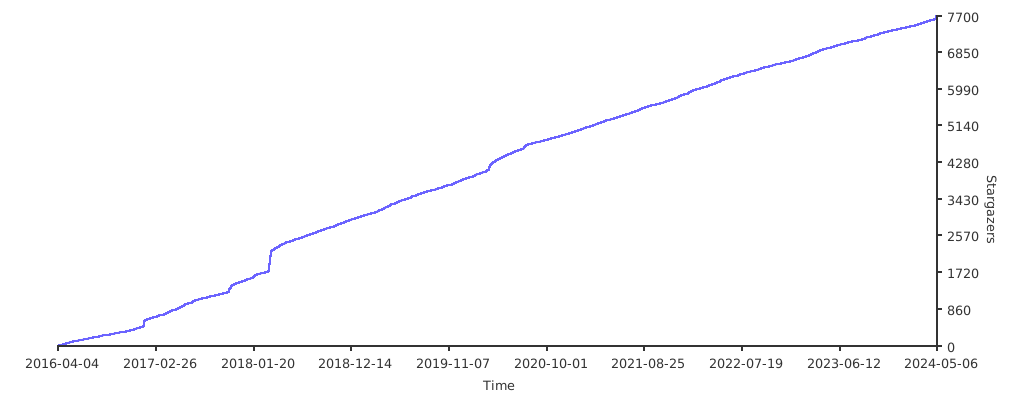
## Stargazers over time
[](https://starchart.cc/appleboy/gorush)
## License
Copyright 2026 Bo-Yi Wu [@appleboy](https://github.com/appleboy).
Licensed under the MIT License.