

Website — Forum — Documentation — Releases
Contributor stats — CI overview

Records what you do so that you can know how you've spent your time.
All in a secure way where you control the data.
Website
— Forum
— Documentation
— Releases
Contributor stats
— CI overview






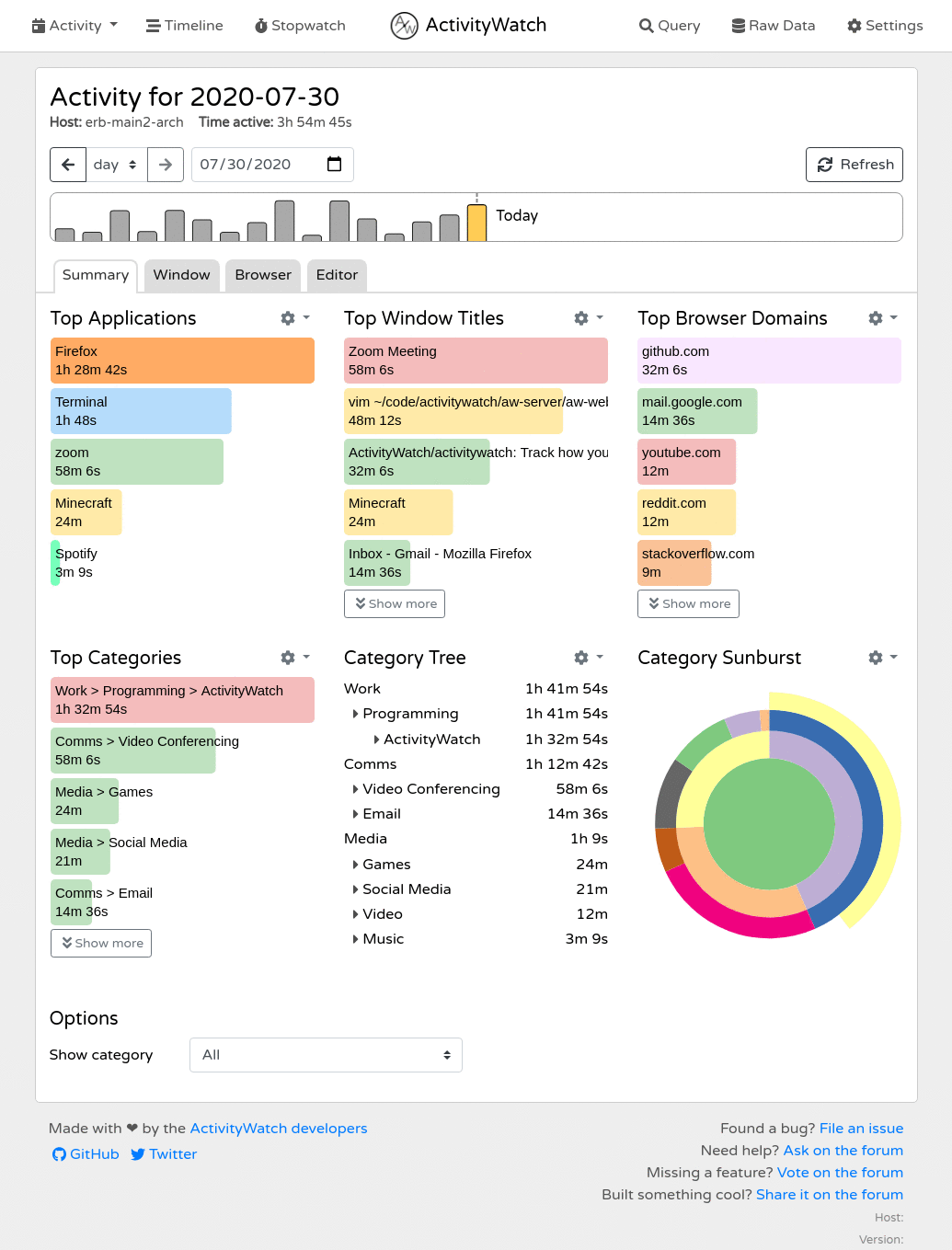
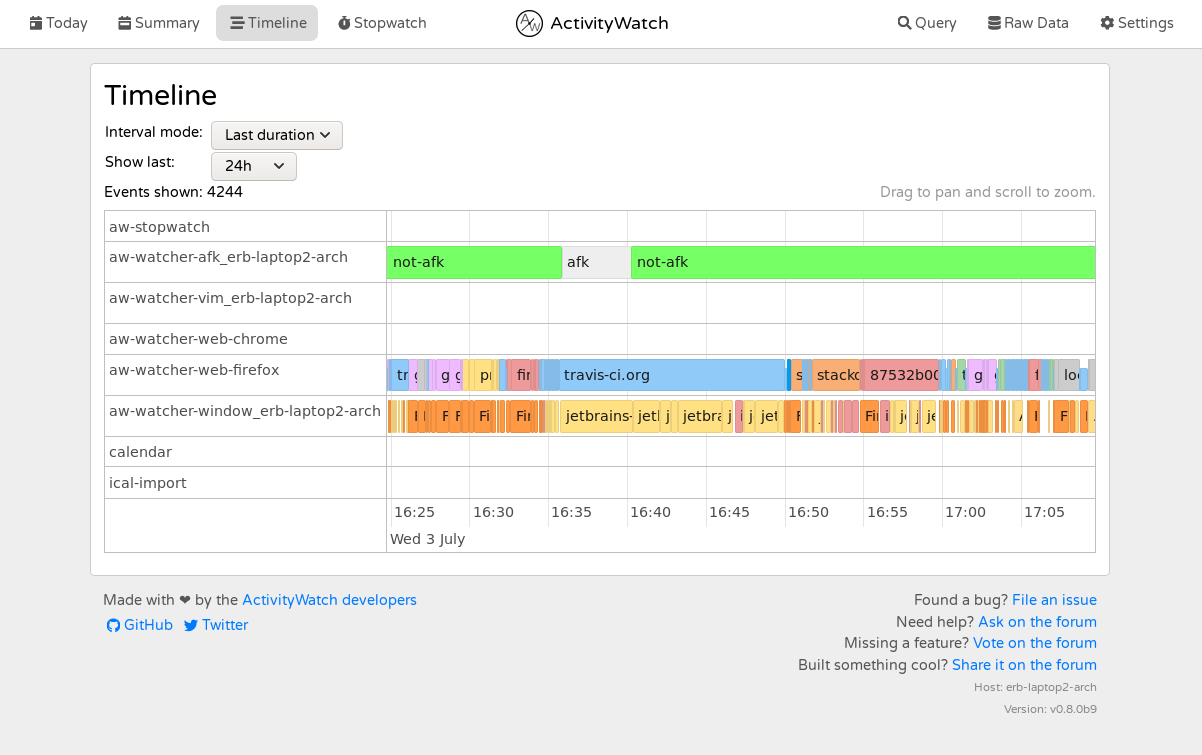 You can find more (and newer) screenshots on [the website](https://activitywatch.net/screenshots/).
## Installation & Usage
Downloads are available on the [releases page](https://github.com/ActivityWatch/activitywatch/releases).
For instructions on how to get started, please see the [guide in the documentation](https://docs.activitywatch.net/en/latest/getting-started.html).
Interested in building from source? [There's a guide for that too](https://docs.activitywatch.net/en/latest/installing-from-source.html).
## Is this yet another time tracker?
Yes, but we found that most time trackers lack one or more important features.
**Common dealbreakers:**
- Not open source
- The user does not own the data (common with non-open source options)
- Lack of synchronization (and when available: it's centralized and the sync server knows everything)
- Difficult to setup/use (most open source options tend to target programmers)
- Low data resolution (low level of detail, does not store raw data, long intervals between entries)
- Hard or impossible to extend (collecting more data is not as simple as it could be)
**To sum it up:**
- Closed source solutions suffer from privacy issues and limited features.
- Open source solutions aren't developed with end-users in mind and are usually not written to be easily extended (they lack a proper API). They also lack synchronization.
We have a plan to address all of these and we're well on our way. See the table below for our progress.
### Feature comparison
##### Basics
| | User owns data | GUI | Sync | Open Source |
| ------------- |:------------------:|:------------------:|:--------------------------:|:------------------:|
| ActivityWatch | :white_check_mark: | :white_check_mark: | [WIP][sync], decentralized | :white_check_mark: |
| [Selfspy] | :white_check_mark: | :x: | :x: | :white_check_mark: |
| [ulogme] | :white_check_mark: | :white_check_mark: | :x: | :white_check_mark: |
| [RescueTime] | :x: | :white_check_mark: | Centralized | :x: |
| [WakaTime] | :x: | :white_check_mark: | Centralized | Clients |
[sync]: https://github.com/ActivityWatch/activitywatch/issues/35
[Selfspy]: https://github.com/selfspy/selfspy
[ulogme]: https://github.com/karpathy/ulogme
[RescueTime]: https://www.rescuetime.com/
[WakaTime]: https://wakatime.com/
##### Platforms
| | Windows | macOS | Linux | Android | iOS |
| ------------- |:------------------:|:------------------:|:------------------:|:------------------:|:-------------------:|
| ActivityWatch | :white_check_mark: | :white_check_mark: | :white_check_mark: | :white_check_mark: |:x: |
| Selfspy | :white_check_mark: | :white_check_mark: | :white_check_mark: | :x: |:x: |
| ulogme | :x: | :white_check_mark: | :white_check_mark: | :x: |:x: |
| RescueTime | :white_check_mark: | :white_check_mark: | :white_check_mark: | :white_check_mark: |Limited functionality|
##### Tracking
| | App & Window Title | AFK | Browser Extensions | Editor Plugins | Extensible |
| ------------- |:------------------:|:------------------:|:------------------:|:------------------:|:---------------------:|
| ActivityWatch | :white_check_mark: | :white_check_mark: | :white_check_mark: | :white_check_mark: | :white_check_mark: |
| Selfspy | :white_check_mark: | :white_check_mark: | :x: | :x: | :x: |
| ulogme | :white_check_mark: | :white_check_mark: | :x: | :x: | :x: |
| RescueTime | :white_check_mark: | :white_check_mark: | :white_check_mark: | :x: | :x: |
| WakaTime | :x: | :white_check_mark: | :white_check_mark: | :white_check_mark: | Only for text editors |
For a complete list of the things ActivityWatch can track, [see the page on *watchers* in the documentation](https://docs.activitywatch.net/en/latest/watchers.html).
## Architecture
```mermaid
graph TD;
aw-qt[aw-qt];
aw-notify[aw-notify];
aw-server[aw-server];
aw-webui[aw-webui];
aw-watcher-window[aw-watcher-window];
aw-watcher-afk[aw-watcher-afk];
aw-watcher-web[aw-watcher-web];
aw-sync[aw-sync];
aw-qt -- Manages --> aw-server;
aw-qt -- Manages --> aw-notify -- Queries --> aw-server;
aw-qt -- Manages --> aw-watcher-window -- Watches --> S1[Active window] -- Heartbeats --> aw-server;
aw-qt -- Manages --> aw-watcher-afk -- Watches --> S2[AFK status] -- Heartbeats --> aw-server;
Browser -- Manages --> aw-watcher-web -- Watches --> S3[Active tab] -- Heartbeats --> aw-server;
SF -- Dropbox/Syncthing/etc --> SF;
aw-server <-- Push/Pull --> aw-sync <-- Read/Write --> SF[Sync folder];
aw-server -- Serves --> aw-webui -- Queries --> aw-server;
%% User -- Interacts --> aw-webui;
%% User -- Observes --> aw-notify;
%% User -- Interacts --> aw-qt;
classDef lightMode fill:#FFFFFF, stroke:#333333, color:#333333;
classDef darkMode fill:#333333, stroke:#FFFFFF, color:#FFFFFF;
classDef lightModeLinks stroke:#333333;
classDef darkModeLinks stroke:#FFFFFF;
class A,B,C,D,E,G lightMode;
class A,B,C,D,E,G darkMode;
%% linkStyle 0 stroke:#FF4136, stroke-width:2px;
%% linkStyle 1 stroke:#1ABC9C, stroke-width:2px;
```
## About this repository
This repo is a bundle of the core components and official modules of ActivityWatch (managed with `git submodule`). Its primary use is as a meta-package providing all the components in one repo; enabling easier packaging and installation. It is also where releases of the full suite are published (see [releases](https://github.com/ActivityWatch/activitywatch/releases)).
### Server
ActivityWatch has two server implementations:
- `aw-server` (Python) - The current default implementation
- `aw-server-rust` - A Rust implementation that is the planned future default
Both provide a REST API to a datastore and query engine, and serve the web interface developed in the `aw-webui` project (which provides the frontend).
The REST API includes:
- Access to a datastore suitable for timeseries/timeperiod-data organized in "buckets" (containers grouping related activity data by metadata like client type or hostname)
- **Buckets API:** Create, retrieve, and delete data buckets
- **Events API:** Read and write timestamped events within buckets
- **Heartbeat API:** Watchers use heartbeat signals to update the current state of activity (e.g., active application, AFK status)
- **Query API:** simple query scripting language for filtering, merging, grouping, and transforming events
- **Client libraries:** Language-specific libraries like `aw-client` (Python), `aw-client-js`, and `aw-client-rust` that wrap REST endpoints for programmatic access
The frontend (`aw-webui`) includes:
- **Data visualization:** Dashboard and timeline views showing activity summaries with detailed breakdowns of app usage, web browsing, and user-defined categories
- **Query explorer:** Browser-based interface for writing, executing, and debugging queries with real-time results
- **Activity browser:** Navigate through historical data with filtering by date ranges, applications, websites, and custom categories
- **Raw data access:** View and browse individual events from all tracking buckets with detailed metadata
- **Export functionality:** Export activity data in JSON format (individual buckets or complete datasets) via web interface or REST API
### Watchers
ActivityWatch comes pre-installed with two watchers:
- `aw-watcher-afk` tracks the user active/inactive state from keyboard and mouse input
- `aw-watcher-window` tracks the currently active application and its window title.
There are lots of other watchers for ActivityWatch which can track more types of activity. Like `aw-watcher-web` which tracks time spent on websites, multiple editor watchers which track spent time coding, and many more! A full list of watchers can be found in [the documentation](https://docs.activitywatch.net/en/latest/watchers.html).
### Libraries
- `aw-core` - core library, provides no runnable modules
- `aw-client` - client library, useful when writing watchers
### Folder structure
You can find more (and newer) screenshots on [the website](https://activitywatch.net/screenshots/).
## Installation & Usage
Downloads are available on the [releases page](https://github.com/ActivityWatch/activitywatch/releases).
For instructions on how to get started, please see the [guide in the documentation](https://docs.activitywatch.net/en/latest/getting-started.html).
Interested in building from source? [There's a guide for that too](https://docs.activitywatch.net/en/latest/installing-from-source.html).
## Is this yet another time tracker?
Yes, but we found that most time trackers lack one or more important features.
**Common dealbreakers:**
- Not open source
- The user does not own the data (common with non-open source options)
- Lack of synchronization (and when available: it's centralized and the sync server knows everything)
- Difficult to setup/use (most open source options tend to target programmers)
- Low data resolution (low level of detail, does not store raw data, long intervals between entries)
- Hard or impossible to extend (collecting more data is not as simple as it could be)
**To sum it up:**
- Closed source solutions suffer from privacy issues and limited features.
- Open source solutions aren't developed with end-users in mind and are usually not written to be easily extended (they lack a proper API). They also lack synchronization.
We have a plan to address all of these and we're well on our way. See the table below for our progress.
### Feature comparison
##### Basics
| | User owns data | GUI | Sync | Open Source |
| ------------- |:------------------:|:------------------:|:--------------------------:|:------------------:|
| ActivityWatch | :white_check_mark: | :white_check_mark: | [WIP][sync], decentralized | :white_check_mark: |
| [Selfspy] | :white_check_mark: | :x: | :x: | :white_check_mark: |
| [ulogme] | :white_check_mark: | :white_check_mark: | :x: | :white_check_mark: |
| [RescueTime] | :x: | :white_check_mark: | Centralized | :x: |
| [WakaTime] | :x: | :white_check_mark: | Centralized | Clients |
[sync]: https://github.com/ActivityWatch/activitywatch/issues/35
[Selfspy]: https://github.com/selfspy/selfspy
[ulogme]: https://github.com/karpathy/ulogme
[RescueTime]: https://www.rescuetime.com/
[WakaTime]: https://wakatime.com/
##### Platforms
| | Windows | macOS | Linux | Android | iOS |
| ------------- |:------------------:|:------------------:|:------------------:|:------------------:|:-------------------:|
| ActivityWatch | :white_check_mark: | :white_check_mark: | :white_check_mark: | :white_check_mark: |:x: |
| Selfspy | :white_check_mark: | :white_check_mark: | :white_check_mark: | :x: |:x: |
| ulogme | :x: | :white_check_mark: | :white_check_mark: | :x: |:x: |
| RescueTime | :white_check_mark: | :white_check_mark: | :white_check_mark: | :white_check_mark: |Limited functionality|
##### Tracking
| | App & Window Title | AFK | Browser Extensions | Editor Plugins | Extensible |
| ------------- |:------------------:|:------------------:|:------------------:|:------------------:|:---------------------:|
| ActivityWatch | :white_check_mark: | :white_check_mark: | :white_check_mark: | :white_check_mark: | :white_check_mark: |
| Selfspy | :white_check_mark: | :white_check_mark: | :x: | :x: | :x: |
| ulogme | :white_check_mark: | :white_check_mark: | :x: | :x: | :x: |
| RescueTime | :white_check_mark: | :white_check_mark: | :white_check_mark: | :x: | :x: |
| WakaTime | :x: | :white_check_mark: | :white_check_mark: | :white_check_mark: | Only for text editors |
For a complete list of the things ActivityWatch can track, [see the page on *watchers* in the documentation](https://docs.activitywatch.net/en/latest/watchers.html).
## Architecture
```mermaid
graph TD;
aw-qt[aw-qt];
aw-notify[aw-notify];
aw-server[aw-server];
aw-webui[aw-webui];
aw-watcher-window[aw-watcher-window];
aw-watcher-afk[aw-watcher-afk];
aw-watcher-web[aw-watcher-web];
aw-sync[aw-sync];
aw-qt -- Manages --> aw-server;
aw-qt -- Manages --> aw-notify -- Queries --> aw-server;
aw-qt -- Manages --> aw-watcher-window -- Watches --> S1[Active window] -- Heartbeats --> aw-server;
aw-qt -- Manages --> aw-watcher-afk -- Watches --> S2[AFK status] -- Heartbeats --> aw-server;
Browser -- Manages --> aw-watcher-web -- Watches --> S3[Active tab] -- Heartbeats --> aw-server;
SF -- Dropbox/Syncthing/etc --> SF;
aw-server <-- Push/Pull --> aw-sync <-- Read/Write --> SF[Sync folder];
aw-server -- Serves --> aw-webui -- Queries --> aw-server;
%% User -- Interacts --> aw-webui;
%% User -- Observes --> aw-notify;
%% User -- Interacts --> aw-qt;
classDef lightMode fill:#FFFFFF, stroke:#333333, color:#333333;
classDef darkMode fill:#333333, stroke:#FFFFFF, color:#FFFFFF;
classDef lightModeLinks stroke:#333333;
classDef darkModeLinks stroke:#FFFFFF;
class A,B,C,D,E,G lightMode;
class A,B,C,D,E,G darkMode;
%% linkStyle 0 stroke:#FF4136, stroke-width:2px;
%% linkStyle 1 stroke:#1ABC9C, stroke-width:2px;
```
## About this repository
This repo is a bundle of the core components and official modules of ActivityWatch (managed with `git submodule`). Its primary use is as a meta-package providing all the components in one repo; enabling easier packaging and installation. It is also where releases of the full suite are published (see [releases](https://github.com/ActivityWatch/activitywatch/releases)).
### Server
ActivityWatch has two server implementations:
- `aw-server` (Python) - The current default implementation
- `aw-server-rust` - A Rust implementation that is the planned future default
Both provide a REST API to a datastore and query engine, and serve the web interface developed in the `aw-webui` project (which provides the frontend).
The REST API includes:
- Access to a datastore suitable for timeseries/timeperiod-data organized in "buckets" (containers grouping related activity data by metadata like client type or hostname)
- **Buckets API:** Create, retrieve, and delete data buckets
- **Events API:** Read and write timestamped events within buckets
- **Heartbeat API:** Watchers use heartbeat signals to update the current state of activity (e.g., active application, AFK status)
- **Query API:** simple query scripting language for filtering, merging, grouping, and transforming events
- **Client libraries:** Language-specific libraries like `aw-client` (Python), `aw-client-js`, and `aw-client-rust` that wrap REST endpoints for programmatic access
The frontend (`aw-webui`) includes:
- **Data visualization:** Dashboard and timeline views showing activity summaries with detailed breakdowns of app usage, web browsing, and user-defined categories
- **Query explorer:** Browser-based interface for writing, executing, and debugging queries with real-time results
- **Activity browser:** Navigate through historical data with filtering by date ranges, applications, websites, and custom categories
- **Raw data access:** View and browse individual events from all tracking buckets with detailed metadata
- **Export functionality:** Export activity data in JSON format (individual buckets or complete datasets) via web interface or REST API
### Watchers
ActivityWatch comes pre-installed with two watchers:
- `aw-watcher-afk` tracks the user active/inactive state from keyboard and mouse input
- `aw-watcher-window` tracks the currently active application and its window title.
There are lots of other watchers for ActivityWatch which can track more types of activity. Like `aw-watcher-web` which tracks time spent on websites, multiple editor watchers which track spent time coding, and many more! A full list of watchers can be found in [the documentation](https://docs.activitywatch.net/en/latest/watchers.html).
### Libraries
- `aw-core` - core library, provides no runnable modules
- `aw-client` - client library, useful when writing watchers
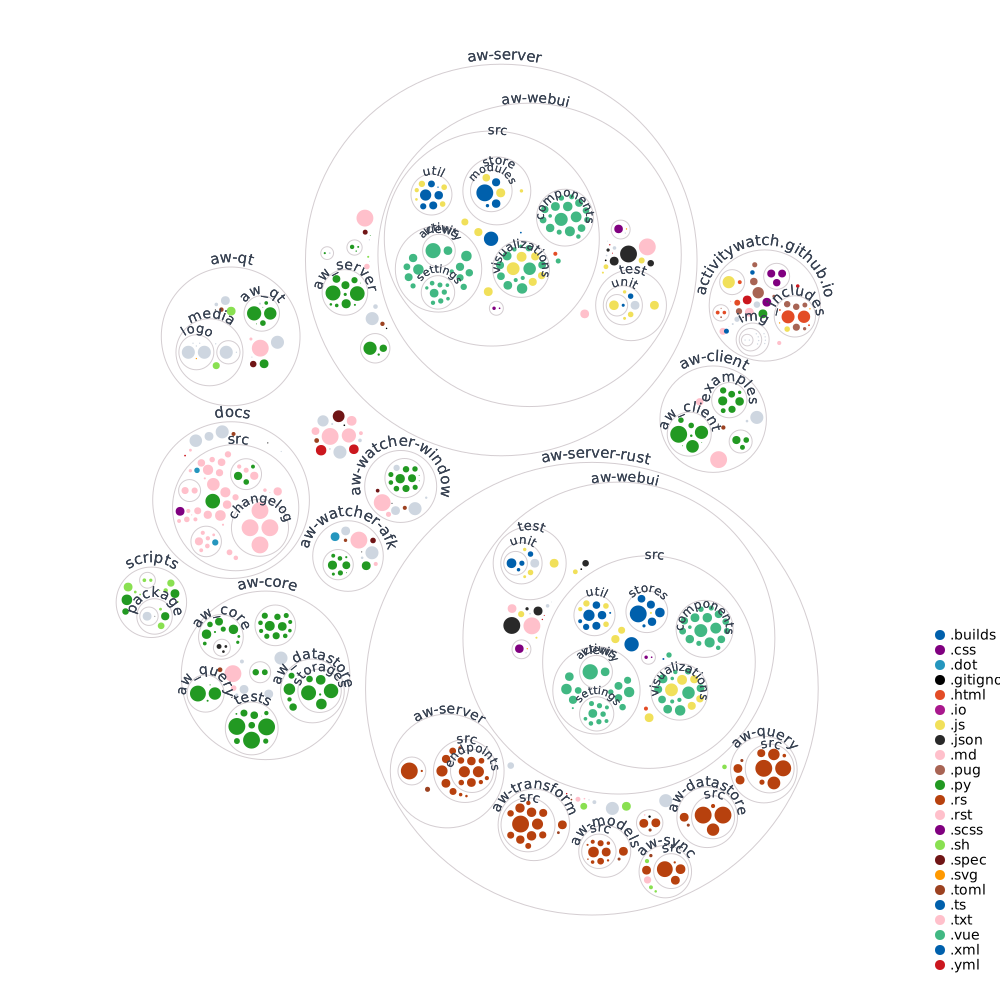
### Folder structure
 ## Contributing
Want to help? Great! Check out the [CONTRIBUTING.md file](./CONTRIBUTING.md)!
## Questions and support
Have a question, suggestion, problem, or just want to say hi? Post on [the forum](https://forum.activitywatch.net/)!
## Contributing
Want to help? Great! Check out the [CONTRIBUTING.md file](./CONTRIBUTING.md)!
## Questions and support
Have a question, suggestion, problem, or just want to say hi? Post on [the forum](https://forum.activitywatch.net/)!