
Architecture and Key Features • To Do • How To Use • Credits • Support • Reference • License
[](https://portal.azure.com/#create/Microsoft.Template/uri/https%3A%2F%2Fraw.githubusercontent.com%2Flordlinus%2Fdatabricks-all-in-one-bicep-template%2Fmain%2Fazuredeploy.json) [](http://armviz.io/#/?load=https%3A%2F%2Fraw.githubusercontent.com%2Flordlinus%2Fdatabricks-all-in-one-bicep-template%2Fmain%2Fazuredeploy.json) ## Why Bicep? Bicep is free and supported by Microsoft support and is fun, easy, and productive way to build and deploy complex infrastructure on Azure. If you are currently using ARM you will love Bicep simple syntax. Bicep also support [declaring existing resources](https://docs.microsoft.com/en-us/azure/azure-resource-manager/bicep/resource-declaration?tabs=azure-powershell#reference-existing-resources). More resources available at this [Link](https://docs.microsoft.com/en-us/azure/azure-resource-manager/bicep/overview#benefits-of-bicep-versus-other-tools) ## Architecture and Key Features 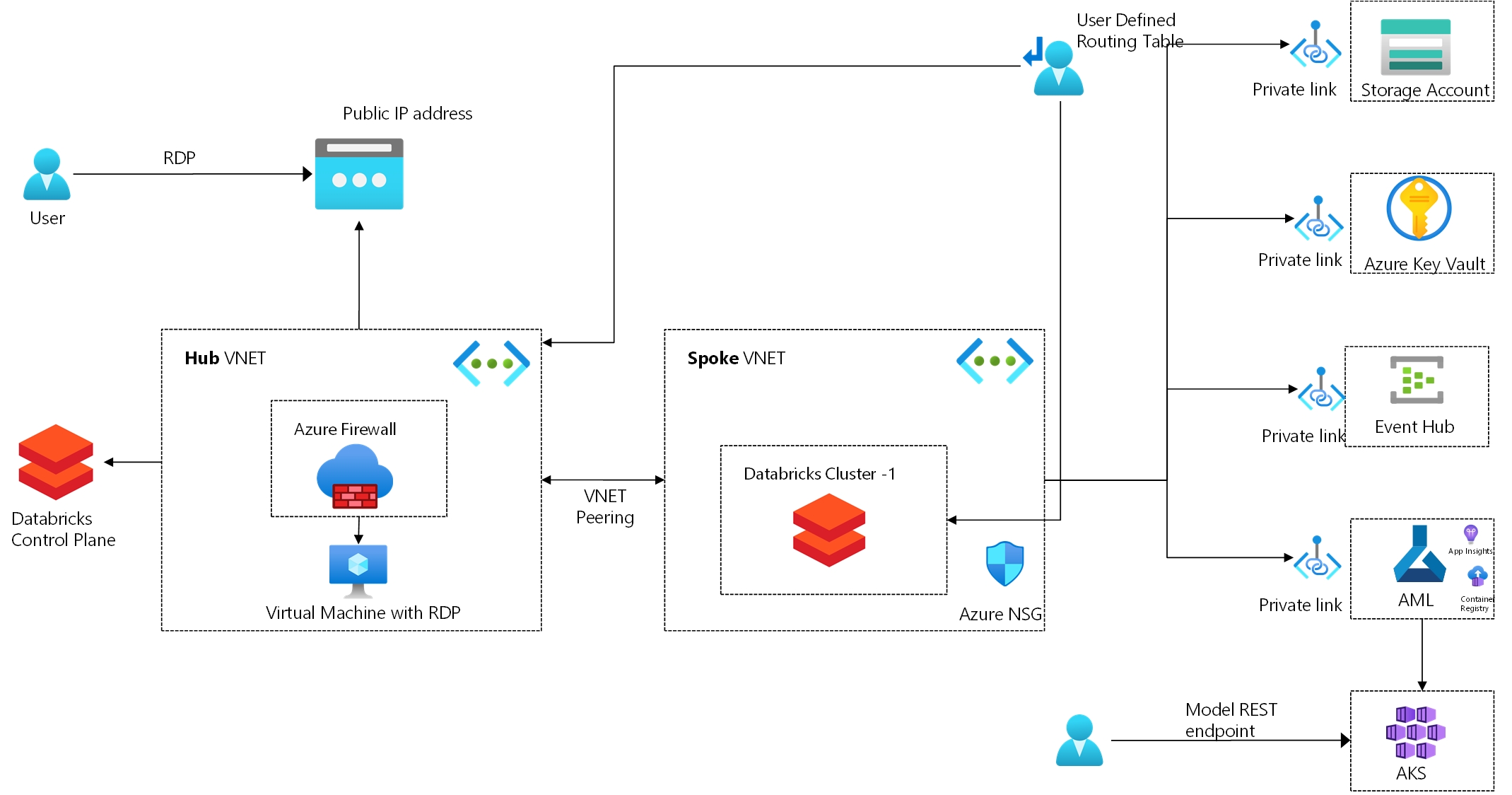 * Based on best practices from Azure Databricks Best Practices and template from Anti-Data-Exfiltration Reference architecture * Hub and Spoke VNETs.[Link](https://docs.microsoft.com/en-us/azure/architecture/reference-architectures/hybrid-networking/hub-spoke?tabs=bicep) * Databricks cluster created in spoke VNET. [Link](https://docs.microsoft.com/en-us/azure/databricks/administration-guide/cloud-configurations/azure/vnet-inject) * Firewall with UDR to allow only required Databricks endpoints. [Link](https://docs.microsoft.com/en-us/azure/virtual-network/manage-network-security-group) * Storage account with Private endpoint. [Link](https://docs.microsoft.com/en-us/azure/storage/common/storage-private-endpoints) * Azure Key Vault with Private endpoint. [Link](https://docs.microsoft.com/en-us/azure/private-link/private-endpoint-overview) * Create Databricks backed secret scope. * Azure Event Hub with Private endpoint. [Link](https://docs.microsoft.com/en-us/azure/event-hubs/private-link-service) * Create cluster with cluster logging and init script for monitoring.[Link](https://docs.microsoft.com/en-us/azure/databricks/clusters/init-scripts) * Sample Databricks notebooks into workspace. * Secured Windows Virtual machine with RDP (Protect data from export).[Link] * Configure Log analytics workspace and collect metrics from spark worker node - Configure Diagnostic logging.[Link](https://docs.microsoft.com/en-us/azure/databricks/administration-guide/account-settings/azure-diagnostic-logs) - Configure sending logs to Azure Monitor using [mspnp/spark-monitoring](https://github.com/mspnp/spark-monitoring) - Configure overwatch for fine grained monitoring. [Link](https://databrickslabs.github.io/overwatch/) * Create Azure ML workspace for Model registry and assist in deploying model to AKS * Create AKS compute for AML for real time model inference/scoring ## To Do * Create Databricks secret scope backed by Azure Key Vault. [Link](https://docs.microsoft.com/en-us/azure/databricks/security/secrets/secret-scopes) * Create Azure SQL with Private link. [Link](https://docs.microsoft.com/en-us/azure/sql/private-link) * Create an integrated ADF pipeline * Integrate into Azure DevOps * Create Databricks performance dashboards * Create and configure External metastore * Configure Databricks access to specific IP only * More sample Databricks notebooks * Add description to all parameters ## Prerequisites - Managed Identity needs to be enabled as a resource provider inside Azure - For the bash script, `jq` must be installed. ## Client password - Client PC password complexity requirements: The supplied password must be between 8-123 characters long and must satisfy at least 3 of password complexity requirements from the following: - Contains an uppercase character - Contains a lowercase character - Contains a numeric digit - Contains a special character - Control characters are not allowed ## How To Use To clone and run this repo, you'll need [Git](https://git-scm.com), [Bicep](https://github.com/Azure/bicep/blob/main/docs/installing.md) and [azure-cli](https://docs.microsoft.com/en-us/cli/azure/install-azure-cli) installed on your computer. Strongly recommend to use vs code to edit the file with bicep extension installed ([instructions](https://marketplace.visualstudio.com/items?itemName=ms-azuretools.vscode-bicep)) for intellisense and other completions. From your command line: ### Option 1: [](https://portal.azure.com/#create/Microsoft.Template/uri/https%3A%2F%2Fraw.githubusercontent.com%2Flordlinus%2Fdatabricks-all-in-one-bicep-template%2Fmain%2Fazuredeploy.json) Click on the above link to deploy the template. ### Option 2 If you need to customize the template you can use the following command: ```bash # Clone this repository $ git clone https://github.com/lordlinus/databricks-all-in-one-bicep-template.git # Go into the repository $ cd databricks-all-in-one-bicep-template # Update main.bicep file with variables as required. Default is for southeastasia region. # Refer to Azure Databricks UDR section under References for region specific parameters. $ code main.bicep # Run the build shell script to create the resources $ ./build.sh ``` Note: Build script assume Linux environment, If you're using Windows, [see this guide](https://docs.microsoft.com/en-us/windows/wsl/install-win10) on running Linux ## Credits This template is based on ARM templates from the below repo: - [Modern-data-warehouse-dataops](https://github.com/Azure-Samples/modern-data-warehouse-dataops) - [Azure PrivateLink Templates](https://github.com/dmauser/PrivateLink) ## Support This repo code is provided as-is and if you need help/support on bicep reach out to Azure support team (Bicep is supported by Microsoft support and 100% free to use.) ## Reference - [Bicep Language Spec](https://github.com/Azure/bicep/blob/main/docs/spec/bicep.md) - [Azure Databricks UDR](https://docs.microsoft.com/en-us/azure/databricks/administration-guide/cloud-configurations/azure/udr) ## License MIT --- > GitHub [@lordlinus](https://github.com/lordlinus) · > Twitter [@lordlinus](https://twitter.com/lordlinus) · > Linkedin [Sunil Sattiraju](https://www.linkedin.com/in/sunilsattiraju/)