# rrdiagram-js
**Repository Path**: mirrors_Chrriis/rrdiagram-js
## Basic Information
- **Project Name**: rrdiagram-js
- **Description**: Generate railroad diagrams from code or BNF, generate BNF from code
- **Primary Language**: Unknown
- **License**: Apache-2.0
- **Default Branch**: master
- **Homepage**: None
- **GVP Project**: No
## Statistics
- **Stars**: 0
- **Forks**: 0
- **Created**: 2020-09-24
- **Last Updated**: 2026-04-04
## Categories & Tags
**Categories**: Uncategorized
**Tags**: None
## README
RRDiagram-JS
---
Generate railroad diagrams from code or BNF. Generate BNF from code.
RR Diagram is a Javascript library that generates railroad diagrams (also called syntax diagrams) from code or from BNF notation. The output format is a very compact SVG image where rules can contain links.
RR Diagram can also be used to generate BNF notation from a model.
This is a Javascript port of the [Java-based version](https://github.com/Chrriis/RRDiagram). This version adds the capability of converting BNF present in an HTML page as well as relying on CSS styles from the page to style the SVG content.
Example
=======
This is the kind of diagrams that can get generated:
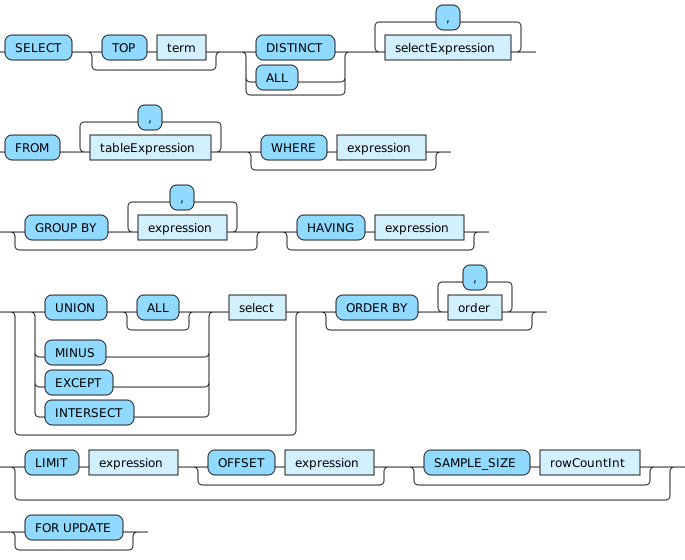
The above is generated using the right conversion options on this BNF:
H2_SELECT =
'SELECT' [ 'TOP' term ] [ 'DISTINCT' | 'ALL' ] selectExpression {',' selectExpression} \
'FROM' tableExpression {',' tableExpression} [ 'WHERE' expression ] \
[ 'GROUP BY' expression {',' expression} ] [ 'HAVING' expression ] \
[ ( 'UNION' [ 'ALL' ] | 'MINUS' | 'EXCEPT' | 'INTERSECT' ) select ] [ 'ORDER BY' order {',' order} ] \
[ 'LIMIT' expression [ 'OFFSET' expression ] [ 'SAMPLE_SIZE' rowCountInt ] ] \
[ 'FOR UPDATE' ];
Usage
=====
To convert BNF text to a nice diagram, place the text in a `pre` tag and give it a class like `BNF`. Then include rrdiagram.js in your webpage. At the end of your page, add the following script to replace all those `pre` tags using the `BNF` class with a div that uses the `BNFSVG` class:
```Javascript
var bnfDisplay = new rrdiagram.bnfdisplay.BNFDisplay();
bnfDisplay.replaceBNF('BNF', 'BNFSVG');
```
Styles used by the produced diagrams must be defined in the page. Here is an example of those definitions:
```CSS
.rrConnector {fill:none;stroke:#222222;}
.rrRule {fill:#d3f0ff;stroke:#222222;}
.rrRuleText {fill:#000000;font-family:Verdana,Sans-serif;font-size:12px;}
.rrLiteral {fill:#90d9ff;stroke:#222222;}
.rrLiteralText {fill:#000000;font-family:Verdana,Sans-serif;font-size:12px;}
.rrSpecialSequence {fill:#e4f4ff;stroke:#222222;}
.rrSpecialSequenceText {fill:#000000;font-family:Verdana,Sans-serif;font-size:12px;}
.rrLoopCardinalities {fill:#000000;font-family:Verdana,Sans-serif;font-size:10px;}
```
The whole API is available too.
The diagram model represents the actual constructs visible on the diagram.
To convert a diagram model to SVG:
```Javascript
var rrDiagram = new rrdiagram.ui.RRDiagram(rrElement);
var rrDiagramToSVG = new rrdiagram.ui.RRDiagramToSVG();
var svg = rrDiagramToSVG.convert(rrDiagram);
```
The grammar model represents a BNF-like grammar.
It can be converted to a diagram model:
```Javascript
var grammar = new rrdiagram.model.Grammar(rules);
var grammarToRRDiagram = new rrdiagram.model.GrammarToRRDiagram();
var rules = grammar.getRules();
for(var i=0; i
- definition
=
:=
::=
- concatenation
,
<whitespace>
- termination
;
- alternation
|
- option
[ ... ]
?
- repetition
{ ... } => 0..N
expression* => 0..N
expression+ => 1..N
<digits> * expression => <digits>...<digits>
<digits> * [expression] => <0>...<digits>
<digits> * expression? => <0>...<digits>
- grouping
( ... )
- literal
" ... " or ' ... '
- special characters
(? ... ?)
- comments
(* ... *)
When getting the BNF syntax from the grammar model, it is possible to tweak the kind of BNF to get by changing some options on the converter.
License
=======
This library is provided under the ASL, version 2.0 or later.
Setup
---
```
npm install
```
Compile
---
```
npm run compile
```