# ember-timetree
**Repository Path**: mirrors_CrowdStrike/ember-timetree
## Basic Information
- **Project Name**: ember-timetree
- **Description**: Visualize hierarchical timeline data. Built with Ember.js and D3.js
- **Primary Language**: Unknown
- **License**: BSD-2-Clause
- **Default Branch**: master
- **Homepage**: None
- **GVP Project**: No
## Statistics
- **Stars**: 0
- **Forks**: 0
- **Created**: 2022-01-07
- **Last Updated**: 2025-12-07
## Categories & Tags
**Categories**: Uncategorized
**Tags**: None
## README
# ember-timetree - DEPRECATED
##As this component is no longer in development inside Crowdstrike we are providing this code for illustrative purposes only. Please feel free to use and fork but be aware we will no longer be updating this repository to support newer versions of Ember or fixing issues.
Visualize hierarchical timeline data. Built with [Ember.js](http://emberjs.com) and [D3.js](http://d3js.org).
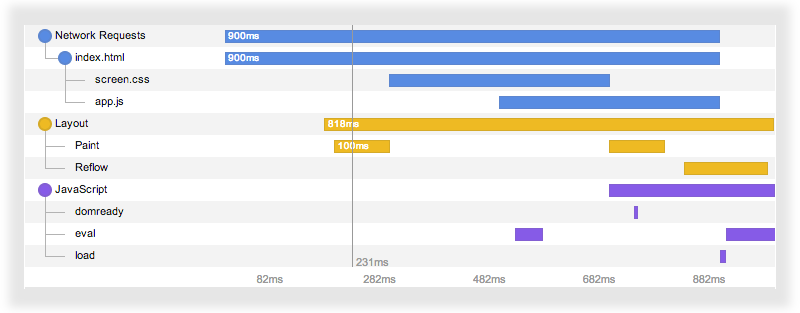 Peep [the demo](http://crowdstrike.github.io/ember-timetree).
## Installation
```
ember install:addon ember-timetree
```
## Basic Usage
```handlebars
{{time-tree content=yourTimetreeArray}}
```
where `YourTimetreeArray` is an array of objects representing **the rows** of
the timetree.
## Row Object
Each row object is a plain JavaScript object defining at least a display name,
a start time, and an end time. Here is the full set of fields.
```javascript
{
/* REQUIRED FIELDS */
label: "Name",
start: 12345, // Milliseconds since the UTC epoch.
end: 67890,
/* OPTIONAL FIELDS */
parent: 3, // Index of this row's hierarchical parent in the array.
id: "123456L", // Id for determining uniqueness; defaults to index in the array.
className: "info", // CSS class name for this row's labels and bars.
content: {}, // Arbitrary content to bind when the user selects (clicks on) a
// row. Useful if you want to do exact identity comparison to the
// selection. If empty, selecting a row binds `content` to the
// row object itself (which ember-timetree may have transformed,
// so don't count on it being identical to your original input).
sections: [{ start: 12345, end: 23456, className: "active" }, // Start/stop this row's timeline multiple times.
{ start: 23456, end: 67890, className: "inactive" }] // Each section can have its own, optional CSS class name.
// Note the row object's overall start/end fields must
// still be specified above, as its bar will still be drawn.
}
```
## More Options
### Selection
To bind to the currently selected row of the timetree, set the `time-tree`'s
`selection` attribute. Upon the user selecting a row, the binding will contain
the selected row's `content` field, or the row object itself if `content` is
empty.
ember-timetree won't transform the `content` field but it may transform the row
object, so don't count on the latter being identical to your original input.
### Resize on Collapse
If you set the `resizeOnCollapse` attribute to true, the height of the tree
will resize when collapsing a node. This is nice when you have really long tree
and you do not want white space when a node is collapsed.
### Brush View
Want to zoom and drag to focus anywhere on your timeline? After the main view,
add a `{{time-tree-brush}}`, and link the two via the `range` and `brushRange`
attributes, respectively.
```handlebars
{{time-tree content=yourTimetreeArray range=yourRange}}
{{time-tree-brush content=yourTimetreeArray brushRange=yourRange}}
```

### Extending
Many methods on `time-tree` can be extended. For example, to override the
built-in date/time format:
```javascript
import Ember from 'ember';
import TimeTreeComponent from 'ember-timetree/components/time-tree';
const MyTimeTreeComponent = TimeTreeComponent.extend({
timeFormat: Ember.computed(function() {
/* global d3 */
return d3.time.format.utc("your D3 date format here");
}).property()
});
export default MyTimeTreeComponent;
```
### Default View Options
```javascript
width: 750,
rowHeight: 15,
rowSpacing: 10,
labelsWidth: 200,
axisHeight: 20,
axisPosition: 'bottom',
indentSize: 20,
labelAlign: 'left',
contentMargin: null, // e.g. { top: 0, left: 0, bottom: 0, right: 0 },
collapsable: true, // can collapse hierarchy items?
resizeOnCollapse: false, // resize the height of the tree when collapsing a node
scrubbable: true, // draw the scrubber (on hover)?
selectable: true, // can select rows (on click)?
brushable: false, // can drag-click and drag to zoom?
showLabels: true,
showLinks: true,
content: null, // bind this to the array of row objects
selection: null, // bind this to the selected row
brushRange: null, // bind this to a TimetreeBrushView
```
View-source on [the demo page](http://crowdstrike.github.io/ember-timetree) to
get more ideas how to tweak ember-timetree to your liking.
## Development
### Installation
* `git clone` this repository
* `npm install`
* `bower install`
### Running
* `ember server`
* Visit your app at http://localhost:4200.
### Running Tests
* `ember test`
* `ember test --server`
### Building
* `ember build`
For more information on using ember-cli, visit [http://www.ember-cli.com/](http://www.ember-cli.com/).
## Credits
Peep [the demo](http://crowdstrike.github.io/ember-timetree).
## Installation
```
ember install:addon ember-timetree
```
## Basic Usage
```handlebars
{{time-tree content=yourTimetreeArray}}
```
where `YourTimetreeArray` is an array of objects representing **the rows** of
the timetree.
## Row Object
Each row object is a plain JavaScript object defining at least a display name,
a start time, and an end time. Here is the full set of fields.
```javascript
{
/* REQUIRED FIELDS */
label: "Name",
start: 12345, // Milliseconds since the UTC epoch.
end: 67890,
/* OPTIONAL FIELDS */
parent: 3, // Index of this row's hierarchical parent in the array.
id: "123456L", // Id for determining uniqueness; defaults to index in the array.
className: "info", // CSS class name for this row's labels and bars.
content: {}, // Arbitrary content to bind when the user selects (clicks on) a
// row. Useful if you want to do exact identity comparison to the
// selection. If empty, selecting a row binds `content` to the
// row object itself (which ember-timetree may have transformed,
// so don't count on it being identical to your original input).
sections: [{ start: 12345, end: 23456, className: "active" }, // Start/stop this row's timeline multiple times.
{ start: 23456, end: 67890, className: "inactive" }] // Each section can have its own, optional CSS class name.
// Note the row object's overall start/end fields must
// still be specified above, as its bar will still be drawn.
}
```
## More Options
### Selection
To bind to the currently selected row of the timetree, set the `time-tree`'s
`selection` attribute. Upon the user selecting a row, the binding will contain
the selected row's `content` field, or the row object itself if `content` is
empty.
ember-timetree won't transform the `content` field but it may transform the row
object, so don't count on the latter being identical to your original input.
### Resize on Collapse
If you set the `resizeOnCollapse` attribute to true, the height of the tree
will resize when collapsing a node. This is nice when you have really long tree
and you do not want white space when a node is collapsed.
### Brush View
Want to zoom and drag to focus anywhere on your timeline? After the main view,
add a `{{time-tree-brush}}`, and link the two via the `range` and `brushRange`
attributes, respectively.
```handlebars
{{time-tree content=yourTimetreeArray range=yourRange}}
{{time-tree-brush content=yourTimetreeArray brushRange=yourRange}}
```

### Extending
Many methods on `time-tree` can be extended. For example, to override the
built-in date/time format:
```javascript
import Ember from 'ember';
import TimeTreeComponent from 'ember-timetree/components/time-tree';
const MyTimeTreeComponent = TimeTreeComponent.extend({
timeFormat: Ember.computed(function() {
/* global d3 */
return d3.time.format.utc("your D3 date format here");
}).property()
});
export default MyTimeTreeComponent;
```
### Default View Options
```javascript
width: 750,
rowHeight: 15,
rowSpacing: 10,
labelsWidth: 200,
axisHeight: 20,
axisPosition: 'bottom',
indentSize: 20,
labelAlign: 'left',
contentMargin: null, // e.g. { top: 0, left: 0, bottom: 0, right: 0 },
collapsable: true, // can collapse hierarchy items?
resizeOnCollapse: false, // resize the height of the tree when collapsing a node
scrubbable: true, // draw the scrubber (on hover)?
selectable: true, // can select rows (on click)?
brushable: false, // can drag-click and drag to zoom?
showLabels: true,
showLinks: true,
content: null, // bind this to the array of row objects
selection: null, // bind this to the selected row
brushRange: null, // bind this to a TimetreeBrushView
```
View-source on [the demo page](http://crowdstrike.github.io/ember-timetree) to
get more ideas how to tweak ember-timetree to your liking.
## Development
### Installation
* `git clone` this repository
* `npm install`
* `bower install`
### Running
* `ember server`
* Visit your app at http://localhost:4200.
### Running Tests
* `ember test`
* `ember test --server`
### Building
* `ember build`
For more information on using ember-cli, visit [http://www.ember-cli.com/](http://www.ember-cli.com/).
## Credits
