# netflix-ratings-extractor
**Repository Path**: mirrors_GUI/netflix-ratings-extractor
## Basic Information
- **Project Name**: netflix-ratings-extractor
- **Description**: Greasemonkey script for Chrome, Firefox, Safari: export your rated Netflix movies.
- **Primary Language**: Unknown
- **License**: MIT
- **Default Branch**: master
- **Homepage**: None
- **GVP Project**: No
## Statistics
- **Stars**: 0
- **Forks**: 0
- **Created**: 2020-08-08
- **Last Updated**: 2026-01-03
## Categories & Tags
**Categories**: Uncategorized
**Tags**: None
## README
Netflix Ratings Extractor
=========================
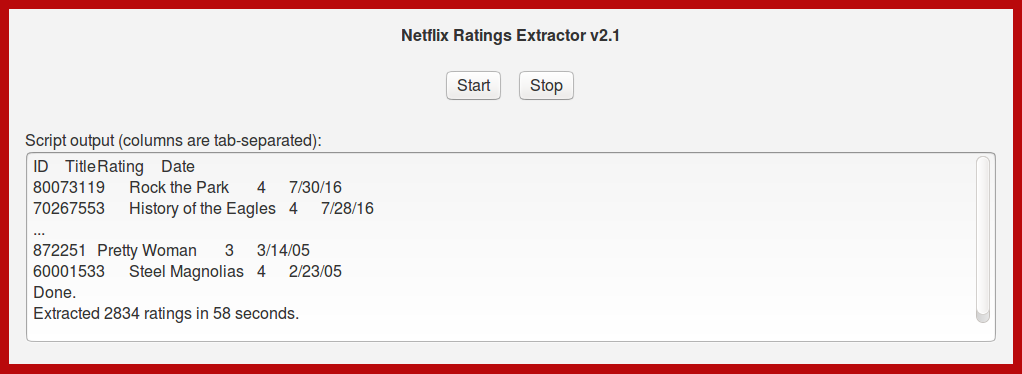
Greasemonkey script for Chrome, Firefox, Safari: export your rated Netflix movies.
Main UI:
Installation instructions
-------------------------
* Chrome:
* Right-click on [this GitHub link to the script's raw source code](https://raw.githubusercontent.com/m5n/netflix-ratings-extractor/master/netflix-ratings-extractor.user.js) and select `Save Link As...` to save the script to a directory of your choice.
* From the application menu, select `More tools > Extensions`.
* Locate the script file on your computer and drag the file onto the Extensions page.
* Click `Add extension`.
* Manage your scripts via the application's `Tools > Extensions` menu.
* Firefox:
* Install the [Greasemonkey](https://addons.mozilla.org/en-US/firefox/addon/748) add-on.
* Restart Firefox.
* Install this script by clicking on [this GitHub link to the script's raw source code](https://raw.githubusercontent.com/m5n/netflix-ratings-extractor/master/netflix-ratings-extractor.user.js).
* (You may be asked to opt in for anonymous usage collection. Either accept or decline, but you'll have to click on the above link again.)
* Manage your scripts via the `Manage User Scripts...` option in the Greasemonkey menu.
* Opera:
* [Configure Opera](http://www.techerator.com/2011/02/how-to-add-greasemoney-and-other-scripts-to-opera-11/) to allow Greasemonkey scripts to be run.
* Install this script by right-clicking on [this GitHub link to the script's raw source code](https://raw.githubusercontent.com/m5n/netflix-ratings-extractor/master/netflix-ratings-extractor.user.js) and selecting the `Save Linked Content As...` option. Save the script to the directory you configured in the previous step, but rename it to "NetflixRatingsExtractor.user.js" so you can identify it later.
* Restart Opera.
* Manage your scripts directly in the directory you configured above.
* Safari:
* Install the [NinjaKit](http://www.reddit.com/r/apple/comments/dd2sk/ninjakit_greasemonkey_for_safari/) extension.
* Restart Safari.
* Install this script by clicking on [this GitHub link to the script's raw source code](https://raw.githubusercontent.com/m5n/netflix-ratings-extractor/master/netflix-ratings-extractor.user.js).
* Manage your scripts via the NinjaKit toolbar icon or via the Extensions preferences.
Usage instructions
------------------
1. Go to Netflix and log in.
1. Navigate to the `Your Account` page via the profile menu at the top-right.
1. In the `MY PROFILE` section, follow the `Ratings` link.
1. At the top of your ratings page find the start/stop buttons and the script's output area.
1. Click the start button.
1. When the script finishes, you can copy the data in the output area to a new text file or to somewhere else for further processing (e.g. a spreadsheet). The first row has the column titles. Columns are tab-separated.
A Netflix movie URL can be reconstructed like so: `https://www.netflix.com/title/`
Known issues
------------
* If you have the streaming plan, this script will work "as is". If you have the DVD plan, try loading https://dvd.netflix.com/MoviesYouveSeen and scroll to the end of the page. If it loads more movies, great, you can use this script "as is". If it does not, try [v1.18 of this script](https://raw.githubusercontent.com/m5n/netflix-ratings-extractor/10e33f0063aee2b26f03c12ea3acf5dc2d94b3fe/netflix-ratings-extractor.user.js).
* Extracting the ratings from the page can be slow if you have a lot of rated movies. Extracting 2500 ratings can take more than 60 seconds.
History
-------
https://github.com/m5n/netflix-ratings-extractor/commits/master/netflix-ratings-extractor.user.js
(This script's home used to be [http://userscripts.org/scripts/show/32964](http://userscripts-mirror.org/scripts/show/32964))
Acknowledgments
---------------
This script is based on [Anthony Lieuallen's "getFlix Revamped"](http://web.arantius.com/getflix-revamped), which is based on [Devanshu Mehta's "getFlix" scripts](http://www.scienceaddiction.com/2006/03/03/fetch-your-netflix-ratings/), which in turn are based on [scripts by John Resig](http://ejohn.org/projects/netflix). I completely rewrote Anthony's script for version 1.0 of my script, but I learned the Greasemonkey ropes by studying his script.
Needless to say I'm standing on the shoulders of giants.