# HyperDbg
**Repository Path**: mirrors_HyperDbg/HyperDbg
## Basic Information
- **Project Name**: HyperDbg
- **Description**: State-of-the-art native debugging tools
- **Primary Language**: Unknown
- **License**: GPL-3.0
- **Default Branch**: master
- **Homepage**: None
- **GVP Project**: No
## Statistics
- **Stars**: 1
- **Forks**: 0
- **Created**: 2022-01-06
- **Last Updated**: 2026-04-20
## Categories & Tags
**Categories**: Uncategorized
**Tags**: None
## README




# HyperDbg Debugger
 **HyperDbg Debugger** is a free (as in free beer), open-source, community-driven, hypervisor-assisted, user-mode, and kernel-mode Windows debugger with a focus on using modern hardware technologies. It is a debugger designed for analyzing, fuzzing, and reversing.
You can follow **HyperDbg** on **[Twitter](https://twitter.com/HyperDbg)** or **[Mastodon](https://infosec.exchange/@hyperdbg)** to get notified about new releases, or join any of the HyperDbg groups, where you can ask developers and open-source reversing enthusiasts for help setting up and using HyperDbg.
- **[Telegram](https://t.me/HyperDbg)**
- **[Discord](https://discord.gg/anSPsGUtzN)**
- **[Matrix](https://matrix.to/#/#hyperdbg-discussion:matrix.org)**
## Description
**HyperDbg** is designed with a focus on using modern hardware technologies to provide new features to the debuggers' world. It operates on top of Windows by virtualizing an already running system using Intel VT-x and EPT. This debugger aims not to use any APIs and software debugging mechanisms, but instead, it uses Second Layer Page Table (a.k.a. Extended Page Table or EPT) extensively to monitor both kernel and user executions.
**HyperDbg Debugger** is a free (as in free beer), open-source, community-driven, hypervisor-assisted, user-mode, and kernel-mode Windows debugger with a focus on using modern hardware technologies. It is a debugger designed for analyzing, fuzzing, and reversing.
You can follow **HyperDbg** on **[Twitter](https://twitter.com/HyperDbg)** or **[Mastodon](https://infosec.exchange/@hyperdbg)** to get notified about new releases, or join any of the HyperDbg groups, where you can ask developers and open-source reversing enthusiasts for help setting up and using HyperDbg.
- **[Telegram](https://t.me/HyperDbg)**
- **[Discord](https://discord.gg/anSPsGUtzN)**
- **[Matrix](https://matrix.to/#/#hyperdbg-discussion:matrix.org)**
## Description
**HyperDbg** is designed with a focus on using modern hardware technologies to provide new features to the debuggers' world. It operates on top of Windows by virtualizing an already running system using Intel VT-x and EPT. This debugger aims not to use any APIs and software debugging mechanisms, but instead, it uses Second Layer Page Table (a.k.a. Extended Page Table or EPT) extensively to monitor both kernel and user executions.
HyperDbg comes with features like hidden hooks, which are as fast as old inline hooks, but also stealth. It mimics hardware debug registers for (read & write) to a specific location, but this time invisible for both the Windows kernel and the programs, and of course, without any limitation in size or count!
Using TLB-splitting and having features such as measuring code coverage and monitoring all mov(s) to/from memory by a function, makes HyperDbg a unique debugger.
Although it has novel features, HyperDbg tries to be as stealthy as possible. It doesn’t use any debugging APIs to debug Windows or any application, so classic anti-debugging methods won’t detect it. Also, it resists the exploitation of time delta methods (e.g., RDTSC/RDTSCP) to detect the presence of hypervisors, therefore making it much harder for applications, packers, protectors, malware, anti-cheat engines, etc. to discover the debugger.
## Why HyperDbg?
HyperDbg is harder to set up and use, and also requires deeper low-level system knowledge compared to traditional debuggers. However, it provides two major advantages:
1. **Full System & OS Control**
HyperDbg operates at the hypervisor level, giving you powerful capabilities that are simply not possible with classic debuggers. This allows you to leverage hardware-assisted [features](https://github.com/HyperDbg/HyperDbg?tab=readme-ov-file#unique-features) for advanced reverse engineering and debugging scenarios.
2. **Stealth & Detection Resistance**
Since HyperDbg doesn't rely on standard OS debugging APIs, it is generally much harder (though not impossible) to detect. This makes it a strong choice when working against anti-debugging protections.
These advantages open up entirely new debugging and reverse engineering techniques that go beyond what conventional debuggers can offer.
## Build & Installation
You can download the latest compiled binary files from **[releases](https://github.com/HyperDbg/HyperDbg/releases)**; otherwise, if you want to build HyperDbg, you should clone HyperDbg with the `--recursive` flag.
```
git clone --recursive https://github.com/HyperDbg/HyperDbg.git
```
Please visit **[Build & Install](https://docs.hyperdbg.org/getting-started/build-and-install)** and **[Quick Start](https://docs.hyperdbg.org/getting-started/quick-start)** for a detailed explanation of how to start with **HyperDbg**. You can also see the **[FAQ](https://docs.hyperdbg.org/getting-started/faq)** for more information, or if you previously used other native debuggers like GDB, LLDB, or WinDbg, you could see the [command map](https://hyperdbg.github.io/commands-map).
## Tutorials
The **OpenSecurityTraining2's "Reversing with HyperDbg (Dbg3301)**" tutorial series, available on [**OST2's website**](https://ost2.fyi/Dbg3301) (_preferred_) and [**YouTube**](https://www.youtube.com/playlist?list=PLUFkSN0XLZ-kF1f143wlw8ujlH2A45nZY) is the recommended way to get started with and learn HyperDbg. It guides you through the initial steps of using HyperDbg, covering essential concepts, principles, and debugging functionalities, along with practical examples and numerous reverse engineering methods that are unique to HyperDbg.
If you're interested in understanding the internal design and architecture of hypervisors and HyperDbg, you can read the [**Hypervisor From Scratch**](https://rayanfam.com/tutorials) tutorials.
## Publications
In case you use one of **HyperDbg**'s components in your work, please consider citing our papers.
**1. [HyperDbg: Reinventing Hardware-Assisted Debugging (CCS'22)](https://dl.acm.org/doi/abs/10.1145/3548606.3560649)** [[arXiv](https://arxiv.org/abs/2207.05676)]
```
@inproceedings{karvandi2022hyperdbg,
title={HyperDbg: Reinventing Hardware-Assisted Debugging},
author={Karvandi, Mohammad Sina and Gholamrezaei, MohammadHosein and Khalaj Monfared, Saleh and Meghdadizanjani, Soroush and Abbassi, Behrooz and Amini, Ali and Mortazavi, Reza and Gorgin, Saeid and Rahmati, Dara and Schwarz, Michael},
booktitle={Proceedings of the 2022 ACM SIGSAC Conference on Computer and Communications Security},
pages={1709--1723},
year={2022}
}
```
Other paper built upon HyperDbg...
**2. [The Reversing Machine: Reconstructing Memory Assumptions](https://arxiv.org/pdf/2405.00298)** [[arXiv](https://arxiv.org/abs/2405.00298)]
```
@article{karvandi2024reversing,
title={The Reversing Machine: Reconstructing Memory Assumptions},
author={Karvandi, Mohammad Sina and Meghdadizanjani, Soroush and Arasteh, Sima and Monfared, Saleh Khalaj and Fallah, Mohammad K and Gorgin, Saeid and Lee, Jeong-A and van der Kouwe, Erik},
journal={arXiv preprint arXiv:2405.00298},
year={2024}
}
```
**3. [hwdbg: Debugging Hardware Like Software (EuroSec'25)](https://dl.acm.org/doi/abs/10.1145/3722041.3723101)** [[PDF](https://dl.acm.org/doi/pdf/10.1145/3722041.3723101)]
```
@inproceedings{karvandi2025hwdbg,
title={hwdbg: Debugging Hardware Like Software},
author={Karvandi, Mohammad Sina and Meghdadizanjani, Soroush and Monfared, Saleh Khalaj and van der Kouwe, Erik and Slowinska, Asia},
booktitle={Proceedings of the 18th European Workshop on Systems Security},
pages={56--62},
year={2025}
}
```
You can also read [this article](https://research.hyperdbg.org/debugger/kernel-debugger-design/) as it describes the overall architecture, technical difficulties, design decisions, and internals of HyperDbg Debugger, [this article](https://research.hyperdbg.org/vmm/transparency/) about our efforts on vm-exit transparency, [this article](https://research.hyperdbg.org/debugger/chasing-bugs/) about chasing bugs within hypervisors, and [this article](https://research.hyperdbg.org/debugger/gaining-insights/) about new reverse engineering techniques introduced in HyperDbg. More articles, posts, and resources are available at the **[awesome](https://github.com/HyperDbg/awesome)** repo, and in addition, the **[slides](https://github.com/HyperDbg/slides)** repo provides presentation slides for further reference.
## Unique Features
* Advanced Hypervisor-based Kernel Mode Debugger [link][link][link]
* Classic EPT Hook (Hidden Breakpoint) [link][link][link]
* Inline EPT Hook (Inline Hook) [link][link]
* Monitor Memory for R/W (Emulating Hardware Debug Registers Without Limitation) [link][link][link]
* SYSCALL Hook (Disable EFER & Handle #UD) [link][link][link]
* SYSRET Hook (Disable EFER & Handle #UD) [link][link]
* CPUID Hook & Monitor [link][link]
* RDMSR Hook & Monitor [link][link]
* WRMSR Hook & Monitor [link][link]
* RDTSC/RDTSCP Hook & Monitor [link]
* RDPMC Hook & Monitor [link]
* VMCALL Hook & Monitor [link]
* Debug Registers Hook & Monitor [link]
* I/O Port (IN Instruction) Hook & Monitor [link][link]
* I/O Port (OUT Instruction) Hook & Monitor [link][link]
* MMIO Monitor [link]
* Exception (IDT < 32) Monitor [link][link][link]
* External-Interrupt (IDT > 32) Monitor [link][link][link]
* Running Automated Scripts [link]
* Transparent-mode and Hyperevade Project (Anti-debugging and Anti-hypervisor Resistance) [link][link][link]
* Running Custom Assembly in Both VMX-root, VMX non-root (Kernel & User) [link]
* Checking for Custom Conditions [link][link]
* Process-specific & Thread-specific Debugging [link][link][link]
* VMX-root Compatible Message Tracing [link]
* Powerful Kernel Side Scripting Engine [link][link]
* Support To Symbols (Parsing PDB Files) [link][link]
* Mapping Data To Symbols & Create Structures, Enums From PDB Files [link][link][link]
* Event Forwarding (#DFIR) [link][link]
* Transparent Breakpoint Handler [link][link]
* Various Custom Scripts [link]
* HyperDbg Software Development Kit (SDK) [link]
* Event Short-circuiting [link][link]
* Tracking Records of Function Calls and Return Addresses [link]
* Kernel-level Length Disassembler Engine (LDE) [link][link]
* Memory Execution Monitor & Execution Blocking [link]
* Custom Page-fault Injection [link]
* Different Event Calling Stages [link]
* Injecting Custom Interrupts/Exceptions/Faults [link][link]
* Instant Events in the Debugger Mode [link]
* Detecting Kernel-to-user and User-to-kernel Transitions [link]
* Physical Memory Monitoring Hooks [link]
* Enumerating PCI/PCI-e Devices [link]
* Interpreting and Dumping PCI/PCI-e Configuration Space (CAM) [link]
* Dumping IDT Entries, I/O APIC, and Local APIC in XAPIC and X2APIC Modes [link][link][link]
* Triggering and Counting System Management Mode (SMM) Interrupts (SMIs) [link]
* Attaching to the User-mode Process and Preventing Execution [link]
* Intercepting Execution of XSETBV Instructions [link]
* Writing Library Script Files [link]
## How does it work?
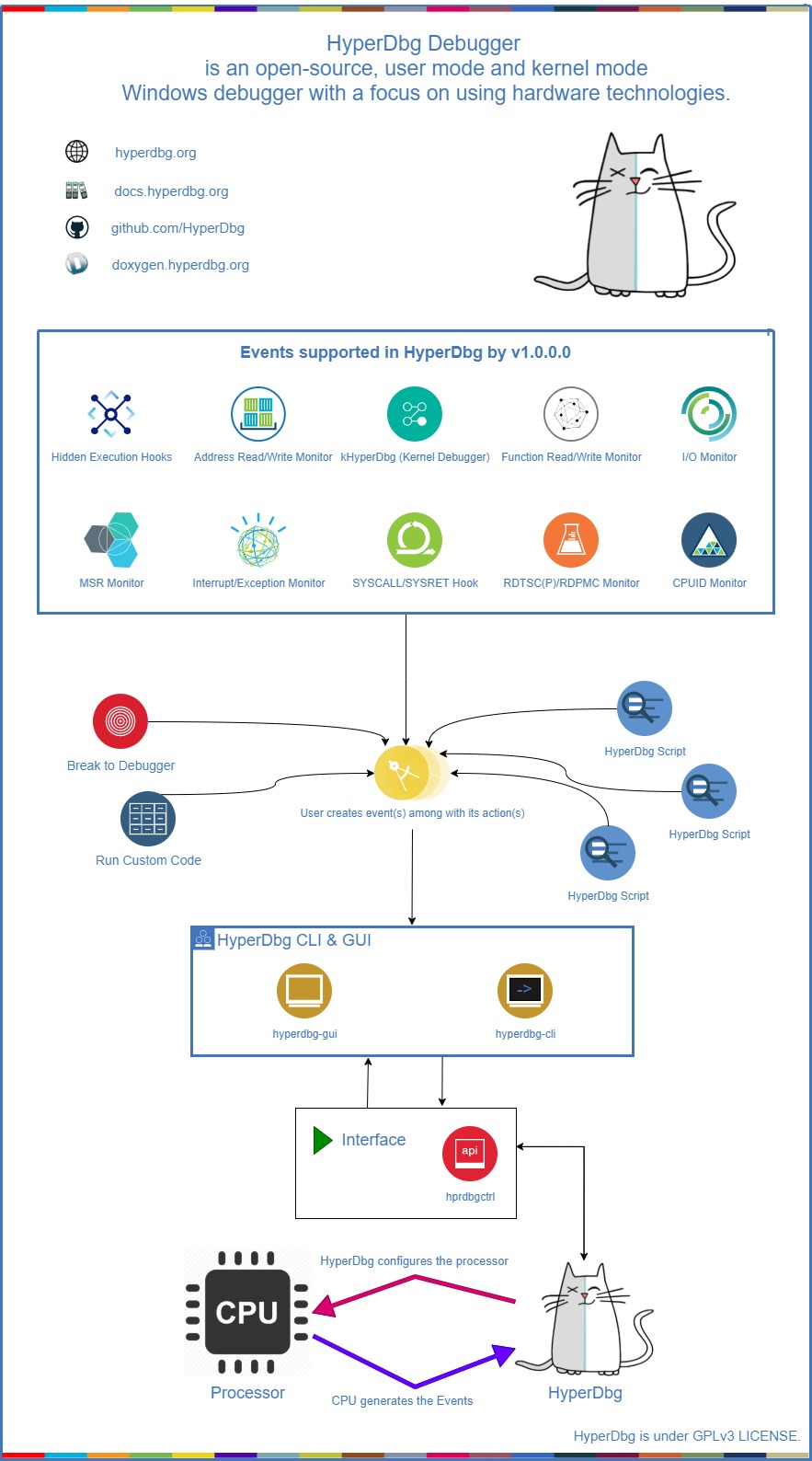
You can read about the internal design of HyperDbg and its features in the [documentation](https://docs.hyperdbg.org/design). Here's a top-level diagram that shows how HyperDbg works:
## Scripts
You can write your **[scripts](https://github.com/HyperDbg/scripts)** to automate your debugging journey. **HyperDbg** has a powerful, fast, and entirely kernel-side implemented [script engine](https://docs.hyperdbg.org/commands/scripting-language).
## Contributing
Contributing to HyperDbg is super appreciated. We have made a list of potential [tasks](https://github.com/HyperDbg/HyperDbg/blob/master/CONTRIBUTING.md#things-to-work-on) that you might be interested in contributing towards.
If you want to contribute to HyperDbg, please read the [Contribution Guide](https://github.com/HyperDbg/HyperDbg/blob/master/CONTRIBUTING.md).
## License
**HyperDbg**, and all its submodules and repos, unless a license is otherwise specified, are licensed under **GPLv3** LICENSE.
Dependencies are licensed by their own.