# arc-progress
**Repository Path**: mirrors_Hzy0913/arc-progress
## Basic Information
- **Project Name**: arc-progress
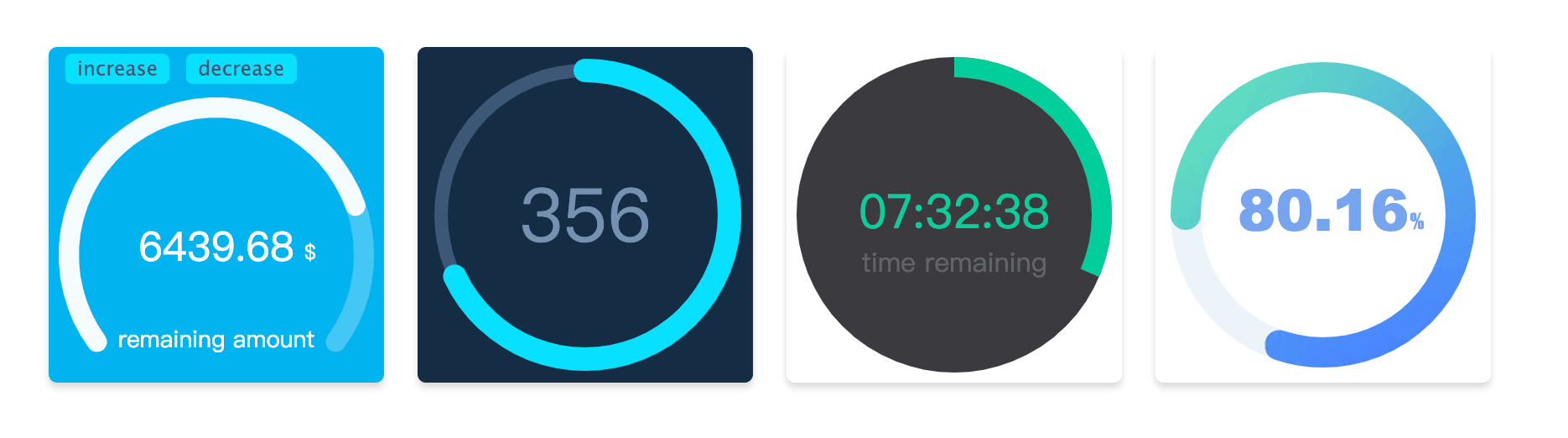
- **Description**: :whale: Arc circular animation progress bar drawn by canvas, you can used in the react component, or no dependence.
- **Primary Language**: Unknown
- **License**: MIT
- **Default Branch**: master
- **Homepage**: None
- **GVP Project**: No
## Statistics
- **Stars**: 0
- **Forks**: 0
- **Created**: 2023-07-17
- **Last Updated**: 2026-03-30
## Categories & Tags
**Categories**: Uncategorized
**Tags**: None
## README
# arc-progress.js
#### 使用canvas绘制的圆弧形进度条
#### 如果你想在react中使用,可以使用 [react-arc-progress](https://github.com/Hzy0913/arc-progress/tree/react-arc-progress "react-arc-progress") 组件,由于使用了React Hook,依赖的React版本需要 >=16.8.0
[Preview](http://preview.binlive.cn/arc-progress "Preview")
## Installation
```shell
npm install arc-progress -S
```
##### 直接引入js文件
如果选使用`
```
如果在React中使用,可以使用[react-arc-progress](https://github.com/Hzy0913/arc-progress/tree/react-arc-progress "react-arc-progress") 组件
如果在vue中使用,在可以获取真实dom节点的生命周期里进行实例化
在Vue中:
```javascript
```
## Options
##### 在实例化时传入如下可选的option
| Option | type |Description |
| ------------ | ------------ | ------------ |
| el | string or dom (必传) |容器的class 或者 id名,也可以直接传入 dom 节点的引用|
| size | number |生成进度条canvas容器的大小,默认为200|
| progress | number (必传)| 设置进度条的进度,取值范围为0 - 1|
| text | string | 设置进度条文字|
| arcStart | number |设置圆环的起始点,具体用法见下|
| arcEnd | number |设置圆环的结束点,具体用法见下|
| thickness | number |设置圆环进度条的厚度|
| fillThickness | number |设置圆环进度条填充内容的厚度,不设置该项时默认与`thickness`一致|
| emptyColor | string |设置圆环进度条为空部分的颜色|
| fillColor | string or object |设置圆环进度条填充部分的样式,可以设置纯色或渐变色,也可以使用图片进行填充,具体用法见下|
| lineCap | string |设置圆环进度条末端的类型,有3个可选的值,分别是:`butt`, `round`, `square`。默认值是 `round`|
| speed | number |设置动画速度阈,范围为-100到100,默认为0|
| animation | boolean or number |设置动画持续时间,单位为毫秒值,当取值为`false`时,没有过渡动画|
| textStyle | object |设置文字样式,具体用法见下|
| customText | array |设置自定义的文字内容,具体用法见下|
| animationEnd | function |进度条动画结束时候的回调|
| onError | function |捕获错误的回调|
| observer | function |监听进度条动画变化时的回调|
## Methods
实例化后可调用的方法
| Name |Description |
| ------------ | ------------ |
| updateProgress | 更新进度条的方法,传递参数optios如上一致(没有`el`参数)|
| destroy | 销毁进度条的方法|
## Options 说明
##### arcStart 和 arcEnd
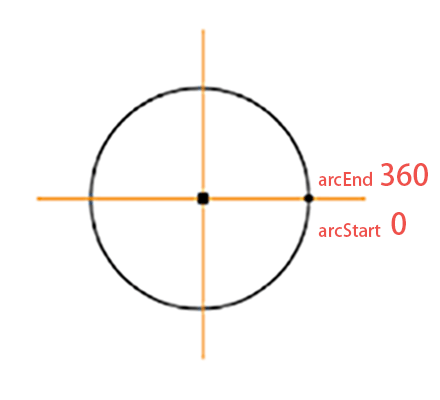 如图所示标注了弧形的起点和重点,方向为顺时针。如果你想绘制一个圆形进度条,可以设置`arcStart`为`-90`,`arcEnd`为`270`。如果想绘制一个半圆,可以设置`arcStart`为`180`,`arcEnd`为`360`。可以根据需要调整绘制起止角度数。
##### fillColor
fillColor为被填充的进度条颜色,可以传入色值为其定义颜色,如(#fe4d3c)。
如果想使用渐变色填充,改参数需要设置为对象类型,例如`{gradient: [color 1, color2, color 2]}`,则会生成三个颜色的径向渐变色。
如使用图片填充,则需要将参数设置为对象格式`{image: url}`,传入图片的url地址。例如 `fillColor: {image: 'http://img.com/fillImg'}` 时,则会使用该图片进行填充。
##### textStyle
设置传入`text`参数的文字样式,它需要为对象类型,可选的内容如下
| Name |Type |Description |
| ------------ | ------------ |------------ |
| size |string|设置文字大小, 如 `18px`|
| color |string| 设置文字颜色, 如 `#fa0556`|
| font |string| 设置文字字体, 如 `Microsoft YaHei`|
| x |number |设置文字对齐的x轴|
| y |number |设置文字对齐的y轴|
##### customText
customText 选项可以自定义文字内容,它的格式为数组,可以定义多个文字。其每个用法与`textStyle`参数一致,只是多了`text`字段。
| Name |Type |Description |
| ------------ | ------------ |------------ |
| text |string|设置文字内容|
| others || 其他参数内容与`textStyle`用法一致|
如图所示标注了弧形的起点和重点,方向为顺时针。如果你想绘制一个圆形进度条,可以设置`arcStart`为`-90`,`arcEnd`为`270`。如果想绘制一个半圆,可以设置`arcStart`为`180`,`arcEnd`为`360`。可以根据需要调整绘制起止角度数。
##### fillColor
fillColor为被填充的进度条颜色,可以传入色值为其定义颜色,如(#fe4d3c)。
如果想使用渐变色填充,改参数需要设置为对象类型,例如`{gradient: [color 1, color2, color 2]}`,则会生成三个颜色的径向渐变色。
如使用图片填充,则需要将参数设置为对象格式`{image: url}`,传入图片的url地址。例如 `fillColor: {image: 'http://img.com/fillImg'}` 时,则会使用该图片进行填充。
##### textStyle
设置传入`text`参数的文字样式,它需要为对象类型,可选的内容如下
| Name |Type |Description |
| ------------ | ------------ |------------ |
| size |string|设置文字大小, 如 `18px`|
| color |string| 设置文字颜色, 如 `#fa0556`|
| font |string| 设置文字字体, 如 `Microsoft YaHei`|
| x |number |设置文字对齐的x轴|
| y |number |设置文字对齐的y轴|
##### customText
customText 选项可以自定义文字内容,它的格式为数组,可以定义多个文字。其每个用法与`textStyle`参数一致,只是多了`text`字段。
| Name |Type |Description |
| ------------ | ------------ |------------ |
| text |string|设置文字内容|
| others || 其他参数内容与`textStyle`用法一致|