# GRDB.swift
**Repository Path**: mirrors_Marus/GRDB.swift
## Basic Information
- **Project Name**: GRDB.swift
- **Description**: A toolkit for SQLite databases, with a focus on application development
- **Primary Language**: Unknown
- **License**: MIT
- **Default Branch**: master
- **Homepage**: None
- **GVP Project**: No
## Statistics
- **Stars**: 0
- **Forks**: 0
- **Created**: 2020-08-09
- **Last Updated**: 2026-03-07
## Categories & Tags
**Categories**: Uncategorized
**Tags**: None
## README
GRDB 4 [](https://developer.apple.com/swift/) [](https://developer.apple.com/swift/) [](https://developer.apple.com/swift/) [](/LICENSE) [](https://travis-ci.org/groue/GRDB.swift)
==========
### A toolkit for SQLite databases, with a focus on application development
---
**Latest release**: May 25, 2019 • version 4.0.1 • [CHANGELOG](CHANGELOG.md) • [Migrating From GRDB 3 to GRDB 4](Documentation/GRDB3MigrationGuide.md)
**Requirements**: iOS 9.0+ / macOS 10.9+ / watchOS 2.0+ • Swift 4.2+ / Xcode 10.0+
| Swift version | GRDB version |
| ------------- | ----------------------------------------------------------- |
| **Swift 5** | **v4.0.1** |
| **Swift 4.2** | **v4.0.1** |
| Swift 4.1 | [v3.7.0](https://github.com/groue/GRDB.swift/tree/v3.7.0) |
| Swift 4 | [v2.10.0](https://github.com/groue/GRDB.swift/tree/v2.10.0) |
| Swift 3.2 | [v1.3.0](https://github.com/groue/GRDB.swift/tree/v1.3.0) |
| Swift 3.1 | [v1.3.0](https://github.com/groue/GRDB.swift/tree/v1.3.0) |
| Swift 3 | [v1.0](https://github.com/groue/GRDB.swift/tree/v1.0) |
| Swift 2.3 | [v0.81.2](https://github.com/groue/GRDB.swift/tree/v0.81.2) |
| Swift 2.2 | [v0.80.2](https://github.com/groue/GRDB.swift/tree/v0.80.2) |
**Contact**:
- Release announcements and usage tips: follow [@groue](http://twitter.com/groue) on Twitter.
- Report bugs in a [Github issue](https://github.com/groue/GRDB.swift/issues/new). Make sure you check the [existing issues](https://github.com/groue/GRDB.swift/issues?q=is%3Aopen) first.
- A question? Looking for advice? Do you wonder how to contribute? Fancy a chat? Go to the [GRDB forums](https://forums.swift.org/c/related-projects/grdb), or open a [Github issue](https://github.com/groue/GRDB.swift/issues/new).
## What is this?
GRDB provides raw access to SQL and advanced SQLite features, because one sometimes enjoys a sharp tool. It has robust concurrency primitives, so that multi-threaded applications can efficiently use their databases. It grants your application models with persistence and fetching methods, so that you don't have to deal with SQL and raw database rows when you don't want to.
Compared to [SQLite.swift](http://github.com/stephencelis/SQLite.swift) or [FMDB](http://github.com/ccgus/fmdb), GRDB can spare you a lot of glue code. Compared to [Core Data](https://developer.apple.com/library/content/documentation/Cocoa/Conceptual/CoreData/) or [Realm](http://realm.io), it can simplify your multi-threaded applications.
It comes with [up-to-date documentation](#documentation), [general guides](#general-guides--good-practices), and it is [fast](https://github.com/groue/GRDB.swift/wiki/Performance).
See [Why Adopt GRDB?](Documentation/WhyAdoptGRDB.md) if you are looking for your favorite database library.
---
Features •
Usage •
Installation •
Documentation •
Demo Application •
FAQ
---
## Features
GRDB ships with:
- [Access to raw SQL and SQLite](#sqlite-api)
- [Records](#records): Fetching and persistence methods for your custom structs and class hierarchies.
- [Query Interface](#the-query-interface): A swift way to avoid the SQL language.
- [Associations](Documentation/AssociationsBasics.md): Relations and joins between record types.
- [WAL Mode Support](#database-pools): Extra performance for multi-threaded applications.
- [Migrations](#migrations): Transform your database as your application evolves.
- [Database Observation](#database-changes-observation): Observe database changes and transactions.
- [Full-Text Search](#full-text-search)
- [Encryption](#encryption)
- [Support for Custom SQLite Builds](Documentation/CustomSQLiteBuilds.md)
Companion libraries that enhance and extend GRDB:
- [RxGRDB]: track database changes in a reactive way, with [RxSwift](https://github.com/ReactiveX/RxSwift).
- [GRDBObjc](https://github.com/groue/GRDBObjc): FMDB-compatible bindings to GRDB.
## Usage
Connect to an SQLite database
```swift
import GRDB
// Simple database connection
let dbQueue = try DatabaseQueue(path: "/path/to/database.sqlite")
// Enhanced multithreading based on SQLite's WAL mode
let dbPool = try DatabasePool(path: "/path/to/database.sqlite")
```
See [Database Connections](#database-connections)
Execute SQL statements
```swift
try dbQueue.write { db in
try db.execute(sql: """
CREATE TABLE place (
id INTEGER PRIMARY KEY AUTOINCREMENT,
title TEXT NOT NULL,
favorite BOOLEAN NOT NULL DEFAULT 0,
latitude DOUBLE NOT NULL,
longitude DOUBLE NOT NULL)
""")
try db.execute(sql: """
INSERT INTO place (title, favorite, latitude, longitude)
VALUES (?, ?, ?, ?)
""", arguments: ["Paris", true, 48.85341, 2.3488])
let parisId = db.lastInsertedRowID
// Swift 5 only
try db.execute(literal: """
INSERT INTO place (title, favorite, latitude, longitude)
VALUES (\("Madrid"), \(true), \(40.41678), \(-3.70379))
""")
}
```
See [Executing Updates](#executing-updates)
Fetch database rows and values
```swift
try dbQueue.read { db in
// Fetch database rows
let rows = try Row.fetchCursor(db, sql: "SELECT * FROM place")
while let row = try rows.next() {
let title: String = row["title"]
let isFavorite: Bool = row["favorite"]
let coordinate = CLLocationCoordinate2D(
latitude: row["latitude"],
longitude: row["longitude"])
}
// Fetch values
let placeCount = try Int.fetchOne(db, sql: "SELECT COUNT(*) FROM place")! // Int
let placeTitles = try String.fetchAll(db, sql: "SELECT title FROM place") // [String]
}
let placeCount = try dbQueue.read { db in
try Int.fetchOne(db, sql: "SELECT COUNT(*) FROM place")!
}
```
See [Fetch Queries](#fetch-queries)
Store custom models aka "records"
```swift
struct Place {
var id: Int64?
var title: String
var isFavorite: Bool
var coordinate: CLLocationCoordinate2D
}
// snip: turn Place into a "record" by adopting the protocols that
// provide fetching and persistence methods.
try dbQueue.write { db in
// Create database table
try db.create(table: "place") { t in
t.autoIncrementedPrimaryKey("id")
t.column("title", .text).notNull()
t.column("favorite", .boolean).notNull().defaults(to: false)
t.column("longitude", .double).notNull()
t.column("latitude", .double).notNull()
}
var berlin = Place(
id: nil,
title: "Berlin",
isFavorite: false,
coordinate: CLLocationCoordinate2D(latitude: 52.52437, longitude: 13.41053))
try berlin.insert(db)
berlin.id // some value
berlin.isFavorite = true
try berlin.update(db)
}
```
See [Records](#records)
Fetch records and values with the Swift query interface
```swift
try dbQueue.read { db in
// Place?
let paris = try Place.fetchOne(db, key: 1)
// Place?
let berlin = try Place.filter(Column("title") == "Berlin").fetchOne(db)
// [Place]
let favoritePlaces = try Place
.filter(Column("favorite") == true)
.order(Column("title"))
.fetchAll(db)
// Int
let favoriteCount = try Place.filter(Column("favorite")).fetchCount(db)
// SQL is always welcome
let places = try Place.fetchAll(db, sql: "SELECT * FROM place")
}
```
See the [Query Interface](#the-query-interface)
Be notified of database changes
```swift
let request = Place.order(Column("title"))
try ValueObservation
.trackingAll(request)
.start(in: dbQueue) { (places: [Place]) in
print("Places have changed.")
}
```
See [Database Changes Observation](#database-changes-observation)
Documentation
=============
**GRDB runs on top of SQLite**: you should get familiar with the [SQLite FAQ](http://www.sqlite.org/faq.html). For general and detailed information, jump to the [SQLite Documentation](http://www.sqlite.org/docs.html).
#### Reference
- [GRDB Reference](http://groue.github.io/GRDB.swift/docs/4.0/index.html) (generated by [Jazzy](https://github.com/realm/jazzy))
#### Getting Started
- [Installation](#installation)
- [Demo Application](#demo-application)
- [Database Connections](#database-connections): Connect to SQLite databases
#### SQLite and SQL
- [SQLite API](#sqlite-api): The low-level SQLite API • [executing updates](#executing-updates) • [fetch queries](#fetch-queries) • [SQL Interpolation]
#### Records and the Query Interface
- [Records](#records): Fetching and persistence methods for your custom structs and class hierarchies.
- [Query Interface](#the-query-interface): A swift way to generate SQL • [table creation](#database-schema) • [requests](#requests)
#### Application Tools
- [Migrations](#migrations): Transform your database as your application evolves.
- [Full-Text Search](#full-text-search): Perform efficient and customizable full-text searches.
- [Joined Queries Support](#joined-queries-support): Consume complex joined queries.
- [Database Changes Observation](#database-changes-observation): Observe database changes and transactions.
- [Encryption](#encryption): Encrypt your database with SQLCipher.
- [Backup](#backup): Dump the content of a database to another.
#### Good to Know
- [Avoiding SQL Injection](#avoiding-sql-injection)
- [Error Handling](#error-handling)
- [Unicode](#unicode)
- [Memory Management](#memory-management)
- [Data Protection](#data-protection)
- [Concurrency](#concurrency)
- [Performance](#performance)
#### General Guides & Good Practices
- :bulb: [Good Practices for Designing Record Types](Documentation/GoodPracticesForDesigningRecordTypes.md)
- :bulb: [Migrating From GRDB 3 to GRDB 4](Documentation/GRDB3MigrationGuide.md)
- :bulb: [Issues tagged "best practices"](https://github.com/groue/GRDB.swift/issues?q=is%3Aissue+label%3A%22best+practices%22)
- :question: [Issues tagged "question"](https://github.com/groue/GRDB.swift/issues?utf8=✓&q=is%3Aissue%20label%3Aquestion)
- :blue_book: [Why Adopt GRDB?](Documentation/WhyAdoptGRDB.md)
- :blue_book: [How to build an iOS application with SQLite and GRDB.swift](https://medium.com/@gwendal.roue/how-to-build-an-ios-application-with-sqlite-and-grdb-swift-d023a06c29b3)
- :blue_book: [Four different ways to handle SQLite concurrency](https://medium.com/@gwendal.roue/four-different-ways-to-handle-sqlite-concurrency-db3bcc74d00e)
- :blue_book: [Unexpected SQLite with Swift](https://hackernoon.com/unexpected-sqlite-with-swift-ddc6343bcbfc)
**[FAQ](#faq)**
**[Sample Code](#sample-code)**
Installation
============
**The installation procedures below have GRDB use the version of SQLite that ships with the target operating system.**
See [Encryption](#encryption) for the installation procedure of GRDB with SQLCipher.
See [Custom SQLite builds](Documentation/CustomSQLiteBuilds.md) for the installation procedure of GRDB with a customized build of SQLite 3.27.2.
See [Enabling FTS5 Support](#enabling-fts5-support) for the installation procedure of GRDB with support for the FTS5 full-text engine.
## CocoaPods
[CocoaPods](http://cocoapods.org/) is a dependency manager for Xcode projects. To use GRDB with CocoaPods (version 1.2 or higher), specify in your `Podfile`:
```ruby
use_frameworks!
pod 'GRDB.swift'
```
## Swift Package Manager
The [Swift Package Manager](https://swift.org/package-manager/) automates the distribution of Swift code. To use GRDB with SPM, add a dependency to your `Package.swift` file:
```swift
let package = Package(
dependencies: [
.package(url: "https://github.com/groue/GRDB.swift.git", from: "4.0.1")
]
)
```
Note that Linux is not currently supported.
## Carthage
[Carthage](https://github.com/Carthage/Carthage) is **unsupported**. For some context about this decision, see [#433](https://github.com/groue/GRDB.swift/issues/433).
## Manually
1. [Download](https://github.com/groue/GRDB.swift/releases/tag/v4.0.1) a copy of GRDB, or clone its repository and make sure you use the latest tagged version with the `git checkout v4.0.1` command.
2. Embed the `GRDB.xcodeproj` project in your own project.
3. Add the `GRDBOSX`, `GRDBiOS`, or `GRDBWatchOS` target in the **Target Dependencies** section of the **Build Phases** tab of your application target (extension target for WatchOS).
4. Add the `GRDB.framework` from the targetted platform to the **Embedded Binaries** section of the **General** tab of your application target (extension target for WatchOS).
> :bulb: **Tip**: see the [Demo Application](DemoApps/GRDBDemoiOS/README.md) for an example of such integration.
Demo Application
================
The repository comes with a [demo application](DemoApps/GRDBDemoiOS/README.md) that shows you:
- how to setup a database in an iOS app
- how to define a simple [Codable Record](#codable-records)
- how to track database changes with [ValueObservation] and [FetchedRecordsController].
Database Connections
====================
GRDB provides two classes for accessing SQLite databases: `DatabaseQueue` and `DatabasePool`:
```swift
import GRDB
// Pick one:
let dbQueue = try DatabaseQueue(path: "/path/to/database.sqlite")
let dbPool = try DatabasePool(path: "/path/to/database.sqlite")
```
The differences are:
- Database pools allow concurrent database accesses (this can improve the performance of multithreaded applications).
- Database pools open your SQLite database in the [WAL mode](https://www.sqlite.org/wal.html) (unless read-only).
- Database queues support [in-memory databases](https://www.sqlite.org/inmemorydb.html).
**If you are not sure, choose DatabaseQueue.** You will always be able to switch to DatabasePool later.
- [Database Queues](#database-queues)
- [Database Pools](#database-pools)
## Database Queues
**Open a database queue** with the path to a database file:
```swift
import GRDB
let dbQueue = try DatabaseQueue(path: "/path/to/database.sqlite")
let inMemoryDBQueue = DatabaseQueue()
```
SQLite creates the database file if it does not already exist. The connection is closed when the database queue gets deallocated.
**A database queue can be used from any thread.** The `write` and `read` methods are synchronous, and block the current thread until your database statements are executed in a protected dispatch queue:
```swift
// Modify the database:
try dbQueue.write { db in
try db.create(table: "place") { ... }
try Place(...).insert(db)
}
// Read values:
try dbQueue.read { db in
let places = try Place.fetchAll(db)
let placeCount = try Place.fetchCount(db)
}
```
Database access methods can return values:
```swift
let placeCount = try dbQueue.read { db in
try Place.fetchCount(db)
}
let newPlaceCount = try dbQueue.write { db -> Int in
try Place(...).insert(db)
return try Place.fetchCount(db)
}
```
**A database queue serializes accesses to the database**, which means that there is never more than one thread that uses the database.
- When you don't need to modify the database, prefer the `read` method. It prevents any modification to the database.
- The `write` method wraps your database statements in a transaction that commits if and only if no error occurs. On the first unhandled error, all changes are reverted, the whole transaction is rollbacked, and the error is rethrown.
When precise transaction handling is required, see [Transactions and Savepoints](#transactions-and-savepoints).
**A database queue needs your application to follow rules in order to deliver its safety guarantees.** Please refer to the [Concurrency](#concurrency) chapter.
> :bulb: **Tip**: see the [Demo Application](DemoApps/GRDBDemoiOS/README.md) for a sample code that sets up a database queue on iOS.
### DatabaseQueue Configuration
```swift
var config = Configuration()
config.readonly = true
config.foreignKeysEnabled = true // Default is already true
config.trace = { print($0) } // Prints all SQL statements
config.label = "MyDatabase" // Useful when your app opens multiple databases
let dbQueue = try DatabaseQueue(
path: "/path/to/database.sqlite",
configuration: config)
```
See [Configuration](http://groue.github.io/GRDB.swift/docs/4.0/Structs/Configuration.html) for more details.
## Database Pools
**A database pool allows concurrent database accesses.**
```swift
import GRDB
let dbPool = try DatabasePool(path: "/path/to/database.sqlite")
```
SQLite creates the database file if it does not already exist. The connection is closed when the database pool gets deallocated.
> :point_up: **Note**: unless read-only, a database pool opens your database in the SQLite "WAL mode". The WAL mode does not fit all situations. Please have a look at https://www.sqlite.org/wal.html.
**A database pool can be used from any thread.** The `write` and `read` methods are synchronous, and block the current thread until your database statements are executed in a protected dispatch queue:
```swift
// Modify the database:
try dbPool.write { db in
try db.create(table: "place") { ... }
try Place(...).insert(db)
}
// Read values:
try dbPool.read { db in
let places = try Place.fetchAll(db)
let placeCount = try Place.fetchCount(db)
}
```
Database access methods can return values:
```swift
let placeCount = try dbPool.read { db in
try Place.fetchCount(db)
}
let newPlaceCount = try dbPool.write { db -> Int in
try Place(...).insert(db)
return try Place.fetchCount(db)
}
```
**Database pools allow several threads to access the database at the same time:**
- When you don't need to modify the database, prefer the `read` method, because several threads can perform reads in parallel.
Reads are generally non-blocking, unless the maximum number of concurrent reads has been reached. In this case, a read has to wait for another read to complete. That maximum number can be [configured](#databasepool-configuration).
- Reads are guaranteed an immutable view of the last committed state of the database, regardless of concurrent writes. This kind of isolation is called [snapshot isolation](https://sqlite.org/isolation.html).
- Unlike reads, writes are serialized. There is never more than a single thread that is writing into the database.
- The `write` method wraps your database statements in a transaction that commits if and only if no error occurs. On the first unhandled error, all changes are reverted, the whole transaction is rollbacked, and the error is rethrown.
When precise transaction handling is required, see [Transactions and Savepoints](#transactions-and-savepoints).
- Database pools can take [snapshots](#database-snapshots) of the database.
**A database pool needs your application to follow rules in order to deliver its safety guarantees.** See the [Concurrency](#concurrency) chapter for more details about database pools, how they differ from database queues, and advanced use cases.
> :bulb: **Tip**: see the [Demo Application](DemoApps/GRDBDemoiOS/README.md) for a sample code that sets up a database queue on iOS, and just replace DatabaseQueue with DatabasePool.
### DatabasePool Configuration
```swift
var config = Configuration()
config.readonly = true
config.foreignKeysEnabled = true // Default is already true
config.trace = { print($0) } // Prints all SQL statements
config.label = "MyDatabase" // Useful when your app opens multiple databases
config.maximumReaderCount = 10 // The default is 5
let dbPool = try DatabasePool(
path: "/path/to/database.sqlite",
configuration: config)
```
See [Configuration](http://groue.github.io/GRDB.swift/docs/4.0/Structs/Configuration.html) for more details.
Database pools are more memory-hungry than database queues. See [Memory Management](#memory-management) for more information.
SQLite API
==========
**In this section of the documentation, we will talk SQL.** Jump to the [query interface](#the-query-interface) if SQL is not your cup of tea.
- [Executing Updates](#executing-updates)
- [Fetch Queries](#fetch-queries)
- [Fetching Methods](#fetching-methods)
- [Row Queries](#row-queries)
- [Value Queries](#value-queries)
- [Values](#values)
- [Data](#data-and-memory-savings)
- [Date and DateComponents](#date-and-datecomponents)
- [NSNumber and NSDecimalNumber](#nsnumber-and-nsdecimalnumber)
- [Swift enums](#swift-enums)
- [Custom Value Types](#custom-value-types)
- [Transactions and Savepoints](#transactions-and-savepoints)
- [SQL Interpolation]
Advanced topics:
- [Prepared Statements](#prepared-statements)
- [Custom SQL Functions and Aggregates](#custom-sql-functions-and-aggregates)
- [Database Schema Introspection](#database-schema-introspection)
- [Row Adapters](#row-adapters)
- [Raw SQLite Pointers](#raw-sqlite-pointers)
## Executing Updates
Once granted with a [database connection](#database-connections), the `execute` method executes the SQL statements that do not return any database row, such as `CREATE TABLE`, `INSERT`, `DELETE`, `ALTER`, etc.
For example:
```swift
try dbQueue.write { db in
try db.execute(sql: """
CREATE TABLE player (
id INTEGER PRIMARY KEY AUTOINCREMENT,
name TEXT NOT NULL,
score INT)
""")
try db.execute(
sql: "INSERT INTO player (name, score) VALUES (?, ?)",
arguments: ["Barbara", 1000])
try db.execute(
sql: "UPDATE player SET score = :score WHERE id = :id",
arguments: ["score": 1000, "id": 1])
}
}
```
The `?` and colon-prefixed keys like `:score` in the SQL query are the **statements arguments**. You pass arguments with arrays or dictionaries, as in the example above. See [Values](#values) for more information on supported arguments types (Bool, Int, String, Date, Swift enums, etc.), and [StatementArguments](http://groue.github.io/GRDB.swift/docs/4.0/Structs/StatementArguments.html) for a detailed documentation of SQLite arguments.
In Swift 5, you can embed query arguments right into your SQL queries, with the `literal` argument label, as in the example below. See [SQL Interpolation] for more details.
```swift
// Swift 5
try dbQueue.write { db in
try db.execute(literal: """
INSERT INTO player (name, score)
VALUES (\("O'Brien"), \(550))
""")
}
```
**Never ever embed values directly in your raw SQL strings**. See [Avoiding SQL Injection](#avoiding-sql-injection) for more information:
```swift
// WRONG: don't embed values in raw SQL strings
let id = 123
let name = textField.text
try db.execute(
sql: "UPDATE player SET name = '\(name)' WHERE id = \(id)")
// CORRECT: use SQL Interpolation (Swift 5)
try db.execute(
literal: "UPDATE player SET name = \(name) WHERE id = \(id)")
// CORRECT: use arguments dictionary
try db.execute(
sql: "UPDATE player SET name = :name WHERE id = :id",
arguments: ["name": name, "id": id])
// CORRECT: use arguments array
try db.execute(
sql: "UPDATE player SET name = ? WHERE id = ?",
arguments: [name, id])
```
**Join multiple statements with a semicolon**:
```swift
try db.execute(sql: """
INSERT INTO player (name, score) VALUES (?, ?);
INSERT INTO player (name, score) VALUES (?, ?);
""", arguments: ["Arthur", 750, "Barbara", 1000])
// Swift 5
try db.execute(literal: """
INSERT INTO player (name, score) VALUES (\("Arthur"), \(750));
INSERT INTO player (name, score) VALUES (\("Barbara"), \(1000));
""")
```
When you want to make sure that a single statement is executed, use [Prepared Statements](#prepared-statements).
**After an INSERT statement**, you can get the row ID of the inserted row:
```swift
try db.execute(
sql: "INSERT INTO player (name, score) VALUES (?, ?)",
arguments: ["Arthur", 1000])
let playerId = db.lastInsertedRowID
```
Don't miss [Records](#records), that provide classic **persistence methods**:
```swift
var player = Player(name: "Arthur", score: 1000)
try player.insert(db)
let playerId = player.id
```
## Fetch Queries
[Database connections](#database-connections) let you fetch database rows, plain values, and custom models aka "records".
**Rows** are the raw results of SQL queries:
```swift
try dbQueue.read { db in
if let row = try Row.fetchOne(db, sql: "SELECT * FROM wine WHERE id = ?", arguments: [1]) {
let name: String = row["name"]
let color: Color = row["color"]
print(name, color)
}
}
```
**Values** are the Bool, Int, String, Date, Swift enums, etc. stored in row columns:
```swift
try dbQueue.read { db in
let urls = try URL.fetchCursor(db, sql: "SELECT url FROM wine")
while let url = try urls.next() {
print(url)
}
}
```
**Records** are your application objects that can initialize themselves from rows:
```swift
let wines = try dbQueue.read { db in
try Wine.fetchAll(db, sql: "SELECT * FROM wine")
}
```
- [Fetching Methods](#fetching-methods) and [Cursors](#cursors)
- [Row Queries](#row-queries)
- [Value Queries](#value-queries)
- [Records](#records)
### Fetching Methods
**Throughout GRDB**, you can always fetch *cursors*, *arrays*, or *single values* of any fetchable type (database [row](#row-queries), simple [value](#value-queries), or custom [record](#records)):
```swift
try Row.fetchCursor(...) // A Cursor of Row
try Row.fetchAll(...) // [Row]
try Row.fetchOne(...) // Row?
```
- `fetchCursor` returns a **[cursor](#cursors)** over fetched values:
```swift
let rows = try Row.fetchCursor(db, sql: "SELECT ...") // A Cursor of Row
```
- `fetchAll` returns an **array**:
```swift
let players = try Player.fetchAll(db, sql: "SELECT ...") // [Player]
```
- `fetchOne` returns a **single optional value**, and consumes a single database row (if any).
```swift
let count = try Int.fetchOne(db, sql: "SELECT COUNT(*) ...") // Int?
```
### Cursors
**Whenever you consume several rows from the database, you can fetch an Array, or a Cursor**.
The `fetchAll()` method returns a regular Swift array, that you iterate like all other arrays:
```swift
try dbQueue.read { db in
// [Player]
let players = try Player.fetchAll(db, sql: "SELECT ...")
for player in players {
// use player
}
}
```
Unlike arrays, cursors returned by `fetchCursor()` load their results step after step:
```swift
try dbQueue.read { db in
// Cursor of Player
let players = try Player.fetchCursor(db, sql: "SELECT ...")
while let player = try players.next() {
// use player
}
}
```
Both arrays and cursors can iterate over database results. How do you choose one or the other? Look at the differences:
- **Cursors can not be used on any thread**: you must consume a cursor on the dispatch queue it was created in. Particularly, don't extract a cursor out of a database access method:
```swift
// Wrong
let cursor = try dbQueue.read { db in
try Player.fetchCursor(db, ...)
}
while let player = try cursor.next() { ... }
```
Conversely, arrays may be consumed on any thread:
```swift
// OK
let array = try dbQueue.read { db in
try Player.fetchAll(db, ...)
}
for player in array { ... }
```
- **Cursors can be iterated only one time.** Arrays can be iterated many times.
- **Cursors iterate database results in a lazy fashion**, and don't consume much memory. Arrays contain copies of database values, and may take a lot of memory when there are many fetched results.
- **Cursors are granted with direct access to SQLite,** unlike arrays that have to take the time to copy database values. If you look after extra performance, you may prefer cursors over arrays.
- **Cursors adopt the [Cursor](http://groue.github.io/GRDB.swift/docs/4.0/Protocols/Cursor.html) protocol, which looks a lot like standard [lazy sequences](https://developer.apple.com/reference/swift/lazysequenceprotocol) of Swift.** As such, cursors come with many convenience methods: `compactMap`, `contains`, `dropFirst`, `dropLast`, `drop(while:)`, `enumerated`, `filter`, `first`, `flatMap`, `forEach`, `joined`, `joined(separator:)`, `max`, `max(by:)`, `min`, `min(by:)`, `map`, `prefix`, `prefix(while:)`, `reduce`, `reduce(into:)`, `suffix`:
```swift
// Prints all Github links
try URL
.fetchCursor(db, sql: "SELECT url FROM link")
.filter { url in url.host == "github.com" }
.forEach { url in print(url) }
// An efficient cursor of coordinates:
let locations = try Row.
.fetchCursor(db, sql: "SELECT latitude, longitude FROM place")
.map { row in
CLLocationCoordinate2D(latitude: row[0], longitude: row[1])
}
// Turn cursors into arrays or sets:
let array = try Array(cursor)
let set = try Set(cursor)
```
- **Cursors are not Swift sequences.** That's because Swift sequences can't handle iteration errors, when reading SQLite results may fail at any time. SQL functions may throw errors. On iOS, [data protection](#data-protection) may block access to the database file in the background. On macOS, your application users may mess with the file system.
- **Cursors require a little care**:
- Don't modify the results during a cursor iteration:
```swift
// Undefined behavior
while let player = try players.next() {
try db.execute(sql: "DELETE ...")
}
```
- Don't turn a cursor of `Row` into an array. You would not get the distinct rows you expect. To get a array of rows, use `Row.fetchAll(...)`. Generally speaking, make sure you copy a row whenever you extract it from a cursor for later use: `row.copy()`.
If you don't see, or don't care about the difference, use arrays. If you care about memory and performance, use cursors when appropriate.
### Row Queries
- [Fetching Rows](#fetching-rows)
- [Column Values](#column-values)
- [DatabaseValue](#databasevalue)
- [Rows as Dictionaries](#rows-as-dictionaries)
#### Fetching Rows
Fetch **cursors** of rows, **arrays**, or **single** rows (see [fetching methods](#fetching-methods)):
```swift
try dbQueue.read { db in
try Row.fetchCursor(db, sql: "SELECT ...", arguments: ...) // A Cursor of Row
try Row.fetchAll(db, sql: "SELECT ...", arguments: ...) // [Row]
try Row.fetchOne(db, sql: "SELECT ...", arguments: ...) // Row?
let rows = try Row.fetchCursor(db, sql: "SELECT * FROM wine")
while let row = try rows.next() {
let name: String = row["name"]
let color: Color = row["color"]
print(name, color)
}
}
let rows = try dbQueue.read { db in
try Row.fetchAll(db, sql: "SELECT * FROM player")
}
```
Arguments are optional arrays or dictionaries that fill the positional `?` and colon-prefixed keys like `:name` in the query:
```swift
let rows = try Row.fetchAll(db,
sql: "SELECT * FROM player WHERE name = ?",
arguments: ["Arthur"])
let rows = try Row.fetchAll(db,
sql: "SELECT * FROM player WHERE name = :name",
arguments: ["name": "Arthur"])
```
See [Values](#values) for more information on supported arguments types (Bool, Int, String, Date, Swift enums, etc.), and [StatementArguments](http://groue.github.io/GRDB.swift/docs/4.0/Structs/StatementArguments.html) for a detailed documentation of SQLite arguments.
Unlike row arrays that contain copies of the database rows, row cursors are close to the SQLite metal, and require a little care:
> :point_up: **Don't turn a cursor of `Row` into an array**. You would not get the distinct rows you expect. To get a array of rows, use `Row.fetchAll(...)`. Generally speaking, make sure you copy a row whenever you extract it from a cursor for later use: `row.copy()`.
#### Column Values
**Read column values** by index or column name:
```swift
let name: String = row[0] // 0 is the leftmost column
let name: String = row["name"] // Leftmost matching column - lookup is case-insensitive
let name: String = row[Column("name")] // Using query interface's Column
```
Make sure to ask for an optional when the value may be NULL:
```swift
let name: String? = row["name"]
```
The `row[]` subscript returns the type you ask for. See [Values](#values) for more information on supported value types:
```swift
let bookCount: Int = row["bookCount"]
let bookCount64: Int64 = row["bookCount"]
let hasBooks: Bool = row["bookCount"] // false when 0
let string: String = row["date"] // "2015-09-11 18:14:15.123"
let date: Date = row["date"] // Date
self.date = row["date"] // Depends on the type of the property.
```
You can also use the `as` type casting operator:
```swift
row[...] as Int
row[...] as Int?
```
> :warning: **Warning**: avoid the `as!` and `as?` operators:
>
> ```swift
> if let int = row[...] as? Int { ... } // BAD - doesn't work
> if let int = row[...] as Int? { ... } // GOOD
> ```
Generally speaking, you can extract the type you need, provided it can be converted from the underlying SQLite value:
- **Successful conversions include:**
- All numeric SQLite values to all numeric Swift types, and Bool (zero is the only false boolean).
- Text SQLite values to Swift String.
- Blob SQLite values to Foundation Data.
See [Values](#values) for more information on supported types (Bool, Int, String, Date, Swift enums, etc.)
- **NULL returns nil.**
```swift
let row = try Row.fetchOne(db, sql: "SELECT NULL")!
row[0] as Int? // nil
row[0] as Int // fatal error: could not convert NULL to Int.
```
There is one exception, though: the [DatabaseValue](#databasevalue) type:
```swift
row[0] as DatabaseValue // DatabaseValue.null
```
- **Missing columns return nil.**
```swift
let row = try Row.fetchOne(db, sql: "SELECT 'foo' AS foo")!
row["missing"] as String? // nil
row["missing"] as String // fatal error: no such column: missing
```
You can explicitly check for a column presence with the `hasColumn` method.
- **Invalid conversions throw a fatal error.**
```swift
let row = try Row.fetchOne(db, sql: "SELECT 'Mom’s birthday'")!
row[0] as String // "Mom’s birthday"
row[0] as Date? // fatal error: could not convert "Mom’s birthday" to Date.
row[0] as Date // fatal error: could not convert "Mom’s birthday" to Date.
let row = try Row.fetchOne(db, sql: "SELECT 256")!
row[0] as Int // 256
row[0] as UInt8? // fatal error: could not convert 256 to UInt8.
row[0] as UInt8 // fatal error: could not convert 256 to UInt8.
```
Those conversion fatal errors can be avoided with the [DatabaseValue](#databasevalue) type:
```swift
let row = try Row.fetchOne(db, sql: "SELECT 'Mom’s birthday'")!
let dbValue: DatabaseValue = row[0]
if dbValue.isNull {
// Handle NULL
} else if let date = Date.fromDatabaseValue(dbValue) {
// Handle valid date
} else {
// Handle invalid date
}
```
This extra verbosity is the consequence of having to deal with an untrusted database: you may consider fixing the content of your database instead. See [Fatal Errors](#fatal-errors) for more information.
- **SQLite has a weak type system, and provides [convenience conversions](https://www.sqlite.org/c3ref/column_blob.html) that can turn String to Int, Double to Blob, etc.**
GRDB will sometimes let those conversions go through:
```swift
let rows = try Row.fetchCursor(db, sql: "SELECT '20 small cigars'")
while let row = try rows.next() {
row[0] as Int // 20
}
```
Don't freak out: those conversions did not prevent SQLite from becoming the immensely successful database engine you want to use. And GRDB adds safety checks described just above. You can also prevent those convenience conversions altogether by using the [DatabaseValue](#databasevalue) type.
#### DatabaseValue
**DatabaseValue is an intermediate type between SQLite and your values, which gives information about the raw value stored in the database.**
You get DatabaseValue just like other value types:
```swift
let dbValue: DatabaseValue = row[0]
let dbValue: DatabaseValue? = row["name"] // nil if and only if column does not exist
// Check for NULL:
dbValue.isNull // Bool
// The stored value:
dbValue.storage.value // Int64, Double, String, Data, or nil
// All the five storage classes supported by SQLite:
switch dbValue.storage {
case .null: print("NULL")
case .int64(let int64): print("Int64: \(int64)")
case .double(let double): print("Double: \(double)")
case .string(let string): print("String: \(string)")
case .blob(let data): print("Data: \(data)")
}
```
You can extract regular [values](#values) (Bool, Int, String, Date, Swift enums, etc.) from DatabaseValue with the [DatabaseValueConvertible.fromDatabaseValue()](#custom-value-types) method:
```swift
let dbValue: DatabaseValue = row["bookCount"]
let bookCount = Int.fromDatabaseValue(dbValue) // Int?
let bookCount64 = Int64.fromDatabaseValue(dbValue) // Int64?
let hasBooks = Bool.fromDatabaseValue(dbValue) // Bool?, false when 0
let dbValue: DatabaseValue = row["date"]
let string = String.fromDatabaseValue(dbValue) // "2015-09-11 18:14:15.123"
let date = Date.fromDatabaseValue(dbValue) // Date?
```
`fromDatabaseValue` returns nil for invalid conversions:
```swift
let row = try Row.fetchOne(db, sql: "SELECT 'Mom’s birthday'")!
let dbValue: DatabaseValue = row[0]
let string = String.fromDatabaseValue(dbValue) // "Mom’s birthday"
let int = Int.fromDatabaseValue(dbValue) // nil
let date = Date.fromDatabaseValue(dbValue) // nil
```
#### Rows as Dictionaries
Row adopts the standard [RandomAccessCollection](https://developer.apple.com/documentation/swift/randomaccesscollection) protocol, and can be seen as a dictionary of [DatabaseValue](#databasevalue):
```swift
// All the (columnName, dbValue) tuples, from left to right:
for (columnName, dbValue) in row {
...
}
```
**You can build rows from dictionaries** (standard Swift dictionaries and NSDictionary). See [Values](#values) for more information on supported types:
```swift
let row: Row = ["name": "foo", "date": nil]
let row = Row(["name": "foo", "date": nil])
let row = Row(/* [AnyHashable: Any] */) // nil if invalid dictionary
```
Yet rows are not real dictionaries: they may contain duplicate columns:
```swift
let row = try Row.fetchOne(db, sql: "SELECT 1 AS foo, 2 AS foo")!
row.columnNames // ["foo", "foo"]
row.databaseValues // [1, 2]
row["foo"] // 1 (leftmost matching column)
for (columnName, dbValue) in row { ... } // ("foo", 1), ("foo", 2)
```
**When you build a dictionary from a row**, you have to disambiguate identical columns, and choose how to present database values. For example:
- A `[String: DatabaseValue]` dictionary that keeps leftmost value in case of duplicated column name:
```swift
let dict = Dictionary(row, uniquingKeysWith: { (left, _) in left })
```
- A `[String: AnyObject]` dictionary which keeps rightmost value in case of duplicated column name. This dictionary is identical to FMResultSet's resultDictionary from FMDB. It contains NSNull values for null columns, and can be shared with Objective-C:
```swift
let dict = Dictionary(
row.map { (column, dbValue) in
(column, dbValue.storage.value as AnyObject)
},
uniquingKeysWith: { (_, right) in right })
```
- A `[String: Any]` dictionary that can feed, for example, JSONSerialization:
```swift
let dict = Dictionary(
row.map { (column, dbValue) in
(column, dbValue.storage.value)
},
uniquingKeysWith: { (left, _) in left })
```
See the documentation of [`Dictionary.init(_:uniquingKeysWith:)`](https://developer.apple.com/documentation/swift/dictionary/2892961-init) for more information.
### Value Queries
Instead of rows, you can directly fetch **[values](#values)**. Like rows, fetch them as **cursors**, **arrays**, or **single** values (see [fetching methods](#fetching-methods)). Values are extracted from the leftmost column of the SQL queries:
```swift
try dbQueue.read { db in
try Int.fetchCursor(db, sql: "SELECT ...", arguments: ...) // A Cursor of Int
try Int.fetchAll(db, sql: "SELECT ...", arguments: ...) // [Int]
try Int.fetchOne(db, sql: "SELECT ...", arguments: ...) // Int?
// When database may contain NULL:
try Optional.fetchCursor(db, sql: "SELECT ...", arguments: ...) // A Cursor of Int?
try Optional.fetchAll(db, sql: "SELECT ...", arguments: ...) // [Int?]
}
let playerCount = try dbQueue.read { db in
try Int.fetchOne(db, sql: "SELECT COUNT(*) FROM player")!
}
```
`fetchOne` returns an optional value which is nil in two cases: either the SELECT statement yielded no row, or one row with a NULL value.
There are many supported value types (Bool, Int, String, Date, Swift enums, etc.). See [Values](#values) for more information:
```swift
let count = try Int.fetchOne(db, sql: "SELECT COUNT(*) FROM player")! // Int
let urls = try URL.fetchAll(db, sql: "SELECT url FROM link") // [URL]
```
## Values
GRDB ships with built-in support for the following value types:
- **Swift Standard Library**: Bool, Double, Float, all signed and unsigned integer types, String, [Swift enums](#swift-enums).
- **Foundation**: [Data](#data-and-memory-savings), [Date](#date-and-datecomponents), [DateComponents](#date-and-datecomponents), NSNull, [NSNumber](#nsnumber-and-nsdecimalnumber), NSString, URL, [UUID](#uuid).
- **CoreGraphics**: CGFloat.
- **[DatabaseValue](#databasevalue)**, the type which gives information about the raw value stored in the database.
- **Full-Text Patterns**: [FTS3Pattern](#fts3pattern) and [FTS5Pattern](#fts5pattern).
- Generally speaking, all types that adopt the [DatabaseValueConvertible](#custom-value-types) protocol.
Values can be used as [statement arguments](http://groue.github.io/GRDB.swift/docs/4.0/Structs/StatementArguments.html):
```swift
let url: URL = ...
let verified: Bool = ...
try db.execute(
sql: "INSERT INTO link (url, verified) VALUES (?, ?)",
arguments: [url, verified])
```
Values can be [extracted from rows](#column-values):
```swift
let rows = try Row.fetchCursor(db, sql: "SELECT * FROM link")
while let row = try rows.next() {
let url: URL = row["url"]
let verified: Bool = row["verified"]
}
```
Values can be [directly fetched](#value-queries):
```swift
let urls = try URL.fetchAll(db, sql: "SELECT url FROM link") // [URL]
```
Use values in [Records](#records):
```swift
struct Link: FetchableRecord {
var url: URL
var isVerified: Bool
init(row: Row) {
url = row["url"]
isVerified = row["verified"]
}
}
```
Use values in the [query interface](#the-query-interface):
```swift
let url: URL = ...
let link = try Link.filter(Column("url") == url).fetchOne(db)
```
### Data (and Memory Savings)
**Data** suits the BLOB SQLite columns. It can be stored and fetched from the database just like other [values](#values):
```swift
let rows = try Row.fetchCursor(db, sql: "SELECT data, ...")
while let row = try rows.next() {
let data: Data = row["data"]
}
```
At each step of the request iteration, the `row[]` subscript creates *two copies* of the database bytes: one fetched by SQLite, and another, stored in the Swift Data value.
**You have the opportunity to save memory** by not copying the data fetched by SQLite:
```swift
while let row = try rows.next() {
let data = row.dataNoCopy(named: "data") // Data?
}
```
The non-copied data does not live longer than the iteration step: make sure that you do not use it past this point.
### Date and DateComponents
[**Date**](#date) and [**DateComponents**](#datecomponents) can be stored and fetched from the database.
Here is how GRDB supports the various [date formats](https://www.sqlite.org/lang_datefunc.html) supported by SQLite:
| SQLite format | Date | DateComponents |
|:---------------------------- |:------------:|:--------------:|
| YYYY-MM-DD | Read ¹ | Read/Write |
| YYYY-MM-DD HH:MM | Read ¹ | Read/Write |
| YYYY-MM-DD HH:MM:SS | Read ¹ | Read/Write |
| YYYY-MM-DD HH:MM:SS.SSS | Read/Write ¹ | Read/Write |
| YYYY-MM-DD**T**HH:MM | Read ¹ | Read |
| YYYY-MM-DD**T**HH:MM:SS | Read ¹ | Read |
| YYYY-MM-DD**T**HH:MM:SS.SSS | Read ¹ | Read |
| HH:MM | | Read/Write |
| HH:MM:SS | | Read/Write |
| HH:MM:SS.SSS | | Read/Write |
| Timestamps since unix epoch | Read ² | |
| `now` | | |
¹ Dates are stored and read in the UTC time zone. Missing components are assumed to be zero.
² GRDB 2+ interprets numerical values as timestamps that fuel `Date(timeIntervalSince1970:)`. Previous GRDB versions used to interpret numbers as [julian days](https://en.wikipedia.org/wiki/Julian_day). Julian days are still supported, with the `Date(julianDay:)` initializer.
#### Date
**Date** can be stored and fetched from the database just like other [values](#values):
```swift
try db.execute(
sql: "INSERT INTO player (creationDate, ...) VALUES (?, ...)",
arguments: [Date(), ...])
let row = try Row.fetchOne(db, ...)!
let creationDate: Date = row["creationDate"]
```
Dates are stored using the format "YYYY-MM-DD HH:MM:SS.SSS" in the UTC time zone. It is precise to the millisecond.
> :point_up: **Note**: this format was chosen because it is the only format that is:
>
> - Comparable (`ORDER BY date` works)
> - Comparable with the SQLite keyword CURRENT_TIMESTAMP (`WHERE date > CURRENT_TIMESTAMP` works)
> - Able to feed [SQLite date & time functions](https://www.sqlite.org/lang_datefunc.html)
> - Precise enough
When the default format does not fit your needs, customize date conversions. For example:
```swift
try db.execute(
sql: "INSERT INTO player (creationDate, ...) VALUES (?, ...)",
arguments: [Date().timeIntervalSinceReferenceDate, ...])
let row = try Row.fetchOne(db, ...)!
let creationDate = Date(timeIntervalSinceReferenceDate: row["creationDate"])
```
See [Codable Records] for more date customization options.
#### DateComponents
DateComponents is indirectly supported, through the **DatabaseDateComponents** helper type.
DatabaseDateComponents reads date components from all [date formats supported by SQLite](https://www.sqlite.org/lang_datefunc.html), and stores them in the format of your choice, from HH:MM to YYYY-MM-DD HH:MM:SS.SSS.
DatabaseDateComponents can be stored and fetched from the database just like other [values](#values):
```swift
let components = DateComponents()
components.year = 1973
components.month = 9
components.day = 18
// Store "1973-09-18"
let dbComponents = DatabaseDateComponents(components, format: .YMD)
try db.execute(
sql: "INSERT INTO player (birthDate, ...) VALUES (?, ...)",
arguments: [dbComponents, ...])
// Read "1973-09-18"
let row = try Row.fetchOne(db, sql: "SELECT birthDate ...")!
let dbComponents: DatabaseDateComponents = row["birthDate"]
dbComponents.format // .YMD (the actual format found in the database)
dbComponents.dateComponents // DateComponents
```
### NSNumber and NSDecimalNumber
**NSNumber** can be stored and fetched from the database just like other [values](#values). Floating point NSNumbers are stored as Double. Integer and boolean, as Int64. Integers that don't fit Int64 won't be stored: you'll get a fatal error instead. Be cautious when an NSNumber contains an UInt64, for example.
NSDecimalNumber deserves a longer discussion:
**SQLite has no support for decimal numbers.** Given the table below, SQLite will actually store integers or doubles:
```sql
CREATE TABLE transfer (
amount DECIMAL(10,5) -- will store integer or double, actually
)
```
This means that computations will not be exact:
```swift
try db.execute(sql: "INSERT INTO transfer (amount) VALUES (0.1)")
try db.execute(sql: "INSERT INTO transfer (amount) VALUES (0.2)")
let sum = try NSDecimalNumber.fetchOne(db, sql: "SELECT SUM(amount) FROM transfer")!
// Yikes! 0.3000000000000000512
print(sum)
```
Don't blame SQLite or GRDB, and instead store your decimal numbers differently.
A classic technique is to store *integers* instead, since SQLite performs exact computations of integers. For example, don't store Euros, but store cents instead:
```swift
// Write
let amount = NSDecimalNumber(string: "0.10")
let integerAmount = amount.multiplying(byPowerOf10: 2).int64Value
try db.execute(sql: "INSERT INTO transfer (amount) VALUES (?)", arguments: [integerAmount])
// Read
let integerAmount = try Int64.fetchOne(db, sql: "SELECT SUM(amount) FROM transfer")!
let amount = NSDecimalNumber(value: integerAmount).multiplying(byPowerOf10: -2) // 0.10
```
### UUID
**UUID** can be stored and fetched from the database just like other [values](#values).
GRDB stores uuids as 16-bytes data blobs, and decodes them from both 16-bytes data blobs and strings such as "E621E1F8-C36C-495A-93FC-0C247A3E6E5F".
### Swift Enums
**Swift enums** and generally all types that adopt the [RawRepresentable](https://developer.apple.com/library/tvos/documentation/Swift/Reference/Swift_RawRepresentable_Protocol/index.html) protocol can be stored and fetched from the database just like their raw [values](#values):
```swift
enum Color : Int {
case red, white, rose
}
enum Grape : String {
case chardonnay, merlot, riesling
}
// Declare empty DatabaseValueConvertible adoption
extension Color : DatabaseValueConvertible { }
extension Grape : DatabaseValueConvertible { }
// Store
try db.execute(
sql: "INSERT INTO wine (grape, color) VALUES (?, ?)",
arguments: [Grape.merlot, Color.red])
// Read
let rows = try Row.fetchCursor(db, sql: "SELECT * FROM wine")
while let row = try rows.next() {
let grape: Grape = row["grape"]
let color: Color = row["color"]
}
```
**When a database value does not match any enum case**, you get a fatal error. This fatal error can be avoided with the [DatabaseValue](#databasevalue) type:
```swift
let row = try Row.fetchOne(db, sql: "SELECT 'syrah'")!
row[0] as String // "syrah"
row[0] as Grape? // fatal error: could not convert "syrah" to Grape.
row[0] as Grape // fatal error: could not convert "syrah" to Grape.
let dbValue: DatabaseValue = row[0]
if dbValue.isNull {
// Handle NULL
} else if let grape = Grape.fromDatabaseValue(dbValue) {
// Handle valid grape
} else {
// Handle unknown grape
}
```
### Custom Value Types
Conversion to and from the database is based on the `DatabaseValueConvertible` protocol:
```swift
protocol DatabaseValueConvertible {
/// Returns a value that can be stored in the database.
var databaseValue: DatabaseValue { get }
/// Returns a value initialized from dbValue, if possible.
static func fromDatabaseValue(_ dbValue: DatabaseValue) -> Self?
}
```
All types that adopt this protocol can be used like all other [values](#values) (Bool, Int, String, Date, Swift enums, etc.)
The `databaseValue` property returns [DatabaseValue](#databasevalue), a type that wraps the five values supported by SQLite: NULL, Int64, Double, String and Data. Since DatabaseValue has no public initializer, use `DatabaseValue.null`, or another type that already adopts the protocol: `1.databaseValue`, `"foo".databaseValue`, etc. Conversion to DatabaseValue *must not* fail.
The `fromDatabaseValue()` factory method returns an instance of your custom type if the database value contains a suitable value. If the database value does not contain a suitable value, such as "foo" for Date, `fromDatabaseValue` *must* return nil (GRDB will interpret this nil result as a conversion error, and react accordingly).
## Transactions and Savepoints
- [Transactions and Safety](#transactions-and-safety)
- [Explicit Transactions](#explicit-transactions)
- [Savepoints](#savepoints)
- [Transaction Kinds](#transaction-kinds)
### Transactions and Safety
**A transaction** is a fundamental tool of SQLite that guarantees [data consistency](https://www.sqlite.org/transactional.html) as well as [proper isolation](https://sqlite.org/isolation.html) between application threads and database connections.
GRDB generally opens transactions for you, as a way to enforce its [concurrency guarantees](#concurrency), and provide maximal security for both your application data and application logic:
```swift
// BEGIN TRANSACTION
// INSERT INTO credit ...
// INSERT INTO debit ...
// COMMIT
try dbQueue.write { db in
try Credit(destinationAccout, amount).insert(db)
try Debit(sourceAccount, amount).insert(db)
}
// BEGIN TRANSACTION
// INSERT INTO credit ...
// INSERT INTO debit ...
// COMMIT
try dbPool.write { db in
try Credit(destinationAccout, amount).insert(db)
try Debit(sourceAccount, amount).insert(db)
}
```
Yet you may need to exactly control when transactions take place:
### Explicit Transactions
`DatabaseQueue.inDatabase()` and `DatabasePool.writeWithoutTransaction()` execute your database statements outside of any transaction:
```swift
// INSERT INTO credit ...
// INSERT INTO debit ...
try dbQueue.inDatabase { db in
try Credit(destinationAccout, amount).insert(db)
try Debit(sourceAccount, amount).insert(db)
}
// INSERT INTO credit ...
// INSERT INTO debit ...
try dbPool.writeWithoutTransaction { db in
try Credit(destinationAccout, amount).insert(db)
try Debit(sourceAccount, amount).insert(db)
}
```
**Writing outside of any transaction is dangerous,** for two reasons:
- In our credit/debit example, you may successfully insert a credit, but fail inserting the debit, and end up with unbalanced accounts (oops).
```swift
// UNSAFE DATABASE INTEGRITY
try dbQueue.inDatabase { db in // or dbPool.writeWithoutTransaction
try Credit(destinationAccout, amount).insert(db) // may succeed
try Debit(sourceAccount, amount).insert(db) // may fail
}
```
Transactions avoid this kind of bug.
- [Database pool](#database-pools) concurrent reads can see an inconsistent state of the database:
```swift
// UNSAFE CONCURRENCY
try dbPool.writeWithoutTransaction { db in
try Credit(destinationAccout, amount).insert(db)
// <- Concurrent dbPool.read sees a partial db update here
try Debit(sourceAccount, amount).insert(db)
}
```
Transactions avoid this kind of bug, too.
To open explicit transactions, use one of the `Database.inTransaction`, `DatabaseQueue.inTransaction`, or `DatabasePool.writeInTransaction` methods:
```swift
// BEGIN TRANSACTION
// INSERT INTO credit ...
// INSERT INTO debit ...
// COMMIT
try dbQueue.inDatabase { db in // or dbPool.writeWithoutTransaction
try db.inTransaction {
try Credit(destinationAccout, amount).insert(db)
try Debit(sourceAccount, amount).insert(db)
return .commit
}
}
// BEGIN TRANSACTION
// INSERT INTO credit ...
// INSERT INTO debit ...
// COMMIT
try dbQueue.inTransaction { db in // or dbPool.writeInTransaction
try Credit(destinationAccout, amount).insert(db)
try Debit(sourceAccount, amount).insert(db)
return .commit
}
```
If an error is thrown from the transaction block, the transaction is rollbacked and the error is rethrown by the `inTransaction` method. If you return `.rollback` instead of `.commit`, the transaction is also rollbacked, but no error is thrown.
You can also perform manual transaction management:
```swift
try dbQueue.inDatabase { db in // or dbPool.writeWithoutTransaction
try db.beginTransaction()
...
try db.commit()
try db.execute(sql: "BEGIN TRANSACTION")
...
try db.execute(sql: "ROLLBACK")
}
```
Transactions can't be left opened unless you set the [allowsUnsafeTransactions](http://groue.github.io/GRDB.swift/docs/4.0/Structs/Configuration.html) configuration flag:
```swift
// fatal error: A transaction has been left opened at the end of a database access
try dbQueue.inDatabase { db in
try db.execute(sql: "BEGIN TRANSACTION")
// <- no commit or rollback
}
```
You can ask if a transaction is currently opened:
```swift
func myCriticalMethod(_ db: Database) throws {
precondition(db.isInsideTransaction, "This method requires a transaction")
try ...
}
```
Yet, you have a better option than checking for transactions: critical database sections should use savepoints, described below:
```swift
func myCriticalMethod(_ db: Database) throws {
try db.inSavepoint {
// Here the database is guaranteed to be inside a transaction.
try ...
}
}
```
### Savepoints
**Statements grouped in a savepoint can be rollbacked without invalidating a whole transaction:**
```swift
try dbQueue.write { db in
// Makes sure both inserts succeed, or none:
try db.inSavepoint {
try Credit(destinationAccout, amount).insert(db)
try Debit(sourceAccount, amount).insert(db)
return .commit
}
// Other savepoints, etc...
}
```
If an error is thrown from the savepoint block, the savepoint is rollbacked and the error is rethrown by the `inSavepoint` method. If you return `.rollback` instead of `.commit`, the savepoint is also rollbacked, but no error is thrown.
**Unlike transactions, savepoints can be nested.** They implicitly open a transaction if no one was opened when the savepoint begins. As such, they behave just like nested transactions. Yet the database changes are only written to disk when the outermost transaction is committed:
```swift
try dbQueue.inDatabase { db in
try db.inSavepoint {
...
try db.inSavepoint {
...
return .commit
}
...
return .commit // writes changes to disk
}
}
```
SQLite savepoints are more than nested transactions, though. For advanced uses, use [SQLite savepoint documentation](https://www.sqlite.org/lang_savepoint.html).
### Transaction Kinds
SQLite supports [three kinds of transactions](https://www.sqlite.org/lang_transaction.html): deferred (the default), immediate, and exclusive.
The transaction kind can be changed in the database configuration, or for each transaction:
```swift
// 1) Default configuration:
let dbQueue = try DatabaseQueue(path: "...")
// BEGIN DEFERED TRANSACTION ...
dbQueue.write { db in ... }
// BEGIN EXCLUSIVE TRANSACTION ...
dbQueue.inTransaction(.exclusive) { db in ... }
// 2) Customized default transaction kind:
var config = Configuration()
config.defaultTransactionKind = .immediate
let dbQueue = try DatabaseQueue(path: "...", configuration: config)
// BEGIN IMMEDIATE TRANSACTION ...
dbQueue.write { db in ... }
// BEGIN EXCLUSIVE TRANSACTION ...
dbQueue.inTransaction(.exclusive) { db in ... }
```
## Prepared Statements
**Prepared Statements** let you prepare an SQL query and execute it later, several times if you need, with different arguments.
There are two kinds of prepared statements: **select statements**, and **update statements**:
```swift
try dbQueue.write { db in
let updateSQL = "INSERT INTO player (name, score) VALUES (:name, :score)"
let updateStatement = try db.makeUpdateStatement(sql: updateSQL)
let selectSQL = "SELECT * FROM player WHERE name = ?"
let selectStatement = try db.makeSelectStatement(sql: selectSQL)
}
```
The `?` and colon-prefixed keys like `:name` in the SQL query are the statement arguments. You set them with arrays or dictionaries (arguments are actually of type [StatementArguments](http://groue.github.io/GRDB.swift/docs/4.0/Structs/StatementArguments.html), which happens to adopt the ExpressibleByArrayLiteral and ExpressibleByDictionaryLiteral protocols).
```swift
updateStatement.arguments = ["name": "Arthur", "score": 1000]
selectStatement.arguments = ["Arthur"]
```
After arguments are set, you can execute the prepared statement:
```swift
try updateStatement.execute()
```
Select statements can be used wherever a raw SQL query string would fit (see [fetch queries](#fetch-queries)):
```swift
let rows = try Row.fetchCursor(selectStatement) // A Cursor of Row
let players = try Player.fetchAll(selectStatement) // [Player]
let player = try Player.fetchOne(selectStatement) // Player?
```
You can set the arguments at the moment of the statement execution:
```swift
try updateStatement.execute(arguments: ["name": "Arthur", "score": 1000])
let player = try Player.fetchOne(selectStatement, arguments: ["Arthur"])
```
> :point_up: **Note**: it is a programmer error to reuse a prepared statement that has failed: GRDB may crash if you do so.
See [row queries](#row-queries), [value queries](#value-queries), and [Records](#records) for more information.
### Prepared Statements Cache
When the same query will be used several times in the lifetime of your application, you may feel a natural desire to cache prepared statements.
**Don't cache statements yourself.**
> :point_up: **Note**: This is because you don't have the necessary tools. Statements are tied to specific SQLite connections and dispatch queues which you don't manage yourself, especially when you use [database pools](#database-pools). A change in the database schema [may, or may not](https://www.sqlite.org/compile.html#max_schema_retry) invalidate a statement. On systems earlier than OSX 10.10 that don't have the [sqlite3_close_v2 function](https://www.sqlite.org/c3ref/close.html), SQLite connections won't close properly if statements have been kept alive.
Instead, use the `cachedUpdateStatement` and `cachedSelectStatement` methods. GRDB does all the hard caching and [memory management](#memory-management) stuff for you:
```swift
let updateStatement = try db.cachedUpdateStatement(sql: sql)
let selectStatement = try db.cachedSelectStatement(sql: sql)
```
Should a cached prepared statement throw an error, don't reuse it (it is a programmer error). Instead, reload it from the cache.
## Custom SQL Functions and Aggregates
**SQLite lets you define SQL functions and aggregates.**
A custom SQL function or aggregate extends SQLite:
```sql
SELECT reverse(name) FROM player; -- custom function
SELECT maxLength(name) FROM player; -- custom aggregate
```
- [Custom SQL Functions](#custom-sql-functions)
- [Custom Aggregates](#custom-aggregates)
### Custom SQL Functions
```swift
let reverse = DatabaseFunction("reverse", argumentCount: 1, pure: true) { (values: [DatabaseValue]) in
// Extract string value, if any...
guard let string = String.fromDatabaseValue(values[0]) else {
return nil
}
// ... and return reversed string:
return String(string.reversed())
}
dbQueue.add(function: reverse) // Or dbPool.add(function: ...)
try dbQueue.read { db in
// "oof"
try String.fetchOne(db, sql: "SELECT reverse('foo')")!
}
```
The *function* argument takes an array of [DatabaseValue](#databasevalue), and returns any valid [value](#values) (Bool, Int, String, Date, Swift enums, etc.) The number of database values is guaranteed to be *argumentCount*.
SQLite has the opportunity to perform additional optimizations when functions are "pure", which means that their result only depends on their arguments. So make sure to set the *pure* argument to true when possible.
**Functions can take a variable number of arguments:**
When you don't provide any explicit *argumentCount*, the function can take any number of arguments:
```swift
let averageOf = DatabaseFunction("averageOf", pure: true) { (values: [DatabaseValue]) in
let doubles = values.compactMap { Double.fromDatabaseValue($0) }
return doubles.reduce(0, +) / Double(doubles.count)
}
dbQueue.add(function: averageOf)
try dbQueue.read { db in
// 2.0
try Double.fetchOne(db, sql: "SELECT averageOf(1, 2, 3)")!
}
```
**Functions can throw:**
```swift
let sqrt = DatabaseFunction("sqrt", argumentCount: 1, pure: true) { (values: [DatabaseValue]) in
guard let double = Double.fromDatabaseValue(values[0]) else {
return nil
}
guard double >= 0 else {
throw DatabaseError(message: "invalid negative number")
}
return sqrt(double)
}
dbQueue.add(function: sqrt)
// SQLite error 1 with statement `SELECT sqrt(-1)`: invalid negative number
try dbQueue.read { db in
try Double.fetchOne(db, sql: "SELECT sqrt(-1)")!
}
```
**Use custom functions in the [query interface](#the-query-interface):**
```swift
// SELECT reverseString("name") FROM player
Player.select(reverseString.apply(nameColumn))
```
**GRDB ships with built-in SQL functions that perform unicode-aware string transformations.** See [Unicode](#unicode).
### Custom Aggregates
Before registering a custom aggregate, you need to define a type that adopts the `DatabaseAggregate` protocol:
```swift
protocol DatabaseAggregate {
// Initializes an aggregate
init()
// Called at each step of the aggregation
mutating func step(_ dbValues: [DatabaseValue]) throws
// Returns the final result
func finalize() throws -> DatabaseValueConvertible?
}
```
For example:
```swift
struct MaxLength : DatabaseAggregate {
var maxLength: Int = 0
mutating func step(_ dbValues: [DatabaseValue]) {
// At each step, extract string value, if any...
guard let string = String.fromDatabaseValue(dbValues[0]) else {
return
}
// ... and update the result
let length = string.count
if length > maxLength {
maxLength = length
}
}
func finalize() -> DatabaseValueConvertible? {
return maxLength
}
}
let maxLength = DatabaseFunction(
"maxLength",
argumentCount: 1,
pure: true,
aggregate: MaxLength.self)
dbQueue.add(function: maxLength) // Or dbPool.add(function: ...)
try dbQueue.read { db in
// Some Int
try Int.fetchOne(db, sql: "SELECT maxLength(name) FROM player")!
}
```
The `step` method of the aggregate takes an array of [DatabaseValue](#databasevalue). This array contains as many values as the *argumentCount* parameter (or any number of values, when *argumentCount* is omitted).
The `finalize` method of the aggregate returns the final aggregated [value](#values) (Bool, Int, String, Date, Swift enums, etc.).
SQLite has the opportunity to perform additional optimizations when aggregates are "pure", which means that their result only depends on their inputs. So make sure to set the *pure* argument to true when possible.
**Use custom aggregates in the [query interface](#the-query-interface):**
```swift
// SELECT maxLength("name") FROM player
let request = Player.select(maxLength.apply(nameColumn))
try Int.fetchOne(db, request) // Int?
```
## Database Schema Introspection
GRDB comes with a set of schema introspection methods:
```swift
try dbQueue.read { db in
// Bool, true if the table exists
try db.tableExists("player")
// [ColumnInfo], the columns in the table
try db.columns(in: "player")
// PrimaryKeyInfo
try db.primaryKey("player")
// [ForeignKeyInfo], the foreign keys defined on the table
try db.foreignKeys(on: "player")
// [IndexInfo], the indexes defined on the table
try db.indexes(on: "player")
// Bool, true if column(s) is a unique key (primary key or unique index)
try db.table("player", hasUniqueKey: ["email"])
}
// Bool, true if argument is the name of an internal SQLite table
Database.isSQLiteInternalTable(...)
// Bool, true if argument is the name of an internal GRDB table
Database.isGRDBInternalTable(...)
```
## Row Adapters
**Row adapters let you present database rows in the way expected by the row consumers.**
They basically help two incompatible row interfaces to work together. For example, a row consumer expects a column named "consumed", but the produced row has a column named "produced".
In this case, the `ColumnMapping` row adapter comes in handy:
```swift
// Fetch a 'produced' column, and consume a 'consumed' column:
let adapter = ColumnMapping(["consumed": "produced"])
let row = try Row.fetchOne(db, sql: "SELECT 'Hello' AS produced", adapter: adapter)!
row["consumed"] // "Hello"
row["produced"] // nil
```
Row adapters are values that adopt the [RowAdapter](http://groue.github.io/GRDB.swift/docs/4.0/Protocols/RowAdapter.html) protocol. You can implement your own custom adapters ([**:fire: EXPERIMENTAL**](#what-are-experimental-features)), or use one of the four built-in adapters, described below.
To see how row adapters can be used, see [Joined Queries Support](#joined-queries-support).
### ColumnMapping
ColumnMapping renames columns. Build one with a dictionary whose keys are adapted column names, and values the column names in the raw row:
```swift
// [newName:"Hello"]
let adapter = ColumnMapping(["newName": "oldName"])
let row = try Row.fetchOne(db, sql: "SELECT 'Hello' AS oldName", adapter: adapter)!
```
### SuffixRowAdapter
`SuffixRowAdapter` hides the first columns in a row:
```swift
// [b:1 c:2]
let adapter = SuffixRowAdapter(fromIndex: 1)
let row = try Row.fetchOne(db, sql: "SELECT 0 AS a, 1 AS b, 2 AS c", adapter: adapter)!
```
### RangeRowAdapter
`RangeRowAdapter` only exposes a range of columns.
```swift
// [b:1]
let adapter = RangeRowAdapter(1..<2)
let row = try Row.fetchOne(db, sql: "SELECT 0 AS a, 1 AS b, 2 AS c", adapter: adapter)!
```
### EmptyRowAdapter
`EmptyRowAdapter` hides all columns.
```swift
let adapter = EmptyRowAdapter()
let row = try Row.fetchOne(db, sql: "SELECT 0 AS a, 1 AS b, 2 AS c", adapter: adapter)!
row.isEmpty // true
```
This limit adapter may turn out useful in some narrow use cases. You'll be happy to find it when you need it.
### ScopeAdapter
`ScopeAdapter` defines *row scopes*:
```swift
let adapter = ScopeAdapter([
"left": RangeRowAdapter(0..<2),
"right": RangeRowAdapter(2..<4)])
let row = try Row.fetchOne(db, sql: "SELECT 0 AS a, 1 AS b, 2 AS c, 3 AS d", adapter: adapter)!
```
ScopeAdapter does not change the columns and values of the fetched row. Instead, it defines *scopes*, which you access through the `Row.scopes` property:
```swift
row // [a:0 b:1 c:2 d:3]
row.scopes["left"] // [a:0 b:1]
row.scopes["right"] // [c:2 d:3]
row.scopes["missing"] // nil
```
Scopes can be nested:
```swift
let adapter = ScopeAdapter([
"left": ScopeAdapter([
"left": RangeRowAdapter(0..<1),
"right": RangeRowAdapter(1..<2)]),
"right": ScopeAdapter([
"left": RangeRowAdapter(2..<3),
"right": RangeRowAdapter(3..<4)])
])
let row = try Row.fetchOne(db, sql: "SELECT 0 AS a, 1 AS b, 2 AS c, 3 AS d", adapter: adapter)!
let leftRow = row.scopes["left"]!
leftRow.scopes["left"] // [a:0]
leftRow.scopes["right"] // [b:1]
let rightRow = row.scopes["right"]!
rightRow.scopes["left"] // [c:2]
rightRow.scopes["right"] // [d:3]
```
Any adapter can be extended with scopes:
```swift
let baseAdapter = RangeRowAdapter(0..<2)
let adapter = ScopeAdapter(base: baseAdapter, scopes: [
"remainder": SuffixRowAdapter(fromIndex: 2)])
let row = try Row.fetchOne(db, sql: "SELECT 0 AS a, 1 AS b, 2 AS c, 3 AS d", adapter: adapter)!
row // [a:0 b:1]
row.scopes["remainder"] // [c:2 d:3]
```
## Raw SQLite Pointers
**If not all SQLite APIs are exposed in GRDB, you can still use the [SQLite C Interface](https://www.sqlite.org/c3ref/intro.html) and call [SQLite C functions](https://www.sqlite.org/c3ref/funclist.html).**
Those functions are embedded right into the [GRDBCustom](Documentation/CustomSQLiteBuilds.md) module. Otherwise, you'll need to import `SQLite3`, `SQLCipher`, or `CSQLite`, depending on the GRDB flavor you are using:
```swift
// Swift Package Manager
import CSQLite
// SQLCipher
import SQLCipher
// System SQLite
import SQLite3
let sqliteVersion = String(cString: sqlite3_libversion())
```
Raw pointers to database connections and statements are available through the `Database.sqliteConnection` and `Statement.sqliteStatement` properties:
```swift
try dbQueue.read { db in
// The raw pointer to a database connection:
let sqliteConnection = db.sqliteConnection
// The raw pointer to a statement:
let statement = try db.makeSelectStatement(sql: "SELECT ...")
let sqliteStatement = statement.sqliteStatement
}
```
> :point_up: **Notes**
>
> - Those pointers are owned by GRDB: don't close connections or finalize statements created by GRDB.
> - GRDB opens SQLite connections in the "[multi-thread mode](https://www.sqlite.org/threadsafe.html)", which (oddly) means that **they are not thread-safe**. Make sure you touch raw databases and statements inside their dedicated dispatch queues.
> - Use the raw SQLite C Interface at your own risk. GRDB won't prevent you from shooting yourself in the foot.
Before jumping in the low-level wagon, here is the list of all SQLite APIs used by GRDB:
- `sqlite3_aggregate_context`, `sqlite3_create_function_v2`, `sqlite3_result_blob`, `sqlite3_result_double`, `sqlite3_result_error`, `sqlite3_result_error_code`, `sqlite3_result_int64`, `sqlite3_result_null`, `sqlite3_result_text`, `sqlite3_user_data`, `sqlite3_value_blob`, `sqlite3_value_bytes`, `sqlite3_value_double`, `sqlite3_value_int64`, `sqlite3_value_text`, `sqlite3_value_type`: see [Custom SQL Functions and Aggregates](#custom-sql-functions-and-aggregates)
- `sqlite3_backup_finish`, `sqlite3_backup_init`, `sqlite3_backup_step`: see [Backup](#backup)
- `sqlite3_bind_blob`, `sqlite3_bind_double`, `sqlite3_bind_int64`, `sqlite3_bind_null`, `sqlite3_bind_parameter_count`, `sqlite3_bind_parameter_name`, `sqlite3_bind_text`, `sqlite3_clear_bindings`, `sqlite3_column_blob`, `sqlite3_column_bytes`, `sqlite3_column_count`, `sqlite3_column_double`, `sqlite3_column_int64`, `sqlite3_column_name`, `sqlite3_column_text`, `sqlite3_column_type`, `sqlite3_exec`, `sqlite3_finalize`, `sqlite3_prepare_v2`, `sqlite3_reset`, `sqlite3_step`: see [Executing Updates](#executing-updates), [Fetch Queries](#fetch-queries), [Prepared Statements](#prepared-statements), [Values](#values)
- `sqlite3_busy_handler`, `sqlite3_busy_timeout`: see [Configuration.busyMode](http://groue.github.io/GRDB.swift/docs/4.0/Structs/Configuration.html)
- `sqlite3_changes`, `sqlite3_total_changes`: see [Database.changesCount and Database.totalChangesCount](http://groue.github.io/GRDB.swift/docs/4.0/Classes/Database.html)
- `sqlite3_close`, `sqlite3_close_v2`, `sqlite3_next_stmt`, `sqlite3_open_v2`: see [Database Connections](#database-connections)
- `sqlite3_commit_hook`, `sqlite3_rollback_hook`, `sqlite3_update_hook`: see [TransactionObserver Protocol](#transactionobserver-protocol), [DatabaseRegionObservation], [ValueObservation], [FetchedRecordsController]
- `sqlite3_config`: see [Error Log](#error-log)
- `sqlite3_create_collation_v2`: see [String Comparison](#string-comparison)
- `sqlite3_db_release_memory`: see [Memory Management](#memory-management)
- `sqlite3_errcode`, `sqlite3_errmsg`, `sqlite3_errstr`, `sqlite3_extended_result_codes`: see [Error Handling](#error-handling)
- `sqlite3_key`, `sqlite3_rekey`: see [Encryption](#encryption)
- `sqlite3_last_insert_rowid`: see [Executing Updates](#executing-updates)
- `sqlite3_preupdate_count`, `sqlite3_preupdate_depth`, `sqlite3_preupdate_hook`, `sqlite3_preupdate_new`, `sqlite3_preupdate_old`: see [Support for SQLite Pre-Update Hooks](#support-for-sqlite-pre-update-hooks)
- `sqlite3_set_authorizer`: **reserved by GRDB**
- `sqlite3_sql`: see [Statement.sql](http://groue.github.io/GRDB.swift/docs/4.0/Classes/Statement.html)
- `sqlite3_trace`: see [Configuration.trace](http://groue.github.io/GRDB.swift/docs/4.0/Structs/Configuration.html)
- `sqlite3_wal_checkpoint_v2`: see [DatabasePool.checkpoint](http://groue.github.io/GRDB.swift/docs/4.0/Classes/DatabasePool.html)
Records
=======
**On top of the [SQLite API](#sqlite-api), GRDB provides protocols and a class** that help manipulating database rows as regular objects named "records":
```swift
try dbQueue.write { db in
if var place = try Place.fetchOne(db, key: 1) {
place.isFavorite = true
try place.update(db)
}
}
```
Of course, you need to open a [database connection](#database-connections), and [create database tables](#database-schema) first.
To define your custom records, you subclass the ready-made `Record` class, or you extend your structs and classes with protocols that come with focused sets of features: fetching methods, persistence methods, record comparison...
Extending structs with record protocols is more "swifty". Subclassing the Record class is more "classic". You can choose either way. See some [examples of record definitions](#examples-of-record-definitions), and the [list of record methods](#list-of-record-methods) for an overview.
> :point_up: **Note**: if you are familiar with Core Data's NSManagedObject or Realm's Object, you may experience a cultural shock: GRDB records are not uniqued, do not auto-update, and do not lazy-load. This is both a purpose, and a consequence of protocol-oriented programming. You should read [How to build an iOS application with SQLite and GRDB.swift](https://medium.com/@gwendal.roue/how-to-build-an-ios-application-with-sqlite-and-grdb-swift-d023a06c29b3) for a general introduction.
>
> :bulb: **Tip**: after you have read this chapter, check the [Good Practices for Designing Record Types](Documentation/GoodPracticesForDesigningRecordTypes.md) Guide.
>
> :bulb: **Tip**: see the [Demo Application](DemoApps/GRDBDemoiOS/README.md) for a sample app that uses records.
**Overview**
- [Inserting Records](#inserting-records)
- [Fetching Records](#fetching-records)
- [Updating Records](#updating-records)
- [Deleting Records](#deleting-records)
- [Counting Records](#counting-records)
**Protocols and the Record Class**
- [Record Protocols Overview](#record-protocols-overview)
- [FetchableRecord Protocol](#fetchablerecord-protocol)
- [TableRecord Protocol](#tablerecord-protocol)
- [PersistableRecord Protocol](#persistablerecord-protocol)
- [Persistence Methods](#persistence-methods)
- [Customizing the Persistence Methods]
- [Codable Records]
- [Record Class](#record-class)
- [Record Comparison]
- [Record Customization Options]
**Records in a Glance**
- [Examples of Record Definitions](#examples-of-record-definitions)
- [List of Record Methods](#list-of-record-methods)
### Inserting Records
To insert a record in the database, call the `insert` method:
```swift
let player = Player(name: "Arthur", email: "arthur@example.com")
try player.insert(db)
```
:point_right: `insert` is available for subclasses of the [Record](#record-class) class, and types that adopt the [PersistableRecord] protocol.
### Fetching Records
To fetch records from the database, call a [fetching method](#fetching-methods):
```swift
let arthur = try Player.fetchOne(db, // Player?
sql: "SELECT * FROM players WHERE name = ?",
arguments: ["Arthur"])
let bestPlayers = try Player // [Player]
.order(Column("score").desc)
.limit(10)
.fetchAll(db)
let spain = try Country.fetchOne(db, key: "ES") // Country?
```
:point_right: Fetching from raw SQL is available for subclasses of the [Record](#record-class) class, and types that adopt the [FetchableRecord] protocol.
:point_right: Fetching without SQL, using the [query interface](#the-query-interface), is available for subclasses of the [Record](#record-class) class, and types that adopt both [FetchableRecord] and [TableRecord] protocol.
### Updating Records
To update a record in the database, call the `update` method:
```swift
if let player = try Player.fetchOne(db, key: 1)
player.score = 1000
try player.update(db)
}
```
It is possible to [avoid useless updates](#record-comparison):
```swift
if var player = try Player.fetchOne(db, key: 1) {
// does not hit the database if score has not changed
try player.updateChanges(db) {
$0.score = 1000
}
}
```
For batch updates, execute an [SQL query](#executing-updates):
```swift
try db.execute(sql: "UPDATE player SET synchronized = 1")
```
:point_right: update methods are available for subclasses of the [Record](#record-class) class, and types that adopt the [PersistableRecord] protocol.
### Deleting Records
To delete a record in the database, call the `delete` method:
```swift
if let player = try Player.fetchOne(db, key: 1) {
try player.delete(db)
}
```
You can also delete by primary key, or any unique index:
```swift
try Player.deleteOne(db, key: 1)
try Player.deleteOne(db, key: ["email": "arthur@example.com"])
try Country.deleteAll(db, keys: ["FR", "US"])
```
For batch deletes, execute an [SQL query](#executing-updates), or see the [query interface](#the-query-interface):
```swift
try Player
.filter(Column("email") == nil)
.deleteAll(db)
```
:point_right: delete methods are available for subclasses of the [Record](#record-class) class, and types that adopt the [PersistableRecord] protocol.
### Counting Records
To count records, call the `fetchCount` method:
```swift
let playerCount: Int = try Player.fetchCount(db)
let playerWithEmailCount: Int = try Player
.filter(Column("email") == nil)
.fetchCount(db)
```
:point_right: `fetchCount` is available for subclasses of the [Record](#record-class) class, and types that adopt the [TableRecord] protocol.
Details follow:
- [Record Protocols Overview](#record-protocols-overview)
- [FetchableRecord Protocol](#fetchablerecord-protocol)
- [TableRecord Protocol](#tablerecord-protocol)
- [PersistableRecord Protocol](#persistablerecord-protocol)
- [Codable Records]
- [Record Class](#record-class)
- [Record Comparison]
- [Record Customization Options]
- [Examples of Record Definitions](#examples-of-record-definitions)
- [List of Record Methods](#list-of-record-methods)
## Record Protocols Overview
**GRDB ships with three record protocols**. Your own types will adopt one or several of them, according to the abilities you want to extend your types with.
- [FetchableRecord] is able to **decode database rows**.
It is always possible to decode rows without this protocol:
```swift
struct Place { ... }
try dbQueue.read { db in
let rows = try Row.fetchAll(db, sql: "SELECT * FROM place")
let places: [Place] = rows.map { row in
return Place(
id: row["id"],
title: row["title"],
coordinate: CLLocationCoordinate2D(
latitude: row["latitude"],
longitude: row["longitude"]))
)
}
}
```
But FetchableRecord lets you write code that is easier to read, and more efficient as well, both in terms of performance and memory usage:
```swift
struct Place: FetchableRecord { ... }
try dbQueue.read { db in
let places = try Place.fetchAll(db, sql: "SELECT * FROM place")
}
```
> :bulb: **Tip**: FetchableRecord can derive its implementation from the standard Decodable protocol. See [Codable Records] for more information.
FetchableRecord can decode database rows, but it is not able to build SQL requests for you. For that, you also need TableRecord:
- [TableRecord] is able to **generate SQL queries**:
```swift
struct Place: TableRecord { ... }
// SELECT * FROM place ORDER BY title
let request = Place.order(Column("title"))
```
When a type adopts both TableRecord and FetchableRecord, it can load from those requests:
```swift
struct Place: TableRecord, FetchableRecord { ... }
try dbQueue.read { db in
let places = try Place.order(Column("title")).fetchAll(db)
let paris = try Place.fetchOne(key: 1)
}
```
- [PersistableRecord] is able to **write**: it can create, update, and delete rows in the database:
```swift
struct Place : PersistableRecord { ... }
try dbQueue.write { db in
try Place.delete(db, key: 1)
try Place(...).insert(db)
}
```
A persistable record can also [compare](#record-comparison) itself against other records, and avoid useless database updates.
> :bulb: **Tip**: PersistableRecord can derive its implementation from the standard Encodable protocol. See [Codable Records] for more information.
## FetchableRecord Protocol
**The FetchableRecord protocol grants fetching methods to any type** that can be built from a database row:
```swift
protocol FetchableRecord {
/// Row initializer
init(row: Row)
}
```
**To use FetchableRecord**, subclass the [Record](#record-class) class, or adopt it explicitly. For example:
```swift
struct Place {
var id: Int64?
var title: String
var coordinate: CLLocationCoordinate2D
}
extension Place : FetchableRecord {
init(row: Row) {
id = row["id"]
title = row["title"]
coordinate = CLLocationCoordinate2D(
latitude: row["latitude"],
longitude: row["longitude"])
}
}
```
Rows also accept column enums:
```swift
extension Place : FetchableRecord {
enum Columns: String, ColumnExpression {
case id, title, latitude, longitude
}
init(row: Row) {
id = row[Columns.id]
title = row[Columns.title]
coordinate = CLLocationCoordinate2D(
latitude: row[Columns.latitude],
longitude: row[Columns.longitude])
}
}
```
See [column values](#column-values) for more information about the `row[]` subscript.
When your record type adopts the standard Decodable protocol, you don't have to provide the implementation for `init(row:)`. See [Codable Records] for more information:
```swift
// That's all
struct Player: Decodable, FetchableRecord {
var id: Int64
var name: String
var score: Int
}
```
FetchableRecord allows adopting types to be fetched from SQL queries:
```swift
try Place.fetchCursor(db, sql: "SELECT ...", arguments:...) // A Cursor of Place
try Place.fetchAll(db, sql: "SELECT ...", arguments:...) // [Place]
try Place.fetchOne(db, sql: "SELECT ...", arguments:...) // Place?
```
See [fetching methods](#fetching-methods) for information about the `fetchCursor`, `fetchAll` and `fetchOne` methods. See [StatementArguments](http://groue.github.io/GRDB.swift/docs/4.0/Structs/StatementArguments.html) for more information about the query arguments.
> :point_up: **Note**: for performance reasons, the same row argument to `init(row:)` is reused during the iteration of a fetch query. If you want to keep the row for later use, make sure to store a copy: `self.row = row.copy()`.
> :point_up: **Note**: The `FetchableRecord.init(row:)` initializer fits the needs of most applications. But some application are more demanding than others. When FetchableRecord does not exactly provide the support you need, have a look at the [Beyond FetchableRecord] chapter.
## TableRecord Protocol
**The TableRecord protocol** generates SQL for you. To use TableRecord, subclass the [Record](#record-class) class, or adopt it explicitly:
```swift
protocol TableRecord {
static var databaseTableName: String { get }
static var databaseSelection: [SQLSelectable] { get }
}
```
The `databaseSelection` type property is optional, and documented in the [Columns Selected by a Request] chapter.
The `databaseTableName` type property is the name of a database table. By default, it is derived from the type name:
```swift
struct Place: TableRecord { }
print(Place.databaseTableName) // prints "place"
```
For example:
- Place: `place`
- Country: `country`
- PostalAddress: `postalAddress`
- HTTPRequest: `httpRequest`
- TOEFL: `toefl`
You can still provide a custom table name:
```swift
struct Place: TableRecord {
static let databaseTableName = "location"
}
print(Place.databaseTableName) // prints "location"
```
Subclasses of the [Record](#record-class) class must always override their superclass's `databaseTableName` property:
```swift
class Place: Record {
override class var databaseTableName: String {
return "place"
}
}
print(Place.databaseTableName) // prints "place"
```
When a type adopts both TableRecord and [FetchableRecord](#fetchablerecord-protocol), it can be fetched using the [query interface](#the-query-interface):
```swift
// SELECT * FROM place WHERE name = 'Paris'
let paris = try Place.filter(nameColumn == "Paris").fetchOne(db)
```
TableRecord can also fetch records by primary key:
```swift
try Player.fetchOne(db, key: 1) // Player?
try Player.fetchAll(db, keys: [1, 2, 3]) // [Player]
try Country.fetchOne(db, key: "FR") // Country?
try Country.fetchAll(db, keys: ["FR", "US"]) // [Country]
```
When the table has no explicit primary key, GRDB uses the [hidden "rowid" column](#the-implicit-rowid-primary-key):
```swift
// SELECT * FROM document WHERE rowid = 1
try Document.fetchOne(db, key: 1) // Document?
```
For multiple-column primary keys and unique keys defined by unique indexes, provide a dictionary:
```swift
// SELECT * FROM citizenship WHERE citizenId = 1 AND countryCode = 'FR'
try Citizenship.fetchOne(db, key: ["citizenId": 1, "countryCode": "FR"]) // Citizenship?
```
## PersistableRecord Protocol
**GRDB record types can create, update, and delete rows in the database.**
Those abilities are granted by three protocols:
```swift
// Defines how a record encodes itself into the database
protocol EncodableRecord {
/// Defines the values persisted in the database
func encode(to container: inout PersistenceContainer)
}
// Adds persistence methods
protocol MutablePersistableRecord: TableRecord, EncodableRecord {
/// Optional method that lets your adopting type store its rowID upon
/// successful insertion. Don't call it directly: it is called for you.
mutating func didInsert(with rowID: Int64, for column: String?)
}
// Adds immutability
protocol PersistableRecord: MutablePersistableRecord {
/// Non-mutating version of the optional didInsert(with:for:)
func didInsert(with rowID: Int64, for column: String?)
}
```
Yes, three protocols instead of one. Here is how you pick one or the other:
- **If your type is a class**, choose `PersistableRecord`. On top of that, implement `didInsert(with:for:)` if the database table has an auto-incremented primary key.
- **If your type is a struct, and the database table has an auto-incremented primary key**, choose `MutablePersistableRecord`, and implement `didInsert(with:for:)`.
- **Otherwise**, choose `PersistableRecord`, and ignore `didInsert(with:for:)`.
The `encode(to:)` method defines which [values](#values) (Bool, Int, String, Date, Swift enums, etc.) are assigned to database columns.
The optional `didInsert` method lets the adopting type store its rowID after successful insertion, and is only useful for tables that have an auto-incremented primary key. It is called from a protected dispatch queue, and serialized with all database updates.
**To use the persistable protocols**, subclass the [Record](#record-class) class, or adopt one of them explicitly. For example:
```swift
extension Place : MutablePersistableRecord {
/// The values persisted in the database
func encode(to container: inout PersistenceContainer) {
container["id"] = id
container["title"] = title
container["latitude"] = coordinate.latitude
container["longitude"] = coordinate.longitude
}
// Update id upon successful insertion:
mutating func didInsert(with rowID: Int64, for column: String?) {
id = rowID
}
}
var paris = Place(
id: nil,
title: "Paris",
coordinate: CLLocationCoordinate2D(latitude: 48.8534100, longitude: 2.3488000))
try paris.insert(db)
paris.id // some value
```
Persistence containers also accept column enums:
```swift
extension Place : MutablePersistableRecord {
enum Columns: String, ColumnExpression {
case id, title, latitude, longitude
}
func encode(to container: inout PersistenceContainer) {
container[Columns.id] = id
container[Columns.title] = title
container[Columns.latitude] = coordinate.latitude
container[Columns.longitude] = coordinate.longitude
}
}
```
When your record type adopts the standard Encodable protocol, you don't have to provide the implementation for `encode(to:)`. See [Codable Records] for more information:
```swift
// That's all
struct Player: Encodable, MutablePersistableRecord {
var id: Int64?
var name: String
var score: Int
mutating func didInsert(with rowID: Int64, for column: String?) {
id = rowID
}
}
```
### Persistence Methods
[Record](#record-class) subclasses and types that adopt [PersistableRecord] are given default implementations for methods that insert, update, and delete:
```swift
// Instance methods
try place.save(db) // INSERT or UPDATE
try place.insert(db) // INSERT
try place.update(db) // UPDATE
try place.update(db, columns: ...) // UPDATE
try place.updateChanges(db, from: ...) // Maybe UPDATE
try place.updateChanges(db) { ... } // Maybe UPDATE
try place.updateChanges(db) // Maybe UPDATE (Record class only)
try place.delete(db) // DELETE
try place.exists(db)
// Type methods
try Place.deleteAll(db) // DELETE
try Place.deleteAll(db, keys:...) // DELETE
try Place.deleteOne(db, key:...) // DELETE
```
- `insert`, `update`, `save` and `delete` can throw a [DatabaseError](#error-handling).
- `update` and `updateChanges` can also throw a [PersistenceError](#persistenceerror), should the update fail because there is no matching row in the database.
When saving an object that may or may not already exist in the database, prefer the `save` method:
- `save` makes sure your values are stored in the database.
It performs an UPDATE if the record has a non-null primary key, and then, if no row was modified, an INSERT. It directly perfoms an INSERT if the record has no primary key, or a null primary key.
Despite the fact that it may execute two SQL statements, `save` behaves as an atomic operation: GRDB won't allow any concurrent thread to sneak in (see [concurrency](#concurrency)).
- `delete` returns whether a database row was deleted or not.
**All primary keys are supported**, including composite primary keys that span several columns, and the [implicit rowid primary key](#the-implicit-rowid-primary-key).
### Customizing the Persistence Methods
Your custom type may want to perform extra work when the persistence methods are invoked.
For example, it may want to have its UUID automatically set before inserting. Or it may want to validate its values before saving.
When you subclass [Record](#record-class), you simply have to override the customized method, and call `super`:
```swift
class Player : Record {
var uuid: UUID?
override func insert(_ db: Database) throws {
if uuid == nil {
uuid = UUID()
}
try super.insert(db)
}
}
```
If you use the raw [PersistableRecord] protocol, use one of the *special methods* `performInsert`, `performUpdate`, `performSave`, `performDelete`, or `performExists`:
```swift
struct Link : PersistableRecord {
var url: URL
func insert(_ db: Database) throws {
try validate()
try performInsert(db)
}
func update(_ db: Database, columns: Set) throws {
try validate()
try performUpdate(db, columns: columns)
}
func validate() throws {
if url.host == nil {
throw ValidationError("url must be absolute.")
}
}
}
```
> :point_up: **Note**: the special methods `performInsert`, `performUpdate`, etc. are reserved for your custom implementations. Do not use them elsewhere. Do not provide another implementation for those methods.
>
> :point_up: **Note**: it is recommended that you do not implement your own version of the `save` method. Its default implementation forwards the job to `update` or `insert`: these are the methods that may need customization, not `save`.
## Codable Records
Record types that adopt an archival protocol ([Codable, Encodable or Decodable](https://developer.apple.com/documentation/foundation/archives_and_serialization/encoding_and_decoding_custom_types)) get free database support just by declaring conformance to the desired [record protocols](#record-protocols-overview):
```swift
// Declare a record...
struct Player: Codable, FetchableRecord, PersistableRecord {
var name: String
var score: Int
}
// ...and there you go:
try dbQueue.write { db in
try Player(name: "Arthur", score: 100).insert(db)
let players = try Player.fetchAll(db)
}
```
Codable records encode and decode their properties according to their own implementation of the Encodable and Decodable protocols. Yet databases have specific requirements:
- Properties are always coded according to their preferred database representation, when they have one (all [values](#values) that adopt the [DatabaseValueConvertible](#custom-value-types) protocol).
- You can customize the encoding and decoding of dates and uuids.
- Complex properties (arrays, dictionaries, nested structs, etc.) are stored as JSON.
For more information about Codable records, see:
- [JSON Columns]
- [Date and UUID Coding Strategies]
- [The userInfo Dictionary]
- [Tip: Derive Columns from Coding Keys](#tip-derive-columns-from-coding-keys)
> :bulb: **Tip**: see the [Demo Application](DemoApps/GRDBDemoiOS/README.md) for a sample app that uses Codable records.
### JSON Columns
When a [Codable record](#codable-records) contains a property that is not a simple [value](#values) (Bool, Int, String, Date, Swift enums, etc.), that value is encoded and decoded as a **JSON string**. For example:
```swift
enum AchievementColor: String, Codable {
case bronze, silver, gold
}
struct Achievement: Codable {
var name: String
var color: AchievementColor
}
struct Player: Codable, FetchableRecord, PersistableRecord {
var name: String
var score: Int
var achievements: [Achievement] // stored in a JSON column
}
try! dbQueue.write { db in
// INSERT INTO player (name, score, achievements)
// VALUES (
// 'Arthur',
// 100,
// '[{"color":"gold","name":"Use Codable Records"}]')
let achievement = Achievement(name: "Use Codable Records", color: .gold)
let player = Player(name: "Arthur", score: 100, achievements: [achievement])
try player.insert(db)
}
```
GRDB uses the standard [JSONDecoder](https://developer.apple.com/documentation/foundation/jsondecoder) and [JSONEncoder](https://developer.apple.com/documentation/foundation/jsonencoder) from Foundation. By default, Data values are handled with the `.base64` strategy, Date with the `.millisecondsSince1970` strategy, and non conforming floats with the `.throw` strategy.
You can customize the JSON format by implementing those methods:
```swift
protocol FetchableRecord {
static func databaseJSONDecoder(for column: String) -> JSONDecoder
}
protocol MutablePersistableRecord {
static func databaseJSONEncoder(for column: String) -> JSONEncoder
}
```
> :bulb: **Tip**: Make sure you set the JSONEncoder `sortedKeys` option, available from iOS 11.0+, macOS 10.13+, and watchOS 4.0+. This option makes sure that the JSON output is stable. This stability is required for [Record Comparison] to work as expected, and database observation tools such as [ValueObservation] to accurately recognize changed records.
### Date and UUID Coding Strategies
By default, [Codable Records] encode and decode their Date and UUID properties as described in the general [Date and DateComponents](#date-and-datecomponents) and [UUID](#uuid) chapters.
To sum up: dates encode themselves in the "YYYY-MM-DD HH:MM:SS.SSS" format, in the UTC time zone, and decode a variety of date formats and timestamps. UUIDs encode themselves as 16-bytes data blobs, and decode both 16-bytes data blobs and strings such as "E621E1F8-C36C-495A-93FC-0C247A3E6E5F".
Those behaviors can be overridden:
```swift
protocol FetchableRecord {
static var databaseDateDecodingStrategy: DatabaseDateDecodingStrategy { get }
}
protocol MutablePersistableRecord {
static var databaseDateEncodingStrategy: DatabaseDateEncodingStrategy { get }
static var databaseUUIDEncodingStrategy: DatabaseUUIDEncodingStrategy { get }
}
```
See [DatabaseDateDecodingStrategy](https://groue.github.io/GRDB.swift/docs/4.0/Enums/DatabaseDateDecodingStrategy.html), [DatabaseDateEncodingStrategy](https://groue.github.io/GRDB.swift/docs/4.0/Enums/DatabaseDateEncodingStrategy.html), and [DatabaseUUIDEncodingStrategy](https://groue.github.io/GRDB.swift/docs/4.0/Enums/DatabaseUUIDEncodingStrategy.html) to learn about all available strategies.
> :point_up: **Note**: there is no customization of uuid decoding, because UUID can already decode all its encoded variants (16-bytes blobs, and uuid strings).
### The userInfo Dictionary
Your [Codable Records] can be stored in the database, but they may also have other purposes. In this case, you may need to customize their implementations of `Decodable.init(from:)` and `Encodable.encode(to:)`, depending on the context.
The standard way to provide such context is the `userInfo` dictionary. Implement those properties:
```swift
protocol FetchableRecord {
static var databaseDecodingUserInfo: [CodingUserInfoKey: Any] { get }
}
protocol MutablePersistableRecord {
static var databaseEncodingUserInfo: [CodingUserInfoKey: Any] { get }
}
```
For example, here is a Player type that customizes its decoding:
```swift
// A key that holds a decoder's name
let decoderName = CodingUserInfoKey(rawValue: "decoderName")!
struct Player: FetchableRecord, Decodable {
init(from decoder: Decoder) throws {
// Print the decoder name
let decoderName = decoder.userInfo[decoderName] as? String
print("Decoded from \(decoderName ?? "unknown decoder")")
...
}
}
```
You can have a specific decoding from JSON...
```swift
// prints "Decoded from JSON"
let decoder = JSONDecoder()
decoder.userInfo = [decoderName: "JSON"]
let player = try decoder.decode(Player.self, from: jsonData)
```
... and another one from database rows:
```swift
extension Player: FetchableRecord {
static let databaseDecodingUserInfo: [CodingUserInfoKey: Any] = [decoderName: "database row"]
}
// prints "Decoded from database row"
let player = try Player.fetchOne(db, ...)
```
> :point_up: **Note**: make sure the `databaseDecodingUserInfo` and `databaseEncodingUserInfo` properties are explicitly declared as `[CodingUserInfoKey: Any]`. If they are not, the Swift compiler may silently miss the protocol requirement, resulting in sticky empty userInfo.
### Tip: Derive Columns from Coding Keys
Codable types are granted with a [CodingKeys](https://developer.apple.com/documentation/foundation/archives_and_serialization/encoding_and_decoding_custom_types) enum. You can use them to safely define database columns:
```swift
struct Player: Codable {
var id: Int64
var name: String
var score: Int
}
extension Player: FetchableRecord, PersistableRecord {
enum Columns {
static let id = Column(CodingKeys.id)
static let name = Column(CodingKeys.name)
static let score = Column(CodingKeys.score)
}
}
```
Those columns let you build requests with the [query interface](#the-query-interface):
```swift
extension Player {
static func filter(name: String) -> QueryInterfaceRequest {
return filter(Columns.name == name)
}
static var maximumScore: QueryInterfaceRequest {
return select(max(Columns.score), as: Int.self)
}
}
```
Those requests can both fetch...
```swift
// Fetch values
try dbQueue.read { db in
// SELECT * FROM player WHERE name = 'Arthur'
let arthur = try Player.filter(name: "Arthur").fetchOne(db) // Player?
// SELECT MAX(score) FROM player
let maxScore = try Player.maximumScore.fetchOne(db) // Int?
}
```
... and feed database observation tools such as [ValueObservation]:
```swift
// Observe changes
try ValueObservation
.trackingOne(Player.maximumScore)
.start(in: dbQueue) { (maxScore: Int?) in
print("The maximum score has changed")
}
```
## Record Class
**Record** is a class that is designed to be subclassed. It inherits its features from the [FetchableRecord, TableRecord, and PersistableRecord](#record-protocols-overview) protocols. On top of that, Record instances can compare against previous versions of themselves in order to [avoid useless updates](#record-comparison).
Record subclasses define their custom database relationship by overriding database methods. For example:
```swift
class Place: Record {
var id: Int64?
var title: String
var isFavorite: Bool
var coordinate: CLLocationCoordinate2D
init(id: Int64?, title: String, isFavorite: Bool, coordinate: CLLocationCoordinate2D) {
self.id = id
self.title = title
self.isFavorite = isFavorite
self.coordinate = coordinate
super.init()
}
/// The table name
override class var databaseTableName: String {
return "place"
}
/// The table columns
enum Columns: String, ColumnExpression {
case id, title, favorite, latitude, longitude
}
/// Creates a record from a database row
required init(row: Row) {
id = row[Columns.id]
title = row[Columns.title]
isFavorite = row[Columns.favorite]
coordinate = CLLocationCoordinate2D(
latitude: row[Columns.latitude],
longitude: row[Columns.longitude])
super.init(row: row)
}
/// The values persisted in the database
override func encode(to container: inout PersistenceContainer) {
container[Columns.id] = id
container[Columns.title] = title
container[Columns.favorite] = isFavorite
container[Columns.latitude] = coordinate.latitude
container[Columns.longitude] = coordinate.longitude
}
/// Update record ID after a successful insertion
override func didInsert(with rowID: Int64, for column: String?) {
id = rowID
}
}
```
## Record Comparison
**Records that adopt the [EncodableRecord] protocol can compare against other records, or against previous versions of themselves.**
This helps avoiding costly UPDATE statements when a record has not been edited.
- [The `updateChanges` Methods](#the-updatechanges-methods)
- [The `databaseEquals` Method](#the-databaseequals-method)
- [The `databaseChanges` and `hasDatabaseChanges` Methods](#the-databasechanges-and-hasdatabasechanges-methods)
### The `updateChanges` Methods
The `updateChanges` methods perform a database update of the changed columns only (and does nothing if record has no change).
- `updateChanges(_:from:)`
This method lets you compare two records:
```swift
if let oldPlayer = try Player.fetchOne(db, key: 42) {
var newPlayer = oldPlayer
newPlayer.score = 100
if try newPlayer.updateChanges(db, from: oldPlayer) {
print("player was modified, and updated in the database")
} else {
print("player was not modified, and database was not hit")
}
}
```
- `updateChanges(_:with:)`
This method lets you update a record in place:
```swift
if var player = try Player.fetchOne(db, key: 42) {
let modified = try player.updateChanges(db) {
$0.score = 100
}
if modified {
print("player was modified, and updated in the database")
} else {
print("player was not modified, and database was not hit")
}
}
```
- `updateChanges(_:)` (Record class only)
Instances of the [Record](#record-class) class are able to compare against themselves, and know if they have changes that have not been saved since the last fetch or saving:
```swift
// Record class only
if let player = try Player.fetchOne(db, key: 42) {
player.score = 100
if try player.updateChanges(db) {
print("player was modified, and updated in the database")
} else {
print("player was not modified, and database was not hit")
}
}
```
### The `databaseEquals` Method
This method returns whether two records have the same database representation:
```swift
let oldPlayer: Player = ...
var newPlayer: Player = ...
if newPlayer.databaseEquals(oldPlayer) == false {
try newPlayer.save(db)
}
```
> :point_up: **Note**: The comparison is performed on the database representation of records. As long as your record type adopts the EncodableRecord protocol, you don't need to care about Equatable.
### The `databaseChanges` and `hasDatabaseChanges` Methods
`databaseChanges(from:)` returns a dictionary of differences between two records:
```swift
let oldPlayer = Player(id: 1, name: "Arthur", score: 100)
let newPlayer = Player(id: 1, name: "Arthur", score: 1000)
for (column, oldValue) in newPlayer.databaseChanges(from: oldPlayer) {
print("\(column) was \(oldValue)")
}
// prints "score was 100"
```
The [Record](#record-class) class is able to compare against itself:
```swift
// Record class only
let player = Player(id: 1, name: "Arthur", score: 100)
try player.insert(db)
player.score = 1000
for (column, oldValue) in player.databaseChanges {
print("\(column) was \(oldValue)")
}
// prints "score was 100"
```
[Record](#record-class) instances also have a `hasDatabaseChanges` property:
```swift
// Record class only
player.score = 1000
if player.hasDatabaseChanges {
try player.save(db)
}
```
`Record.hasDatabaseChanges` is false after a Record instance has been fetched or saved into the database. Subsequent modifications may set it, or not: `hasDatabaseChanges` is based on value comparison. **Setting a property to the same value does not set the changed flag**:
```swift
let player = Player(name: "Barbara", score: 750)
player.hasDatabaseChanges // true
try player.insert(db)
player.hasDatabaseChanges // false
player.name = "Barbara"
player.hasDatabaseChanges // false
player.score = 1000
player.hasDatabaseChanges // true
player.databaseChanges // ["score": 750]
```
For an efficient algorithm which synchronizes the content of a database table with a JSON payload, check [JSONSynchronization.playground](Playgrounds/JSONSynchronization.playground/Contents.swift).
## Record Customization Options
GRDB records come with many default behaviors, that are designed to fit most situations. Many of those defaults can be customized for your specific needs:
- [Customizing the Persistence Methods]: define what happens when you call a persistance method such as `player.insert(db)`
- [Conflict Resolution]: Run `INSERT OR REPLACE` queries, and generally define what happens when a persistence method violates a unique index.
- [The Implicit RowID Primary Key]: all about the special `rowid` column.
- [Columns Selected by a Request]: define which columns are selected by requests such as `Player.fetchAll(db)`.
- [Beyond FetchableRecord]: the FetchableRecord protocol is not the end of the story.
[Codable Records] have a few extra options:
- [JSON Columns]: control the format of JSON columns.
- [Date and UUID Coding Strategies]: control the format of Date and UUID properties in your Codable records.
- [The userInfo Dictionary]: adapt your Codable implementation for the database.
### Conflict Resolution
**Insertions and updates can create conflicts**: for example, a query may attempt to insert a duplicate row that violates a unique index.
Those conflicts normally end with an error. Yet SQLite let you alter the default behavior, and handle conflicts with specific policies. For example, the `INSERT OR REPLACE` statement handles conflicts with the "replace" policy which replaces the conflicting row instead of throwing an error.
The [five different policies](https://www.sqlite.org/lang_conflict.html) are: abort (the default), replace, rollback, fail, and ignore.
**SQLite let you specify conflict policies at two different places:**
- In the definition of the database table:
```swift
// CREATE TABLE player (
// id INTEGER PRIMARY KEY AUTOINCREMENT,
// email TEXT UNIQUE ON CONFLICT REPLACE
// )
try db.create(table: "player") { t in
t.autoIncrementedPrimaryKey("id")
t.column("email", .text).unique(onConflict: .replace) // <--
}
// Despite the unique index on email, both inserts succeed.
// The second insert replaces the first row:
try db.execute(sql: "INSERT INTO player (email) VALUES (?)", arguments: ["arthur@example.com"])
try db.execute(sql: "INSERT INTO player (email) VALUES (?)", arguments: ["arthur@example.com"])
```
- In each modification query:
```swift
// CREATE TABLE player (
// id INTEGER PRIMARY KEY AUTOINCREMENT,
// email TEXT UNIQUE
// )
try db.create(table: "player") { t in
t.autoIncrementedPrimaryKey("id")
t.column("email", .text).unique()
}
// Again, despite the unique index on email, both inserts succeed.
try db.execute(sql: "INSERT OR REPLACE INTO player (email) VALUES (?)", arguments: ["arthur@example.com"])
try db.execute(sql: "INSERT OR REPLACE INTO player (email) VALUES (?)", arguments: ["arthur@example.com"])
```
When you want to handle conflicts at the query level, specify a custom `persistenceConflictPolicy` in your type that adopts the PersistableRecord protocol. It will alter the INSERT and UPDATE queries run by the `insert`, `update` and `save` [persistence methods](#persistence-methods):
```swift
protocol MutablePersistableRecord {
/// The policy that handles SQLite conflicts when records are
/// inserted or updated.
///
/// This property is optional: its default value uses the ABORT
/// policy for both insertions and updates, so that GRDB generate
/// regular INSERT and UPDATE queries.
static var persistenceConflictPolicy: PersistenceConflictPolicy { get }
}
struct Player : MutablePersistableRecord {
static let persistenceConflictPolicy = PersistenceConflictPolicy(
insert: .replace,
update: .replace)
}
// INSERT OR REPLACE INTO player (...) VALUES (...)
try player.insert(db)
```
> :point_up: **Note**: the `ignore` policy does not play well at all with the `didInsert` method which notifies the rowID of inserted records. Choose your poison:
>
> - if you specify the `ignore` policy in the database table definition, don't implement the `didInsert` method: it will be called with some random id in case of failed insert.
> - if you specify the `ignore` policy at the query level, the `didInsert` method is never called.
>
> :point_up: **Note**: The `replace` policy may have to delete rows so that inserts and updates can succeed. Those deletions are not reported to [transaction observers](#transactionobserver-protocol) (this might change in a future release of SQLite).
### The Implicit RowID Primary Key
**All SQLite tables have a primary key.** Even when the primary key is not explicit:
```swift
// No explicit primary key
try db.create(table: "event") { t in
t.column("message", .text)
t.column("date", .datetime)
}
// No way to define an explicit primary key
try db.create(virtualTable: "book", using: FTS4()) { t in
t.column("title")
t.column("author")
t.column("body")
}
```
The implicit primary key is stored in the hidden column `rowid`. Hidden means that `SELECT *` does not select it, and yet it can be selected and queried: `SELECT *, rowid ... WHERE rowid = 1`.
Some GRDB methods will automatically use this hidden column when a table has no explicit primary key:
```swift
// SELECT * FROM event WHERE rowid = 1
let event = try Event.fetchOne(db, key: 1)
// DELETE FROM book WHERE rowid = 1
try Book.deleteOne(db, key: 1)
```
#### Exposing the RowID Column
**By default, a record type that wraps a table without any explicit primary key doesn't know about the hidden rowid column.**
Without primary key, records don't have any identity, and the [persistence method](#persistence-methods) can behave in undesired fashion: `update()` throws errors, `save()` always performs insertions and may break constraints, `exists()` is always false.
When SQLite won't let you provide an explicit primary key (as in [full-text](#full-text-search) tables, for example), you may want to make your record type fully aware of the hidden rowid column:
1. Have the `databaseSelection` static property (from the [TableRecord] protocol) return the hidden rowid column:
```swift
struct Event : TableRecord {
static let databaseSelection: [SQLSelectable] = [AllColumns(), Column.rowID]
}
// When you subclass Record, you need an override:
class Book : Record {
override class var databaseSelection: [SQLSelectable] {
return [AllColums(), Column.rowID]
}
}
```
GRDB will then select the `rowid` column by default:
```swift
// SELECT *, rowid FROM event
let events = try Event.fetchAll(db)
```
2. Have `init(row:)` from the [FetchableRecord] protocol consume the "rowid" column:
```swift
struct Event : FetchableRecord {
var id: Int64?
init(row: Row) {
id = row[Column.rowID]
}
}
```
Your fetched records will then know their ids:
```swift
let event = try Event.fetchOne(db)!
event.id // some value
```
3. Encode the rowid in `encode(to:)`, and keep it in the `didInsert(with:for:)` method (both from the [PersistableRecord and MutablePersistableRecord](#persistablerecord-protocol) protocols):
```swift
struct Event : MutablePersistableRecord {
var id: Int64?
func encode(to container: inout PersistenceContainer) {
container[Column.rowID] = id
container["message"] = message
container["date"] = date
}
mutating func didInsert(with rowID: Int64, for column: String?) {
id = rowID
}
}
```
You will then be able to track your record ids, update them, or check for their existence:
```swift
let event = Event(message: "foo", date: Date())
// Insertion sets the record id:
try event.insert(db)
event.id // some value
// Record can be updated:
event.message = "bar"
try event.update(db)
// Record knows if it exists:
event.exists(db) // true
```
### Beyond FetchableRecord
**Some GRDB users eventually discover that the [FetchableRecord] protocol does not fit all situations.** Use cases that are not well handled by FetchableRecord include:
- Your application needs polymorphic row decoding: it decodes some type or another, depending on the values contained in a database row.
- Your application needs to decode rows with a context: each decoded value should be initialized with some extra value that does not come from the database.
- Your application needs a record type that supports untrusted databases, and may fail at decoding database rows (throw an error when a row contains invalid values).
Since those use cases are not well handled by FetchableRecord, don't try to implement them on top of this protocol: you'll just fight the framework.
Instead, please have a look at the [CustomizedDecodingOfDatabaseRows](Playgrounds/CustomizedDecodingOfDatabaseRows.playground/Contents.swift) playground. You'll run some sample code, and learn how to escape FetchableRecord when you need. And remember that leaving FetchableRecord will not deprive you of [query interface requests](#requests) and generally all SQL generation features of the [TableRecord] and [PersistableRecord] protocols.
## Examples of Record Definitions
We will show below how to declare a record type for the following database table:
```swift
try dbQueue.write { db in
try db.create(table: "place") { t in
t.autoIncrementedPrimaryKey("id")
t.column("title", .text).notNull()
t.column("favorite", .boolean).notNull().defaults(to: false)
t.column("longitude", .double).notNull()
t.column("latitude", .double).notNull()
}
}
```
Each one of the three examples below is correct. You will pick one or the other depending on your personal preferences and the requirements of your application:
Define a Codable struct, and adopt the record protocols you need
This is the shortest way to define a record type.
See the [Record Protocols Overview](#record-protocols-overview), and [Codable Records] for more information.
```swift
struct Place: Codable {
var id: Int64?
var title: String
var favorite: Bool
var latitude: CLLocationDegrees
var longitude: CLLocationDegrees
var coordinate: CLLocationCoordinate2D {
get {
return CLLocationCoordinate2D(
latitude: latitude,
longitude: longitude)
}
set {
latitude = newValue.latitude
longitude = newValue.longitude
}
}
}
// SQL generation
extension Place: TableRecord { }
// Fetching methods
extension Place: FetchableRecord { }
// Persistence methods
extension Place: MutablePersistableRecord {
/// Update record ID after a successful insertion
mutating func didInsert(with rowID: Int64, for column: String?) {
id = rowID
}
}
```
Define a plain struct, and adopt the record protocols you need
See the [Record Protocols Overview](#record-protocols-overview) for more information.
```swift
struct Place {
var id: Int64?
var title: String
var isFavorite: Bool
var coordinate: CLLocationCoordinate2D
}
// SQL generation
extension Place: TableRecord {
/// The table columns
enum Columns: String, ColumnExpression {
case id, title, favorite, latitude, longitude
}
}
// Fetching methods
extension Place: FetchableRecord {
/// Creates a record from a database row
init(row: Row) {
id = row[Columns.id]
title = row[Columns.title]
isFavorite = row[Columns.favorite]
coordinate = CLLocationCoordinate2D(
latitude: row[Columns.latitude],
longitude: row[Columns.longitude])
}
}
// Persistence methods
extension Place: MutablePersistableRecord {
/// The values persisted in the database
func encode(to container: inout PersistenceContainer) {
container[Columns.id] = id
container[Columns.title] = title
container[Columns.favorite] = isFavorite
container[Columns.latitude] = coordinate.latitude
container[Columns.longitude] = coordinate.longitude
}
/// Update record ID after a successful insertion
mutating func didInsert(with rowID: Int64, for column: String?) {
id = rowID
}
}
```
Subclass the Record class
See the [Record class](#record-class) for more information.
```swift
class Place: Record {
var id: Int64?
var title: String
var isFavorite: Bool
var coordinate: CLLocationCoordinate2D
init(id: Int64?, title: String, isFavorite: Bool, coordinate: CLLocationCoordinate2D) {
self.id = id
self.title = title
self.isFavorite = isFavorite
self.coordinate = coordinate
super.init()
}
/// The table name
override class var databaseTableName: String {
return "place"
}
/// The table columns
enum Columns: String, ColumnExpression {
case id, title, favorite, latitude, longitude
}
/// Creates a record from a database row
required init(row: Row) {
id = row[Columns.id]
title = row[Columns.title]
isFavorite = row[Columns.favorite]
coordinate = CLLocationCoordinate2D(
latitude: row[Columns.latitude],
longitude: row[Columns.longitude])
super.init(row: row)
}
/// The values persisted in the database
override func encode(to container: inout PersistenceContainer) {
container[Columns.id] = id
container[Columns.title] = title
container[Columns.favorite] = isFavorite
container[Columns.latitude] = coordinate.latitude
container[Columns.longitude] = coordinate.longitude
}
/// Update record ID after a successful insertion
override func didInsert(with rowID: Int64, for column: String?) {
id = rowID
}
}
```
## List of Record Methods
This is the list of record methods, along with their required protocols. The [Record](#record-class) class adopts all these protocols, and adds a few extra methods.
| Method | Protocols | Notes |
| ------ | --------- | :---: |
| **Core Methods** | | |
| `init(row:)` | [FetchableRecord] | |
| `Type.databaseTableName` | [TableRecord] | |
| `Type.databaseSelection` | [TableRecord] | [*](#columns-selected-by-a-request) |
| `Type.persistenceConflictPolicy` | [PersistableRecord] | [*](#conflict-resolution) |
| `record.encode(to:)` | [PersistableRecord] | |
| `record.didInsert(with:for:)` | [PersistableRecord] | |
| **Insert and Update Records** | | |
| `record.insert(db)` | [PersistableRecord] | |
| `record.save(db)` | [PersistableRecord] | |
| `record.update(db)` | [PersistableRecord] | |
| `record.update(db, columns:...)` | [PersistableRecord] | |
| `record.updateChanges(db, from:...)` | [PersistableRecord] | [*](#record-comparison) |
| `record.updateChanges(db) { ... }` | [PersistableRecord] | [*](#record-comparison) |
| `record.updateChanges(db)` | [Record](#record-class) | [*](#record-comparison) |
| **Delete Records** | | |
| `record.delete(db)` | [PersistableRecord] | |
| `Type.deleteOne(db, key:...)` | [PersistableRecord] | ¹ |
| `Type.deleteAll(db)` | [PersistableRecord] | |
| `Type.deleteAll(db, keys:...)` | [PersistableRecord] | ¹ |
| `Type.filter(...).deleteAll(db)` | [PersistableRecord] | ² |
| **Check Record Existence** | | |
| `record.exists(db)` | [PersistableRecord] | |
| **Convert Record to Dictionary** | | |
| `record.databaseDictionary` | [PersistableRecord] | |
| **Count Records** | | |
| `Type.fetchCount(db)` | [TableRecord] | |
| `Type.filter(...).fetchCount(db)` | [TableRecord] | ² |
| **Fetch Record [Cursors](#cursors)** | | |
| `Type.fetchCursor(db)` | [FetchableRecord] & [TableRecord] | |
| `Type.fetchCursor(db, keys:...)` | [FetchableRecord] & [TableRecord] | ¹ |
| `Type.fetchCursor(db, sql: sql)` | [FetchableRecord] | ³ |
| `Type.fetchCursor(statement)` | [FetchableRecord] | ⁴ |
| `Type.filter(...).fetchCursor(db)` | [FetchableRecord] & [TableRecord] | ² |
| **Fetch Record Arrays** | | |
| `Type.fetchAll(db)` | [FetchableRecord] & [TableRecord] | |
| `Type.fetchAll(db, keys:...)` | [FetchableRecord] & [TableRecord] | ¹ |
| `Type.fetchAll(db, sql: sql)` | [FetchableRecord] | ³ |
| `Type.fetchAll(statement)` | [FetchableRecord] | ⁴ |
| `Type.filter(...).fetchAll(db)` | [FetchableRecord] & [TableRecord] | ² |
| **Fetch Individual Records** | | |
| `Type.fetchOne(db)` | [FetchableRecord] & [TableRecord] | |
| `Type.fetchOne(db, key:...)` | [FetchableRecord] & [TableRecord] | ¹ |
| `Type.fetchOne(db, sql: sql)` | [FetchableRecord] | ³ |
| `Type.fetchOne(statement)` | [FetchableRecord] | ⁴ |
| `Type.filter(...).fetchOne(db)` | [FetchableRecord] & [TableRecord] | ² |
| **[Record Comparison]** | | |
| `record.databaseEquals(...)` | [PersistableRecord] | |
| `record.databaseChanges(from:...)` | [PersistableRecord] | |
| `record.updateChanges(db, from:...)` | [PersistableRecord] | |
| `record.updateChanges(db) { ... }` | [PersistableRecord] | |
| `record.hasDatabaseChanges` | [Record](#record-class) | |
| `record.databaseChanges` | [Record](#record-class) | |
| `record.updateChanges(db)` | [Record](#record-class) | |
¹ All unique keys are supported: primary keys (single-column, composite, [implicit RowID](#the-implicit-rowid-primary-key)) and unique indexes:
```swift
try Player.fetchOne(db, key: 1) // Player?
try Player.fetchOne(db, key: ["email": "arthur@example.com"]) // Player?
try Country.fetchAll(db, keys: ["FR", "US"]) // [Country]
```
² See [Fetch Requests](#requests):
```swift
let request = Player.filter(emailColumn != nil).order(nameColumn)
let players = try request.fetchAll(db) // [Player]
let count = try request.fetchCount(db) // Int
```
³ See [SQL queries](#fetch-queries):
```swift
let player = try Player.fetchOne(db, sql: "SELECT * FROM player WHERE id = ?", arguments: [1]) // Player?
```
⁴ See [Prepared Statements](#prepared-statements):
```swift
let statement = try db.makeSelectStatement(sql: "SELECT * FROM player WHERE id = ?")
let player = try Player.fetchOne(statement, arguments: [1]) // Player?
```
The Query Interface
===================
**The query interface lets you write pure Swift instead of SQL:**
```swift
try dbQueue.write { db in
// Update database schema
try db.create(table: "wine") { t in ... }
// Fetch records
let wines = try Wine.filter(origin == "Burgundy").order(price).fetchAll(db)
// Count
let count = try Wine.filter(color == Color.red).fetchCount(db)
// Delete
try Wine.filter(corked == true).deleteAll(db)
}
```
You need to open a [database connection](#database-connections) before you can query the database.
Please bear in mind that the query interface can not generate all possible SQL queries. You may also *prefer* writing SQL, and this is just OK. From little snippets to full queries, your SQL skills are welcome:
```swift
try dbQueue.write { db in
// Update database schema (with SQL)
try db.execute(sql: "CREATE TABLE wine (...)")
// Fetch records (with SQL)
let wines = try Wine.fetchAll(db,
sql: "SELECT * FROM wine WHERE origin = ? ORDER BY price",
arguments: ["Burgundy"])
// Count (with an SQL snippet)
let count = try Wine
.filter(sql: "color = ?", arguments: [Color.red])
.fetchCount(db)
// Delete (with SQL)
try db.execute(sql: "DELETE FROM wine WHERE corked")
}
```
So don't miss the [SQL API](#sqlite-api).
- [Database Schema](#database-schema)
- [Requests](#requests)
- [Expressions](#expressions)
- [SQL Operators](#sql-operators)
- [SQL Functions](#sql-functions)
- [Fetching from Requests]
- [Fetching by Key](#fetching-by-key)
- [Fetching Aggregated Values](#fetching-aggregated-values)
- [Delete Requests](#delete-requests)
- [Custom Requests](#custom-requests)
- [Associations and Joins](Documentation/AssociationsBasics.md)
## Database Schema
Once granted with a [database connection](#database-connections), you can setup your database schema without writing SQL:
- [Create Tables](#create-tables)
- [Modify Tables](#modify-tables)
- [Drop Tables](#drop-tables)
- [Create Indexes](#create-indexes)
### Create Tables
```swift
// CREATE TABLE place (
// id INTEGER PRIMARY KEY AUTOINCREMENT,
// title TEXT,
// favorite BOOLEAN NOT NULL DEFAULT 0,
// latitude DOUBLE NOT NULL,
// longitude DOUBLE NOT NULL
// )
try db.create(table: "place") { t in
t.autoIncrementedPrimaryKey("id")
t.column("title", .text)
t.column("favorite", .boolean).notNull().defaults(to: false)
t.column("longitude", .double).notNull()
t.column("latitude", .double).notNull()
}
```
The `create(table:)` method covers nearly all SQLite table creation features. For virtual tables, see [Full-Text Search](#full-text-search), or use raw SQL.
SQLite itself has many reference documents about table creation: [CREATE TABLE](https://www.sqlite.org/lang_createtable.html), [Datatypes In SQLite Version 3](https://www.sqlite.org/datatype3.html), [SQLite Foreign Key Support](https://www.sqlite.org/foreignkeys.html), [ON CONFLICT](https://www.sqlite.org/lang_conflict.html), [The WITHOUT ROWID Optimization](https://www.sqlite.org/withoutrowid.html).
**Configure table creation**:
```swift
// CREATE TABLE example ( ... )
try db.create(table: "example") { t in ... }
// CREATE TEMPORARY TABLE example IF NOT EXISTS (
try db.create(table: "example", temporary: true, ifNotExists: true) { t in
```
> :bulb: **Tip**: database table names should be singular, and camel-cased. Make them look like Swift identifiers: `place`, `country`, `postalAddress`, 'httpRequest'.
>
> This will help you using [Associations] when you need them. Database table names that follow another naming convention are totally OK, but you will need to perform extra configuration.
**Add regular columns** with their name and eventual type (text, integer, double, numeric, boolean, blob, date and datetime) - see [SQLite data types](https://www.sqlite.org/datatype3.html):
```swift
// CREATE TABLE example (
// a,
// name TEXT,
// creationDate DATETIME,
try db.create(table: "example") { t in
t.column("a")
t.column("name", .text)
t.column("creationDate", .datetime)
```
Define **not null** columns, and set **default** values:
```swift
// email TEXT NOT NULL,
t.column("email", .text).notNull()
// name TEXT NOT NULL DEFAULT 'Anonymous',
t.column("name", .text).notNull().defaults(to: "Anonymous")
```
Use an individual column as **primary**, **unique**, or **foreign key**. When defining a foreign key, the referenced column is the primary key of the referenced table (unless you specify otherwise):
```swift
// id INTEGER PRIMARY KEY AUTOINCREMENT,
t.autoIncrementedPrimaryKey("id")
// uuid TEXT PRIMARY KEY,
t.column("uuid", .text).primaryKey()
// email TEXT UNIQUE,
t.column("email", .text).unique()
// countryCode TEXT REFERENCES country(code) ON DELETE CASCADE,
t.column("countryCode", .text).references("country", onDelete: .cascade)
```
> :bulb: **Tip**: when you need an integer primary key that automatically generates unique values, it is highly recommended that you use the `autoIncrementedPrimaryKey` method:
>
> ```swift
> try db.create(table: "example") { t in
> t.autoIncrementedPrimaryKey("id")
> ...
> }
> ```
>
> The reason for this recommendation is that auto-incremented primary keys prevent the reuse of ids. This prevents your app or [database observation tools](#database-changes-observation) to think that a row was updated, when it was actually deleted, then replaced. Depending on your application needs, this may be acceptable. But usually it is not.
**Create an index** on the column:
```swift
t.column("score", .integer).indexed()
```
For extra index options, see [Create Indexes](#create-indexes) below.
**Perform integrity checks** on individual columns, and SQLite will only let conforming rows in. In the example below, the `$0` closure variable is a column which lets you build any SQL [expression](#expressions).
```swift
// name TEXT CHECK (LENGTH(name) > 0)
// score INTEGER CHECK (score > 0)
t.column("name", .text).check { length($0) > 0 }
t.column("score", .integer).check(sql: "score > 0")
```
Other **table constraints** can involve several columns:
```swift
// PRIMARY KEY (a, b),
t.primaryKey(["a", "b"])
// UNIQUE (a, b) ON CONFLICT REPLACE,
t.uniqueKey(["a", "b"], onConfict: .replace)
// FOREIGN KEY (a, b) REFERENCES parents(c, d),
t.foreignKey(["a", "b"], references: "parents")
// CHECK (a + b < 10),
t.check(Column("a") + Column("b") < 10)
// CHECK (a + b < 10)
t.check(sql: "a + b < 10")
}
```
### Modify Tables
SQLite lets you rename tables, and add columns to existing tables:
```swift
// ALTER TABLE referer RENAME TO referrer
try db.rename(table: "referer", to: "referrer")
// ALTER TABLE player ADD COLUMN url TEXT
try db.alter(table: "player") { t in
t.add(column: "url", .text)
}
```
> :point_up: **Note**: SQLite restricts the possible table alterations, and may require you to recreate dependent triggers or views. See the documentation of the [ALTER TABLE](https://www.sqlite.org/lang_altertable.html) for details. See [Advanced Database Schema Changes](#advanced-database-schema-changes) for a way to lift restrictions.
### Drop Tables
Drop tables with the `drop(table:)` method:
```swift
try db.drop(table: "obsolete")
```
### Create Indexes
Create indexes with the `create(index:)` method:
```swift
// CREATE UNIQUE INDEX byEmail ON users(email)
try db.create(index: "byEmail", on: "users", columns: ["email"], unique: true)
```
Relevant SQLite documentation:
- [CREATE INDEX](https://www.sqlite.org/lang_createindex.html)
- [Indexes On Expressions](https://www.sqlite.org/expridx.html)
- [Partial Indexes](https://www.sqlite.org/partialindex.html)
## Requests
**The query interface requests** let you fetch values from the database:
```swift
let request = Player.filter(emailColumn != nil).order(nameColumn)
let players = try request.fetchAll(db) // [Player]
let count = try request.fetchCount(db) // Int
```
All requests start from **a type** that adopts the `TableRecord` protocol, such as a `Record` subclass (see [Records](#records)):
```swift
class Player : Record { ... }
```
Declare the table **columns** that you want to use for filtering, or sorting:
```swift
let idColumn = Column("id")
let nameColumn = Column("name")
```
You can also declare column enums, if you prefer:
```swift
// Columns.id and Columns.name can be used just as
// idColumn and nameColumn declared above.
enum Columns: String, ColumnExpression {
case id
case name
}
```
You can now build requests with the following methods: `all`, `none`, `select`, `distinct`, `filter`, `matching`, `group`, `having`, `order`, `reversed`, `limit`, `joining`, `including`. All those methods return another request, which you can further refine by applying another method: `Player.select(...).filter(...).order(...)`.
- `all()`, `none()`: the requests for all rows, or no row.
```swift
// SELECT * FROM player
Player.all()
```
The hidden `rowid` column can be selected as well [when you need it](#the-implicit-rowid-primary-key).
- `select(...)` and `select(..., as:)` define the selected columns. See [Columns Selected by a Request].
```swift
// SELECT name FROM player
Player.select(nameColumn, as: String.self)
```
- `annotated(with: ...)` extends the selection with [association aggregates](Documentation/AssociationsBasics.md#association-aggregates).
```swift
// SELECT team.*, COUNT(DISTINCT player.rowid) AS playerCount
// FROM team
// LEFT JOIN player ON player.teamId = team.id
// GROUP BY team.id
Team.annotated(with: Team.players.count)
```
- `distinct()` performs uniquing.
```swift
// SELECT DISTINCT name FROM player
Player.select(nameColumn, as: String.self).distinct()
```
- `filter(expression)` applies conditions.
```swift
// SELECT * FROM player WHERE id IN (1, 2, 3)
Player.filter([1,2,3].contains(idColumn))
// SELECT * FROM player WHERE (name IS NOT NULL) AND (height > 1.75)
Player.filter(nameColumn != nil && heightColumn > 1.75)
```
- `filter(key:)` and `filter(keys:)` apply conditions on primary keys and unique keys:
```swift
// SELECT * FROM player WHERE id = 1
Player.filter(key: 1)
// SELECT * FROM country WHERE isoCode IN ('FR', 'US')
Country.filter(keys: ["FR", "US"])
// SELECT * FROM citizenship WHERE citizenId = 1 AND countryCode = 'FR'
Citizenship.filter(key: ["citizenId": 1, "countryCode": "FR"])
// SELECT * FROM player WHERE email = 'arthur@example.com'
Player.filter(key: ["email": "arthur@example.com"])
```
- `matching(pattern)` performs [full-text search](#full-text-search).
```swift
// SELECT * FROM document WHERE document MATCH 'sqlite database'
let pattern = FTS3Pattern(matchingAllTokensIn: "SQLite database")
Document.matching(pattern)
```
When the pattern is nil, no row will match.
- `group(expression, ...)` groups rows.
```swift
// SELECT name, MAX(score) FROM player GROUP BY name
Player
.select(nameColumn, max(scoreColumn))
.group(nameColumn)
```
- `having(expression)` applies conditions on grouped rows.
```swift
// SELECT team, MAX(score) FROM player GROUP BY team HAVING MIN(score) >= 1000
Player
.select(teamColumn, max(scoreColumn))
.group(teamColumn)
.having(min(scoreColumn) >= 1000)
```
- `having(aggregate)` applies conditions on grouped rows, according to an [association aggregate](Documentation/AssociationsBasics.md#association-aggregates).
```swift
// SELECT team.*
// FROM team
// LEFT JOIN player ON player.teamId = team.id
// GROUP BY team.id
// HAVING COUNT(DISTINCT player.rowid) >= 5
Team.having(Team.players.count >= 5)
```
- `order(ordering, ...)` sorts.
```swift
// SELECT * FROM player ORDER BY name
Player.order(nameColumn)
// SELECT * FROM player ORDER BY score DESC, name
Player.order(scoreColumn.desc, nameColumn)
```
Each `order` call clears any previous ordering:
```swift
// SELECT * FROM player ORDER BY name
Player.order(scoreColumn).order(nameColumn)
```
- `orderByPrimaryKey()` sorts by primary key:
```swift
// SELECT * FROM player ORDER BY id
Player.orderByPrimaryKey()
// SELECT * FROM country ORDER BY code
Country.orderByPrimaryKey()
// SELECT * FROM citizenship ORDER BY citizenId, countryCode
Citizenship.orderByPrimaryKey()
```
- `reversed()` reverses the eventual orderings.
```swift
// SELECT * FROM player ORDER BY score ASC, name DESC
Player.order(scoreColumn.desc, nameColumn).reversed()
```
If no ordering was already specified, this method has no effect:
```swift
// SELECT * FROM player
Player.all().reversed()
```
- `limit(limit, offset: offset)` limits and pages results.
```swift
// SELECT * FROM player LIMIT 5
Player.limit(5)
// SELECT * FROM player LIMIT 5 OFFSET 10
Player.limit(5, offset: 10)
```
- `joining(...)` and `including(...)` fetch and join records through [Associations].
```swift
// SELECT player.*, team.*
// FROM player
// JOIN team ON team.id = player.teamId
Player.including(required: Player.team)
```
You can refine requests by chaining those methods:
```swift
// SELECT * FROM player WHERE (email IS NOT NULL) ORDER BY name
Player.order(nameColumn).filter(emailColumn != nil)
```
The `select`, `order`, `group`, and `limit` methods ignore and replace previously applied selection, orderings, grouping, and limits. On the opposite, `filter`, `matching`, and `having` methods extend the query:
```swift
Player // SELECT * FROM player
.filter(nameColumn != nil) // WHERE (name IS NOT NULL)
.filter(emailColumn != nil) // AND (email IS NOT NULL)
.order(nameColumn) // - ignored -
.reversed() // - ignored -
.order(scoreColumn) // ORDER BY score
.limit(20, offset: 40) // - ignored -
.limit(10) // LIMIT 10
```
Raw SQL snippets are also accepted, with eventual [arguments](http://groue.github.io/GRDB.swift/docs/4.0/Structs/StatementArguments.html):
```swift
// SELECT DATE(creationDate), COUNT(*) FROM player WHERE name = 'Arthur' GROUP BY date(creationDate)
Player
.select(sql: "DATE(creationDate), COUNT(*)")
.filter(sql: "name = ?", arguments: ["Arthur"])
.group(sql: "DATE(creationDate)")
```
### Columns Selected by a Request
By default, query interface requests select all columns:
```swift
// SELECT * FROM player
let request = Player.all()
```
**The selection can be changed for each individual requests, or for all requests built from a given type.**
The `select(...)` and `select(..., as:)` methods change the selection of a single request (see [Fetching from Requests] for detailed information):
```swift
let request = Player.select(max(Column("score")))
let maxScore: Int? = try Int.fetchOne(db, request)
```
The default selection for a record type is controlled by the `databaseSelection` property:
```swift
struct RestrictedPlayer : TableRecord {
static let databaseTableName = "player"
static let databaseSelection: [SQLSelectable] = [Column("id"), Column("name")]
}
struct ExtendedPlayer : TableRecord {
static let databaseTableName = "player"
static let databaseSelection: [SQLSelectable] = [AllColumns(), Column.rowID]
}
// SELECT id, name FROM player
let request = RestrictedPlayer.all()
// SELECT *, rowid FROM player
let request = ExtendedPlayer.all()
```
> :point_up: **Note**: make sure the `databaseSelection` property is explicitly declared as `[SQLSelectable]`. If it is not, the Swift compiler may silently miss the protocol requirement, resulting in sticky `SELECT *` requests. To verify your setup, see the [How do I print a request as SQL?](#how-do-i-print-a-request-as-sql) FAQ.
## Expressions
Feed [requests](#requests) with SQL expressions built from your Swift code:
### SQL Operators
- `=`, `<>`, `<`, `<=`, `>`, `>=`, `IS`, `IS NOT`
Comparison operators are based on the Swift operators `==`, `!=`, `===`, `!==`, `<`, `<=`, `>`, `>=`:
```swift
// SELECT * FROM player WHERE (name = 'Arthur')
Player.filter(nameColumn == "Arthur")
// SELECT * FROM player WHERE (name IS NULL)
Player.filter(nameColumn == nil)
// SELECT * FROM player WHERE (score IS 1000)
Player.filter(scoreColumn === 1000)
// SELECT * FROM rectangle WHERE width < height
Rectangle.filter(widthColumn < heightColumn)
```
> :point_up: **Note**: SQLite string comparison, by default, is case-sensitive and not Unicode-aware. See [string comparison](#string-comparison) if you need more control.
- `*`, `/`, `+`, `-`
SQLite arithmetic operators are derived from their Swift equivalent:
```swift
// SELECT ((temperature * 1.8) + 32) AS farenheit FROM planet
Planet.select((temperatureColumn * 1.8 + 32).aliased("farenheit"))
```
> :point_up: **Note**: an expression like `nameColumn + "rrr"` will be interpreted by SQLite as a numerical addition (with funny results), not as a string concatenation.
- `AND`, `OR`, `NOT`
The SQL logical operators are derived from the Swift `&&`, `||` and `!`:
```swift
// SELECT * FROM player WHERE ((NOT verified) OR (score < 1000))
Player.filter(!verifiedColumn || scoreColumn < 1000)
```
When you want to join a sequence of expressions with `AND` or `OR` operators, use `joined(operator:)`:
```swift
// SELECT * FROM player WHERE (verified AND (score >= 1000) AND (name IS NOT NULL))
let conditions = [
verifiedColumn,
scoreColumn >= 1000,
nameColumn != nil]
Player.filter(conditions.joined(operator: .and))
```
When the sequence is empty, `joined(operator: .and)` returns true, and `joined(operator: .or)` returns false:
```swift
// SELECT * FROM player WHERE 1
Player.filter([].joined(operator: .and))
// SELECT * FROM player WHERE 0
Player.filter([].joined(operator: .or))
```
- `BETWEEN`, `IN`, `NOT IN`
To check inclusion in a Swift sequence (array, set, range…), call the `contains` method:
```swift
// SELECT * FROM player WHERE id IN (1, 2, 3)
Player.filter([1, 2, 3].contains(idColumn))
// SELECT * FROM player WHERE id NOT IN (1, 2, 3)
Player.filter(![1, 2, 3].contains(idColumn))
// SELECT * FROM player WHERE score BETWEEN 0 AND 1000
Player.filter((0...1000).contains(scoreColumn))
// SELECT * FROM player WHERE (score >= 0) AND (score < 1000)
Player.filter((0..<1000).contains(scoreColumn))
// SELECT * FROM player WHERE initial BETWEEN 'A' AND 'N'
Player.filter(("A"..."N").contains(initialColumn))
// SELECT * FROM player WHERE (initial >= 'A') AND (initial < 'N')
Player.filter(("A"..<"N").contains(initialColumn))
```
> :point_up: **Note**: SQLite string comparison, by default, is case-sensitive and not Unicode-aware. See [string comparison](#string-comparison) if you need more control.
- `LIKE`
The SQLite LIKE operator is available as the `like` method:
```swift
// SELECT * FROM player WHERE (email LIKE '%@example.com')
Player.filter(emailColumn.like("%@example.com"))
```
> :point_up: **Note**: the SQLite LIKE operator is case-insensitive but not Unicode-aware. For example, the expression `'a' LIKE 'A'` is true but `'æ' LIKE 'Æ'` is false.
- `MATCH`
The full-text MATCH operator is available through [FTS3Pattern](#fts3pattern) (for FTS3 and FTS4 tables) and [FTS5Pattern](#fts5pattern) (for FTS5):
FTS3 and FTS4:
```swift
let pattern = FTS3Pattern(matchingAllTokensIn: "SQLite database")
// SELECT * FROM document WHERE document MATCH 'sqlite database'
Document.matching(pattern)
// SELECT * FROM document WHERE content MATCH 'sqlite database'
Document.filter(contentColumn.match(pattern))
```
FTS5:
```swift
let pattern = FTS5Pattern(matchingAllTokensIn: "SQLite database")
// SELECT * FROM document WHERE document MATCH 'sqlite database'
Document.matching(pattern)
```
### SQL Functions
- `ABS`, `AVG`, `COUNT`, `LENGTH`, `MAX`, `MIN`, `SUM`:
Those are based on the `abs`, `average`, `count`, `length`, `max`, `min` and `sum` Swift functions:
```swift
// SELECT MIN(score), MAX(score) FROM player
Player.select(min(scoreColumn), max(scoreColumn))
// SELECT COUNT(name) FROM player
Player.select(count(nameColumn))
// SELECT COUNT(DISTINCT name) FROM player
Player.select(count(distinct: nameColumn))
```
- `IFNULL`
Use the Swift `??` operator:
```swift
// SELECT IFNULL(name, 'Anonymous') FROM player
Player.select(nameColumn ?? "Anonymous")
// SELECT IFNULL(name, email) FROM player
Player.select(nameColumn ?? emailColumn)
```
- `LOWER`, `UPPER`
The query interface does not give access to those SQLite functions. Nothing against them, but they are not unicode aware.
Instead, GRDB extends SQLite with SQL functions that call the Swift built-in string functions `capitalized`, `lowercased`, `uppercased`, `localizedCapitalized`, `localizedLowercased` and `localizedUppercased`:
```swift
Player.select(nameColumn.uppercased())
```
> :point_up: **Note**: When *comparing* strings, you'd rather use a [collation](#string-comparison):
>
> ```swift
> let name: String = ...
>
> // Not recommended
> nameColumn.uppercased() == name.uppercased()
>
> // Better
> nameColumn.collating(.caseInsensitiveCompare) == name
> ```
- Custom SQL functions and aggregates
You can apply your own [custom SQL functions and aggregates](#custom-functions-):
```swift
let f = DatabaseFunction("f", ...)
// SELECT f(name) FROM player
Player.select(f.apply(nameColumn))
```
## Fetching from Requests
Once you have a request, you can fetch the records at the origin of the request:
```swift
// Some request based on `Player`
let request = Player.filter(...)... // QueryInterfaceRequest
// Fetch players:
try request.fetchCursor(db) // A Cursor of Player
try request.fetchAll(db) // [Player]
try request.fetchOne(db) // Player?
```
For example:
```swift
let allPlayers = try Player.fetchAll(db) // [Player]
let arthur = try Player.filter(nameColumn == "Arthur").fetchOne(db) // Player?
```
See [fetching methods](#fetching-methods) for information about the `fetchCursor`, `fetchAll` and `fetchOne` methods.
**You sometimes want to fetch other values**.
The simplest way is to use the request as an argument to a fetching method of the desired type:
```swift
// Fetch an Int
let request = Player.select(max(scoreColumn))
let maxScore = try Int.fetchOne(db, request) // Int?
// Fetch a Row
let request = Player.select(min(scoreColumn), max(scoreColumn))
let row = try Row.fetchOne(db, request)! // Row
let minScore = row[0] as Int?
let maxScore = row[1] as Int?
```
When you also want to use database observation tools such as [ValueObservation], you have to go one step further, and change the type of the request:
- When you change the selection, prefer the `select(..., as:)` method:
```swift
// A request of Int
let request = Player.select(max(scoreColumn), as: Int.self)
// Simple fetch
let maxScore = try dbQueue.read { db in
try request.fetchOne(db) // Int?
}
// Observe with ValueObservation
try ValueObservation
.trackingOne(request)
.start(in: dbQueue) { (maxScore: Int?) in
print("The maximum score has changed")
}
```
- Otherwise, use `asRequest(of:)`. Here is an example that uses [Associations]:
```swift
struct BookInfo: FetchableRecord, Decodable {
var book: Book
var author: Author
}
// A request of BookInfo
let request = Book
.including(required: Book.author)
.asRequest(of: BookInfo.self)
// Simple fetch
let bookInfos = try dbQueue.read { db in
try request.fetchAll(db) // [BookInfo]
}
// Observe with ValueObservation
try ValueObservation
.trackingAll(request)
.start(in: dbQueue) { (bookInfos: [BookInfo]) in
print("Books have changed")
}
```
## Fetching By Key
**Fetching records according to their primary key** is a very common task. It has a shortcut which accepts any single-column primary key:
```swift
// SELECT * FROM player WHERE id = 1
try Player.fetchOne(db, key: 1) // Player?
// SELECT * FROM player WHERE id IN (1, 2, 3)
try Player.fetchAll(db, keys: [1, 2, 3]) // [Player]
// SELECT * FROM country WHERE isoCode = 'FR'
try Country.fetchOne(db, key: "FR") // Country?
// SELECT * FROM country WHERE isoCode IN ('FR', 'US')
try Country.fetchAll(db, keys: ["FR", "US"]) // [Country]
```
When the table has no explicit primary key, GRDB uses the [hidden "rowid" column](#the-implicit-rowid-primary-key):
```swift
// SELECT * FROM document WHERE rowid = 1
try Document.fetchOne(db, key: 1) // Document?
```
For multiple-column primary keys and unique keys defined by unique indexes, provide a dictionary:
```swift
// SELECT * FROM citizenship WHERE citizenId = 1 AND countryCode = 'FR'
try Citizenship.fetchOne(db, key: ["citizenId": 1, "countryCode": "FR"]) // Citizenship?
// SELECT * FROM player WHERE email = 'arthur@example.com'
try Player.fetchOne(db, key: ["email": "arthur@example.com"]) // Player?
```
**When you want to build a request and plan to fetch from it later**, use the `filter(key:)` and `filter(keys:)` methods:
```swift
// SELECT * FROM player WHERE id = 1
let request = Player.filter(key: 1)
let player = try request.fetchOne(db) // Player?
// SELECT * FROM player WHERE id IN (1, 2, 3)
let request = Player.filter(keys: [1, 2, 3])
let players = try request.fetchAll(db) // [Player]
// SELECT * FROM country WHERE isoCode = 'FR'
let request = Country.filter(key: "FR")
let country = try request.fetchOne(db) // Country?
// SELECT * FROM country WHERE isoCode IN ('FR', 'US')
let request = Country.filter(keys: ["FR", "US"])
let countries = try request.fetchAll(db) // [Country]
// SELECT * FROM citizenship WHERE citizenId = 1 AND countryCode = 'FR'
let request = Citizenship.filter(key: ["citizenId": 1, "countryCode": "FR"])
let citizenship = request.fetchOne(db) // Citizenship?
// SELECT * FROM player WHERE email = 'arthur@example.com'
let request = Player.filter(key: ["email": "arthur@example.com"])
let player = try request.fetchOne(db) // Player?
```
Those requests can feed [ValueObservation]:
```swift
try ValueObservation.
.trackingOne(Player.filter(key: 1))
.start(in: dbQueue) { (player: Player?) in
print("Player 1 has changed")
}
```
## Fetching Aggregated Values
**Requests can count.** The `fetchCount()` method returns the number of rows that would be returned by a fetch request:
```swift
// SELECT COUNT(*) FROM player
let count = try Player.fetchCount(db) // Int
// SELECT COUNT(*) FROM player WHERE email IS NOT NULL
let count = try Player.filter(emailColumn != nil).fetchCount(db)
// SELECT COUNT(DISTINCT name) FROM player
let count = try Player.select(nameColumn).distinct().fetchCount(db)
// SELECT COUNT(*) FROM (SELECT DISTINCT name, score FROM player)
let count = try Player.select(nameColumn, scoreColumn).distinct().fetchCount(db)
```
**Other aggregated values** can also be selected and fetched (see [SQL Functions](#sql-functions)):
```swift
let request = Player.select(max(scoreColumn))
let maxScore = try Int.fetchOne(db, request) // Int?
let request = Player.select(min(scoreColumn), max(scoreColumn))
let row = try Row.fetchOne(db, request)! // Row
let minScore = row[0] as Int?
let maxScore = row[1] as Int?
```
## Delete Requests
**Requests can delete records**, with the `deleteAll()` method:
```swift
// DELETE FROM player WHERE email IS NULL
let request = Player.filter(emailColumn == nil)
try request.deleteAll(db)
```
> :point_up: **Note** Deletion methods are only available for records that adopts the [PersistableRecord] protocol.
**Deleting records according to their primary key** is also quite common. It has a shortcut which accepts any single-column primary key:
```swift
// DELETE FROM player WHERE id = 1
try Player.deleteOne(db, key: 1)
// DELETE FROM player WHERE id IN (1, 2, 3)
try Player.deleteAll(db, keys: [1, 2, 3])
// DELETE FROM country WHERE isoCode = 'FR'
try Country.deleteOne(db, key: "FR")
// DELETE FROM country WHERE isoCode IN ('FR', 'US')
try Country.deleteAll(db, keys: ["FR", "US"])
```
When the table has no explicit primary key, GRDB uses the [hidden "rowid" column](#the-implicit-rowid-primary-key):
```swift
// DELETE FROM document WHERE rowid = 1
try Document.deleteOne(db, key: 1)
```
For multiple-column primary keys and unique keys defined by unique indexes, provide a dictionary:
```swift
// DELETE FROM citizenship WHERE citizenId = 1 AND countryCode = 'FR'
try Citizenship.deleteOne(db, key: ["citizenId": 1, "countryCode": "FR"])
// DELETE FROM player WHERE email = 'arthur@example.com'
Player.deleteOne(db, key: ["email": "arthur@example.com"])
```
## Custom Requests
Until now, we have seen [requests](#requests) created from any type that adopts the [TableRecord] protocol:
```swift
let request = Player.all() // QueryInterfaceRequest
```
Those requests of type `QueryInterfaceRequest` can fetch and count:
```swift
try request.fetchCursor(db) // A Cursor of Player
try request.fetchAll(db) // [Player]
try request.fetchOne(db) // Player?
try request.fetchCount(db) // Int
```
**When the query interface can not generate the SQL you need**, you can still fallback to [raw SQL](#fetch-queries):
```swift
// Custom SQL is always welcome
try Player.fetchAll(db, sql: "SELECT ...") // [Player]
```
But you may prefer to bring some elegance back in, and build custom requests:
```swift
// No custom SQL in sight
try Player.customRequest().fetchAll(db) // [Player]
```
Custom requests can also feed [ValueObservation]:
```swift
try ValueObservation.
.trackingAll(Player.customRequest(...))
.start(in: dbQueue) { (players: [Player]) in
print("Players have changed")
}
```
- [FetchRequest Protocol](#fetchrequest-protocol)
- [Building Custom Requests](#building-custom-requests)
- [Fetching From Custom Requests](#fetching-from-custom-requests)
### FetchRequest Protocol
**FetchRequest** is the protocol for all requests that run from a single select statement, and know how fetched rows should be interpreted:
```swift
protocol FetchRequest: DatabaseRegionConvertible {
/// The type that tells how fetched rows should be decoded
associatedtype RowDecoder
/// A tuple that contains a prepared statement, and an eventual row adapter.
func prepare(_ db: Database, forSingleResult singleResult: Bool) throws -> (SelectStatement, RowAdapter?)
/// The number of rows fetched by the request.
func fetchCount(_ db: Database) throws -> Int
}
```
When the `RowDecoder` associated type is [Row](#fetching-rows), or a [value](#value-queries), or a type that conforms to [FetchableRecord], the request can fetch: see [Fetching From Custom Requests](#fetching-from-custom-requests) below.
The `prepare(_:forSingleResult:)` method accepts a database connection, a `singleResult` hint, and returns a prepared statement and an optional row adapter. Conforming types can use the `singleResult` hint as an optimization opportunity, and return a [prepared statement](#prepared-statements) that fetches at most one row, with a `LIMIT` SQL clause, when possible. The optional row adapter helps presenting the fetched rows in the way expected by the row decoders (see [row adapters](#row-adapters)).
The `fetchCount` method has a default implementation that builds a correct but naive SQL query from the statement returned by `prepare`: `SELECT COUNT(*) FROM (...)`. Adopting types can refine the counting SQL by customizing their `fetchCount` implementation.
The base `DatabaseRegionConvertible` protocol is involved in [database observation](#database-changes-observation). For more information, see [DatabaseRegion], [DatabaseRegionObservation], and [ValueObservation].
The FetchRequest protocol is adopted, for example, by [query interface requests](#requests):
```swift
// A FetchRequest whose RowDecoder associated type is Player:
let request = Player.all()
```
### Building Custom Requests
**To build custom requests**, you can use one of the built-in requests, derive requests from other requests, or create your own request type that adopts the [FetchRequest](#fetchrequest-protocol) protocol.
- [SQLRequest](http://groue.github.io/GRDB.swift/docs/4.0/Structs/SQLRequest.html) is a fetch request built from raw SQL. For example:
```swift
extension Player {
static func filter(color: Color) -> SQLRequest {
return SQLRequest(
sql: "SELECT * FROM player WHERE color = ?"
arguments: [color])
}
}
// [Player]
try Player.filter(color: .red).fetchAll(db)
```
In Swift 5, you can build SQLRequest with [SQL Interpolation]:
```swift
// Swift 5
extension Player {
static func filter(color: Color) -> SQLRequest {
return "SELECT * FROM player WHERE color = \(color)"
}
}
```
- The `asRequest(of:)` method changes the type fetched by the request. It is useful, for example, when you use [Associations]:
```swift
struct BookInfo: FetchableRecord, Decodable {
var book: Book
var author: Author
}
let request = Book
.including(required: Book.author)
.asRequest(of: BookInfo.self)
// [BookInfo]
try request.fetchAll(db)
```
- The `adapted(_:)` method eases the consumption of complex rows with [row adapters](#row-adapters). See [Joined Queries Support](#joined-queries-support) for some sample code that uses this method.
- [AnyFetchRequest](http://groue.github.io/GRDB.swift/docs/4.0/Structs/AnyFetchRequest.html): a [type-erased](http://chris.eidhof.nl/post/type-erasers-in-swift/) request.
### Fetching From Custom Requests
A type adopting [FetchRequest](#fetchrequest-protocol) knows exactly what it has to do when its RowDecoder associated type can decode database rows ([Row](#fetching-rows) itself, [values](#value-queries), or [FetchableRecord]):
```swift
let rowRequest = ... // Some FetchRequest that fetches Row
try request.fetchCursor(db) // A cursor of rows
let playerRequest = ... // Some FetchRequest that fetches Player
try request.fetchAll(db) // [Player]
let intRequest = ... // Some FetchRequest that fetches Int
try request.fetchOne(db) // Int?
```
For example:
```swift
let playerRequest = SQLRequest(
sql: "SELECT * FROM player WHERE color = ?"
arguments: [color])
try request.fetchAll(db) // [Player]
```
See [fetching methods](#fetching-methods) for information about the `fetchCursor`, `fetchAll` and `fetchOne` methods.
The RowDecoder type associated with the FetchRequest does not have to be Row, DatabaseValueConvertible, or FetchableRecord. See the [Beyond FetchableRecord] chapter for more information.
## Migrations
**Migrations** are a convenient way to alter your database schema over time in a consistent and easy way.
Migrations run in order, once and only once. When a user upgrades your application, only non-applied migrations are run.
Inside each migration, you typically [define and update your database tables](#database-schema) according to your evolving application needs:
```swift
var migrator = DatabaseMigrator()
// 1st migration
migrator.registerMigration("v1") { db in
try db.create(table: "author") { t in ... }
try db.create(table: "book") { t in ... }
try db.create(index: ...)
}
// 2nd migration
migrator.registerMigration("v2") { db in
try db.alter(table: "author") { t in ... }
}
// Migrations for future versions will be inserted here:
//
// // 3rd migration
// migrator.registerMigration("...") { db in
// ...
// }
```
**Each migration runs in a separate transaction.** Should one throw an error, its transaction is rollbacked, subsequent migrations do not run, and the error is eventually thrown by `migrator.migrate(dbQueue)`.
**The memory of applied migrations is stored in the database itself** (in a reserved table).
You migrate the database up to the latest version with the `migrate(_:)` method:
```swift
try migrator.migrate(dbQueue) // or migrator.migrate(dbPool)
```
To migrate a database up to a specific version, use `migrate(_:upTo:)`:
```swift
try migrator.migrate(dbQueue, upTo: "v2")
```
Migrations can only run forward:
```swift
try migrator.migrate(dbQueue, upTo: "v2")
try migrator.migrate(dbQueue, upTo: "v1")
// fatal error: database is already migrated beyond migration "v1"
```
Check if a migration has been applied:
```swift
let appliedMigrations = try migrator.appliedMigrations(in: dbQueue)
if appliedMigrations.contains("v2") {
// "v2" migration has been applied
}
```
### The `eraseDatabaseOnSchemaChange` Option
A DatabaseMigrator can automatically wipe out the full database content, and recreate the whole database from scratch, if it detects that a migration has changed its definition:
```swift
var migrator = DatabaseMigrator()
migrator.eraseDatabaseOnSchemaChange = true
```
Beware! This flag can destroy your precious users' data!
Yet it may be useful in those two situations:
1. During application development, as you are still designing migrations, and the schema changes often.
In this case, it is recommended that this flag does not ship in the distributed application:
```swift
var migrator = DatabaseMigrator()
#if DEBUG
// Speed up development by nuking the database when migrations change
migrator.eraseDatabaseOnSchemaChange = true
#endif
```
2. When the database content can easily be recreated, such as a cache for some downloaded data.
The `eraseDatabaseOnSchemaChange` option triggers a recreation of the database if the migrator detects a *schema change*. A schema change is any difference in the `sqlite_master` table, which contains the SQL used to create database tables, indexes, triggers, and views.
### Advanced Database Schema Changes
SQLite does not support many schema changes, and won't let you drop a table column with "ALTER TABLE ... DROP COLUMN ...", for example.
Yet any kind of schema change is still possible. The SQLite documentation explains in detail how to do so: https://www.sqlite.org/lang_altertable.html#otheralter. This technique requires the temporary disabling of foreign key checks, and is supported by the `registerMigrationWithDeferredForeignKeyCheck` function:
```swift
// Add a NOT NULL constraint on player.name:
migrator.registerMigrationWithDeferredForeignKeyCheck("AddNotNullCheckOnName") { db in
try db.create(table: "new_player") { t in
t.autoIncrementedPrimaryKey("id")
t.column("name", .text).notNull()
}
try db.execute(sql: "INSERT INTO new_player SELECT * FROM player")
try db.drop(table: "player")
try db.rename(table: "new_player", to: "player")
}
```
While your migration code runs with disabled foreign key checks, those are re-enabled and checked at the end of the migration, regardless of eventual errors.
## Full-Text Search
**Full-Text Search is an efficient way to search a corpus of textual documents.**
```swift
// Create full-text tables
try db.create(virtualTable: "book", using: FTS4()) { t in // or FTS3(), or FTS5()
t.column("author")
t.column("title")
t.column("body")
}
// Populate full-text table with records or SQL
try Book(...).insert(db)
try db.execute(
sql: "INSERT INTO book (author, title, body) VALUES (?, ?, ?)",
arguments: [...])
// Build search patterns
let pattern = FTS3Pattern(matchingPhrase: "Moby-Dick")
// Search with the query interface or SQL
let books = try Book.matching(pattern).fetchAll(db)
let books = try Book.fetchAll(db,
sql: "SELECT * FROM book WHERE book MATCH ?",
arguments: [pattern])
```
- **[Choosing the Full-Text Engine](#choosing-the-full-text-engine)**
- **[Enabling FTS5 Support](#enabling-fts5-support)**
- **Create Full-Text Virtual Tables**: [FTS3/4](#create-fts3-and-fts4-virtual-tables), [FTS5](#create-fts5-virtual-tables)
- **Choosing a Tokenizer**: [FTS3/4](#fts3-and-fts4-tokenizers), [FTS5](#fts5-tokenizers)
- **Search Patterns**: [FTS3/4](#fts3pattern), [FTS5](#fts5pattern)
- **Sorting by Relevance**: [FTS5](#fts5-sorting-by-relevance)
- **External Content Full-Text Tables**: [FTS4/5](#external-content-full-text-tables)
- **Full-Text Record**s: [FTS3/4/5](#full-text-records)
- **Unicode Full-Text Gotchas**: [FTS3/4/5](#unicode-full-text-gotchas). Unicorns don't exist.
- **Custom Tokenizers**: [FTS5](Documentation/FTS5Tokenizers.md). Leverage extra full-text features such as synonyms or stop words. Avoid [unicode gotchas](#unicode-full-text-gotchas).
- **Sample Code**: [WWDC Companion](https://github.com/groue/WWDCCompanion), an iOS app that stores, displays, and lets the user search the WWDC 2016 sessions.
### Choosing the Full-Text Engine
**SQLite supports three full-text engines: [FTS3, FTS4](https://www.sqlite.org/fts3.html) and [FTS5](https://www.sqlite.org/fts5.html).**
Generally speaking, FTS5 is better than FTS4 which improves on FTS3. But this does not really tell which engine to choose for your application. Instead, make your choice depend on:
- **The full-text features needed by the application**:
| Full-Text Needs | FTS3 | FTS4 | FTS5 |
| -------------------------------------------------------------------------- | :--: | :--: | :--: |
| :question: Queries | | | |
| **Words searches** (documents that contain "database") | X | X | X |
| **Prefix searches** (documents that contain a word starting with "data") | X | X | X |
| **Phrases searches** (documents that contain the phrase "SQLite database") | X | X | X |
| **Boolean searches** (documents that contain "SQLite" or "database") | X | X | X |
| **Proximity search** (documents that contain "SQLite" near "database") | X | X | X |
| :scissors: Tokenization | | | |
| **Ascii case insensitivity** (have "DATABASE" match "database") | X | X | X |
| **Unicode case insensitivity** (have "ÉLÉGANCE" match "élégance") | X | X | X |
| **Latin diacritics insensitivity** (have "elegance" match "élégance") | X | X | X |
| **English Stemming** (have "frustration" match "frustrated") | X | X | X |
| **English Stemming and Ascii case insensitivity** | X | X | X |
| **English Stemming and Unicode case insensitivity** | | | X |
| **English Stemming and Latin diacritics insensitivity** | | | X |
| **Synonyms** (have "1st" match "first") | ¹ | ¹ | X ² |
| **Pinyin and Romaji** (have "romaji" match "ローマ字") | ¹ | ¹ | X ² |
| **Stop words** (don't index, and don't match words like "and" and "the") | ¹ | ¹ | X ² |
| **Spell checking** (have "alamaba" match "alabama") | ¹ | ¹ | ¹ |
| :bowtie: Other Features | | | |
| **Ranking** (sort results by relevance) | ¹ | ¹ | X |
| **Snippets** (display a few words around a match) | X | X | X |
¹ Requires extra setup, possibly hard to implement.
² Requires a [custom tokenizer](Documentation/FTS5Tokenizers.md).
For a full feature list, read the SQLite documentation. Some missing features can be achieved with extra application code.
- **The speed versus disk space constraints.** Roughly speaking, FTS4 and FTS5 are faster than FTS3, but use more space. FTS4 only supports content compression.
- **The location of the indexed text in your database schema.** Only FTS4 and FTS5 support "contentless" and "external content" tables.
- **The SQLite library integrated in your application.** The version of SQLite that ships with iOS, macOS and watchOS supports FTS3 and FTS4 out of the box, but not always FTS5. To use FTS5, see [Enabling FTS5 Support](#enabling-fts5-support).
- See [FST3 vs. FTS4](https://www.sqlite.org/fts3.html#differences_between_fts3_and_fts4) and [FTS5 vs. FTS3/4](https://www.sqlite.org/fts5.html#appendix_a) for more differences.
> :point_up: **Note**: In case you were still wondering, it is recommended to read the SQLite documentation: [FTS3 & FTS4](https://www.sqlite.org/fts3.html) and [FTS5](https://www.sqlite.org/fts5.html).
### Create FTS3 and FTS4 Virtual Tables
**FTS3 and FTS4 full-text tables store and index textual content.**
Create tables with the `create(virtualTable:using:)` method:
```swift
// CREATE VIRTUAL TABLE document USING fts3(content)
try db.create(virtualTable: "document", using: FTS3()) { t in
t.column("content")
}
// CREATE VIRTUAL TABLE document USING fts4(content)
try db.create(virtualTable: "document", using: FTS4()) { t in
t.column("content")
}
```
**All columns in a full-text table contain text.** If you need to index a table that contains other kinds of values, you need an ["external content" full-text table](#external-content-full-text-tables).
You can specify a [tokenizer](#fts3-and-fts4-tokenizers):
```swift
// CREATE VIRTUAL TABLE book USING fts4(
// tokenize=porter,
// author,
// title,
// body
// )
try db.create(virtualTable: "book", using: FTS4()) { t in
t.tokenizer = .porter
t.column("author")
t.column("title")
t.column("body")
}
```
FTS4 supports [options](https://www.sqlite.org/fts3.html#fts4_options):
```swift
// CREATE VIRTUAL TABLE book USING fts4(
// content,
// uuid,
// content="",
// compress=zip,
// uncompress=unzip,
// prefix="2,4",
// notindexed=uuid,
// languageid=lid
// )
try db.create(virtualTable: "document", using: FTS4()) { t in
t.content = ""
t.compress = "zip"
t.uncompress = "unzip"
t.prefixes = [2, 4]
t.column("content")
t.column("uuid").notIndexed()
t.column("lid").asLanguageId()
}
```
The `content` option is involved in "contentless" and "external content" full-text tables. GRDB can help you defining full-text tables that automatically synchronize with their content table. See [External Content Full-Text Tables](#external-content-full-text-tables).
See [SQLite documentation](https://www.sqlite.org/fts3.html) for more information.
### FTS3 and FTS4 Tokenizers
**A tokenizer defines what "matching" means.** Depending on the tokenizer you choose, full-text searches won't return the same results.
SQLite ships with three built-in FTS3/4 tokenizers: `simple`, `porter` and `unicode61` that use different algorithms to match queries with indexed content:
```swift
try db.create(virtualTable: "book", using: FTS4()) { t in
// Pick one:
t.tokenizer = .simple // default
t.tokenizer = .porter
t.tokenizer = .unicode61(...)
}
```
See below some examples of matches:
| content | query | simple | porter | unicode61 |
| ----------- | ---------- | :----: | :----: | :-------: |
| Foo | Foo | X | X | X |
| Foo | FOO | X | X | X |
| Jérôme | Jérôme | X ¹ | X ¹ | X ¹ |
| Jérôme | JÉRÔME | | | X ¹ |
| Jérôme | Jerome | | | X ¹ |
| Database | Databases | | X | |
| Frustration | Frustrated | | X | |
¹ Don't miss [Unicode Full-Text Gotchas](#unicode-full-text-gotchas)
- **simple**
```swift
try db.create(virtualTable: "book", using: FTS4()) { t in
t.tokenizer = .simple // default
}
```
The default "simple" tokenizer is case-insensitive for ASCII characters. It matches "foo" with "FOO", but not "Jérôme" with "JÉRÔME".
It does not provide stemming, and won't match "databases" with "database".
It does not strip diacritics from latin script characters, and won't match "jérôme" with "jerome".
- **porter**
```swift
try db.create(virtualTable: "book", using: FTS4()) { t in
t.tokenizer = .porter
}
```
The "porter" tokenizer compares English words according to their roots: it matches "database" with "databases", and "frustration" with "frustrated".
It does not strip diacritics from latin script characters, and won't match "jérôme" with "jerome".
- **unicode61**
```swift
try db.create(virtualTable: "book", using: FTS4()) { t in
t.tokenizer = .unicode61()
t.tokenizer = .unicode61(diacritics: .keep)
}
```
The "unicode61" tokenizer is case-insensitive for unicode characters. It matches "Jérôme" with "JÉRÔME".
It strips diacritics from latin script characters by default, and matches "jérôme" with "jerome". This behavior can be disabled, as in the example above.
It does not provide stemming, and won't match "databases" with "database".
See [SQLite tokenizers](https://www.sqlite.org/fts3.html#tokenizer) for more information.
### FTS3Pattern
**Full-text search in FTS3 and FTS4 tables is performed with search patterns:**
- `database` matches all documents that contain "database"
- `data*` matches all documents that contain a word starting with "data"
- `SQLite database` matches all documents that contain both "SQLite" and "database"
- `SQLite OR database` matches all documents that contain "SQLite" or "database"
- `"SQLite database"` matches all documents that contain the "SQLite database" phrase
**Not all search patterns are valid**: they must follow the [Full-Text Index Queries Grammar](https://www.sqlite.org/fts3.html#full_text_index_queries).
The FTS3Pattern type helps you validating patterns, and building valid patterns from untrusted strings (such as strings typed by users):
```swift
struct FTS3Pattern {
init(rawPattern: String) throws
init?(matchingAnyTokenIn string: String)
init?(matchingAllTokensIn string: String)
init?(matchingPhrase string: String)
}
```
The first initializer validates your raw patterns against the query grammar, and may throw a [DatabaseError](#databaseerror):
```swift
// OK: FTS3Pattern
let pattern = try FTS3Pattern(rawPattern: "sqlite AND database")
// DatabaseError: malformed MATCH expression: [AND]
let pattern = try FTS3Pattern(rawPattern: "AND")
```
The three other initializers don't throw. They build a valid pattern from any string, **including strings provided by users of your application**. They let you find documents that match all given words, any given word, or a full phrase, depending on the needs of your application:
```swift
let query = "SQLite database"
// Matches documents that contain "SQLite" or "database"
let pattern = FTS3Pattern(matchingAnyTokenIn: query)
// Matches documents that contain both "SQLite" and "database"
let pattern = FTS3Pattern(matchingAllTokensIn: query)
// Matches documents that contain "SQLite database"
let pattern = FTS3Pattern(matchingPhrase: query)
```
They return nil when no pattern could be built from the input string:
```swift
let pattern = FTS3Pattern(matchingAnyTokenIn: "") // nil
let pattern = FTS3Pattern(matchingAnyTokenIn: "*") // nil
```
FTS3Pattern are regular [values](#values). You can use them as query [arguments](http://groue.github.io/GRDB.swift/docs/4.0/Structs/StatementArguments.html):
```swift
let documents = try Document.fetchAll(db,
sql: "SELECT * FROM document WHERE content MATCH ?",
arguments: [pattern])
```
Use them in the [query interface](#the-query-interface):
```swift
// Search in all columns
let documents = try Document.matching(pattern).fetchAll(db)
// Search in a specific column:
let documents = try Document.filter(Column("content").match(pattern)).fetchAll(db)
```
### Enabling FTS5 Support
When the FTS3 and FTS4 full-text engines don't suit your needs, you may want to use FTS5. See [Choosing the Full-Text Engine](#choosing-the-full-text-engine) to help you make a decision.
The version of SQLite that ships with iOS, macOS and watchOS does not always support the FTS5 engine. To enable FTS5 support, you'll need to install GRDB with one of those installation techniques:
1. Use the GRDB.swift CocoaPod with a custom compilation option, as below. It uses the system SQLite, which is compiled with FTS5 support, but only on iOS 11.4+ / macOS 10.13+ / watchOS 4.3+:
```ruby
pod 'GRDB.swift'
platform :ios, '11.4' # or above
post_install do |installer|
installer.pods_project.targets.select { |target| target.name == "GRDB.swift" }.each do |target|
target.build_configurations.each do |config|
config.build_settings['OTHER_SWIFT_FLAGS'] = "$(inherited) -D SQLITE_ENABLE_FTS5"
end
end
end
```
> :warning: **Warning**: make sure you use the right platform version! You will get runtime errors on devices with a lower version.
> :point_up: **Note**: there used to be a GRDBPlus CocoaPod with pre-enabled FTS5 support. This CocoaPod is deprecated: please switch to the above technique.
2. Use the GRDB.swift/SQLCipher CocoaPod subspec (see [encryption](#encryption)):
```ruby
pod 'GRDB.swift/SQLCipher'
```
3. Use a [custom SQLite build] and activate the `SQLITE_ENABLE_FTS5` compilation option.
### Create FTS5 Virtual Tables
**FTS5 full-text tables store and index textual content.**
To use FTS5, you'll need a [custom SQLite build] that activates the `SQLITE_ENABLE_FTS5` compilation option.
Create FTS5 tables with the `create(virtualTable:using:)` method:
```swift
// CREATE VIRTUAL TABLE document USING fts5(content)
try db.create(virtualTable: "document", using: FTS5()) { t in
t.column("content")
}
```
**All columns in a full-text table contain text.** If you need to index a table that contains other kinds of values, you need an ["external content" full-text table](#external-content-full-text-tables).
You can specify a [tokenizer](#fts5-tokenizers):
```swift
// CREATE VIRTUAL TABLE book USING fts5(
// tokenize='porter',
// author,
// title,
// body
// )
try db.create(virtualTable: "book", using: FTS5()) { t in
t.tokenizer = .porter()
t.column("author")
t.column("title")
t.column("body")
}
```
FTS5 supports [options](https://www.sqlite.org/fts5.html#fts5_table_creation_and_initialization):
```swift
// CREATE VIRTUAL TABLE book USING fts5(
// content,
// uuid UNINDEXED,
// content='table',
// content_rowid='id',
// prefix='2 4',
// columnsize=0,
// detail=column
// )
try db.create(virtualTable: "document", using: FTS5()) { t in
t.column("content")
t.column("uuid").notIndexed()
t.content = "table"
t.contentRowID = "id"
t.prefixes = [2, 4]
t.columnSize = 0
t.detail = "column"
}
```
The `content` and `contentRowID` options are involved in "contentless" and "external content" full-text tables. GRDB can help you defining full-text tables that automatically synchronize with their content table. See [External Content Full-Text Tables](#external-content-full-text-tables).
See [SQLite documentation](https://www.sqlite.org/fts5.html) for more information.
### FTS5 Tokenizers
**A tokenizer defines what "matching" means.** Depending on the tokenizer you choose, full-text searches won't return the same results.
SQLite ships with three built-in FTS5 tokenizers: `ascii`, `porter` and `unicode61` that use different algorithms to match queries with indexed content.
```swift
try db.create(virtualTable: "book", using: FTS5()) { t in
// Pick one:
t.tokenizer = .unicode61() // default
t.tokenizer = .unicode61(...)
t.tokenizer = .ascii
t.tokenizer = .porter(...)
}
```
See below some examples of matches:
| content | query | ascii | unicode61 | porter on ascii | porter on unicode61 |
| ----------- | ---------- | :----: | :-------: | :-------------: | :-----------------: |
| Foo | Foo | X | X | X | X |
| Foo | FOO | X | X | X | X |
| Jérôme | Jérôme | X ¹ | X ¹ | X ¹ | X ¹ |
| Jérôme | JÉRÔME | | X ¹ | | X ¹ |
| Jérôme | Jerome | | X ¹ | | X ¹ |
| Database | Databases | | | X | X |
| Frustration | Frustrated | | | X | X |
¹ Don't miss [Unicode Full-Text Gotchas](#unicode-full-text-gotchas)
- **unicode61**
```swift
try db.create(virtualTable: "book", using: FTS5()) { t in
t.tokenizer = .unicode61()
t.tokenizer = .unicode61(diacritics: .keep)
}
```
The default "unicode61" tokenizer is case-insensitive for unicode characters. It matches "Jérôme" with "JÉRÔME".
It strips diacritics from latin script characters by default, and matches "jérôme" with "jerome". This behavior can be disabled, as in the example above.
It does not provide stemming, and won't match "databases" with "database".
- **ascii**
```swift
try db.create(virtualTable: "book", using: FTS5()) { t in
t.tokenizer = .ascii
}
```
The "ascii" tokenizer is case-insensitive for ASCII characters. It matches "foo" with "FOO", but not "Jérôme" with "JÉRÔME".
It does not provide stemming, and won't match "databases" with "database".
It does not strip diacritics from latin script characters, and won't match "jérôme" with "jerome".
- **porter**
```swift
try db.create(virtualTable: "book", using: FTS5()) { t in
t.tokenizer = .porter() // porter wrapping unicode61 (the default)
t.tokenizer = .porter(.ascii) // porter wrapping ascii
t.tokenizer = .porter(.unicode61(diacritics: .keep)) // porter wrapping unicode61 without diacritics stripping
}
```
The porter tokenizer is a wrapper tokenizer which compares English words according to their roots: it matches "database" with "databases", and "frustration" with "frustrated".
It strips diacritics from latin script characters if it wraps unicode61, and does not if it wraps ascii (see the example above).
See [SQLite tokenizers](https://www.sqlite.org/fts5.html#tokenizers) for more information, and [custom FTS5 tokenizers](Documentation/FTS5Tokenizers.md) in order to add your own tokenizers.
### FTS5Pattern
**Full-text search in FTS5 tables is performed with search patterns:**
- `database` matches all documents that contain "database"
- `data*` matches all documents that contain a word starting with "data"
- `SQLite database` matches all documents that contain both "SQLite" and "database"
- `SQLite OR database` matches all documents that contain "SQLite" or "database"
- `"SQLite database"` matches all documents that contain the "SQLite database" phrase
**Not all search patterns are valid**: they must follow the [Full-Text Query Syntax](https://www.sqlite.org/fts5.html#full_text_query_syntax).
The FTS5Pattern type helps you validating patterns, and building valid patterns from untrusted strings (such as strings typed by users):
```swift
extension Database {
func makeFTS5Pattern(rawPattern: String, forTable table: String) throws -> FTS5Pattern
}
struct FTS5Pattern {
init?(matchingAnyTokenIn string: String)
init?(matchingAllTokensIn string: String)
init?(matchingPhrase string: String)
}
```
The `Database.makeFTS5Pattern(rawPattern:forTable:)` method validates your raw patterns against the query grammar and the columns of the targeted table, and may throw a [DatabaseError](#databaseerror):
```swift
// OK: FTS5Pattern
try db.makeFTS5Pattern(rawPattern: "sqlite", forTable: "book")
// DatabaseError: syntax error near \"AND\"
try db.makeFTS5Pattern(rawPattern: "AND", forTable: "book")
// DatabaseError: no such column: missing
try db.makeFTS5Pattern(rawPattern: "missing: sqlite", forTable: "book")
```
The FTS5Pattern initializers don't throw. They build a valid pattern from any string, **including strings provided by users of your application**. They let you find documents that match all given words, any given word, or a full phrase, depending on the needs of your application:
```swift
let query = "SQLite database"
// Matches documents that contain "SQLite" or "database"
let pattern = FTS5Pattern(matchingAnyTokenIn: query)
// Matches documents that contain both "SQLite" and "database"
let pattern = FTS5Pattern(matchingAllTokensIn: query)
// Matches documents that contain "SQLite database"
let pattern = FTS5Pattern(matchingPhrase: query)
// Matches documents that start with "SQLite database"
let pattern = FTS5Pattern(matchingPrefixPhrase: query)
```
They return nil when no pattern could be built from the input string:
```swift
let pattern = FTS5Pattern(matchingAnyTokenIn: "") // nil
let pattern = FTS5Pattern(matchingAnyTokenIn: "*") // nil
```
FTS5Pattern are regular [values](#values). You can use them as query [arguments](http://groue.github.io/GRDB.swift/docs/4.0/Structs/StatementArguments.html):
```swift
let documents = try Document.fetchAll(db,
sql: "SELECT * FROM document WHERE document MATCH ?",
arguments: [pattern])
```
Use them in the [query interface](#the-query-interface):
```swift
let documents = try Document.matching(pattern).fetchAll(db)
```
### FTS5: Sorting by Relevance
**FTS5 can sort results by relevance** (most to least relevant):
```swift
// SQL
let documents = try Document.fetchAll(db,
sql: "SELECT * FROM document WHERE document MATCH ? ORDER BY rank",
arguments: [pattern])
// Query Interface
let documents = try Document.matching(pattern).order(Column.rank).fetchAll(db)
```
For more information about the ranking algorithm, as well as extra options, read [Sorting by Auxiliary Function Results](https://www.sqlite.org/fts5.html#sorting_by_auxiliary_function_results)
GRDB does not provide any ranking for FTS3 and FTS4. See SQLite's [Search Application Tips](https://www.sqlite.org/fts3.html#appendix_a) if you really need it.
### External Content Full-Text Tables
**An external content table does not store the indexed text.** Instead, it indexes the text stored in another table.
This is very handy when you want to index a table that can not be declared as a full-text table (because it contains non-textual values, for example). You just have to define an external content full-text table that refers to the regular table.
The two tables must be kept up-to-date, so that the full-text index matches the content of the regular table. This synchronization happens automatically if you use the `synchronize(withTable:)` method in your full-text table definition:
```swift
// A regular table
try db.create(table: "book") { t in
t.column("author", .text)
t.column("title", .text)
t.column("content", .text)
...
}
// A full-text table synchronized with the regular table
try db.create(virtualTable: "book_ft", using: FTS4()) { t in // or FTS5()
t.synchronize(withTable: "book")
t.column("author")
t.column("title")
t.column("content")
}
```
The eventual content already present in the regular table is indexed, and every insert, update or delete that happens in the regular table is automatically applied to the full-text index.
For more information, see the SQLite documentation about external content tables: [FTS4](https://www.sqlite.org/fts3.html#_external_content_fts4_tables_), [FTS5](https://sqlite.org/fts5.html#external_content_tables).
See also [WWDC Companion](https://github.com/groue/WWDCCompanion), a sample app that uses external content tables to store, display, and let the user search the WWDC sessions.
#### Deleting Synchronized Full-Text Tables
Synchronization of full-text tables with their content table happens by the mean of SQL triggers.
SQLite automatically deletes those triggers when the content (not full-text) table is dropped.
However, those triggers remain after the full-text table has been dropped. Unless they are dropped too, they will prevent future insertion, updates, and deletions in the content table, and the creation of a new full-text table.
To drop those triggers, use the `dropFTS4SynchronizationTriggers` or `dropFTS5SynchronizationTriggers` methods:
```swift
// Create tables
try db.create(table: "book") { t in
...
}
try db.create(virtualTable: "book_ft", using: FTS4()) { t in
t.synchronize(withTable: "book")
...
}
// Drop full-text table
try db.drop(table: "book_ft")
try db.dropFTS4SynchronizationTriggers(forTable: "book_ft")
```
> :warning: **Warning**: there was a bug in GRDB up to version 2.3.1 included, which created triggers with a wrong name. If it is possible that the full-text table was created by an old version of GRDB, then delete the synchronization triggers **twice**: once with the name of the deleted full-text table, and once with the name of the content table:
>
> ```swift
> // Drop full-text table
> try db.drop(table: "book_ft")
> try db.dropFTS4SynchronizationTriggers(forTable: "book_ft")
> try db.dropFTS4SynchronizationTriggers(forTable: "book") // Support for GRDB <= 2.3.1
> ```
#### Querying External Content Full-Text Tables
When you need to perform a full-text search, and the external content table contains all the data you need, you can simply query the full-text table.
But if you need to load columns from the regular table, and in the same time perform a full-text search, then you will need to query both tables at the same time.
That is because SQLite will throw an error when you try to perform a full-text search on a regular table:
```swift
// SQLite error 1: unable to use function MATCH in the requested context
// SELECT * FROM book WHERE book MATCH '...'
let books = Book.matching(pattern).fetchAll(db)
```
The solution is to perform a joined request, using raw SQL:
```swift
let sql = """
SELECT book.*
FROM book
JOIN book_ft
ON book_ft.rowid = book.rowid
AND book_ft MATCH ?
"""
let books = Book.fetchAll(db, sql: sql, arguments: [pattern])
```
### Full-Text Records
**You can define [record](#records) types around the full-text virtual tables.**
However these tables don't have any explicit primary key. Instead, they use the [implicit rowid primary key](#the-implicit-rowid-primary-key): a special hidden column named `rowid`.
You will have to [expose this hidden column](#exposing-the-rowid-column) in order to fetch, delete, and update full-text records by primary key.
### Unicode Full-Text Gotchas
The SQLite built-in tokenizers for [FTS3, FTS4](#fts3-and-fts4-tokenizers) and [FTS5](#fts5-tokenizers) are generally unicode-aware, with a few caveats, and limitations.
Generally speaking, matches may fail when content and query don't use the same [unicode normalization](http://unicode.org/reports/tr15/). SQLite actually exhibits inconsistent behavior in this regard.
For example, for "aimé" to match "aimé", they better have the same normalization: the NFC "aim\u{00E9}" form may not match its NFD "aime\u{0301}" equivalent. Most strings that you get from Swift, UIKit and Cocoa use NFC, so be careful with NFD inputs (such as strings from the HFS+ file system, or strings that you can't trust like network inputs). Use [String.precomposedStringWithCanonicalMapping](https://developer.apple.com/reference/swift/string/1407210-precomposedstringwithcanonicalma) to turn a string into NFC.
Besides, if you want "fi" to match the ligature "fi" (U+FB01), then you need to normalize your indexed contents and inputs to NFKC or NFKD. Use [String.precomposedStringWithCompatibilityMapping](https://developer.apple.com/reference/swift/string/1407834-precomposedstringwithcompatibili) to turn a string into NFKC.
Unicode normalization is not the end of the story, because it won't help "Encyclopaedia" match "Encyclopædia", "Mueller", "Müller", "Grossmann", "Großmann", or "Diyarbakır", "DIYARBAKIR". The [String.applyingTransform](https://developer.apple.com/reference/swift/string/1643133-applyingtransform) method can help.
GRDB lets you write [custom FTS5 tokenizers](Documentation/FTS5Tokenizers.md) that can transparently deal with all these issues. For FTS3 and FTS4, you'll need to pre-process your strings before injecting them in the full-text engine.
Happy indexing!
## Joined Queries Support
**GRDB helps consuming joined queries with complex selection.**
In this chapter, we will focus on the extraction of information from complex rows, such as the ones fetched by the query below:
```sql
-- How to consume the left, middle, and right parts of those rows?
SELECT player.*, team.*, MAX(round.score) AS maxScore
FROM player
LEFT JOIN team ON ...
LEFT JOIN round ON ...
GROUP BY ...
```
We will not talk about the *generation* of joined queries, which is covered in [Associations].
**So what are we talking about?**
It is difficult to consume rows fetched from complex joined queries, because they often contain several columns with the same name: `id` from table `player`, `id` from table `team`, etc.
When such ambiguity happens, GRDB row accessors always favor the leftmost matching column. This means that `row["id"]` would give a player id, whithout any obvious way to access the team id.
A classical technique to avoid this ambiguity is to give each column a unique name. For example:
```sql
-- A classical technique
SELECT player.id AS player_id, player.name AS player_name, team.id AS team_id, team.name AS team_name, team.color AS team_color, MAX(round.score) AS maxScore
FROM player
LEFT JOIN team ON ...
LEFT JOIN round ON ...
GROUP BY ...
```
This technique works pretty well, but it has three drawbacks:
1. The selection becomes hard to read and understand.
2. Such queries are difficult to write by hand.
3. The mangled names are a *very* bad fit for [FetchableRecord] types that expect specific column names. After all, if the `Team` record type can read `SELECT * FROM team ...`, it should be able to read `SELECT ..., team.*, ...` as well.
We thus need another technique. **Below we'll see how to split rows into slices, and preserve column names.**
`SELECT player.*, team.*, MAX(round.score) AS maxScore FROM ...` will be splitted into three slices: one that contains player's columns, one that contains team's columns, and a remaining slice that contains remaining column(s). The Player record type will be able to read the first slice, which contains the colums expected by the `Player.init(row:)` initializer. In the same way, the Team record type could read the second slice.
Unlike the name-mangling technique, splitting rows keeps SQL legible, accepts your hand-crafted SQL queries, and plays as nicely as possible with your existing [record types](#records).
- [Splitting Rows, an Introduction](#splitting-rows-an-introduction)
- [Splitting Rows, the Record Way](#splitting-rows-the-record-way)
- [Splitting Rows, the Request Way](#splitting-rows-the-request-way)
- [Splitting Rows, the Codable Way](#splitting-rows-the-codable-way)
### Splitting Rows, an Introduction
Let's first write some introductory code, hoping that this chapter will make you understand how pieces fall together. We'll see [later](#splitting-rows-the-record-way) how records will help us streamline the initial approach, how to track changes in joined requests, and how we can use the standard Decodable protocol.
To split rows, we will use [row adapters](#row-adapters). Row adapters adapt rows so that row consumers see exactly the columns they want. Among other things, row adapters can define several *row scopes* that give access to as many *row slices*. Sounds like a perfect match.
At the very beginning, there is an SQL query:
```swift
try dbQueue.read { db in
let sql = """
SELECT player.*, team.*, MAX(round.score) AS maxScore
FROM player
LEFT JOIN team ON ...
LEFT JOIN round ON ...
GROUP BY ...
"""
```
We need an adapter that extracts player columns, in a slice that has as many columns as there are columns in the player table. That's [RangeRowAdapter](#rangerowadapter):
```swift
// SELECT player.*, team.*, ...
// <------>
let playerWidth = try db.columns(in: "player").count
let playerAdapter = RangeRowAdapter(0 ..< playerWidth)
```
We also need an adapter that extracts team columns:
```swift
// SELECT player.*, team.*, ...
// <---->
let teamWidth = try db.columns(in: "team").count
let teamAdapter = RangeRowAdapter(playerWidth ..< (playerWidth + teamWidth))
```
We merge those two adapters in a single [ScopeAdapter](#scopeadapter) that will allow us to access both sliced rows:
```swift
let playerScope = "player"
let teamScope = "team"
let adapter = ScopeAdapter([
playerScope: playerAdapter,
teamScope: teamAdapter])
```
And now we can fetch, and start consuming our rows. You already know [row cursors](#fetching-rows):
```swift
let rows = try Row.fetchCursor(db, sql: sql, adapter: adapter)
while let row = try rows.next() {
```
From a fetched row, we can build a player:
```swift
let player: Player = row[playerScope]
```
In the SQL query, the team is joined with the `LEFT JOIN` operator. This means that the team may be missing: its slice may contain team values, or it may only contain NULLs. When this happens, we don't want to build a Team record, and we thus load an *optional* Team:
```swift
let team: Team? = row[teamScope]
```
And finally, we can load the maximum score, assuming that the "maxScore" column is not ambiguous:
```swift
let maxScore: Int = row["maxScore"]
print("player: \(player)")
print("team: \(team)")
print("maxScore: \(maxScore)")
}
}
```
> :bulb: In this chapter, we have learned:
>
> - how to use `RangeRowAdapter` to extract a specific table's columns into a *row slice*.
> - how to use `ScopeAdapter` to gives access to several row slices through named scopes.
> - how to use Row subscripting to extract records from rows, or optional records in order to deal with left joins.
### Splitting Rows, the Record Way
Our introduction above has introduced important techniques. It uses [row adapters](#row-adapters) in order to split rows. It uses Row subscripting in order to extract records from row slices.
But we may want to make it more usable and robust:
1. It's generally easier to consume records than raw rows.
2. Joined records not always need all columns from a table (see `TableRecord.databaseSelection` in [Columns Selected by a Request]).
3. Building row adapters is long and error prone.
To address the first bullet, let's define a record that holds our player, optional team, and maximum score. Since it can decode database rows, it adopts the [FetchableRecord] protocol:
```swift
struct PlayerInfo {
var player: Player
var team: Team?
var maxScore: Int
}
/// PlayerInfo can decode rows:
extension PlayerInfo: FetchableRecord {
private enum Scopes {
static let player = "player"
static let team = "team"
}
init(row: Row) {
player = row[Scopes.player]
team = row[Scopes.team]
maxScore = row["maxScore"]
}
}
```
Let's now write the method that fetches PlayerInfo records:
```swift
extension PlayerInfo {
static func fetchAll(_ db: Database) throws -> [PlayerInfo] {
```
To acknowledge that both Player and Team records may customize their selection of the "player" and "team" columns, we'll write our SQL in a slightly different way:
```swift
// Let Player and Team customize their selection:
let sql = """
SELECT
\(Player.selectionSQL()), -- instead of player.*
\(Team.selectionSQL()), -- instead of team.*
MAX(round.score) AS maxScore
FROM player
LEFT JOIN team ON ...
LEFT JOIN round ON ...
GROUP BY ...
"""
```
`Player.selectionSQL()` will output `player.*`, unless Player defines a [customized selection](#columns-selected-by-a-request).
> :point_up: **Note**: you may also use SQL table aliases:
>
> ```swift
> let sql = """
> SELECT
> \(Player.selectionSQL(alias: "p")),
> \(Team.selectionSQL(alias: "t")),
> MAX(r.score) AS maxScore
> FROM player p
> LEFT JOIN team t ON ...
> LEFT JOIN round r ON ...
> GROUP BY ...
> """
> ```
Now is the time to build adapters (taking in account the customized selection of both player and team). We use the `splittingRowAdapters` global function, which builds row adapters of desired widths:
```swift
let adapters = try splittingRowAdapters(columnCounts: [
Player.numberOfSelectedColumns(db),
Team.numberOfSelectedColumns(db)])
let adapter = ScopeAdapter([
Scopes.player: adapters[0],
Scopes.team: adapters[1]])
```
> :point_up: **Note**: `splittingRowAdapters` returns as many adapters as necessary to fully split a row. In the example above, it returns *three* adapters: one for player, one for team, and one for the remaining columns.
And finally, we can fetch player infos:
```swift
return try PlayerInfo.fetchAll(db, sql: sql, adapter: adapter)
}
}
```
And when your app needs to fetch player infos, it now reads:
```swift
// Fetch player infos
let playerInfos = try dbQueue.read { db in
try PlayerInfo.fetchAll(db)
}
```
> :bulb: In this chapter, we have learned:
>
> - how to define a `FetchableRecord` record that consumes rows fetched from a joined query.
> - how to use `selectionSQL` and `numberOfSelectedColumns` in order to deal with nested record types that define custom selection.
> - how to use `splittingRowAdapters` in order to streamline the definition of row slices.
> - how to gather all relevant methods and constants in a record type, fully responsible of its relationship with the database.
### Splitting Rows, the Request Way
The `PlayerInfo.fetchAll` method [above](#splitting-rows-the-record-way) directly fetches records. It's all good, but in order to profit from [database observation](#database-changes-observation), you'll need a [custom request](#custom-requests) that defines a database query.
It is recommended that you read the previous paragraphs before you dive in this sample code. We start with the same PlayerInfo record as above:
```swift
struct PlayerInfo {
var player: Player
var team: Team?
var maxScore: Int
}
/// PlayerInfo can decode rows:
extension PlayerInfo: FetchableRecord {
private enum Scopes {
static let player = "player"
static let team = "team"
}
init(row: Row) {
player = row[Scopes.player]
team = row[Scopes.team]
maxScore = row["maxScore"]
}
}
```
Now we write a method that returns a request, and build the fetching method on top of that request:
```swift
extension PlayerInfo {
/// The request for all player infos
static func all() -> AdaptedFetchRequest> {
let sql = """
SELECT
\(Player.selectionSQL()),
\(Team.selectionSQL()),
MAX(round.score) AS maxScore
FROM player
LEFT JOIN team ON ...
LEFT JOIN round ON ...
GROUP BY ...
"""
return SQLRequest(sql: sql).adapted { db in
let adapters = try splittingRowAdapters(columnCounts: [
Player.numberOfSelectedColumns(db),
Team.numberOfSelectedColumns(db)])
return ScopeAdapter([
Scopes.player: adapters[0],
Scopes.team: adapters[1]])
}
}
/// Fetches all player infos
static func fetchAll(_ db: Database) throws -> [PlayerInfo] {
return try all().fetchAll(db)
}
}
```
It is now time to use our request:
```swift
// Fetch player infos
let playerInfos = try dbQueue.read { db in
try PlayerInfo.fetchAll(db)
}
// Track player infos with RxRGDB:
PlayerInfo.all()
.rx.fetchAll(in: dbQueue)
.subscribe(onNext: { (playerInfos: [PlayerInfo]) in
print("Player infos have changed")
})
```
> :bulb: In this chapter, we have learned how to define a custom request that can both fetch records from joined queries, and feed database observation tools.
### Splitting Rows, the Codable Way
[Codable Records] build on top of the standard Decodable protocol in order to decode database rows.
You can consume complex joined queries with Codable records as well. As a demonstration, we'll rewrite the [above](#splitting-rows-the-request-way) sample code:
```swift
struct Player: Decodable, FetchableRecord, TableRecord {
var id: Int64
var name: String
}
struct Team: Decodable, FetchableRecord, TableRecord {
var id: Int64
var name: String
var color: Color
}
struct PlayerInfo: Decodable, FetchableRecord {
var player: Player
var team: Team?
var maxScore: Int
}
extension PlayerInfo {
/// The request for all player infos
static func all() -> AdaptedFetchRequest> {
let sql = """
SELECT
\(Player.selectionSQL()),
\(Team.selectionSQL()),
MAX(round.score) AS maxScore
FROM player
LEFT JOIN team ON ...
LEFT JOIN round ON ...
GROUP BY ...
"""
return SQLRequest(sql: sql).adapted { db in
let adapters = try splittingRowAdapters(columnCounts: [
Player.numberOfSelectedColumns(db),
Team.numberOfSelectedColumns(db)])
return ScopeAdapter([
CodingKeys.player.stringValue: adapters[0],
CodingKeys.team.stringValue: adapters[1]])
}
}
/// Fetches all player infos
static func fetchAll(_ db: Database) throws -> [PlayerInfo] {
return try all().fetchAll(db)
}
}
// Fetch player infos
let playerInfos = try dbQueue.read { db in
try PlayerInfo.fetchAll(db)
}
// Track player infos with RxRGDB:
PlayerInfo.all()
.rx.fetchAll(in: dbQueue)
.subscribe(onNext: { (playerInfos: [PlayerInfo]) in
print("Player infos have changed")
})
```
> :bulb: In this chapter, we have learned how to use the `Decodable` protocol and its associated `CodingKeys` enum in order to dry up our code.
Database Changes Observation
============================
**SQLite notifies its host application of changes performed to the database, as well of transaction commits and rollbacks.**
GRDB puts this SQLite feature to some good use, and lets you observe the database in various ways:
- [After Commit Hook](#after-commit-hook): Handle successful transactions one by one.
- [ValueObservation and DatabaseRegionObservation]: Automated tracking of database requests.
- [FetchedRecordsController]: Animate table views according to database changes.
- [TransactionObserver Protocol](#transactionobserver-protocol): Low-level database observation.
- [RxGRDB]: Automated tracking of database changes, with [RxSwift](https://github.com/ReactiveX/RxSwift).
Database observation requires that a single [database queue](#database-queues) or [pool](#database-pools) is kept open for all the duration of the database usage.
## After Commit Hook
When your application needs to make sure a specific database transaction has been successfully committed before it executes some work, use the `Database.afterNextTransactionCommit(_:)` method.
Its closure argument is called right after database changes have been successfully written to disk:
```swift
try dbQueue.write { db in
db.afterNextTransactionCommit { db in
print("success")
}
...
} // prints "success"
```
The closure runs in a protected dispatch queue, serialized with all database updates.
**This "after commit hook" helps synchronizing the database with other resources, such as files, or system sensors.**
In the example below, a [location manager](https://developer.apple.com/documentation/corelocation/cllocationmanager) starts monitoring a CLRegion if and only if it has successfully been stored in the database:
```swift
/// Inserts a region in the database, and start monitoring upon
/// successful insertion.
func startMonitoring(_ db: Database, region: CLRegion) throws {
// Make sure database is inside a transaction
try db.inSavepoint {
// Save the region in the database
try insert(...)
// Start monitoring if and only if the insertion is
// eventually committed
db.afterNextTransactionCommit { _ in
// locationManager prefers the main queue:
DispatchQueue.main.async {
locationManager.startMonitoring(for: region)
}
}
return .commit
}
}
```
The method above won't trigger the location manager if the transaction is eventually rollbacked (explicitly, or because of an error), as in the sample code below:
```swift
try dbQueue.write { db in
// success
try startMonitoring(db, region)
// On error, the transaction is rollbacked, the region is not inserted, and
// the location manager is not invoked.
try failableMethod(db)
}
```
## ValueObservation and DatabaseRegionObservation
**ValueObservation and DatabaseRegionObservation** are two database observations tools that track changes in database [requests](#requests).
```swift
// Let's observe all players!
let request = Player.all()
```
[ValueObservation] notifies your application with **fresh values** (this is what most applications need :+1:):
```swift
let observation = ValueObservation.trackingAll(request)
let observer = observation.start(in: dbQueue) { (players: [Player]) in
let names = players.map { $0.name }.joined(separator: ", ")
print("Fresh players: \(names)")
}
try dbQueue.write { db in
try Player(name: "Arthur").insert(db)
}
// Prints "Fresh players: Arthur, ..."
```
[DatabaseRegionObservation] notifies your application with **database connections**, right after an impactful database transaction has been committed (reserved for more advanced use cases :nerd_face:):
```swift
let observation = DatabaseRegionObservation(tracking: request)
let observer = observation.start(in: dbQueue) { (db: Database) in
print("Players have changed.")
}
try dbQueue.write { db in
try Player(name: "Barbara").insert(db)
}
// Prints "Players have changed."
```
- [ValueObservation]
- [DatabaseRegionObservation]
## ValueObservation
**ValueObservation tracks changes in the results of database [requests](#requests), and notifies fresh values whenever the database changes.**
Changes are only notified after they have been committed in the database. No insertion, update, or deletion in tracked tables is missed. This includes indirect changes triggered by [foreign keys](https://www.sqlite.org/foreignkeys.html#fk_actions) or [SQL triggers](https://www.sqlite.org/lang_createtrigger.html).
- **[ValueObservation Usage](#valueobservation-usage)**
- [ValueObservation.trackingCount, trackingOne, trackingAll](#valueobservationtrackingcount-trackingone-trackingall)
- [ValueObservation.tracking(_:fetch:)](#valueobservationtracking_fetch)
- [ValueObservation Transformations](#valueobservation-transformations): [map](#valueobservationmap), [compactMap](#valueobservationcompactmap), ...
- [ValueObservation Error Handling](#valueobservation-error-handling)
- [ValueObservation Options](#valueobservation-options)
- [Advanced: ValueObservation.tracking(_:reducer:)](#advanced-valueobservationtracking_reducer)
### ValueObservation Usage
Here is a typical UIViewController which observes the database in order to keep its view up-to-date:
```swift
class PlayerViewController: UIViewController {
@IBOutlet weak var nameLabel: UILabel!
private var observer: TransactionObserver?
override func viewWillAppear(_ animated: Bool) {
super.viewWillAppear(animated)
// Define a ValueObservation which tracks a player
let request = Player.filter(key: 42)
let observation = ValueObservation.trackingOne(request)
// Start observing the database
observer = try! observation.start(
in: dbQueue,
onChange: { [unowned self] (player: Player?) in
// Player has been refreshed: update view
self.nameLabel.text = player?.name
})
}
override func viewWillDisappear(_ animated: Bool) {
super.viewWillDisappear(animated)
// Stop observing the database
observer = nil
}
}
```
By default, all values are notified on the main queue. Views can be updated right from the `onChange` callback.
By default, an initial fetch is performed as soon as the observation starts: the view is set up and ready when the `viewWillAppear` method returns.
The observer returned by the `start` method is stored in a property of the view controller. This allows the view controller to control the duration of the observation. When the observer is deallocated, the observation stops. Meanwhile, all transactions that modify the observed player are notified, and the `nameLabel` is kept up-to-date.
> :bulb: **Tip**: see the [Demo Application](DemoApps/GRDBDemoiOS/README.md) for a sample app that uses ValueObservation.
>
> :bulb: **Tip**: When fetching values is slow, and should never ever block the main queue, opt in for async notifications:
>
> ```swift
> override func viewWillAppear(_ animated: Bool) {
> super.viewWillAppear(animated)
>
> // Define a ValueObservation which tracks a player
> let request = Player.filter(key: 42)
> var observation = ValueObservation.trackingOne(request)
>
> // Observation is asynchronous
> observation.scheduling = .async(onQueue: .main, startImmediately: true)
>
> // Start observing the database
> observer = try! observation.start(
> in: dbQueue,
> onChange: { [unowned self] (player: Player?) in
> // Player has been refreshed: update view
> self.activityIndicator.stopAnimating()
> self.nameLabel.text = player?.name
> })
>
> // Wait for player
> activityIndicator.startAnimating()
> nameLabel.text = nil
> }
> ```
>
> See [ValueObservation.scheduling](#valueobservationscheduling) for more information.
### ValueObservation.trackingCount, trackingOne, trackingAll
Given a [request](#requests), you can track its number of results, the first one, or all of them:
```swift
ValueObservation.trackingCount(request)
ValueObservation.trackingOne(request)
ValueObservation.trackingAll(request)
```
Those observations match the `fetchCount`, `fetchOne`, and `fetchAll` request methods:
- `trackingCount` notifies counts:
```swift
// Observe number of players
let observer = ValueObservation
.trackingCount(Player.all())
.start(in: dbQueue) { (count: Int) in
print("Number of players have changed: \(count)")
}
```
- `trackingOne` notifies optional values, built from a single database row (if any):
```swift
// Observe a single player
let observer = ValueObservation
.trackingOne(Player.filter(key: 1))
.start(in: dbQueue) { (player: Player?) in
print("Player has changed: \(player)")
}
// Observe the maximum score
let request = Player.select(max(Column("score")), as: Int.self)
let observer = ValueObservation
.trackingOne(request)
.start(in: dbQueue) { (maximumScore: Int?) in
print("Maximum score has changed: \(maximumScore)")
}
```
- `trackingAll` notifies arrays:
```swift
// Observe all players
let observer = ValueObservation
.trackingAll(Player.all())
.start(in: dbQueue) { (players: [Player]) in
print("Players have changed: \(players)")
}
// Observe all player names
let request = SQLRequest(sql: "SELECT name FROM player")
let observer = ValueObservation
.trackingAll(request)
.start(in: dbQueue) { (names: [String]) in
print("Player names have changed: \(names)")
}
```
> :point_up: **Note**: the observations returned by the [ValueObservation.trackingCount, trackingOne, and trackingAll](#valueobservationtrackingcount-trackingone-trackingall) methods perform a filtering of consecutive identical values, based on raw database values.
### ValueObservation.tracking(_:fetch:)
Observing the database is not always easy to express with simple requests, as above.
For example, let's say that we have a struct that defines a "Hall of Fame":
```swift
struct HallOfFame {
var totalPlayerCount: Int
var bestPlayers: [Player]
/// Fetch a HallOfFame
static fetch(_ db: Database) throws -> HallOfFame {
let totalPlayerCount = try Player.fetchCount(db)
let bestPlayers = try Player
.order(Column("score").desc)
.limit(10)
.fetchAll(db)
return HallOfFame(
totalPlayerCount: totalPlayerCount,
bestPlayers: bestPlayers)
}
}
let hallOfFame = try dbQueue.read { db in try HallOfFame.fetch(db) }
print("""
Best players out of \(hallOfFame.totalPlayerCount):
\(hallOfFame.bestPlayers)
""")
```
In order to track changes in the Hall of Fame, we'll use the `ValueObservation.tracking(_:fetch:)` method. It accepts two parameters:
1. A list of observed requests.
2. A closure that fetches a fresh value whenever one of the observed requests are modified.
In our case, any change to the `player` table can impact the Hall of Fame. We thus track the request for all players, `Player.all()`, and fetch a new Hall of Fame whenever players change:
```swift
let observation = ValueObservation.tracking(Player.all(), fetch: { db in
try HallOfFame.fetch(db)
})
let observer = observation.start(in: dbQueue) { (hallOfFame: HallOfFame) in
print("""
Best players out of \(hallOfFame.totalPlayerCount):
\(hallOfFame.bestPlayers)
""")
}
```
#### Filtering out Consecutive Identical Values
It may happen that a database change does not modify the observed values. The Hall of Fame, for example, is not affected by changes that happen to the worst players.
When such a database change happens, `ValueObservation.tracking(_:fetch:)` is triggered, just in case the best players would be modified, and ends up notifying identical consecutive values.
You can filter out those duplicates with the [ValueObservation.distinctUntilChanged](#valueobservationdistinctuntilchanged) method. It requires the observed value to adopt the Equatable protocol:
```swift
extension HallOfFame: Equatable { ... }
let observation = ValueObservation
.tracking(Player.all(), fetch: HallOfFame.fetch)
.distinctUntilChanged()
let observer = observation.start(in: dbQueue) { (hallOfFame: HallOfFame) in
print("""
Best players out of \(hallOfFame.totalPlayerCount):
\(hallOfFame.bestPlayers)
""")
}
```
#### DatabaseRegionConvertible Observation
The initial parameter of the `ValueObservation.tracking(_:fetch:)` method can be fed with requests, and generally speaking, values that adopt the [DatabaseRegionConvertible] protocol.
Thanks to DatabaseRegionConvertible, `TeamInfoRequest` below is not only able to fetch a team and its players, but also to be observed.
```swift
/// A team and its players
struct TeamInfo {
var team: Team
var players: [Player]
}
/// A request that can fetch TeamInfo, given a team id.
struct TeamInfoRequest {
var teamId: Int64
/// The request for the team
private var teamRequest: QueryInterfaceRequest {
return Team.filter(key: teamId)
}
/// The request for the players
private var playersRequest: QueryInterfaceRequest {
return Player.filter(Column("teamId") == teamId)
}
/// Fetch a TeamInfo
func fetch(_ db: Database) throws -> TeamInfo? {
guard let team = try teamRequest.fetchOne(db) else {
return nil
}
let players = try playersRequest.fetchAll(db)
return TeamInfo(team: team, players: players)
}
}
/// Make TeamInfoRequest observable
extension TeamInfoRequest: DatabaseRegionConvertible {
func databaseRegion(_ db: Database) throws -> DatabaseRegion {
// Returns the union of the team region and the players region
let teamRegion = try teamRequest.databaseRegion(db)
let playersRegion = try playersRequest.databaseRegion(db)
return teamRegion.union(playersRegion)
}
}
let request = TeamInfoRequest(teamId: 1)
// Simple fetch
let teamInfo: TeamInfo? = try dbQueue.read(request.fetch)
// Observation
let observer = ValueObservation
.tracking(request, fetch: request.fetch)
.start(in: dbQueue) { (teamInfo: TeamInfo?) in
print("Team and its players have hanged.")
}
```
### ValueObservation Transformations
- [ValueObservation.map](#valueobservationmap)
- [ValueObservation.compactMap](#valueobservationcompactmap)
- [ValueObservation.distinctUntilChanged](#valueobservationdistinctuntilchanged)
- [ValueObservation.combine(...)](#valueobservationcombine)
#### ValueObservation.map
The `map` method lets you transform the values notified by a ValueObservation.
For example:
```swift
// Observe a player's profile image
let observation = ValueObservation
.trackingOne(Player.filter(key: 42))
.map { player in player?.loadBigProfileImage() }
let observer = observation.start(in: dbQueue) { (image: UIImage?) in
print("Player picture has changed")
}
```
The transformation closure does not run on the main queue, and is suitable for heavy computations.
#### ValueObservation.compactMap
The `compactMap` method lets you transform and filter the values notified by a ValueObservation. Only non-nil transformed values are notified.
For example:
```swift
// Observe a player
let observation = ValueObservation
.trackingOne(Player.filter(key: 42))
.compactMap { $0 }
let observer = observation.start(in: dbQueue) { (player: Player) in
print("Player name: \(player.name)")
}
```
The transformation closure does not run on the main queue, and is suitable for heavy computations.
#### ValueObservation.distinctUntilChanged
The `distinctUntilChanged` method filters out the consecutive equal values notified by a ValueObservation. The observed values must adopt the standard Equatable protocol.
For example:
```swift
let observation = ValueObservation
.trackingOne(Player.filter(key: 42))
.map { player in player != nil } // existence test
.distinctUntilChanged()
let observer = observation.start(in: dbQueue) { (exists: Bool) in
if exists {
print("Player 42 exists.")
} else {
print("Player 42 does not exist.")
}
}
```
> :point_up: **Note**: the observations returned by the [ValueObservation.trackingCount, trackingOne, and trackingAll](#valueobservationtrackingcount-trackingone-trackingall) methods already perform a similar filtering, based on raw database values.
#### ValueObservation.combine(...)
Sometimes you need to observe several requests at the same time. For example, you need to observe changes in both a team and its players.
When this happens, **combine** several observations together with the `ValueObservation.combine(...)` method:
```swift
// The two observed requests (the team and its players)
let teamRequest = Team.filter(key: 1)
let playersRequest = Player.filter(Column("teamId") == 1)
// Two observations
let teamObservation = ValueObservation.trackingOne(teamRequest)
let playersObservation = ValueObservation.trackingAll(playersRequest)
// The combined observation
let observation = ValueObservation.combine(teamObservation, playersObservation)
// Start tracking players and teams
let observer = observation.start(in: dbQueue) { (team: Team?, players: [Player]) in
print("Team or players have changed.")
}
```
Combining observations provides the guarantee that notified values are [**consistent**](https://en.wikipedia.org/wiki/Consistency_(database_systems)).
> :point_up: **Note**: you can combine up to five observations together. Please submit a pull request if you need more.
>
> :point_up: **Note**: readers who are familiar with Reactive Programming will recognize the [CombineLatest](http://reactivex.io/documentation/operators/combinelatest.html) operator in the `ValueObservation.combine` method. The reactive operator does not care about data consistency, though: if you use a Reactive layer such as [RxGRDB], compose observations with `ValueObservation.combine`, not with the CombineLatest operator.
### ValueObservation Error Handling
When you start an observation, you can provide an `onError` callback. This callback is called whenever an error happens when a fresh value is fetched after a database change. It is scheduled just like values (see [ValueObservation.scheduling](#valueobservationscheduling)):
```swift
let observer = try observation.start(
in: dbQueue,
onError: { error in
print("fresh value could not be fetched")
},
onChange: { value in
print("fresh value: \(value)")
})
```
### ValueObservation Options
Some behaviors of value observations can be configured:
- [ValueObservation.scheduling](#valueobservationscheduling): Control the dispatching of notified values.
- [ValueObservation.requiresWriteAccess](#valueobservationrequireswriteaccess): Allow observations to write in the database.
#### ValueObservation.scheduling
The `scheduling` property lets you control how fresh values are notified:
- `.mainQueue` (the default): all values are notified on the main queue.
If the observation starts on the main queue, an initial value is notified right upon subscription, synchronously:
```swift
// On main queue
let observer = ValueObservation
.trackingAll(Player.all())
.start(in: dbQueue) { (players: [Player]) in
// On main queue
print("fresh players: \(players)")
}
// <- here "fresh players" is already printed.
```
If the observation does not start on the main queue, an initial value is also notified on the main queue, but asynchronously:
```swift
// Not on the main queue
let observer = ValueObservation
.trackingAll(Player.all())
.start(in: dbQueue) { (players: [Player]) in
// On main queue
print("fresh players: \(players)")
}
```
When the database changes, fresh values are asynchronously notified:
```swift
// Eventually prints "fresh players" on the main queue
try dbQueue.write { db in
try Player(...).insert(db)
}
```
- `.async(onQueue:startImmediately:)`: all values are asychronously notified on the specified queue.
An initial value is fetched and notified if `startImmediately` is true.
For example:
```swift
// On main queue
var observation = ValueObservation.trackingAll(Player.all())
observation.scheduling = .async(onQueue: .main, startImmediately: true)
let observer = try observation.start(in: dbQueue) { (players: [Player]) in
// On main queue
print("fresh players: \(players)")s
}
// <- here "fresh players" is not printed yet.
```
- `unsafe(startImmediately:)`: values are not all notified on the same dispatch queue.
If `startImmediately` is true, an initial value is notified right upon subscription, synchronously, on the dispatch queue which starts the observation.
```swift
// On any queue
var observation = ValueObservation.trackingAll(Player.all())
observation.scheduling = .unsafe(startImmediately: true)
let observer = try observation.start(in: dbQueue) { (players: [Player]) in
print("fresh players: \(players)")
}
// <- here "fresh players" is already printed.
```
When the database changes, other values are notified on unspecified queues.
> :point_up: **Note**: this unsafe mode is intended for third-party libraries that provide their own scheduling engine.
#### ValueObservation.requiresWriteAccess
The `requiresWriteAccess` property is false by default. When true, a ValueObservation has a write access to the database, and its fetches are automatically wrapped in a [savepoint](#transactions-and-savepoints):
```swift
var observation = ValueObservation.tracking(..., fetch: { db in
// write access allowed
})
observation.requiresWriteAccess = true
```
When you use a [database pool](#database-pools), don't use this flag unless you really need it. Observations with write access are less efficient because they block all writes for the whole duration of a fetch.
### Advanced: ValueObservation.tracking(_:reducer:)
The most low-level way to define a ValueObservation is to create one from an observed database region (see above), and a **reducer** that adopts the **ValueReducer** protocol ([**:fire: EXPERIMENTAL**](#what-are-experimental-features)):
```swift
protocol ValueReducer {
associatedtype Fetched
associatedtype Value
/// Fetches a database value
func fetch(_ db: Database) throws -> Fetched
/// Returns a notified value
mutating func value(_ fetched: Fetched) -> Value?
}
```
The `fetch` method is called upon changes in the observed [database region](#databaseregion). It runs inside a protected dispatch queue and is guaranteed an immutable view of the last committed state of the database.
The `value` method transforms a fetched value into a notified value. It returns nil if the observer should not be notified. It runs inside a dispatch queue called the "reduce queue", which is not the main queue, and not a database queue.
The sample code below counts the number of times the player table is modified:
```swift
var count = 0
let reducer = AnyValueReducer(
fetch: { _ in /* don't fetch anything */ },
value: { _ -> Int? in
defer { count += 1 }
return count })
let observation = ValueObservation.tracking(Player.all(), reducer: { _ in reducer })
let observer = observation.start(in: dbQueue) { (count: Int) in
print("Number of transactions that have modified players: \(count)")
}
// Prints "Number of transactions that have modified players: 0"
try dbQueue.write { db in
try Player(...).insert(db)
}
// Prints "Number of transactions that have modified players: 1"
```
## DatabaseRegionObservation
**DatabaseRegionObservation tracks changes in database [requests](#requests), and notifies each impactful [transaction](#transactions-and-savepoints).**
No insertion, update, or deletion in the tracked tables is missed. This includes indirect changes triggered by [foreign keys](https://www.sqlite.org/foreignkeys.html#fk_actions) or [SQL triggers](https://www.sqlite.org/lang_createtrigger.html).
DatabaseRegionObservation calls your application right after changes have been committed in the database, and before any other thread had any opportunity to perform further changes. *This is a pretty strong guarantee, that most applications do not really need.* Instead, most applications prefer to be notified with fresh values: make sure you check [ValueObservation] before using DatabaseRegionObservation.
### DatabaseRegionObservation Usage
Define an observation by providing one or several requests to track:
```swift
// Track all players
let observation = DatabaseRegionObservation(tracking: Player.all())
```
Then start the observation from a [database queue](#database-queues) or [pool](#database-pools):
```swift
let observer = observation.start(in: dbQueue) { (db: Database) in
print("Players were changed")
}
```
And enjoy the changes notifications:
```swift
try dbQueue.write { db in
try Player(name: "Arthur").insert(db)
}
// Prints "Players were changed"
```
By default, the observation lasts until the observer returned by the `start` method is deallocated. See [DatabaseRegionObservation.extent](#databaseregionobservationextent) for more details.
You can also feed DatabaseRegionObservation with [DatabaseRegion], or any type which conforms to the [DatabaseRegionConvertible] protocol. For example:
```swift
// Observe the full database
let observation = DatabaseRegionObservation(tracking: DatabaseRegion.fullDatabase)
let observer = observation.start(in: dbQueue) { (db: Database) in
print("Database was changed")
}
```
### DatabaseRegionObservation Use Cases
**There are very few use cases for DatabaseRegionObservation**.
For example:
- One needs to write in the database after an impactful transaction.
- One needs to synchronize the content of the database file with some external resources, like other files, or system sensors like CLRegion monitoring.
- On iOS, one needs to process a database transaction before the operating system had any opportunity to put the application in the suspended state.
- One want to build a [database snapshot](#database-snapshots) with a guaranteed snapshot content.
Outside of those use cases, it is much likely *wrong* to use a DatabaseRegionObservation. Please check other [Database Observation](#database-changes-observation) options.
### DatabaseRegionObservation.extent
The `extent` property lets you specify the duration of the observation. See [Observation Extent](#observation-extent) for more details:
```swift
// This observation lasts until the database connection is closed
var observation = DatabaseRegionObservation...
observation.extent = .databaseLifetime
_ = observation.start(in: dbQueue) { db in ... }
```
The default extent is `.observerLifetime`: the observation stops when the observer returned by `start` is deallocated.
Regardless of the extent of an observation, you can always stop observation with the `remove(transactionObserver:)` method:
```swift
// Start
let observer = observation.start(in: dbQueue) { db in ... }
// Stop
dbQueue.remove(transactionObserver: observer)
```
## FetchedRecordsController
**FetchedRecordsController tracks changes in the results of a request, feeds table views and collection views, and animates cells when the results of the request change.**
It looks and behaves very much like [Core Data's NSFetchedResultsController](https://developer.apple.com/library/ios/documentation/CoreData/Reference/NSFetchedResultsController_Class/).
Given a fetch request, and a type that adopts the [FetchableRecord] protocol, such as a subclass of the [Record](#record-class) class, a FetchedRecordsController is able to track changes in the results of the fetch request, notify of those changes, and return the results of the request in a form that is suitable for a table view or a collection view, with one cell per fetched record.
> :point_up: **Note**: when you don't need to animate a table or a collection view, use [ValueObservation] or [RxGRDB] instead.
>
> :bulb: **Tip**: see the [Demo Application](DemoApps/GRDBDemoiOS/README.md) for a sample app that uses FetchedRecordsController.
- [Creating the Fetched Records Controller](#creating-the-fetched-records-controller)
- [Responding to Changes](#responding-to-changes)
- [The Changes Notifications](#the-changes-notifications)
- [Modifying the Fetch Request](#modifying-the-fetch-request)
- [Table and Collection Views](#table-and-collection-views)
- [Implementing the Table View Datasource Methods](#implementing-the-table-view-datasource-methods)
- [Implementing Table View Updates](#implementing-table-view-updates)
- [FetchedRecordsController Concurrency](#fetchedrecordscontroller-concurrency)
### Creating the Fetched Records Controller
When you initialize a fetched records controller, you provide the following mandatory information:
- A [database connection](#database-connections)
- The type of the fetched records. It must be a type that adopts the [FetchableRecord] protocol, such as a subclass of the [Record](#record-class) class
- A fetch request
```swift
class Player : Record { ... }
let dbQueue = DatabaseQueue(...) // or DatabasePool
// Using a Request from the Query Interface:
let controller = FetchedRecordsController(
dbQueue,
request: Player.order(Column("name")))
// Using SQL, and eventual arguments:
let controller = FetchedRecordsController(
dbQueue,
sql: "SELECT * FROM player ORDER BY name WHERE countryCode = ?",
arguments: ["FR"])
```
The fetch request can involve several database tables. The fetched records controller will only track changes in the columns and tables used by the fetch request.
```swift
let controller = FetchedRecordsController(
dbQueue,
sql: """
SELECT author.name, COUNT(book.id) AS bookCount
FROM author
LEFT JOIN book ON book.authorId = author.id
GROUP BY author.id
ORDER BY author.name
""")
```
After creating an instance, you invoke `performFetch()` to actually execute
the fetch.
```swift
try controller.performFetch()
```
### Responding to Changes
In general, FetchedRecordsController is designed to respond to changes at *the database layer*, by [notifying](#the-changes-notifications) when *database rows* change location or values.
Changes are not reflected until they are applied in the database by a successful [transaction](#transactions-and-savepoints):
```swift
// One transaction
try dbQueue.write { db in // or dbPool.write
try player1.insert(db)
try player2.insert(db)
}
// One transaction
try dbQueue.inTransaction { db in // or dbPool.writeInTransaction
try player1.insert(db)
try player2.insert(db)
return .commit
}
// Two transactions
try dbQueue.inDatabase { db in // or dbPool.writeWithoutTransaction
try player1.insert(db)
try player2.insert(db)
}
```
When you apply several changes to the database, you should group them in a single explicit transaction. The controller will then notify of all changes together.
### The Changes Notifications
An instance of FetchedRecordsController notifies that the controller’s fetched records have been changed by the mean of *callbacks*:
```swift
let controller = try FetchedRecordsController(...)
controller.trackChanges(
// controller's records are about to change:
willChange: { controller in ... },
// notification of individual record changes:
onChange: { (controller, record, change) in ... },
// controller's records have changed:
didChange: { controller in ... })
try controller.performFetch()
```
See [Implementing Table View Updates](#implementing-table-view-updates) for more detail on table view updates.
**All callbacks are optional.** When you only need to grab the latest results, you can omit the `didChange` argument name:
```swift
controller.trackChanges { controller in
let newPlayers = controller.fetchedRecords // [Player]
}
```
> :warning: **Warning**: notification of individual record changes (the `onChange` callback) has FetchedRecordsController use a diffing algorithm that has a high complexity, a high memory consumption, and is thus **not suited for large result sets**. One hundred rows is probably OK, but one thousand is probably not. If your application experiences problems with large lists, see [Issue 263](https://github.com/groue/GRDB.swift/issues/263) for more information.
Callbacks have the fetched record controller itself as an argument: use it in order to avoid memory leaks:
```swift
// BAD: memory leak
controller.trackChanges { _ in
let newPlayers = controller.fetchedRecords
}
// GOOD
controller.trackChanges { controller in
let newPlayers = controller.fetchedRecords
}
```
**Callbacks are invoked asynchronously.** See [FetchedRecordsController Concurrency](#fetchedrecordscontroller-concurrency) for more information.
**Values fetched from inside callbacks may be inconsistent with the controller's records.** This is because after database has changed, and before the controller had the opportunity to invoke callbacks in the main thread, other database changes can happen.
To avoid inconsistencies, provide a `fetchAlongside` argument to the `trackChanges` method, as below:
```swift
controller.trackChanges(
fetchAlongside: { db in
// Fetch any extra value, for example the number of fetched records:
return try Player.fetchCount(db)
},
didChange: { (controller, count) in
// The extra value is the second argument.
let recordsCount = controller.fetchedRecords.count
assert(count == recordsCount) // guaranteed
})
```
Whenever the fetched records controller can not look for changes after a transaction has potentially modified the tracked request, an error handler is called. The request observation is not stopped, though: future transactions may successfully be handled, and the notified changes will then be based on the last successful fetch.
```swift
controller.trackErrors { (controller, error) in
print("Missed a transaction because \(error)")
}
```
### Modifying the Fetch Request
You can change a fetched records controller's fetch request or SQL query.
```swift
controller.setRequest(Player.order(Column("name")))
controller.setRequest(sql: "SELECT ...", arguments: ...)
```
The [notification callbacks](#the-changes-notifications) are notified of eventual changes if the new request fetches a different set of records.
> :point_up: **Note**: This behavior differs from Core Data's NSFetchedResultsController, which does not notify of record changes when the fetch request is replaced.
**Change callbacks are invoked asynchronously.** This means that modifying the request from the main thread does *not* immediately triggers callbacks. When you need to take immediate action, force the controller to refresh immediately with its `performFetch` method. In this case, changes callbacks are *not* called:
```swift
// Change request on the main thread:
controller.setRequest(Player.order(Column("name")))
// Here callbacks have not been called yet.
// You can cancel them, and refresh records immediately:
try controller.performFetch()
```
### Table and Collection Views
FetchedRecordsController let you feed table and collection views, and keep them up-to-date with the database content.
For nice animated updates, a fetched records controller needs to recognize identical records between two different result sets. When records adopt the [TableRecord] protocol, they are automatically compared according to their primary key:
```swift
class Player : TableRecord { ... }
let controller = FetchedRecordsController(
dbQueue,
request: Player.all())
```
For other types, the fetched records controller needs you to be more explicit:
```swift
let controller = FetchedRecordsController(
dbQueue,
request: ...,
isSameRecord: { (player1, player2) in player1.id == player2.id })
```
#### Implementing the Table View Datasource Methods
The table view data source asks the fetched records controller to provide relevant information:
```swift
func numberOfSections(in tableView: UITableView) -> Int {
return fetchedRecordsController.sections.count
}
func tableView(_ tableView: UITableView, numberOfRowsInSection section: Int) -> Int {
return fetchedRecordsController.sections[section].numberOfRecords
}
func tableView(_ tableView: UITableView, cellForRowAt indexPath: IndexPath) -> UITableViewCell {
let cell = ...
let record = fetchedRecordsController.record(at: indexPath)
// Configure the cell
return cell
}
```
> :point_up: **Note**: In its current state, FetchedRecordsController does not support grouping table view rows into custom sections: it generates a unique section.
#### Implementing Table View Updates
When changes in the fetched records should reload the whole table view, you can simply tell so:
```swift
controller.trackChanges { [unowned self] _ in
self.tableView.reloadData()
}
```
Yet, FetchedRecordsController can notify that the controller’s fetched records have been changed due to some add, remove, move, or update operations, and help applying animated changes to a UITableView.
##### Typical Table View Updates
For animated table view updates, use the `willChange` and `didChange` callbacks to bracket events provided by the fetched records controller, as illustrated in the following example:
```swift
// Assume self has a tableView property, and a cell configuration
// method named configure(_:at:).
controller.trackChanges(
// controller's records are about to change:
willChange: { [unowned self] _ in
self.tableView.beginUpdates()
},
// notification of individual record changes:
onChange: { [unowned self] (controller, record, change) in
switch change {
case .insertion(let indexPath):
self.tableView.insertRows(at: [indexPath], with: .fade)
case .deletion(let indexPath):
self.tableView.deleteRows(at: [indexPath], with: .fade)
case .update(let indexPath, _):
if let cell = self.tableView.cellForRow(at: indexPath) {
self.configure(cell, at: indexPath)
}
case .move(let indexPath, let newIndexPath, _):
self.tableView.deleteRows(at: [indexPath], with: .fade)
self.tableView.insertRows(at: [newIndexPath], with: .fade)
// // Alternate technique which actually moves cells around:
// let cell = self.tableView.cellForRow(at: indexPath)
// self.tableView.moveRow(at: indexPath, to: newIndexPath)
// if let cell = cell {
// self.configure(cell, at: newIndexPath)
// }
}
},
// controller's records have changed:
didChange: { [unowned self] _ in
self.tableView.endUpdates()
})
```
> :warning: **Warning**: notification of individual record changes (the `onChange` callback) has FetchedRecordsController use a diffing algorithm that has a high complexity, a high memory consumption, and is thus **not suited for large result sets**. One hundred rows is probably OK, but one thousand is probably not. If your application experiences problems with large lists, see [Issue 263](https://github.com/groue/GRDB.swift/issues/263) for more information.
>
> :point_up: **Note**: our sample code above uses `unowned` references to the table view controller. This is a safe pattern as long as the table view controller owns the fetched records controller, and is deallocated from the main thread (this is usually the case). In other situations, prefer weak references.
>
> :bulb: **Tip**: see the [Demo Application](DemoApps/GRDBDemoiOS/README.md) for a sample app that uses FetchedRecordsController to animate a table view.
### FetchedRecordsController Concurrency
**A fetched records controller *can not* be used from any thread.**
When the database itself can be read and modified from [any thread](#database-connections), fetched records controllers **must** be used from the main thread. Record changes are also [notified](#the-changes-notifications) on the main thread.
**Change callbacks are invoked asynchronously.** This means that changes made from the main thread are *not* immediately notified. When you need to take immediate action, force the controller to refresh immediately with its `performFetch` method. In this case, changes callbacks are *not* called:
```swift
// Change database on the main thread:
try dbQueue.write { db in
try Player(...).insert(db)
}
// Here callbacks have not been called yet.
// You can cancel them, and refresh records immediately:
try controller.performFetch()
```
> :point_up: **Note**: when the main thread does not fit your needs, give a serial dispatch queue to the controller initializer: the controller must then be used from this queue, and record changes are notified on this queue as well.
>
> ```swift
> let queue = DispatchQueue()
> queue.async {
> let controller = try FetchedRecordsController(..., queue: queue)
> controller.trackChanges { /* in queue */ }
> try controller.performFetch()
> }
> ```
## TransactionObserver Protocol
The `TransactionObserver` protocol lets you **observe individual database changes and transactions**:
```swift
protocol TransactionObserver : class {
/// Notifies a database change:
/// - event.kind (insert, update, or delete)
/// - event.tableName
/// - event.rowID
///
/// For performance reasons, the event is only valid for the duration of
/// this method call. If you need to keep it longer, store a copy:
/// event.copy().
func databaseDidChange(with event: DatabaseEvent)
/// Filters the database changes that should be notified to the
/// `databaseDidChange(with:)` method.
func observes(eventsOfKind eventKind: DatabaseEventKind) -> Bool
/// An opportunity to rollback pending changes by throwing an error.
func databaseWillCommit() throws
/// Database changes have been committed.
func databaseDidCommit(_ db: Database)
/// Database changes have been rollbacked.
func databaseDidRollback(_ db: Database)
}
```
- [Activate a Transaction Observer](#activate-a-transaction-observer)
- [Database Changes And Transactions](#database-changes-and-transactions)
- [Filtering Database Events](#filtering-database-events)
- [Observation Extent](#observation-extent)
- [DatabaseRegion]
- [Support for SQLite Pre-Update Hooks](#support-for-sqlite-pre-update-hooks)
### Activate a Transaction Observer
**To activate a transaction observer, add it to the database queue or pool:**
```swift
let observer = MyObserver()
dbQueue.add(transactionObserver: observer)
```
By default, database holds weak references to its transaction observers: they are not retained, and stop getting notifications after they are deallocated. See [Observation Extent](#observation-extent) for more options.
### Database Changes And Transactions
**A transaction observer is notified of all database changes**: inserts, updates and deletes. This includes indirect changes triggered by ON DELETE and ON UPDATE actions associated to [foreign keys](https://www.sqlite.org/foreignkeys.html#fk_actions), and [SQL triggers](https://www.sqlite.org/lang_createtrigger.html).
> :point_up: **Note**: the changes that are not notified are changes to internal system tables (such as `sqlite_master`), changes to [`WITHOUT ROWID`](https://www.sqlite.org/withoutrowid.html) tables, and the deletion of duplicate rows triggered by [`ON CONFLICT REPLACE`](https://www.sqlite.org/lang_conflict.html) clauses (this last exception might change in a future release of SQLite).
Notified changes are not actually written to disk until the [transaction](#transactions-and-savepoints) commits, and the `databaseDidCommit` callback is called. On the other side, `databaseDidRollback` confirms their invalidation:
```swift
try dbQueue.write { db in
try db.execute(sql: "INSERT ...") // 1. didChange
try db.execute(sql: "UPDATE ...") // 2. didChange
} // 3. willCommit, 4. didCommit
try dbQueue.inTransaction { db in
try db.execute(sql: "INSERT ...") // 1. didChange
try db.execute(sql: "UPDATE ...") // 2. didChange
return .rollback // 3. didRollback
}
try dbQueue.write { db in
try db.execute(sql: "INSERT ...") // 1. didChange
throw SomeError()
} // 2. didRollback
```
Database statements that are executed outside of any transaction do not drop off the radar:
```swift
try dbQueue.inDatabase { db in
try db.execute(sql: "INSERT ...") // 1. didChange, 2. willCommit, 3. didCommit
try db.execute(sql: "UPDATE ...") // 4. didChange, 5. willCommit, 6. didCommit
}
```
Changes that are on hold because of a [savepoint](https://www.sqlite.org/lang_savepoint.html) are only notified after the savepoint has been released. This makes sure that notified events are only events that have an opportunity to be committed:
```swift
try dbQueue.inTransaction { db in
try db.execute(sql: "INSERT ...") // 1. didChange
try db.execute(sql: "SAVEPOINT foo")
try db.execute(sql: "UPDATE ...") // delayed
try db.execute(sql: "UPDATE ...") // delayed
try db.execute(sql: "RELEASE SAVEPOINT foo") // 2. didChange, 3. didChange
try db.execute(sql: "SAVEPOINT foo")
try db.execute(sql: "UPDATE ...") // not notified
try db.execute(sql: "ROLLBACK TO SAVEPOINT foo")
return .commit // 4. willCommit, 5. didCommit
}
```
**Eventual errors** thrown from `databaseWillCommit` are exposed to the application code:
```swift
do {
try dbQueue.inTransaction { db in
...
return .commit // 1. willCommit (throws), 2. didRollback
}
} catch {
// 3. The error thrown by the transaction observer.
}
```
> :point_up: **Note**: all callbacks are called in a protected dispatch queue, and serialized with all database updates.
>
> :point_up: **Note**: the databaseDidChange(with:) and databaseWillCommit() callbacks must not touch the SQLite database. This limitation does not apply to databaseDidCommit and databaseDidRollback which can use their database argument.
[DatabaseRegionObservation], [ValueObservation], [FetchedRecordsController], and [RxGRDB] are based on the TransactionObserver protocol.
See also [TableChangeObserver.swift](https://gist.github.com/groue/2e21172719e634657dfd), which shows a transaction observer that notifies of modified database tables with NSNotificationCenter.
### Filtering Database Events
**Transaction observers can avoid being notified of database changes they are not interested in.**
The filtering happens in the `observes(eventsOfKind:)` method, which tells whether the observer wants notification of specific kinds of changes, or not. For example, here is how an observer can focus on the changes that happen on the "player" database table:
```swift
class PlayerObserver: TransactionObserver {
func observes(eventsOfKind eventKind: DatabaseEventKind) -> Bool {
// Only observe changes to the "player" table.
return eventKind.tableName == "player"
}
func databaseDidChange(with event: DatabaseEvent) {
// This method is only called for changes that happen to
// the "player" table.
}
}
```
Generally speaking, the `observes(eventsOfKind:)` method can distinguish insertions from deletions and updates, and is also able to inspect the columns that are about to be changed:
```swift
class PlayerScoreObserver: TransactionObserver {
func observes(eventsOfKind eventKind: DatabaseEventKind) -> Bool {
// Only observe changes to the "score" column of the "player" table.
switch eventKind {
case .insert(let tableName):
return tableName == "player"
case .delete(let tableName):
return tableName == "player"
case .update(let tableName, let columnNames):
return tableName == "player" && columnNames.contains("score")
}
}
}
```
When the `observes(eventsOfKind:)` method returns false for all event kinds, the observer is still notified of commits and rollbacks:
```swift
class PureTransactionObserver: TransactionObserver {
func observes(eventsOfKind eventKind: DatabaseEventKind) -> Bool {
// Ignore all individual changes
return false
}
func databaseDidChange(with event: DatabaseEvent) { /* Never called */ }
func databaseWillCommit() throws { /* Called before commit */ }
func databaseDidRollback(_ db: Database) { /* Called on rollback */ }
func databaseDidCommit(_ db: Database) { /* Called on commit */ }
}
```
For more information about event filtering, see [DatabaseRegion].
### Observation Extent
**You can specify how long an observer is notified of database changes and transactions.**
The `remove(transactionObserver:)` method explicitly stops notifications, at any time:
```swift
// From a database queue or pool:
dbQueue.remove(transactionObserver: observer)
// From a database connection:
dbQueue.inDatabase { db in
db.remove(transactionObserver: observer)
}
```
Alternatively, use the `extent` parameter of the `add(transactionObserver:extent:)` method:
```swift
let observer = MyObserver()
// On a database queue or pool:
dbQueue.add(transactionObserver: observer) // default extent
dbQueue.add(transactionObserver: observer, extent: .observerLifetime)
dbQueue.add(transactionObserver: observer, extent: .nextTransaction)
dbQueue.add(transactionObserver: observer, extent: .databaseLifetime)
// On a database connection:
dbQueue.inDatabase { db in
db.add(transactionObserver: ...)
}
```
- The default extent is `.observerLifetime`: the database holds a weak reference to the observer, and the observation automatically ends when the observer is deallocated. Meanwhile, observer is notified of all changes and transactions.
- `.nextTransaction` activates the observer until the current or next transaction completes. The database keeps a strong reference to the observer until its `databaseDidCommit` or `databaseDidRollback` method is eventually called. Hereafter the observer won't get any further notification.
- `.databaseLifetime` has the database retain and notify the observer until the database connection is closed.
Finally, an observer may ignore all database changes until the end of the current transaction:
```swift
class PlayerObserver: TransactionObserver {
var playerTableWasModified = false
func observes(eventsOfKind eventKind: DatabaseEventKind) -> Bool {
return eventKind.tableName == "player"
}
func databaseDidChange(with event: DatabaseEvent) {
playerTableWasModified = true
// It is pointless to keep on tracking further changes:
stopObservingDatabaseChangesUntilNextTransaction()
}
}
```
After `stopObservingDatabaseChangesUntilNextTransaction()`, the `databaseDidChange(with:)` method will not be notified of any change for the remaining duration of the current transaction. This helps GRDB optimize database observation.
### DatabaseRegion
**[DatabaseRegion](https://groue.github.io/GRDB.swift/docs/4.0/Structs/DatabaseRegion.html) is a type that helps observing changes in the results of a database [request](#requests)**.
A request knows which database modifications can impact its results. It can communicate this information to [transaction observers](#transactionobserver-protocol) by the way of a DatabaseRegion.
DatabaseRegion fuels, for example, [ValueObservation and DatabaseRegionObservation].
**A region notifies *potential* changes, not *actual* changes in the results of a request.** A change is notified if and only if a statement has actually modified the tracked tables and columns by inserting, updating, or deleting a row.
For example, if you observe the region of `Player.select(max(Column("score")))`, then you'll get be notified of all changes performed on the `score` column of the `player` table (updates, insertions and deletions), even if they do not modify the value of the maximum score. However, you will not get any notification for changes performed on other database tables, or updates to other columns of the player table.
For more details, see the [reference](http://groue.github.io/GRDB.swift/docs/4.0/Structs/DatabaseRegion.html#/s:4GRDB14DatabaseRegionV10isModified2bySbAA0B5EventV_tF).
#### The DatabaseRegionConvertible Protocol
**DatabaseRegionConvertible** is a protocol for all types that can turn into a [DatabaseRegion]:
```swift
protocol DatabaseRegionConvertible {
func databaseRegion(_ db: Database) throws -> DatabaseRegion
}
```
All [requests](#requests) adopt this protocol, and this allows them to be observed with [DatabaseRegionObservation] and [ValueObservation].
Use this protocol when you want to encapsulate your complex requests in a dedicated type, and still profit from observation APIs. See [DatabaseRegionConvertible Observation](#databaseregionconvertible-observation) for more information.
### Support for SQLite Pre-Update Hooks
A [custom SQLite build] can activate [SQLite "preupdate hooks"](https://sqlite.org/c3ref/preupdate_count.html). In this case, TransactionObserverType gets an extra callback which lets you observe individual column values in the rows modified by a transaction:
```swift
protocol TransactionObserverType : class {
#if SQLITE_ENABLE_PREUPDATE_HOOK
/// Notifies before a database change (insert, update, or delete)
/// with change information (initial / final values for the row's
/// columns).
///
/// The event is only valid for the duration of this method call. If you
/// need to keep it longer, store a copy: event.copy().
func databaseWillChange(with event: DatabasePreUpdateEvent)
#endif
}
```
Encryption
==========
**GRDB can encrypt your database with [SQLCipher](http://sqlcipher.net) v3.4+.**
Use [CocoaPods](http://cocoapods.org/), and specify in your `Podfile`:
```ruby
# GRDB with SQLCipher 4
pod 'GRDB.swift/SQLCipher'
pod 'SQLCipher', '~> 4.0'
# GRDB with SQLCipher 3
pod 'GRDB.swift/SQLCipher'
pod 'SQLCipher', '~> 3.4'
```
> :warning: **Warning**: SQLCipher 4 is *not compatible** with SQLCipher 3.
>
> When you want to open your existing SQLCipher 3 database with SQLCipher 4, you may want to run the `cipher_compatibility` pragma:
>
> ```swift
> // Open an SQLCipher 3 database with SQLCipher 4
> var configuration = Configuration()
> configuration.passphrase = "..."
> configuration.prepareDatabase = { db in
> try db.execute(sql: "PRAGMA cipher_compatibility = 3")
> }
> let dbQueue = try DatabaseQueue(path: dbPath, configuration: configuration)
> ```
>
> See [SQLCipher 4.0.0 Release](https://www.zetetic.net/blog/2018/11/30/sqlcipher-400-release/) and [Upgrading to SQLCipher 4](https://discuss.zetetic.net/t/upgrading-to-sqlcipher-4/3283) for more information. See also [Advanced configuration options for SQLCipher](#advanced-configuration-options-for-sqlcipher) below.
**You create and open an encrypted database** by providing a passphrase to your [database connection](#database-connections):
```swift
var configuration = Configuration()
configuration.passphrase = "secret"
let dbQueue = try DatabaseQueue(path: "...", configuration: configuration)
```
**You can change the passphrase** of an already encrypted database:
```swift
try dbQueue.change(passphrase: "newSecret")
```
Providing a passphrase won't encrypt a clear-text database that already exists, though. SQLCipher can't do that, and you will get an error instead: `SQLite error 26: file is encrypted or is not a database`.
**To encrypt an existing clear-text database**, create a new and empty encrypted database, and copy the content of the clear-text database in it. The technique to do that is [documented](https://discuss.zetetic.net/t/how-to-encrypt-a-plaintext-sqlite-database-to-use-sqlcipher-and-avoid-file-is-encrypted-or-is-not-a-database-errors/868/1) by SQLCipher. With GRDB, it gives:
```swift
// The clear-text database
let clearDBQueue = try DatabaseQueue(path: "/path/to/clear.db")
// The encrypted database, at some distinct location:
var configuration = Configuration()
configuration.passphrase = "secret"
let encryptedDBQueue = try DatabaseQueue(path: "/path/to/encrypted.db", configuration: config)
try clearDBQueue.inDatabase { db in
try db.execute(sql: "ATTACH DATABASE ? AS encrypted KEY ?", arguments: [encryptedDBQueue.path, "secret"])
try db.execute(sql: "SELECT sqlcipher_export('encrypted')")
try db.execute(sql: "DETACH DATABASE encrypted")
}
// Now the copy is done, and the clear-text database can be deleted.
```
## Advanced configuration options for SQLCipher
Some advanced SQLCipher configuration steps must happen very early in the database lifetime, and you will have to use the `configuration.prepareDatabase` property in order to run them correctly:
```swift
var configuration = Configuration()
configuration.passphrase = "secret"
configuration.prepareDatabase = { db in
try db.execute(sql: "PRAGMA cipher_page_size = 4096")
try db.execute(sql: "PRAGMA kdf_iter = 128000")
}
let dbQueue = try DatabaseQueue(path: "...", configuration: configuration)
```
See [PRAGMA cipher_page_size](https://www.zetetic.net/sqlcipher/sqlcipher-api/#cipher_page_size) and [PRAGMA kdf_iter](https://www.zetetic.net/sqlcipher/sqlcipher-api/#kdf_iter) for more information.
## Backup
**You can backup (copy) a database into another.**
Backups can for example help you copying an in-memory database to and from a database file when you implement NSDocument subclasses.
```swift
let source: DatabaseQueue = ... // or DatabasePool
let destination: DatabaseQueue = ... // or DatabasePool
try source.backup(to: destination)
```
The `backup` method blocks the current thread until the destination database contains the same contents as the source database.
When the source is a [database pool](#database-pools), concurrent writes can happen during the backup. Those writes may, or may not, be reflected in the backup, but they won't trigger any error.
## Avoiding SQL Injection
SQL injection is a technique that lets an attacker nuke your database.
> 
>
> https://xkcd.com/327/
Here is an example of code that is vulnerable to SQL injection:
```swift
// BAD BAD BAD
let id = 1
let name = textField.text
try dbQueue.write { db in
try db.execute(sql: "UPDATE students SET name = '\(name)' WHERE id = \(id)")
}
```
If the user enters a funny string like `Robert'; DROP TABLE students; --`, SQLite will see the following SQL, and drop your database table instead of updating a name as intended:
```sql
UPDATE students SET name = 'Robert';
DROP TABLE students;
--' WHERE id = 1
```
To avoid those problems, **never embed raw values in your SQL queries**. The only correct technique is to provide [arguments](#executing-updates) to your raw SQL queries:
```swift
let name = textField.text
try dbQueue.write { db in
// Good
try db.execute(
sql: "UPDATE students SET name = ? WHERE id = ?",
arguments: [name, id])
// Just as good
try db.execute(
sql: "UPDATE students SET name = :name WHERE id = :id",
arguments: ["name": name, "id": id])
}
```
When you use [records](#records) and the [query interface](#the-query-interface), GRDB always prevents SQL injection for you:
```swift
let id = 1
let name = textField.text
try dbQueue.write { db in
if var student = try Student.fetchOne(db, key: id) {
student.name = name
try student.update(db)
}
}
```
## Error Handling
GRDB can throw [DatabaseError](#databaseerror), [PersistenceError](#persistenceerror), or crash your program with a [fatal error](#fatal-errors).
Considering that a local database is not some JSON loaded from a remote server, GRDB focuses on **trusted databases**. Dealing with [untrusted databases](#how-to-deal-with-untrusted-inputs) requires extra care.
- [DatabaseError](#databaseerror)
- [PersistenceError](#persistenceerror)
- [Fatal Errors](#fatal-errors)
- [How to Deal with Untrusted Inputs](#how-to-deal-with-untrusted-inputs)
- [Error Log](#error-log)
### DatabaseError
**DatabaseError** are thrown on SQLite errors:
```swift
do {
try db.execute(
sql: "INSERT INTO pet (masterId, name) VALUES (?, ?)",
arguments: [1, "Bobby"])
} catch let error as DatabaseError {
// The SQLite error code: 19 (SQLITE_CONSTRAINT)
error.resultCode
// The extended error code: 787 (SQLITE_CONSTRAINT_FOREIGNKEY)
error.extendedResultCode
// The eventual SQLite message: FOREIGN KEY constraint failed
error.message
// The eventual erroneous SQL query
// "INSERT INTO pet (masterId, name) VALUES (?, ?)"
error.sql
// Full error description:
// "SQLite error 19 with statement `INSERT INTO pet (masterId, name)
// VALUES (?, ?)` arguments [1, "Bobby"]: FOREIGN KEY constraint failed""
error.description
}
```
**SQLite uses codes to distinguish between various errors:**
```swift
do {
try ...
} catch let error as DatabaseError where error.extendedResultCode == .SQLITE_CONSTRAINT_FOREIGNKEY {
// foreign key constraint error
} catch let error as DatabaseError where error.resultCode == .SQLITE_CONSTRAINT {
// any other constraint error
} catch let error as DatabaseError {
// any other database error
}
```
In the example above, `error.extendedResultCode` is a precise [extended result code](https://www.sqlite.org/rescode.html#extended_result_code_list), and `error.resultCode` is a less precise [primary result code](https://www.sqlite.org/rescode.html#primary_result_code_list). Extended result codes are refinements of primary result codes, as `SQLITE_CONSTRAINT_FOREIGNKEY` is to `SQLITE_CONSTRAINT`, for example. See [SQLite result codes](https://www.sqlite.org/rescode.html) for more information.
As a convenience, extended result codes match their primary result code in a switch statement:
```swift
do {
try ...
} catch let error as DatabaseError {
switch error.extendedResultCode {
case ResultCode.SQLITE_CONSTRAINT_FOREIGNKEY:
// foreign key constraint error
case ResultCode.SQLITE_CONSTRAINT:
// any other constraint error
default:
// any other database error
}
}
```
> :warning: **Warning**: SQLite has progressively introduced extended result codes accross its versions. The [SQLite release notes](http://www.sqlite.org/changes.html) are unfortunately not quite clear about that: write your handling of extended result codes with care.
### PersistenceError
**PersistenceError** is thrown by the [PersistableRecord] protocol, in a single case: when the `update` method could not find any row to update:
```swift
do {
try player.update(db)
} catch let PersistenceError.recordNotFound(databaseTableName: table, key: key) {
print("Key \(key) was not found in table \(table).")
}
```
### Fatal Errors
**Fatal errors notify that the program, or the database, has to be changed.**
They uncover programmer errors, false assumptions, and prevent misuses. Here are a few examples:
- **The code asks for a non-optional value, when the database contains NULL:**
```swift
// fatal error: could not convert NULL to String.
let name: String = row["name"]
```
Solution: fix the contents of the database, use [NOT NULL constraints](#create-tables), or load an optional:
```swift
let name: String? = row["name"]
```
- **Conversion from database value to Swift type fails:**
```swift
// fatal error: could not convert "Mom’s birthday" to Date.
let date: Date = row["date"]
// fatal error: could not convert "" to URL.
let url: URL = row["url"]
```
Solution: fix the contents of the database, or use [DatabaseValue](#databasevalue) to handle all possible cases:
```swift
let dbValue: DatabaseValue = row["date"]
if dbValue.isNull {
// Handle NULL
} else if let date = Date.fromDatabaseValue(dbValue) {
// Handle valid date
} else {
// Handle invalid date
}
```
- **The database can't guarantee that the code does what it says:**
```swift
// fatal error: table player has no unique index on column email
try Player.deleteOne(db, key: ["email": "arthur@example.com"])
```
Solution: add a unique index to the player.email column, or use the `deleteAll` method to make it clear that you may delete more than one row:
```swift
try Player.filter(Column("email") == "arthur@example.com").deleteAll(db)
```
- **Database connections are not reentrant:**
```swift
// fatal error: Database methods are not reentrant.
dbQueue.write { db in
dbQueue.write { db in
...
}
}
```
Solution: avoid reentrancy, and instead pass a database connection along.
### How to Deal with Untrusted Inputs
Let's consider the code below:
```swift
let sql = "SELECT ..."
// Some untrusted arguments for the query
let arguments: [String: Any] = ...
let rows = try Row.fetchCursor(db, sql: sql, arguments: StatementArguments(arguments))
while let row = try rows.next() {
// Some untrusted database value:
let date: Date? = row[0]
}
```
It has two opportunities to throw fatal errors:
- **Untrusted arguments**: The dictionary may contain values that do not conform to the [DatabaseValueConvertible protocol](#values), or may miss keys required by the statement.
- **Untrusted database content**: The row may contain a non-null value that can't be turned into a date.
In such a situation, you can still avoid fatal errors by exposing and handling each failure point, one level down in the GRDB API:
```swift
// Untrusted arguments
if let arguments = StatementArguments(arguments) {
let statement = try db.makeSelectStatement(sql: sql)
try statement.validate(arguments: arguments)
statement.unsafeSetArguments(arguments)
var cursor = try Row.fetchCursor(statement)
while let row = try iterator.next() {
// Untrusted database content
let dbValue: DatabaseValue = row[0]
if dbValue.isNull {
// Handle NULL
if let date = Date.fromDatabaseValue(dbValue) {
// Handle valid date
} else {
// Handle invalid date
}
}
}
```
See [prepared statements](#prepared-statements) and [DatabaseValue](#databasevalue) for more information.
### Error Log
**SQLite can be configured to invoke a callback function containing an error code and a terse error message whenever anomalies occur.**
This global error callback must be configured early in the lifetime of your application:
```swift
Database.logError = { (resultCode, message) in
NSLog("%@", "SQLite error \(resultCode): \(message)")
}
```
> :warning: **Warning**: Database.logError must be set before any database connection is opened. This includes the connections that your application opens with GRDB, but also connections opened by other tools, such as third-party libraries. Setting it after a connection has been opened is an SQLite misuse, and has no effect.
See [The Error And Warning Log](https://sqlite.org/errlog.html) for more information.
## Unicode
SQLite lets you store unicode strings in the database.
However, SQLite does not provide any unicode-aware string transformations or comparisons.
### Unicode functions
The `UPPER` and `LOWER` built-in SQLite functions are not unicode-aware:
```swift
// "JéRôME"
try String.fetchOne(db, sql: "SELECT UPPER('Jérôme')")
```
GRDB extends SQLite with [SQL functions](#custom-sql-functions-and-aggregates) that call the Swift built-in string functions `capitalized`, `lowercased`, `uppercased`, `localizedCapitalized`, `localizedLowercased` and `localizedUppercased`:
```swift
// "JÉRÔME"
let uppercased = DatabaseFunction.uppercase
try String.fetchOne(db, sql: "SELECT \(uppercased.name)('Jérôme')")
```
Those unicode-aware string functions are also readily available in the [query interface](#sql-functions):
```swift
Player.select(nameColumn.uppercased)
```
### String Comparison
SQLite compares strings in many occasions: when you sort rows according to a string column, or when you use a comparison operator such as `=` and `<=`.
The comparison result comes from a *collating function*, or *collation*. SQLite comes with three built-in collations that do not support Unicode: [binary, nocase, and rtrim](https://www.sqlite.org/datatype3.html#collation).
GRDB comes with five extra collations that leverage unicode-aware comparisons based on the standard Swift String comparison functions and operators:
- `unicodeCompare` (uses the built-in `<=` and `==` Swift operators)
- `caseInsensitiveCompare`
- `localizedCaseInsensitiveCompare`
- `localizedCompare`
- `localizedStandardCompare`
A collation can be applied to a table column. All comparisons involving this column will then automatically trigger the comparison function:
```swift
try db.create(table: "player") { t in
// Guarantees case-insensitive email unicity
t.column("email", .text).unique().collate(.nocase)
// Sort names in a localized case insensitive way
t.column("name", .text).collate(.localizedCaseInsensitiveCompare)
}
// Players are sorted in a localized case insensitive way:
let players = try Player.order(nameColumn).fetchAll(db)
```
> :warning: **Warning**: SQLite *requires* host applications to provide the definition of any collation other than binary, nocase and rtrim. When a database file has to be shared or migrated to another SQLite library of platform (such as the Android version of your application), make sure you provide a compatible collation.
If you can't or don't want to define the comparison behavior of a column (see warning above), you can still use an explicit collation in SQL requests and in the [query interface](#the-query-interface):
```swift
let collation = DatabaseCollation.localizedCaseInsensitiveCompare
let players = try Player.fetchAll(db,
sql: "SELECT * FROM player ORDER BY name COLLATE \(collation.name))")
let players = try Player.order(nameColumn.collating(collation)).fetchAll(db)
```
**You can also define your own collations**:
```swift
let collation = DatabaseCollation("customCollation") { (lhs, rhs) -> NSComparisonResult in
// return the comparison of lhs and rhs strings.
}
dbQueue.add(collation: collation) // Or dbPool.add(collation: ...)
```
## Memory Management
Both SQLite and GRDB use non-essential memory that help them perform better.
You can reclaim this memory with the `releaseMemory` method:
```swift
// Release as much memory as possible.
dbQueue.releaseMemory()
dbPool.releaseMemory()
```
This method blocks the current thread until all current database accesses are completed, and the memory collected.
### Memory Management on iOS
**The iOS operating system likes applications that do not consume much memory.**
[Database queues](#database-queues) and [pools](#database-pools) can call the `releaseMemory` method for you, when application receives memory warnings, and when application enters background: call the `setupMemoryManagement` method after creating the queue or pool instance:
```
let dbQueue = try DatabaseQueue(...)
dbQueue.setupMemoryManagement(in: UIApplication.shared)
```
## Data Protection
[Data Protection](https://developer.apple.com/library/content/documentation/iPhone/Conceptual/iPhoneOSProgrammingGuide/StrategiesforImplementingYourApp/StrategiesforImplementingYourApp.html#//apple_ref/doc/uid/TP40007072-CH5-SW21) lets you protect files so that they are encrypted and unavailable until the device is unlocked.
Data protection can be enabled [globally](https://developer.apple.com/library/content/documentation/IDEs/Conceptual/AppDistributionGuide/AddingCapabilities/AddingCapabilities.html#//apple_ref/doc/uid/TP40012582-CH26-SW30) for all files created by an application.
You can also explicitly protect a database, by configuring its enclosing *directory*. This will not only protect the database file, but also all [temporary files](https://www.sqlite.org/tempfiles.html) created by SQLite (including the persistent `.shm` and `.wal` files created by [database pools](#database-pools)).
For example, to explicitly use [complete](https://developer.apple.com/reference/foundation/fileprotectiontype/1616200-complete) protection:
```swift
// Paths
let fileManager = FileManager.default
let directoryURL = try fileManager
.url(for: .applicationSupportDirectory, in: .userDomainMask, appropriateFor: nil, create: true)
.appendingPathComponent("database", isDirectory: true)
let databaseURL = directoryURL.appendingPathComponent("db.sqlite")
// Create directory if needed
var isDirectory: ObjCBool = false
if !fileManager.fileExists(atPath: directoryURL.path, isDirectory: &isDirectory) {
try fileManager.createDirectory(atPath: directoryURL.path, withIntermediateDirectories: false)
} else if !isDirectory.boolValue {
throw NSError(domain: NSCocoaErrorDomain, code: NSFileWriteFileExistsError, userInfo: nil)
}
// Enable data protection
try fileManager.setAttributes([.protectionKey : FileProtectionType.complete], ofItemAtPath: directoryURL.path)
// Open database
let dbQueue = try DatabaseQueue(path: databaseURL.path)
```
When a database is protected, an application that runs in the background on a locked device won't be able to read or write from it. Instead, it will get [DatabaseError](#error-handling) with code [`SQLITE_IOERR`](https://www.sqlite.org/rescode.html#ioerr) (10) "disk I/O error", or [`SQLITE_AUTH`](https://www.sqlite.org/rescode.html#auth) (23) "not authorized".
You can catch those errors and wait for [UIApplicationDelegate.applicationProtectedDataDidBecomeAvailable(_:)](https://developer.apple.com/reference/uikit/uiapplicationdelegate/1623044-applicationprotecteddatadidbecom) or [UIApplicationProtectedDataDidBecomeAvailable](https://developer.apple.com/reference/uikit/uiapplicationprotecteddatadidbecomeavailable) notification in order to retry the failed database operation.
## Concurrency
- [Guarantees and Rules](#guarantees-and-rules)
- [Differences between Database Queues and Pools](#differences-between-database-queues-and-pools)
- [Advanced DatabasePool](#advanced-databasepool)
- [Database Snapshots](#database-snapshots)
- [DatabaseWriter and DatabaseReader Protocols](#databasewriter-and-databasereader-protocols)
- [Unsafe Concurrency APIs](#unsafe-concurrency-apis)
- [Dealing with External Connections](#dealing-with-external-connections)
### Guarantees and Rules
GRDB ships with three concurrency modes:
- [DatabaseQueue](#database-queues) opens a single database connection, and serializes all database accesses.
- [DatabasePool](#database-pools) manages a pool of several database connections, and allows concurrent reads and writes.
- [DatabaseSnapshot](#database-snapshots) opens a single read-only database connection on an unchanging database content, and (currently) serializes all database accesses
**All foster application safety**: regardless of the concurrency mode you choose, GRDB provides you with the same guarantees, as long as you follow three rules.
- :bowtie: **Guarantee 1: writes are always serialized**. At every moment, there is no more than a single thread that is writing into the database.
> Database writes always happen in a unique serial dispatch queue, named the *writer protected dispatch queue*.
- :bowtie: **Guarantee 2: reads are always isolated**. This means that they are guaranteed an immutable view of the last committed state of the database, and that you can perform subsequent fetches without fearing eventual concurrent writes to mess with your application logic:
```swift
try dbPool.read { db in // or dbQueue.read
// Guaranteed to be equal
let count1 = try Player.fetchCount(db)
let count2 = try Player.fetchCount(db)
}
```
> In [database queues](#database-queues), reads happen in the same protected dispatch queue as writes: isolation is just a consequence of the serialization of database accesses
>
> [Database pools](#database-pools) and [snapshots](#database-snapshots) both use the "snapshot isolation" made possible by SQLite's WAL mode (see [Isolation In SQLite](https://sqlite.org/isolation.html)).
- :bowtie: **Guarantee 3: requests don't fail**, unless a database constraint violation, a [programmer mistake](#error-handling), or a very low-level issue such as a disk error or an unreadable database file. GRDB grants *correct* use of SQLite, and particularly avoids locking errors and other SQLite misuses.
Those guarantees hold as long as you follow three rules:
- :point_up: **Rule 1**: Have a unique instance of DatabaseQueue or DatabasePool connected to any database file.
This means that opening a new connection each time you access the database is a bad idea. Do share a single connection instead.
See the [Demo Application](DemoApps/GRDBDemoiOS/README.md) for a sample app that sets up a single database queue that is available throughout the application.
If there are several instances of database queues or pools that write in the same database, a multi-threaded application will eventually face "database is locked" errors. See [Dealing with External Connections](#dealing-with-external-connections).
```swift
// SAFE CONCURRENCY
func fetchCurrentUser(_ db: Database) throws -> User? {
return try User.fetchOne(db)
}
// dbQueue is a singleton defined somewhere in your app
let user = try dbQueue.read { db in // or dbPool.read
try fetchCurrentUser(db)
}
// UNSAFE CONCURRENCY
// This method fails when some other thread is currently writing into
// the database.
func currentUser() throws -> User? {
let dbQueue = try DatabaseQueue(...)
return try dbQueue.read { db in
try User.fetchOne(db)
}
}
let user = try currentUser()
```
- :point_up: **Rule 2**: Group related statements within a single call to a DatabaseQueue or DatabasePool database access method (or use [snapshots](#database-snapshots)).
Database access methods isolate your groups of related statements against eventual database updates performed by other threads, and guarantee a consistent view of the database. This isolation is only guaranteed *inside* the closure argument of those methods. Two consecutive calls *do not* guarantee isolation:
```swift
// SAFE CONCURRENCY
try dbPool.read { db in // or dbQueue.read
// Guaranteed to be equal:
let count1 = try Place.fetchCount(db)
let count2 = try Place.fetchCount(db)
}
// UNSAFE CONCURRENCY
// Those two values may be different because some other thread may have
// modified the database between the two blocks:
let count1 = try dbPool.read { db in try Place.fetchCount(db) }
let count2 = try dbPool.read { db in try Place.fetchCount(db) }
```
In the same vein, when you fetch values that depends on some database updates, group them:
```swift
// SAFE CONCURRENCY
try dbPool.write { db in
// The count is guaranteed to be non-zero
try Place(...).insert(db)
let count = try Place.fetchCount(db)
}
// UNSAFE CONCURRENCY
// The count may be zero because some other thread may have performed
// a deletion between the two blocks:
try dbPool.write { db in try Place(...).insert(db) }
let count = try dbPool.read { db in try Place.fetchCount(db) }
```
On that last example, see [Advanced DatabasePool](#advanced-databasepool) if you look after extra performance.
- :point_up: **Rule 3**: When you perform several modifications of the database that temporarily put the database in an inconsistent state, make sure those modifications are grouped within a [transaction](#transactions-and-savepoints).
```swift
// SAFE CONCURRENCY
try dbPool.write { db in // or dbQueue.write
try Credit(destinationAccout, amount).insert(db)
try Debit(sourceAccount, amount).insert(db)
}
// SAFE CONCURRENCY
try dbPool.writeInTransaction { db in // or dbQueue.inTransaction
try Credit(destinationAccout, amount).insert(db)
try Debit(sourceAccount, amount).insert(db)
return .commit
}
// UNSAFE CONCURRENCY
try dbPool.writeWithoutTransaction { db in
try Credit(destinationAccout, amount).insert(db)
// <- Concurrent dbPool.read sees a partial db update here
try Debit(sourceAccount, amount).insert(db)
}
```
Without transaction, `DatabasePool.read { ... }` may see the first statement, but not the second, and access a database where the balance of accounts is not zero. A highly bug-prone situation.
So do use [transactions](#transactions-and-savepoints) in order to guarantee database consistency accross your application threads: that's what they are made for.
### Differences between Database Queues and Pools
Despite the common [guarantees and rules](#guarantees-and-rules) shared by [database queues](#database-queues) and [pools](#database-pools), those two database accessors don't have the same behavior.
**Database queues** serialize all database accesses, reads, and writes. There is never more than one thread that uses the database. In the image below, we see how three threads can see the database as time passes:
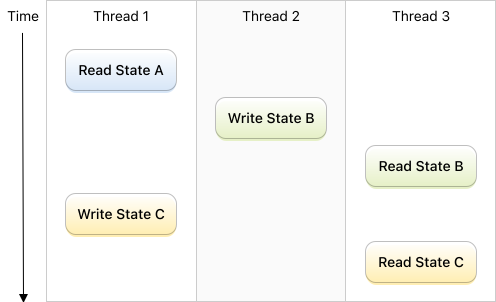
**Database pools** also serialize all writes. But they allow concurrent reads and writes, and isolate reads so that they don't see changes performed by other threads. This gives a very different picture:
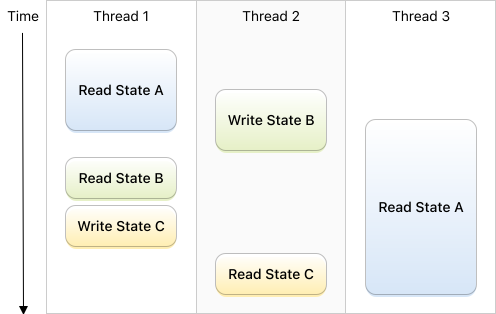
See how, with database pools, two reads can see different database states at the same time.
For more information about database pools, grab information about SQLite [WAL mode](https://www.sqlite.org/wal.html) and [snapshot isolation](https://sqlite.org/isolation.html). See [Database Observation](#database-changes-observation) when you look after automatic notifications of database changes.
### Advanced DatabasePool
[Database pools](#database-pools) are very concurrent, since all reads can run in parallel, and can even run during write operations. But writes are still serialized: at any given point in time, there is no more than a single thread that is writing into the database.
When your application modifies the database, and then reads some value that depends on those modifications, you may want to avoid locking the writer queue longer than necessary:
```swift
try dbPool.write { db in
// Increment the number of players
try Player(...).insert(db)
// Read the number of players. The writer queue is still locked :-(
let count = try Player.fetchCount(db)
}
```
A wrong solution is to chain a write then a read, as below. Don't do that, because another thread may modify the database in between, and make the read unreliable:
```swift
// WRONG
try dbPool.write { db in
// Increment the number of players
try Player(...).insert(db)
}
// <- other threads can write in the database here
try dbPool.read { db in
// Read some random value :-(
let count = try Player.fetchCount(db)
}
```
The correct solution is the `concurrentRead` method, which must be called from within a write block, outside of any transaction.
`concurrentRead` returns a **future value** which you consume on any dispatch queue, with the `wait()` method:
```swift
// CORRECT
let futureCount: DatabaseFuture = try dbPool.writeWithoutTransaction { db in
// increment the number of players
try Player(...).insert(db)
// <- not in a transaction here
let futureCount = dbPool.concurrentRead { db
return try Player.fetchCount(db)
}
return futureCount
}
// <- The writer queue has been unlocked :-)
// Wait for the player count
let count: Int = try futureCount.wait()
```
`concurrentRead` blocks until it can guarantee its closure argument an isolated access to the last committed state of the database. It then asynchronously executes the closure.
The closure can run concurrently with eventual updates performed after `concurrentRead`: those updates won't be visible from within the closure. In the example below, the number of players is guaranteed to be non-zero, even though it is fetched concurrently with the player deletion:
```swift
try dbPool.writeWithoutTransaction { db in
// Increment the number of players
try Player(...).insert(db)
let futureCount = dbPool.concurrentRead { db
// Guaranteed to be non-zero
return try Player.fetchCount(db)
}
try Player.deleteAll(db)
}
```
[Transaction Observers](#transactionobserver-protocol) can also use `concurrentRead` in their `databaseDidCommit` method in order to process database changes without blocking other threads that want to write into the database.
### Database Snapshots
**A database snapshot sees an unchanging database content, as it existed at the moment it was created.**
"Unchanging" means that a snapshot never sees any database modifications during all its lifetime. And yet it doesn't prevent database updates. This "magic" is made possible by SQLite's WAL mode (see [Isolation In SQLite](https://sqlite.org/isolation.html)).
You create snapshots from a [database pool](#database-pools):
```swift
let snapshot = try dbPool.makeSnapshot()
```
You can create as many snapshots as you need, regardless of the [maximum number of readers](#databasepool-configuration) in the pool. A snapshot database connection is closed when the snapshot gets deallocated.
**A snapshot can be used from any thread.** Its `read` methods is synchronous, and blocks the current thread until your database statements are executed:
```swift
// Read values:
try snapshot.read { db in
let players = try Player.fetchAll(db)
let playerCount = try Player.fetchCount(db)
}
// Extract a value from the database:
let playerCount = try snapshot.read { db in
try Player.fetchCount(db)
}
```
When you want to control the latest committed changes seen by a snapshot, create it from the pool's writer protected dispatch queue, outside of any transaction:
```swift
let snapshot1 = try dbPool.writeWithoutTransaction { db -> DatabaseSnapshot in
try db.inTransaction {
// delete all players
try Player.deleteAll()
return .commit
}
// <- not in a transaction here
return dbPool.makeSnapshot()
}
// <- Other threads may modify the database here
let snapshot2 = try dbPool.makeSnapshot()
try snapshot1.read { db in
// Guaranteed to be zero
try Player.fetchCount(db)
}
try snapshot2.read { db in
// Could be anything
try Player.fetchCount(db)
}
```
> :point_up: **Note**: snapshots currently serialize all database accesses. In the future, snapshots may allow concurrent reads.
### DatabaseWriter and DatabaseReader Protocols
Both DatabaseQueue and DatabasePool adopt the [DatabaseReader](http://groue.github.io/GRDB.swift/docs/4.0/Protocols/DatabaseReader.html) and [DatabaseWriter](http://groue.github.io/GRDB.swift/docs/4.0/Protocols/DatabaseWriter.html) protocols. DatabaseSnapshot adopts DatabaseReader only.
These protocols provide a unified API that let you write generic code that targets all concurrency modes. They fuel, for example:
- [Migrations](#migrations)
- [DatabaseRegionObservation]
- [ValueObservation]
- [FetchedRecordsController]
- [RxGRDB]
Only five types adopt those protocols: DatabaseQueue, DatabasePool, DatabaseSnapshot, AnyDatabaseReader, and AnyDatabaseWriter. Expanding this set is not supported: any future GRDB release may break your custom writers and readers, without notice.
DatabaseReader and DatabaseWriter provide the *smallest* common guarantees: they don't erase the differences between queues, pools, and snapshots. See for example [Differences between Database Queues and Pools](#differences-between-database-queues-and-pools).
However, you can prevent some parts of your application from writing in the database by giving them a DatabaseReader:
```swift
// This class can read in the database, but can't write into it.
class MyReadOnlyComponent {
let reader: DatabaseReader
init(reader: DatabaseReader) {
self.reader = reader
}
}
let dbQueue: DatabaseQueue = ...
let component = MyReadOnlyComponent(reader: dbQueue)
```
> :point_up: **Note**: DatabaseReader is not a **secure** way to prevent an application component from writing in the database, because write access is just a cast away:
>
> ```swift
> if let dbQueue = reader as? DatabaseQueue {
> try dbQueue.write { ... }
> }
> ```
### Unsafe Concurrency APIs
**Database queues, pools, snapshots, as well as their common protocols `DatabaseReader` and `DatabaseWriter` provide *unsafe* APIs.** Unsafe APIs lift [concurrency guarantees](#guarantees-and-rules), and allow advanced yet unsafe patterns.
- **`unsafeRead`**
The `unsafeRead` method is synchronous, and blocks the current thread until your database statements are executed in a protected dispatch queue. GRDB does just the bare minimum to provide a database connection that can read.
When used on a database pool, reads are no longer isolated:
```swift
dbPool.unsafeRead { db in
// Those two values may be different because some other thread
// may have inserted or deleted a player between the two requests:
let count1 = try Player.fetchCount(db)
let count2 = try Player.fetchCount(db)
}
```
When used on a database queue, the closure argument is allowed to write in the database.
- **`unsafeReentrantRead`**
The `unsafeReentrantRead` behaves just as `unsafeRead` (see above), and allows reentrant calls:
```swift
dbPool.read { db1 in
// No "Database methods are not reentrant" fatal error:
dbPool.unsafeReentrantRead { db2 in
dbPool.unsafeReentrantRead { db3 in
...
}
}
}
```
Reentrant database accesses make it very easy to break the second [safety rule](#guarantees-and-rules), which says: "group related statements within a single call to a DatabaseQueue or DatabasePool database access method.". Using a reentrant method is pretty much likely the sign of a wrong application architecture that needs refactoring.
There is a single valid use case for reentrant methods, which is when you are unable to control database access scheduling.
- **`unsafeReentrantWrite`**
The `unsafeReentrantWrite` method is synchronous, and blocks the current thread until your database statements are executed in a protected dispatch queue. Writes are serialized: eventual concurrent database updates are postponed until the block has executed.
Reentrant calls are allowed:
```swift
dbQueue.write { db1 in
// No "Database methods are not reentrant" fatal error:
dbQueue.unsafeReentrantWrite { db2 in
dbQueue.unsafeReentrantWrite { db3 in
...
}
}
}
```
Reentrant database accesses make it very easy to break the second [safety rule](#guarantees-and-rules), which says: "group related statements within a single call to a DatabaseQueue or DatabasePool database access method.". Using a reentrant method is pretty much likely the sign of a wrong application architecture that needs refactoring.
There is a single valid use case for reentrant methods, which is when you are unable to control database access scheduling.
### Dealing with External Connections
The first rule of GRDB is:
- **[Rule 1](#guarantees-and-rules)**: Have a unique instance of DatabaseQueue or DatabasePool connected to any database file.
This means that dealing with external connections is not a focus of GRDB. [Guarantees](#guarantees-and-rules) of GRDB may or may not hold as soon as some external connection modifies a database.
If you absolutely need multiple connections, then:
- Reconsider your position
- Read about [isolation in SQLite](https://www.sqlite.org/isolation.html)
- Learn about [locks and transactions](https://www.sqlite.org/lang_transaction.html)
- Become a master of the [WAL mode](https://www.sqlite.org/wal.html)
- Prepare to setup a [busy handler](https://www.sqlite.org/c3ref/busy_handler.html) with [Configuration.busyMode](http://groue.github.io/GRDB.swift/docs/4.0/Structs/Configuration.html)
- [Ask questions](https://github.com/groue/GRDB.swift/issues)
## Performance
GRDB is a reasonably fast library, and can deliver quite efficient SQLite access. See [Comparing the Performances of Swift SQLite libraries](https://github.com/groue/GRDB.swift/wiki/Performance) for an overview.
You'll find below general advice when you do look after performance:
- Focus
- Know your platform
- Use transactions
- Don't do useless work
- Learn about SQL strengths and weaknesses
- Avoid strings & dictionaries
### Performance tip: focus
You don't know which part of your program needs improvement until you have run a benchmarking tool.
Don't make any assumption, avoid optimizing code too early, and use [Instruments](https://developer.apple.com/library/ios/documentation/ToolsLanguages/Conceptual/Xcode_Overview/MeasuringPerformance.html).
### Performance tip: know your platform
If your application processes a huge JSON file and inserts thousands of rows in the database right from the main thread, it will quite likely become unresponsive, and provide a sub-quality user experience.
If not done yet, read the [Concurrency Programming Guide](https://developer.apple.com/library/ios/documentation/General/Conceptual/ConcurrencyProgrammingGuide/Introduction/Introduction.html#//apple_ref/doc/uid/TP40008091) and learn how to perform heavy computations without blocking your application.
Most GRBD APIs are [synchronous](#database-connections). Spawning them into parallel queues is as easy as:
```swift
DispatchQueue.global().async {
dbQueue.write { db in
// Perform database work
}
DispatchQueue.main.async {
// update your user interface
}
}
```
### Performance tip: use transactions
Performing multiple updates to the database is much faster when executed inside a [transaction](#transactions-and-savepoints). This is because a transaction allows SQLite to postpone writing changes to disk until the final commit:
```swift
// Inefficient
try dbQueue.inDatabase { db in // or dbPool.writeWithoutTransaction
for player in players {
try player.insert(db)
}
}
// Efficient
try dbQueue.write { db in // or dbPool.write
for player in players {
try player.insert(db)
}
}
// Efficient
try dbQueue.inTransaction { db in // or dbPool.writeInTransaction
for player in players {
try player.insert(db)
}
return .commit
}
```
### Performance tip: don't do useless work
Obviously, no code is faster than any code.
**Don't fetch columns you don't use**
```swift
// SELECT * FROM player
try Player.fetchAll(db)
// SELECT id, name FROM player
try Player.select(idColumn, nameColumn).fetchAll(db)
```
If your Player type can't be built without other columns (it has non-optional properties for other columns), *do define and use a different type*.
See [Columns Selected by a Request] for more information.
**Don't fetch rows you don't use**
Use [fetchOne](#fetching-methods) when you need a single value, and otherwise limit your queries at the database level:
```swift
// Wrong way: this code may discard hundreds of useless database rows
let players = try Player.order(scoreColumn.desc).fetchAll(db)
let hallOfFame = players.prefix(5)
// Better way
let hallOfFame = try Player.order(scoreColumn.desc).limit(5).fetchAll(db)
```
**Don't copy values unless necessary**
Particularly: the Array returned by the `fetchAll` method, and the cursor returned by `fetchCursor` aren't the same:
`fetchAll` copies all values from the database into memory, when `fetchCursor` iterates database results as they are generated by SQLite, taking profit from SQLite efficiency.
You should only load arrays if you need to keep them for later use (such as iterating their contents in the main thread). Otherwise, use `fetchCursor`.
See [fetching methods](#fetching-methods) for more information about `fetchAll` and `fetchCursor`. See also the [Row.dataNoCopy](#data-and-memory-savings) method.
**Don't update rows unless necessary**
An UPDATE statement is costly: SQLite has to look for the updated row, update values, and write changes to disk.
When the overwritten values are the same as the existing ones, it's thus better to avoid performing the UPDATE statement:.
```swift
if player.hasDatabaseChanges {
try player.update(db)
}
```
See [Record Comparison] for more information.
### Performance tip: learn about SQL strengths and weaknesses
Consider a simple use case: your store application has to display a list of authors with the number of available books:
- J. M. Coetzee (6)
- Herman Melville (1)
- Alice Munro (3)
- Kim Stanley Robinson (7)
- Oliver Sacks (4)
The following code is inefficient. It is an example of the [N+1 problem](http://stackoverflow.com/questions/97197/what-is-the-n1-selects-issue), because it performs one query to load the authors, and then N queries, as many as there are authors. This turns very inefficient as the number of authors grows:
```swift
// SELECT * FROM author
let authors = try Author.fetchAll(db)
for author in authors {
// SELECT COUNT(*) FROM book WHERE authorId = ...
author.bookCount = try Book.filter(authorIdColumn == author.id).fetchCount(db)
}
```
Instead, perform *a single query*:
```swift
let sql = """
SELECT author.*, COUNT(book.id) AS bookCount
FROM author
LEFT JOIN book ON book.authorId = author.id
GROUP BY author.id
"""
let authors = try Author.fetchAll(db, sql: sql)
```
In the example above, consider extending your Author with an extra bookCount property, or define and use a different type.
Generally, define indexes on your database tables, and use SQLite's efficient query planning:
- [Query Planning](https://www.sqlite.org/queryplanner.html)
- [CREATE INDEX](https://www.sqlite.org/lang_createindex.html)
- [The SQLite Query Planner](https://www.sqlite.org/optoverview.html)
- [EXPLAIN QUERY PLAN](https://www.sqlite.org/eqp.html)
### Performance tip: avoid strings & dictionaries
The String and Dictionary Swift types are better avoided when you look for the best performance.
Now GRDB [records](#records), for your convenience, do use strings and dictionaries:
```swift
class Player : Record {
var id: Int64?
var name: String
var email: String
required init(_ row: Row) {
id = row["id"] // String
name = row["name"] // String
email = row["email"] // String
super.init()
}
override func encode(to container: inout PersistenceContainer) {
container["id"] = id // String
container["name"] = name // String
container["email"] = email // String
}
}
```
When convenience hurts performance, you can still use records, but you have better avoiding their string and dictionary-based methods.
For example, when fetching values, prefer loading columns by index:
```swift
// Strings & dictionaries
let players = try Player.fetchAll(db)
// Column indexes
// SELECT id, name, email FROM player
let request = Player.select(idColumn, nameColumn, emailColumn)
let rows = try Row.fetchCursor(db, request)
while let row = try rows.next() {
let id: Int64 = row[0]
let name: String = row[1]
let email: String = row[2]
let player = Player(id: id, name: name, email: email)
...
}
```
When inserting values, use reusable [prepared statements](#prepared-statements), and set statements values with an *array*:
```swift
// Strings & dictionaries
for player in players {
try player.insert(db)
}
// Prepared statement
let insertStatement = db.prepareStatement("INSERT INTO player (name, email) VALUES (?, ?)")
for player in players {
// Only use the unsafe arguments setter if you are sure that you provide
// all statement arguments. A mistake can store unexpected values in
// the database.
insertStatement.unsafeSetArguments([player.name, player.email])
try insertStatement.execute()
}
```
FAQ
===
- [How do I create a database in my application?](#how-do-i-create-a-database-in-my-application)
- [How do I open a database stored as a resource of my application?](#how-do-i-open-a-database-stored-as-a-resource-of-my-application)
- [How do I close a database connection?](#how-do-i-close-a-database-connection)
- [How do I print a request as SQL?](#how-do-i-print-a-request-as-sql)
- [Generic parameter 'T' could not be inferred](#generic-parameter-t-could-not-be-inferred)
- [SQLite error 10 "disk I/O error", SQLite error 23 "not authorized"](#sqlite-error-10-disk-io-error-sqlite-error-23-not-authorized)
- [What Are Experimental Features?](#what-are-experimental-features)
### How do I create a database in my application?
This question assumes that your application has to create a new database from scratch. If your app has to open an existing database that is embedded inside your application as a resource, see [How do I open a database stored as a resource of my application?](#how-do-i-open-a-database-stored-as-a-resource-of-my-application) instead.
The database has to be stored in a valid place where it can be created and modified. For example, in the [Application Support directory](https://developer.apple.com/library/content/documentation/FileManagement/Conceptual/FileSystemProgrammingGuide/FileSystemOverview/FileSystemOverview.html):
```swift
let databaseURL = try FileManager.default
.url(for: .applicationSupportDirectory, in: .userDomainMask, appropriateFor: nil, create: true)
.appendingPathComponent("db.sqlite")
let dbQueue = try DatabaseQueue(path: databaseURL.path)
```
### How do I open a database stored as a resource of my application?
If your application does not need to modify the database, open a read-only [connection](#database-connections) to your resource:
```swift
var configuration = Configuration()
configuration.readonly = true
let dbPath = Bundle.main.path(forResource: "db", ofType: "sqlite")!
let dbQueue = try DatabaseQueue(path: dbPath, configuration: configuration)
```
If the application should modify the database, you need to copy it to a place where it can be modified. For example, in the [Application Support directory](https://developer.apple.com/library/content/documentation/FileManagement/Conceptual/FileSystemProgrammingGuide/FileSystemOverview/FileSystemOverview.html). Only then, open a [connection](#database-connections):
```swift
let fileManager = FileManager.default
let dbPath = try fileManager
.url(for: .applicationSupportDirectory, in: .userDomainMask, appropriateFor: nil, create: true)
.appendingPathComponent("db.sqlite")
.path
if !fileManager.fileExists(atPath: dbPath) {
let dbResourcePath = Bundle.main.path(forResource: "db", ofType: "sqlite")!
try fileManager.copyItem(atPath: dbResourcePath, toPath: dbPath)
}
let dbQueue = try DatabaseQueue(path: dbPath)
```
### How do I close a database connection?
Database connections are managed by [database queues](#database-queues) and [pools](#database-pools). A connection is closed when its database queue or pool is deallocated, and all usages of this connection are completed.
Database accesses that run in background threads postpone the closing of connections.
### How do I print a request as SQL?
When you want to debug a request that does not deliver the expected results, you may want to print the SQL that is actually executed.
You can turn your request into a `SQLRequest` instance:
```swift
try dbQueue.read { db in
let request = Wine
.filter(Column("origin") == "Burgundy")
.order(Column("price")
let sqlRequest = try SQLRequest(db, request: request)
print(sqlRequest.sql)
// Prints SELECT * FROM wine WHERE origin = ? ORDER BY price
print(sqlRequest.arguments)
// Prints ["Burgundy"]
}
```
Another option is to setup a tracing function that will print out all SQL requests executed by your application. You provide the trace function when you connect to the database:
```swift
var config = Configuration()
config.trace = { print($0) } // Prints all SQL statements
let dbQueue = try DatabaseQueue(path: dbPath, configuration: config)
try dbQueue.read { db in
let wines = Wine
.filter(Column("origin") == "Burgundy")
.order(Column("price")
.fetchAll(db)
// Prints SELECT * FROM wine WHERE origin = 'Burgundy' ORDER BY price
}
```
### Generic parameter 'T' could not be inferred
You may get this error when using the `read` and `write` methods of database queues and pools:
```swift
// Generic parameter 'T' could not be inferred
let x = try dbQueue.read { db in
let result = try String.fetchOne(db, ...)
return result
}
```
This is a Swift compiler issue (see [SR-1570](https://bugs.swift.org/browse/SR-1570)).
The general workaround is to explicitly declare the type of the closure result:
```swift
// General Workaround
let string = try dbQueue.read { db -> String? in
let result = try String.fetchOne(db, ...)
return result
}
```
You can also, when possible, write a single-line closure:
```swift
// Single-line closure workaround:
let string = try dbQueue.read { db in
try String.fetchOne(db, ...)
}
```
### SQLite error 10 "disk I/O error", SQLite error 23 "not authorized"
Those errors may be the sign that SQLite can't access the database due to [data protection](#data-protection).
When your application should be able to run in the background on a locked device, it has to catch this error, and, for example, wait for [UIApplicationDelegate.applicationProtectedDataDidBecomeAvailable(_:)](https://developer.apple.com/reference/uikit/uiapplicationdelegate/1623044-applicationprotecteddatadidbecom) or [UIApplicationProtectedDataDidBecomeAvailable](https://developer.apple.com/reference/uikit/uiapplicationprotecteddatadidbecomeavailable) notification and retry the failed database operation.
This error can also be prevented altogether by using a more relaxed [file protection](https://developer.apple.com/reference/foundation/filemanager/1653059-file_protection_values).
### What Are Experimental Features?
Since GRDB 1.0, all backwards compatibility guarantees of [semantic versioning](http://semver.org) apply: no breaking change will happen until the next major version of the library.
There is an exception, though: *experimental features*, marked with the "**:fire: EXPERIMENTAL**" badge. Those are advanced features that are too young, or lack user feedback. They are not stabilized yet.
Those experimental features are not protected by semantic versioning, and may break between two minor releases of the library. To help them becoming stable, [your feedback](https://github.com/groue/GRDB.swift/issues) is greatly appreciated.
Sample Code
===========
- The [Documentation](#documentation) is full of GRDB snippets.
- [Demo Application](DemoApps/GRDBDemoiOS/README.md): A sample iOS application.
- [WWDC Companion](https://github.com/groue/WWDCCompanion): A sample iOS application.
- Check `GRDB.xcworkspace`: it contains GRDB-enabled playgrounds to play with.
- How to synchronize a database table with a JSON payload: [JSONSynchronization.playground](Playgrounds/JSONSynchronization.playground/Contents.swift)
---
**Thanks**
- [Pierlis](http://pierlis.com), where we write great software.
- [@alextrob](https://github.com/alextrob), [@bellebethcooper](https://github.com/bellebethcooper), [@bfad](https://github.com/bfad), [@cfilipov](https://github.com/cfilipov), [@charlesmchen-signal](https://github.com/charlesmchen-signal), [@Chiliec](https://github.com/Chiliec), [@darrenclark](https://github.com/darrenclark), [@davidkraus](https://github.com/davidkraus), [@fpillet](http://github.com/fpillet), [@gusrota](https://github.com/gusrota), [@hartbit](https://github.com/hartbit), [@kdubb](https://github.com/kdubb), [@kluufger](https://github.com/kluufger), [@KyleLeneau](https://github.com/KyleLeneau), [@Marus](https://github.com/Marus), [@michaelkirk-signal](https://github.com/michaelkirk-signal), [@pakko972](https://github.com/pakko972), [@peter-ss](https://github.com/peter-ss), [@pierlo](https://github.com/pierlo), [@pocketpixels](https://github.com/pocketpixels), [@schveiguy](https://github.com/schveiguy), [@SD10](https://github.com/SD10), [@sobri909](https://github.com/sobri909), [@sroddy](https://github.com/sroddy), [@swiftlyfalling](https://github.com/swiftlyfalling), [@valexa](https://github.com/valexa), and [@zmeyc](https://github.com/zmeyc) for their contributions, help, and feedback on GRDB.
- [@aymerick](https://github.com/aymerick) and [@kali](https://github.com/kali) because SQL.
- [ccgus/fmdb](https://github.com/ccgus/fmdb) for its excellency.
Legacy
======
#### Changes Tracking
This chapter has been renamed [Record Comparison].
#### Persistable Protocol
This protocol has been renamed [PersistableRecord] in GRDB 3.0.
#### RowConvertible Protocol
This protocol has been renamed [FetchableRecord] in GRDB 3.0.
#### TableMapping Protocol
This protocol has been renamed [TableRecord] in GRDB 3.0.
#### Customized Decoding of Database Rows
This chapter has been renamed [Beyond FetchableRecord].
[Associations]: Documentation/AssociationsBasics.md
[Beyond FetchableRecord]: #beyond-fetchablerecord
[Codable Records]: #codable-records
[Columns Selected by a Request]: #columns-selected-by-a-request
[Conflict Resolution]: #conflict-resolution
[Customizing the Persistence Methods]: #customizing-the-persistence-methods
[Date and UUID Coding Strategies]: #date-and-uuid-coding-strategies
[Fetching from Requests]: #fetching-from-requests
[The Implicit RowID Primary Key]: #the-implicit-rowid-primary-key
[The userInfo Dictionary]: #the-userinfo-dictionary
[JSON Columns]: #json-columns
[FetchableRecord]: #fetchablerecord-protocol
[EncodableRecord]: #persistablerecord-protocol
[PersistableRecord]: #persistablerecord-protocol
[Record Comparison]: #record-comparison
[Record Customization Options]: #record-customization-options
[TableRecord]: #tablerecord-protocol
[ValueObservation]: #valueobservation
[DatabaseRegionObservation]: #databaseregionobservation
[FetchedRecordsController]: #fetchedrecordscontroller
[RxGRDB]: http://github.com/RxSwiftCommunity/RxGRDB
[DatabaseRegionConvertible]: #the-databaseregionconvertible-protocol
[ValueObservation and DatabaseRegionObservation]: #valueobservation-and-databaseregionobservation
[DatabaseRegion]: #databaseregion
[SQL Interpolation]: Documentation/SQLInterpolation.md
[custom SQLite build]: Documentation/CustomSQLiteBuilds.md