# vim-clap
**Repository Path**: mirrors_Olical/vim-clap
## Basic Information
- **Project Name**: vim-clap
- **Description**: :clap: Modern generic interactive finder and dispatcher for Vim and NeoVim
- **Primary Language**: Unknown
- **License**: MIT
- **Default Branch**: master
- **Homepage**: None
- **GVP Project**: No
## Statistics
- **Stars**: 0
- **Forks**: 0
- **Created**: 2020-09-25
- **Last Updated**: 2026-05-24
## Categories & Tags
**Categories**: Uncategorized
**Tags**: None
## README
# vim-clap
[](https://github.com/liuchengxu/vim-clap/actions?workflow=ci)
[![Gitter][G1]][G2]
[G1]: https://badges.gitter.im/liuchengxu/vim-clap.svg
[G2]: https://gitter.im/liuchengxu/vim-clap?utm_source=badge&utm_medium=badge&utm_campaign=pr-badge
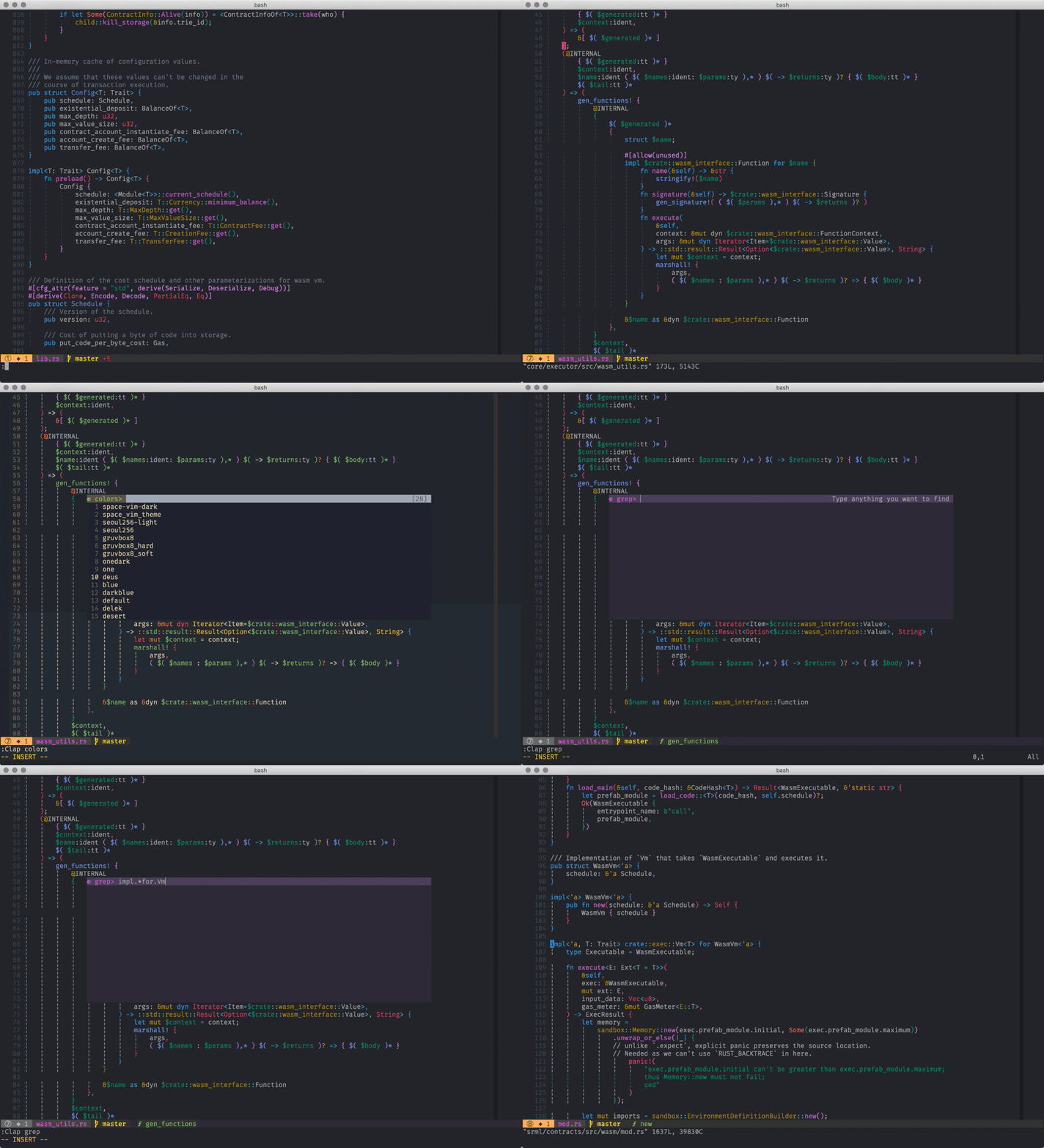
Vim-clap is a modern generic interactive finder and dispatcher, based on the newly feature: `floating_win` of neovim or `popup` of vim. The goal of vim-clap is to work everywhere out of the box, with fast response.
## Table of Contents
* [Features](#features)
* [Caveats](#caveats)
* [Requirement](#requirement)
* [Installation](#installation)
* [Usage](#usage)
* [Commands](#commands)
* [Global variables](#global-variables)
* [Keybindings](#keybindings)
* [Execute some code during the process](#execute-some-code-during-the-process)
* [Change highlights](#change-highlights)
* [How to add a new provider](#how-to-add-a-new-provider)
* [Provider arguments](#provider-arguments)
* [Create non-pure-async provider](#create-non-pure-async-provider)
* [Create pure async provider](#create-pure-async-provider)
* [Register provider](#register-provider)
* [Contribution](#contribution)
* [Credit](#credit)
* [License](#license)
## Features
- [x] Pure vimscript.
- [x] Work out of the box, without any extra dependency.
- [x] Extensible, easy to add new source providers.
- [x] Find or dispatch anything on the fly, with smart cache strategy.
- [x] Avoid touching the current window layout, less eye movement.
- [x] Support multi-selection, use vim's regexp as filter by default.
- [x] Support the preview functionality when navigating the result list.
- [x] Support builtin match and external fuzzy filter tools.
- [ ] Support searching by multiple providers simultaneously.
- [ ] Add the preview support for more providers.
- [ ] Add the multi-selection support for more providers.
- [ ] More UI layout.
## Caveats
- Vim-clap is in a very early stage, breaking changes and bugs are expected.
- The Windows support is not fully tested. The providers without using any system related command should work smoothly, that is to say, most sync providers are just able to work. Please [create an issue](https://github.com/liuchengxu/vim-clap/issues/new?assignees=&labels=&template=bug_report.md&title=) if you run into any error in Windows. And any help would be appreciated.
- Although a lot of effort has been made to unify the behavior of vim-clap between vim and neovim, and most part works in the same way, it just can't be exactly the same, for `floating_win` and `popup` are actually two different things anyway.
## Requirement
- Vim: `:echo has('patch-8.1.2114')`.
- NeoVim: `:echo has('nvim-0.4')`.
## Installation
```vim
Plug 'liuchengxu/vim-clap'
```
## Usage
Vim-clap is utterly easy to use, just type, press Ctrl-J/K to locate the wanted entry, and press Enter to apply and exit. The default settings should work well for most people in most cases, but it's absolutely hackable too.
### Commands
The paradigm is `Clap [provider_id_or_alias] {provider_args}`, where the `provider_id_or_alias` is obviously either the name or alias of provider. Technically the `provider_id` can be anything that can be used a key of a Dict, but I recommend you using an _identifier_ like name as the provider id, and use the alias rule if you prefer a special name.
Command | List | Requirement
:---- | :---- | :----
`Clap bcommits`**!** | Git commits for the current buffer | **[git][git]**
`Clap blines` | Lines in the current buffer | _none_
`Clap buffers` | Open buffers | _none_
`Clap colors` | Colorschemes | _none_
`Clap hist:` or `Clap command_history` | Command history | _none_
`Clap commits` **!** | Git commits | **[git][git]**
`Clap files` | Files | **[fd][fd]**/**[git][git]**/**[rg][rg]**/find
`Clap filetypes` | File types | _none_
`Clap gfiles` or `Clap git_files` | Files managed by git | **[git][git]**
`Clap grep`**+** | Grep on the fly | **[rg][rg]**
`Clap history` | Open buffers and `v:oldfiles` | _none_
`Clap jumps` | Jumps | _none_
`Clap lines` | Lines in the loaded buffers | _none_
`Clap marks` | Marks | _none_
`Clap tags` | Tags in the current buffer | **[vista.vim][vista.vim]**
`Clap windows` **!** | Windows | _none_
[fd]: https://github.com/sharkdp/fd
[rg]: https://github.com/BurntSushi/ripgrep
[git]: https://github.com/git/git
[vista.vim]: https://github.com/liuchengxu/vista.vim
- The command with a superscript `!` means that it is not yet implemented or not tested.
- The command with a superscript `+` means that it supports multi-selection via Tab.
- Use `:Clap grep ++query=` to grep the word under cursor.
[Send a pull request](https://github.com/liuchengxu/vim-clap/pulls) if you want to get your provider listed here.
### Global variables
- `g:clap_provider_alias`: Dict, if you don't want to invoke some clap provider by its id(name), as it's too long or somehow, you can add an alias for that provider.
```vim
" The provider name is `command_history`, with the following alias config,
" now you can call it via both `:Clap command_history` and `:Clap hist:`.
let g:clap_provider_alias = {'hist:': 'command_history'}
```
- `g:clap_popup_input_delay`: Number, 200ms by default, delay for actually responsing to the input, vim only.
- `g:clap_no_matches_msg`: String, "NO MATCHES FOUND", message to show when there is no matches found.
- `g:clap_disable_run_rooter`: Bool, v:false, vim-clap by default will try to run from the project root by changing `cwd` temporarily. Set it to `v:true` to run from the origin `cwd`. The project root here means the git base directory. Create an issue if you want to see more support about the project root.
- `g:clap_current_selection_sign`: Dict, `{ 'text': '>>', 'texthl': "WarningMsg", "linehl": "ClapCurrentSelection"}`.
- `g:clap_selected_sign`: Dict, `{ 'text': ' >', 'texthl': "WarningMsg", "linehl": "ClapSelected"}`.
- `g:clap_open_action`: Dict, `{ 'ctrl-t': 'tab split', 'ctrl-x': 'split', 'ctrl-v': 'vsplit' }`, extra key bindings for opening the selected file in a different way. NOTE: do not define a key binding which is conflicted with the other default bindings of vim-clap, and only `ctrl-*` is supported for now.
The option naming convention for provider is `g:clap_provider_{provider_id}_{opt}`.
- `g:clap_provider_grep_delay`: 300ms by default, delay for actually spawning the grep job in the background.
- `g:clap_provider_grep_blink`: [2, 100] by default, blink 2 times with 100ms timeout when jumping the result. Set it to [0, 0] to disable the blink.
See `:help clap-options` for more information.
### Keybindings
- [x] Use Ctrl-j/Down or Ctrl-k/Up to navigate the result list up and down.
- [x] Use Ctrl-a/Home to go to the start of the input.
- [x] Use Ctrl-e/End to go to the end of the input.
- [x] Use Ctrl-c, Ctrl-[ or Esc to exit.
- [x] Use Ctrl-h/BS to delete previous character.
- [x] Use Ctrl-d to delete next character.
- [x] Use Ctrl-b to move cursor left one character.
- [x] Use Ctrl-f to move cursor right one character.
- [x] Use Enter to select the entry and exit.
- [x] Use Tab to select multiple entries and open them using the quickfix window.(Need the provider has `sink*` support)
- [x] Use Ctrl-t or Ctrl-x, Ctrl-v to open the selected entry in a new tab or a new split.
See `:help clap-keybindings` for more information.
### Execute some code during the process
```vim
augroup YourGroup
autocmd!
autocmd User ClapOnEnter call YourFunction()
autocmd User ClapOnExit call YourFunction()
augroup END
```
### Change highlights
The default highlights:
```vim
hi default link ClapInput Visual
hi default link ClapDisplay Pmenu
hi default link ClapPreview PmenuSel
hi default link ClapMatches Search
" By default ClapQuery will use the bold fg of Normal and the same bg of ClapInput
hi ClapDefaultPreview ctermbg=237 guibg=#3E4452
hi ClapDefaultSelected cterm=bold,underline gui=bold,underline ctermfg=80 guifg=#5fd7d7
hi ClapDefaultCurrentSelection cterm=bold gui=bold ctermfg=224 guifg=#ffd7d7
hi default link ClapPreview ClapDefaultPreview
hi default link ClapSelected ClapDefaultSelected
hi default link ClapCurrentSelection ClapDefaultCurrentSelection
```
If you want a different highlight for the matches found, try:
```vim
hi default link ClapMatches Function
```
Or:
```vim
hi ClapMatches cterm=bold ctermfg=170 gui=bold guifg=#bc6ec5
```
See `:help clap-highlights` for more information.
## How to add a new provider
The provider of vim-clap is actually a Dict that specifies the action of your move in the input window. The idea is simple, once you have typed something, the `source` will be filtered or a job will be spawned, and then the result retrived later will be shown in the dispaly window.
There are generally two kinds of providers in vim-clap.
1. Non-pure-async provider: suitable for these which are able to collect all the items in a short time, e.g., open buffers, command history.It will run sync if the source is not large. But it's also able to deal with the list that is huge, let's say 100,000+ lines/items, in which case vim-clap will choose to run the external filter in async. In a word, vim-clap can always be fast responsive. What's more, it's extremely easy to introduce a new non-pure-async clap provider as vim-clap provides the default implementation of `on_typed` and `source_async`.
2. Pure async provider: suitable for the time-consuming jobs, e.g., grep a word in a directory.
### Provider arguments
```
Clap [provider_id_or_alias] [++opt] [+opt]
```
All the opts are accessible via `g:clap.context[opt]`.
The form of `[++opt]` is `++{optname}={value}`, where {optname} is one of:
- `++externalfilter=fzf` or `++ef=fzf`.
`[+opt]` is used for the bool arguments:
- `+async`
`Clap! [provider_id_or_alias]` is equal to `Clap [provider_id_or_alias] +async`.
`++opt` and `+opt` will be stored in the Dict `g:clap.context`, the rest arguments will be stored in a List of String `g:clap.provider.args`.
### Create non-pure-async provider
For the non-pure-async providers, you could run it in async or sync way. By default vim-clap will choose the best strategy, running async for the source consisted of 5000+ lines or otherwise run it in sync way. [See the discussion about the non-pure-async providers](https://github.com/liuchengxu/vim-clap/issues/17#issue-501470657).
Field | Type | Required | Has default implementation
:---- | :---- | :---- | :----
`sink` | Funcref | **mandatory** | No
`sink*` | Funcref | optional | No
`source` | String/List/Funcref | **mandatory** | No
`source_async` | String | optional | **Yes**
`filter` | Funcref | **mandatory** | **Yes**
`on_typed` | Funcref | **mandatory** | **Yes**
`on_move` | Funcref | optional | No
`on_enter` | Funcref | optional | No
`on_exit` | Funcref | optional | No
`support_open_action` | Bool | optional | **Yes** if the `sink` is `e`/`edit`/`edit!`
`enable_rooter` | Bool | Optional | No
- `sink`:
- String: vim command to handle the selected entry.
- Funcref: reference to function to process the selected entry.
- `sink*`: similar to `sink*`, but takes the list of multiple selected entries as input.
- `source`:
- List: vim List as input to vim-clap.
- String: external command to generate input to vim-clap (e.g. `find .`).
- Funcref: reference to function that returns a List to generate input to vim-clap.
- `source_async`: String, job command to filter the items of `source` based on the external tools. The default implementation is to feed the output of `source` into the external fuzzy filters and then display the filtered result, which could have some limitations, e.g., the matched input is not highlighted.
- `filter`: given what you have typed, use `filter(entry)` to evaluate each entry in the display window, when the result is zero remove the item from the current result list. The default implementation is to match the input using vim's regex.
- `on_typed`: reference to function to filter the `source`.
- `on_move`: when navigating the result list, can be used for the preview purpose, see [clap/provider/colors](autoload/clap/provider/colors.vim).
- `on_enter`: when entering the clap window, can be used for recording the current state.
- `on_exit`: can be used for restoring the state on start.
- `enable_rooter`: try to run the `source` from the project root.
You have to provide `sink` and `source` option. The `source` field is indispensable for a synchoronous provider. In another word, if you provide the `source` option this provider will be seen as a sync one, which means you could use the default `on_typed` implementation of vim-clap.
### Create pure async provider
Field | Type | Required | Has default implementation
:---- | :---- | :---- | :----
`sink` | funcref | **mandatory** | No
`on_typed` | funcref | **mandatory** | No
`on_move` | funcref | optional | No
`on_enter` | funcref | optional | No
`converter` | funcref | optional | No
`jobstop` | funcref | **mandatory** | **Yes** if you use `clap#dispatcher#job_start(cmd)`
`support_open_action` | Bool | optional | **Yes** if the `sink` is `e`/`edit`/`edit!`
`enable_rooter` | Bool | Optional | No
- `on_typed`: reference to function to spawn an async job.
- `converter`: reference to function to convert the raw output of job to another form, e.g., prepend an icon to the grep result, see [clap/provider/grep.vim](autoload/clap/provider/grep.vim).
- `jobstop`: Reference to function to stop the current job of an async provider. By default you could utilize `clap#dispatcher#job_start(cmd)` to start a new job, and then the job stop part will be handled by vim-clap as well, otherwise you'll have to take care of the `jobstart` and `jobstop` on your own.
You must provide `sink`, `on_typed` option. It's a bit of complex to write an asynchornous provider, you'll need to prepare the command for spawning the job and overal workflow, although you could use `clap#dispatcher#job_start(cmd)` to let vim-clap deal with the job control and display update. Take [clap/provider/grep.vim](autoload/clap/provider/grep.vim) for a reference.
### Register provider
Vim-clap will try to load the providers with convention.
- vimrc
Define `g:clap_provider_{provider_id}` in your vimrc, e.g.,
```vim
" `:Clap quick_open` to open some dotfiles quickly.
let g:clap_provider_quick_open = {
\ 'source': ['~/.vimrc', '~/.spacevim', '~/.bashrc', '~/.tmux.conf'],
\ 'sink': 'e',
\ }
```
- autoload
`g:clap#provider#{provider_id}#`. See `:h autoload` and [clap/provider](autoload/clap/provider).
## Contribution
Vim-clap is still in beta. Any kinds of contributions are highly welcome.
If you would like to see support for more providers or share your own provider, please [create an issue](https://github.com/liuchengxu/vim-clap/issues) or [create a pull request](https://github.com/liuchengxu/vim-clap/pulls).
If you'd liked to discuss the project more directly, check out [![][G1]][G2].
## Credit
- Vim-clap is initially enlightened by [snails](https://github.com/manateelazycat/snails).
- Some providers' idea and code are borrowed from [fzf.vim](https://github.com/junegunn/fzf.vim).
## [License](LICENSE)
MIT