# escargot
**Repository Path**: mirrors_Samsung/escargot
## Basic Information
- **Project Name**: escargot
- **Description**: Escargot is a lightweight JavaScript engine designed specifically for resource-constrained environments.
- **Primary Language**: Unknown
- **License**: MIT
- **Default Branch**: master
- **Homepage**: None
- **GVP Project**: No
## Statistics
- **Stars**: 0
- **Forks**: 0
- **Created**: 2020-09-25
- **Last Updated**: 2026-10-30
## Categories & Tags
**Categories**: Uncategorized
**Tags**: None
## README
# Escargot
[](LICENSE)
[](https://github.com/Samsung/escargot/releases)
[](https://github.com/Samsung/escargot/actions/workflows/es-actions.yml)
[](https://scan.coverity.com/projects/samsung-escargot)
[](https://codecov.io/gh/Samsung/escargot)
**Modern JavaScript for memory-constrained applications.**
Escargot is an embeddable JavaScript engine developed by Samsung and used
in shipping products. It combines modern JavaScript and ICU-backed
internationalization with a bytecode interpreter designed to keep memory
use low as workloads grow.
Embed it through the C++ API or the optional Node-API hosting layer, and
choose the features you ship. JavaScript execution does not require a JIT
or executable memory for generated machine code.
[Quick start](#quick-start) · [Compare engines](#measured-performance-and-memory) ·
[Embedding](#embed-in-your-application) · [ICU configuration](#icu-configuration)
### Why Escargot?
* **Modern language support.** Targets
[ECMAScript 2026](https://262.ecma-international.org/17.0/), with ICU-backed
`Intl` and `Temporal`. Available internationalization features depend on
your [ICU configuration and version](#icu-configuration).
* **Memory use on substantial workloads.** The comparisons below cover
SunSpider, Octane, and Web Tooling, including parsers, compilers, and
formatters. Inspect execution speed and resident memory together to
evaluate the trade-off for your application.
* **Control over deployment size.** Reuse a suitable system ICU to avoid
shipping another copy, or bundle a version with your application. Select
WebAssembly, threading, code cache, and debugger support through
[build options](#build-options).
* **A choice of targets.** Build for Linux, Android, Tizen, Windows, macOS,
and iOS. FreeRTOS and NuttX reference ports are also available; see the
[platform table](#supported-platforms-and-architectures) for architectures
and validation scope.
### Measured performance and memory
Compare Escargot with QuickJS and V8, including V8 Lite (`--lite-mode`).
Hermes V1 results, when available, include explicit compatibility failures.
Choose your target architecture below. Execution scores and memory are
measured separately; memory comparisons use a fixed amount of work for
each engine.
ARM64 — 64-bit ARM platforms
[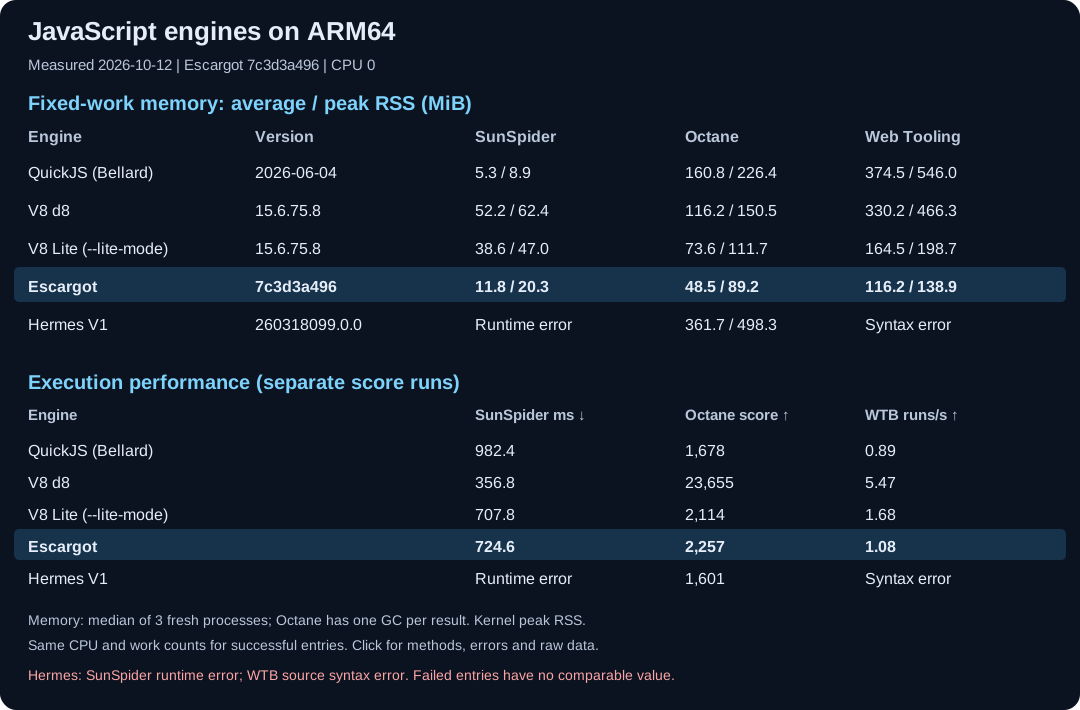](https://samsung.github.io/escargot/performance/monthly/)
ARM32 — 32-bit embedded platforms
[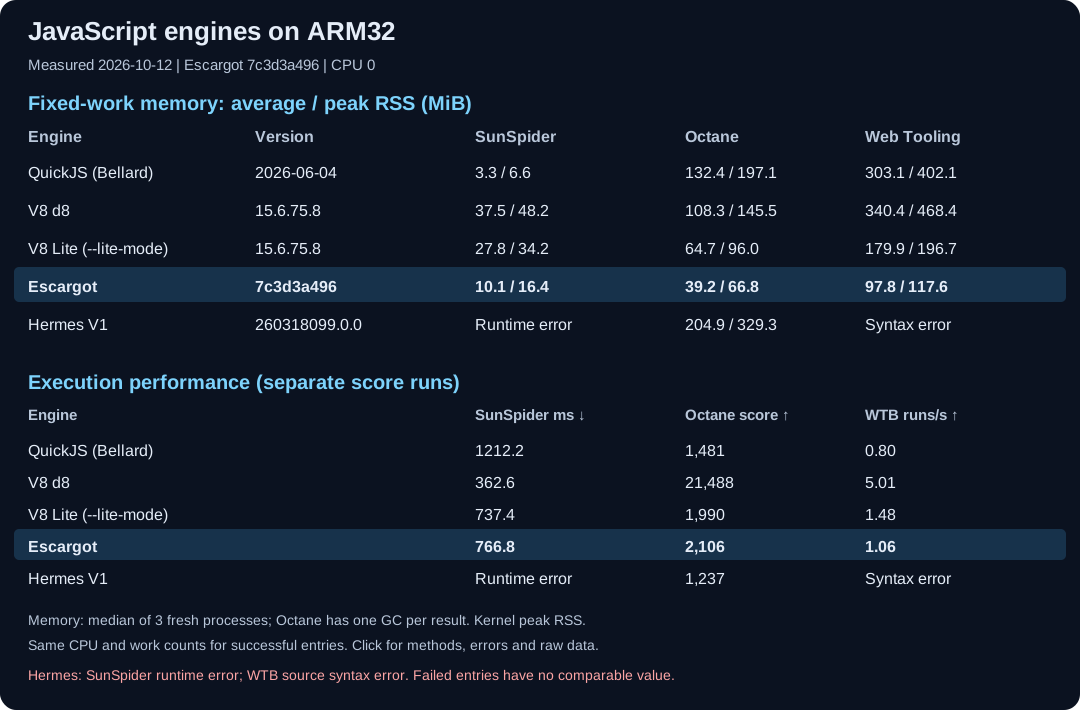](https://samsung.github.io/escargot/performance/monthly/arm32/)
Both views update automatically when CI publishes a validated comparison.
Open the [comparison dashboard](https://samsung.github.io/escargot/performance/monthly/)
for individual tests, measurement methods, repeat ranges, and raw data.
These suites cover different kinds of work: small scripts in SunSpider,
longer benchmark workloads in Octane, and JavaScript development tools in
Web Tooling. Use them to narrow your choices, then measure your own scripts
on your target device.
### Quick start
On Debian or Ubuntu, install the build prerequisites and build the shell:
```sh
sudo apt-get install build-essential cmake git libicu-dev pkg-config python3
git clone https://github.com/Samsung/escargot.git
cd escargot
git submodule update --init third_party
cmake -S . -B out -DCMAKE_BUILD_TYPE=Release -DESCARGOT_ENABLE_SHELL=ON
cmake --build out --parallel
./out/escargot -e 'print("Hello from Escargot!")'
```
Run a file with `./out/escargot path/to/script.js`. This Linux configuration
uses system ICU; see [ICU configuration](#icu-configuration) for feature
requirements and alternatives. For other systems, follow the
[platform-specific build instructions](#supported-platforms-and-architectures).
### Embed in your application
The default build produces `out/libescargot.a` and the command-line shell.
Choose the integration that fits your host application:
* **C++:** start with the [public API](src/api/EscargotPublic.h). The
[shell implementation](src/shell/Shell.cpp) shows how the API is used to
initialize the engine, create a context, and evaluate scripts.
* **Node-API:** enable the optional [Node-API v10 hosting layer](docs/n-api.md)
for C-style hosting APIs and native addons. Consult its integration guide
for configuration and host responsibilities.
* **RTOS:** use the [porting guide](docs/porting/RTOS_PORTING_GUIDE.md) and
[reference applications](samples/rtos) for platform integration.
Set `ESCARGOT_BUILD_SHARED_LIBS=ON` for a shared library, or
`ESCARGOT_ENABLE_SHELL=OFF` to build without the C++ shell. Run the
[benchmark and conformance suites](#testing-) as part of your evaluation.
Before unloading a shared library that contains or links Escargot, the host
must release all Escargot objects, persistent references and callbacks, call
`Globals::finalizeThread()` on every auxiliary thread that initialized Escargot,
and let those threads exit. On the main Escargot thread, call:
```cpp
Escargot::Globals::finalize();
Escargot::Globals::destroyRuntimeForSharedLibraryUnload();
// Now the host may dlclose() the library containing or linking Escargot.
```
The calling host thread may remain alive. All finalization must finish before
`dlclose()`; Escargot does not detect an embedding library's unload and finalize
it automatically. No Escargot calls may run concurrently with final runtime
destruction. Keep this work outside shared-library destructors, where loader
locking can conflict with thread shutdown.
Ordinary `finalize()` retains the GC runtime and its descriptor caches for
existing initialization/finalization cycles. The explicit destruction API
invalidates those caches and is terminal for that library mapping: neither
`initialize()` nor `initializeThread()` is allowed afterward until the library
has actually been unloaded and freshly loaded. Extra loader references or
non-unloadable dependencies can prevent that unload; a successful `dlclose()`
alone does not prove a fresh runtime. A collector shared with other users must
not be destroyed while any of them still needs it.
The unload regression runs on Linux. Mach-based incremental GC on Darwin
cannot currently retire its exception-monitor thread; the final destruction
operation rejects that configuration instead of allowing unsafe unload.
Linux C++ test configurations (`ESCARGOT_BUILD_CCTEST=ON`, Node-API disabled)
provide the separate `shared_library_unload_test` target. Build it explicitly
and run it with the embedding test DSO:
```sh
cmake --build out --target shared_library_unload_test
./out/shared_library_unload_test ./out/libescargot_unload_test_runtime.so
```
It tests normal restart and actual embedding/engine unload and reload on the
same host thread, including GC, TLS keys and incremental GC cleanup.
Escargot is available under the [LGPL-2.1 license](LICENSE).
Bug reports and contributions are welcome; see [Contributing](#contributing-).
## Contents 📋
* [Building](#building-)
* [Linux](#linux)
* [macOS](#macos)
* [iOS](#ios)
* [Android](#android)
* [Tizen](#tizen)
* [Windows](#windows)
* [Bare-metal / RTOS](#bare-metal--rtos)
* [ICU configuration](#icu-configuration)
* [Debugger](#debugger)
* [Testing](#testing-)
* [Contributing](#contributing-)
* [Research Papers](#research-papers-)
* [License](#license-)
## Building 🛠️
### Supported Platforms and Architectures
Architecture names below use `x86` for 32-bit Intel, `x64` for x86-64,
`arm` for 32-bit ARM, and `aarch64`/`arm64` for 64-bit ARM.
| Platform | Architectures | Status |
|---|---|---|
| Linux | x86, x64, arm, aarch64, riscv64 | Supported Linux platform. Ubuntu is used by CI and in the package-install example; it is not an OS restriction. |
| macOS | x64, aarch64 | Supported on both Intel and Apple Silicon. |
| iOS / iPadOS | aarch64 | Simulator and device builds are supported. |
| Windows | x86, x64, arm64 | Supported; WebAssembly is currently unavailable on arm64. |
| Android | x86, x64, arm, aarch64 | Supported across the Android ABIs. |
| Tizen | x86, x64, arm, aarch64, riscv64 | |
| Bare-metal / RTOS | arm (Cortex-M) | FreeRTOS and NuttX reference ports are provided. |
### Build Options
Pass these options when configuring with CMake.
| **Flag** | **Description** | **Value** | **Default** |
|---|---|---|---|
| -DESCARGOT_BUILD_SHARED_LIBS | Build shared library | ON/OFF | OFF |
| -DESCARGOT_BUILD_GC_SHARED_LIBS | Build GCutil as a shared library | ON/OFF | OFF |
| -DESCARGOT_ENABLE_SHELL | Build the Escargot shell (`-DENABLE_SHELL` remains a legacy alias) | ON/OFF | ON, except OFF when ESCARGOT_NAPI is ON |
| -DESCARGOT_BUILD_CCTEST | Build the C++ tests | ON/OFF | OFF |
| -DESCARGOT_LIBICU_SUPPORT | Include libicu library | ON/OFF | ON, except OFF on bare-metal |
| -DESCARGOT_LIBICU_SUPPORT_VENDORED | Bundle ICU; see [ICU configuration](#icu-configuration) | ON/OFF | ON on Windows, macOS, and iOS; OFF elsewhere |
| -DESCARGOT_LIBICU_SUPPORT_WITH_DLOPEN | Load ICU at runtime instead of linking directly | ON/OFF | ON unless vendored ICU is selected; OFF on macOS and iOS; unsupported on iOS |
| -DESCARGOT_WASM | Enable WebAssembly support | ON/OFF | OFF |
| -DESCARGOT_CODE_CACHE | Enable code cache | ON/OFF | OFF |
| -DESCARGOT_TCO | Enable tail call optimization | ON/OFF | OFF |
| -DESCARGOT_THREADING | Enable threading features (e.g. Atomics, SharedArrayBuffer) | ON/OFF | ON, except OFF on bare-metal |
| -DESCARGOT_TLS_ACCESS_BY_ADDRESS | Enable thread local storage access optimization (offset) | ON/OFF | OFF everywhere (safety-first; opt in manually on stable glibc-style targets) |
| -DESCARGOT_TLS_ACCESS_BY_PTHREAD_KEY | Enable thread local storage access optimization (pthread_key) | ON/OFF | ON when THREADING is ON and host is Android, otherwise OFF |
| -DESCARGOT_TEMPORAL | Enable Temporal support (requires ICU) | ON/OFF | ON when LIBICU is ON, otherwise OFF |
| -DESCARGOT_SHADOWREALM | Enable ShadowRealm support | ON/OFF | OFF |
| -DESCARGOT_SMALL_CONFIG | Enable aggressive memory optimizations for tiny devices | ON/OFF | OFF |
| -DESCARGOT_EXPORT_ALL | Export all symbols instead of the default curated public API | ON/OFF | OFF |
| -DESCARGOT_TEST | Enable additional features used only for testing | ON/OFF | OFF |
| -DESCARGOT_DEBUGGER | Enable Debug server | ON/OFF | OFF |
| -DESCARGOT_NAPI | Enable Node-API (N-API) support and C-style hosting APIs | ON/OFF | OFF |
Advanced / developer-only options (profiling, sanitizers, internal knobs)
| **Flag** | **Description** | **Value** | **Default** |
|---|---|---|---|
| **-DESCARGOT_ASAN** | Build with AddressSanitizer | ON/OFF | OFF |
| **-DESCARGOT_COVERAGE** | Build with gcov/Codecov instrumentation | ON/OFF | OFF |
| **-DESCARGOT_DEPLOY** | Build for deployment (set up RPATH for a bundled ICU) | ON/OFF | OFF |
| **-DESCARGOT_USE_EXTENDED_API** | Enable the extended C++ API (FunctionTemplateRef, etc.) | ON/OFF | ON when NAPI is ON, otherwise OFF |
| **-DESCARGOT_USE_CUSTOM_LOGGING** | Use a custom logging backend instead of the host's native log (e.g. dlog on Tizen) | ON/OFF | OFF |
| **-DESCARGOT_TCO_DEBUG** | Enable extra tail-call-optimization debug checks (debug builds only, requires ESCARGOT_TCO) | ON/OFF | OFF |
| **-DESCARGOT_PROFILE_BDWGC** | Enable bdwgc (Boehm GC) profiling | ON/OFF | OFF |
| **-DESCARGOT_MEM_STATS** | Enable memory usage statistics | ON/OFF | OFF |
| **-DESCARGOT_VALGRIND** | Build with Valgrind annotations | ON/OFF | OFF |
| **-DESCARGOT_GOOGLE_PERF** | Build with gperftools (Google Performance Tools) profiling | ON/OFF | OFF |
| **-DESCARGOT_BUILD_64BIT_FORCE_LARGE** | On 64-bit targets, force full 64-bit pointers instead of 32-bit-in-64-bit compression | ON/OFF | ON |
### Linux
Escargot supports Linux distributions generally. The commands below use
Debian/Ubuntu package names because Ubuntu is used by CI; install the
equivalent development packages on other distributions.
Debian/Ubuntu prerequisites:
```sh
sudo apt-get install build-essential cmake git libicu-dev pkg-config python3
```
Prerequisites for x86-64-to-x86 compilation:
```sh
sudo apt-get install gcc-multilib g++-multilib
sudo apt-get install libicu-dev:i386
```
Build Escargot:
```sh
git submodule update --init third_party
cmake -S . -B out -DCMAKE_BUILD_TYPE=Release -DESCARGOT_ENABLE_SHELL=ON
cmake --build out
# Run a JavaScript file with the shell produced by the default build.
./out/escargot path/to/script.js
```
The default configuration produces the static library `out/libescargot.a`
and the `out/escargot` shell. Set `ESCARGOT_BUILD_SHARED_LIBS=ON` for a
shared library, or `ESCARGOT_ENABLE_SHELL=OFF` when embedding the library
without the command-line shell.
### macOS
Install the Xcode Command Line Tools (or full Xcode), then install the
remaining build prerequisites:
```sh
xcode-select --install
brew install cmake python
```
Build Escargot:
```sh
git submodule update --init third_party
cmake -S . -B out -DCMAKE_BUILD_TYPE=Release -DESCARGOT_ENABLE_SHELL=ON
cmake --build out
```
ICU is vendored by default on macOS (see "Vendored ICU" below) -- it's built
from the `third_party/icu` submodule above and linked statically, so no
Homebrew `icu4c`/`pkg-config` setup is needed for the default path. To opt
back into a Homebrew/system-provided ICU instead:
```sh
brew install icu4c
# add icu path to pkg_config_path (x64)
export PKG_CONFIG_PATH="/usr/local/opt/icu4c/lib/pkgconfig:$PKG_CONFIG_PATH"
# add icu path to pkg_config_path (arm64)
export PKG_CONFIG_PATH="/opt/homebrew/opt/icu4c/lib/pkgconfig:$PKG_CONFIG_PATH"
cmake -S . -B out -DCMAKE_BUILD_TYPE=Release \
-DESCARGOT_LIBICU_SUPPORT_VENDORED=OFF \
-DESCARGOT_ENABLE_SHELL=ON
cmake --build out
```
### Android
Build prerequisites on Ubuntu:
```sh
sudo apt install openjdk-17-jdk # require java 17
```
Build Escargot using gradle:
```sh
git submodule update --init third_party
export ANDROID_SDK_ROOT=.... # set your android SDK root first
cd build/android/
./gradlew bundleReleaseAar # build escargot AAR
./gradlew bundleHostJar # bundle jar for host
./gradlew javadocJar # create java doc
./gradlew sourcesJar # create sources jar
./gradlew assembleDebug # build debug test shell
./gradlew :escargot:connectedDebugAndroidTest # run escargot-jni tests on android device
./gradlew :escargot:testDebugUnitTest # run escargot-jni tests on host
```
### Tizen
Escargot is packaged and deployed in Tizen products. The RPM spec supports
the Tizen package architectures `x86`, `x64`, `arm`, `aarch64`, and
`riscv64`, and selects product profiles such as TV, mobile, wearable, and
headless through the Tizen build environment.
For a reference GBS build, use the repository's Tizen profile:
```sh
git submodule update --init third_party/GCutil
gbs -c .github/workflows/gbs.conf build -A armv7l -P profile.tizen --define "enable_shell 1"
```
The public CI continuously validates the armv7 package build. Tizen product
build and qualification flows use the same RPM packaging integration.
### Bare-metal / RTOS
Escargot runs on bare-metal and RTOS targets with no OS underneath
(no pthreads, no `mmap`, no filesystem). Specifying a bare-metal/RTOS target via `CMAKE_SYSTEM_NAME` (such as `Generic`, `NuttX`, `FreeRTOS`) automatically
configures the engine side of this (`-DOS_BAREMETAL=1` and friends,
ICU/threading defaulted off):
```sh
cmake -DCMAKE_SYSTEM_NAME=Generic -DCMAKE_SYSTEM_PROCESSOR=arm ... /path/to/escargot
```
A full port additionally needs its own small CMake project for BDWGC
(`third_party/GCutil`) and a `PlatformRef` implementation providing the
RTOS's task stack bounds and tick source. See
[`docs/porting/RTOS_PORTING_GUIDE.md`](docs/porting/RTOS_PORTING_GUIDE.md)
for the full checklist and code contract, and
[`samples/rtos/freertos/`](samples/rtos/freertos) for a complete, working
in-tree sample (FreeRTOS / Cortex-M55, QEMU `mps3-an547`) — cross-compiled
and boot-tested under QEMU by the `RTOS-FreeRTOS` CI job
(`.github/workflows/rtos-freertos.yml`) whenever engine or sample sources
change.
A second reference port, NuttX / Cortex-M55 (same QEMU target), is also
in-tree: [`samples/rtos/nuttx/`](samples/rtos/nuttx) has the escargot NSH
app (`interpreters-escargot/`, meant to be dropped into your own
NuttX+apps checkout's `apps/interpreters/`) and the out-of-tree CMake
project that builds the engine for it (`escargot-lib-cmake/`). Unlike
FreeRTOS-Kernel, NuttX itself isn't vendored as a submodule here (a NuttX
app fundamentally needs a full NuttX+apps source tree, not a standalone
library dependency) — CI-verified instead by the `RTOS-NuttX` job
(`.github/workflows/rtos-nuttx.yml`), which checks out NuttX + its `apps`
monorepo at pinned commits (cached across runs) and boot-tests the same
way. Both ports' shared contract and checklist are in
[`docs/porting/RTOS_PORTING_GUIDE.md`](docs/porting/RTOS_PORTING_GUIDE.md).
### Windows
Build from a **Developer Command Prompt for Visual Studio** with the Visual
Studio CMake generator and MSBuild. The examples below use Visual Studio
2022 (`-G "Visual Studio 17 2022"`); substitute the generator name for
another installed Visual Studio version (e.g. `-G "Visual Studio 16 2019"`)
if that's what you have.
Install the following:
- Visual Studio's **Desktop development with C++** workload, including
**MSVC v143 C++ build tools**, **CMake tools for Windows**, and a
**Windows 10 or 11 SDK**.
- The MSVC target tools for the architecture you intend to build.
- Python 3, available as `python` on `PATH`. Escargot uses it to generate
Unicode tables during the build.
- Git, for the source checkout, submodules, and vcpkg bootstrap.
Choose the matching Visual Studio platform and vcpkg triplet:
| Target | CMake `-A` value | vcpkg triplet | Additional MSVC tools |
|---|---|---|---|
| x86 | `Win32` | `x86-windows` | x86/x64 build tools |
| x64 | `x64` | `x64-windows` | x86/x64 build tools |
| ARM64 | `ARM64` | `arm64-windows` | ARM64 build tools |
ICU is supplied through [vcpkg](https://github.com/microsoft/vcpkg). The
following x64 example can be adapted with the table above:
```bat
git clone --depth 1 --branch 2026.07.29 https://github.com/microsoft/vcpkg.git
call vcpkg\bootstrap-vcpkg.bat
vcpkg\vcpkg.exe install icu --triplet=x64-windows
git submodule update --init third_party
cmake -S . -B out -G "Visual Studio 17 2022" -A x64 ^
-DICU_ROOT=vcpkg\installed\x64-windows ^
-DESCARGOT_ENABLE_SHELL=ON
cmake --build out --config Release
```
For ARM64, substitute `-A ARM64` and `arm64-windows`. Also pass
`-DESCARGOT_WASM=OFF`: the vendored WABT dependency does not yet support
MSVC/ARM64.
```bat
vcpkg\vcpkg.exe install icu --triplet=arm64-windows
cmake -S . -B out-arm64 -G "Visual Studio 17 2022" -A ARM64 ^
-DICU_ROOT=vcpkg\installed\arm64-windows ^
-DESCARGOT_ENABLE_SHELL=ON -DESCARGOT_WASM=OFF
cmake --build out-arm64 --config Release
```
The executable is written to `out\Release\escargot.exe` (or
`out-arm64\Release\escargot.exe`). Copy the ICU DLLs it depends on from the
matching `vcpkg\installed\\bin\` directory beside the executable
when distributing it.
#### Use Windows' built-in ICU DLL (no vcpkg)
To avoid bundling ICU from vcpkg, explicitly select the Windows ICU path:
```bat
cmake -S . -B out -G "Visual Studio 17 2022" -A x64 ^
-DESCARGOT_ENABLE_SHELL=ON ^
-DESCARGOT_LIBICU_SUPPORT_VENDORED=OFF
cmake --build out --config Release
```
This links through the Windows SDK's `icu.lib` and uses the ICU DLL supplied
by Windows at runtime, so there is no `ICU_ROOT`, vcpkg installation, or ICU
DLL to copy beside `escargot.exe`. It requires a target with the built-in ICU
available (Windows 10 version 1703 or later). Escargot also falls back to
this runtime-ICU path when no vcpkg ICU is found, but passing
`-DESCARGOT_LIBICU_SUPPORT_VENDORED=OFF` records the choice explicitly and
avoids the configure-time fallback warning.
The Windows ICU version follows the operating system. Use the vcpkg path
above when a pinned ICU version and identical Intl/Unicode behavior across
machines are more important than avoiding the ICU deployment files.
### iOS
`ESCARGOT_HOST=ios` cross-compiles Escargot from a macOS host to arm64 iOS.
Which of Apple's two iOS SDKs is targeted is selected with
`-DCMAKE_OSX_SYSROOT`:
| `-DCMAKE_OSX_SYSROOT=` | Target | Status |
|-|-|-|
| `iphonesimulator` | iOS Simulator (arm64, i.e. an Apple Silicon build machine) | Built **and run** in CI (`build-test-on-ios-simulator-arm64`, which runs Octane) |
| `iphoneos` | Real iPhone/iPad hardware (arm64) | Built and Mach-O-verified in CI (`build-on-ios-device-arm64`), **never executed on physical hardware by this project** -- see the caveats below |
There is no separate "ipados" host: Apple ships one SDK/platform identifier
("iOS") and one arm64 sysroot/triple for both iPhone and iPad at the
CMake/toolchain level. arm64 is the only supported architecture (armv7
devices predate every supported deployment target, and an x86_64 simulator
would mean an Intel build machine).
Prerequisite: a full Xcode install (not just the Command Line Tools --
`xcrun --sdk iphonesimulator --show-sdk-path`, or `--sdk iphoneos` for a
device build, must succeed).
ICU on iOS has exactly two supported configurations: vendored (the default;
see "Vendored ICU" below) or off entirely (`-DESCARGOT_LIBICU_SUPPORT=OFF`).
There is no system/pkg-config ICU dev package available on iOS, and
dlopen-loading an arbitrary library is unavailable there too, so both of
those other ICU paths are rejected with a `FATAL_ERROR` at configure time.
#### iOS Simulator
```sh
git submodule update --init third_party/GCutil third_party/icu # update submodules (+ vendored ICU source)
cmake -S . -B out \
-DCMAKE_SYSTEM_NAME=iOS \
-DCMAKE_OSX_SYSROOT=iphonesimulator \
-DCMAKE_OSX_ARCHITECTURES=arm64 \
-DCMAKE_OSX_DEPLOYMENT_TARGET=13.0 \
-DESCARGOT_ENABLE_SHELL=ON -DCMAKE_BUILD_TYPE=Release
cmake --build out
```
The resulting `out/escargot` is an arm64 Mach-O binary linked against the
iphonesimulator SDK, and running it takes two steps -- neither of them
optional, both confirmed against real-world reports of the same two
failures (not guessed):
1. **Ad-hoc code-sign it.** macOS on Apple Silicon enforces code signing on
*every* arm64 executable, including plain command-line tools -- the
linker only emits a minimal "linker-signed" signature by default, which
recent macOS versions reject outright (`Killed: 9`) even though nothing
else about the binary is wrong:
```sh
codesign --sign - --force out/escargot # ad-hoc signature, no identity/provisioning needed
```
2. **Run it inside a booted simulator device via `simctl spawn`,** not by
invoking it bare from Terminal. A simulator-platform Mach-O binary still
needs `DYLD_ROOT_PATH` pointed at a *booted* simulator runtime's root
(not the Xcode SDK path used at build time) or it fails at dyld startup
with `dyld: attempt to run simulator program outside simulator
(DYLD_ROOT_PATH not set)` -- `xcrun simctl spawn` sets this up for you
(and everything else the simulator runtime environment needs), so it's
the robust way to do this rather than hand-deriving that runtime-root
path yourself:
```sh
xcrun simctl list devices available # pick any pre-provisioned iOS (not watchOS/tvOS) device's UDID
xcrun simctl boot
xcrun simctl spawn "$(pwd)/out/escargot" run.js # simctl spawn needs an absolute path
```
A GitHub Actions `macos-latest` runner already has Xcode-provisioned
simulator devices available (no extra download), so both steps above are
CI-safe as-is. Manually exporting `DYLD_ROOT_PATH=` and invoking `out/escargot` directly (bypassing
`simctl spawn` entirely) is also technically possible -- it's the lower-level
mechanism `simctl spawn` itself relies on internally -- but that runtime-root
path lives under `/Library/Developer/CoreSimulator/...`, resolved
per-runtime/per-Xcode-version rather than being a fixed, easy-to-derive
path (unlike the build-time SDK path from `xcrun --sdk iphonesimulator
--show-sdk-path`), so `simctl spawn` is the supported, non-fragile way to do
this and what the CI job below actually uses.
See the `build-test-on-ios-simulator-arm64` CI job
(`.github/workflows/es-actions.yml`) for a full working example, including
running the Octane benchmark this way.
#### iOS device (`iphoneos`)
Same build, different sysroot -- the two SDKs share one set of headers and
API-availability annotations and differ only in sysroot and target triple
(`arm64-apple-ios` vs `arm64-apple-ios-simulator`), which the
vendored ICU cross build picks up too:
```sh
git submodule update --init third_party/GCutil third_party/icu
# static libescargot.a (+ the escargot shell binary)
cmake -S . -B out-device \
-DCMAKE_SYSTEM_NAME=iOS \
-DCMAKE_OSX_SYSROOT=iphoneos \
-DCMAKE_OSX_ARCHITECTURES=arm64 \
-DCMAKE_OSX_DEPLOYMENT_TARGET=13.0 \
-DESCARGOT_ENABLE_SHELL=ON -DCMAKE_BUILD_TYPE=Release
cmake --build out-device
# or a shared libescargot.dylib to embed in an app bundle's Frameworks/
cmake -S . -B out-device-shared \
-DCMAKE_SYSTEM_NAME=iOS \
-DCMAKE_OSX_SYSROOT=iphoneos \
-DCMAKE_OSX_ARCHITECTURES=arm64 \
-DCMAKE_OSX_DEPLOYMENT_TARGET=13.0 \
-DESCARGOT_BUILD_SHARED_LIBS=ON -DCMAKE_BUILD_TYPE=Release
cmake --build out-device-shared
```
⚠️ **Read this before shipping a device build.** Escargot's own CI builds
this configuration and verifies the resulting Mach-O really is tagged for
the iOS *device* platform (`vtool -show-build` -> `platform IOS`), that it
is arm64, that ICU ended up statically linked, and that the dylib's install
name is `@rpath`-relative -- but nothing in this project has ever *executed*
Escargot on physical iOS hardware. The runtime coverage for the iOS host
comes from the Simulator job. Treat the device build as "expected to work,
build-verified, unproven at runtime", and please file an issue if it isn't.
What the build gives you, and what stays your responsibility:
- **The `escargot` shell binary is a compile/link check, not a deliverable.**
A stock (non-jailbroken) device cannot launch a bare CLI executable at
all. On device you link `libescargot.a` (or embed `libescargot.dylib`)
into your own app target and drive the engine through
[`src/api/EscargotPublic.h`](src/api/EscargotPublic.h) or the Node-API
layer ([`docs/n-api.md`](docs/n-api.md)) from your app's code.
- **Code signing, provisioning and bundle packaging are yours.** This build
emits plain unsigned Mach-O artifacts; Xcode (or `codesign` with a real
identity + a provisioning profile that covers the device) is what makes
them runnable. A shared `libescargot.dylib` has to be embedded under the
app bundle's `Frameworks/` and signed along with the app.
- **No JIT, so no entitlement problems.** Escargot is a pure interpreter --
it never maps writable-executable memory, so it needs neither the
`dynamic-codesigning` entitlement (which Apple grants no third-party app)
nor any JIT-related workaround. This is the reason an ordinary App Store
app can embed it in the first place.
- **All file paths must be inside the app sandbox.** Anything the embedder
hands the engine has to be a container-relative path -- most notably
`VMInstanceRef::create(locale, timezone, baseCacheDir)`'s `baseCacheDir`
when built with `-DESCARGOT_CODE_CACHE=ON`, which must point at a
writable directory in your container (e.g. Caches), not a hardcoded
`/tmp`.
- **Deployment target.** `-DCMAKE_OSX_DEPLOYMENT_TARGET` is forwarded to the
vendored ICU cross build as well, so both halves agree on the minimum iOS
version; raise it as your app needs.
See the `build-on-ios-device-arm64` CI job
(`.github/workflows/es-actions.yml`) for the exact commands and
verification steps.
### ICU configuration
Escargot can use ICU already installed on your target or bundle ICU with
your application. Reusing system ICU avoids distributing another copy of
its libraries and locale data. Bundling lets you pin the ICU version
independently of the target OS. This is a deployment choice; runtime memory
use still depends on the libraries, data, and workload in use.
| Target | Default ICU source | Alternatives |
|---|---|---|
| Linux | System ICU, loaded at runtime | Vendored ICU, direct linking, or ICU disabled |
| Android / Tizen | System ICU, loaded at runtime | ICU disabled |
| macOS | Vendored ICU | Homebrew/system ICU via direct linking, or ICU disabled |
| Windows | vcpkg ICU, with a system-ICU fallback if vcpkg ICU is unavailable | Explicitly select Windows ICU, or disable ICU; see [Windows](#windows) |
| iOS | Vendored ICU | ICU disabled |
| Bare-metal / RTOS | ICU disabled | Requires target-specific integration |
#### Choose a configuration
For Linux, pass one of these configurations to CMake, using a separate build
directory for each. All examples assume the submodules have been initialized.
```sh
# Reuse system ICU (the Linux default).
cmake -S . -B out-system -DCMAKE_BUILD_TYPE=Release \
-DESCARGOT_LIBICU_SUPPORT_VENDORED=OFF \
-DESCARGOT_LIBICU_SUPPORT_WITH_DLOPEN=ON
# Build and statically link the vendored ICU, including its filtered data.
cmake -S . -B out-vendored -DCMAKE_BUILD_TYPE=Release \
-DESCARGOT_LIBICU_SUPPORT_VENDORED=ON
# Omit ICU-backed features, including Intl and Temporal.
cmake -S . -B out-noicu -DCMAKE_BUILD_TYPE=Release \
-DESCARGOT_LIBICU_SUPPORT=OFF -DESCARGOT_TEMPORAL=OFF
```
Then run `cmake --build --parallel`. To link directly
against a system ICU development package on Linux, set both
`ESCARGOT_LIBICU_SUPPORT_VENDORED=OFF` and
`ESCARGOT_LIBICU_SUPPORT_WITH_DLOPEN=OFF`; CMake locates it through
`pkg-config`. See the platform instructions for macOS, Windows, and iOS.
#### System ICU version requirements
Required versions depend on the features your application uses. The runtime
binder searches versioned ICU libraries starting at ICU 49; that is a
library-discovery bound, **not a minimum version for all Intl and Temporal
features**. The following checks apply to the runtime-binding path:
| Feature or operation | Version checked by Escargot |
|---|---|
| `Intl.NumberFormat` and `Intl.DisplayNames` initialization | ICU 62+ |
| `Intl.ListFormat` and `Intl.DurationFormat` initialization | ICU 67+ |
| `Intl.DateTimeFormat` date-range formatting path | ICU 67+ |
| `Intl.RelativeTimeFormat` initialization | ICU 68+ |
| `Intl.Segmenter` initialization | ICU 69+ |
| Temporal local-time-zone offset calculation | ICU 69+ |
These checks do not guarantee every option is available. Some operations
have additional version or symbol requirements; for example, number-range
formatting probes for the required symbols because Windows' system ICU may
not export them. Guarded operations reject unsupported versions, while a
missing required ICU symbol can terminate the process. Validate the features
you need against the ICU supplied by your deployment target.
The vendored source is pinned to ICU **78.1**. See the
[runtime binder](third_party/runtime_icu_binder/RuntimeICUBinder.cpp),
[Intl implementations](src/intl), and
[Temporal implementation](src/runtime/TemporalObject.cpp) for the checks.
#### Vendored ICU
`ESCARGOT_LIBICU_SUPPORT_VENDORED=ON` selects the following platform-specific
integration and disables runtime loading through the binder:
Vendored ICU build and packaging details
- **linux** and **macOS**: both build the `third_party/icu` submodule
(pinned to tag `release-78.1`, matching this repo's CI pin) from source --
via `runConfigureICU Linux/gcc`/`MacOSX` respectively -- with its data
trimmed via `build/icu-filters/escargot.json` to just what
`third_party/runtime_icu_binder/RuntimeICUBinder.h`'s call surface uses,
and links the result statically -- no separate ICU data file, no runtime
ICU dependency at all. (The macOS static archives are just as mutually
referential as the linux ones, but don't need linux's
`-Wl,--start-group`/`--end-group` treatment -- Apple's `ld64` doesn't
understand that GNU ld syntax, and doesn't need an equivalent either since
it resolves undefined symbols across all archives on the command line
regardless of order.)
- **windows**: ICU's own Windows build only ships `common`/`i18n` as DLLs (no
static `.lib` variant), so this locates an ICU installed via
[vcpkg](https://github.com/microsoft/vcpkg) (`-DICU_ROOT=/installed/`)
and links against its import libs; the matching DLLs (selected via
`dumpbin /dependents`, not a blanket copy) need to ship next to
`escargot.exe`/`escargot.dll` -- see the Windows build instructions above
and the `build-on-windows-x86-x64`/`build-windows` CI jobs.
- **ios**: ICU has no native "iOS" autoconf target, so this does the
standard two-pass cross build from ICU's User Guide's cross-compilation
section (`--with-cross-build`): first build ICU's own tools (`genrb`,
`genbrk`, ...) natively for the macOS build machine
(`runConfigureICU MacOSX`), then cross-compile the real target ICU
(`configure --with-cross-build=`) with `CC`/`CFLAGS`/
`LDFLAGS` pointed at the selected iOS SDK's sysroot (`iphonesimulator` or
`iphoneos`, following this build's own `-DCMAKE_OSX_SYSROOT`) and a
matching explicit `-target arm64-apple-ios[-simulator]` triple,
reusing pass 1's tools to generate its (filtered, per
`build/icu-filters/escargot.json`) data. The result is linked statically
-- no separate ICU data file, no runtime ICU dependency at all.
See `build/VendoredICU.cmake` for the implementation and
`.github/workflows/es-actions.yml`'s `build-test-on-vendored-icu-linux`/
`build-on-macos`/`build-on-macos-arm64`/`build-test-on-ios-simulator-arm64`/
`build-on-ios-device-arm64` jobs for full end-to-end examples (build, verify
static linking via `ldd`/`otool -L`, run tests, and for the iOS Simulator
run the Octane benchmark).
## Debugger
Make sure Escargot is built with the `-DESCARGOT_DEBUGGER=1` flag (off by default) enabled;
then start Escargot with the `--start-debug-server` option.
### Connect using a debugger client
- Escargot python debugger
- run `./tools/debugger/debugger.py`; It will automatically connect to a debug server on the default port `6501`
- run `./tools/debugger/debugger.py --help` for a list of options
- [Visual Studio Code extension](https://github.com/Samsung/escargot-vscode-extension/?tab=readme-ov-file#how-to-use)
- Chrome Devtools `⚠️ Early in development ⚠️`
- Initial setup:
- Navigate to [chrome://inspect](chrome://inspect)
- Make sure *Discover network targets* is enabled; click configure
- Add `localhost:6501` as a target; click Done
- Usage:
- The started debug server will be listed in the *Remote Target* list (If it is not, the page may need to be reloaded using the browser reload button)
- Click `inspect`
- A new window with the Chrome Devtools debugger UI will open
## Testing ✅
Escargot supports various benchmark sets, which can be run using the [tools/run-tests.py](https://github.com/Samsung/escargot/blob/master/tools/run-tests.py) script.
Prerequisites:
```sh
# Python 3 only -- the v8/spidermonkey/test262 runners are pure python3, no python2 needed.
sudo apt-get install python3
sudo apt-get install python3-chardet # or: pip install chardet -- required by the test262 runner
```
| Benchmark | flag |
| --- | --- |
| SunSpider 1.0.2 | `sunspider` |
| [Octane 2.0](https://github.com/chromium/octane.git) | `octane` |
| [test262](https://github.com/tc39/test262.git) | `test262` |
| [Web Tooling Benchmark](https://github.com/v8/web-tooling-benchmark) | `web-tooling-benchmark` |
| SpiderMonkey (vendor-made) | `spidermonkey` |
| ChakraCore (vendor-made) | `chakracore` |
| V8 (vendor-made) | `v8` |
After a default build, run individual benchmark suites (or combine suites in
one command) as follows:
```sh
tools/run-tests.py --engine=./out/escargot web-tooling-benchmark
tools/run-tests.py --engine=./out/escargot spidermonkey test262 v8
```
## Contributing 💡
Escargot welcomes contributions of code, documentation, bug reports, and
suggestions. By contributing, you agree to license your contribution under
the [LGPL-2.1](https://github.com/Samsung/escargot/blob/master/LICENSE).
#### ❗ Vulnerability Reporting
⚠️ If you identify any vulnerabilities, please report them through the [Issues page](https://github.com/Samsung/escargot/issues). *Reports sent via other channels may not be considered or may be processed with delays*. Please note that our project assumes the execution of valid JavaScript source code only. Handling of invalid source code is not within the main scope of this project and might not be addressed.
## Research Papers 📝
* [Dynamic code compression for JavaScript engine](https://doi.org/10.1002/spe.3186)
Software: Practice and Experience Vol. 53 (5), pp. 1196-1217, 2023
* [Tail Call Optimization Tailored for Native Stack Utilization in JavaScript Runtimes](https://doi.org/10.1109/ACCESS.2024.3441750)
IEEE Access Vol. 12, pp. 111801-111817, 2024
* [Rethinking Exception Handling in a Lightweight JavaScript Interpreter](https://doi.org/10.1109/ACCESS.2026.3726724)
IEEE Access, pp. 130711-130727, 2026
## License 📜
Escargot is open-source software primarily licensed under [LGPL-2.1](https://github.com/Samsung/escargot/blob/master/LICENSE), with some components covered by other licenses. Complete license and copyright information can be found in the source code.