



# HunyuanVideo **Repository Path**: mirrors_Tencent/HunyuanVideo ## Basic Information - **Project Name**: HunyuanVideo - **Description**: HunyuanVideo: A Systematic Framework For Large Video Generation Model - **Primary Language**: Unknown - **License**: Not specified - **Default Branch**: main - **Homepage**: None - **GVP Project**: No ## Statistics - **Stars**: 1 - **Forks**: 0 - **Created**: 2024-12-04 - **Last Updated**: 2025-12-27 ## Categories & Tags **Categories**: Uncategorized **Tags**: None ## README [English](./README.md)

# HunyuanVideo: A Systematic Framework For Large Video Generation Model
[![Replicate](https://replicate.com/zsxkib/hunyuan-video/badge)](https://replicate.com/zsxkib/hunyuan-video)
👋 加入我们的 WeChatDiscord

----- 本仓库包含了 HunyuanVideo 项目的 PyTorch 模型定义、预训练权重和推理/采样代码。参考我们的项目页面 [project page](https://aivideo.hunyuan.tencent.com) 查看更多内容。 > [**HunyuanVideo: A Systematic Framework For Large Video Generation Model**](https://arxiv.org/abs/2412.03603)
## 🔥🔥🔥 更新!! * 2025年11月21日: 🎉 开源 [HunyuanVideo-1.5](https://github.com/Tencent-Hunyuan/HunyuanVideo-1.5), 新一代高效强大的视频基础模型。 * 2025年05月28日: 💃 开源 [HunyuanVideo-Avatar](https://github.com/Tencent-Hunyuan/HunyuanVideo-Avatar), 腾讯混元语音数字人模型。 * 2025年05月09日: 🙆 开源 [HunyuanCustom](https://github.com/Tencent-Hunyuan/HunyuanCustom), 腾讯混元一致性视频生成模型。 * 2025年03月06日: 🌅 开源 [HunyuanVideo-I2V](https://github.com/Tencent-Hunyuan/HunyuanVideo-I2V), 支持高质量图生视频。 * 2025年01月13日: 📈 开源 Penguin Video [基准测试集](https://github.com/Tencent-Hunyuan/HunyuanVideo/blob/main/assets/PenguinVideoBenchmark.csv) 。 * 2024年12月18日: 🏃‍♂️ 开源 HunyuanVideo [FP8 模型权重](https://huggingface.co/tencent/HunyuanVideo/blob/main/hunyuan-video-t2v-720p/transformers/mp_rank_00_model_states_fp8.pt),节省更多 GPU 显存。 * 2024年12月17日: 🤗 HunyuanVideo已经集成到[Diffusers](https://huggingface.co/docs/diffusers/main/api/pipelines/hunyuan_video)中。 * 2024年12月03日: 🚀 开源 HunyuanVideo 多卡并行推理代码,由[xDiT](https://github.com/xdit-project/xDiT)提供。 * 2024年12月03日: 👋 开源 HunyuanVideo 文生视频的推理代码和模型权重。 ## 🎥 作品展示
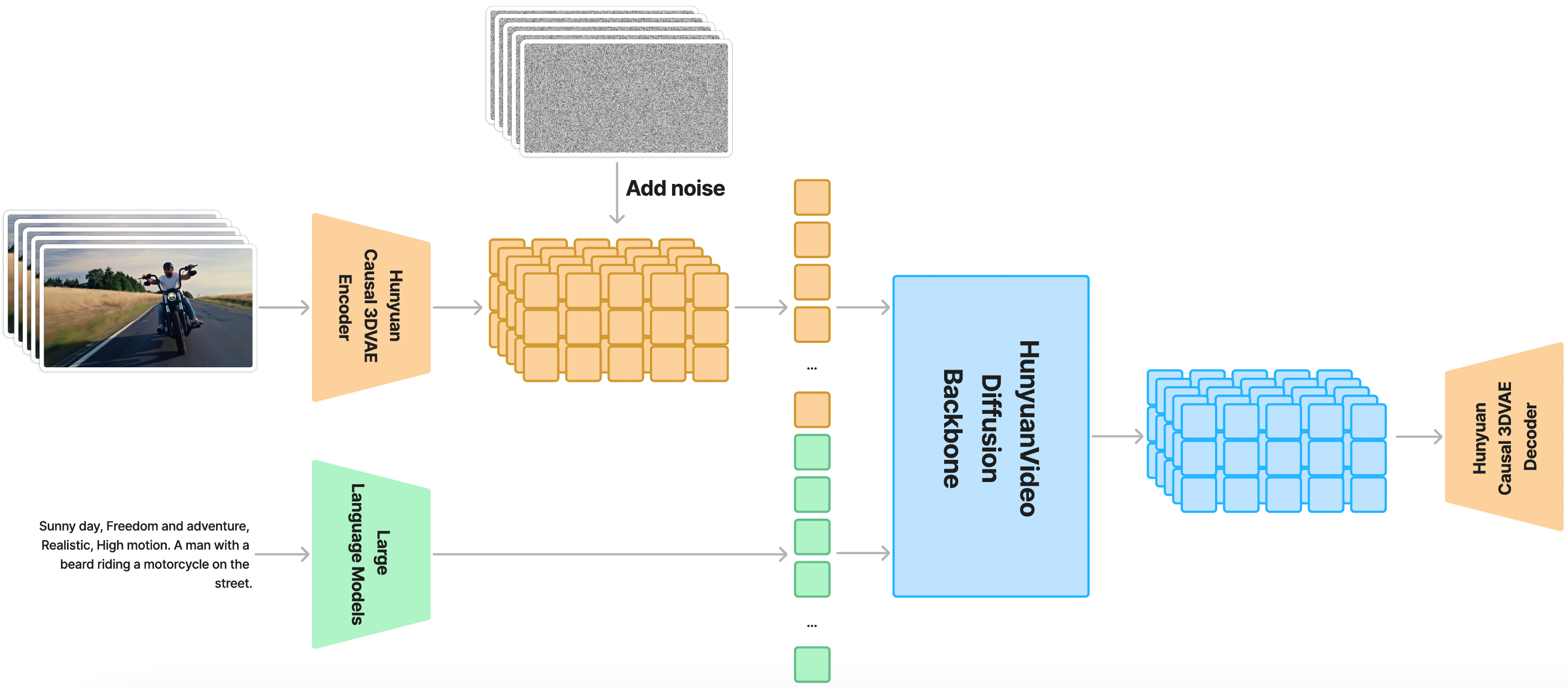
## 🧩 社区贡献 如果您的项目中有开发或使用 HunyuanVideo,欢迎告知我们。 - ComfyUI (支持FP8推理、V2V和IP2V生成): [ComfyUI-HunyuanVideoWrapper](https://github.com/kijai/ComfyUI-HunyuanVideoWrapper) by [Kijai](https://github.com/kijai) - ComfyUI-Native (ComfyUI官方原生支持): [ComfyUI-HunyuanVideo](https://comfyanonymous.github.io/ComfyUI_examples/hunyuan_video/) by [ComfyUI Official](https://github.com/comfyanonymous/ComfyUI) - FastVideo (一致性蒸馏模型、滑动块注意力): [FastVideo](https://github.com/hao-ai-lab/FastVideo) and [Sliding Tile Attention](https://hao-ai-lab.github.io/blogs/sta/) by [Hao AI Lab](https://hao-ai-lab.github.io/) - HunyuanVideo-gguf (GGUF、量化): [HunyuanVideo-gguf](https://huggingface.co/city96/HunyuanVideo-gguf) by [city96](https://huggingface.co/city96) - Enhance-A-Video (生成更高质量的视频): [Enhance-A-Video](https://github.com/NUS-HPC-AI-Lab/Enhance-A-Video) by [NUS-HPC-AI-Lab](https://ai.comp.nus.edu.sg/) - TeaCache (基于缓存的加速采样): [TeaCache](https://github.com/LiewFeng/TeaCache) by [Feng Liu](https://github.com/LiewFeng) - HunyuanVideoGP (针对低性能GPU的版本): [HunyuanVideoGP](https://github.com/deepbeepmeep/HunyuanVideoGP) by [DeepBeepMeep](https://github.com/deepbeepmeep) - RIFLEx (视频时序外拓): [RIFLEx](https://riflex-video.github.io/) by [Tsinghua University](https://riflex-video.github.io/) - HunyuanVideo Keyframe Control Lora (视频关键帧控制LoRA): [hunyuan-video-keyframe-control-lora](https://github.com/dashtoon/hunyuan-video-keyframe-control-lora) by [dashtoon](https://github.com/dashtoon) - Sparse-VideoGen (基于高像素级保真度的视频加速生成): [Sparse-VideoGen](https://github.com/svg-project/Sparse-VideoGen) by [University of California, Berkeley](https://svg-project.github.io/) - FramePack (将输入帧上下文打包到下一帧预测模型中用于视频生成): [FramePack](https://github.com/lllyasviel/FramePack) by [Lvmin Zhang](https://github.com/lllyasviel) - Jenga (加速采样): [Jenga](https://github.com/dvlab-research/Jenga) by [DV Lab](https://github.com/dvlab-research) - DCM (用于高效高质量视频生成的双专家一致性模型): [DCM](https://github.com/Vchitect/DCM) by [Vchitect](https://github.com/Vchitect/DCM) ## 📑 开源计划 - HunyuanVideo (文生视频模型) - [x] 推理代码 - [x] 模型权重 - [x] 多GPU序列并行推理(GPU 越多,推理速度越快) - [x] Web Demo (Gradio) - [x] Diffusers - [x] FP8 量化版本 - [x] Penguin Video 基准测试集 - [x] ComfyUI - [HunyuanVideo (图生视频模型)](https://github.com/Tencent-Hunyuan/HunyuanVideo-I2V) - [x] 推理代码 - [x] 模型权重 ## 目录 - [HunyuanVideo: A Systematic Framework For Large Video Generation Model](#hunyuanvideo-a-systematic-framework-for-large-video-generation-model) - [🎥 作品展示](#-作品展示) - [🔥🔥🔥 更新!!](#-更新) - [🧩 社区贡献](#-社区贡献) - [📑 开源计划](#-开源计划) - [目录](#目录) - [**摘要**](#摘要) - [**HunyuanVideo 的架构**](#hunyuanvideo-的架构) - [🎉 **亮点**](#-亮点) - [**统一的图视频生成架构**](#统一的图视频生成架构) - [**MLLM 文本编码器**](#mllm-文本编码器) - [**3D VAE**](#3d-vae) - [**Prompt 改写**](#prompt-改写) - [📈 能力评估](#-能力评估) - [📜 运行配置](#-运行配置) - [🛠️ 安装和依赖](#️-安装和依赖) - [Linux 安装指引](#linux-安装指引) - [🧱 下载预训练模型](#-下载预训练模型) - [🔑 单卡推理](#-单卡推理) - [使用命令行](#使用命令行) - [运行gradio服务](#运行gradio服务) - [更多配置](#更多配置) - [🚀 使用 xDiT 实现多卡并行推理](#-使用-xdit-实现多卡并行推理) - [使用命令行](#使用命令行-1) - [🚀 FP8 Inference](#---fp8-inference) - [Using Command Line](#using-command-line) - [🔗 BibTeX](#-bibtex) - [致谢](#致谢) - [Star 趋势](#star-趋势) --- ## **摘要** HunyuanVideo 是一个全新的开源视频生成大模型,具有与领先的闭源模型相媲美甚至更优的视频生成表现。为了训练 HunyuanVideo,我们采用了一个全面的框架,集成了数据整理、图像-视频联合模型训练和高效的基础设施以支持大规模模型训练和推理。此外,通过有效的模型架构和数据集扩展策略,我们成功地训练了一个拥有超过 130 亿参数的视频生成模型,使其成为最大的开源视频生成模型之一。 我们在模型结构的设计上做了大量的实验以确保其能拥有高质量的视觉效果、多样的运动、文本-视频对齐和生成稳定性。根据专业人员的评估结果,HunyuanVideo 在综合指标上优于以往的最先进模型,包括 Runway Gen-3、Luma 1.6 和 3 个中文社区表现最好的视频生成模型。**通过开源基础模型和应用模型的代码和权重,我们旨在弥合闭源和开源视频基础模型之间的差距,帮助社区中的每个人都能够尝试自己的想法,促进更加动态和活跃的视频生成生态。** ## **HunyuanVideo 的架构** HunyuanVideo 是一个隐空间模型,训练时它采用了 3D VAE 压缩时间维度和空间维度的特征。文本提示通过一个大语言模型编码后作为条件输入模型,引导模型通过对高斯噪声的多步去噪,输出一个视频的隐空间表示。最后,推理时通过 3D VAE 解码器将隐空间表示解码为视频。

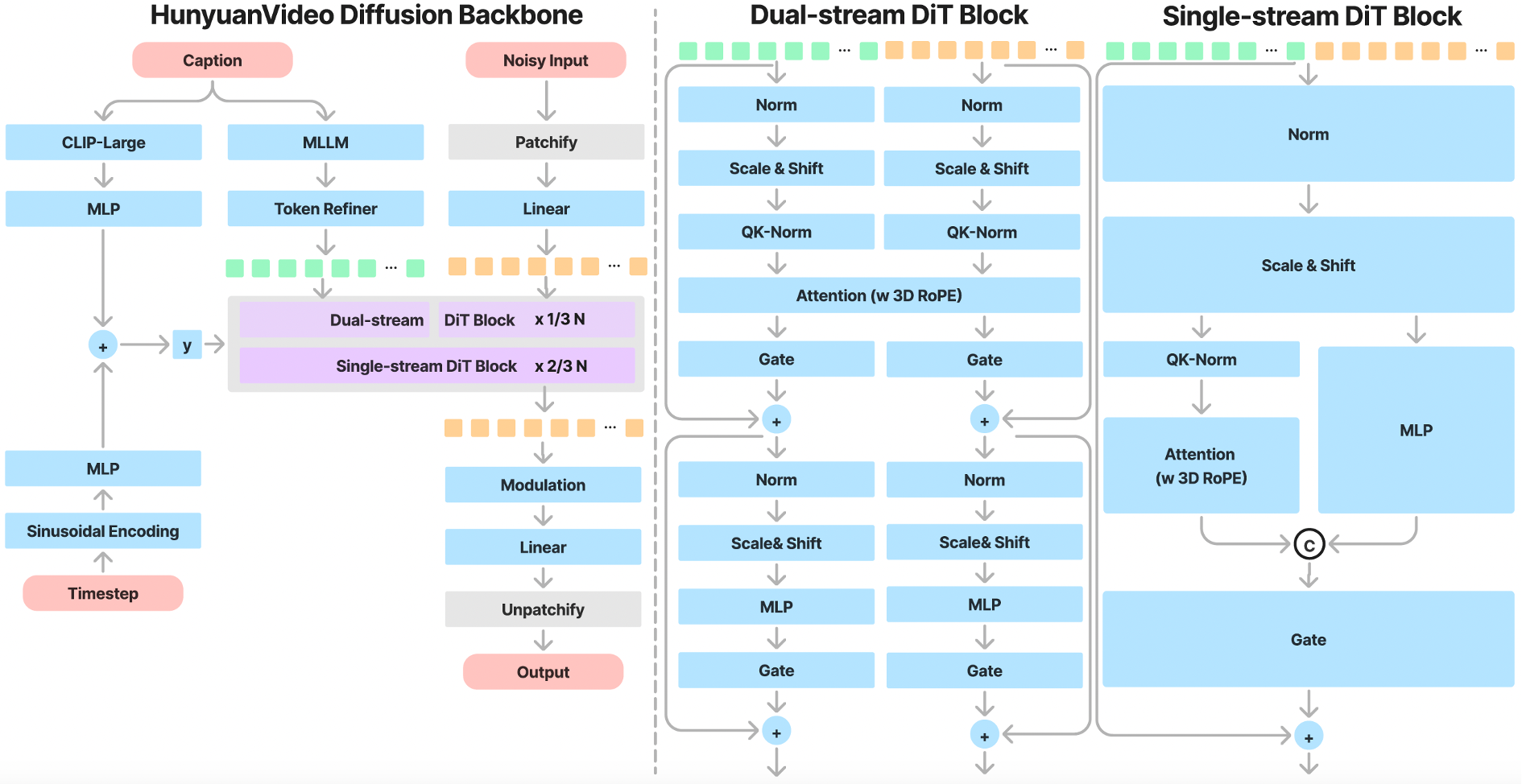
## 🎉 **亮点** ### **统一的图视频生成架构** HunyuanVideo 采用了 Transformer 和 Full Attention 的设计用于视频生成。具体来说,我们使用了一个“双流到单流”的混合模型设计用于视频生成。在双流阶段,视频和文本 token 通过并行的 Transformer Block 独立处理,使得每个模态可以学习适合自己的调制机制而不会相互干扰。在单流阶段,我们将视频和文本 token 连接起来并将它们输入到后续的 Transformer Block 中进行有效的多模态信息融合。这种设计捕捉了视觉和语义信息之间的复杂交互,增强了整体模型性能。

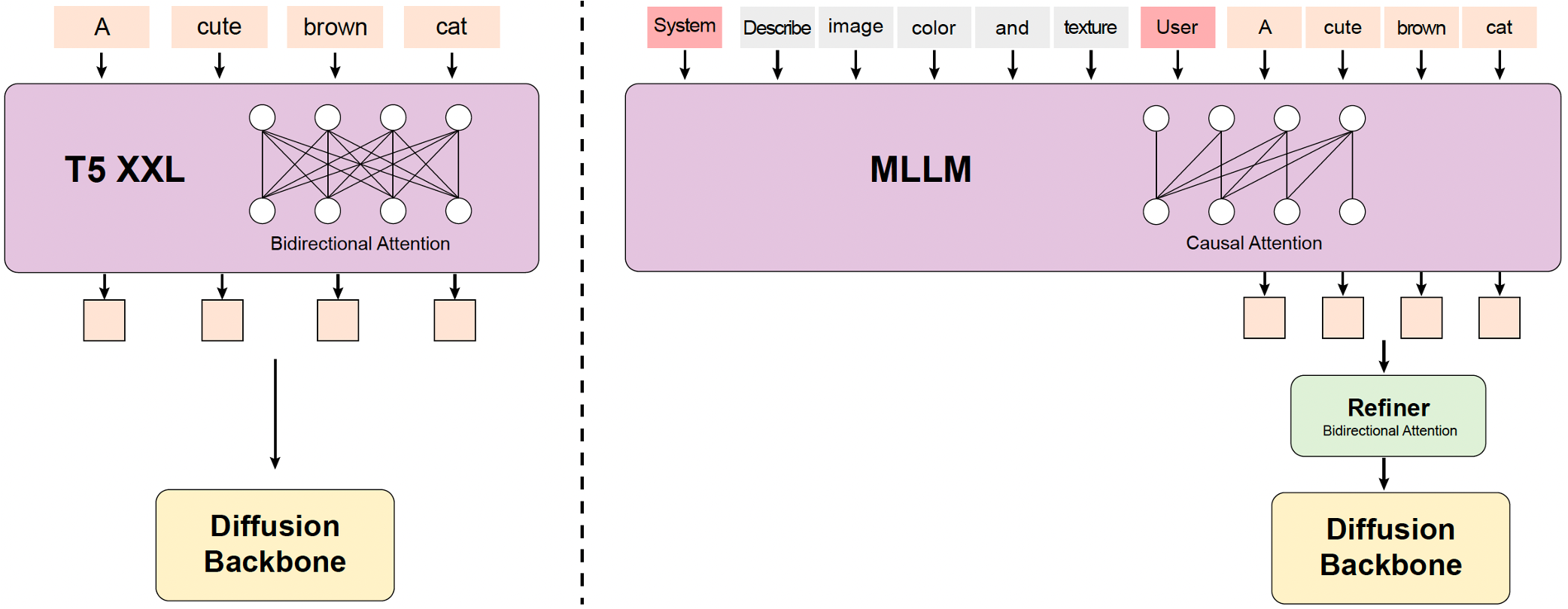
### **MLLM 文本编码器** 过去的视频生成模型通常使用预训练的 CLIP 和 T5-XXL 作为文本编码器,其中 CLIP 使用 Transformer Encoder,T5 使用 Encoder-Decoder 结构。HunyuanVideo 使用了一个预训练的 Multimodal Large Language Model (MLLM) 作为文本编码器,它具有以下优势: * 与 T5 相比,MLLM 基于图文数据指令微调后在特征空间中具有更好的图像-文本对齐能力,这减轻了扩散模型中的图文对齐的难度; * 与 CLIP 相比,MLLM 在图像的细节描述和复杂推理方面表现出更强的能力; * MLLM 可以通过遵循系统指令实现零样本生成,帮助文本特征更多地关注关键信息。 由于 MLLM 是基于 Causal Attention 的,而 T5-XXL 使用了 Bidirectional Attention 为扩散模型提供更好的文本引导。因此,我们引入了一个额外的 token 优化器来增强文本特征。

### **3D VAE** 我们的 VAE 采用了 CausalConv3D 作为 HunyuanVideo 的编码器和解码器,用于压缩视频的时间维度和空间维度,其中时间维度压缩 4 倍,空间维度压缩 8 倍,压缩为 16 channels。这样可以显著减少后续 Transformer 模型的 token 数量,使我们能够在原始分辨率和帧率下训练视频生成模型。

### **Prompt 改写** 为了解决用户输入文本提示的多样性和不一致性的困难,我们微调了 [Hunyuan-Large model](https://github.com/Tencent/Tencent-Hunyuan-Large) 模型作为我们的 prompt 改写模型,将用户输入的提示词改写为更适合模型偏好的写法。 我们提供了两个改写模式:正常模式和导演模式。两种模式的提示词见[这里](hyvideo/prompt_rewrite.py)。正常模式旨在增强视频生成模型对用户意图的理解,从而更准确地解释提供的指令。导演模式增强了诸如构图、光照和摄像机移动等方面的描述,倾向于生成视觉质量更高的视频。注意,这种增强有时可能会导致一些语义细节的丢失。 Prompt 改写模型可以直接使用 [Hunyuan-Large](https://github.com/Tencent/Tencent-Hunyuan-Large) 部署和推理. 我们开源了 prompt 改写模型的权重,见[这里](https://huggingface.co/Tencent/HunyuanVideo-PromptRewrite). ## 📈 能力评估 为了评估 HunyuanVideo 的能力,我们选择了四个闭源视频生成模型作为对比。我们总共使用了 1,533 个 prompt,每个 prompt 通过一次推理生成了相同数量的视频样本。为了公平比较,我们只进行了一次推理以避免任何挑选。在与其他方法比较时,我们保持了所有选择模型的默认设置,并确保了视频分辨率的一致性。视频根据三个标准进行评估:文本对齐、运动质量和视觉质量。在 60 多名专业评估人员评估后,HunyuanVideo 在综合指标上表现最好,特别是在运动质量方面表现较为突出。

模型 是否开源 时长 文本对齐 运动质量 视觉质量 综合评价 排序
HunyuanVideo (Ours) 5s 61.8% 66.5% 95.7% 41.3% 1
国内模型 A (API) 5s 62.6% 61.7% 95.6% 37.7% 2
国内模型 B (Web) 5s 60.1% 62.9% 97.7% 37.5% 3
GEN-3 alpha (Web) 6s 47.7% 54.7% 97.5% 27.4% 4
Luma1.6 (API) 5s 57.6% 44.2% 94.1% 24.8% 5

## 📜 运行配置 下表列出了运行 HunyuanVideo 模型使用文本生成视频的推荐配置(batch size = 1): | 模型 | 分辨率
(height/width/frame) | 峰值显存 | |:--------------:|:--------------------------------:|:----------------:| | HunyuanVideo | 720px1280px129f | 60G | | HunyuanVideo | 544px960px129f | 45G | * 本项目适用于使用 NVIDIA GPU 和支持 CUDA 的设备 * 模型在单张 80G GPU 上测试 * 运行 720px1280px129f 的最小显存要求是 60GB,544px960px129f 的最小显存要求是 45GB。 * 测试操作系统:Linux ## 🛠️ 安装和依赖 首先克隆 git 仓库: ```shell git clone https://github.com/Tencent-Hunyuan/HunyuanVideo cd HunyuanVideo ``` ### Linux 安装指引 我们推荐使用 CUDA 12.4 或 11.8 的版本。 Conda 的安装指南可以参考[这里](https://docs.anaconda.com/free/miniconda/index.html)。 ```shell # 1. Create conda environment conda create -n HunyuanVideo python==3.10.9 # 2. Activate the environment conda activate HunyuanVideo # 3. Install PyTorch and other dependencies using conda # For CUDA 11.8 conda install pytorch==2.6.0 torchvision==0.19.0 torchaudio==2.4.0 pytorch-cuda=11.8 -c pytorch -c nvidia # For CUDA 12.4 conda install pytorch==2.6.0 torchvision==0.19.0 torchaudio==2.4.0 pytorch-cuda=12.4 -c pytorch -c nvidia # 4. Install pip dependencies python -m pip install -r requirements.txt # 5. Install flash attention v2 for acceleration (requires CUDA 11.8 or above) python -m pip install ninja python -m pip install git+https://github.com/Dao-AILab/flash-attention.git@v2.6.3 # 6. Install xDiT for parallel inference (It is recommended to use torch 2.6.0 and flash-attn 2.6.3) python -m pip install xfuser==0.4.0 ``` 如果在特定 GPU 型号上遭遇 float point exception(core dump) 问题,可尝试以下方案修复: ```shell #选项1:确保已正确安装 CUDA 12.4, CUBLAS>=12.4.5.8, 和 CUDNN>=9.00 (或直接使用我们提供的CUDA12镜像) pip install nvidia-cublas-cu12==12.4.5.8 export LD_LIBRARY_PATH=/opt/conda/lib/python3.8/site-packages/nvidia/cublas/lib/ #选项2:强制显式使用 CUDA11.8 编译的 Pytorch 版本以及其他所有软件包 pip uninstall -r requirements.txt # 确保卸载所有依赖包 pip uninstall -y xfuser pip install torch==2.6.0 --index-url https://download.pytorch.org/whl/cu118 pip install -r requirements.txt pip install ninja pip install git+https://github.com/Dao-AILab/flash-attention.git@v2.6.3 pip install xfuser==0.4.0 ``` 另外,我们提供了一个预构建的 Docker 镜像,可以使用如下命令进行拉取和运行。 ```shell # 用于 CUDA 12.4 (已更新避免 float point exception) docker pull hunyuanvideo/hunyuanvideo:cuda_12 docker run -itd --gpus all --init --net=host --uts=host --ipc=host --name hunyuanvideo --security-opt=seccomp=unconfined --ulimit=stack=67108864 --ulimit=memlock=-1 --privileged hunyuanvideo/hunyuanvideo:cuda_12 # 用于 CUDA 11.8 docker pull hunyuanvideo/hunyuanvideo:cuda_11 docker run -itd --gpus all --init --net=host --uts=host --ipc=host --name hunyuanvideo --security-opt=seccomp=unconfined --ulimit=stack=67108864 --ulimit=memlock=-1 --privileged hunyuanvideo/hunyuanvideo:cuda_11 ``` ## 🧱 下载预训练模型 下载预训练模型参考[这里](ckpts/README.md)。 ## 🔑 单卡推理 我们在下表中列出了支持的高度/宽度/帧数设置。 | 分辨率 | h/w=9:16 | h/w=16:9 | h/w=4:3 | h/w=3:4 | h/w=1:1 | |:---------------------:|:----------------------------:|:---------------:|:---------------:|:---------------:|:---------------:| | 540p | 544px960px129f | 960px544px129f | 624px832px129f | 832px624px129f | 720px720px129f | | 720p (推荐) | 720px1280px129f | 1280px720px129f | 1104px832px129f | 832px1104px129f | 960px960px129f | ### 使用命令行 ```bash cd HunyuanVideo python3 sample_video.py \ --video-size 720 1280 \ --video-length 129 \ --infer-steps 50 \ --prompt "A cat walks on the grass, realistic style." \ --flow-reverse \ --use-cpu-offload \ --save-path ./results ``` ### 运行gradio服务 ```bash python3 gradio_server.py --flow-reverse # set SERVER_NAME and SERVER_PORT manually # SERVER_NAME=0.0.0.0 SERVER_PORT=8081 python3 gradio_server.py --flow-reverse ``` ### 更多配置 下面列出了更多关键配置项: | 参数 | 默认值 | 描述 | |:----------------------:|:---------:|:-----------------------------------------:| | `--prompt` | None | 用于生成视频的 prompt | | `--video-size` | 720 1280 | 生成视频的高度和宽度 | | `--video-length` | 129 | 生成视频的帧数 | | `--infer-steps` | 50 | 生成时采样的步数 | | `--embedded-cfg-scale` | 6.0 | 文本的控制强度 | | `--flow-shift` | 7.0 | 推理时 timestep 的 shift 系数,值越大,高噪区域采样步数越多 | | `--flow-reverse` | False | If reverse, learning/sampling from t=1 -> t=0 | | `--neg-prompt` | None | 负向词 | | `--seed` | 0 | 随机种子 | | `--use-cpu-offload` | False | 启用 CPU offload,可以节省显存 | | `--save-path` | ./results | 保存路径 | ## 🚀 使用 xDiT 实现多卡并行推理 [xDiT](https://github.com/xdit-project/xDiT) 是一个针对多 GPU 集群的扩展推理引擎,用于扩展 Transformers(DiTs)。 它成功为各种 DiT 模型(包括 mochi-1、CogVideoX、Flux.1、SD3 等)提供了低延迟的并行推理解决方案。该存储库采用了 [Unified Sequence Parallelism (USP)](https://arxiv.org/abs/2405.07719) API 用于混元视频模型的并行推理。 ### 使用命令行 例如,可用如下命令使用8张GPU卡完成推理 ```bash cd HunyuanVideo torchrun --nproc_per_node=8 sample_video_parallel.py \ --video-size 1280 720 \ --video-length 129 \ --infer-steps 50 \ --prompt "A cat walks on the grass, realistic style." \ --flow-reverse \ --seed 42 \ --ulysses_degree 8 \ --ring_degree 1 \ --save-path ./results ``` 可以配置`--ulysses-degree`和`--ring-degree`来控制并行配置,可选参数如下。
支持的并行配置 (点击查看详情) | --video-size | --video-length | --ulysses-degree x --ring-degree | --nproc_per_node | |----------------------|----------------|----------------------------------|------------------| | 1280 720 或 720 1280 | 129 | 8x1,4x2,2x4,1x8 | 8 | | 1280 720 或 720 1280 | 129 | 1x5 | 5 | | 1280 720 或 720 1280 | 129 | 4x1,2x2,1x4 | 4 | | 1280 720 或 720 1280 | 129 | 3x1,1x3 | 3 | | 1280 720 或 720 1280 | 129 | 2x1,1x2 | 2 | | 1104 832 或 832 1104 | 129 | 4x1,2x2,1x4 | 4 | | 1104 832 或 832 1104 | 129 | 3x1,1x3 | 3 | | 1104 832 或 832 1104 | 129 | 2x1,1x2 | 2 | | 960 960 | 129 | 6x1,3x2,2x3,1x6 | 6 | | 960 960 | 129 | 4x1,2x2,1x4 | 4 | | 960 960 | 129 | 3x1,1x3 | 3 | | 960 960 | 129 | 1x2,2x1 | 2 | | 960 544 或 544 960 | 129 | 6x1,3x2,2x3,1x6 | 6 | | 960 544 或 544 960 | 129 | 4x1,2x2,1x4 | 4 | | 960 544 或 544 960 | 129 | 3x1,1x3 | 3 | | 960 544 或 544 960 | 129 | 1x2,2x1 | 2 | | 832 624 或 624 832 | 129 | 4x1,2x2,1x4 | 4 | | 624 832 或 624 832 | 129 | 3x1,1x3 | 3 | | 832 624 或 624 832 | 129 | 2x1,1x2 | 2 | | 720 720 | 129 | 1x5 | 5 | | 720 720 | 129 | 3x1,1x3 | 3 |

在 8xGPU上生成1280x720 (129 帧 50 步)的时耗 (秒)
1 2 4 8
1904.08 934.09 (2.04x) 514.08 (3.70x) 337.58 (5.64x)

## 🚀 FP8 Inference 使用FP8量化后的HunyuanVideo模型能够帮您节省大概10GB显存。 使用前需要从 Huggingface 下载[FP8权重](https://huggingface.co/tencent/HunyuanVideo/blob/main/hunyuan-video-t2v-720p/transformers/mp_rank_00_model_states_fp8.pt)和每层量化权重的[scale参数](https://huggingface.co/tencent/HunyuanVideo/blob/main/hunyuan-video-t2v-720p/transformers/mp_rank_00_model_states_fp8_map.pt). ### Using Command Line 这里,您必须显示地指定FP8的权重路径。例如,可用如下命令使用FP8模型推理 ```bash cd HunyuanVideo DIT_CKPT_PATH={PATH_TO_FP8_WEIGHTS}/{WEIGHT_NAME}_fp8.pt python3 sample_video.py \ --dit-weight ${DIT_CKPT_PATH} \ --video-size 1280 720 \ --video-length 129 \ --infer-steps 50 \ --prompt "A cat walks on the grass, realistic style." \ --seed 42 \ --embedded-cfg-scale 6.0 \ --flow-shift 7.0 \ --flow-reverse \ --use-cpu-offload \ --use-fp8 \ --save-path ./results ``` ## 🔗 BibTeX 如果您认为 [HunyuanVideo](https://arxiv.org/abs/2412.03603) 给您的研究和应用带来了一些帮助,可以通过下面的方式来引用: ```BibTeX @article{kong2024hunyuanvideo, title={Hunyuanvideo: A systematic framework for large video generative models}, author={Kong, Weijie and Tian, Qi and Zhang, Zijian and Min, Rox and Dai, Zuozhuo and Zhou, Jin and Xiong, Jiangfeng and Li, Xin and Wu, Bo and Zhang, Jianwei and others}, journal={arXiv preprint arXiv:2412.03603}, year={2024} } ``` ## 致谢 HunyuanVideo 的开源离不开诸多开源工作,这里我们特别感谢 [SD3](https://huggingface.co/stabilityai/stable-diffusion-3-medium), [FLUX](https://github.com/black-forest-labs/flux), [Llama](https://github.com/meta-llama/llama), [LLaVA](https://github.com/haotian-liu/LLaVA), [Xtuner](https://github.com/InternLM/xtuner), [diffusers](https://github.com/huggingface/diffusers) and [HuggingFace](https://huggingface.co) 的开源工作和探索。另外,我们也感谢腾讯混元多模态团队对 HunyuanVideo 适配多种文本编码器的支持。 ## Star 趋势 Star History Chart