# echomd
**Repository Path**: mirrors_WebReflection/echomd
## Basic Information
- **Project Name**: echomd
- **Description**: A terminal oriented MD like syntax
- **Primary Language**: Unknown
- **License**: MIT
- **Default Branch**: master
- **Homepage**: None
- **GVP Project**: No
## Statistics
- **Stars**: 0
- **Forks**: 0
- **Created**: 2020-08-19
- **Last Updated**: 2025-12-27
## Categories & Tags
**Categories**: Uncategorized
**Tags**: None
## README
# echomd [](https://travis-ci.org/WebReflection/echomd)
An md like conversion tool for shell terminals.
Would you like to try echomd Markdown for browser console? Check [consolemd](https://github.com/WebReflection/consolemd#consolemd-) out
Fully inspired by the work of John Gruber,
`echomd` is a [Markdown](http://daringfireball.net/projects/markdown/) flavor
that targets terminals and consoles.
There are few inconsistencies across Windows, Mac, and Linux worlds,
when it comes to highlight, underline, or emphasize text in console,
and `echomd` is here to help and make it as simple as possible to improve
console textual layout.
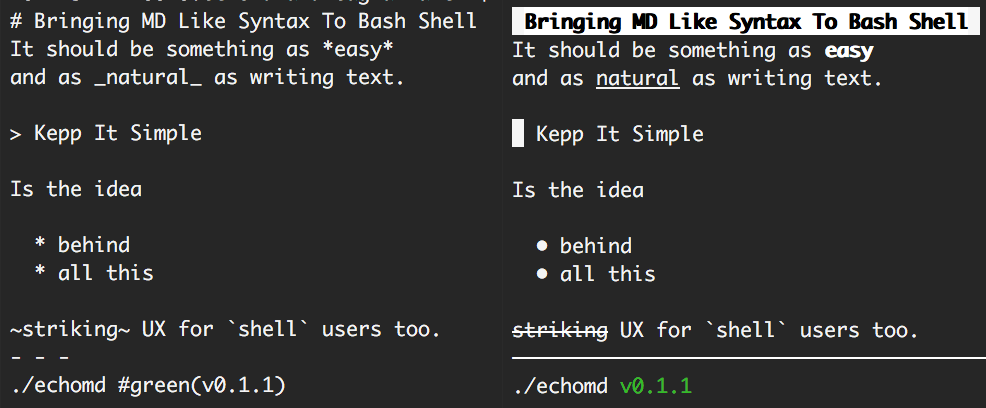
### How to install it
You can chose between the [perl version](perl/echomd),
virtually natively available in every Linux and Mac terminal,
or the [nodejs version](js/echomd), usable both as module
and executable.
#### ArchLinux perl version via [AUR](https://aur.archlinux.org/packages/echomd)
`yaourt -S --noconfirm --needed echomd`
#### Other Mac or Linux distributions (perl based)
`curl -o- https://webreflection.github.io/echomd/install | bash`
#### NodeJS version via [npm](https://www.npmjs.com/package/echomd)
`npm install -g echomd`
Once installed, you can see a demo via `echomd -h` or `echomd --help`.
Please note the demo has duplicated surrounding chars on purpose,
so you can remember how to replicate a specific feature.
## Features
Following the list of transformers implemented via `echomd`.
#### Code blocks
Code blocks are simply **not parsed** and preserved as they are.
These can be both multiline, via 3 backticks, or single line.
echomd 'Some text
```
multi *line*
block
```
and `single _line_` too'
#### Horizontal lines
Using 3 or more `***` or `---` or `___`,
with optional spaces in between,
produces a 72 length straight line,
simulating somehow a browser `
`
#### Headers
There are two kind of headers, the most important one,
defined using only **one** `# Hashtag`,
which is a fully highlighted and bold header,
or two or more `## Hashtags` for less important headers,
still highlighted compared to the rest of the text.
#### Bold
Using one or two asterisks would produce some bold text.
`*this*` or `**this**` will produce identical text,
preserving the semantic original meaning of the `*`,
showing up consistently bold in every platform.
The reason one star does not produce `` tag equivalent,
is that italic text is unfortunately not widely supported (Linux only)
so it'd be bad UX for cross platform users if completely unrecognizable elsewhere.
#### Dim
A meaningful, cross platform, way to dim some text via one or more `-`.
#### Underline
Following same cross platform consistency reason,
using one or more underscores will produce an underlined text.
`_this_` and `__this__`are equivalent, and it's possible combine
both bold and underline at once via `*_this_*` or `_*that*_`.
#### Blink
Visible on Linux and macOS only, it is possible to blink text via one or more `:`.
#### Reverse
A meaningful, cross platform, way to reverse some text via one or more `!`.
#### Hidden
A way to hide text via `?`, o Mac and Linux only.
#### Strike
Visible on Linux only, and just to preserve original MD intent,
it is possible to strike text via one or more `~`.
#### Bullets list
It is possible to create a nice bullets list simply using 1 or more spaces / tabs.
```
This is some text.
* this is a bullet
* this is another one
that will preserve spaces
to it's possible to go new line
* this is the last bullet
And this is some text.
```
Bear in mind, nested lists and all possible complicated and uncommon Web related scenarios are not supported. Keep It Simple (and handy) is the root idea of this project.
#### Quotes
It is possible to quote some text simply starting a line with `> `.
```
This is some text from somebody else.
> brace yourselves, echomd is coming
```
#### Colors and Background Colors
Software designed for the terminal cannot go too fancy with tags or styles,
yet it can have colors **or** background colors (not both together).
The proposed syntax is pretty simple: `#green(text)` for text in green, and `!#green(text)` for text with a green background.
The list of currently supported colors (both text or background) is the same exposed through NodeJS `util/inspect.colors` module: _bold, italic, underline, inverse, white, grey, black, blue, cyan, green, magenta, red, yellow_.
## As NodeJS moule
The module can output directly in console or produce the raw text using `require('echomd').raw` function.
### License
`echomd` is under the MIT style License (MIT).