# MaterialViewPager
**Repository Path**: mirrors_YoKeyword/MaterialViewPager
## Basic Information
- **Project Name**: MaterialViewPager
- **Description**: A Material Design ViewPager easy to use library
- **Primary Language**: Unknown
- **License**: Apache-2.0
- **Default Branch**: master
- **Homepage**: None
- **GVP Project**: No
## Statistics
- **Stars**: 0
- **Forks**: 0
- **Created**: 2020-08-19
- **Last Updated**: 2026-01-17
## Categories & Tags
**Categories**: Uncategorized
**Tags**: None
## README
MaterialViewPager
=======
[](http://android-arsenal.com/details/1/1731)
[](http://androidweekly.net/issues/issue-151)
[](https://gitter.im/florent37/MaterialViewPager?utm_source=badge&utm_medium=badge&utm_campaign=pr-badge&utm_content=badge)
Material Design ViewPager easy to use library
[](http://youtu.be/g6tTDVceM9E)
#Sample
 You can find a sample APK : [Link](https://github.com/florent37/MaterialViewPager/releases/download/1.1.0/sample-release.apk)
And have a look on a sample Youtube Video : [Youtube Link](http://www.youtube.com/watch?v=r95Tt6AS18c)
[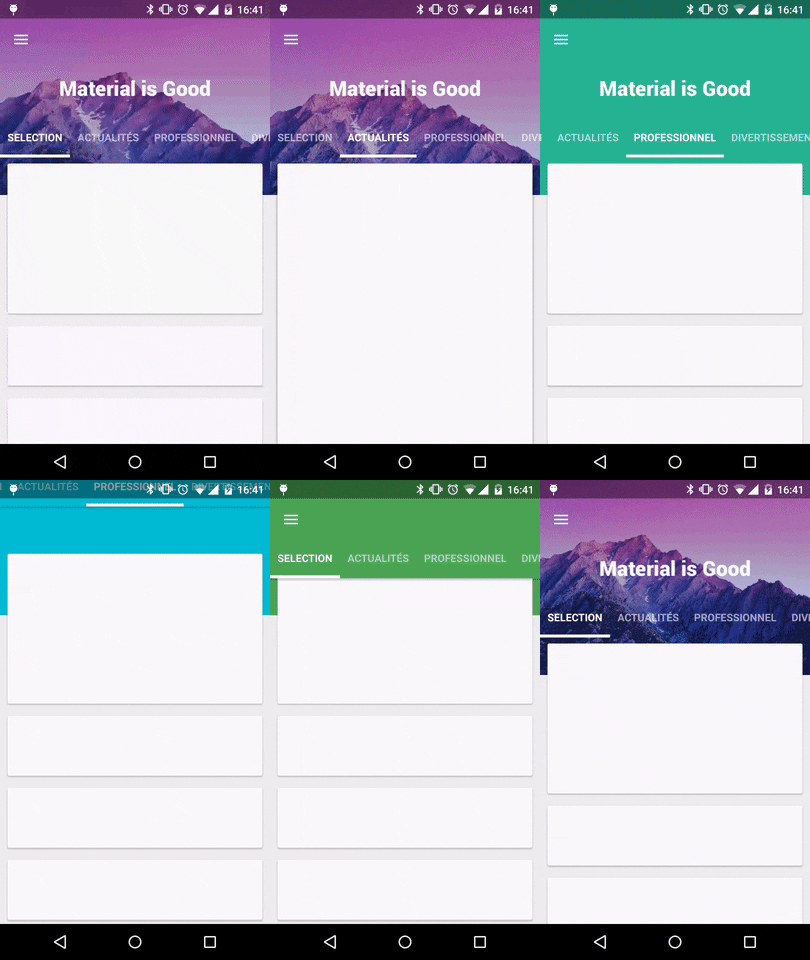](http://www.youtube.com/watch?v=r95Tt6AS18c)
#Download
In your module [](https://bintray.com/florent37/maven/MaterialViewPager/_latestVersion)
```groovy
compile ('com.github.florent37:materialviewpager:1.1.3@aar'){
transitive = true
}
```
#Usage
Add MaterialViewPager to your activity's layout
```xml
```
with **header_logo.xml**
```xml
```
You will see on Android Studio Preview :
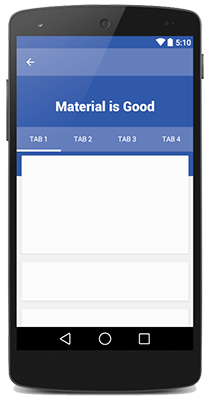
To get a beautiful screen and enable preview, you theme may follow
```xml
```
#Retrieve the MaterialViewPager
You can use MaterialViewPager as an usual Android View, and get it by findViewById
```java
public class MainActivity extends ActionBarActivity {
private MaterialViewPager mViewPager;
@Override
protected void onCreate(Bundle savedInstanceState) {
super.onCreate(savedInstanceState);
setContentView(R.layout.activity_main);
mViewPager = (MaterialViewPager) findViewById(R.id.materialViewPager);
}
}
```
#Customisation
First choose your color and height
```xml
```
##Set your logo
```xml
```
###Titlebar Logo
[](http://youtu.be/82gvoUqXb_I)
Your logo's layout must
* layout_height="@dimen/materialviewpager_logoHeight"
**header_logo.xml**
```xml
```
```xml
```
###Fading Logo
[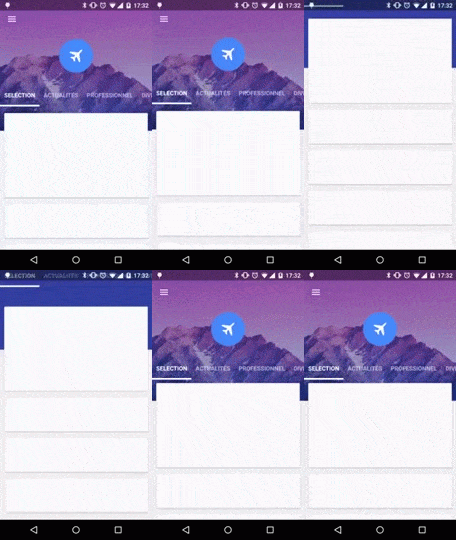](http://youtu.be/9laniARQdqg)
**header_logo.xml**
```xml
```
```xml
```
##Toolbar Animation
##Hide Logo and Toolbar
[](http://youtu.be/3ElFoqVKxag)
```xml
```
###Sticky Toolbar
[](http://youtu.be/3ElFoqVKxag)
```xml
```
###Transparent Toolbar
[](https://youtu.be/jUVO2cozQHQ)
```xml
```
##Header Layout
You can replace the header
```xml
```
###Moving Header
Or use the default header, with a KenBurns animation
```xml
```
###Static Header
Or simply use an ImageView as header
```xml
```
##Custom Tab Bar
You can set you own tab bar, by default I provided 2 implementations
###Standard
[](http://youtu.be/VRinfxgewNE)
```xml
```
###News Stand
[](http://youtu.be/MBzK2s7HU1A)
```xml
```
###Or create your own tab bar
Create your own layout using a PagerSlidingTabStrip
**my_tabs.xml**
```xml
```
**Don't forget to give it id="@id/materialviewpager_pagerTitleStrip"**
```xml
```
#Animate Header
[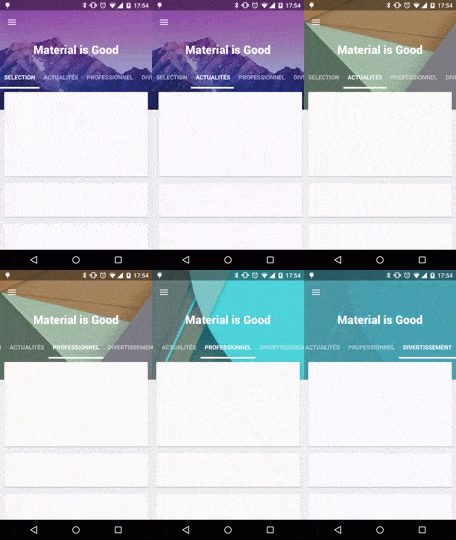](http://youtu.be/90gKwEL1j2I )
Simply add a listen to the ViewPager
```java
mViewPager.setMaterialViewPagerListener(new MaterialViewPager.Listener() {
@Override
public HeaderDesign getHeaderDesign(int page) {
switch (page) {
case 0:
return HeaderDesign.fromColorResAndUrl(
R.color.blue,
"http://cdn1.tnwcdn.com/wp-content/blogs.dir/1/files/2014/06/wallpaper_51.jpg");
case 1:
return HeaderDesign.fromColorResAndUrl(
R.color.green,
"https://fs01.androidpit.info/a/63/0e/android-l-wallpapers-630ea6-h900.jpg");
case 2:
return HeaderDesign.fromColorResAndUrl(
R.color.cyan,
"http://www.droid-life.com/wp-content/uploads/2014/10/lollipop-wallpapers10.jpg");
case 3:
return HeaderDesign.fromColorResAndUrl(
R.color.red,
"http://www.tothemobile.com/wp-content/uploads/2014/07/original.jpg");
}
//execute others actions if needed (ex : modify your header logo)
return null;
}
});
```
Available
```java
HeaderDesign.fromColorAndUrl(Color.BLUE,"http:...);
HeaderDesign.fromColorResAndUrl(R.color.blue,"http:...);
HeaderDesign.fromColorAndDrawable(Color.BLUE,myDrawable);
HeaderDesign.fromColorResAndDrawable(R.color.blue,myDrawable);
```
#Toolbar
```java
Toolbar toolbar = mViewPager.getToolbar();
if (toolbar != null) {
setSupportActionBar(toolbar);
ActionBar actionBar = getSupportActionBar();
actionBar.setDisplayHomeAsUpEnabled(true);
actionBar.setDisplayShowHomeEnabled(true);
actionBar.setDisplayShowTitleEnabled(true);
actionBar.setDisplayUseLogoEnabled(false);
actionBar.setHomeButtonEnabled(true);
}
```
#ViewPager
```java
ViewPager viewPager = mViewPager.getViewPager();
viewPage.setAdapter(...);
//After set an adapter to the ViewPager
mViewPager.getPagerTitleStrip().setViewPager(mViewPager.getViewPager());
```
#Register your Scrollable
First thing, your fragment view and your scrollable must be **transparent**, so **do not use android:backgound="..."**
Sample :
```xml
```
##RecyclerView
From your fragment
```java
mAdapter = new RecyclerViewMaterialAdapter(new ***Adapter(mList));
mRecyclerView.setAdapter(mAdapter);
MaterialViewPagerHelper.registerRecyclerView(getActivity(), mRecyclerView, null);
```
###ReyclerView.OnScrollListener
If you already use ReyclerView.OnScrollListener (maybe for load more, or anything else)
```java
MaterialViewPagerHelper.registerRecyclerView(getActivity(), mRecyclerView, myRecyclerViewOnScrollListener);
```
So myRecyclerViewOnScrollListener will be still notified
##ScrollView
The ScrollView must be an [ObservableScrollView][android-observablescrollview]
```java
MaterialViewPagerHelper.registerScrollView(getActivity(), mScrollView, null);
```
###CallBacks
If you already use ObservableScrollViewCallbacks (maybe for load more, or anything else)
```java
MaterialViewPagerHelper.registerScrollView(getActivity(), mScrollView, myObservableScrollViewCallbacks);
```
So myObservableScrollViewCallbacks will be still notified
###Layout
And must include @layout/material_view_pager_placeholder as first child
```xml
...your content...
```
#CHANGELOG
##1.1.3
- header is now clickable
- fixed some scrolling issues
##1.1.2
- quick scroll fix
- can set a custom viewpager with app:viewpager_viewpager (the viewpager id must be id/materialviewpager_viewpager)
##1.1.0
- orientation change fix
- header image display fix
- elements on header are now clickable
- notifyHeaderChanged
##1.0.8
- added attribute viewpager_disableToolbar
##1.0.7
- fix bug on low resolutions
##1.0.6
- added attribute transparentToolbar
- added attribute animatedHeaderImage
- fixed bug when page is too small to scroll
- modified HeaderDesign implementation
##1.0.5
- smoother toolbar scrolling
- fixed bug with fitSystemWindow
- added HeaderDesign to modify the header color & image
- added displayToolbarWhenSwipe attribute
##1.0.4
Fixed :
- Orientation changed
- Memory Leak
- Android >2.3 with NineOldAndroid
- Removed ListView usage
##1.0.3
Fixed : Rapid scrolling results in varying Toolbar height
RecyclerViewMaterialAdapter can handle a custom placeholder cells count (usefull for GridLayoutManager)
```java
public RecyclerViewMaterialAdapter(RecyclerView.Adapter adapter, int placeholderSize)
```
##1.0.2
Added attributes
```java
app:viewpager_parallaxHeaderFactor="1.5"
app:viewpager_headerAdditionalHeight="20dp"
```
*parallaxHeaderFactor* Modify the speed of parallax header scroll (not the speed of KenBurns effect)
*parallaxHeaderFactor* Set up the height of the header's layout displayed behind the first cards view
Fixed issue when scroll down & scroll up multiples time while hideToolbarAndTitle="true"
##1.0.1
Added attributes
```java
viewpager_headerAlpha="0.6"
```
#TODO
- Header image does not load every time
- **Remove Webviews from Android SDK !!!**
#Community
Looking for contributors, feel free to fork !
Tell me if you're using my library in your application, I'll share it in this README
#Dependencies
* [Picasso][picasso] (from Square)
* [KenBurnsView][kenburnsview] (from flavioarfaria)
* [Material PagerSlidingTabStrip][pagerslidingtitlestrip] (from jpardogo, forked from astuetz)
* [Android-Observablescrollview][android-observablescrollview] (from ksoichiro)
#Credits
Author: Florent Champigny [http://www.florentchampigny.com/](http://www.florentchampigny.com/)
You can find a sample APK : [Link](https://github.com/florent37/MaterialViewPager/releases/download/1.1.0/sample-release.apk)
And have a look on a sample Youtube Video : [Youtube Link](http://www.youtube.com/watch?v=r95Tt6AS18c)
[](http://www.youtube.com/watch?v=r95Tt6AS18c)
#Download
In your module [](https://bintray.com/florent37/maven/MaterialViewPager/_latestVersion)
```groovy
compile ('com.github.florent37:materialviewpager:1.1.3@aar'){
transitive = true
}
```
#Usage
Add MaterialViewPager to your activity's layout
```xml
```
with **header_logo.xml**
```xml
```
You will see on Android Studio Preview :

To get a beautiful screen and enable preview, you theme may follow
```xml
```
#Retrieve the MaterialViewPager
You can use MaterialViewPager as an usual Android View, and get it by findViewById
```java
public class MainActivity extends ActionBarActivity {
private MaterialViewPager mViewPager;
@Override
protected void onCreate(Bundle savedInstanceState) {
super.onCreate(savedInstanceState);
setContentView(R.layout.activity_main);
mViewPager = (MaterialViewPager) findViewById(R.id.materialViewPager);
}
}
```
#Customisation
First choose your color and height
```xml
```
##Set your logo
```xml
```
###Titlebar Logo
[](http://youtu.be/82gvoUqXb_I)
Your logo's layout must
* layout_height="@dimen/materialviewpager_logoHeight"
**header_logo.xml**
```xml
```
```xml
```
###Fading Logo
[](http://youtu.be/9laniARQdqg)
**header_logo.xml**
```xml
```
```xml
```
##Toolbar Animation
##Hide Logo and Toolbar
[](http://youtu.be/3ElFoqVKxag)
```xml
```
###Sticky Toolbar
[](http://youtu.be/3ElFoqVKxag)
```xml
```
###Transparent Toolbar
[](https://youtu.be/jUVO2cozQHQ)
```xml
```
##Header Layout
You can replace the header
```xml
```
###Moving Header
Or use the default header, with a KenBurns animation
```xml
```
###Static Header
Or simply use an ImageView as header
```xml
```
##Custom Tab Bar
You can set you own tab bar, by default I provided 2 implementations
###Standard
[](http://youtu.be/VRinfxgewNE)
```xml
```
###News Stand
[](http://youtu.be/MBzK2s7HU1A)
```xml
```
###Or create your own tab bar
Create your own layout using a PagerSlidingTabStrip
**my_tabs.xml**
```xml
```
**Don't forget to give it id="@id/materialviewpager_pagerTitleStrip"**
```xml
```
#Animate Header
[](http://youtu.be/90gKwEL1j2I )
Simply add a listen to the ViewPager
```java
mViewPager.setMaterialViewPagerListener(new MaterialViewPager.Listener() {
@Override
public HeaderDesign getHeaderDesign(int page) {
switch (page) {
case 0:
return HeaderDesign.fromColorResAndUrl(
R.color.blue,
"http://cdn1.tnwcdn.com/wp-content/blogs.dir/1/files/2014/06/wallpaper_51.jpg");
case 1:
return HeaderDesign.fromColorResAndUrl(
R.color.green,
"https://fs01.androidpit.info/a/63/0e/android-l-wallpapers-630ea6-h900.jpg");
case 2:
return HeaderDesign.fromColorResAndUrl(
R.color.cyan,
"http://www.droid-life.com/wp-content/uploads/2014/10/lollipop-wallpapers10.jpg");
case 3:
return HeaderDesign.fromColorResAndUrl(
R.color.red,
"http://www.tothemobile.com/wp-content/uploads/2014/07/original.jpg");
}
//execute others actions if needed (ex : modify your header logo)
return null;
}
});
```
Available
```java
HeaderDesign.fromColorAndUrl(Color.BLUE,"http:...);
HeaderDesign.fromColorResAndUrl(R.color.blue,"http:...);
HeaderDesign.fromColorAndDrawable(Color.BLUE,myDrawable);
HeaderDesign.fromColorResAndDrawable(R.color.blue,myDrawable);
```
#Toolbar
```java
Toolbar toolbar = mViewPager.getToolbar();
if (toolbar != null) {
setSupportActionBar(toolbar);
ActionBar actionBar = getSupportActionBar();
actionBar.setDisplayHomeAsUpEnabled(true);
actionBar.setDisplayShowHomeEnabled(true);
actionBar.setDisplayShowTitleEnabled(true);
actionBar.setDisplayUseLogoEnabled(false);
actionBar.setHomeButtonEnabled(true);
}
```
#ViewPager
```java
ViewPager viewPager = mViewPager.getViewPager();
viewPage.setAdapter(...);
//After set an adapter to the ViewPager
mViewPager.getPagerTitleStrip().setViewPager(mViewPager.getViewPager());
```
#Register your Scrollable
First thing, your fragment view and your scrollable must be **transparent**, so **do not use android:backgound="..."**
Sample :
```xml
```
##RecyclerView
From your fragment
```java
mAdapter = new RecyclerViewMaterialAdapter(new ***Adapter(mList));
mRecyclerView.setAdapter(mAdapter);
MaterialViewPagerHelper.registerRecyclerView(getActivity(), mRecyclerView, null);
```
###ReyclerView.OnScrollListener
If you already use ReyclerView.OnScrollListener (maybe for load more, or anything else)
```java
MaterialViewPagerHelper.registerRecyclerView(getActivity(), mRecyclerView, myRecyclerViewOnScrollListener);
```
So myRecyclerViewOnScrollListener will be still notified
##ScrollView
The ScrollView must be an [ObservableScrollView][android-observablescrollview]
```java
MaterialViewPagerHelper.registerScrollView(getActivity(), mScrollView, null);
```
###CallBacks
If you already use ObservableScrollViewCallbacks (maybe for load more, or anything else)
```java
MaterialViewPagerHelper.registerScrollView(getActivity(), mScrollView, myObservableScrollViewCallbacks);
```
So myObservableScrollViewCallbacks will be still notified
###Layout
And must include @layout/material_view_pager_placeholder as first child
```xml
...your content...
```
#CHANGELOG
##1.1.3
- header is now clickable
- fixed some scrolling issues
##1.1.2
- quick scroll fix
- can set a custom viewpager with app:viewpager_viewpager (the viewpager id must be id/materialviewpager_viewpager)
##1.1.0
- orientation change fix
- header image display fix
- elements on header are now clickable
- notifyHeaderChanged
##1.0.8
- added attribute viewpager_disableToolbar
##1.0.7
- fix bug on low resolutions
##1.0.6
- added attribute transparentToolbar
- added attribute animatedHeaderImage
- fixed bug when page is too small to scroll
- modified HeaderDesign implementation
##1.0.5
- smoother toolbar scrolling
- fixed bug with fitSystemWindow
- added HeaderDesign to modify the header color & image
- added displayToolbarWhenSwipe attribute
##1.0.4
Fixed :
- Orientation changed
- Memory Leak
- Android >2.3 with NineOldAndroid
- Removed ListView usage
##1.0.3
Fixed : Rapid scrolling results in varying Toolbar height
RecyclerViewMaterialAdapter can handle a custom placeholder cells count (usefull for GridLayoutManager)
```java
public RecyclerViewMaterialAdapter(RecyclerView.Adapter adapter, int placeholderSize)
```
##1.0.2
Added attributes
```java
app:viewpager_parallaxHeaderFactor="1.5"
app:viewpager_headerAdditionalHeight="20dp"
```
*parallaxHeaderFactor* Modify the speed of parallax header scroll (not the speed of KenBurns effect)
*parallaxHeaderFactor* Set up the height of the header's layout displayed behind the first cards view
Fixed issue when scroll down & scroll up multiples time while hideToolbarAndTitle="true"
##1.0.1
Added attributes
```java
viewpager_headerAlpha="0.6"
```
#TODO
- Header image does not load every time
- **Remove Webviews from Android SDK !!!**
#Community
Looking for contributors, feel free to fork !
Tell me if you're using my library in your application, I'll share it in this README
#Dependencies
* [Picasso][picasso] (from Square)
* [KenBurnsView][kenburnsview] (from flavioarfaria)
* [Material PagerSlidingTabStrip][pagerslidingtitlestrip] (from jpardogo, forked from astuetz)
* [Android-Observablescrollview][android-observablescrollview] (from ksoichiro)
#Credits
Author: Florent Champigny [http://www.florentchampigny.com/](http://www.florentchampigny.com/)


 License
--------
Copyright 2015 florent37, Inc.
Licensed under the Apache License, Version 2.0 (the "License");
you may not use this file except in compliance with the License.
You may obtain a copy of the License at
http://www.apache.org/licenses/LICENSE-2.0
Unless required by applicable law or agreed to in writing, software
distributed under the License is distributed on an "AS IS" BASIS,
WITHOUT WARRANTIES OR CONDITIONS OF ANY KIND, either express or implied.
See the License for the specific language governing permissions and
limitations under the License.
[snap]: https://oss.sonatype.org/content/repositories/snapshots/
[picasso]: https://github.com/square/picasso
[kenburnsview]: https://github.com/flavioarfaria/KenBurnsView
[pagerslidingtitlestrip]: https://github.com/jpardogo/PagerSlidingTabStrip
[android-observablescrollview]: https://github.com/ksoichiro/Android-ObservableScrollView
License
--------
Copyright 2015 florent37, Inc.
Licensed under the Apache License, Version 2.0 (the "License");
you may not use this file except in compliance with the License.
You may obtain a copy of the License at
http://www.apache.org/licenses/LICENSE-2.0
Unless required by applicable law or agreed to in writing, software
distributed under the License is distributed on an "AS IS" BASIS,
WITHOUT WARRANTIES OR CONDITIONS OF ANY KIND, either express or implied.
See the License for the specific language governing permissions and
limitations under the License.
[snap]: https://oss.sonatype.org/content/repositories/snapshots/
[picasso]: https://github.com/square/picasso
[kenburnsview]: https://github.com/flavioarfaria/KenBurnsView
[pagerslidingtitlestrip]: https://github.com/jpardogo/PagerSlidingTabStrip
[android-observablescrollview]: https://github.com/ksoichiro/Android-ObservableScrollView