# play
**Repository Path**: mirrors_dave/play
## Basic Information
- **Project Name**: play
- **Description**: jsgo playground: edit and run Go code in the browser, supporting arbitrary import paths
- **Primary Language**: Unknown
- **License**: MIT
- **Default Branch**: master
- **Homepage**: None
- **GVP Project**: No
## Statistics
- **Stars**: 0
- **Forks**: 0
- **Created**: 2020-11-23
- **Last Updated**: 2026-05-17
## Categories & Tags
**Categories**: Uncategorized
**Tags**: None
## README
 # 2020 Update
* The compile.jsgo.io and play.jsgo.io services have been shut down.
* Anything deployed to jsgo.io or pkg.jsgo.io will continue to work fine.
I created the jsgo.io system several years ago, and it costs about $150/month to host which I pay
personally. I'm tightening up my finances right now, so this outgoing had to stop.
If anyone would like to host it for me (it runs on a single GKE `n1-standard-2` instance), please
let me know and we can get it back online!
I had a plan for a big rewrite that would make is possible to run on App Engine, thus reduce the
cost to almost zero. Unfortunately this is something I'm hesitant to start, because it seems that
Go on the client is moving away from GopherJS and towards WASM.
# play.jsgo.io
Edit and run Go in the browser, supporting arbitrary import paths!
https://play.jsgo.io/
[
# 2020 Update
* The compile.jsgo.io and play.jsgo.io services have been shut down.
* Anything deployed to jsgo.io or pkg.jsgo.io will continue to work fine.
I created the jsgo.io system several years ago, and it costs about $150/month to host which I pay
personally. I'm tightening up my finances right now, so this outgoing had to stop.
If anyone would like to host it for me (it runs on a single GKE `n1-standard-2` instance), please
let me know and we can get it back online!
I had a plan for a big rewrite that would make is possible to run on App Engine, thus reduce the
cost to almost zero. Unfortunately this is something I'm hesitant to start, because it seems that
Go on the client is moving away from GopherJS and towards WASM.
# play.jsgo.io
Edit and run Go in the browser, supporting arbitrary import paths!
https://play.jsgo.io/
[ ](https://play.jsgo.io/)
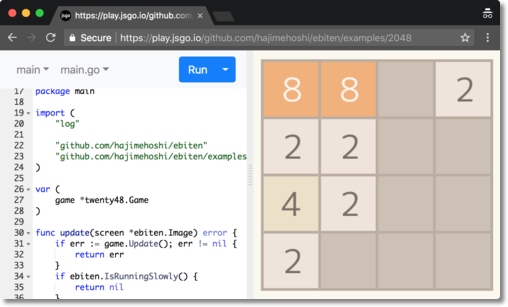
The jsgo playground is an extension of the jsgo compiler. The compiler allows you to easily compile Go
to JS using GopherJS, and automatically host the results in an aggressively cached CDN. The playground
adds an online editor and many other features (see below).
The unique feature of the jsgo playground is that it supports arbitrary import paths. Other Go playgrounds
are limited to just the Go standard library.
For more for more info:
* jsgo compiler: https://github.com/dave/jsgo
* jsgo playground: https://github.com/dave/play
## Demos
Here's the simplest demo - it just writes to the console and to the page:
* https://play.jsgo.io/github.com/dave/jstest
Here's a couple of simple demos that accept files by drag and drop. The first compresses dropped files to
a zip. The second compresses images to jpg. They use the Go standard library zip / image libraries, which
work flawlessly in the browser:
* https://play.jsgo.io/github.com/dave/zip
* https://play.jsgo.io/github.com/dave/img
The amazing ebiten 2D games library is a perfect example of the power of Go in the browser. Here's some
demos:
* https://play.jsgo.io/github.com/hajimehoshi/ebiten/examples/2048
* https://play.jsgo.io/github.com/hajimehoshi/go-inovation
* https://play.jsgo.io/github.com/hajimehoshi/ebiten/examples/flappy
## Contact
If you'd like to chat more about the project, feel free to [add an issue](https://github.com/dave/play/issues),
mention [@dave](https://github.com/dave/) or post in the #gopherjs channel of the Gophers Slack. I'm
happy to help!
## Features
#### Initialise
The URL can be used to initialise with code in several ways:
* Load a Go package with `/{{ Package path }}`
* Load a Github Gist with `/gist.github.com/{{ Gist ID }}`
* Load a shared project with `/{{ Share ID }}`
* Load a `play.golang.org` share with `/p/{{ Go playground ID }}`
](https://play.jsgo.io/)
The jsgo playground is an extension of the jsgo compiler. The compiler allows you to easily compile Go
to JS using GopherJS, and automatically host the results in an aggressively cached CDN. The playground
adds an online editor and many other features (see below).
The unique feature of the jsgo playground is that it supports arbitrary import paths. Other Go playgrounds
are limited to just the Go standard library.
For more for more info:
* jsgo compiler: https://github.com/dave/jsgo
* jsgo playground: https://github.com/dave/play
## Demos
Here's the simplest demo - it just writes to the console and to the page:
* https://play.jsgo.io/github.com/dave/jstest
Here's a couple of simple demos that accept files by drag and drop. The first compresses dropped files to
a zip. The second compresses images to jpg. They use the Go standard library zip / image libraries, which
work flawlessly in the browser:
* https://play.jsgo.io/github.com/dave/zip
* https://play.jsgo.io/github.com/dave/img
The amazing ebiten 2D games library is a perfect example of the power of Go in the browser. Here's some
demos:
* https://play.jsgo.io/github.com/hajimehoshi/ebiten/examples/2048
* https://play.jsgo.io/github.com/hajimehoshi/go-inovation
* https://play.jsgo.io/github.com/hajimehoshi/ebiten/examples/flappy
## Contact
If you'd like to chat more about the project, feel free to [add an issue](https://github.com/dave/play/issues),
mention [@dave](https://github.com/dave/) or post in the #gopherjs channel of the Gophers Slack. I'm
happy to help!
## Features
#### Initialise
The URL can be used to initialise with code in several ways:
* Load a Go package with `/{{ Package path }}`
* Load a Github Gist with `/gist.github.com/{{ Gist ID }}`
* Load a shared project with `/{{ Share ID }}`
* Load a `play.golang.org` share with `/p/{{ Go playground ID }}`
 #### Run
Click the `Run` button to run your code in the right-hand panel. If the imports have been changed recently,
the dependencies will be refreshed before running.
#### Run
Click the `Run` button to run your code in the right-hand panel. If the imports have been changed recently,
the dependencies will be refreshed before running.
 #### Format code
Use the `Format code` option to run `gofmt` on your code. This is executed automatically when the `Run`,
`Update`, `Share` or `Deploy` features are used.
#### Format code
Use the `Format code` option to run `gofmt` on your code. This is executed automatically when the `Run`,
`Update`, `Share` or `Deploy` features are used.
 #### Update
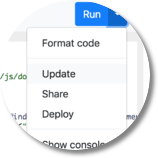
If you update a dependency, use the `Update` option, which does the equivalent of `go get -u` and refreshes
the changes in any import or dependency.
#### Update
If you update a dependency, use the `Update` option, which does the equivalent of `go get -u` and refreshes
the changes in any import or dependency.
 #### Share
To share your project with others, use the `Share` option. Your project will be persisted to a json file
on `src.jsgo.io` and the page will update to a sharable URL.
#### Share
To share your project with others, use the `Share` option. Your project will be persisted to a json file
on `src.jsgo.io` and the page will update to a sharable URL.
 #### Deploy
To deploy your code to [jsgo.io](https://jsgo.io), use the `Deploy` feature. A modal will be displayed with the
link to the page on `jsgo.io`, and the Loader JS on `pkg.jsgo.io`.
Use the `jsgo.io` link for testing and toy projects. Remember you're sharing the `jsgo.io` domain with
everyone else, so the browser environment should be considered toxic.
The Loader JS on `pkg.jsgo.io` can be used in production, and should be added to a script tag on your
own website. See [github.com/dave/jsgo](https://github.com/dave/jsgo) for more information.
#### Deploy
To deploy your code to [jsgo.io](https://jsgo.io), use the `Deploy` feature. A modal will be displayed with the
link to the page on `jsgo.io`, and the Loader JS on `pkg.jsgo.io`.
Use the `jsgo.io` link for testing and toy projects. Remember you're sharing the `jsgo.io` domain with
everyone else, so the browser environment should be considered toxic.
The Loader JS on `pkg.jsgo.io` can be used in production, and should be added to a script tag on your
own website. See [github.com/dave/jsgo](https://github.com/dave/jsgo) for more information.
 #### Console
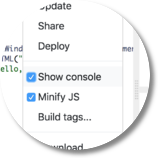
Writes to `os.Stdout` are redirected to a playground console, which can be toggled using the `Show console`
option. The console will automatically appear the first time it's written to.
#### Console
Writes to `os.Stdout` are redirected to a playground console, which can be toggled using the `Show console`
option. The console will automatically appear the first time it's written to.
 #### Minify
In normal usage, all JS is minified. For debugging, this can be toggled with the `Minify JS` option.
#### Minify
In normal usage, all JS is minified. For debugging, this can be toggled with the `Minify JS` option.
 #### Build tags
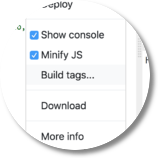
The build tags used when compiling can be edited with the `Build tags...` option. The selected build
tags are persisted when using the `Share` feature.
#### Build tags
The build tags used when compiling can be edited with the `Build tags...` option. The selected build
tags are persisted when using the `Share` feature.
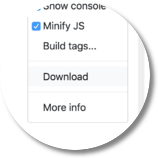 #### Download
The `Download` option downloads the project. Single file projects are downloaded as a single file, while
multi-file projects download as a zip.
#### Download
The `Download` option downloads the project. Single file projects are downloaded as a single file, while
multi-file projects download as a zip.
 #### Upload
Files can be uploaded to the project simply by drag+drop. Zip files generated by the `Download` feature
can be uploaded to restore a multi-file project.
#### Upload
Files can be uploaded to the project simply by drag+drop. Zip files generated by the `Download` feature
can be uploaded to restore a multi-file project.
 #### File menu
Change the selected file with the file menu.
#### File menu
Change the selected file with the file menu.
 #### Add file
Add a file to the current package with the `Add file` option. Only `.go`, `.md` and `.inc.js` files are
supported. If no extension is supplied, `.go` is added.
#### Add file
Add a file to the current package with the `Add file` option. Only `.go`, `.md` and `.inc.js` files are
supported. If no extension is supplied, `.go` is added.
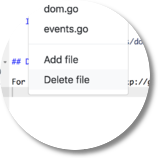 #### Delete file
Delete a file from the current package with the `Delete file` option.
#### Delete file
Delete a file from the current package with the `Delete file` option.
 #### Package menu
Change the selected package with the package menu.
#### Package menu
Change the selected package with the package menu.
 #### Add package
Add an empty package with the `Add package` option.
#### Add package
Add an empty package with the `Add package` option.
 #### Load package
The source for an import or dependency can be loaded with the `Load package` option. By default, only
the direct imports of your project are listed. Use the `Show all dependencies` option to show the entire
dependency tree.
#### Load package
The source for an import or dependency can be loaded with the `Load package` option. By default, only
the direct imports of your project are listed. Use the `Show all dependencies` option to show the entire
dependency tree.
 #### Remove package
A package can be removed with the `Remove package` option.
## Run locally?
If you'd like to run `play.jsgo.io` locally, take a look at [these instructions](https://github.com/dave/jsgo/blob/master/LOCAL.md).
#### Remove package
A package can be removed with the `Remove package` option.
## Run locally?
If you'd like to run `play.jsgo.io` locally, take a look at [these instructions](https://github.com/dave/jsgo/blob/master/LOCAL.md).