# zxcvbn-ios
**Repository Path**: mirrors_dropbox/zxcvbn-ios
## Basic Information
- **Project Name**: zxcvbn-ios
- **Description**: A realistic password strength estimator.
- **Primary Language**: Unknown
- **License**: MIT
- **Default Branch**: master
- **Homepage**: None
- **GVP Project**: No
## Statistics
- **Stars**: 0
- **Forks**: 0
- **Created**: 2020-09-24
- **Last Updated**: 2026-02-14
## Categories & Tags
**Categories**: Uncategorized
**Tags**: None
## README
```
.................................................bbb....................
.zzzzzzzzzz..xxx....xxx....cccccccc..vvv....vvv..bbb.........nnnnnnn....
.....zzzz......xxxxxx....cccc........vvv....vvv..bbbbbbbb....nnn...nnn..
...zzzz........xxxxxx....cccc..........vvvvvv....bbb....bb...nnn...nnn..
.zzzzzzzzzz..xxx....xxx....cccccccc......vv......bbbbbbbb....nnn...nnn..
........................................................................
```
An obj-c port of zxcvbn, a password strength estimation library, designed for iOS.
`DBZxcvbn` attempts to give sound password advice through pattern matching
and conservative entropy calculations. It finds 10k common passwords,
common American names and surnames, common English words, and common
patterns like dates, repeats (aaa), sequences (abcd), and QWERTY
patterns.
Check out the original [JavaScript](https://github.com/dropbox/zxcvbn) (well, CoffeeScript) or the [Python port](https://github.com/dropbox/python-zxcvbn).
For full motivation, see [zxcvbn: realistic password strength estimation](https://blogs.dropbox.com/tech/2012/04/zxcvbn-realistic-password-strength-estimation/).
# Installation
Coming soon.
# Use
The easiest way to use `DBZxcvbn` is by displaying a `DBPasswordStrengthMeter` in your form. Set up your `UITextFieldDelegate` and add a `DBPasswordStrengthMeter`.
See the example here: [DBCreateAccountViewController.m](https://github.com/dropbox/zxcvbn-ios/blob/master/Example/DBCreateAccountViewController.m)
As the user types, you can call `scorePassword:` like so:
``` objc
- (BOOL)textField:(UITextField *)textField shouldChangeCharactersInRange:(NSRange)range replacementString:(NSString *)string
{
NSString *password = [textField.text stringByReplacingCharactersInRange:range withString:string];
[self.passwordStrengthMeterView scorePassword:password];
return YES;
}
```
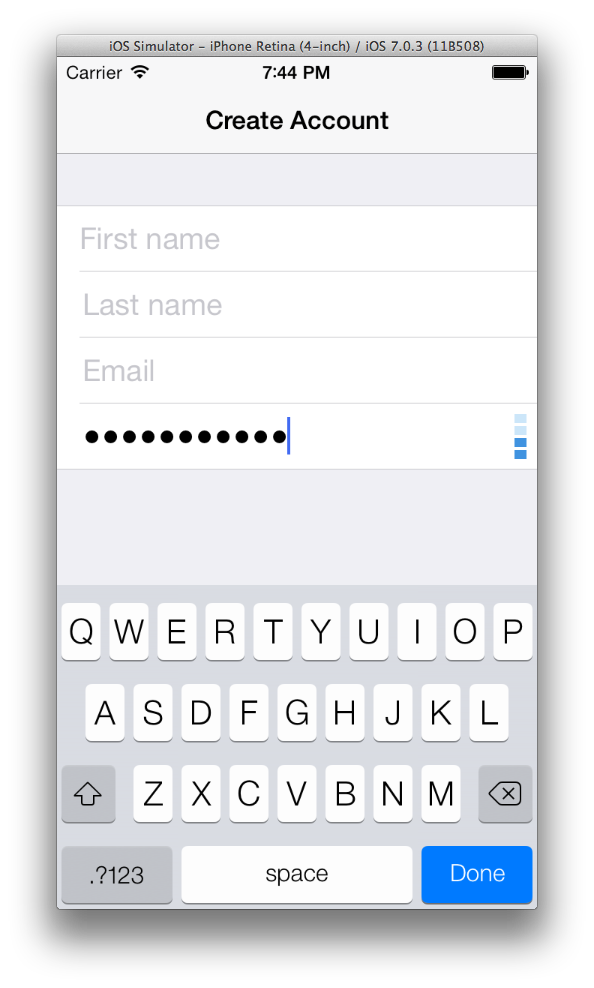
Here is what `DBPasswordStrengthMeter` looks like in a form:
To use `DBZxcvbn` without the `DBPasswordStrengthMeter` view simply import `DBZxcvbn.h`, create a new instance of `DBZxcvbn`, then call `passwordStrength:userInputs:`.
``` objc
#import
DBZxcvbn *zxcvbn = [[DBZxcvbn alloc] init];
DBResult *result = [zxcvbn passwordStrength:password userInputs:userInputs];
```
The DBResult includes a few properties:
``` objc
result.entropy // bits
result.crackTime // estimation of actual crack time, in seconds.
result.crackTimeDisplay // same crack time, as a friendlier string:
// "instant", "6 minutes", "centuries", etc.
result.score // [0,1,2,3,4] if crack time is less than
// [10**2, 10**4, 10**6, 10**8, Infinity].
// (useful for implementing a strength bar.)
result.matchSequence // the list of patterns that zxcvbn based the
// entropy calculation on.
result.calcTime // how long it took to calculate an answer,
// in milliseconds. usually only a few ms.
````
The optional `userInputs` argument is an array of strings that `DBZxcvbn`
will add to its internal dictionary. This can be whatever list of
strings you like, but is meant for user inputs from other fields of the
form, like name and email. That way a password that includes the user's
personal info can be heavily penalized. This list is also good for
site-specific vocabulary.
# Acknowledgments
Thanks to Dropbox for supporting independent projects and open source software.
A huge thanks to [Dan Wheeler](https://github.com/lowe) for the original [CoffeeScript implementation](https://github.com/dropbox/zxcvbn). Thanks to [Ryan Pearl](https://github.com/dropbox/python-zxcvbn) for his [Python port](). I've enjoyed copying your code :)
Echoing the acknowledgments from earlier libraries...
Many thanks to Mark Burnett for releasing his 10k top passwords list:
http://xato.net/passwords/more-top-worst-passwords
and for his 2006 book,
"Perfect Passwords: Selection, Protection, Authentication"
Huge thanks to Wiktionary contributors for building a frequency list
of English as used in television and movies:
http://en.wiktionary.org/wiki/Wiktionary:Frequency_lists
Last but not least, big thanks to xkcd :)
https://xkcd.com/936/