# phoenix-todo-list-tutorial
**Repository Path**: mirrors_dwyl/phoenix-todo-list-tutorial
## Basic Information
- **Project Name**: phoenix-todo-list-tutorial
- **Description**: ✅ Complete beginners tutorial building a todo list from scratch in Phoenix 1.7 (latest)
- **Primary Language**: Unknown
- **License**: Not specified
- **Default Branch**: main
- **Homepage**: None
- **GVP Project**: No
## Statistics
- **Stars**: 0
- **Forks**: 0
- **Created**: 2020-08-08
- **Last Updated**: 2026-01-24
## Categories & Tags
**Categories**: Uncategorized
**Tags**: None
## README
# Phoenix Todo List Tutorial
A complete beginners step-by-step tutorial
for building a Todo List in Phoenix.
100% functional. 0% JavaScript.
Just `HTML`, `CSS` and `Elixir`.
Fast and maintainable.

[](http://codecov.io/github/dwyl/phoenix-todo-list-tutorial?branch=master)
[](http://hits.dwyl.com/dwyl/phoenix-todo-list-tutorial)
[](https://github.com/dwyl/phoenix-todo-list-tutorial/issues)
## Why? 🤷
Todo lists are familiar to most people;
we make lists all the time.
_Building_ a Todo list from scratch
is a great way to learn `Elixir`/`Phoenix`
because the **UI/UX** is **simple**,
so we can focus on implementation.
For the team
[**`@dwyl`**](https://github.com/dwyl)
this app/tutorial
is a showcase of how server side rendering
(_with client side progressive enhancement_)
can provide a excellent balance between
developer effectiveness (_shipping features fast_),
UX and _accessibility_.
The server rendered pages take less than 5ms to respond
so the UX is _fast_.
On Fly.io:
[phxtodo.fly.dev](https://phxtodo.fly.dev/)
round-trip response times are sub 200ms for all interactions,
so it _feels_ like a client-side rendered App.
## What? 💭
A Todo list tutorial
that shows a complete beginner
how to build an app in Elixir/Phoenix
from scratch.
### Try it on Fly.io: [phxtodo.fly.dev](https://phxtodo.fly.dev)
Try the Fly.io version.
Add a few items to the list and test the functionality.
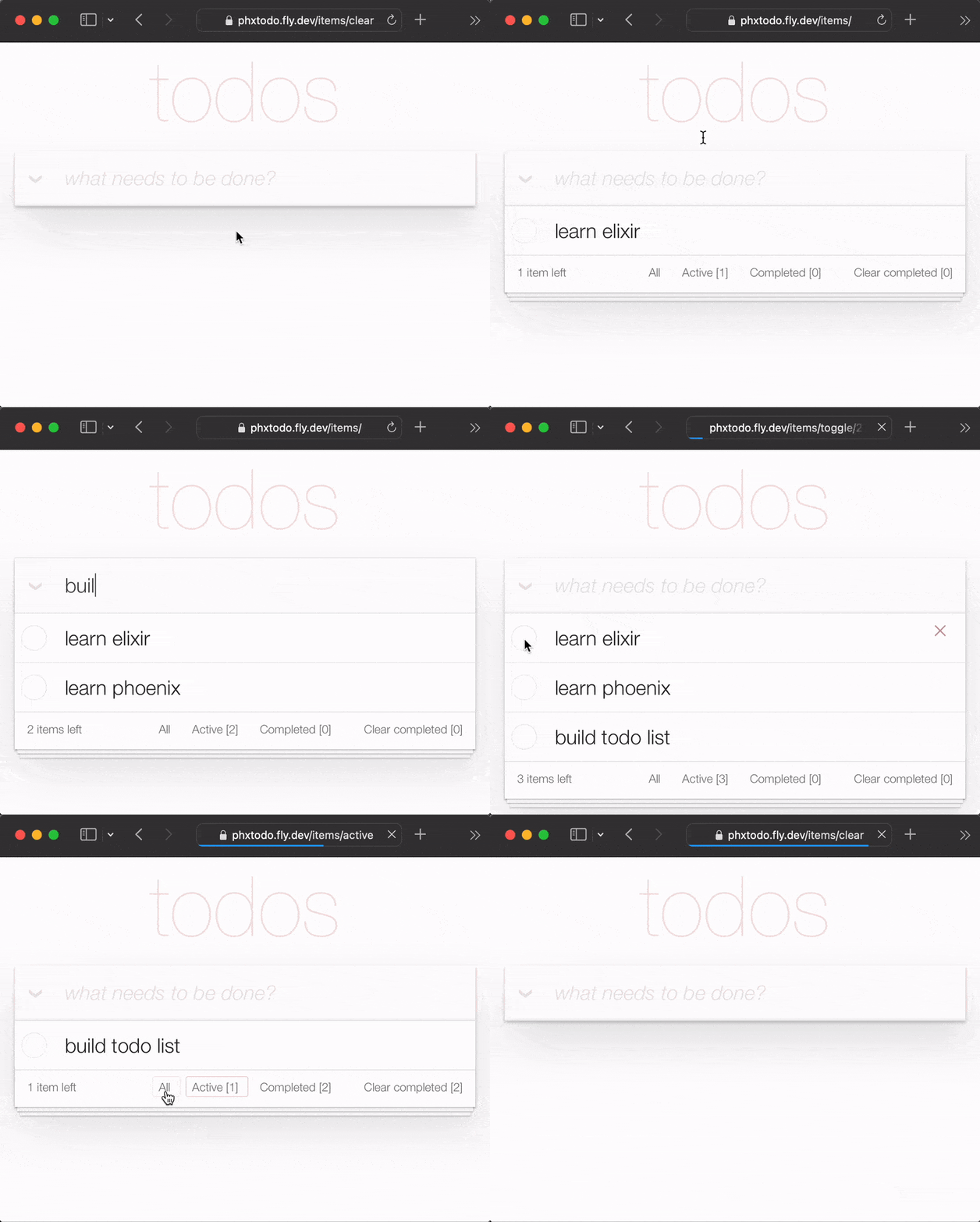
Even with a full HTTP round-trip for each interaction,
the response time is _fast_.
Pay attention to how Chrome|Firefox|Safari
waits for the response from the server before re-rendering the page.
The old full page refresh of yesteryear is _gone_.
Modern browsers intelligently render just the changes!
So the UX approximates "native"!
Seriously, try the Fly.io app on your Phone and see!
### TodoMVC
In this tutorial
we are using the
[TodoMVC](https://github.com/dwyl/javascript-todo-list-tutorial#todomvc)
CSS to simplify our UI.
This has several advantages
the biggest being _minimizing_ how much CSS we have to write!
It also means we have a guide to which _features_
need to be implemented to achieve full functionality.
> **Note**: we _love_ `CSS` for its incredible power/flexibility,
but we know that not everyone like it.
see: [learn-tachyons#why](https://github.com/dwyl/learn-tachyons#why)
The _last_ thing we want is to waste tons of time
with `CSS` in a `Phoenix` tutorial!
## Who? 👤
This tutorial is for
anyone who is learning to Elixir/Phoenix.
No prior experience with Phoenix is assumed/expected.
We have included _all_ the steps required to build the app.
> If you get stuck on any step,
please open an
[issue](https://github.com/dwyl/phoenix-todo-list-tutorial/issues)
on GitHub where we are happy to help you get unstuck!
If you feel that any line of code can use a bit more explanation/clarity,
please don't hesitate to _inform_ us!
We _know_ what it's like to be a beginner,
it can be _frustrating_ when something does not make sense!
Asking questions on GitHub
helps _everyone_ to learn!
Please give us feedback! 🙏
Star the repo if you found it helpful. ⭐
## _How_? 👩💻
### Before You Start! 💡
_Before_ you attempt to _build_ the Todo List,
make sure you have everything you need installed on you computer.
See:
[prerequisites](https://github.com/dwyl/phoenix-chat-example#0-pre-requisites-before-you-start)
Once you have confirmed that you have Phoenix & PostgreSQL installed,
try running the _finished_ App.
### 0. Run The _Finished_ App on Your `localhost` 💻
_Before_ you start building your own version of the Todo List App,
run the _finished_ version on your `localhost`
to confirm that it works.
Clone the project from GitHub:
```sh
git clone git@github.com:dwyl/phoenix-todo-list-tutorial.git && cd phoenix-todo-list-tutorial
```
Install dependencies and setup the database:
```sh
mix setup
```
Start the Phoenix server:
```sh
mix phx.server
```
Visit
[`localhost:4000`](http://localhost:4000)
in your web browser.
You should see:
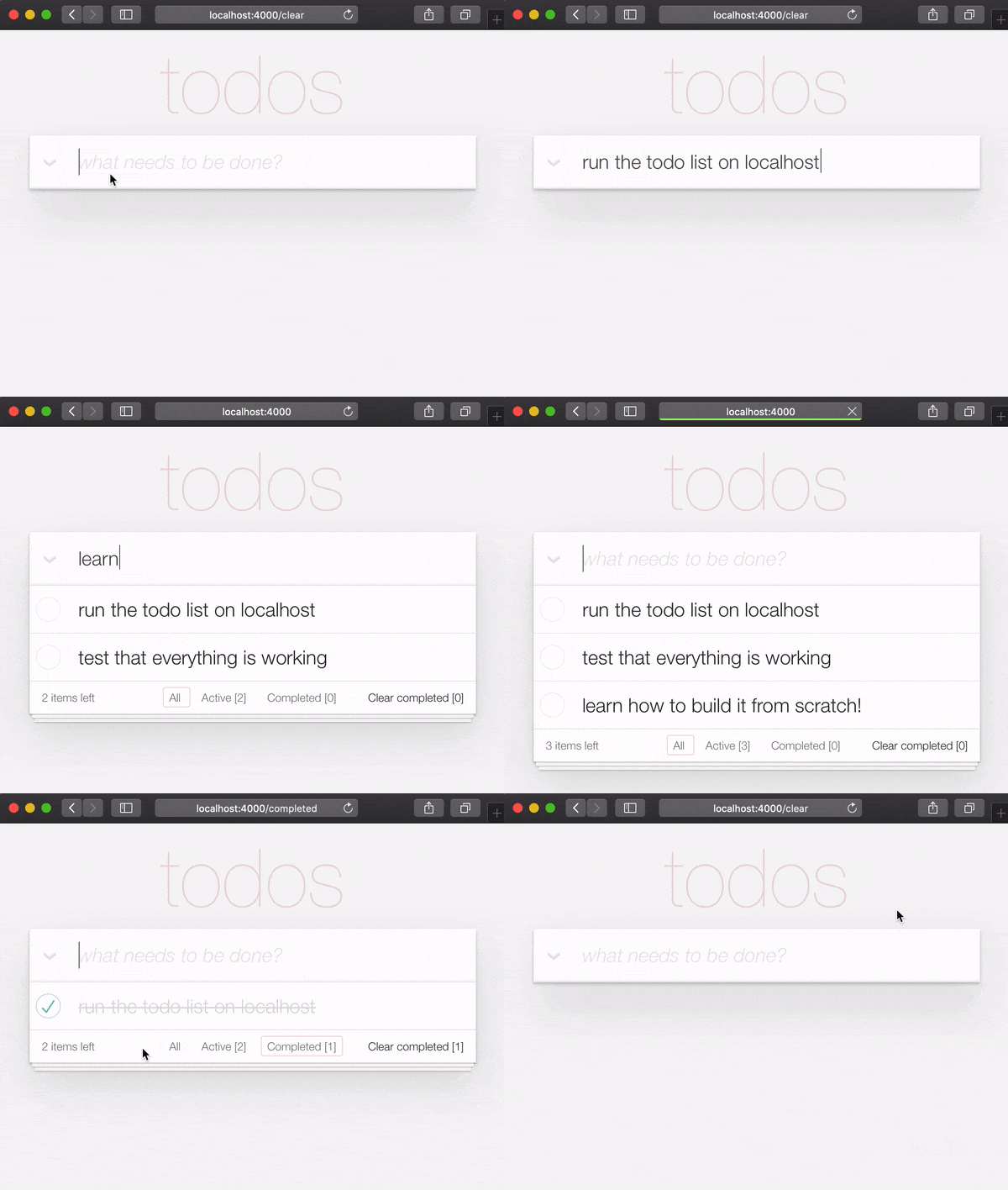
Now that you have the _finished_ example app
running on your `localhost`,
let's build it from scratch
and understand all the steps.
#### Auth [Optional]
When running the _finished_ example app on `localhost`,
if you want try the **`login` button**,
you will need to get an `AUTH_API_KEY`. [1 minute]
See:
[Get your `AUTH_API_KEY`](https://github.com/dwyl/auth_plug#2-get-your-auth_api_key-)
### _Build_ it!
If you ran the finished app on your `localhost`
(_and you really should!_),
you will need to change up a directory before starting the tutorial:
```
cd ..
```
Now you are ready to _build_!
### 1. Create a New Phoenix Project 🆕
In your terminal,
create a new Phoenix app
using the following
[`mix`](https://elixir-lang.org/getting-started/mix-otp/introduction-to-mix.html)
command:
```sh
mix phx.new app --no-dashboard --no-gettext --no-mailer
```
When prompted to install dependencies,
type Y followed by Enter.
> **Note**: those **flags** after the `app` name
> are just to avoid creating files we don't _need_
> for this simple example.
> See:
> [hexdocs.pm/phoenix/Mix.Tasks.Phx.New](https://hexdocs.pm/phoenix/Mix.Tasks.Phx.New.html)
Change into the newly created `app` directory (`cd app`)
and ensure you have everything you need:
```sh
mix setup
```
Start the Phoenix server:
```sh
mix phx.server
```
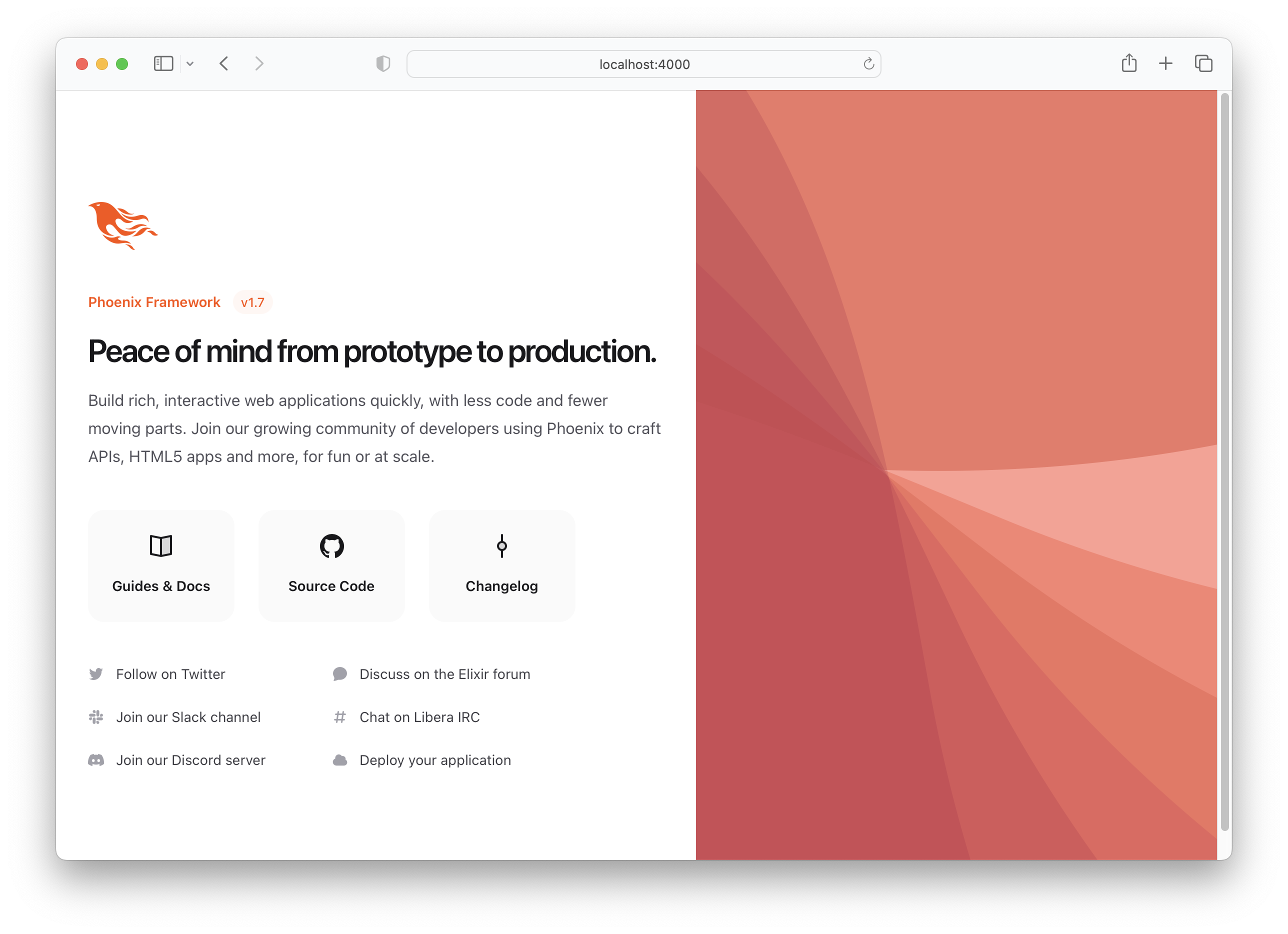
Now you can visit
[`localhost:4000`](http://localhost:4000)
in your web browser.
You should see something similar to:
Shut down the Phoenix server ctrl+C.
Run the tests to ensure everything works as expected:
```sh
mix test
```
You should see:
```sh
Compiling 16 files (.ex)
Generated app app
17:49:40.111 [info] Already up
...
Finished in 0.04 seconds
3 tests, 0 failures
```
Having established that the Phoenix App works as expected,
let's move on to creating some files!
### 2. Create `items` Schema
In creating a basic Todo List we only need one schema: `items`.
Later we can add separate lists and tags to organise/categorise
our `items` but for now this is all we need.
Run the following [generator](https://hexdocs.pm/phoenix/Mix.Tasks.Phx.Gen.Html.html)
command to create the items table:
```sh
mix phx.gen.html Todo Item items text:string person_id:integer status:integer
```
Strictly speaking we only _need_ the `text` and `status` fields,
but since we know we want to associate items with people
(_later in the tutorial),
we are adding the field _now_.
You will see the following output:
```
* creating lib/app_web/controllers/item_controller.ex
* creating lib/app_web/controllers/item_html/edit.html.heex
* creating lib/app_web/controllers/item_html/index.html.heex
* creating lib/app_web/controllers/item_html/new.html.heex
* creating lib/app_web/controllers/item_html/show.html.heex
* creating lib/app_web/controllers/item_html.ex
* creating test/app_web/controllers/item_controller_test.exs
* creating lib/app/todo/item.ex
* creating priv/repo/migrations/20221205102303_create_items.exs
* creating lib/app/todo.ex
* injecting lib/app/todo.ex
* creating test/app/todo_test.exs
* injecting test/app/todo_test.exs
* creating test/support/fixtures/todo_fixtures.ex
* injecting test/support/fixtures/todo_fixtures.ex
Add the resource to your browser scope in lib/app_web/router.ex:
resources "/items", ItemController
Remember to update your repository by running migrations:
$ mix ecto.migrate
```
That created a _bunch_ of files!
Some of which we don't strictly _need_.
We could _manually_ create _only_ the files we _need_,
but this is the "official" way of creating a CRUD App in Phoenix,
so we are using it for speed.
> **Note**: Phoenix
[Contexts](https://hexdocs.pm/phoenix/contexts.html)
denoted in this example as `Todo`,
are "_dedicated modules that expose and group related functionality_."
We feel they _unnecessarily complicate_ basic Phoenix Apps
with layers of "interface" and we _really_ wish we could
[avoid](https://github.com/phoenixframework/phoenix/issues/3832) them.
But given that they are baked into the generators,
and the _creator_ of the framework
[_likes_](https://youtu.be/tMO28ar0lW8?t=376) them,
we have a choice: either get on board with Contexts
or _manually_ create all the files in our Phoenix projects.
Generators are a _much_ faster way to build!
_Embrace_ them,
even if you end up having to `delete` a few
unused files along the way!
We are _not_ going to explain each of these files
at this stage in the tutorial because
it's _easier_ to understand the files
as you are _building_ the App!
The purpose of each file will become clear
as you progress through editing them.
### 2.1 Add the `/items` Resources to `router.ex`
Follow the instructions noted by the generator to
add the `resources "/items", ItemController` to the `router.ex`.
Open the `lib/app_web/router.ex` file
and locate the line: `scope "/", AppWeb do`.
Add the line to the end of the block.
e.g:
```elixir
scope "/", AppWeb do
pipe_through :browser
get "/", PageController, :index
resources "/items", ItemController # this is the new line
end
```
Your `router.ex` file should look like this:
[`router.ex#L20`](https://github.com/dwyl/phoenix-todo-list-tutorial/blob/b158abd7f0c3fbc462a4230f07b5e5e79723a258/app/lib/app_web/router.ex#L17-L22)
Now, as the terminal suggested,
run `mix ecto.migrate`.
This will finish setting up the
database tables and run the
necessary migrations so
everything works properly!
### 2.2 _Run_ The App!
At this point we _already_ have a functional Todo List
(_if we were willing to use the default Phoenix UI_).
Try running the app on your `localhost`:
Run the generated migrations with `mix ecto.migrate` then the server with:
```
mix phx.server
```
Visit: http://localhost:4000/items/new
and input some data.
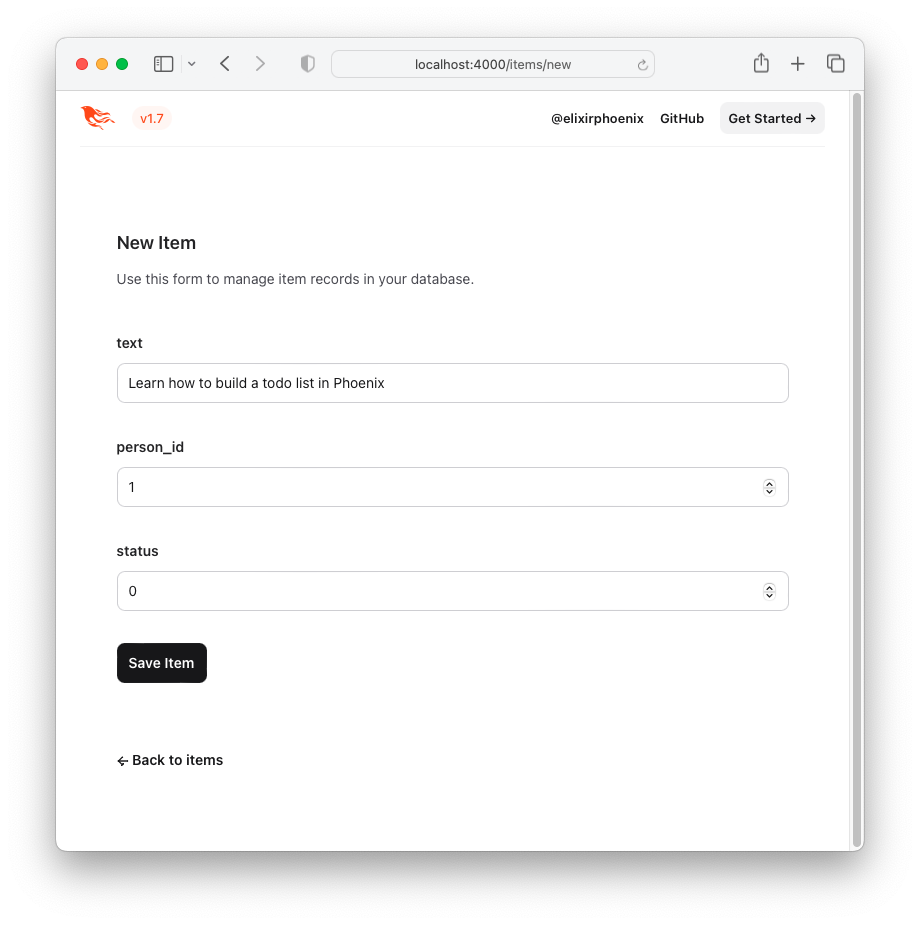
Click the "Save Item" button
and you will be redirected to the "show" page:
http://localhost:4000/items/1
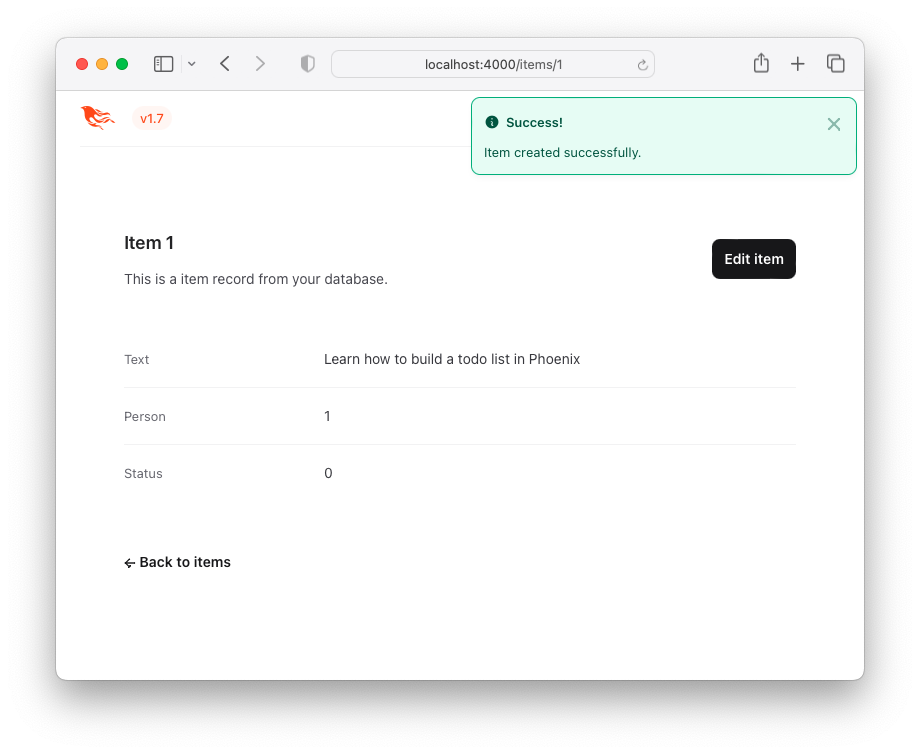
This is not an attractive User Experience (UX),
but it _works_!
Here is a _list_ of items - a "Todo List".
You can visit this by clicking
the `Back to items` button or by
accessing the following URL
http://localhost:4000/items.
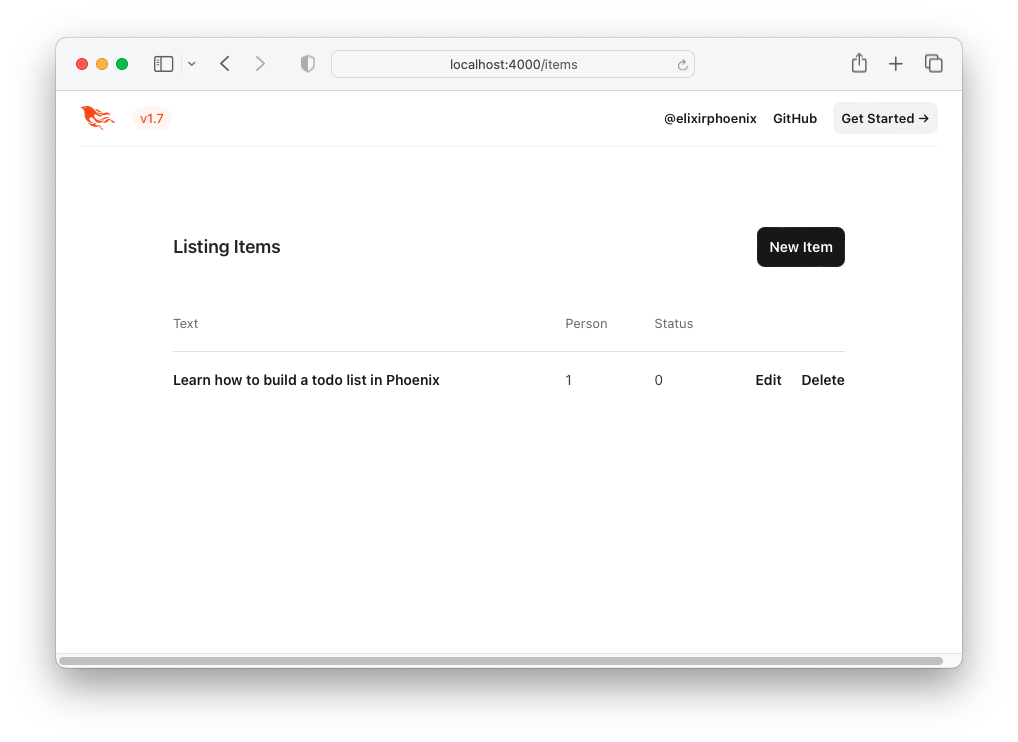
Let's improve the UX by using the TodoMVC `HTML` and `CSS`!
### 3. Create the TodoMVC UI/UX
To recreate the TodoMVC UI/UX,
let's borrow the `HTML` code directly from the example.
Visit: http://todomvc.com/examples/vanillajs
add a couple of items to the list.
Then, inspect the source
using your browser's
[Dev Tools](https://developers.google.com/web/tools/chrome-devtools/open).
e.g:
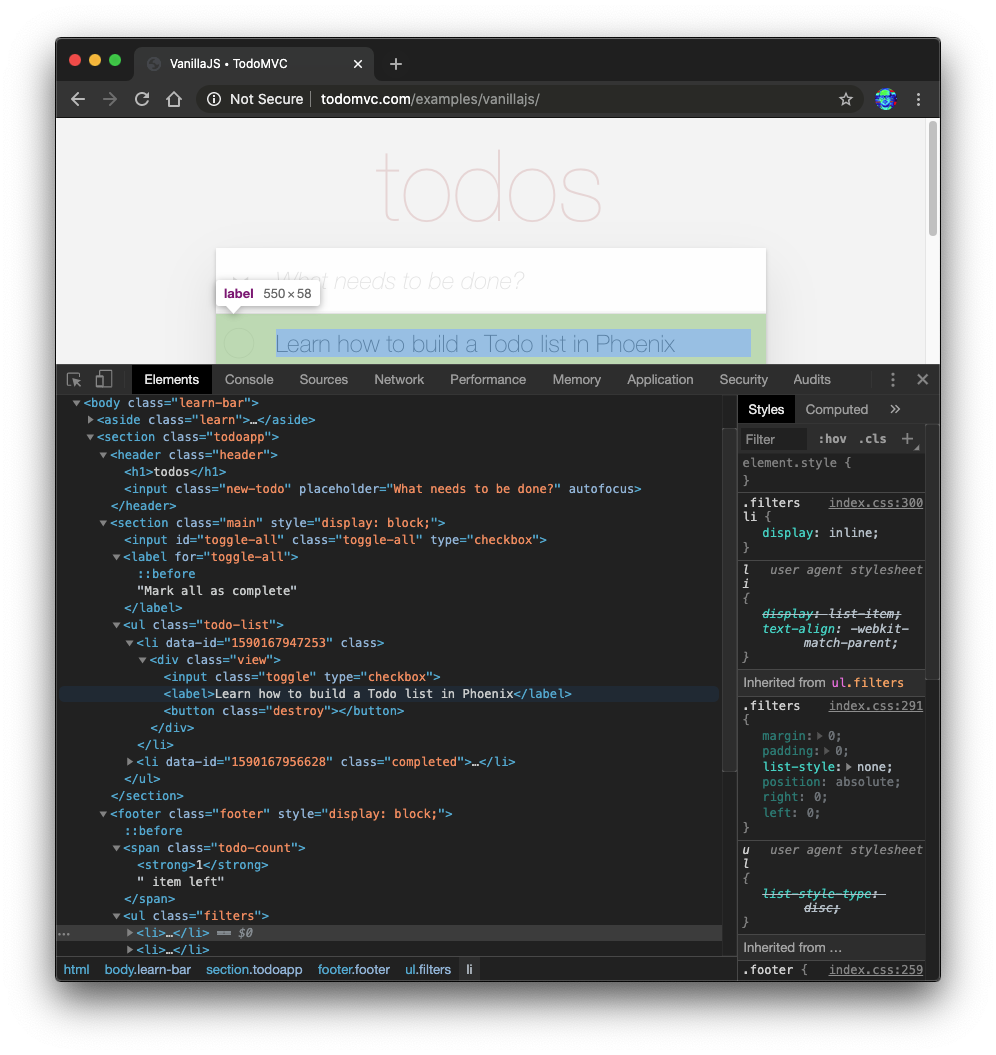
Right-click on the source you want
(e.g: ``)
and select "Edit as HTML":
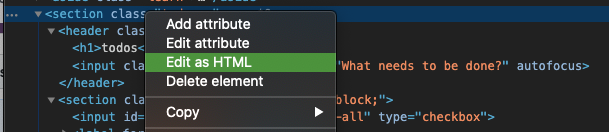
Once the `HTML` for the `` is editable,
select it and copy it.
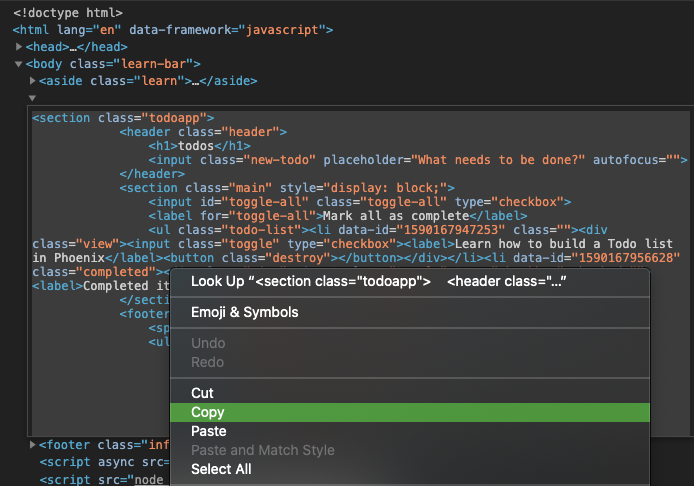
The `HTML` code is:
```html
todos
```
Let's convert this `HTML` to an Embedded Elixir
([`EEx`](https://hexdocs.pm/eex/EEx.html)) template.
> **Note**: the _reason_ that we are copying this `HTML`
from the browser's Elements inspector
instead of _directly_ from the source
on GitHub:
[`examples/vanillajs/index.html`](https://github.com/tastejs/todomvc/blob/c50cc922495fd76cb44844e3b1cd77e35a5d6be1/examples/vanillajs/index.html#L18)
is that this is a "single page app",
so the `
`
only gets populated in the browser.
Copying it from the browser Dev Tools
is the easiest way to get the _complete_ `HTML`.
### 3.1 Paste the HTML into `index.html.eex`
Open the `lib/app_web/controllers/item_html/index.html.eex` file
and scroll to the bottom.
Then (_without removing the code that is already there_)
paste the `HTML` code we sourced from TodoMVC.
> e.g:
[`/lib/app_web/controllers/item_html/index.html.eex#L27-L73`](https://github.com/dwyl/phoenix-todo-list-tutorial/blob/8bcc3239d975f5b706514d1a88ea47ca57e5239a/lib/app_web/controllers/item_html/index.html.heex#L27-L73)
If you attempt to run the app now
and visit
[http://localhost:4000/items/](http://localhost:4000/items/)
You will see this (_without the TodoMVC `CSS`_):
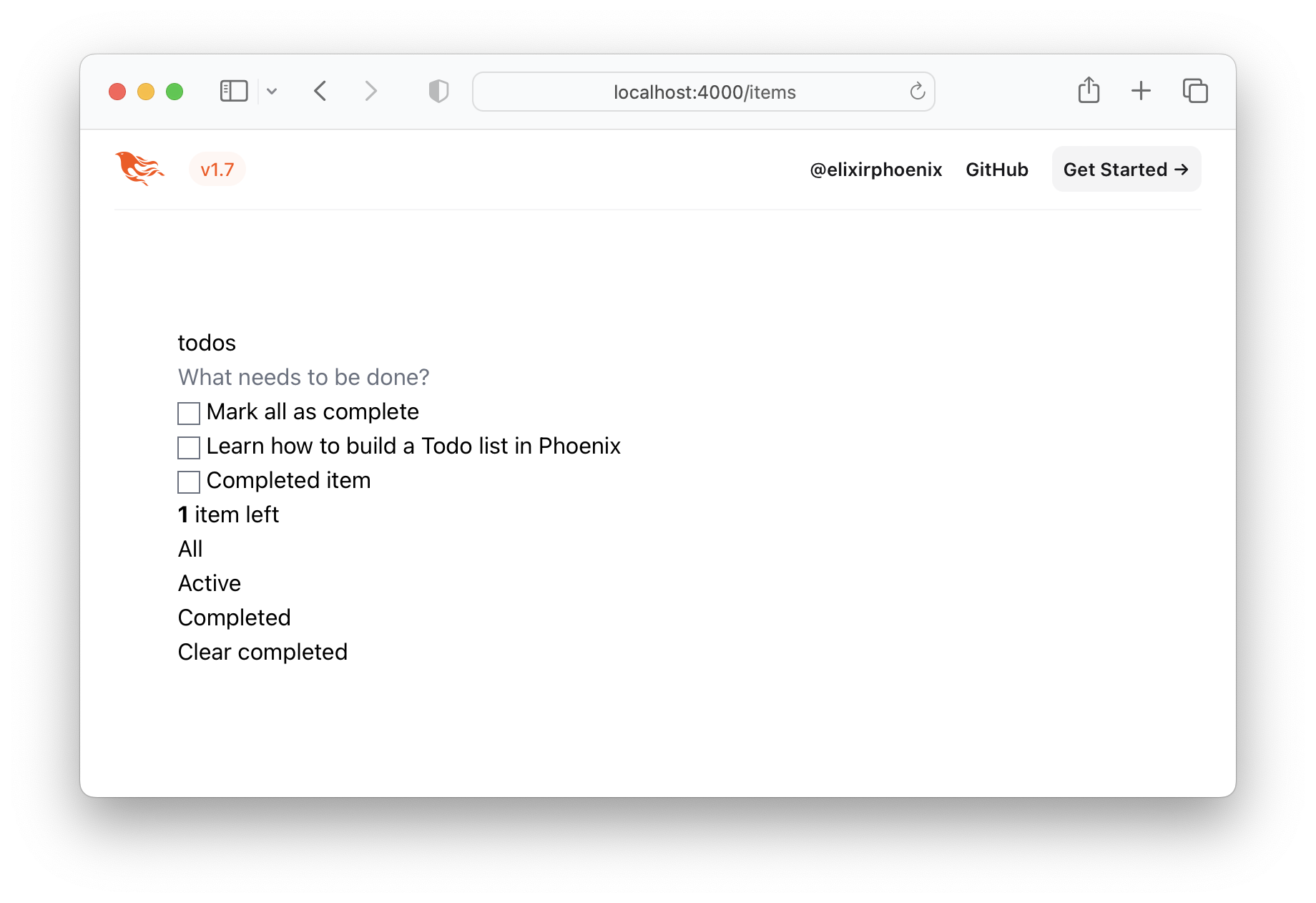
That's obviously not what we want,
so let's get the TodoMVC `CSS`
and save it in our project!
### 3.2 Save the TodoMVC CSS to `/assets/css`
Visit
http://todomvc.com/examples/vanillajs/node_modules/todomvc-app-css/index.css
and save the file to `/assets/css/todomvc-app.css`.
e.g:
[`/assets/css/todomvc-app.css`](https://github.com/dwyl/phoenix-todo-list-tutorial/blob/a341c2cbb5f1ad91897293f058a5d7bee6c1e1cc/assets/css/todomvc-app.css)
### 3.3 Import the `todomvc-app.css` in `app.scss`
Open the `assets/css/app.scss` file and replace it with the following:
```css
/* This file is for your main application css. */
/* @import "./phoenix.css"; */
@import "./todomvc-app.css";
```
e.g:
[`/assets/css/app.scss#L4`](https://github.com/dwyl/phoenix-todo-list-tutorial/blob/8bcc3239d975f5b706514d1a88ea47ca57e5239a/assets/css/app.css#L4)
### 3.4 _Simplify_ The Layout Template
Open your `lib/app_web/components/layouts/app.html.heex` file
and replace the contents with the following code:
```html
Phoenix Todo List
<%= @inner_content %>
```
> Before:
[`lib/app_web/components/layouts/app.html.eex`](https://github.com/dwyl/phoenix-todo-list-tutorial/blob/bddacda93ecd892fe0907210bab335e6b6e5e489/lib/app_web/templates/layout/app.html.eex)
> After:
[`lib/app_web/components/layouts/app.html.heex`](https://github.com/dwyl/phoenix-todo-list-tutorial/blob/8bcc3239d975f5b706514d1a88ea47ca57e5239a/lib/app_web/components/layouts/app.html.heex)
`<%= @inner_content %>` is where the Todo App will be rendered.
> **Note**: the `
```
This will install the UMD builds from Turbo
without us needing to install a package using `npm`.
Neat, huh?
And that's it!
Now when you deploy your server rendered Phoenix App,
it will _feel_ like an SPA!
Try the Fly.io demo again:
[phxtodo.fly.dev](https://phxtodo.fly.dev/)
Feel that buttery-smooth page transition.
### 11.5 Remove unused /items/:id route
Currently, our application occurs in the same page.
However, there is a route that we don't use
and is also aesthetically incompatible with the rest
of our app.
If we check `lib/app_web/controllers/item_controller.ex`,
you might notice the following function.
```elixir
def show(conn, %{"id" => id}) do
item = Todo.get_item!(id)
render(conn, :show, item: item)
end
```
This serves the `GET /items/:id` route.
We could do the same as we did with `edit`
and render `index`.
However, let's do something different
so we learn a bit more about routes.
If we head on to `router.ex`,
and locate the line:
```elixir
resources "/items", ItemController
```
We can change it to this.
```elixir
resources "/items", ItemController, except: [:show]
```
We are saying that we want to keep
*all* the routes in ItemController
**except** the one related to the `show` action.
We can now safely delete it
from `item_controller.ex`,
as we don't need it any more.
Your files should look like the following.
e.g:
[`/lib/router.ex#L19-L29`](https://github.com/dwyl/phoenix-todo-list-tutorial/blob/0c12a6bec7aeed5562a239d0dc8eea4952250cdd/lib/app_web/router.ex#L19-L29)
[`lib/app_web/controllers/item_controller.ex`](https://github.com/dwyl/phoenix-todo-list-tutorial/blob/auth/lib/app_web/controllers/item_controller.ex)
### 12. Authentication (Optional)
Currently, the application allows *anyone*
to access it and manage todo `items`.
Wouldn't it be great if
we added *authentication* so each `person`
could check their own list?
We created a dedicated authentication guide:
[`/auth.md`](./auth.md)
to help you set this up.
You will soon find out this is extremely easy 😀.
### Deploy!
Deployment to Fly.io takes a few minutes,
but has a few "steps",
we suggest you follow the speed run guide:
https://fly.io/docs/elixir/getting-started/
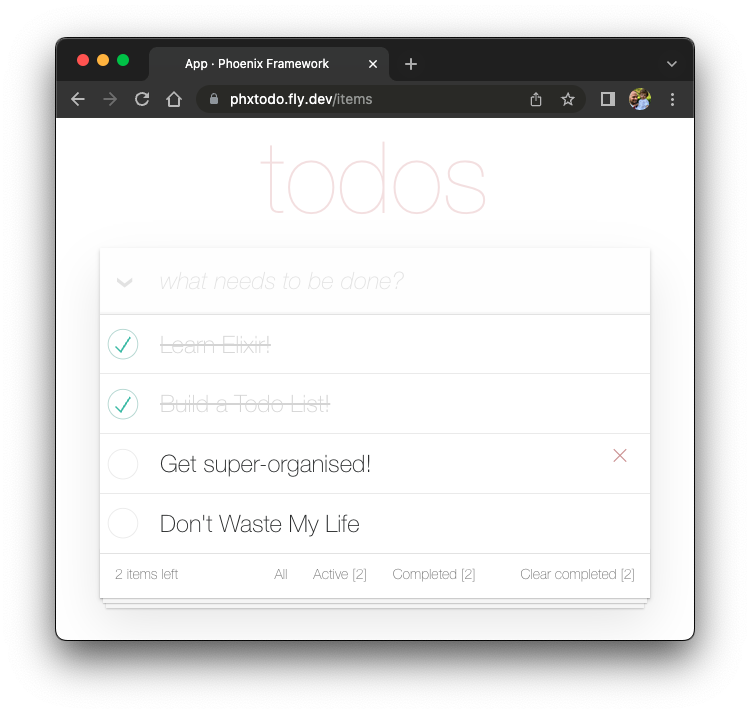
Once you have _deployed_ you will will be able
to view/use your app in any Web/Mobile Browser.
e.g: https://phxtodo.fly.dev xs
### 13. REST API (Optional)
Our `Phoenix` server currently
only returns **`HTML` pages**
that are **_server-side_ rendered**.
This is already *awesome*
but we can make use of `Phoenix`
to extend its capabilities.
What if our server also responded
with `JSON`?
You're in luck!
We've created small guide
for creating a `REST API`:
[**`api.md`**](./api.md)
### Done!
## What _Next_?
If you found this example useful,
please ⭐️ the GitHub repository
so we (_and others_) know you liked it!
If you want to learn more Phoenix
and the magic of **`LiveView`**,
consider reading our beginner's tutorial:
[github.com/dwyl/**phoenix-liveview-counter-tutorial**](https://github.com/dwyl/phoenix-liveview-counter-tutorial)
Thank you for learning with us! ☀️
## Learning
+ Learn Elixir: https://github.com/dwyl/learn-elixir
+ Learn Phoenix https://github.com/dwyl/learn-phoenix-framework
+ Phoenix Chat Tutorial:
https://github.com/dwyl/phoenix-chat-example
+ Phoenix LiveView Counter Tutorial:
https://github.com/dwyl/phoenix-liveview-counter-tutorial
 If we check `lib/app_web/controllers/item_controller.ex`,
you might notice the following function.
```elixir
def show(conn, %{"id" => id}) do
item = Todo.get_item!(id)
render(conn, :show, item: item)
end
```
This serves the `GET /items/:id` route.
We could do the same as we did with `edit`
and render `index`.
However, let's do something different
so we learn a bit more about routes.
If we head on to `router.ex`,
and locate the line:
```elixir
resources "/items", ItemController
```
We can change it to this.
```elixir
resources "/items", ItemController, except: [:show]
```
We are saying that we want to keep
*all* the routes in ItemController
**except** the one related to the `show` action.
We can now safely delete it
from `item_controller.ex`,
as we don't need it any more.
Your files should look like the following.
e.g:
[`/lib/router.ex#L19-L29`](https://github.com/dwyl/phoenix-todo-list-tutorial/blob/0c12a6bec7aeed5562a239d0dc8eea4952250cdd/lib/app_web/router.ex#L19-L29)
[`lib/app_web/controllers/item_controller.ex`](https://github.com/dwyl/phoenix-todo-list-tutorial/blob/auth/lib/app_web/controllers/item_controller.ex)
### 12. Authentication (Optional)
Currently, the application allows *anyone*
to access it and manage todo `items`.
Wouldn't it be great if
we added *authentication* so each `person`
could check their own list?
We created a dedicated authentication guide:
[`/auth.md`](./auth.md)
to help you set this up.
You will soon find out this is extremely easy 😀.
### Deploy!
Deployment to Fly.io takes a few minutes,
but has a few "steps",
we suggest you follow the speed run guide:
https://fly.io/docs/elixir/getting-started/
Once you have _deployed_ you will will be able
to view/use your app in any Web/Mobile Browser.
e.g: https://phxtodo.fly.dev
If we check `lib/app_web/controllers/item_controller.ex`,
you might notice the following function.
```elixir
def show(conn, %{"id" => id}) do
item = Todo.get_item!(id)
render(conn, :show, item: item)
end
```
This serves the `GET /items/:id` route.
We could do the same as we did with `edit`
and render `index`.
However, let's do something different
so we learn a bit more about routes.
If we head on to `router.ex`,
and locate the line:
```elixir
resources "/items", ItemController
```
We can change it to this.
```elixir
resources "/items", ItemController, except: [:show]
```
We are saying that we want to keep
*all* the routes in ItemController
**except** the one related to the `show` action.
We can now safely delete it
from `item_controller.ex`,
as we don't need it any more.
Your files should look like the following.
e.g:
[`/lib/router.ex#L19-L29`](https://github.com/dwyl/phoenix-todo-list-tutorial/blob/0c12a6bec7aeed5562a239d0dc8eea4952250cdd/lib/app_web/router.ex#L19-L29)
[`lib/app_web/controllers/item_controller.ex`](https://github.com/dwyl/phoenix-todo-list-tutorial/blob/auth/lib/app_web/controllers/item_controller.ex)
### 12. Authentication (Optional)
Currently, the application allows *anyone*
to access it and manage todo `items`.
Wouldn't it be great if
we added *authentication* so each `person`
could check their own list?
We created a dedicated authentication guide:
[`/auth.md`](./auth.md)
to help you set this up.
You will soon find out this is extremely easy 😀.
### Deploy!
Deployment to Fly.io takes a few minutes,
but has a few "steps",
we suggest you follow the speed run guide:
https://fly.io/docs/elixir/getting-started/
Once you have _deployed_ you will will be able
to view/use your app in any Web/Mobile Browser.
e.g: https://phxtodo.fly.dev