Check them out.
### Install
```bash
npm install --save v-clipboard
```
```bash
yarn add v-clipboard
```
```javascript
import Vue from 'vue'
import Clipboard from 'v-clipboard'
Vue.use(Clipboard)
```
### Usage
When an element that contains `v-clipboard` directive is clicked, the value of `value` will be copied into clipboard.
---
Copying **static** value (directive should receive actual value):
```vue
```
```vue
```
Copying **dynamic** value (directive should recieve a function that returns value):
```vue
```
Copying **anything** in your methods:
```js
this.$clipboard(value)
```
Without plugin:
```js
import { Clipboard } from 'v-clipboard'
await Clipboard.copy(value)
```
### Events
```vue
```
```js
{
methods: {
clipboardSuccessHandler (value, event) {
console.log('success', value)
},
clipboardErrorHandler (value, event) {
console.log('error', value)
}
}
}
```
### How it works
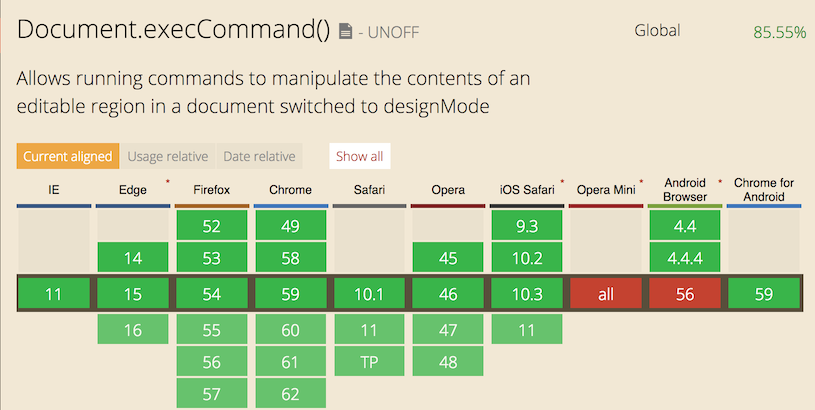
`copy / $clipboard` is an `async` call. Firstly, library makes an attempt to update clibpoard using `execCommand`, if that operation is unsuccessful it makes an attemnt to use Navigator Clipboard API and automatically requests access, waits for access to be granted, then writes to clipboard.
### Demo
https://codesandbox.io/s/epic-waterfall-17yet5?file=/src/App.vue
### Compatibility