# jal
**Repository Path**: mirrors_iliakan/jal
## Basic Information
- **Project Name**: jal
- **Description**: Personal finance tracking project
- **Primary Language**: Unknown
- **License**: Not specified
- **Default Branch**: master
- **Homepage**: None
- **GVP Project**: No
## Statistics
- **Stars**: 0
- **Forks**: 0
- **Created**: 2021-03-27
- **Last Updated**: 2026-10-19
## Categories & Tags
**Categories**: Uncategorized
**Tags**: None
## README
# JAL
Just Another Ledger is a project for personal finance tracking.
[](https://pypi.python.org/pypi/jal/)
*[English](https://github.com/titov-vv/jal/blob/master/docs/README.md), [Русский](https://github.com/titov-vv/jal/blob/master/docs/README.ru.md)*
It was designed to keep records of personal incomes/spendings and investments with up-to-date information about account's balances and portfolio value.
### Main features
- multiple accounts with different currencies (base currency is russian rouble but might be changed in future versions)
- 5 types of transactions:
1. Generic income/spending operations that may be splitted into several categories
2. Transfers of money between different accounts and currencies
3. Buy/Sell operation for securities (jal supports stocks, ETFs, options, partial support of bonds and futures)
4. Dividend for stocks and Interest payments for bonds
5. Corporate actions for stocks (Split, Symbol change, Merger, Spin-Off, Stock dividend)
- basic reports:
1. monthly incomes/spendings splitted by category
2. profit/loss report for investments accounts
3. closed deals report
- stock/ETF quotes updates for US (Yahoo), EU (Euronext) and RU (MOEX) exchanges traded stocks
- broker statement import:
1. Quik HTML-report (only trades, fee might be incomplete)
2. Interactive Brokers Flex-query report
3. Uralsib Broker zipped XLS reports (trades, cash transactions)
4. KIT Finance XLSX-report (trades)
- tax report preparation for foreign investments according to Russian Tax Code ()
- *experimental* download russian electronic slips from russian tax authority:
1. QR code may be scanned from camera, clipboard image or image file on disk
2. Authorization via login/password to FNS personal account or ESIA/Gosuslugi (no passwords are stored in the progam, only SessionId is stored - you may check in source code)
(you will need to install additional dependencies to use these function - packages `pyzbar` and `Pillow`)
- *experimental* category recognition for goods in slip with help of `tensorflow`
### Installation
*jal* was created to be portable and cross-platform. Thus you have several ways to install and run the program:
- You may get file archive from [the GitHub repository](https://github.com/titov-vv/jal), unpack it into suitable directory on your PC and use `run.py` to start application.
In order to succeed this way you need to have Python 3.8.1 and satisfy all dependencies listed in `requirements.txt`.
- You may use installation package with `pip install jal` command. It will take care about dependencies automatically and will install `jal` entry point* to run the program.
Alternatively you may use `python -m jal.jal` if you can't run application with `jal` entry point.
- You may mix two methods together - download source files from github and then use `setup.py` for preferred way of installation.
Database will be initialized automatically with minimal required set of data and you will be able to start use the program.
* - entry point location is platform dependable. Eg. on Linux it might be in `~/.local/run`, on Windows - `Scripts` directory of your python installation.
### Screenshots
Qt have a better look on Linux out of the box. Here is main program window:

The same window on Windows - the same functions with a bit different look:

Accounts are be arranged in groups (Cash, Cards, Investments, etc), each account holds one currency.
Below is a view of main window where one account is chosen ('Mastercard') and account select/edit window is opened on top:

Example of investment account view with Buy, Sell and Dividend operations recorded (there is an asset select/edit window on top):

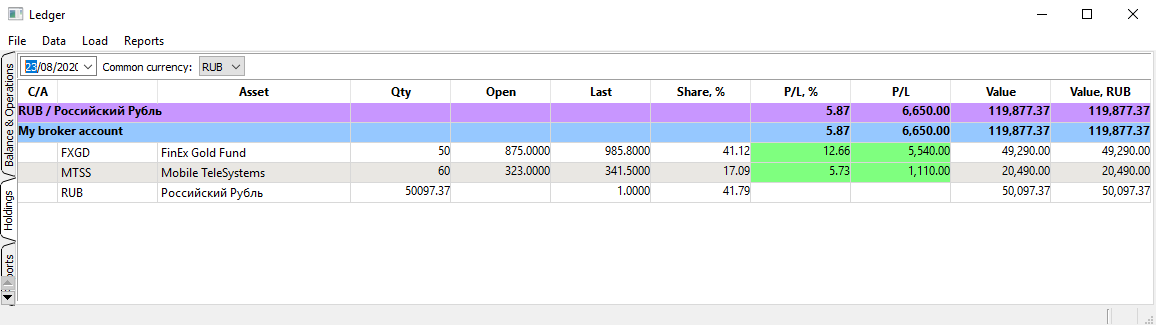
'Holdings' tab contains portfolio overview (You display account and portfolio balances for any date).
Holdings are grouped by currencies and then by accounts.
Examples of reports are below:
Monthly incomes/spendings *(categories hierarchy is supported with sub-totals calculation)*

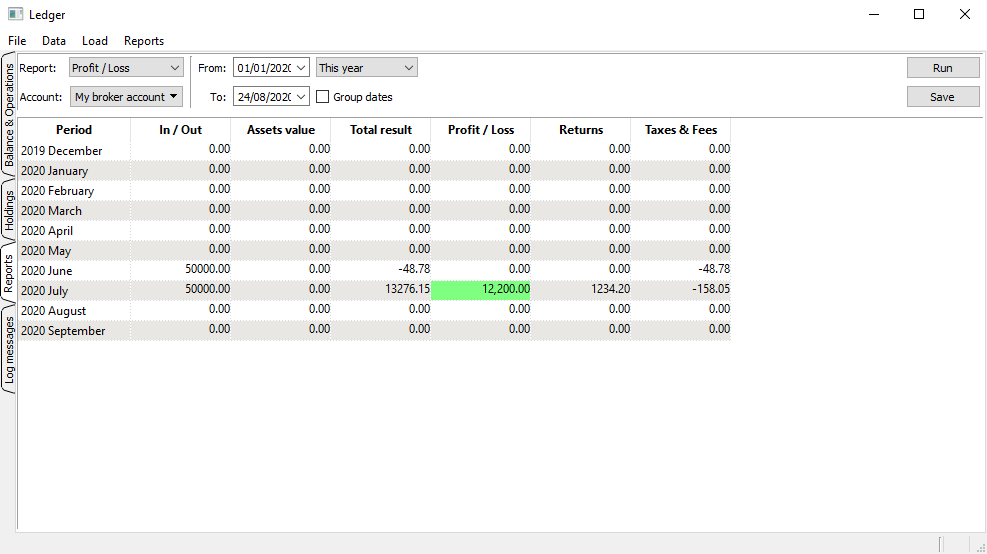
Profit/Loss for investment account *(Assets value to be fixed, Returns include dividends and other payments)*
List of all closed deals for investment account

---
[](https://hits.seeyoufarm.com)