# MaterialDateTimePicker
**Repository Path**: mirrors_inloop/MaterialDateTimePicker
## Basic Information
- **Project Name**: MaterialDateTimePicker
- **Description**: Pick a date or time on Android in style
- **Primary Language**: Unknown
- **License**: Apache-2.0
- **Default Branch**: master
- **Homepage**: None
- **GVP Project**: No
## Statistics
- **Stars**: 0
- **Forks**: 0
- **Created**: 2020-09-25
- **Last Updated**: 2026-03-08
## Categories & Tags
**Categories**: Uncategorized
**Tags**: None
## README
# Material DateTime Picker - Select a time/date in style
[](https://gitter.im/wdullaer/MaterialDateTimePicker?utm_source=badge&utm_medium=badge&utm_campaign=pr-badge&utm_content=badge)

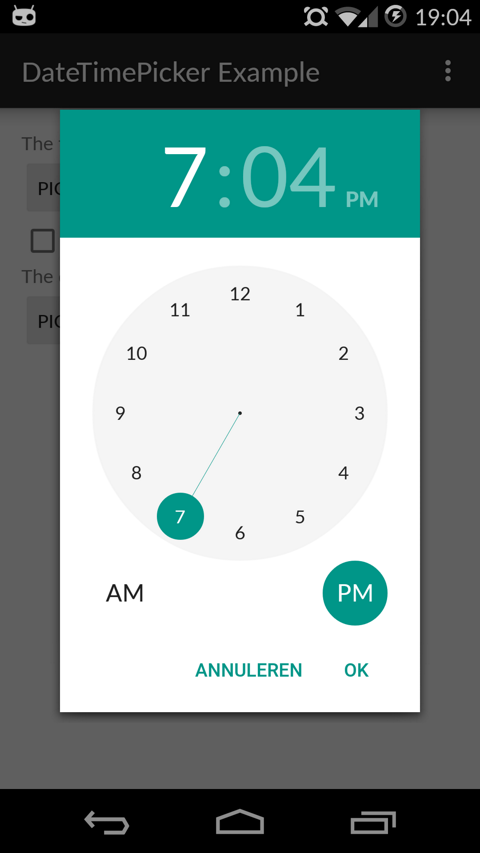
Material DateTime Picker tries to offer you the date and time pickers as shown in [the Material Design spec](http://www.google.com/design/spec/components/pickers.html), with an
easy themable API.
The library uses [the code from the Android frameworks](https://android.googlesource.com/platform/frameworks/opt/datetimepicker/) as a base and tweaked it to be as close as possible to Material Design example.
Support for Android 4.0 and up.
Feel free to fork or issue pull requests on github. Issues can be reported on the github issue tracker.
Date Picker | Time Picker
---- | ----
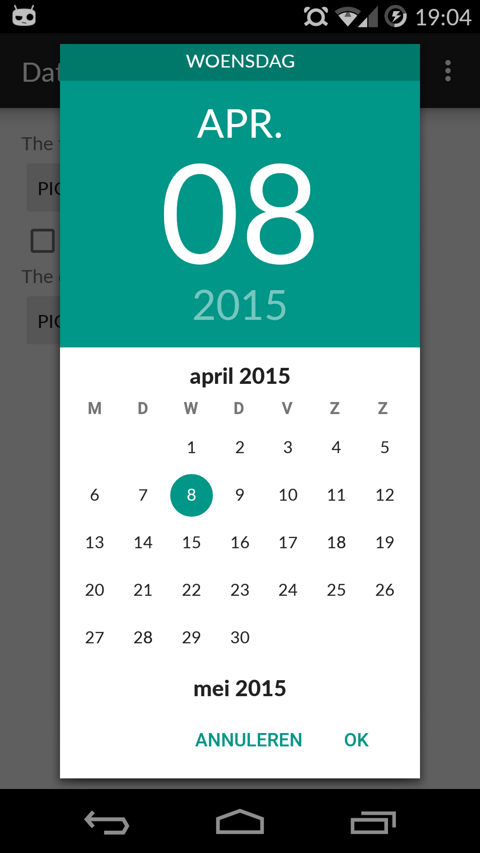 | 
## Table of Contents
1. [Setup](#setup)
2. [Using Material Date/Time Pickers](#using-material-datetime-pickers)
1. [Implement Listeners](#implement-an-ontimesetlistenerondatesetlistener)
2. [Create Pickers](#create-a-timepickerdialogdatepickerdialog-using-the-supplied-factory)
3. [Theme the Pickers](#theme-the-pickers)
3. [Additional Options](#additional-options)
4. [FAQ](#faq)
5. [Potential Improvements](#potential-improvements)
6. [License](#license)
## Setup
The easiest way to add the Material DateTime Picker library to your project is by adding it as a dependency to your `build.gradle`
```java
dependencies {
compile 'com.wdullaer:materialdatetimepicker:2.4.0'
}
```
You may also add the library as an Android Library to your project. All the library files live in ```library```.
## Using Material Date/Time Pickers
The library follows the same API as other pickers in the Android framework.
For a basic implementation, you'll need to
1. Implement an `OnTimeSetListener`/`OnDateSetListener`
2. Create a `TimePickerDialog`/`DatePickerDialog` using the supplied factory
3. Theme the pickers
### Implement an `OnTimeSetListener`/`OnDateSetListener`
In order to receive the date or time set in the picker, you will need to implement the `OnTimeSetListener` or
`OnDateSetListener` interfaces. Typically this will be the `Activity` or `Fragment` that creates the Pickers. The callbacks use the same API as the standard Android pickers.
```java
@Override
public void onTimeSet(RadialPickerLayout view, int hourOfDay, int minute) {
String time = "You picked the following time: "+hourOfDay+"h"+minute;
timeTextView.setText(time);
}
@Override
public void onDateSet(DatePickerDialog view, int year, int monthOfYear, int dayOfMonth) {
String date = "You picked the following date: "+dayOfMonth+"/"+(monthOfYear+1)+"/"+year;
dateTextView.setText(date);
}
```
### Create a `TimePickerDialog`/`DatePickerDialog` using the supplied factory
You will need to create a new instance of `TimePickerDialog` or `DatePickerDialog` using the static `newInstance()` method, supplying proper default values and a callback. Once the dialogs are configured, you can call `show()`.
```java
Calendar now = Calendar.getInstance();
DatePickerDialog dpd = DatePickerDialog.newInstance(
MainActivity.this,
now.get(Calendar.YEAR),
now.get(Calendar.MONTH),
now.get(Calendar.DAY_OF_MONTH)
);
dpd.show(getFragmentManager(), "Datepickerdialog");
```
### Theme the pickers
The pickers will be themed automatically based on the current theme where they are created, based on the current `colorAccent`. You can also theme the dialogs via the `setAccentColor(int color)` method. Alternatively, you can theme the pickers by overwriting the color resources `mdtp_accent_color` and `mdtp_accent_color_dark` in your project.
```xml
#009688
#00796b
```
The exact order in which colors are selected is as follows:
1. `setAccentColor(int color)` in java code
2. `android.R.attr.colorAccent` (if android 5.0+)
3. `R.attr.colorAccent` (eg. when using AppCompat)
4. `R.color.mdtp_accent_color` and `R.color.mdtp_accent_color_dark` if none of the others are set in your project
The pickers also have a dark theme. This can be specified globablly using the `mdtp_theme_dark` attribute in your theme or the `setThemeDark(boolean themeDark)` functions. The function calls overwrite the XML setting.
```xml
- true
```
## Additional Options
* `TimePickerDialog` dark theme
The `TimePickerDialog` has a dark theme that can be set by calling
```java
tpd.setThemeDark(true);
```
* `DatePickerDialog` dark theme
The `DatePickerDialog` has a dark theme that can be set by calling
```java
dpd.setThemeDark(true);
```
* `setAccentColor(String color)` and `setAccentColor(int color)`
Set the accentColor to be used by the Dialog. The String version parses the color out using `Color.parseColor()`. The int version requires a ColorInt bytestring. It will explicitly set the color to fully opaque.
* `TimePickerDialog` `setTitle(String title)`
Shows a title at the top of the `TimePickerDialog`
* `DatePickerDialog` `setTitle(String title)`
Shows a title at the top of the `DatePickerDialog` instead of the day of the week
* `setOkText()` and `setCancelText()`
Set a custom text for the dialog Ok and Cancel labels. Can take a resourceId of a String. Works in both the DatePickerDialog and TimePickerDialog
* `setMinTime(Timepoint time)`
Set the minimum valid time to be selected. Time values earlier in the day will be deactivated
* `setMaxTime(Timepoint time)`
Set the maximum valid time to be selected. Time values later in the day will be deactivated
* `setSelectableTimes(Timepoint[] times)`
You can pass in an array of `Timepoints`. These values are the only valid selections in the picker. `setMinTime(Timepoint time)` and `setMaxTime(Timepoint time)` will further trim this list down.
* `setTimeInterval(int hourInterval, int minuteInterval, int secondInterval)`
Set the interval for selectable times in the TimePickerDialog. This is a convenience wrapper around `setSelectableTimes`
* `setSelectableDays(Calendar[] days)`
You can pass a `Calendar[]` to the `DatePickerDialog`. The values in this list are the only acceptable dates for the picker. It takes precedence over `setMinDate(Calendar day)` and `setMaxDate(Calendar day)`
* `setHighlightedDays(Calendar[] days)`
You can pass a `Calendar[]` of days to highlight. They will be rendered in bold. You can tweak the color of the highlighted days by overwriting `mdtp_date_picker_text_highlighted`
* `showYearPickerFirst(boolean yearPicker)`
Show the year picker first, rather than the month and day picker.
* `OnDismissListener` and `OnCancelListener`
Both pickers can be passed a `DialogInterface.OnDismissLisener` or `DialogInterface.OnCancelListener` which allows you to run code when either of these events occur.
```java
tpd.setOnCancelListener(new DialogInterface.OnCancelListener() {
@Override
public void onCancel(DialogInterface dialogInterface) {
Log.d("TimePicker", "Dialog was cancelled");
}
});
```
* `vibrate(boolean vibrate)`
Set whether the dialogs should vibrate the device when a selection is made. This defaults to `true`.
* `dismissOnPause(boolean dismissOnPause)`
Set whether the picker dismisses itself when the parent Activity is paused or whether it recreates itself when the Activity is resumed.
* `DatePickerDialog` `autoDismiss(boolean autoDismiss)`
If set to `true` will dismiss the picker when the user selects a date. This defaults to `false`.
* `TimepickerDialog` `enableSeconds(boolean enableSconds)` and `enableMinutes(boolean enableMinutes)`
Allows you to enable or disable a seconds and minutes picker ont he `TimepickerDialog`. Enabling the seconds picker, implies enabling the minutes picker. Disabling the minute picker will disable the seconds picker. The last applied setting will be used. By default `enableSeconds = false` and `enableMinutes = true`.
## FAQ
### Why not use `SupportDialogFragment`?
Not using the support library versions has been a well considered choice, based on the following considerations:
* Less than 5% of the devices using the android market do not support native `Fragments`, a number which will decrease even further going forward.
* Even if you use `SupportFragments` in your application, you can still use the normal `FragmentManager`
This means that in the current setup everyone can use the library: people using the support library and people not using the support library.
Finally changing to `SupportDialogFragment` now will break the API for all the people using this library.
If you do really need `SupportDialogFragment`, you should fork the library. It involves changing all of 2 lines of code, so it should be easy enough to keep it up to date with the upstream.
### Why does the `DatePickerDialog` return the selected month -1?
In the java `Calendar` class months use 0 based indexing: January is month 0, December is month 11. This convention is widely used in the java world, for example the native Android DatePicker.
### Why are my callbacks lost when the device changes orientation?
The simple solution is to dismiss the pickers when your activity is paused.
```java
tpd.dismissOnPause(true);
```
If you do wish to retain the pickers when an orientation change occurs, things become a bit more tricky.
By default, when an orientation changes occurs android will destroy and recreate your entire `Activity`. Wherever possible this library will retain its state on an orientation change. The only notable exceptions are the different callbacks and listeners. These interfaces are often implemented on `Activities` or `Fragments`. Naively trying to retain them would cause memory leaks. Apart from explicitly requiring that the callback interfaces are implemented on an `Activity`, there is no safe way to properly retain the callbacks, that I'm aware off.
This means that it is your responsibility to set the listeners in your `Activity`'s `onResume()` callback.
```java
@Override
public void onResume() {
super.onResume();
DatePickerDialog dpd = (DatePickerDialog) getFragmentManager().findFragmentByTag("Datepickerdialog");
TimePickerDialog tpd = (TimePickerDialog) getFragmentManager().findFragmentByTag("TimepickerDialog");
if(tpd != null) tpd.setOnTimeSetListener(this);
if(dpd != null) dpd.setOnDateSetListener(this);
}
```
## Potential Improvements
* Landscape timepicker can use some improvement
* Implement the new style of pickers
* Code cleanup: there is a bit too much spit and ductape in the tweaks I've done.
* Document all options on both pickers
## License
Copyright (c) 2015 Wouter Dullaert
Licensed under the Apache License, Version 2.0 (the "License");
you may not use this file except in compliance with the License.
You may obtain a copy of the License at
http://www.apache.org/licenses/LICENSE-2.0
Unless required by applicable law or agreed to in writing, software
distributed under the License is distributed on an "AS IS" BASIS,
WITHOUT WARRANTIES OR CONDITIONS OF ANY KIND, either express or implied.
See the License for the specific language governing permissions and
limitations under the License.