# qFlipper
**Repository Path**: mirrors_jeffreydwalter/qFlipper
## Basic Information
- **Project Name**: qFlipper
- **Description**: qFlipper — desktop application for updating Flipper Zero firmware via PC
- **Primary Language**: Unknown
- **License**: GPL-3.0
- **Default Branch**: dev
- **Homepage**: None
- **GVP Project**: No
## Statistics
- **Stars**: 0
- **Forks**: 0
- **Created**: 2022-04-30
- **Last Updated**: 2026-05-24
## Categories & Tags
**Categories**: Uncategorized
**Tags**: None
## README
## qFlipper
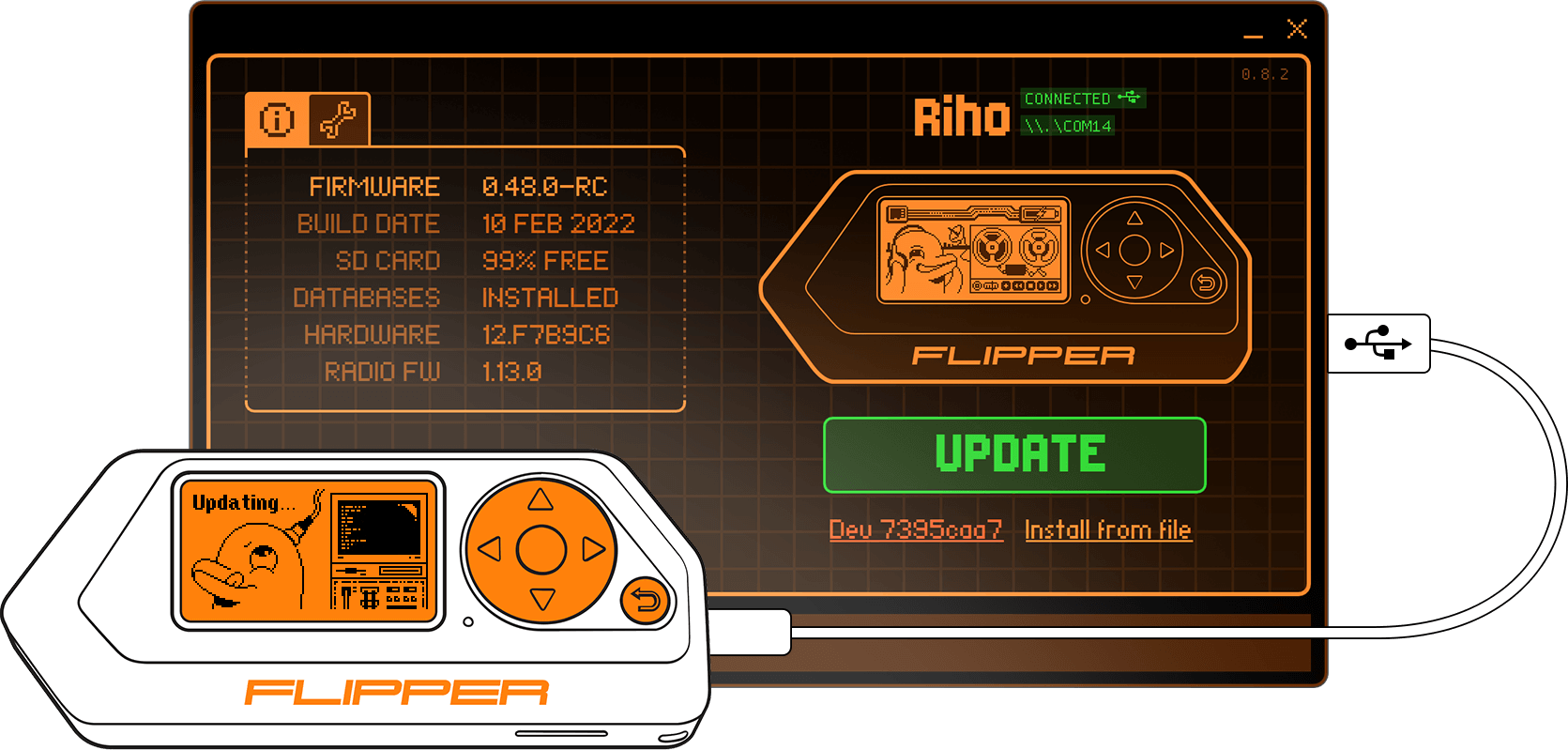
### Graphical desktop application for updating [Flipper Zero](https://flipperzero.one/) firmware via PC
qFlipper is completely open source and based on [Qt](https://www.qt.io/) framework. Runs on Windows, macOS, Linux.
 ## Download
Download official qFlipper builds here: [update.flipperzero.one](https://update.flipperzero.one/)
## Download
Download official qFlipper builds here: [update.flipperzero.one](https://update.flipperzero.one/)
 ## Features
* Update Flipper's firmware and supplemental data with a press of one button
* Repair a broken firmware installation
* Stream Flipper's display and control it remotely
* Install firmware from a `.dfu` file
* Backup and restore settings, progress and pairing data
* Automatic self-update feature
* Command line interface
## Build from sources
### Cloning
Make sure to clone the project together with submodules:
```sh
git clone https://github.com/flipperdevices/qFlipper.git --recursive
```
### Windows
Build requirements:
- MS Visual Studio 2019 or newer
- Qt5 (MSVC build) >= 5.15.0 or Qt6 >= 6.3.0
- NSIS (to generate the installer)
Edit `build_windows.bat` to adjust to your build environment and then run:
```cmd
build_windows.bat
```
Note: STM32 Bootloader driver is not provided in this repository.
### Linux
#### Docker build (AppImage, official)
Setup dev container by running:
```sh
docker compose up -d
```
Compile qFlipper by running:
```sh
docker compose exec dev ./build_linux.sh
```
#### Standalone build
Build requirements:
- Qt5 >= 5.15.0 or Qt6 >= 6.3.0
- libusb >= 1.0.16
- zlib >= 1.2.0
Make sure to install the following Qt modules (the exact package names might differ slightly depending on your Linux distribution):
```
base, tools, serialport, declarative, wayland, [quickcontrols2, graphicaleffects] (Qt5 only), qt5-compat (Qt6 only)
```
Then run:
```sh
mkdir build && cd build
qmake ../qFlipper.pro PREFIX=/path/to/install/dir -spec linux-g++ CONFIG+=qtquickcompiler &&
make qmake_all && make && make install
```
**Caution:** `make install`ing to the system prefix is not recommended. Instead, use this method for building distro-specific packages.
In this case, it is possible to disable the built-in application update feature by passing `DEFINES+=DISABLE_APPLICATION_UPDATES` to the `qmake` call.
### MacOS
Build requirements:
- Xcode or command line tools
- Qt6 6.3.1 static universal from [Flipper brew tap](https://github.com/flipperdevices/homebrew-flipper)
- libusb 1.0.24 universal from [Flipper brew tap](https://github.com/flipperdevices/homebrew-flipper)
- [dmgbuild](https://pypi.org/project/dmgbuild/) >= 1.5.2
If you want to sign binaries, set `SIGNING_KEY` environment variable:
export SIGNING_KEY="Your Developer Key ID"
Building, signing and creating package:
./build_mac.sh
Resulting image can be found in: `build_mac/qFlipper.dmg`
## Run
### Linux
```sh
./build/qFlipper-x86_64.AppImage
```
or just launch the file above from your favourite file manager.
You will likely need to set up udev rules in order to use qFlipper as a normal user:
```sh
./qFlipper-x86_64.AppImage rules install [/optional/path/to/rules/dir]
```
#### Package managers support
See [contrib](./contrib) for available options.
## Project structure
- `application` - The main graphical application, written mostly in QML.
- `cli` - The command line interface, provides nearly all main application's functionality.
- `backend` - The backend library, written in C++. Takes care of most of the logic.
- `dfu` - Low level library for accessing USB and DFU devices.
- `plugins` - Protobuf-based communication protocol support.
- `3rdparty` - Third-party libraries.
- `contrib` - Contributed packages and scripts.
- `driver-tool` - DFU driver installation tool for Windows (based on `libwdi`).
- `docker` - Docker configuration files.
- `installer-assets` - Supplementary data for deployment.
## Reporting bugs
qFlipper is a project under active development. Please report any encountered bugs to make it better!
The (mostly) complete guide is located [here](./.github/ISSUE_TEMPLATE/bug_report.md).
## Known bugs
* Sometimes Flipper's serial port doesn't get recognised by the OS, which leads to firmware update errors. This is a firmware issue.
* On some systems, there is noticeable flicker during opening, closing or resizing of the log area.
* Release source archives are automatically generated by Github and are unsuitable for building as they do not contain submodules.
## Features
* Update Flipper's firmware and supplemental data with a press of one button
* Repair a broken firmware installation
* Stream Flipper's display and control it remotely
* Install firmware from a `.dfu` file
* Backup and restore settings, progress and pairing data
* Automatic self-update feature
* Command line interface
## Build from sources
### Cloning
Make sure to clone the project together with submodules:
```sh
git clone https://github.com/flipperdevices/qFlipper.git --recursive
```
### Windows
Build requirements:
- MS Visual Studio 2019 or newer
- Qt5 (MSVC build) >= 5.15.0 or Qt6 >= 6.3.0
- NSIS (to generate the installer)
Edit `build_windows.bat` to adjust to your build environment and then run:
```cmd
build_windows.bat
```
Note: STM32 Bootloader driver is not provided in this repository.
### Linux
#### Docker build (AppImage, official)
Setup dev container by running:
```sh
docker compose up -d
```
Compile qFlipper by running:
```sh
docker compose exec dev ./build_linux.sh
```
#### Standalone build
Build requirements:
- Qt5 >= 5.15.0 or Qt6 >= 6.3.0
- libusb >= 1.0.16
- zlib >= 1.2.0
Make sure to install the following Qt modules (the exact package names might differ slightly depending on your Linux distribution):
```
base, tools, serialport, declarative, wayland, [quickcontrols2, graphicaleffects] (Qt5 only), qt5-compat (Qt6 only)
```
Then run:
```sh
mkdir build && cd build
qmake ../qFlipper.pro PREFIX=/path/to/install/dir -spec linux-g++ CONFIG+=qtquickcompiler &&
make qmake_all && make && make install
```
**Caution:** `make install`ing to the system prefix is not recommended. Instead, use this method for building distro-specific packages.
In this case, it is possible to disable the built-in application update feature by passing `DEFINES+=DISABLE_APPLICATION_UPDATES` to the `qmake` call.
### MacOS
Build requirements:
- Xcode or command line tools
- Qt6 6.3.1 static universal from [Flipper brew tap](https://github.com/flipperdevices/homebrew-flipper)
- libusb 1.0.24 universal from [Flipper brew tap](https://github.com/flipperdevices/homebrew-flipper)
- [dmgbuild](https://pypi.org/project/dmgbuild/) >= 1.5.2
If you want to sign binaries, set `SIGNING_KEY` environment variable:
export SIGNING_KEY="Your Developer Key ID"
Building, signing and creating package:
./build_mac.sh
Resulting image can be found in: `build_mac/qFlipper.dmg`
## Run
### Linux
```sh
./build/qFlipper-x86_64.AppImage
```
or just launch the file above from your favourite file manager.
You will likely need to set up udev rules in order to use qFlipper as a normal user:
```sh
./qFlipper-x86_64.AppImage rules install [/optional/path/to/rules/dir]
```
#### Package managers support
See [contrib](./contrib) for available options.
## Project structure
- `application` - The main graphical application, written mostly in QML.
- `cli` - The command line interface, provides nearly all main application's functionality.
- `backend` - The backend library, written in C++. Takes care of most of the logic.
- `dfu` - Low level library for accessing USB and DFU devices.
- `plugins` - Protobuf-based communication protocol support.
- `3rdparty` - Third-party libraries.
- `contrib` - Contributed packages and scripts.
- `driver-tool` - DFU driver installation tool for Windows (based on `libwdi`).
- `docker` - Docker configuration files.
- `installer-assets` - Supplementary data for deployment.
## Reporting bugs
qFlipper is a project under active development. Please report any encountered bugs to make it better!
The (mostly) complete guide is located [here](./.github/ISSUE_TEMPLATE/bug_report.md).
## Known bugs
* Sometimes Flipper's serial port doesn't get recognised by the OS, which leads to firmware update errors. This is a firmware issue.
* On some systems, there is noticeable flicker during opening, closing or resizing of the log area.
* Release source archives are automatically generated by Github and are unsuitable for building as they do not contain submodules.