# react-render-tracker
**Repository Path**: mirrors_lahmatiy/react-render-tracker
## Basic Information
- **Project Name**: react-render-tracker
- **Description**: React render tracker – a tool to discover performance issues related to unintentional re-renders and unmounts
- **Primary Language**: Unknown
- **License**: MIT
- **Default Branch**: main
- **Homepage**: None
- **GVP Project**: No
## Statistics
- **Stars**: 0
- **Forks**: 0
- **Created**: 2021-08-25
- **Last Updated**: 2026-05-17
## Categories & Tags
**Categories**: Uncategorized
**Tags**: None
## README
[](https://www.npmjs.com/package/react-render-tracker)
# React Render Tracker
React Render Tracker – a tool to discover performance issues related to unintended re-renders.
React Render Tracker (RRT) presents component’s tree state over the time and an event log related to a selected component (fiber) or its subtree. It doesn't provide a complete state of the components, but the difference between their states. It's not a replacement for React Devtools, but a compliment to it with a focus on investigation of changes in app's component tree (like mounts, updates and unmounts) and their causes.
[React Render Tracker v0.6 – Overview & Instructions](https://github.com/lahmatiy/react-render-tracker/files/7963996/React.Render.Tracker.overview.rev.nov.23.2021.pdf)
Supported React v16.9+ (fully functional for a React development build, but for profiling and production builds it is not capturing some data, see [issue #25](https://github.com/lahmatiy/react-render-tracker/issues/25))
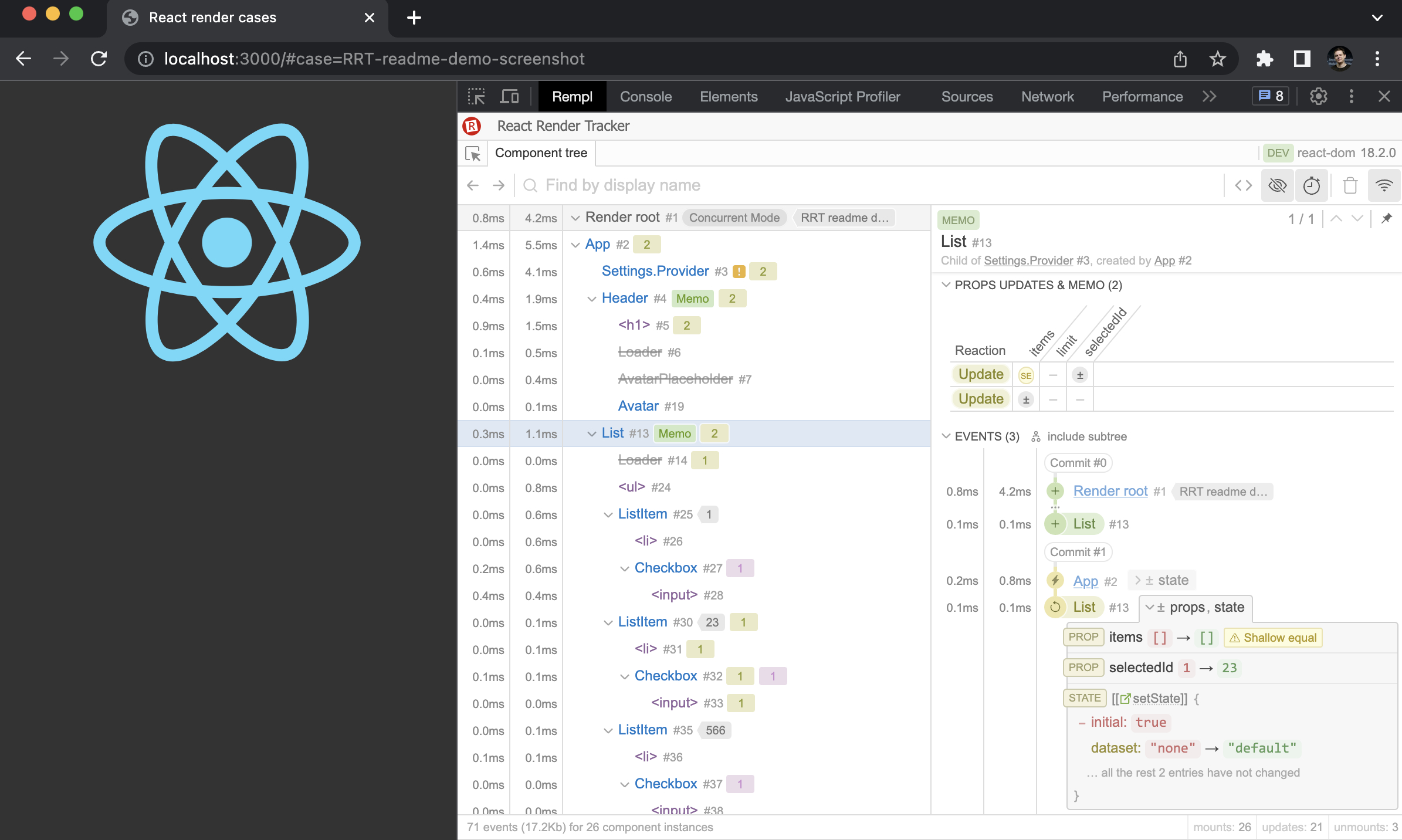
Features:
- The state of component's tree over time including unmounted components (can be hidden by a toggle in the top right corner) and number of updates (re-renders)
- Two types of component's tree hierarchy: owner-based (how components are created, that's better for updates tracking, selected by default) and parent-based (how components are mounted)
- The matrix of props updates and update bailouts for a selected fiber
- Displaying context used on fibers and locations where context is reading using hooks
- Displaying consumers list for provider fibers
- Details on useMemo() and useCallback() hook usage and recomputations for a selected fiber
- Event log for a selected component (with the option to include a subtree component's events), grouped by a React's batch of work (commit), with details on changes in context, state and props
- Displaying which component (fiber) is responsible for selected component updates
- Self and subtree rendering timings (hidden by default, use toggle in the right top corner to enable it)
- Open a source location in an editor
- Overall stats on events and component instances in the status bar
- API for a fetching and processing captured data for a [browser](#option-3--data-client-in-a-browser) and [headless browser frameworks](#option-4--data-client-in-a-headless-browser-framework)
- More to come... (see [roadmap](https://github.com/lahmatiy/react-render-tracker/issues/6))
## How to use
All you need to do is to add a single `
```
> NOTE: A path for a bundle in the NPM package is `dist/react-render-tracker.js`
You can use a CDN service to include script with no installation from NPM:
- jsDelivr
```html
```
- unpkg
```html
```
Next, you need to open the user interface or use data client API, one of the ways that best suits your case:
- [Option #0 – Open UI right in the page](#option-0--open-ui-right-in-the-page)
- [Option #1 – Using with browser's devtools](#option-1--using-with-browsers-devtools)
- [Option #2 – Open UI in another tab, or browser, or device](#option-2--open-ui-in-another-tab-or-browser-or-device)
- [Option #3 – Data client in a browser](#option-3--data-client-in-a-browser)
- [Option #4 – Data client in a headless browser framework](#option-4--data-client-in-a-headless-browser-framework)
### Option #0 – Open UI right in the page
To avoid any additional installs you may just add `data-config="inpage:true"` attribute to the `
```
### Option #1 – Using with browser's devtools
1. Install Rempl extension [for Chromium](https://chrome.google.com/webstore/detail/rempl/hcikjlholajopgbgfmmlbmifdfbkijdj) based browser or [for Firefox](https://addons.mozilla.org/en-US/firefox/addon/rempl/) (other browsers might be added later)
2. Open location of your React app, then open browser's devtools and find Rempl tab here. Click it. That's it.
> NOTE: If your React application and browser's devtools were opened before Rempl extension is installed, you need to close and open browser's devtools as well as reload the page with React application.
### Option #2 – Open UI in another tab, or browser, or device
The most universal way for a remote inspection of your React app using React Render Tracker is via a special server as a connection point between the app and React Render Tracker UI. Since RRT is based on [Rempl](https://github.com/rempl/rempl), it works with [rempl-cli](https://github.com/rempl/rempl-cli) which is used to launch such kind of a server. In this case, it becomes possible to inspect a React application launched in any web view with a WebSocket support. In fact, you can inspect a React application running in a browser with no devtools support, or Electron, or VS Code, etc.
1. Run following commands:
```
> npm install -g rempl-cli
> rempl
```
This will launch a Rempl server on port `8177`. Use `--port` option to specify any other port. See more option with `rempl --help` command.
2. Add `` tag with specified origin of the Rempl server:
```html
```
3. Open your application. Open Rempl server location in an evergreen browser on your choice, e.g. `http://localhost:8177` which is the default URL. You should see connected instances of React Render Tracker, select one to see the UI.
> NOTE: During MVP phase cross-browser support is not guarantee. Feel free to open an issue if something doesn't work in non-Chromium browser you use.
### Option #3 – Data client in a browser
The `react-render-tracker/data-client` module provides JavaScript API (data client) to interact with React Render Tracker.
```html
```
See example [here](playground/data-client-example.js).
Data client API:
> NOTE: Data client API is very basic at the moment and a subject to change. Consider it **experimental**. Your feedback is highly welcome.
```ts
// returns a promise that is resolving when data client is connected to RRT
async function isReady(): void;
// returns the state of data client connection to RRT
function isConnected(): boolean;
// returns an array of captured events
async function getEvents(offset = 0, limit = Infinity): Message[];
// return a number of captured events
async function getEventCount(): number;
// adds listener to the connection state changes, return a function to unsubscribe
function subscribeConnected(listener: (value: boolean) => void): () => {};
// adds listener to receive new captured events, return a function to unsubscribe;
// specifies the index from which to consider events as new, by default it's all
// non-captured events; set to 0 to receieve all the events;
function subscribeNewEvents(
callback: (newEvents: Message[]) => void,
offset = events.length
): () => {};
```
### Option #4 – Data client in a headless browser framework
The `react-render-tracker/headless-browser-client` module provides an adapter for headless browser frameworks which is applied to a page object to get the data client API in the context of the page. Supported frameworks:
- [Playwright](https://github.com/microsoft/playwright) (see [example](examples/playwright/script.mjs))
- [Puppeteer](https://github.com/puppeteer/puppeteer) (see [example](examples/puppeteer/script.js))
```js
import { chromium } from "playwright"; // or import puppeteer from "puppeteer";
import newTrackerClient from "react-render-tracker/headless-browser-client";
const browser = chromium.launch();
const page = await browser.newPage();
const rrt = await newTrackerClient(page);
await page.goto("https://example.com");
const capturedEvents = await rrt.getEvents();
```
## Configuring React Render Tracker
React Render Tracker can be configured by the attribute `data-config` on `
```
### inpage
Type: `boolean`
Default: `false`
Opens in-page host for the tool on initialization when `true`.
### openSourceLoc
Type: `string` | `object` | `undefined`
Default: `undefined`
Allows to enable "open in editor" feature which is disabled when value is `undefined` (by default). Option's value should be an object with the following shape (all entries are optional except `pattern`):
```js
{
pattern: 'string', // required
projectRoot: 'string', // optional
basedir: 'string', // optional
basedirJsx: 'string' // optional
}
```
Where:
- `pattern` – defines an URL which should be fetched on a click by a source location link. Such URL should be an endpoint of web server which performs "open in editor" action. For `Visual Studio Code` a web server is not required (see below).
- `projectRoot` – an absolute path for a project dir, any location is appending to it.
- `basedir` – a path relative to project's dir to resolve relative paths (i.e. paths which contain `..`) before appending to `projectRoot`.
- `basedirJsx` – the same as `basedir` but for JSX locations (i.e. `__source` prop values on JSX elements); `basedir` value is used when `basedirJsx` is not specified.
In case your editor is `Visual Studio Code`, it's possible to setup "open in editor" feature without a web server, like so:
```html
```
When a string value is passed for `openSourceLoc` option it's replaced with an object `{ pattern: stringValue }`, i.e.
```js
openSourceLoc: "url pattern";
// the same as ->
openSourceLoc: {
pattern: "url pattern";
}
```
The `pattern`'s value might contain placeholders for a value substitution:
- `[filepath]` – absolute resolved location for a module, e.g. `/Users/username/git/project/src/module.js`
- `[file]` or `[loc]` – the same as `[filepath]`, but line and column are included (the same as `[filepath]:[line]:[column]`), e.g. `/Users/username/git/project/src/module.js:12:5`
- `[line]` – line of location in module's source (starting with 1)
- `[column]` – column of location in module's source (starting with 1)
- `[line0]` – zero-based line of location in module's source
- `[column0]` – zero-based column of location in module's source
## Using custom build / dev version
- Clone the repo and install deps using `npm install`
- Run dev server using `npm start` and include `
```
The dev server provides the following endpoints:
- `/react-render-tracker.js` – a dev build of RRT, UI part (subscriber) is not included (its content is loading by a fetch request)
- `/publisher.js` – the same as `/react-render-tracker.js`
- `/subscriber.js` – UI part of the tool, `/react-render-tracker.js` is refering to this script to load UI into a rempl sandbox
- `/rrt-data-client.js` – data-only client API (see [Option 3](#option-3--data-client-in-a-browser))
- `/dist/react-render-tracker.js` – the same as `/dist/react-render-tracker.js` provided by the package, `publisher` and `subscriber` bundled in a single script
- `/dist/data-client.js` – the same as `/dist/data-client.js` provided by the package
> NOTE: In this case bundle will be rebuild on each request for the script. This version of bundle contains source maps which is good for debugging
As alternative you could run `npm run build` to get a bundle in `dist` folder (`dist/react-render-tracker.js`)
> NOTE: This version of bundle is the same as for publishing (minified and no source maps included)
## How to start playground locally
```
npm install
npm start
```
Open a URL that will displayed in a console (e.g. `Server listen on http://localhost:3000`).
## Acknowledgments
The prototype of React Render Tracker was crafted during the Microsoft's hackathon on July 2021. Thanks to the team working on it: Dana Janoskova (@DJanoskova), Dmitrii Samsonov (@user1736), Yury Tomilin (@r04423), Maksym Kharchenko (@Bon4ik) and Raluca Vasiliu (@kubayaya).
Thanks to React Devtools authors which integration with React internals became a basis for integration implementation in React Render Tracker.
## License
MIT