# fidget.nvim
**Repository Path**: mirrors_matze/fidget.nvim
## Basic Information
- **Project Name**: fidget.nvim
- **Description**: Standalone UI for nvim-lsp progress
- **Primary Language**: Unknown
- **License**: MIT
- **Default Branch**: main
- **Homepage**: None
- **GVP Project**: No
## Statistics
- **Stars**: 0
- **Forks**: 0
- **Created**: 2022-02-18
- **Last Updated**: 2026-05-17
## Categories & Tags
**Categories**: Uncategorized
**Tags**: None
## README
# 💫 Fidget
[](doc/fidget.txt)
[](https://luarocks.org/modules/j-hui/fidget.nvim)
Extensible UI for Neovim notifications and LSP progress messages.
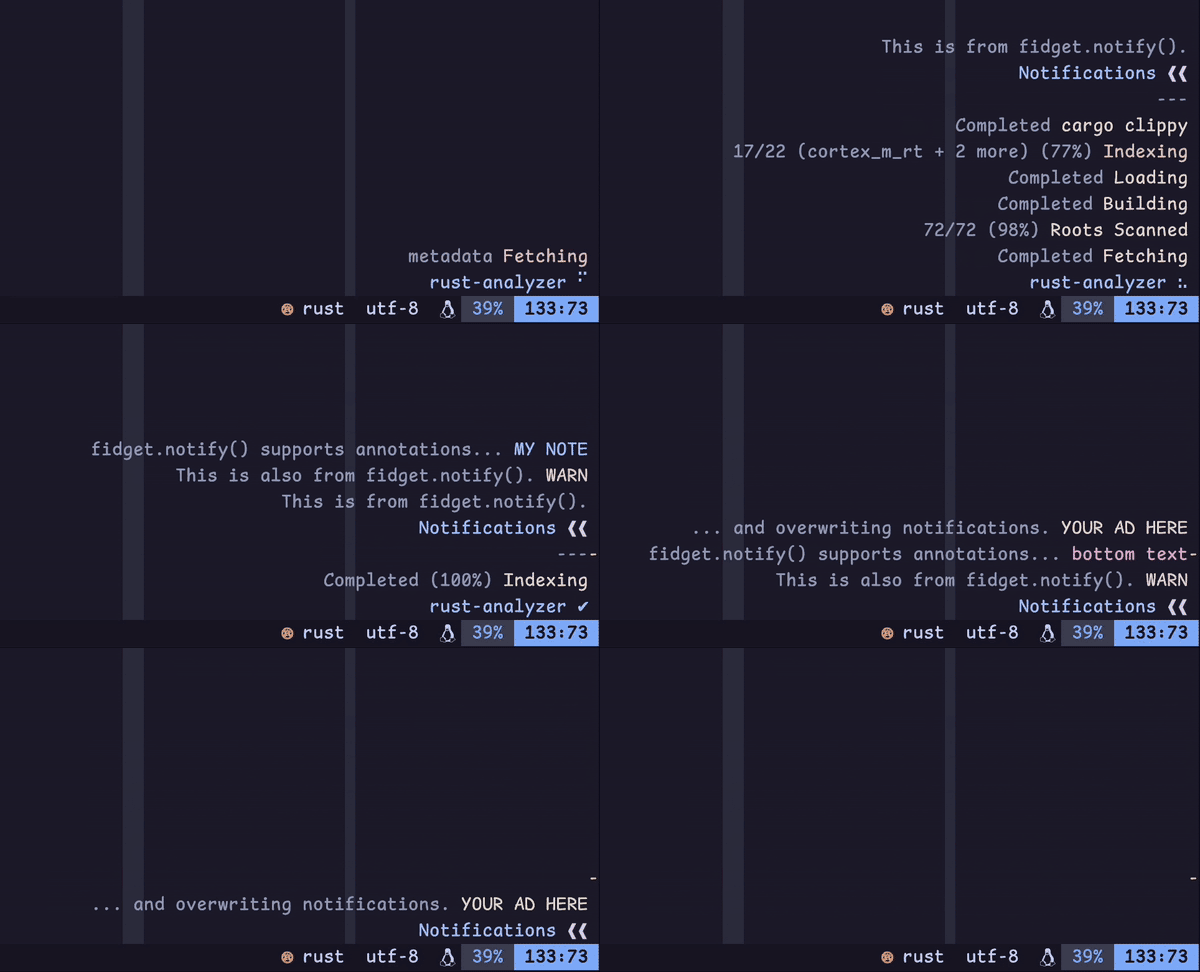
Demo setup
_Note that this demo may not always reflect the exact behavior of the latest release._
This screen recording was taken as I opened a Rust file I'm working on,
triggering `rust-analyzer` to send me some LSP progress messages.
As those messages are ongoing, I trigger some notifications with the following:
```lua
local fidget = require("fidget")
vim.keymap.set("n", "A", function()
fidget.notify("This is from fidget.notify().")
end)
vim.keymap.set("n", "B", function()
fidget.notify("This is also from fidget.notify().", vim.log.levels.WARN)
end)
vim.keymap.set("n", "C", function()
fidget.notify("fidget.notify() supports annotations...", nil, { annote = "MY NOTE", key = "foobar" })
end)
vim.keymap.set("n", "D", function()
fidget.notify(nil, vim.log.levels.ERROR, { annote = "bottom text", key = "foobar" })
fidget.notify("... and overwriting notifications.", vim.log.levels.WARN, { annote = "YOUR AD HERE" })
end)
```
(I use normal mode keymaps to avoid going into ex mode, which would pause Fidget
rendering and make the demo look glitchy...)
Visible elements:
- Terminal + font: [Kitty](https://sw.kovidgoyal.net/kitty/) + [Comic Shanns Mono](https://github.com/shannpersand/comic-shanns)
- Editor: [Neovim v0.9.4](https://github.com/neovim/neovim/tree/v0.9.4)
- Theme: [catppuccin/nvim (mocha, dark)](https://github.com/catppuccin/nvim)
- Status line: [nvim-lualine/lualine.nvim](https://github.com/nvim-lualine/lualine.nvim)
- Color columns: `:set colorcolumn=81,121,+1,+2` (sorry)
- Scrollbar: [petertriho/nvim-scrollbar](https://github.com/petertriho/nvim-scrollbar)
### Why?
Fidget is an unintrusive window in the corner of your editor that manages
its own lifetime. Its goals are:
- to provide a UI for Neovim's [`$/progress`][lsp-progress] handler
- to provide a configurable [`vim.notify()`][vim-notify] backend
- to support basic ASCII animations (Fidget spinners!) to indicate signs of life
- to be easy to configure, sane to maintain, and fun to hack on
There's only so much information one can stash into the status line. Besides,
who doesn't love a little bit of terminal eye candy, as a treat?
[lsp-progress]: https://microsoft.github.io/language-server-protocol/specifications/lsp/3.17/specification/#progress
[vim-notify]: https://neovim.io/doc/user/lua.html#vim.notify()
## Getting Started
### Requirements
Fidget requires Neovim v0.8.0+.
If you would like to see progress notifications, you must have configured Neovim
with an LSP server that uses the [`$/progress`][lsp-progress] handler.
For an up-to-date list of LSP servers this plugin is known to work with, see
[this Wiki page](https://github.com/j-hui/fidget.nvim/wiki/Known-compatible-LSP-servers).
### Installation
Install this plugin using your favorite plugin manager.
See the [documentation](#options) for `setup()` options.
#### [Lazy](https://github.com/folke/lazy.nvim)
```lua
{
"j-hui/fidget.nvim",
opts = {
-- options
},
}
```
#### [vim-plug](https://github.com/junegunn/vim-plug)
```vim
Plug 'j-hui/fidget.nvim'
" Make sure the plugin is installed using :PlugInstall. Then, somewhere after plug#end():
lua <
For more details, see [fidget-option.txt](doc/fidget-option.txt).
## Lua API
Fidget has a Lua API, with [documentation](doc/fidget-api.txt) generated from
source code. You are encouraged to hack around with that.
## Commands
Fidget exposes some of its Lua API functions through `:Fidget` sub-commands
(e.g., `:Fidget clear`), which support shell-like arguments and completion.
These sub-commands are documented below.
### `:Fidget` sub-commands
#### `:Fidget clear`
Clear active notifications
Arguments
Positional arguments:
- **`{group_key}`**: _`(any)`_ group to clear
#### `:Fidget clear_history`
Clear notifications history
Arguments
Flags:
- **`--before {seconds}`**: _`(number)`_ filter history for items updated at least this long ago
- **`--group_key {group_key}`**: _`(any)`_ clear history by group key
- **`--include_active {true|false}`**: _`(boolean)`_ whether to clear items that have not been removed (default: true)
- **`--include_removed {true|false}`**: _`(boolean)`_ whether to clear items that have have been removed (default: true)
- **`--since {seconds}`**: _`(number)`_ filter history for items updated at most this long ago
Positional arguments:
- **`{group_key}`**: _`(any)`_ clear history by group key
#### `:Fidget history`
Show notifications history
Arguments
Flags:
- **`--before {seconds}`**: _`(number)`_ filter history for items updated at least this long ago
- **`--group_key {group_key}`**: _`(any)`_ filter history by group key
- **`--include_active {true|false}`**: _`(boolean)`_ whether to clear items that have not been removed (default: `true`)
- **`--include_removed {true|false}`**: _`(boolean)`_ whether to clear items that have have been removed (default: `true`)
- **`--since {seconds}`**: _`(number)`_ filter history for items updated at most this long ago
Positional arguments:
- **`{group_key}`**: _`(any)`_ filter history by group key
#### `:Fidget lsp_suppress`
Suppress LSP progress notifications
Arguments
Positional arguments:
- **`{suppress}`**: _`(boolean)`_ whether to suppress (omitting this argument toggles suppression)
#### `:Fidget suppress`
Suppress notification window
Arguments
Positional arguments:
- **`{suppress}`**: _`(boolean)`_ whether to suppress (omitting this argument toggles suppression)
## Highlights
Rather than defining its own highlights, Fidget's default configuration uses
built-in highlight groups that are typically overridden by custom Vim color
schemes. With any luck, these will look reasonable when rendered, but the visual
outcome will really depend on what your color scheme decided to do with those
highlight groups.
You can override these highlight groups (e.g., `icon_style`) using the `:h
fidget-options` shown above.
## Related Work
[rcarriga/nvim-notify](https://github.com/rcarriga/nvim-notify) is first and
foremost a `vim.notify()` backend, and it also supports
[LSP progress notifications](https://github.com/rcarriga/nvim-notify/wiki/Usage-Recipes#lsp-status-updates)
(with the integration seems to have been packaged up in
[mrded/nvim-lsp-notify](https://github.com/mrded/nvim-lsp-notify)).
[vigoux/notifier.nvim](https://github.com/vigoux/notifier.nvim) is
a `vim.notify()` backend that comes with first-class LSP notification support.
[neoclide/coc.nvim](https://github.com/neoclide/coc.nvim) provides a nice LSP
progress UI in the status line, which first inspired my desire to have this
feature for nvim-lsp.
[arkav/lualine-lsp-progress](https://github.com/arkav/lualine-lsp-progress) was
the original inspiration for Fidget, and funnels LSP progress messages into
[nvim-lualine/lualine.nvim](https://github.com/nvim-lualine/lualine.nvim).
I once borrowed some of its code (though much of that code has since been
rewritten).
[nvim-lua/lsp-status.nvim](https://github.com/nvim-lua/lsp-status.nvim) also
supports showing progress text, though it requires some configuration to
integrate that into their status line.
### Acknowledgements
Most of the Fidget spinner patterns were adapted from the npm package
[sindresorhus/cli-spinners](https://github.com/sindresorhus/cli-spinners).