# signature-document
**Repository Path**: mirrors_motdotla/signature-document
## Basic Information
- **Project Name**: signature-document
- **Description**: JavaScript rendering engine for a signature-document.
- **Primary Language**: Unknown
- **License**: Not specified
- **Default Branch**: master
- **Homepage**: None
- **GVP Project**: No
## Statistics
- **Stars**: 0
- **Forks**: 0
- **Created**: 2020-08-09
- **Last Updated**: 2026-05-30
## Categories & Tags
**Categories**: Uncategorized
**Tags**: None
## README
# signature-document
 JavaScript rendering engine for a [signature-document](https://github.com/motdotla/signature-document#signature-document-blueprint).
It renders out the contents of the signature-document JSON to a formatted and readable document-like format but friendly to the web. It very basically displays the pages as background images, appropriately sized, and fitting to your viewable screen.
```html
```
## Usage
Place the script tag in the body of an html page. Set data-signature-document-url to the url of a [signature-document file](https://github.com/motdotla/signature-document#signature-document-blueprint). Then initialize the script.
```html
```
### init()
```javascript
signature_document.init();
```
### jafja
```javascript
signature_chrome.jafja = jafja
```
Set jafja to a [jafja](https://github.com/motdotla/jafja) object.
This exposes a series of events you can bind to.
### Events
#### signature_document.rendered
```javascript
jafja.bind('signature_document.rendered', function(values) {
console.log('signature_document.rendered', values);
});
```
The result is an object of values.
* `multipler` - The width and height calculation multiplier.
* `fabrics` - List of fabrics' dom rendered for the document.
```javascript
{
multiplier: 1,
fabrics: []
}
```
#### signature_document.fabric.clicked
```javascript
jafja.bind('signature_document.fabric.clicked', function(values) {
console.log('signature_document.fabric.clicked', values);
});
```
The result is an object of values.
* `page_number` - The number of the page (fabric) clicked.
* `x` - The x position of the last click.
* `y` - The y position of the last click.
```javascript
{
page_number: 1,
x: 20,
y: 20
}
```
#### signature_document.object.selected
```javascript
jafja.bind('signature_document.object.selected', function(values) {
console.log('signature_document.object.selected', values);
});
```
The result is an empty object.
```javascript
{}
```
#### signature_document.fabric.modified
```javascript
jafja.bind('signature_document.fabric.modified', function(values) {
console.log('signature_document.fabric.modified', values);
});
```
The result is an object of values.
* `id` - The id of the object (element) modified.
* `x` - The x position of the last click.
* `y` - The y position of the last click.
* `type` - Either 'signature_element' or 'text_element'.
```javascript
{
id: "some-id",
x: 20,
y: 20,
type: 'signature_element'
}
```
### Example
Copy & paste the following to a blank html page.
```html
```
It will render out to look like the following image.
JavaScript rendering engine for a [signature-document](https://github.com/motdotla/signature-document#signature-document-blueprint).
It renders out the contents of the signature-document JSON to a formatted and readable document-like format but friendly to the web. It very basically displays the pages as background images, appropriately sized, and fitting to your viewable screen.
```html
```
## Usage
Place the script tag in the body of an html page. Set data-signature-document-url to the url of a [signature-document file](https://github.com/motdotla/signature-document#signature-document-blueprint). Then initialize the script.
```html
```
### init()
```javascript
signature_document.init();
```
### jafja
```javascript
signature_chrome.jafja = jafja
```
Set jafja to a [jafja](https://github.com/motdotla/jafja) object.
This exposes a series of events you can bind to.
### Events
#### signature_document.rendered
```javascript
jafja.bind('signature_document.rendered', function(values) {
console.log('signature_document.rendered', values);
});
```
The result is an object of values.
* `multipler` - The width and height calculation multiplier.
* `fabrics` - List of fabrics' dom rendered for the document.
```javascript
{
multiplier: 1,
fabrics: []
}
```
#### signature_document.fabric.clicked
```javascript
jafja.bind('signature_document.fabric.clicked', function(values) {
console.log('signature_document.fabric.clicked', values);
});
```
The result is an object of values.
* `page_number` - The number of the page (fabric) clicked.
* `x` - The x position of the last click.
* `y` - The y position of the last click.
```javascript
{
page_number: 1,
x: 20,
y: 20
}
```
#### signature_document.object.selected
```javascript
jafja.bind('signature_document.object.selected', function(values) {
console.log('signature_document.object.selected', values);
});
```
The result is an empty object.
```javascript
{}
```
#### signature_document.fabric.modified
```javascript
jafja.bind('signature_document.fabric.modified', function(values) {
console.log('signature_document.fabric.modified', values);
});
```
The result is an object of values.
* `id` - The id of the object (element) modified.
* `x` - The x position of the last click.
* `y` - The y position of the last click.
* `type` - Either 'signature_element' or 'text_element'.
```javascript
{
id: "some-id",
x: 20,
y: 20,
type: 'signature_element'
}
```
### Example
Copy & paste the following to a blank html page.
```html
```
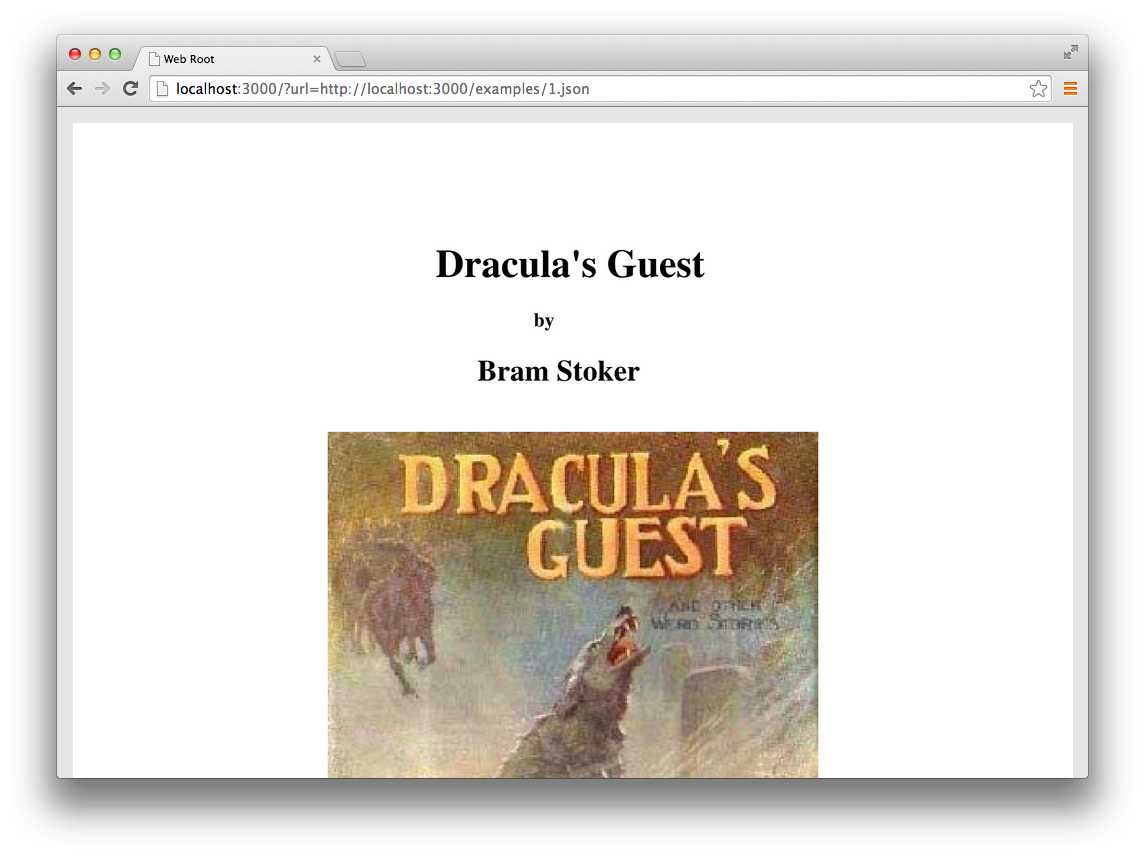
It will render out to look like the following image.
 ## Signature Document Blueprint
A signature-document should be built in the following format. This is a working blueprint and subject to change.
The format borrows from [json:api](http://jsonapi.org/). It should have a documents array, but with only one document in the array. Nested inside shall be a pages array. Each page should have a number as an integer, and a url to the PNG or JPG image of the page. The status should say 'processed'.
```json
{
"documents": [
{
"pages": [
{
"number": 1,
"url": "https://carveproduction.s3.amazonaws.com/48bb42cd-413b-4859-7173-a2e90b41f9fb/1.png"
},
{
"number": 2,
"url": "https://carveproduction.s3.amazonaws.com/48bb42cd-413b-4859-7173-a2e90b41f9fb/2.png"
},
{
"number": 3,
"url": "https://carveproduction.s3.amazonaws.com/48bb42cd-413b-4859-7173-a2e90b41f9fb/3.png"
},
{
"number": 4,
"url": "https://carveproduction.s3.amazonaws.com/48bb42cd-413b-4859-7173-a2e90b41f9fb/4.png"
},
{
"number": 5,
"url": "https://carveproduction.s3.amazonaws.com/48bb42cd-413b-4859-7173-a2e90b41f9fb/5.png"
},
{
"number": 6,
"url": "https://carveproduction.s3.amazonaws.com/48bb42cd-413b-4859-7173-a2e90b41f9fb/6.png"
},
{
"number": 7,
"url": "https://carveproduction.s3.amazonaws.com/48bb42cd-413b-4859-7173-a2e90b41f9fb/7.png"
},
{
"number": 8,
"url": "https://carveproduction.s3.amazonaws.com/48bb42cd-413b-4859-7173-a2e90b41f9fb/8.png"
},
{
"number": 9,
"url": "https://carveproduction.s3.amazonaws.com/48bb42cd-413b-4859-7173-a2e90b41f9fb/9.png"
},
{
"number": 10,
"url": "https://carveproduction.s3.amazonaws.com/48bb42cd-413b-4859-7173-a2e90b41f9fb/10.png"
},
{
"number": 11,
"url": "https://carveproduction.s3.amazonaws.com/48bb42cd-413b-4859-7173-a2e90b41f9fb/11.png"
},
{
"number": 12,
"url": "https://carveproduction.s3.amazonaws.com/48bb42cd-413b-4859-7173-a2e90b41f9fb/12.png"
},
{
"number": 13,
"url": "https://carveproduction.s3.amazonaws.com/48bb42cd-413b-4859-7173-a2e90b41f9fb/13.png"
}
],
"status": "processed",
"url": "http://www.bramstoker.org/pdf/stories/03guest/01guest.pdf",
}
]
}
```
## Development
```
npm install -g grunt-cli
npm install
grunt
```
Visit
You can change the document being rendering by adjusting the script tag's data-signature-document-url in public/index.html.
## Signature Document Blueprint
A signature-document should be built in the following format. This is a working blueprint and subject to change.
The format borrows from [json:api](http://jsonapi.org/). It should have a documents array, but with only one document in the array. Nested inside shall be a pages array. Each page should have a number as an integer, and a url to the PNG or JPG image of the page. The status should say 'processed'.
```json
{
"documents": [
{
"pages": [
{
"number": 1,
"url": "https://carveproduction.s3.amazonaws.com/48bb42cd-413b-4859-7173-a2e90b41f9fb/1.png"
},
{
"number": 2,
"url": "https://carveproduction.s3.amazonaws.com/48bb42cd-413b-4859-7173-a2e90b41f9fb/2.png"
},
{
"number": 3,
"url": "https://carveproduction.s3.amazonaws.com/48bb42cd-413b-4859-7173-a2e90b41f9fb/3.png"
},
{
"number": 4,
"url": "https://carveproduction.s3.amazonaws.com/48bb42cd-413b-4859-7173-a2e90b41f9fb/4.png"
},
{
"number": 5,
"url": "https://carveproduction.s3.amazonaws.com/48bb42cd-413b-4859-7173-a2e90b41f9fb/5.png"
},
{
"number": 6,
"url": "https://carveproduction.s3.amazonaws.com/48bb42cd-413b-4859-7173-a2e90b41f9fb/6.png"
},
{
"number": 7,
"url": "https://carveproduction.s3.amazonaws.com/48bb42cd-413b-4859-7173-a2e90b41f9fb/7.png"
},
{
"number": 8,
"url": "https://carveproduction.s3.amazonaws.com/48bb42cd-413b-4859-7173-a2e90b41f9fb/8.png"
},
{
"number": 9,
"url": "https://carveproduction.s3.amazonaws.com/48bb42cd-413b-4859-7173-a2e90b41f9fb/9.png"
},
{
"number": 10,
"url": "https://carveproduction.s3.amazonaws.com/48bb42cd-413b-4859-7173-a2e90b41f9fb/10.png"
},
{
"number": 11,
"url": "https://carveproduction.s3.amazonaws.com/48bb42cd-413b-4859-7173-a2e90b41f9fb/11.png"
},
{
"number": 12,
"url": "https://carveproduction.s3.amazonaws.com/48bb42cd-413b-4859-7173-a2e90b41f9fb/12.png"
},
{
"number": 13,
"url": "https://carveproduction.s3.amazonaws.com/48bb42cd-413b-4859-7173-a2e90b41f9fb/13.png"
}
],
"status": "processed",
"url": "http://www.bramstoker.org/pdf/stories/03guest/01guest.pdf",
}
]
}
```
## Development
```
npm install -g grunt-cli
npm install
grunt
```
Visit
You can change the document being rendering by adjusting the script tag's data-signature-document-url in public/index.html.