# cs-script
**Repository Path**: mirrors_oleg-shilo/cs-script
## Basic Information
- **Project Name**: cs-script
- **Description**: C# scripting platform
- **Primary Language**: Unknown
- **License**: MIT
- **Default Branch**: master
- **Homepage**: None
- **GVP Project**: No
## Statistics
- **Stars**: 1
- **Forks**: 1
- **Created**: 2022-01-05
- **Last Updated**: 2026-09-20
## Categories & Tags
**Categories**: Uncategorized
**Tags**: None
## README
[](https://stand-with-ukraine.pp.ua)
# CS-Script
 ---
This page is a one-minute-read info about the brightest features of the system. The complete overview can be found on [Wiki](https://github.com/oleg-shilo/cs-script/wiki/CS-Script-Overview)
---
_Please note that this repository is hosting the releases of CS-Script (v4.0.0 and higher). The previous content of this repository and wiki (.NET Framework edition of CS-Script) has been moved to the new repository: https://github.com/oleg-shilo/cs-script.net-framework_
_Note .NET SDK is required to have all features. However, the core features can be utilised even with .NET Runtime only. See [details](https://github.com/oleg-shilo/cs-script/wiki/Choosing-Compiler-Engine#compiler-technology-comparison)._
_After cloning this repository and before building the solution, execute prepare-environment.cmd to prepare local signing certificates for your build._
---
[](https://github.com/oleg-shilo/cs-script/actions/workflows/dotnet-desktop.yml)
[](https://ci.appveyor.com/project/oleg-shilo/cs-script) [](http://chocolatey.org/packages/cs-script) [](http://chocolatey.org/packages/cs-script) [](https://www.nuget.org/packages/CS-Script/)
[](https://oleg-shilo.github.io/cs-script/Donation.html)
CS-Script is a CLR-based scripting system that uses ECMA-compliant C# as a programming language.
CS-Script is one of the most mature C# scripting solutions. It became publicly available in 2004, just two years after the first release of .NET. It was the first comprehensive scripting platform for .NET
CS-Script supports both hosted and standalone (CLI) execution models. This makes it possible to use the script engine as a pure C# alternative to PowerShell. As well as extending .NET applications with C# scripts executed at runtime by the hosted script engine.
CS-Script allows seamless switching of underlying compiling technology without affecting the code base. Currently supported compilers are _dotnet.exe_ and _csc.exe_.
CS-Script also offers comprehensive integration with the most common development tools:
- Visual Studio (built-in feature via `-vs` CLI argument)
- [VSCode](https://github.com/oleg-shilo/cs-script.vscode)
- [Sublime Text 3](https://github.com/oleg-shilo/cs-script-sublime)
- [Notepad++](https://github.com/oleg-shilo/cs-script.npp) .
- [Visual Studio](https://github.com/oleg-shilo/CS-Script.VSIX)
It can be run on Win and Linux. Class library for hosting the script engine is compiled for ".NET Standard" so it can be hosted by any managed application.
Over the long history of CS-Script, it has been downloaded through the Notepad++ x86 plugin manager alone over  times ([stats](https://www.cs-script.net/cs-script/download.stats/daily_downloads.html) till July 2017).
---
This page is a one-minute-read info about the brightest features of the system. The complete overview can be found on [Wiki](https://github.com/oleg-shilo/cs-script/wiki/CS-Script-Overview)
---
_Please note that this repository is hosting the releases of CS-Script (v4.0.0 and higher). The previous content of this repository and wiki (.NET Framework edition of CS-Script) has been moved to the new repository: https://github.com/oleg-shilo/cs-script.net-framework_
_Note .NET SDK is required to have all features. However, the core features can be utilised even with .NET Runtime only. See [details](https://github.com/oleg-shilo/cs-script/wiki/Choosing-Compiler-Engine#compiler-technology-comparison)._
_After cloning this repository and before building the solution, execute prepare-environment.cmd to prepare local signing certificates for your build._
---
[](https://github.com/oleg-shilo/cs-script/actions/workflows/dotnet-desktop.yml)
[](https://ci.appveyor.com/project/oleg-shilo/cs-script) [](http://chocolatey.org/packages/cs-script) [](http://chocolatey.org/packages/cs-script) [](https://www.nuget.org/packages/CS-Script/)
[](https://oleg-shilo.github.io/cs-script/Donation.html)
CS-Script is a CLR-based scripting system that uses ECMA-compliant C# as a programming language.
CS-Script is one of the most mature C# scripting solutions. It became publicly available in 2004, just two years after the first release of .NET. It was the first comprehensive scripting platform for .NET
CS-Script supports both hosted and standalone (CLI) execution models. This makes it possible to use the script engine as a pure C# alternative to PowerShell. As well as extending .NET applications with C# scripts executed at runtime by the hosted script engine.
CS-Script allows seamless switching of underlying compiling technology without affecting the code base. Currently supported compilers are _dotnet.exe_ and _csc.exe_.
CS-Script also offers comprehensive integration with the most common development tools:
- Visual Studio (built-in feature via `-vs` CLI argument)
- [VSCode](https://github.com/oleg-shilo/cs-script.vscode)
- [Sublime Text 3](https://github.com/oleg-shilo/cs-script-sublime)
- [Notepad++](https://github.com/oleg-shilo/cs-script.npp) .
- [Visual Studio](https://github.com/oleg-shilo/CS-Script.VSIX)
It can be run on Win and Linux. Class library for hosting the script engine is compiled for ".NET Standard" so it can be hosted by any managed application.
Over the long history of CS-Script, it has been downloaded through the Notepad++ x86 plugin manager alone over  times ([stats](https://www.cs-script.net/cs-script/download.stats/daily_downloads.html) till July 2017).
_**Documentation disclaimer**_
Please be aware that the online [Documentation Wiki](https://github.com/oleg-shilo/cs-script/wiki) is intended to provide the most detailed information about the product. It is constantly evolving and sometimes may have be a little out of sync concerning the latest product releases.
Though the most accurate and concise documentation is embedded in the engine executable and can be accessed via the CLI "help" command:
```ps
css -help
```
A copy of the help content can be accessed [here](help.txt)
#### _**How to get CS-Script**_
Note, every [release](https://github.com/oleg-shilo/cs-script/releases) comes with a detailed description of how to deploy/integrate CS-Script on/with your environment or application. This covers various package distribution solutions
- .NET Tools
- Chocolatey
- WinGet
- Debian package
- NuGet package
The following section describes a few use cases just to give you an idea about the product:
_**CLI: Executing script from shell**_
CS-Script follows many elements of the Python user experience model. Thus, a script can reference other scripts, .NET assemblies or even NuGet packages. It also uses Python-style caching, ensuring that the script that was executed at least once is never compiled again unless the script code is changed. This ensures ultimate performance. Thus script execution speed of the consecutive runs matches the execution of fully compiled .NET applications.
Create a simple console script:
_You can script any type of application that .NET supports (e.g. WinForm, WPF, WEB API) and in two supported syntaxes: C# and VB._
```ps
cscs -new script.cs
```
This creates a sample script file with a sample code. Of course, you can also create the script file by yourself. This is a top-level class script:
```C#
using System;
Console.WriteLine(user());
string user()
=> Environment.UserName;
```
Execute script file directly in cmd-prompt/linux-shell without building an executable assembly:
```
css .\script.cs
```
Note, while the script engine CLI executables is `cscs.exe` (on Win) and `cscs` (on Linux), you can use `css` shim that is available in both Windows and Linux distros.
_**CLI: Executing script from IDE**_
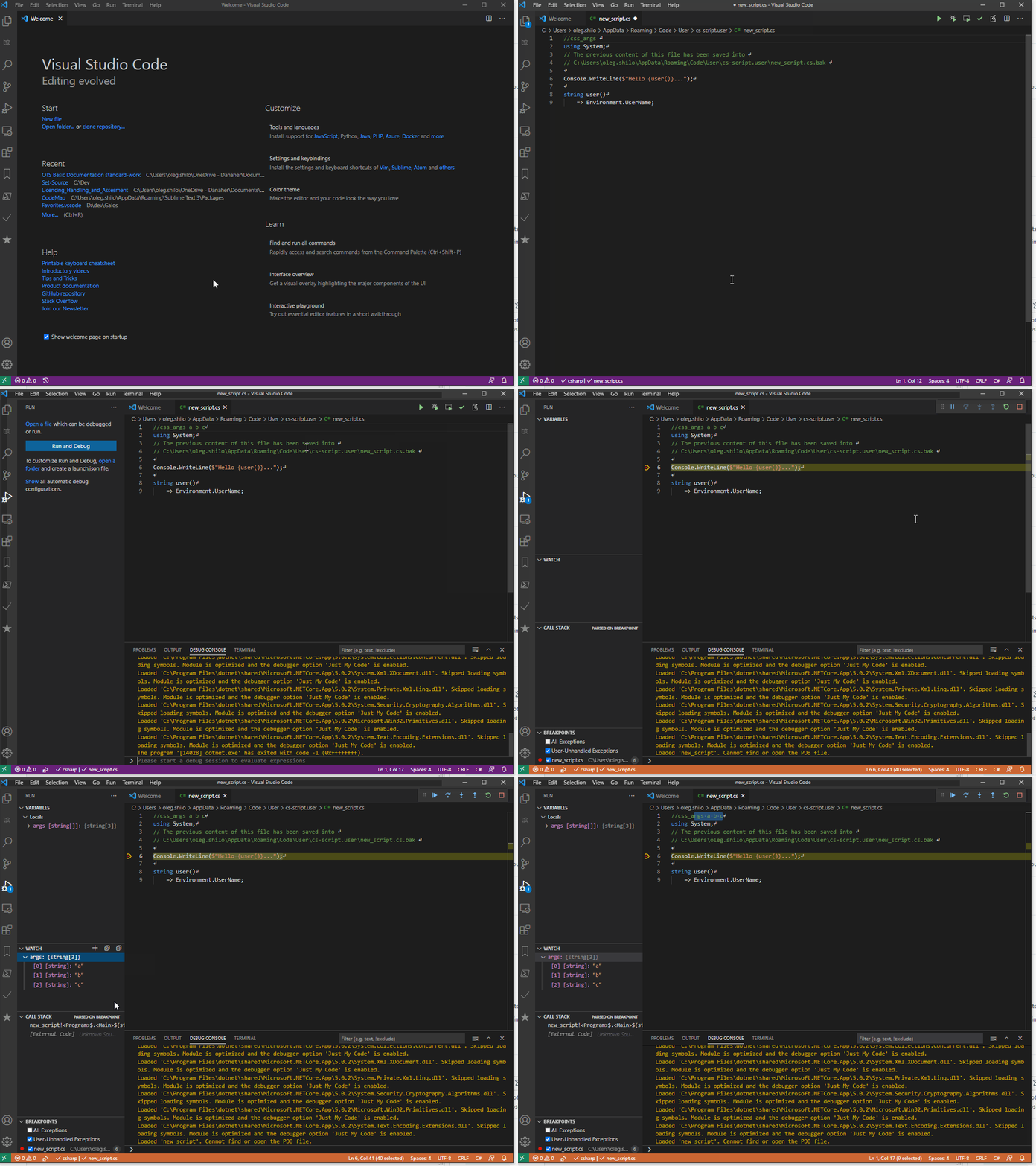
While various IDEs can be used, VSCode is arguably the simplest one.
You can either load the existing script into it with `css -vscode .\script.cs` or create a new script within the IDE if you install the [CS-Script extension](https://marketplace.visualstudio.com/items?itemName=oleg-shilo.cs-script):
_**Hosting script engine**_
You can host the script engine in any .NET application. The class library is distributed as a NuGet package [CS-Script](https://www.nuget.org/packages/CS-Script/).
```ps
Install-Package CS-Script
```
The library is built against _.NET Standard 2.0_ so it can be hosted on any edition of the runtime. However, the script evaluation is done via .NET 5 tool chain, so it needs to be installed on the host PC even if the application is implemented with the older framework (e.g. .NET Framework).
These are just a few samples:
_The complete content of samples can be found [here](https://github.com/oleg-shilo/cs-script.core/blob/master/src/CSScriptLib/src/CSScriptLib/samples.cs)._
```C#
public interface ICalc
{
int Sum(int a, int b);
}
...
// you can, but don't have to inherit your script class from ICalc
ICalc calc = CSScript.Evaluator
.LoadCode(@"using System;
public class Script
{
public int Sum(int a, int b)
{
return a+b;
}
}");
int result = calc.Sum(1, 2);
```
```C#
dynamic script = CSScript.Evaluator
.LoadMethod(@"int Product(int a, int b)
{
return a * b;
}");
int result = script.Product(3, 2);
```
```C#
public interface ICalc
{
int Sum(int a, int b);
int Div(int a, int b);
}
...
ICalc script = CSScript.Evaluator
.LoadMethod(@"public int Sum(int a, int b)
{
return a + b;
}
public int Div(int a, int b)
{
return a/b;
}");
int result = script.Div(15, 3);
```
```C#
var log = CSScript.Evaluator
.CreateDelegate(@"void Log(string message)
{
Console.WriteLine(message);
}");
log("Test message");
```
```C#
int sum = CSScript.Evaluator.Eval("6 + 3");
```