# griffig
**Repository Path**: mirrors_pantor/griffig
## Basic Information
- **Project Name**: griffig
- **Description**: Robotic Manipulation - Learned in the Real World
- **Primary Language**: Unknown
- **License**: MIT
- **Default Branch**: main
- **Homepage**: None
- **GVP Project**: No
## Statistics
- **Stars**: 0
- **Forks**: 0
- **Created**: 2021-07-23
- **Last Updated**: 2026-10-11
## Categories & Tags
**Categories**: Uncategorized
**Tags**: None
## README
Griffig
Robotic Manipulation Learned from Imitation and Self-Supervision.



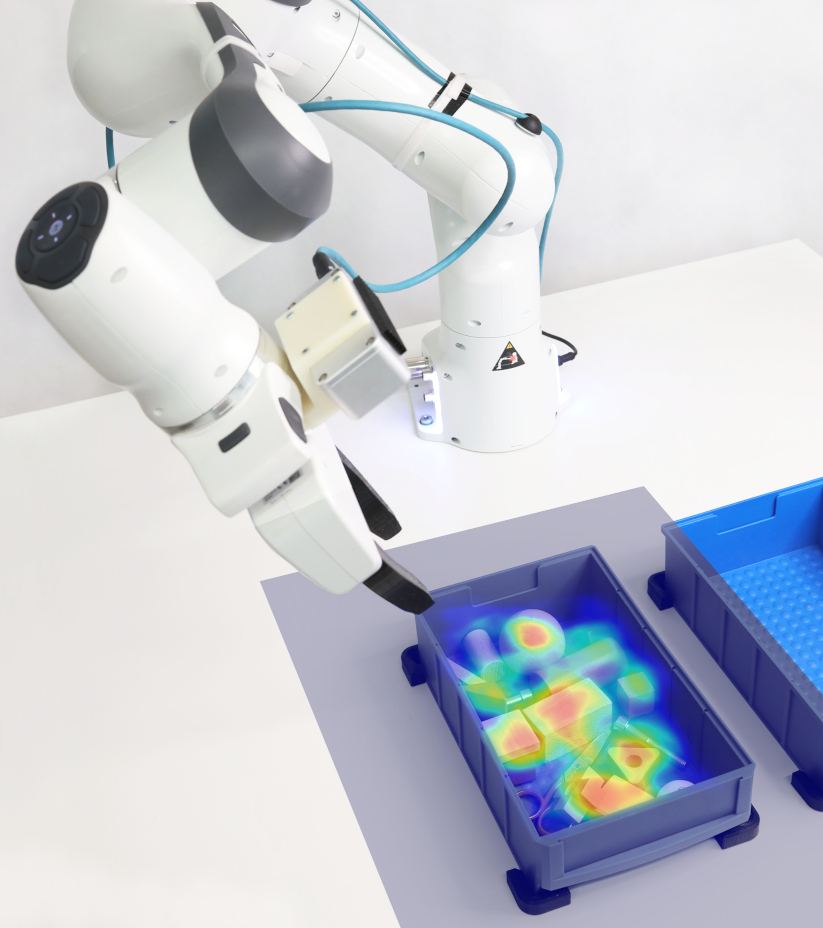
Griffig is a library (in particular) for 6D robotic grasping, learned from large-scale imitation and self-supervised real-world training. Using an action-centric approach, Griffig does not need object models and requires only a simple depth camera as input. In our [model library](https://griffig.xyz), we publish models pre-trained in densly cluttered bin picking scenarios. Griffig is able to calculate grasp points with high performance (< 70ms), and is yet robust achieving grasp rates as high as 95% for typical use-cases. This repository contains the source code and corresponding library of our upcoming paper *Learning 6D Robotic Grasping using a Fully Convolutional Actor-Critic Architecture*.
[](https://griffig.xyz)
You can find many videos on griffig.xyz!
## Installation
Griffig is a library for Python 3.7+. You can install Griffig via [PyPI](https://pypi.org/project/griffig/) by
```bash
# Install Eigen >3.3, OpenCV >3, and OpenGL (e.g. via apt)
(sudo) apt install libeigen3-dev libopencv-dev libgl1-mesa-dev libglu1-mesa-dev libegl1-mesa-dev libglew-dev
pip install griffig
```
Of course, a NVIDIA GPU with corresponding CUDA version is highly recommended. When building from source, you can either call `pip install .` or use CMake directly to build the C++ core of Griffig. We also provide a Docker container to get started more easily.
## Tutorial
We focused on making *Griffig* easy to use! In this tutorial, we use a RGBD pointcloud of the scene to detect a 6D grasp point with an additional pre-shaped gripper stroke. We use a common parallel two-finger gripper and a RealSense D435 camera for recording. Griffig includes a small library of pre-trained models. As with all data-driven methods, make sure to match our robotic system as much as possible. The main output of Griffig is a *grasp point*. Then, the robot should move its gripper to a pre-shaped position and approach the point along a trajectory parallel to its gripper fingers. Be careful of possible collisions that might always happen in bin picking.
[](https://griffig.xyz/dataset/viewer)
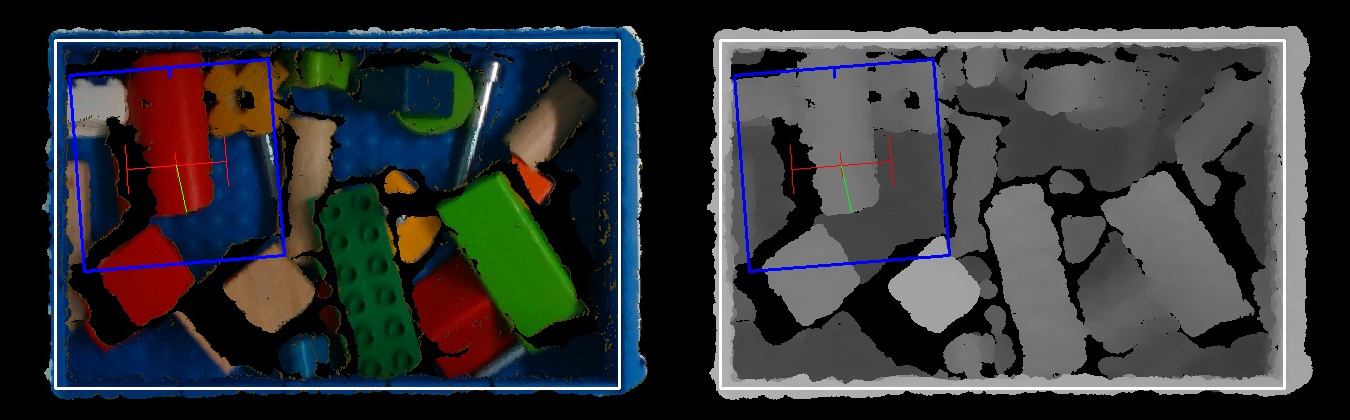
A typical scene looks like the color (left) and depth (right) images above. The (orthographic) images are rendered from pointclouds, and show the bin randomly filled with objects of multiple types. Now, we want to find the *best* grasp within the bin. You can find working examples in the corresponding [directory](). At first, we need to import `griffig`, generate a pointcloud, and create the main `Griffig` instance.
```python
from griffig import Affine, Griffig, Gripper, Pointcloud, BoxData
# Griffig requires a RGB pointcloud of the scene
pointcloud = Pointcloud.fromRealsense(camera.record_pointcloud())
# Specify some options
griffig = Griffig(
model='two-finger', # Use the default model for a two-finger gripper
gripper=Gripper(
min_stroke=0.01, # [m]
max_stroke=0.10, # [m], to limit pre-shaped stroke
),
)
```
Next to the model name (or a path for your own models), we input some details about the robots gripper. In particular, we limit the pre-shaped gripper stroke (or called width). We can now calculate the best possible grasp within the scene. To get the grasp in the global frame in return, we pass Griffig the camera pose of the pointcloud.
```python
grasp = griffig.calculate_grasp(pointcloud, camera_pose=camera_pose)
# Make use of the grasp here!
print(f'Grasp at {grasp.pose} with probability {grasp.estimated_reward})
```
The grasp pose is given as an [Affx](https://github.com/pantor/affx) affine, which is a very light wrapper around [Eigen's](https://eigen.tuxfamily.org) `Affine3d` class. On top, we can easily generate a heatmap of grasp probabilities as a PIL image to visualize our model.
```python
heatmap = griffig.calculate_heatmap()
heatmap.show()
```
Furthermore, we show the usage of the *Griffig* library in a few more details.
### BoxData Class
We can define a box to avoid grasps outside of the bin (and even worse: grasps of the bin itself). A box can be constructed by its contour given as a polygon in the image frame. To construct a cubic box, we've simplify this method by
```python
box_data = BoxData(
size=(0.2, 0.3, 0.1), # (x, y, z) [m]
center=(0.0, 0.0, 0.0), # At the center [m]
)
```
with the size and center position of the box.
### Gripper Class
We use the gripper class for collision checks and to specify the minimum and maximum gripper stroke
```python
gripper = Gripper( # Everything in [m]
# Pre-shaped stroke interval
min_stroke=0.01,
max_stroke=0.10,
# Size of a bounding box for optional collision check
finger_width=0.02, # Finger width
finger_extent=0.008, # Finger extent (in direction of finger opening/closing)
finger_height=0.1, # Finger height from tip to gripper base
# An optional offset for the local grasp pose
offset=Affine(z=0.02),
)
```
### Griffig Class
The `Griffig` class is the main interface for grasp calculations. You can create a griffig instance with following arguments:
```python
griffig = Griffig(
model='two-finger-planar',
gripper=gripper,
box_data=box_data, # Might be None
avoid_collisions=True, # If true, check collisions using the given pointcloud and gripper data
)
```
Griffig includes a [model library](https://griffig.xyz/model-library) for different tasks and downloads them automatically.
### Pointcloud Class
Griffig uses its own pointcloud class as input to its rendering pipeline. Currently, three possible inputs are supported:
```python
# (1) Input from a realsense frame
pointcloud = Pointcloud(realsense_frame=<...>)
# (2) Input from a ROS Pointcloud2 message
pointcloud = Pointcloud(ros_message=<...>)
# (3) The raw pointer variant...
pointcloud = Pointcloud(type=PointType.XYZRGB, data=cloud_data.ptr())
# Then, we can render the pointcloud as a PIL image
image = griffig.render(pointcloud)
image.show()
```
Note that the pointcloud does only store the pointer to the data, but doesn't hold anything.
### Grasp Class
The calculated grasp contains - of course - information about its grasp pose, but also some more details. At first, we calculate the next grasp based on the current pointcloud input.
```python
grasp = griffig.calculate_grasp(pointcloud, camera_pose=camera_pose) # Get grasp in the global frame using the camera pose
print(f'Calculated grasp {grasp} in {grasp.calculation_duration} [ms].') # Calculation duration in [ms]
```
If using a GPU, the grasp calculation should not take longer than a few 100ms, and most probably below 70ms! Then, a typical grasp pipeline would look like this:
```python
# (1) Check if the grasp reward is below a user-defined threshold
if grasp.estimated_reward < 0.2: # Grasp probability in [0, 1]
print('The bin is probably empty!')
approach_start = grasp.pose * Affine(z=-0.12) # Approx. finger length [m]
# (2) Move robot to start of approach trajectory
robot.move_linear(approach_start)
# (3) Move gripper to pre-shaped grasp stroke
robot.move_gripper(grasp.pose.d)
# (4) Move robot to actual grasp pose
robot_move_linear(grasp.pose)
# (5) And finally close the gripper
robot.close_gripper()
```
The robot should have grasped something! If something went wrong, make sure to call `griffig.report_grasp_failure()`, so that griffig will output a different grasp next time.
## Development
Griffig is written in C++17 and Python 3.7 (or higher). It is tested on Ubuntu 20.04 against following dependency versions:
- OpenCV 4.5
- Eigen 3.3.9
- PyBind11 2.6
- TensorFlow 2.4
To build the docker image, call `docker build .`.
## License
Griffig is published under the permissive MIT license. Feel free to contact us in case of commercial interest.