# src-cli-snapshot
**Repository Path**: mirrors_sourcegraph/src-cli-snapshot
## Basic Information
- **Project Name**: src-cli-snapshot
- **Description**: Sourcegraph CLI Fork that uses the Sourcegraph Public Snapshot repository
- **Primary Language**: Unknown
- **License**: Apache-2.0
- **Default Branch**: main
- **Homepage**: None
- **GVP Project**: No
## Statistics
- **Stars**: 0
- **Forks**: 0
- **Created**: 2024-10-05
- **Last Updated**: 2026-05-31
## Categories & Tags
**Categories**: Uncategorized
**Tags**: None
## README
# [Sourcegraph](https://sourcegraph.com) CLI [](https://github.com/sourcegraph/src-cli/actions?query=workflow%3A%22Go+CI%22) [](https://goreportcard.com/report/sourcegraph/src-cli)
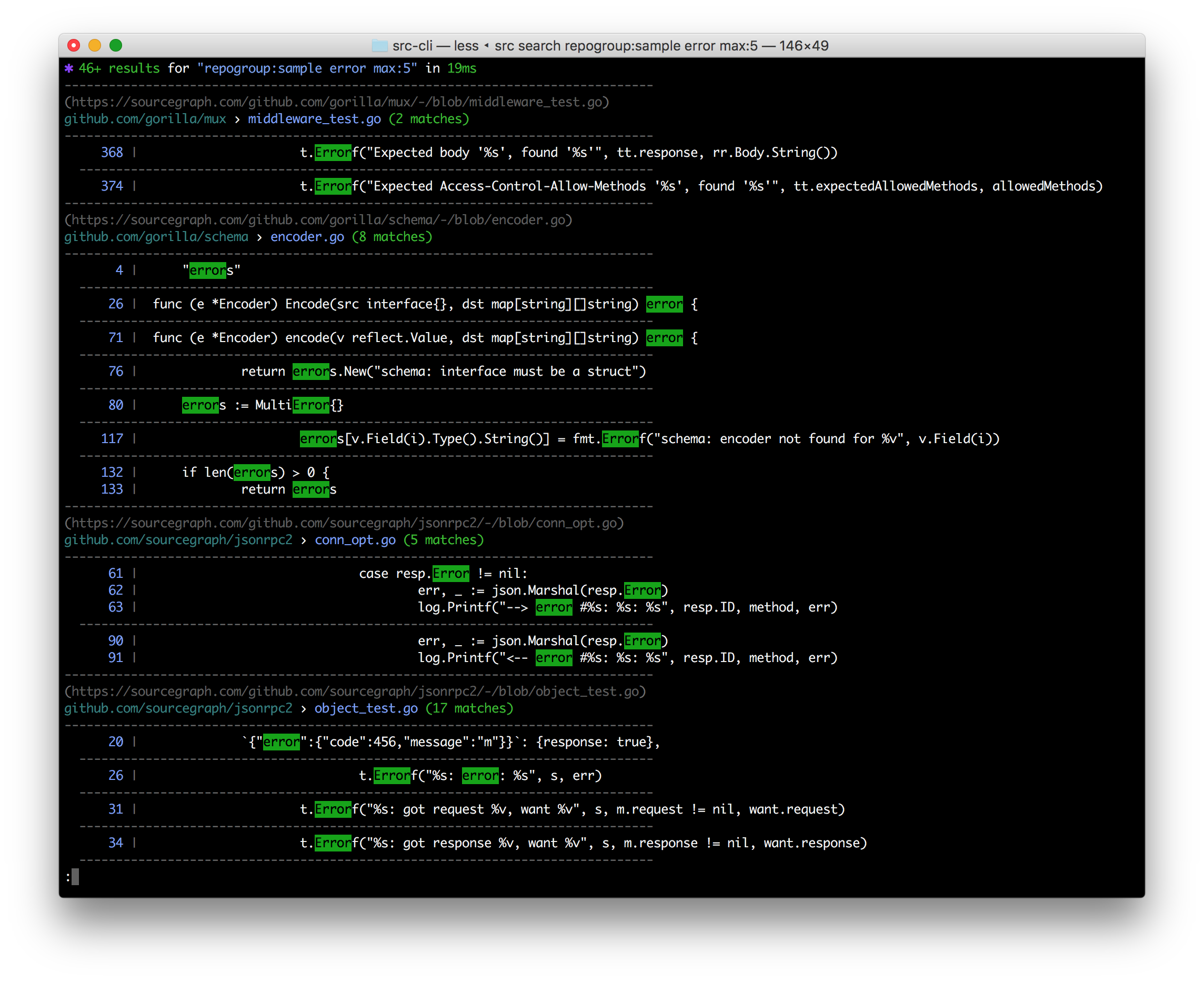 `src` is a command line interface to Sourcegraph:
- **Search & get results in your terminal**
- **Search & get JSON** for programmatic consumption
- Make **GraphQL API requests** with auth easily & get JSON back fast
- Execute **[batch changes](https://docs.sourcegraph.com/batch_changes)**
- **Manage & administrate** repositories, users, and more
- **Easily convert src-CLI commands to equivalent curl commands**, just add --get-curl!
**Note:** Using Sourcegraph 3.12 or earlier? [See the older README](https://github.com/sourcegraph/src-cli/tree/3.11.2).
## Installation
Binary downloads are available on the [releases tab](https://github.com/sourcegraph/src-cli/releases), and through Sourcegraph.com. _If the latest version does not work for you,_ consider using the version compatible with your Sourcegraph instance instead.
### Installation: Mac OS
#### Latest version
```bash
curl -L https://sourcegraph.com/.api/src-cli/src_darwin_amd64 -o /usr/local/bin/src
chmod +x /usr/local/bin/src
```
or with Homebrew:
```bash
brew install sourcegraph/src-cli/src-cli
```
or with npm:
```bash
npm install -g @sourcegraph/src
```
#### Version compatible with your Sourcegraph instance
Replace `sourcegraph.example.com` with your Sourcegraph instance URL:
```bash
curl -L https://sourcegraph.example.com/.api/src-cli/src_darwin_amd64 -o /usr/local/bin/src
chmod +x /usr/local/bin/src
```
or, if you know the specific version to target, for example 3.43.2:
```bash
brew install sourcegraph/src-cli/src-cli@3.43.2
```
or with npm/npx:
```bash
npx @sourcegraph/src@3.43.2 version
```
> Note: Versioned formulas are available on Homebrew for Sourcegraph versions 3.43.2 and later.
### Installation: Linux
#### Latest version
```bash
curl -L https://sourcegraph.com/.api/src-cli/src_linux_amd64 -o /usr/local/bin/src
chmod +x /usr/local/bin/src
```
or with npm:
```bash
npm install -g @sourcegraph/src
```
#### Version compatible with your Sourcegraph instance
Replace `sourcegraph.example.com` with your Sourcegraph instance URL:
```bash
curl -L https://sourcegraph.example.com/.api/src-cli/src_linux_amd64 -o /usr/local/bin/src
chmod +x /usr/local/bin/src
```
or, with npm/npx, if you know the specific version to target, for example 3.43.2:
```bash
npx @sourcegraph/src@3.43.2 version
```
### Installation: Windows
See [Sourcegraph CLI for Windows](WINDOWS.md).
### Installation: Docker
`sourcegraph/src-cli` is published to Docker Hub. You can use the `latest` tag or a specific version such as `3.43`. To see all versions view [sourcegraph/src-cli tags](https://hub.docker.com/r/sourcegraph/src-cli/tags).
```bash
docker run --rm=true sourcegraph/src-cli:latest search 'hello world'
```
## Log into your Sourcegraph instance
Run
`src` is a command line interface to Sourcegraph:
- **Search & get results in your terminal**
- **Search & get JSON** for programmatic consumption
- Make **GraphQL API requests** with auth easily & get JSON back fast
- Execute **[batch changes](https://docs.sourcegraph.com/batch_changes)**
- **Manage & administrate** repositories, users, and more
- **Easily convert src-CLI commands to equivalent curl commands**, just add --get-curl!
**Note:** Using Sourcegraph 3.12 or earlier? [See the older README](https://github.com/sourcegraph/src-cli/tree/3.11.2).
## Installation
Binary downloads are available on the [releases tab](https://github.com/sourcegraph/src-cli/releases), and through Sourcegraph.com. _If the latest version does not work for you,_ consider using the version compatible with your Sourcegraph instance instead.
### Installation: Mac OS
#### Latest version
```bash
curl -L https://sourcegraph.com/.api/src-cli/src_darwin_amd64 -o /usr/local/bin/src
chmod +x /usr/local/bin/src
```
or with Homebrew:
```bash
brew install sourcegraph/src-cli/src-cli
```
or with npm:
```bash
npm install -g @sourcegraph/src
```
#### Version compatible with your Sourcegraph instance
Replace `sourcegraph.example.com` with your Sourcegraph instance URL:
```bash
curl -L https://sourcegraph.example.com/.api/src-cli/src_darwin_amd64 -o /usr/local/bin/src
chmod +x /usr/local/bin/src
```
or, if you know the specific version to target, for example 3.43.2:
```bash
brew install sourcegraph/src-cli/src-cli@3.43.2
```
or with npm/npx:
```bash
npx @sourcegraph/src@3.43.2 version
```
> Note: Versioned formulas are available on Homebrew for Sourcegraph versions 3.43.2 and later.
### Installation: Linux
#### Latest version
```bash
curl -L https://sourcegraph.com/.api/src-cli/src_linux_amd64 -o /usr/local/bin/src
chmod +x /usr/local/bin/src
```
or with npm:
```bash
npm install -g @sourcegraph/src
```
#### Version compatible with your Sourcegraph instance
Replace `sourcegraph.example.com` with your Sourcegraph instance URL:
```bash
curl -L https://sourcegraph.example.com/.api/src-cli/src_linux_amd64 -o /usr/local/bin/src
chmod +x /usr/local/bin/src
```
or, with npm/npx, if you know the specific version to target, for example 3.43.2:
```bash
npx @sourcegraph/src@3.43.2 version
```
### Installation: Windows
See [Sourcegraph CLI for Windows](WINDOWS.md).
### Installation: Docker
`sourcegraph/src-cli` is published to Docker Hub. You can use the `latest` tag or a specific version such as `3.43`. To see all versions view [sourcegraph/src-cli tags](https://hub.docker.com/r/sourcegraph/src-cli/tags).
```bash
docker run --rm=true sourcegraph/src-cli:latest search 'hello world'
```
## Log into your Sourcegraph instance
Run src login SOURCEGRAPH-URL to authenticate `src` to access your Sourcegraph instance with your user credentials.
**Examples**
`src login https://sourcegraph.example.com`
`src login https://sourcegraph.com`
`src` consults the following environment variables:
- `SRC_ENDPOINT`: the URL to your Sourcegraph instance (such as `https://sourcegraph.example.com`)
- `SRC_ACCESS_TOKEN`: your Sourcegraph access token (on your Sourcegraph instance, click your user menu in the top right, then select **Settings > Access tokens** to create one)
For convenience, you can add these environment variables persistently.
### Configuration: Mac OS / Linux
Add the following to your terminal profile file, typically accessible at `~/.bash_profile` (if using Bash) or `~/.zprofile` (if using Zsh):
```
export SRC_ACCESS_TOKEN=my-token
export SRC_ENDPOINT=https://sourcegraph.example.com
```
Replace `my-token` and `https://sourcegraph.example.com` with the appropriate values for your account and instance.
You can also inline them in a single command with:
```sh
SRC_ENDPOINT=https://sourcegraph.example.com SRC_ACCESS_TOKEN=my-token src search 'foo'
```
### Configuration: Windows
Type the following on your PowerShell terminal:
```
$env:SRC_ENDPOINT = 'https://sourcegraph.example.com'
$env:SRC_ACCESS_TOKEN = 'my-token'
```
Replace `my-token` and `https://sourcegraph.example.com` with the appropriate values for your account and instance.
You can also manually add them via the *System Properties* windows. Check [this post](https://www.computerhope.com/issues/ch000549.htm) for details.
Is your Sourcegraph instance behind a custom auth proxy? See [auth proxy configuration](./AUTH_PROXY.md) docs.
## Usage
`src` provides different subcommands to interact with different parts of Sourcegraph:
- `src login` - authenticate to a Sourcegraph instance with your user credentials
- `src search` - perform searches and get results in your terminal or as JSON
- `src api` - run Sourcegraph GraphQL API requests
- `src batch` - execute and manage [batch changes](https://docs.sourcegraph.com/batch_changes)
- `src repos` - manage repositories
- `src users` - manage users
- `src orgs` - manages organization
- `src config` - manage global, org, and user settings
- `src extsvc` - manage external services (repository configuration)
- `src extensions` - manage extensions
- `src code-intel` - manages Code Intelligence data (deprecated alias: `src lsif`)
- `src serve-git` - serves your local git repositories over HTTP for Sourcegraph to pull
- `src version` - check version and guaranteed-compatible version for your Sourcegraph instance
Run `src -h` and `src -h` for more detailed usage information.
You can also read the [usage docs for the latest version of `src-cli`](https://docs.sourcegraph.com/cli/references) online.
#### Optional: Renaming `src`
If you have a naming conflict with the `src` command, such as a Bash alias, you can rename the static binary. For example, on Linux / Mac OS:
```sh
mv /usr/local/bin/src /usr/local/bin/src-cli
```
You can then invoke it via `src-cli`.
## Telemetry
`src` includes the operating system and architecture in the `User-Agent` header sent to Sourcegraph. For example, running `src` version 3.21.10 on an x86-64 Linux host will result in this header:
```
src-cli/3.21.10 linux amd64
```
To disable this and _only_ send the version, you can set `-user-agent-telemetry=false` for a single command, or set the `SRC_DISABLE_USER_AGENT_TELEMETRY` environment variable to any non-blank string.
As with [other Sourcegraph telemetry](https://docs.sourcegraph.com/dev/background-information/telemetry), any collected data is only sent to Sourcegraph.com in aggregate form.
## Development
Some useful notes on developing `src` can be found in [DEVELOPMENT.md](DEVELOPMENT.md).