# bentopdf
**Repository Path**: mirrors_trending/bentopdf
## Basic Information
- **Project Name**: bentopdf
- **Description**: A Privacy First PDF Toolkit
- **Primary Language**: Unknown
- **License**: AGPL-3.0
- **Default Branch**: main
- **Homepage**: None
- **GVP Project**: No
## Statistics
- **Stars**: 1
- **Forks**: 3
- **Created**: 2025-10-22
- **Last Updated**: 2026-10-03
## Categories & Tags
**Categories**: Uncategorized
**Tags**: None
## README

BentoPDF
Supported by


**BentoPDF** is a powerful, privacy-first, client-side PDF toolkit that is self-hostable and allows you to manipulate, edit, merge, and process PDF files directly in your browser. No server-side processing is required, ensuring your files remain secure and private.
[](https://github.com/alam00000/bentopdf/pkgs/container/bentopdf-simple) [](https://ko-fi.com/alio01) 
[](https://github.com/sponsors/alam00000)

---
## Table of Contents
- [Join Us on Discord](#-join-us-on-discord)
- [Documentation](#-documentation)
- [Licensing](#-licensing)
- [Stargazers over time](#-stargazers-over-time)
- [Thank You to Our Sponsors](#-thank-you-to-our-sponsors)
- [Why BentoPDF?](#-why-bentopdf)
- [Features / Tools Supported](#️-features--tools-supported)
- [Organize & Manage PDFs](#organize--manage-pdfs)
- [Edit & Modify PDFs](#edit--modify-pdfs)
- [Convert to PDF](#convert-to-pdf)
- [Convert from PDF](#convert-from-pdf)
- [Secure & Optimize PDFs](#secure--optimize-pdfs)
- [Other Products](#-other-products)
- [Translations](#-translations)
- [Getting Started](#-getting-started)
- [Prerequisites](#prerequisites)
- [Quick Start](#-quick-start)
- [Static Hosting](#static-hosting-using-netlify-vercel-and-github-pages)
- [Self-Hosting Locally](#-self-hosting-locally)
- [Docker Compose / Podman Compose](#-run-with-docker-compose--podman-compose-recommended)
- [Podman Quadlet](#-podman-quadlet-systemd-integration)
- [Self-Hosted Build (Simple Mode)](#-self-hosted-build-simple-mode)
- [Commercial Build](#-commercial-build)
- [Custom Branding](#-custom-branding)
- [Disabling Specific Tools](#-disabling-specific-tools)
- [Disabling the GitHub Star Counter](#-disabling-the-github-star-counter)
- [WASM Configuration](#wasm-configuration)
- [Air-Gapped / Offline Deployment](#air-gapped--offline-deployment)
- [Security Features](#-security-features)
- [Digital Signature CORS Proxy](#digital-signature-cors-proxy-required)
- [Version Management](#-version-management)
- [Development Setup](#-development-setup)
- [Tech Stack & Background](#️-tech-stack--background)
- [Roadmap](#️-roadmap)
- [Contributing](#-contributing)
- [Special Thanks](#special-thanks)
---
## 📢 Join Us on Discord
[](https://discord.gg/Bgq3Ay3f2w)
Have questions, feature requests, or want to chat with the community? Join our Discord server!
---
## 📚 Documentation
[](https://bentopdf.com/docs/)
Visit our [Documentation](https://bentopdf.com/docs/) for:
- **Getting Started** guide
- **Tools Reference** (50+ tools)
- **Self-Hosting** guides (Docker, Vercel, Netlify, Cloudflare, AWS, Hostinger, Nginx, Apache)
- **Contributing** guide
- **Commercial License** details
---
## 📜 Licensing
BentoPDF is **dual-licensed** to fit your needs:
| License | Best For | Price |
| -------------- | -------------------------------------------- | ------------------ |
| **AGPL-3.0** | Open-source projects with public source code | **Free** |
| **Commercial** | Proprietary / closed-source applications | **$79** (lifetime) |

> **One-time purchase** · **Unlimited devices & users** · **Lifetime updates** · **No AGPL obligations**
📖 For more details, see our [Licensing Page](https://bentopdf.com/licensing.html)
### AGPL Components (Pre-configured via CDN)
BentoPDF does **not** bundle AGPL-licensed processing libraries in its source code, but **pre-configures CDN URLs** so all features work out of the box with zero setup:
| Component | License | Features Enabled |
| ---------------------- | -------- | --------------------------------------------------------------------------------------------------- |
| **PyMuPDF** | AGPL-3.0 | PDF to Text/Markdown/SVG/DOCX, Extract Images/Tables, EPUB/MOBI/XPS conversion, Compression, Deskew |
| **Ghostscript** | AGPL-3.0 | PDF/A Conversion, Font to Outline |
| **CoherentPDF (CPDF)** | AGPL-3.0 | Merge, Split by Bookmarks, Table of Contents, PDF to/from JSON, Attachments |
> [!TIP]
> **Zero-config by default.** WASM modules are loaded at runtime from jsDelivr CDN. No manual configuration is needed. For custom deployments (air-gapped, self-hosted), see [WASM Configuration](#wasm-configuration) below.
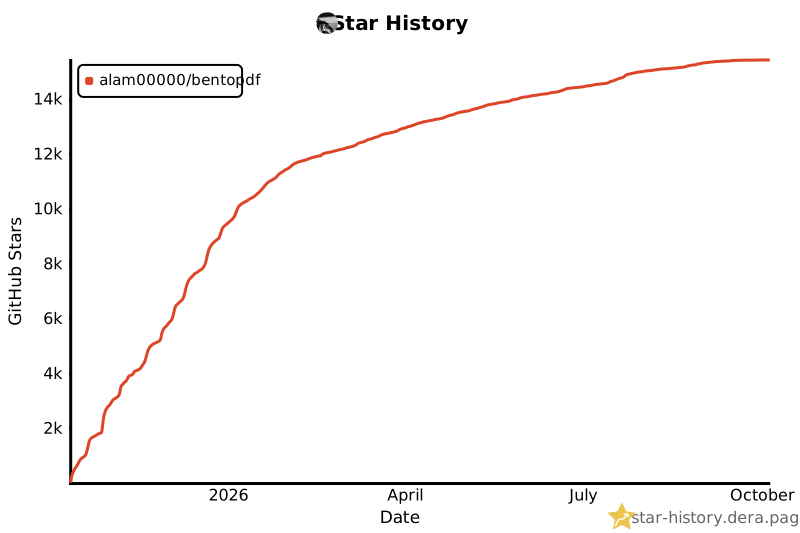
## ⭐ Stargazers over time
[](https://github.com/alam00000/bentopdf/stargazers)
---
## 💖 Thank You to Our Sponsors
We're incredibly grateful to all our sponsors and supporters who help keep BentoPDF free and open source!
[](https://github.com/sponsors/alam00000)
[](https://ko-fi.com/alio01)
---
## ✨ Why BentoPDF?
- **Privacy First**: All processing happens in your browser. Your files are never uploaded to a server, guaranteeing 100% privacy.
- **No Limits**: Manipulate as many files as you want, as often as you want. There are no restrictions or upload limits.
- **High Performance**: Built with modern web technologies, BentoPDF is fast and efficient, handling even large PDF files with ease.
- **Completely Free**: BentoPDF is a free and open-source tool for everyone.
---
## 🛠️ Features / Tools Supported
BentoPDF offers a comprehensive suite of tools to handle all your PDF needs.
### Organize & Manage PDFs
| Tool Name | Description |
| :--------------------------- | :----------------------------------------------------------------------------------------------------- |
| **Merge PDFs** | Combine multiple PDF files into one. Preserves Bookmarks. |
| **Split PDFs** | Extract specific pages or divide a document into smaller files. |
| **Organize Pages** | Reorder, duplicate, or delete pages with a simple drag-and-drop interface. |
| **Extract Pages** | Save a specific range of pages as a new PDF. |
| **Delete Pages** | Remove unwanted pages from your document. |
| **Rotate PDF** | Rotate individual or all pages in a document. |
| **Rotate by Custom Degrees** | Rotate pages by any custom angle. |
| **N-Up PDF** | Combine multiple pages onto a single page. |
| **View PDF** | A powerful, integrated PDF viewer. |
| **Alternate & Mix Pages** | Merge pages by alternating pages from each PDF. Preserves Bookmarks. |
| **Posterize PDF** | Split a PDF into multiple smaller pages for print. |
| **PDF Multi Tool** | Merge, Split, Organize, Delete, Rotate, Add Blank Pages, Extract and Duplicate in a unified interface. |
| **PDF Booklet** | Rearrange pages for double-sided booklet printing. Fold and staple to create a booklet. |
| **Add Attachments** | Embed one or more files into your PDF. |
| **Extract Attachments** | Extract all embedded files from PDF(s) as a ZIP. |
| **Edit Attachments** | View or remove attachments in your PDF. |
| **Divide Pages** | Divide pages horizontally or vertically. |
| **Combine to Single Page** | Stitch all pages into one continuous scroll. |
| **Add Blank Page** | Insert an empty page anywhere in your PDF. |
| **Reverse Pages** | Flip the order of all pages in your document. |
| **View Metadata** | Inspect the hidden properties of your PDF. |
| **PDFs to ZIP** | Package multiple PDF files into a ZIP archive. |
| **Compare PDFs** | Compare two PDFs side by side. |
### Edit & Modify PDFs
| Tool Name | Description |
| :------------------------ | :---------------------------------------------------------------------------------------------------------------------------------------------------------------------------------------------- |
| **PDF Editor** | Annotate, highlight, redact, comment, add shapes/images, search, and view PDFs. |
| **Edit PDF Text** | Edit existing text directly in your PDF. Reuses the document's embedded fonts and keeps the rest of the page untouched. |
| **Create Fillable Forms** | Create professional fillable PDF forms with text fields, checkboxes, dropdowns, radio buttons, signatures, and more. Fully compliant with PDF standards for compatibility with all PDF viewers. |
| **PDF Form Filler** | Fill in forms directly in the browser. Also supports XFA forms. |
| **Add Page Numbers** | Easily add page numbers with customizable formatting. |
| **Bates Numbering** | Add sequential Bates numbers across one or more PDF files. |
| **Add Watermark** | Add text or image watermarks to protect your documents. |
| **Header & Footer** | Add customizable headers and footers. |
| **Crop PDF** | Crop specific pages or the entire document. |
| **Deskew PDF** | Automatically straighten tilted scanned pages using OpenCV. |
| **Font to Outline** | Convert all fonts to vector outlines for consistent rendering across all devices. |
| **Invert Colors** | Invert the colors of your PDF pages for better readability. |
| **Change Background** | Modify the background color of your PDF. |
| **Change Text Color** | Change the color of text content within the PDF. |
| **Flatten PDF** | Flatten form fields and annotations into static content. |
| **Remove Annotations** | Remove comments, highlights, and other annotations. |
| **Remove Blank Pages** | Auto detect and remove blank pages in a PDF. |
| **Edit Bookmarks** | Add, Edit, Create, Import and Export PDF Bookmarks. |
| **Add Stamps** | Add image stamps to your PDF using the annotation toolbar. |
| **Table of Contents** | Generate a table of contents page from PDF bookmarks. |
| **Redact Content** | Permanently remove sensitive content from your PDFs. |
| **Scanner Effect** | Make your PDF look like a scanned document. |
| **Adjust Colors** | Fine-tune brightness, contrast, saturation and more. |
### Automate
| Tool Name | Description |
| :----------------------- | :--------------------------------------------------------------- |
| **PDF Workflow Builder** | Build custom PDF processing pipelines with a visual node editor. |
### Convert to PDF
| Tool Name | Description |
| :-------------------- | :----------------------------------------------------------------------------------------------------- |
| **Image to PDF** | Convert JPG, PNG, BMP, GIF, TIFF, PNM, PGM, PBM, PPM, PAM, JXR, JPX, JP2, PSD, SVG, HEIC, WebP to PDF. |
| **JPG to PDF** | Convert JPG, JPEG, and JPEG2000 (JP2/JPX) images to PDF. |
| **PNG to PDF** | Convert PNG images to PDF. |
| **WebP to PDF** | Convert WebP images to PDF. |
| **SVG to PDF** | Convert SVG images to PDF. |
| **BMP to PDF** | Convert BMP images to PDF. |
| **HEIC to PDF** | Convert HEIC images to PDF. |
| **TIFF to PDF** | Convert TIFF images to PDF. |
| **PSD to PDF** | Convert Adobe Photoshop (PSD) files to PDF. |
| **Word to PDF** | Convert Word documents (DOCX, DOC, ODT, RTF) to PDF. |
| **Excel to PDF** | Convert Excel spreadsheets (XLSX, XLS, ODS, CSV) to PDF. |
| **PowerPoint to PDF** | Convert PowerPoint presentations (PPTX, PPT, ODP) to PDF. |
| **ODT to PDF** | Convert OpenDocument Text files to PDF. |
| **ODS to PDF** | Convert OpenDocument Spreadsheet (ODS) files to PDF. |
| **ODP to PDF** | Convert OpenDocument Presentation (ODP) files to PDF. |
| **ODG to PDF** | Convert OpenDocument Graphics (ODG) files to PDF. |
| **RTF to PDF** | Convert Rich Text Format documents to PDF. |
| **CSV to PDF** | Convert CSV spreadsheet files to PDF. |
| **Markdown to PDF** | Write or paste Markdown and export it as a beautifully formatted PDF. |
| **Text to PDF** | Convert plain text files into a PDF. |
| **JSON to PDF** | Convert JSON files to PDF. |
| **XML to PDF** | Convert XML documents to PDF. |
| **EPUB to PDF** | Convert EPUB e-books to PDF. |
| **MOBI to PDF** | Convert MOBI e-books to PDF. |
| **FB2 to PDF** | Convert FictionBook (FB2) e-books to PDF. |
| **CBZ to PDF** | Convert comic book archives (CBZ/CBR) to PDF. |
| **XPS to PDF** | Convert XPS/OXPS documents to PDF. |
| **Email to PDF** | Convert email files (EML, MSG) to PDF. Supports Outlook exports. |
| **Pages to PDF** | Convert Apple Pages documents to PDF. |
| **WPD to PDF** | Convert WordPerfect documents (WPD) to PDF. |
| **WPS to PDF** | Convert WPS Office documents to PDF. |
| **PUB to PDF** | Convert Microsoft Publisher (PUB) files to PDF. |
| **VSD to PDF** | Convert Microsoft Visio (VSD, VSDX) files to PDF. |
### Convert from PDF
| Tool Name | Description |
| :------------------- | :----------------------------------------------------------------------------- |
| **PDF to Image** | Convert PDF pages to JPG, PNG, WebP, BMP, or TIFF formats. |
| **PDF to JPG** | Convert each PDF page into a JPG image. |
| **PDF to PNG** | Convert each PDF page into a PNG image. |
| **PDF to WebP** | Convert each PDF page into a WebP image. |
| **PDF to BMP** | Convert each PDF page into a BMP image. |
| **PDF to TIFF** | Convert each PDF page into a TIFF image. |
| **PDF to CBZ** | Convert a PDF into a CBZ (Comic Book Archive) for comic readers and Calibre. |
| **PDF to SVG** | Convert each page into a scalable vector graphic (SVG) for perfect quality. |
| **PDF to Greyscale** | Convert a color PDF into a black-and-white version. |
| **PDF to Text** | Extract text from PDF files and save as plain text (.txt). |
| **PDF to JSON** | Convert PDF files to JSON format. |
| **PDF to CSV** | Extract tables from PDF and convert to CSV format. |
| **PDF to Excel** | Extract tables from PDF and convert to Excel (XLSX) format. |
| **Extract Tables** | Extract tables from PDF files and export as CSV, JSON, or Markdown. |
| **OCR PDF** | Make scanned PDFs searchable and copyable using Optical Character Recognition. |
### Secure & Optimize PDFs
| Tool Name | Description |
| :---------------------- | :--------------------------------------------------------------------------------------------------------- |
| **Compress PDF** | Reduce file size while maintaining quality. |
| **Repair PDF** | Attempt to repair and recover data from a corrupted PDF. |
| **Encrypt PDF** | Add a password to protect your PDF from unauthorized access. |
| **Decrypt PDF** | Remove password protection from a PDF (password required). |
| **Change Permissions** | Set or modify user permissions for printing, copying, and editing. |
| **Sign PDF** | Draw, type, or upload your signature. |
| **Digital Signature** | Add cryptographic digital signatures using X.509 certificates (PFX/PEM). Private key never leaves browser. |
| **Validate Signature** | Verify digital signatures, check certificate validity, and confirm document integrity. |
| **Redact Content** | Permanently remove sensitive content from your PDFs. |
| **Edit Metadata** | View and modify PDF metadata (author, title, keywords, etc.). |
| **Remove Metadata** | Strip all metadata from your PDF for privacy. |
| **Linearize PDF** | Optimize PDF for fast web viewing. |
| **Sanitize PDF** | Remove metadata, annotations, scripts, and more. |
| **Fix Page Size** | Standardize all pages to a uniform size. |
| **Page Dimensions** | Analyze page size, orientation, and units. |
| **Remove Restrictions** | Remove password protection and security restrictions associated with digitally signed PDF files. |
---
## 🌍 Translations
BentoPDF is available in multiple languages:
| Language | Status |
| ------------------- | ------------------------------------------------------------------------------------------------------------------------- |
| English | [](public/locales/en/common.json) |
| Chinese | [](public/locales/zh/common.json) |
| Traditional Chinese | [](public/locales/zh-TW/common.json) |
| French | [](public/locales/fr/common.json) |
| German | [](public/locales/de/common.json) |
| Indonesian | [](public/locales/id/common.json) |
| Italian | [](public/locales/it/common.json) |
| Portuguese | [](public/locales/pt/common.json) |
| Turkish | [](public/locales/tr/common.json) |
| Vietnamese | [](public/locales/vi/common.json) |
| Korean | [](public/locales/ko/common.json) |
| Russian | [](public/locales/ru/common.json) |
Want to help translate BentoPDF into your language? Check out our [Translation Guide](TRANSLATION.md)!
---
## 🚀 Getting Started
You can run BentoPDF locally for development or personal use.
### Prerequisites
- [Node.js](https://nodejs.org/) (v18 or higher recommended)
- [npm](https://www.npmjs.com/) (or yarn/pnpm)
- [Docker](https://www.docker.com/) & [Docker Compose](https://docs.docker.com/compose/install/) (for containerized setup)
### 🚀 Quick Start
Run BentoPDF instantly from GitHub Container Registry (Recommended):
```bash
docker run -p 3000:8080 ghcr.io/alam00000/bentopdf-simple:latest
```
Open your browser at: http://localhost:3000
> [!TIP]
> BentoPDF ships in two builds:
>
> - **Self-Hosted build** — `ghcr.io/alam00000/bentopdf-simple:latest`. Every PDF tool the public site has, **without** the BentoPDF marketing (no hero, FAQ, testimonials, footer). Use this for internal/team/organization deployments. It is **not** a feature-reduced lite version.
> - **Commercial build** — `ghcr.io/alam00000/bentopdf:latest`. The full marketing site, used by bentopdf.com itself and by commercial license holders running public-facing deployments. Includes hero, FAQ, testimonials, and footer.
>
> If in doubt: pull the Self-Hosted build.
Alternative: Using Docker Hub or Podman
**Docker Hub:**
```bash
docker run -p 3000:8080 bentopdfteam/bentopdf-simple:latest
```
**Podman (GHCR):**
```bash
podman run -p 3000:8080 ghcr.io/alam00000/bentopdf-simple:latest
```
**Podman (Docker Hub):**
```bash
podman run -p 3000:8080 docker.io/bentopdfteam/bentopdf-simple:latest
```
> [!NOTE]
> All `docker` commands in this documentation work with Podman by replacing `docker` with `podman`.
### Static Hosting using Netlify, Vercel, and GitHub Pages
It is very straightforward to host your own instance of BentoPDF using a static web page hosting service. Plus, services such as Netlify, Vercel, and GitHub Pages all offer a free tier for getting started. See [Static Hosting](https://github.com/alam00000/bentopdf/blob/main/STATIC-HOSTING.md) for details.
### 🏠 Self-Hosting Locally
Since BentoPDF is fully client-side, all processing happens in the user's browser and no server-side processing is required. This means you can host BentoPDF as simple static files on any web server or hosting platform.
> [!IMPORTANT]
> Office file conversion uses LibreOffice WASM, which requires `SharedArrayBuffer`. That means the app must be both cross-origin isolated and served from a secure context. `http://localhost` works for local testing, but `http://192.168.x.x` or other LAN IPs usually require HTTPS even if the server already sends the correct COOP/COEP headers.
**Download from Releases (Recommended):**
The easiest way to self-host is to download the pre-built distribution file from our [GitHub releases](https://github.com/alam00000/bentopdf/releases). Each release includes a `dist-{version}.zip` file that contains all necessary files for self-hosting.
1. Go to [BentoPDF Releases](https://github.com/alam00000/bentopdf/releases)
2. Download the latest `dist-{version}.zip` file
3. Extract the zip file
4. Serve the extracted folder with your preferred web server
**Serve the extracted folder (requires Node.js):**
```bash
# Navigate to the extracted folder
cd dist-1.7.3 # Replace with your version
# Start a local server
npx http-server -c-1
```
The website will be accessible at: `http://localhost:8080/`
> [!NOTE]
> The `-c-1` flag disables caching for development.
**Build from Source (Advanced):**
If you prefer to build from source:
```bash
# Clone the repository
git clone https://github.com/alam00000/bentopdf.git
cd bentopdf
# Install dependencies
npm install
# Build the project
npm run build
# Package the distribution for hosting (optional)
npm run package
# Preview the build locally
npm run preview
# The website will be accessible at: http://localhost:4173/
```
**Compression Modes:**
BentoPDF supports different compression modes for optimized builds:
```bash
# Gzip only (smallest Docker image size)
npm run build:gzip
docker build --build-arg COMPRESSION_MODE=g -t bentopdf:gzip .
# Brotli only (best compression ratio)
npm run build:brotli
docker build --build-arg COMPRESSION_MODE=b -t bentopdf:brotli .
# No compression (fastest build time)
npm run build:original
docker build --build-arg COMPRESSION_MODE=o -t bentopdf:original .
# All formats (default, maximum browser compatibility)
npm run build:all
docker build --build-arg COMPRESSION_MODE=all -t bentopdf:all .
```
| Mode | Files Kept | Use Case |
| ----- | ----------- | --------------------------------- |
| `g` | `.gz` only | Standard nginx or minimal size |
| `b` | `.br` only | Modern CDN with Brotli support |
| `o` | originals | Development or custom compression |
| `all` | all formats | Maximum compatibility (default) |
**CDN Optimization:**
BentoPDF can use jsDelivr CDN to serve large WASM files (LibreOffice, Ghostscript, PyMuPDF) for improved performance and reduced bandwidth costs:
```bash
# Production build with CDN (Recommended)
VITE_USE_CDN=true npm run build
# Standard build with local files only
npm run build
```
**How it works:**
- When `VITE_USE_CDN=true`: Browser loads WASM files from jsDelivr CDN (fast, global delivery)
- Local files are **always included** as automatic fallback
- If CDN fails then it falls back to local files
⚙️ WASM Configuration
Advanced PDF features (PyMuPDF, Ghostscript, CoherentPDF) are pre-configured to load from jsDelivr CDN via environment variables. This means **all features work out of the box** — no manual setup needed.
The default URLs are set in `.env.production`:
```bash
VITE_WASM_PYMUPDF_URL=https://cdn.jsdelivr.net/npm/@bentopdf/pymupdf-wasm@0.11.16/
VITE_WASM_GS_URL=https://cdn.jsdelivr.net/npm/@bentopdf/gs-wasm@0.1.1/assets/
VITE_WASM_CPDF_URL=https://cdn.jsdelivr.net/npm/coherentpdf@2.5.5/dist/
VITE_TESSERACT_WORKER_URL=
VITE_TESSERACT_CORE_URL=
VITE_TESSERACT_LANG_URL=
VITE_TESSERACT_AVAILABLE_LANGUAGES=
VITE_OCR_FONT_BASE_URL=
```
To override via Docker build args:
```bash
docker build \
--build-arg VITE_WASM_PYMUPDF_URL=https://your-server.com/pymupdf/ \
--build-arg VITE_WASM_GS_URL=https://your-server.com/gs/ \
--build-arg VITE_WASM_CPDF_URL=https://your-server.com/cpdf/ \
--build-arg VITE_TESSERACT_WORKER_URL=https://your-server.com/ocr/worker.min.js \
--build-arg VITE_TESSERACT_CORE_URL=https://your-server.com/ocr/core \
--build-arg VITE_TESSERACT_LANG_URL=https://your-server.com/ocr/lang-data \
--build-arg VITE_TESSERACT_AVAILABLE_LANGUAGES=eng,deu \
--build-arg VITE_OCR_FONT_BASE_URL=https://your-server.com/ocr/fonts \
-t bentopdf .
```
To disable a module (require manual user config via Advanced Settings), set its variable to an empty string.
For OCR, either leave all `VITE_TESSERACT_*` variables empty and use the default online assets, or set the worker/core/lang URLs together for self-hosted/offline OCR. If your self-hosted bundle only includes a subset such as `eng,deu`, also set `VITE_TESSERACT_AVAILABLE_LANGUAGES=eng,deu` so the UI only shows bundled languages and OCR fails with a descriptive message for unsupported ones. For fully offline searchable-PDF output, also set `VITE_OCR_FONT_BASE_URL` to the internal directory that serves the bundled OCR text-layer fonts.
Users can also override these defaults per-browser via **Advanced Settings** in the UI — user overrides take priority over the environment defaults.
> [!IMPORTANT]
> These URLs are baked into the JavaScript at **build time**. The WASM files themselves are downloaded by the **user's browser** at runtime — Docker does not download them during the build.
🔒 Air-Gapped / Offline Deployment
For networks with no internet access (government, healthcare, financial, etc.), you need to prepare everything on a machine **with** internet, then transfer the bundle into the isolated network.
#### Automated Script (Recommended)
The included `prepare-airgap.sh` script automates the entire process — downloading WASM packages, building the Docker image, exporting everything into a self-contained bundle with a setup script.
```bash
git clone https://github.com/alam00000/bentopdf.git
cd bentopdf
# Show supported OCR language codes (for --ocr-languages)
bash scripts/prepare-airgap.sh --list-ocr-languages
# Search OCR language codes by name or abbreviation
bash scripts/prepare-airgap.sh --search-ocr-language german
# Interactive mode — prompts for all options
bash scripts/prepare-airgap.sh
# Or fully automated
bash scripts/prepare-airgap.sh --wasm-base-url https://internal.example.com/wasm
```
This produces a bundle directory containing:
```
bentopdf-airgap-bundle/
bentopdf.tar # Docker image
*.tgz # WASM packages (PyMuPDF, Ghostscript, CoherentPDF, Tesseract)
tesseract-langdata/ # OCR traineddata files
ocr-fonts/ # OCR text-layer font files
setup.sh # Setup script for the air-gapped side
README.md # Instructions
```
**Transfer the bundle** into the air-gapped network via USB, internal artifact repo, or approved method. Then run the included setup script:
```bash
cd bentopdf-airgap-bundle
bash setup.sh
```
The setup script loads the Docker image, extracts WASM files, and optionally starts the container.
Script options
| Flag | Description | Default |
| ------------------------------ | ------------------------------------------------ | --------------------------------- |
| `--wasm-base-url ` | Where WASMs will be hosted internally | _(required, prompted if missing)_ |
| `--image-name ` | Docker image tag | `bentopdf` |
| `--output-dir ` | Output bundle directory | `./bentopdf-airgap-bundle` |
| `--simple-mode` | Enable Simple Mode | off |
| `--base-url ` | Subdirectory base URL (e.g. `/pdf/`) | `/` |
| `--language ` | Default UI language (e.g. `fr`, `de`) | _(none)_ |
| `--brand-name ` | Custom brand name | _(none)_ |
| `--brand-logo ` | Logo path relative to `public/` | _(none)_ |
| `--footer-text ` | Custom footer text | _(none)_ |
| `--ocr-languages ` | Comma-separated OCR languages to bundle | `eng` |
| `--list-ocr-languages` | Print supported OCR codes and names, then exit | off |
| `--search-ocr-language ` | Search OCR codes by name or abbreviation | off |
| `--dockerfile ` | Dockerfile to use | `Dockerfile` |
| `--skip-docker` | Skip Docker build and export | off |
| `--skip-wasm` | Skip WASM download (reuse existing `.tgz` files) | off |
The interactive prompt also accepts `list` to print the full supported Tesseract code list and `search ` to find matches such as `search german` or `search chi`.
> [!IMPORTANT]
> WASM files must be served from the **same origin** as the BentoPDF app. Web Workers use `importScripts()` which cannot load scripts cross-origin. For example, if BentoPDF runs at `https://internal.example.com`, the WASM base URL should also be `https://internal.example.com/wasm`.
#### Manual Steps
If you prefer to do it manually without the script
**Step 1: Download the WASM and OCR packages** (on a machine with internet)
```bash
npm pack @bentopdf/pymupdf-wasm@0.11.16
npm pack @bentopdf/gs-wasm
npm pack coherentpdf
npm pack tesseract.js@7.0.0
npm pack tesseract.js-core@7.0.0
mkdir -p tesseract-langdata
curl -fsSL https://cdn.jsdelivr.net/npm/@tesseract.js-data/eng/4.0.0_best_int/eng.traineddata.gz -o tesseract-langdata/eng.traineddata.gz
mkdir -p ocr-fonts
curl -fsSL https://raw.githack.com/googlefonts/noto-fonts/main/hinted/ttf/NotoSans/NotoSans-Regular.ttf -o ocr-fonts/NotoSans-Regular.ttf
```
**Step 2: Build the Docker image with internal URLs**
```bash
git clone https://github.com/alam00000/bentopdf.git
cd bentopdf
docker build \
--build-arg VITE_WASM_PYMUPDF_URL=https://internal-server.example.com/wasm/pymupdf/ \
--build-arg VITE_WASM_GS_URL=https://internal-server.example.com/wasm/gs/ \
--build-arg VITE_WASM_CPDF_URL=https://internal-server.example.com/wasm/cpdf/ \
--build-arg VITE_TESSERACT_WORKER_URL=https://internal-server.example.com/wasm/ocr/worker.min.js \
--build-arg VITE_TESSERACT_CORE_URL=https://internal-server.example.com/wasm/ocr/core \
--build-arg VITE_TESSERACT_LANG_URL=https://internal-server.example.com/wasm/ocr/lang-data \
--build-arg VITE_OCR_FONT_BASE_URL=https://internal-server.example.com/wasm/ocr/fonts \
-t bentopdf .
```
**Step 3: Export the Docker image**
```bash
docker save bentopdf -o bentopdf.tar
```
**Step 4: Transfer into the air-gapped network**
Copy these files via USB drive, internal artifact repository, or approved transfer method:
- `bentopdf.tar` — the Docker image
- `bentopdf-pymupdf-wasm-0.11.14.tgz` — PyMuPDF WASM package
- `bentopdf-gs-wasm-*.tgz` — Ghostscript WASM package
- `coherentpdf-*.tgz` — CoherentPDF WASM package
- `tesseract.js-7.0.0.tgz` — Tesseract worker package
- `tesseract.js-core-7.0.0.tgz` — Tesseract core runtime package
- `tesseract-langdata/` — OCR traineddata files
- `ocr-fonts/` — OCR text-layer font files
**Step 5: Set up inside the air-gapped network**
```bash
# Load the Docker image
docker load -i bentopdf.tar
# Extract the WASM packages
mkdir -p ./wasm/pymupdf ./wasm/gs ./wasm/cpdf ./wasm/ocr/core ./wasm/ocr/lang-data ./wasm/ocr/fonts
tar xzf bentopdf-pymupdf-wasm-0.11.14.tgz -C ./wasm/pymupdf --strip-components=1
tar xzf bentopdf-gs-wasm-*.tgz -C ./wasm/gs --strip-components=1
tar xzf coherentpdf-*.tgz -C ./wasm/cpdf --strip-components=1
TEMP_TESS=$(mktemp -d)
tar xzf tesseract.js-7.0.0.tgz -C "$TEMP_TESS"
cp "$TEMP_TESS/package/dist/worker.min.js" ./wasm/ocr/worker.min.js
rm -rf "$TEMP_TESS"
tar xzf tesseract.js-core-7.0.0.tgz -C ./wasm/ocr/core --strip-components=1
cp ./tesseract-langdata/*.traineddata.gz ./wasm/ocr/lang-data/
cp ./ocr-fonts/* ./wasm/ocr/fonts/
# Run BentoPDF
docker run -d -p 3000:8080 --restart unless-stopped bentopdf
```
Make sure the files are accessible at the URLs you configured in Step 2, including `.../ocr/worker.min.js`, `.../ocr/core`, `.../ocr/lang-data`, and `.../ocr/fonts`.
> [!NOTE]
> If you're building from source instead of Docker, set the variables in `.env.production` before running `npm run build`:
>
> ```bash
> VITE_WASM_PYMUPDF_URL=https://internal-server.example.com/wasm/pymupdf/
> VITE_WASM_GS_URL=https://internal-server.example.com/wasm/gs/
> VITE_WASM_CPDF_URL=https://internal-server.example.com/wasm/cpdf/
> VITE_TESSERACT_WORKER_URL=https://internal-server.example.com/wasm/ocr/worker.min.js
> VITE_TESSERACT_CORE_URL=https://internal-server.example.com/wasm/ocr/core
> VITE_TESSERACT_LANG_URL=https://internal-server.example.com/wasm/ocr/lang-data
> VITE_OCR_FONT_BASE_URL=https://internal-server.example.com/wasm/ocr/fonts
> ```
**Subdirectory Hosting:**
BentoPDF can also be hosted from a subdirectory (e.g., `example.com/tools/bentopdf/`):
```bash
# Example:
# 1. Build the app with the specific BASE_URL. BASE_URL must have a trailing and leading slash. The BASE_URL can be any URL of your choice. Here we are using /tools/bentopdf/ as an example.
BASE_URL=/tools/bentopdf/ npm run build
# 2. Create the nested directory structure inside serve-test (or any folder of your choice for local testing. In case of production, create the nested directory structure inside the root directory)
mkdir -p serve-test/tools/bentopdf
# 3. Copy all files from the 'dist' folder into that nested directory
cp -r dist/* serve-test/tools/bentopdf/
# 4. Serve the 'serve-test' folder
npx serve serve-test
```
The website can be accessible at: `http://localhost:3000/tools/bentopdf/`
The `npm run package` command creates a `dist-{version}.zip` file that you can use for self-hosting.
**Docker Subdirectory Deployment:**
BentoPDF's Docker image also supports the `BASE_URL` build argument for subdirectory deployments:
```bash
# Build for subdirectory deployment
docker build --build-arg BASE_URL=/bentopdf/ -t bentopdf .
# Run the container
docker run -p 3000:8080 bentopdf
# The app will be accessible at http://localhost:3000/bentopdf/
```
**Default Language:**
Set the default UI language at build time. Users can still switch languages — this only changes the initial default. Supported: `en`, `ar`, `be`, `fr`, `de`, `es`, `zh`, `zh-TW`, `vi`, `tr`, `id`, `it`, `pt`, `nl`, `da`.
```bash
docker build --build-arg VITE_DEFAULT_LANGUAGE=fr -t bentopdf .
```
**Combined with Simple Mode:**
```bash
# Build with both BASE_URL and SIMPLE_MODE
docker build \
--build-arg BASE_URL=/tools/pdf/ \
--build-arg SIMPLE_MODE=true \
-t bentopdf-simple .
docker run -p 3000:8080 bentopdf-simple
```
> [!IMPORTANT]
>
> - Always include trailing slashes in `BASE_URL` (e.g., `/bentopdf/` not `/bentopdf`)
> - The default value is `/` for root deployment
### 🚀 Run with Docker Compose / Podman Compose (Recommended)
For a more robust setup with auto-restart capabilities:
1. **Download the repo and create a `docker-compose.yml` file or use the one given in repo**:
```yaml
services:
bentopdf:
image: ghcr.io/alam00000/bentopdf-simple:latest # Self-Hosted build (recommended)
# image: bentopdfteam/bentopdf-simple:latest # Self-Hosted build (Docker Hub)
# image: ghcr.io/alam00000/bentopdf:latest # Commercial build (bentopdf.com / commercial license holders)
container_name: bentopdf
ports:
- '3000:8080'
restart: unless-stopped
```
2. **Start the application**:
```bash
# Docker Compose
docker-compose up -d
# Podman Compose
podman-compose up -d
```
The application will be available at `http://localhost:3000`.
### 🐧 Podman Quadlet (Systemd Integration)
For Linux production deployments, you can run BentoPDF as a systemd service using [Podman Quadlet](https://docs.podman.io/en/latest/markdown/podman-systemd.unit.5.html).
Create `~/.config/containers/systemd/bentopdf.container`:
```ini
[Unit]
Description=BentoPDF - Privacy-first PDF toolkit
After=network-online.target
[Container]
Image=ghcr.io/alam00000/bentopdf-simple:latest
ContainerName=bentopdf
PublishPort=3000:8080
AutoUpdate=registry
[Service]
Restart=always
[Install]
WantedBy=default.target
```
Then enable and start:
```bash
systemctl --user daemon-reload
systemctl --user enable --now bentopdf
```
For detailed Quadlet configuration, see [Self-Hosting Docker Guide](https://bentopdf.com/docs/self-hosting/docker).
### 🏢 Self-Hosted build (Simple Mode)
The Self-Hosted build (the `bentopdf-simple` image, also called Simple Mode) is **functionally identical** to the Commercial build. Every PDF tool is present and behaves the same. It just hides the marketing that only makes sense on bentopdf.com itself or on a commercial public-facing deployment. **It is not a feature-reduced or "lite" version.**
**What the Self-Hosted build hides** (cosmetic only, no PDF features are removed):
- Navigation bar, hero section, features section, FAQ, testimonials, footer
- Updates page title to "PDF Tools"
**What the Self-Hosted build keeps** (everything that actually does PDF work):
- All PDF tools (merge, split, edit, sign, OCR, Office conversion, every other tool)
- Custom branding support, all build-time and runtime config
The Commercial build (`ghcr.io/alam00000/bentopdf:latest`) is what powers bentopdf.com itself and is used by commercial license holders running public-facing deployments. It adds the hero, FAQ, testimonials, and footer that wouldn't make sense on an internal tool.
If you're self-hosting BentoPDF for your team, organization, or as an internal tool, pull `ghcr.io/alam00000/bentopdf-simple:latest`. For more details, see [SIMPLE_MODE.md](SIMPLE_MODE.md).
### 🏬 Commercial Build
The Commercial build (the `bentopdf` image. Note: no `-simple` suffix) is what powers bentopdf.com itself. It includes the full marketing site (hero, features, FAQ, testimonials, footer) on top of every PDF tool. Use this build when you're running BentoPDF as a **public-facing PDF service under your own brand**. For example:
- You're deploying BentoPDF as a hosted SaaS for end-users (with your own domain and branding)
- You want the landing-page experience (marketing sections + tools), not just the tool surface
- You're a commercial license holder embedding BentoPDF into a commercial product or workflow
**Run it as-is** (carries BentoPDF branding by default. Useful to evaluate what the build looks like):
```bash
docker run -p 3000:8080 ghcr.io/alam00000/bentopdf:latest
```
**Build with your own brand** (the typical commercial path — replace the BentoPDF logo, name, and footer):
```bash
docker build \
--build-arg VITE_BRAND_NAME="AcmePDF" \
--build-arg VITE_BRAND_LOGO="images/acme-logo.svg" \
--build-arg VITE_FOOTER_TEXT="© 2026 Acme Corp. All rights reserved." \
-t acmepdf .
docker run -p 3000:8080 acmepdf
```
Or set the same variables when building from source — see [Custom Branding](#-custom-branding) below for the full list of options.
**Combine with other build-time flags** (`BASE_URL`, `VITE_DEFAULT_LANGUAGE`, `DISABLE_TOOLS`, `VITE_USE_CDN`, WASM URL overrides for air-gapped use, etc.) — every option that works on the Self-Hosted build also works here.
> [!IMPORTANT]
> **Licensing**: Running the Commercial build is allowed under both license options BentoPDF ships under:
>
> - **AGPL-3.0** (free): allowed if your deployment publishes its full source code under AGPL — this includes any branding modifications, custom configuration, and any code you build on top of it.
> - **Commercial license** ($79 lifetime): required for closed-source / proprietary deployments — e.g., a private SaaS where you don't open-source your branding fork or surrounding business logic.
>
> See the [Licensing page](https://bentopdf.com/licensing.html) for the full comparison.
### 🎨 Custom Branding
Replace the default BentoPDF logo, name, and footer text with your own. Branding is configured via environment variables at **build time** and works across all deployment methods (Docker, static hosting, air-gapped VMs).
| Variable | Description | Default |
| ------------------ | --------------------------------------- | --------------------------------------- |
| `VITE_BRAND_NAME` | Brand name shown in header and footer | `BentoPDF` |
| `VITE_BRAND_LOGO` | Path to logo file relative to `public/` | `images/favicon-no-bg.svg` |
| `VITE_FOOTER_TEXT` | Custom footer/copyright text | `© 2026 BentoPDF. All rights reserved.` |
**Docker:**
```bash
docker build \
--build-arg VITE_BRAND_NAME="AcmePDF" \
--build-arg VITE_BRAND_LOGO="images/acme-logo.svg" \
--build-arg VITE_FOOTER_TEXT="© 2026 Acme Corp. Internal use only." \
-t acmepdf .
```
**Building from source:**
Place your logo in the `public/` folder, then build:
```bash
VITE_BRAND_NAME="AcmePDF" \
VITE_BRAND_LOGO="images/acme-logo.svg" \
VITE_FOOTER_TEXT="© 2026 Acme Corp. Internal use only." \
npm run build
```
Or set the values in `.env.production` before building.
> [!TIP]
> Branding works in both full mode and Simple Mode. You can combine it with other build-time options like `SIMPLE_MODE`, `BASE_URL`, and `VITE_DEFAULT_LANGUAGE`.
### 🚫 Disabling Specific Tools
Hide tools from the UI for compliance or security requirements. Disabled tools are removed from the homepage, search, keyboard shortcuts, workflow builder, and direct URL access.
Tool IDs are the page URL without `.html` — open any tool and look at the URL (e.g., `edit-pdf`, `sign-pdf`, `encrypt-pdf`).
**Build-time** (baked into the bundle):
```bash
docker build --build-arg DISABLE_TOOLS="edit-pdf,sign-pdf,encrypt-pdf" -t bentopdf .
```
**Runtime** (no rebuild — mount a `config.json`):
```json
{
"disabledTools": ["edit-pdf", "sign-pdf", "encrypt-pdf"]
}
```
```bash
docker run -d -p 3000:8080 \
-v ./config.json:/usr/share/nginx/html/config.json:ro \
ghcr.io/alam00000/bentopdf-simple:latest
```
Both methods can be combined — the lists are merged. For the full list of tool IDs, see the [self-hosting docs](https://bentopdf.com/docs/self-hosting/docker#disabling-specific-tools).
You can also disable specific features inside the PDF Editor (e.g., redaction, forms) without disabling the entire editor. Add `editorDisabledCategories` to your `config.json`:
```json
{
"editorDisabledCategories": ["redaction"]
}
```
For the full list of editor categories, see the [self-hosting docs](https://bentopdf.com/docs/self-hosting/docker#disabling-editor-features).
### 🔕 Disabling the GitHub Star Counter
The navbar shows a live GitHub star count, fetched from `api.github.com` on page load. The only external request that isn't serving a PDF feature. Self-hosters who want zero non-essential network calls can disable it at build time. This removes the fetch code from the bundle entirely and drops `api.github.com` from the Content-Security-Policy.
Simple Mode builds (`bentopdf-simple`) always skip the star counter — this flag is only needed on the Commercial build or custom full builds.
**Docker:**
```bash
docker build --build-arg DISABLE_GITHUB_STARS=true -t bentopdf .
```
**Building from source:**
```bash
DISABLE_GITHUB_STARS=true npm run build
```
### 🔒 Security Features
BentoPDF runs as a non-root user using nginx-unprivileged for enhanced security:
- **Non-Root Execution**: Container runs with minimal privileges using nginx-unprivileged
- **Port 8080**: Uses high port number to avoid requiring root privileges (configurable via `PORT` env var)
- **Security Best Practices**: Follows Principle of Least Privilege
#### Basic Usage
```bash
docker build -t bentopdf .
docker run -p 8080:8080 bentopdf
```
#### Custom Port
By default, BentoPDF listens on port `8080` inside the container. To change this, set the `PORT` environment variable:
```bash
docker run -p 3000:9090 -e PORT=9090 ghcr.io/alam00000/bentopdf-simple:latest
```
| Variable | Description | Default |
| -------- | ------------------------------ | ------- |
| `PORT` | Nginx listen port in container | `8080` |
#### Custom User ID (PUID/PGID)
For environments that require running as a specific non-root user (e.g., NAS devices, Kubernetes with security contexts), use the non-root Dockerfile:
```bash
# Build the non-root image
docker build -f Dockerfile.nonroot -t bentopdf-nonroot .
# Run with custom UID/GID
docker run -d -p 3000:8080 -e PUID=1000 -e PGID=1000 bentopdf-nonroot
```
| Variable | Description | Default |
| -------- | ------------------ | ------- |
| `PUID` | User ID to run as | `1000` |
| `PGID` | Group ID to run as | `1000` |
> [!NOTE]
> The standard `Dockerfile` uses `nginx-unprivileged` (UID 101) and is recommended for most deployments. Use `Dockerfile.nonroot` only when you need a specific UID/GID.
For detailed security configuration, see [SECURITY.md](SECURITY.md).
### Digital Signature CORS Proxy (Required)
The **Digital Signature** tool uses a signing library that may need to fetch certificate chain data from certificate authority providers. Since many certificate servers don't include CORS headers (and often serve over HTTP, which is blocked by browsers on HTTPS sites), a proxy is required for this feature to work.
**When is the proxy needed?**
- Only when using the Digital Signature tool
- Only if your certificate requires fetching issuer certificates from external URLs
- Self-signed certificates typically don't need this
**Deploying the CORS Proxy (Cloudflare Workers):**
1. **Navigate to the cloudflare directory:**
```bash
cd cloudflare
```
2. **Login to Cloudflare (if not already):**
```bash
npx wrangler login
```
3. **Update allowed origins** — open `cors-proxy-worker.js` and change `ALLOWED_ORIGINS` to your domain:
```js
const ALLOWED_ORIGINS = [
'https://your-domain.com',
'https://www.your-domain.com',
];
```
> [!IMPORTANT]
> Without this step, the proxy will reject all requests from your site with a 403 error. The default only allows `bentopdf.com`.
4. **Deploy the worker:**
```bash
npx wrangler deploy
```
5. **Note your worker URL** (e.g., `https://bentopdf-cors-proxy.your-subdomain.workers.dev`)
6. **Set the environment variable when building:**
```bash
VITE_CORS_PROXY_URL=https://your-worker-url.workers.dev npm run build
```
Or with Docker:
```bash
export VITE_CORS_PROXY_URL="https://your-worker-url.workers.dev"
DOCKER_BUILDKIT=1 docker build \
--secret id=VITE_CORS_PROXY_URL,env=VITE_CORS_PROXY_URL \
-t your-bentopdf .
```
#### Production Security Features
The CORS proxy includes several security measures:
| Feature | Description |
| ----------------------- | -------------------------------------------------------------------------------------- |
| **Origin Validation** | Only allows requests from domains listed in `ALLOWED_ORIGINS` |
| **URL Restrictions** | Only allows certificate URLs (`.crt`, `.cer`, `.pem`, `/certs/`, `/ocsp`, `/crl`) |
| **Private IP Blocking** | Blocks IPv4/IPv6 private ranges, link-local, loopback, decimal IPs, and cloud metadata |
| **Content-Type Safety** | Only returns safe certificate MIME types, blocks upstream content-type injection |
| **File Size Limit** | Streams response with 10MB limit, aborts mid-download if exceeded |
| **Rate Limiting** | 60 requests per IP per minute (requires KV) |
| **HMAC Signatures** | Optional client-side signing (deters casual abuse) |
#### Enabling Rate Limiting (Recommended)
Rate limiting requires Cloudflare KV storage:
```bash
cd cloudflare
# Create KV namespace
npx wrangler kv namespace create "RATE_LIMIT_KV"
# Copy the returned ID and add to wrangler.toml:
# [[kv_namespaces]]
# binding = "RATE_LIMIT_KV"
# id = "YOUR_ID_HERE"
# Redeploy
npx wrangler deploy
```
**Free tier limits:** 100,000 reads/day, 1,000 writes/day (~300-500 signatures/day)
#### HMAC Signature Verification (Optional)
> [!WARNING]
> Client-side secrets can be extracted from bundled JavaScript. For production deployments with sensitive requirements, use your own backend server to proxy requests instead of embedding secrets in frontend code.
BentoPDF uses client-side HMAC as a deterrent against casual abuse, but accepts this tradeoff due to its fully client-side architecture. To enable:
```bash
# Generate a secret
openssl rand -hex 32
# Set on Cloudflare Worker
npx wrangler secret put PROXY_SECRET
# Set in build environment
VITE_CORS_PROXY_SECRET=your-secret npm run build
# Or with Docker (optional; URL secret also shown for completeness)
export VITE_CORS_PROXY_URL="https://your-worker-url.workers.dev"
export VITE_CORS_PROXY_SECRET="your-secret"
DOCKER_BUILDKIT=1 docker build \
--secret id=VITE_CORS_PROXY_URL,env=VITE_CORS_PROXY_URL \
--secret id=VITE_CORS_PROXY_SECRET,env=VITE_CORS_PROXY_SECRET \
-t your-bentopdf .
```
### 📦 Version Management
BentoPDF publishes two image variants. Both ship the same PDF tools. The difference is purely whether the bentopdf.com marketing is included.
**Self-Hosted build** — recommended for internal/team/organization deployments:
- **Latest**: `ghcr.io/alam00000/bentopdf-simple:latest`
- **Specific Version**: `ghcr.io/alam00000/bentopdf-simple:1.0.0`
- **Docker Hub**: `bentopdfteam/bentopdf-simple:latest`
**Commercial build** — used by bentopdf.com itself and by commercial license holders running public-facing deployments:
- **Latest**: `ghcr.io/alam00000/bentopdf:latest`
- **Specific Version**: `ghcr.io/alam00000/bentopdf:1.0.0`
- **Docker Hub**: `bentopdfteam/bentopdf:latest`
#### Quick Release
```bash
# Release a patch version (0.0.1 → 0.0.2)
npm run release
# Release a minor version (0.0.1 → 0.1.0)
npm run release:minor
# Release a major version (0.0.1 → 1.0.0)
npm run release:major
```
For detailed release instructions, see [RELEASE.md](RELEASE.md).
### 🚀 Development Setup
#### Option 1: Run with npm
1. **Clone the Repository**:
```bash
git clone https://github.com/alam00000/bentopdf.git
cd bentopdf
```
2. **Install Dependencies**:
```bash
npm install
```
3. **Run the Development Server**:
```bash
npm run dev
```
The application will be available at `http://localhost:5173`.
> The dev server binds to `localhost` only by default. To expose it on your LAN (e.g. for mobile device testing), set `VITE_DEV_HOST=0.0.0.0 npm run dev`. The built-in CORS proxy at `/cors-proxy?url=` restricts targets to a known host allowlist; to permit additional hosts in development, set `VITE_DEV_CORS_PROXY_EXTRA_HOSTS="host1.example.com,host2.example.com"`.
#### Option 2: Build and Run with Docker Compose
1. **Clone the Repository**:
```bash
git clone https://github.com/alam00000/bentopdf.git
cd bentopdf
```
2. **Run with Docker Compose**:
```bash
docker-compose -f docker-compose.dev.yml up -d
```
The application will be available at `http://localhost:3000`.
> [!NOTE]
> After making any local changes to the code, rebuild the Docker image using:
```bash
docker-compose -f docker-compose.dev.yml up --build -d
```
This ensures your latest changes are applied inside the container.
---
## 🛠️ Tech Stack & Background
BentoPDF was originally built using **HTML**, **CSS**, and **vanilla JavaScript**. As the project grew, it was migrated to a modern stack for better maintainability and scalability:
- **Vite**: A fast build tool for modern web development.
- **TypeScript**: For type safety and an improved developer experience.
- **Tailwind CSS**: For rapid and consistent UI development.
> [!NOTE]
> Some parts of the codebase still use legacy structures from the original implementation. Contributors should expect gradual updates as testing and refactoring continue.
---
## 📦 Other Products
| Product | Description | Links |
| :----------------- | :------------------------------------------------------------------------------------------------------------------------------------ | :----------------------------------------------------------------------------------------------------- |
| **Kura** | PDF standards and preflight engine. Converts to every PDF/A level, PDF/UA, PDF/X, PDF/E and PDF/VT, and can perform preflight checks. | [Website](https://kura.bentopdf.com) · [GitHub](https://github.com/alam00000/bentopdf-kura) |
| **Hyper Compress** | The best open source PDF compression engine. | [Website](https://hyper.bentopdf.com) · [GitHub](https://github.com/alam00000/bentopdf-hyper-compress) |
---
## 🗺️ Roadmap
### Planned Features:
- **HTML to PDF**: Convert HTML files or web pages into PDF documents.
Contributions and discussions on the roadmap are welcome! Join the conversation via [Discord](https://discord.gg/Bgq3Ay3f2w).
---
## 🤝 Contributing
We welcome contributions from the community! Here's how you can get started:
1. **Fork the repository** and create your branch from `main`.
2. Follow the **Getting Started** steps to set up your local environment.
3. Make your changes and commit them with a clear message.
4. **Open a Pull Request** and describe the changes you've made.
Have an idea for a new tool or an improvement? [Open an issue](https://github.com/alam00000/bentopdf/issues) to discuss it first.
### 📖 Contributing to Documentation
Our documentation is built with [VitePress](https://vitepress.dev/). Here's how to contribute:
```bash
# Install dependencies
npm install
# Start docs dev server
npm run docs:dev
# Build docs for production
npm run docs:build
# Preview the built docs
npm run docs:preview
```
Documentation files are in the `docs/` folder:
- `docs/index.md` - Home page
- `docs/getting-started.md` - Getting started guide
- `docs/tools/` - Tools reference
- `docs/self-hosting/` - Self-hosting guides (Docker, Vercel, Netlify, Hostinger, etc.)
- `docs/contributing.md` - Contributing guide
- `docs/licensing.md` - Commercial license info
---
## Special Thanks
BentoPDF wouldn't be possible without the amazing open-source tools and libraries that power it. We'd like to extend our heartfelt thanks to the creators and maintainers of:
**Bundled Libraries:**
- **[PDFLib.js](https://pdf-lib.js.org/)** – For enabling powerful client-side PDF manipulation.
- **[PDF.js](https://mozilla.github.io/pdf.js/)** – For the robust PDF rendering engine in the browser.
- **[PDFKit](https://pdfkit.org/)** – For creating and editing PDFs with ease.
- **[EmbedPDF](https://github.com/embedpdf/embed-pdf-viewer)** – For seamless PDF editing in pure JS.
- **[Cropper.js](https://fengyuanchen.github.io/cropperjs/)** – For intuitive image cropping functionality.
- **[Vite](https://vitejs.dev/)** – For lightning-fast development and build tooling.
- **[Tailwind CSS](https://tailwindcss.com/)** – For rapid, flexible, and beautiful UI styling.
- **[qpdf](https://github.com/qpdf/qpdf)** and **[qpdf-wasm](https://github.com/neslinesli93/qpdf-wasm)** – For inspecting, repairing, and transforming PDF files.
- **[LibreOffice](https://www.libreoffice.org/)** – For powerful document conversion capabilities.
- **[wasm-vips](https://github.com/kleisauke/wasm-vips)** – For advanced TIFF encoding with compression (LZW, Deflate, CCITT Group 4).
- **[pixelmatch](https://github.com/mapbox/pixelmatch)** – For fast, accurate image comparison and diff detection.
- **[diff](https://github.com/kpdecker/jsdiff)** – For computing text differences.
- **[microdiff](https://github.com/AsyncBanana/microdiff)** – For lightweight, fast object diffing.
**AGPL Libraries (Pre-configured via CDN):**
- **[CoherentPDF (cpdf)](https://www.coherentpdf.com/)** – For content-preserving PDF operations. _(AGPL-3.0)_
- **[PyMuPDF](https://github.com/pymupdf/PyMuPDF)** – For high-performance PDF manipulation and data extraction. _(AGPL-3.0)_
- **[Ghostscript (GhostPDL)](https://github.com/ArtifexSoftware/ghostpdl)** – For PDF/A conversion and font outlining. _(AGPL-3.0)_
> [!NOTE]
> AGPL-licensed libraries are not bundled in BentoPDF's source code. They are loaded at runtime from CDN (pre-configured) and can be overridden via environment variables or Advanced Settings.
Your work inspires and empowers developers everywhere. Thank you for making open-source amazing!