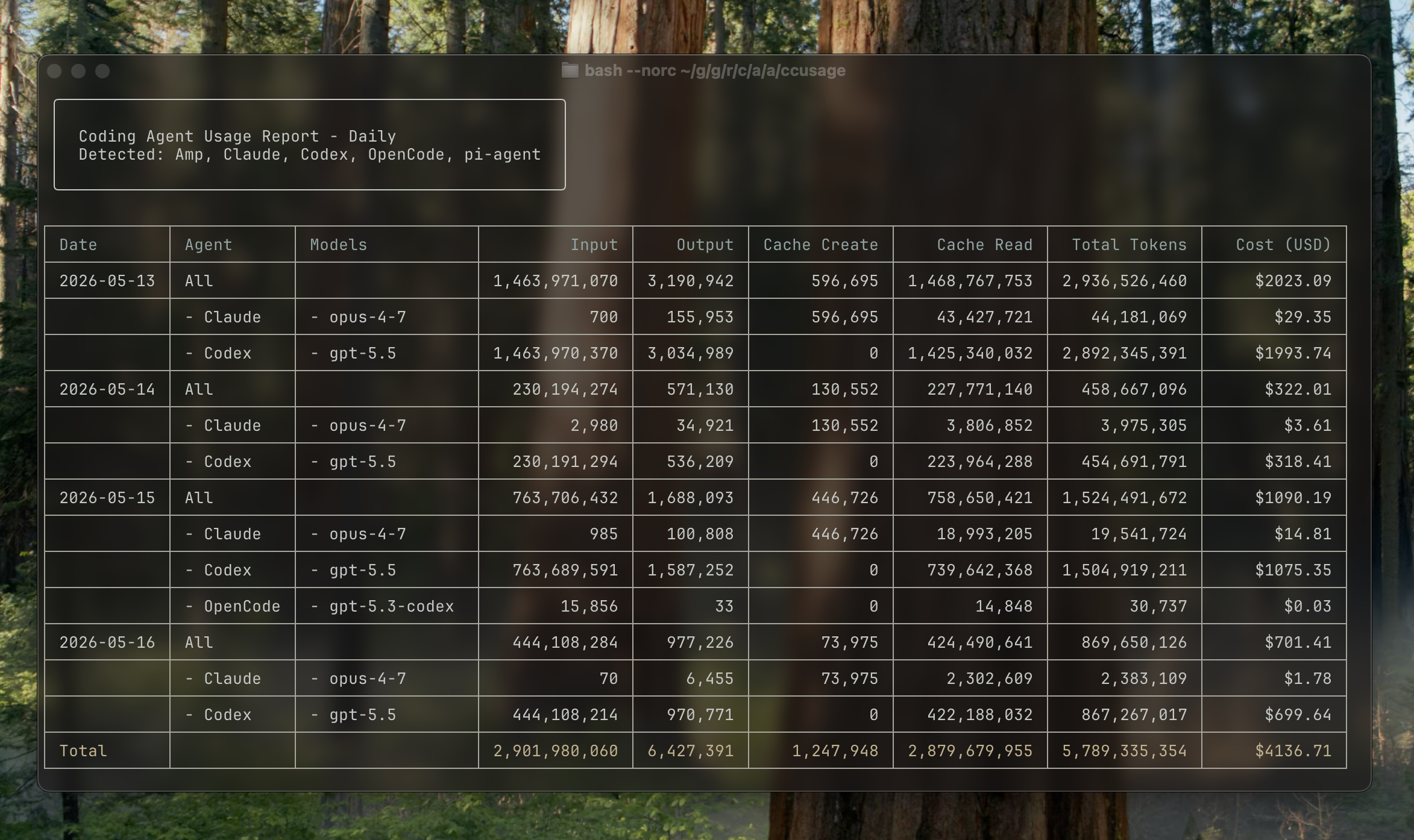
## Quick Start
```bash
npx ccusage@latest
```
## Supported Sources
ccusage reads local usage data from coding agent CLIs and turns it into daily, weekly, monthly, and session reports.
| Source | Focused command example |
| ------------------ | --------------------------- |
| Claude Code | `ccusage claude daily` |
| Codex | `ccusage codex daily` |
| OpenCode | `ccusage opencode daily` |
| Amp | `ccusage amp daily` |
| Droid | `ccusage droid daily` |
| Codebuff | `ccusage codebuff daily` |
| Hermes Agent | `ccusage hermes daily` |
| pi-agent | `ccusage pi daily` |
| Goose | `ccusage goose daily` |
| OpenClaw | `ccusage openclaw daily` |
| Kilo | `ccusage kilo daily` |
| Kimi | `ccusage kimi daily` |
| Qwen | `ccusage qwen daily` |
| GitHub Copilot CLI | `ccusage copilot daily` |
| Gemini CLI | `ccusage gemini daily` |
| Antigravity | `ccusage antigravity daily` |
| Grok Build CLI | `ccusage grok daily` |
| ZCode | `ccusage zcode daily` |
Use `ccusage daily`, `ccusage weekly`, `ccusage monthly`, or `ccusage session` to include every detected source in one report.
## Installation
### Package Runners
You can run ccusage directly without a global installation:
```bash
# npm
npx ccusage@latest
# Nix
nix run github:ccusage/ccusage -- daily
# Alternative package runners
bunx ccusage
pnpm dlx ccusage
pnpx ccusage
# PR preview builds
bunx -p https://pkg.pr.new/ccusage/ccusage@ ccusage --offline
```
> [bunx](https://bun.com/docs/pm/bunx) caches the downloaded package, so repeated runs are faster after the first launch.
## Usage
```bash
# Basic usage
bunx ccusage # Show all detected sources by day (default)
bunx ccusage daily # All detected sources by day
bunx ccusage weekly # All detected sources by week
bunx ccusage monthly # All detected sources by month
bunx ccusage session # All detected sources by session
bunx ccusage blocks # Claude Code 5-hour billing windows
bunx ccusage statusline # Claude Code status line for hooks (Beta)
# Source-focused reports and options
bunx ccusage claude daily --mode display
bunx ccusage codex daily --speed fast
bunx ccusage opencode weekly
bunx ccusage amp session
bunx ccusage droid daily
bunx ccusage codebuff daily
bunx ccusage hermes daily
bunx ccusage goose daily
bunx ccusage openclaw daily
bunx ccusage kilo daily
bunx ccusage kimi daily
bunx ccusage qwen daily
bunx ccusage copilot daily
bunx ccusage gemini daily
bunx ccusage antigravity daily
bunx ccusage grok daily
bunx ccusage zcode daily
bunx ccusage pi daily --pi-path /path/to/sessions
bunx ccusage pi daily --pi-path /path/to/sessions,/archive/pi/sessions
# Explicit unified report
bunx ccusage daily --all
bunx ccusage daily --sections daily,monthly,session --json
bunx ccusage daily --by-agent --json
# Filters and options
bunx ccusage daily --since 2026-04-25 --until 2026-05-16
bunx ccusage daily --last 1 # Today
bunx ccusage weekly --last 1 # This week
bunx ccusage monthly --last 1 # This month
bunx ccusage daily --json # JSON output
bunx ccusage daily --no-cost # Hide cost columns and JSON cost fields
bunx ccusage daily --timezone UTC # Use UTC timezone
# Project analysis
bunx ccusage claude daily --instances # Group Claude Code by project/instance
bunx ccusage claude daily --project myproject # Filter to specific Claude project
bunx ccusage claude daily --instances --project myproject --json # Combined usage
# Compact mode for screenshots/sharing
bunx ccusage --compact # Force compact table mode
bunx ccusage monthly --compact # Compact monthly report
```
## Features
- 📊 **Daily Report**: View token usage and costs aggregated by date
- 📅 **Monthly Report**: View token usage and costs aggregated by month
- 💬 **Session Report**: View usage grouped by conversation sessions
- 🤖 **Unified CLI Reports**: View Claude Code, Codex, OpenCode, Amp, Droid, Codebuff, Hermes Agent, pi-agent, Goose, OpenClaw, Kilo, Kimi, Qwen, GitHub Copilot CLI, Gemini CLI, Antigravity, Grok Build CLI, and ZCode usage from one CLI
- ⏰ **5-Hour Blocks Report**: Track usage within Claude's billing windows with active block monitoring
- 🚀 **Statusline Integration**: Compact usage display for Claude Code status bar hooks (Beta)
- 🤖 **Model Tracking**: See which models are used across supported sources
- 📊 **Model Breakdown**: View per-model cost breakdown with `--breakdown` flag
- 📅 **Date Filtering**: Filter reports by date range using `--since` and `--until`
- ⏱️ **Recent Periods**: Jump to today, this week, or this month with `--last 1` on any daily, weekly, or monthly report
- 📁 **Custom Paths**: Support for custom local data directory locations
- 🎨 **Beautiful Output**: Colorful table-formatted display with automatic responsive layout
- 📱 **Smart Tables**: Automatic compact mode for narrow terminals (< 100 characters) with essential columns
- 📸 **Compact Mode**: Use `--compact` flag to force compact table layout, perfect for screenshots and sharing
- 📋 **Enhanced Model Display**: Model names shown as bulleted lists for better readability
- 📄 **JSON Output**: Export data in structured JSON format with `--json`
- 💰 **Cost Tracking**: Shows costs in USD for each day/month/session
- 🔒 **Cost Hiding**: Remove cost columns and JSON cost fields with `--no-cost`
- 🔄 **Cache Token Support**: Tracks and displays cache creation and cache read tokens separately
- 🌐 **Offline Mode**: Use pre-cached pricing data without network connectivity with `--offline`
- 🧩 **Custom Pricing Overrides**: Override token pricing per raw model name in `ccusage.json` without rebuilding
- 🏗️ **Claude Instance Support**: Group Claude Code usage by project with `--instances` and filter by specific projects
- 🌍 **Timezone Support**: Configure timezone for date grouping with `--timezone` option
- ⚙️ **Configuration Files**: Set defaults with JSON configuration files, complete with IDE autocomplete and validation
## Documentation
Full documentation is available at **[ccusage.com](https://ccusage.com/)**
Further reading (Japanese): [how ccusage began](https://ryoppippi.com/blog/2025-05-29-zenn-6c9a8fe6629cd6-ja/)
## Development
Contributor setup
Contributor setup uses the Nix flake development environment with [nix-direnv](https://github.com/nix-community/nix-direnv) for pinned tools, and `just` for everyday development tasks. Install [Nix](https://nixos.org/) with the `nix-command` and `flakes` experimental features enabled, then let nix-direnv load the dev shell automatically when you enter the directory:
```sh
# Clone the repository
git clone https://github.com/ccusage/ccusage.git
cd ccusage
# Allow direnv to load the Nix dev shell
direnv allow
```
The dev shell provides the pinned `pnpm`, Rust toolchain, GitHub CLI, git hooks, generated local agent skills, package tooling, and project utilities from `flake.nix`. Run `pnpm install --frozen-lockfile` only when a task needs workspace `node_modules`.
Run project tasks with `just` from inside the Nix environment (`just --list` shows every recipe):
```sh
just fmt
just test
just check
```
### Nix Package
The flake exposes `ccusage` as the default package and app:
```sh
nix run github:ccusage/ccusage
nix run github:ccusage/ccusage -- codex daily --offline
nix build github:ccusage/ccusage
```
Nix builds embed the LiteLLM pricing file from the locked `litellm` flake input, so sandboxed builds do not fetch pricing at build time. To update the locked pricing snapshot:
Non-Nix Cargo builds read the same locked LiteLLM revision from `flake.lock` and fetch the pricing file from that revision at build time.
```bash
just update-litellm-pricing
```
The scheduled `update pricing` workflow runs the same update and validation, then opens a PR when the pricing snapshot changes.
## GitHub Sponsors