# screenity
**Repository Path**: mirrors_trending/screenity
## Basic Information
- **Project Name**: screenity
- **Description**: The free and privacy-friendly screen recorder with no limits 🎥
- **Primary Language**: Unknown
- **License**: GPL-3.0
- **Default Branch**: master
- **Homepage**: None
- **GVP Project**: No
## Statistics
- **Stars**: 0
- **Forks**: 0
- **Created**: 2020-11-21
- **Last Updated**: 2026-06-20
## Categories & Tags
**Categories**: Uncategorized
**Tags**: None
## README
# Screenity
> _✨ Screenity's open source work is sponsored by_
> ### Recall.ai - API for desktop recording [ ](https://www.recall.ai/product/desktop-recording-sdk?utm_source=github&utm_medium=sponsorship&utm_campaign=alyssaxuu-screenity)
>
> If you’re looking for a hosted desktop recording API, consider checking out [Recall.ai](https://www.recall.ai/product/desktop-recording-sdk?utm_source=github&utm_medium=sponsorship&utm_campaign=alyssaxuu-screenity), an API that records Zoom, Google Meet, Microsoft Teams, in-person meetings, and more.
[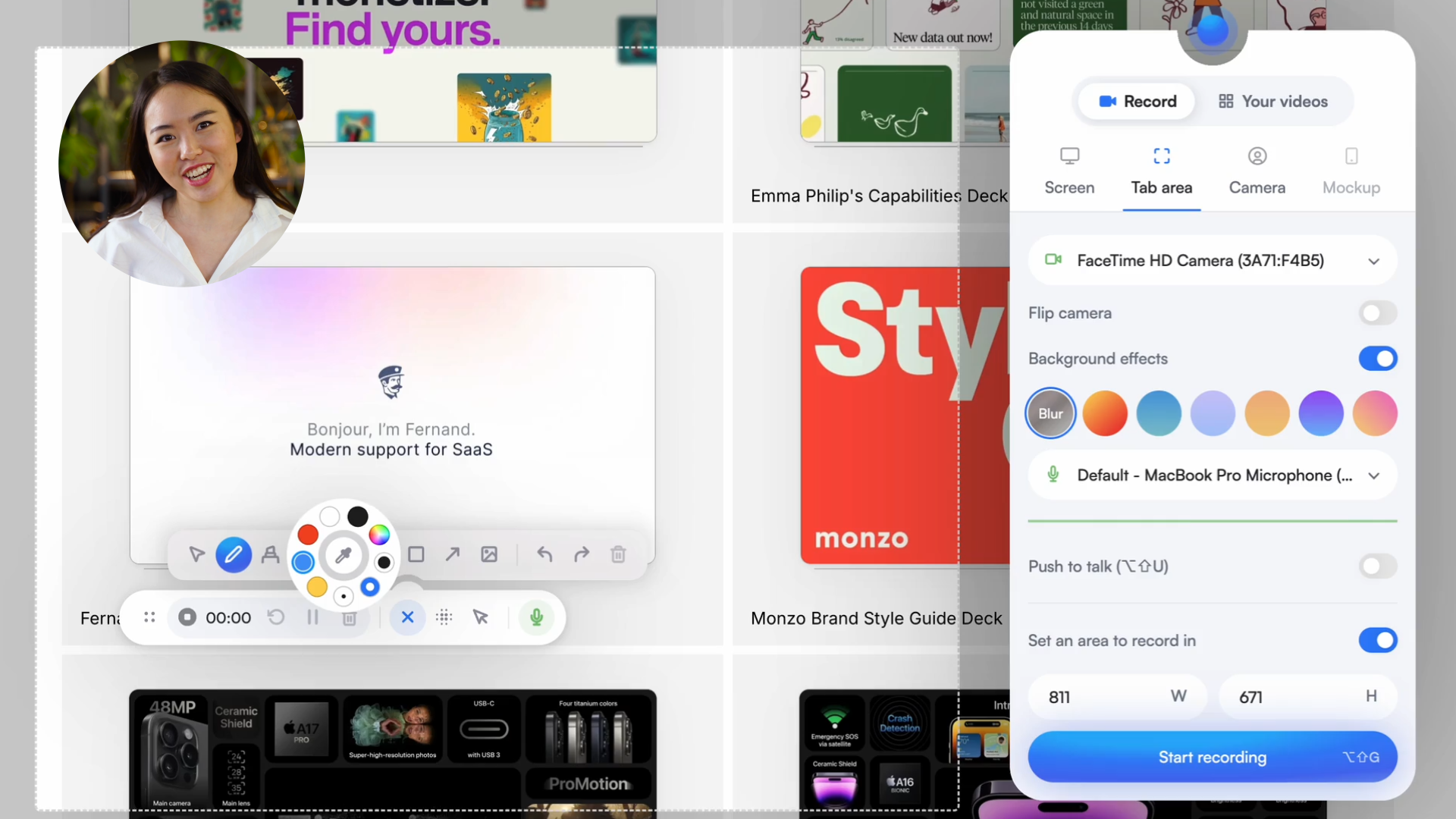](https://screenity.io)
The free and privacy-friendly screen recorder with no limits 🎥
[Get it now - it's free!](https://chrome.google.com/webstore/detail/screenity-screen-recorder/kbbdabhdfibnancpjfhlkhafgdilcnji)
Screenity is a powerful privacy-friendly screen recorder and annotation tool to make better videos for work, education, and more. You can create stunning product demos, tutorials, presentations, or share feedback with your team - all for free.
](https://www.recall.ai/product/desktop-recording-sdk?utm_source=github&utm_medium=sponsorship&utm_campaign=alyssaxuu-screenity)
>
> If you’re looking for a hosted desktop recording API, consider checking out [Recall.ai](https://www.recall.ai/product/desktop-recording-sdk?utm_source=github&utm_medium=sponsorship&utm_campaign=alyssaxuu-screenity), an API that records Zoom, Google Meet, Microsoft Teams, in-person meetings, and more.
[](https://screenity.io)
The free and privacy-friendly screen recorder with no limits 🎥
[Get it now - it's free!](https://chrome.google.com/webstore/detail/screenity-screen-recorder/kbbdabhdfibnancpjfhlkhafgdilcnji)
Screenity is a powerful privacy-friendly screen recorder and annotation tool to make better videos for work, education, and more. You can create stunning product demos, tutorials, presentations, or share feedback with your team - all for free.

 > Want to support the project (and the solo developer behind it)?
>
> Check out [**Screenity Pro**](https://screenity.io/pro): a privacy-friendly, EU-hosted platform with link sharing, multi-scene editing, zoom keyframes, captions, and more ❤️
Made by [Alyssa X](https://alyssax.com)
## Table of contents
- [Screenity](#screenity)
- [Table of contents](#table-of-contents)
- [Features](#features)
- [Self-hosting Screenity](#self-hosting-screenity)
- [Creating a development version](#creating-a-development-version)
- [Enabling Save to Google Drive](#enabling-save-to-google-drive)
- [Acknowledgements](#acknowledgements)
## Features
🎥 Make unlimited recordings of your tab, a specific area, desktop, any application, or camera
> Want to support the project (and the solo developer behind it)?
>
> Check out [**Screenity Pro**](https://screenity.io/pro): a privacy-friendly, EU-hosted platform with link sharing, multi-scene editing, zoom keyframes, captions, and more ❤️
Made by [Alyssa X](https://alyssax.com)
## Table of contents
- [Screenity](#screenity)
- [Table of contents](#table-of-contents)
- [Features](#features)
- [Self-hosting Screenity](#self-hosting-screenity)
- [Creating a development version](#creating-a-development-version)
- [Enabling Save to Google Drive](#enabling-save-to-google-drive)
- [Acknowledgements](#acknowledgements)
## Features
🎥 Make unlimited recordings of your tab, a specific area, desktop, any application, or camera
🎙️ Record your microphone or internal audio, and use features like push to talk
✏️ Annotate by drawing anywhere on the screen, adding text, arrows, shapes, and more
✨ Use AI-powered camera backgrounds or blur to enhance your recordings
🔎 Zoom in smoothly in your recordings to focus on specific areas
🪄 Blur out any sensitive content of any page to keep it private
✂️ Remove or add audio, cut, trim, or crop your recordings with a comprehensive editor
👀 Highlight your clicks and cursor, and go in spotlight mode
⏱️ Set up alarms to automatically stop your recording
💾 Export as mp4, gif, and webm, or save the video directly to Google Drive to share a link
⚙️ Set a countdown, hide parts of the UI, or move it anywhere
🔒 Only you can see your videos, we don’t collect any of your data. You can even go offline!
💙 No limits, make as many videos as you want, for as long as you want
…and much more - all for free & no sign in needed!
## Self-hosting Screenity
> 🛠️ Note: When self-hosted, the extension runs entirely in local-only mode.
> No API calls, sign-in flows, or platform features are enabled, nothing is sent anywhere.
> Some internal code paths connect to [Screenity Pro](https://screenity.io/pro), but these are only active in the official Chrome Store version.
You can run Screenity locally without having to install it from the Chrome Store. Here's how:
1. Download the latest Build.zip from the [releases page](https://github.com/alyssaxuu/screenity/releases)
2. Load the extension by pasting `chrome://extensions/` in the address bar, and [enabling developer mode](https://developer.chrome.com/docs/extensions/mv2/faq/#:~:text=You%20can%20start%20by%20turning,a%20packaged%20extension%2C%20and%20more.).
3. Drag the folder that contains the code (make sure it's a folder and not a ZIP file, so unzip first), or click on the "Load unpacked" button and locate the folder.
4. That's it, you should now be able to use Screenity locally. [Follow these instructions](#enabling-save-to-google-drive) to set up the Google Drive integration.
Self-hosting is totally fine for personal, educational, or internal use.
If you’re thinking of building a commercial product from this, feel free to [reach out](mailto:alyssa@screenity.io), I’m open to chatting 💜
## Creating a development version
> ❗️ Note that the license has changed to [GPLv3](https://github.com/alyssaxuu/screenity/blob/master/LICENSE) for the current MV3 version (Screenity version 3.0.0 and higher). Make sure to read the license and the [Terms of Service](https://screenity.io/en/terms/) regarding intellectual property.
1. Check if your [Node.js](https://nodejs.org/) version is >= **14**.
2. Clone this repository.
3. Run `npm install` to install dependencies.
4. Run `npm start` to start the local development server.
5. Open `chrome://extensions/` in your browser and [enable developer mode](https://developer.chrome.com/docs/extensions/mv2/faq/#:~:text=You%20can%20start%20by%20turning,a%20packaged%20extension%2C%20and%20more.).
6. Click **Load unpacked** and select the `build` folder.
7. The extension should now be available locally.
To rebuild after code changes, run `npm run build`.
### Enabling Save to Google Drive
To enable the Google Drive Upload (authorization consent screen) you must change the client_id in the manifest.json file with your linked extension key.
You can create it accessing [Google Cloud Console](https://console.cloud.google.com/apis/credentials) and selecting Create Credential > OAuth Client ID > Chrome App. To create a persistent extension key, you can follow the steps detailed [here](https://developer.chrome.com/docs/extensions/reference/manifest/key).
## Acknowledgements
- Thanks to [HelpKit](https://www.helpkit.so/) for sponsoring this project by hosting the [Screenity Help Center](https://help.screenity.io/).
- Thanks to [Mei Xuan](https://www.behance.net/meixuanloo) for helping with the Chinese translation of the extension.
If you need any help, or want to become a Screenity expert, you can browse articles and guides in the [help center](https://help.screenity.io). You can also submit any feedback or ideas in this [form](https://tally.so/r/3ElpXq), or contact through [this page](https://help.screenity.io/contact)