# 智询数库助手
**Repository Path**: miuu_note/smartq-db-assistant
## Basic Information
- **Project Name**: 智询数库助手
- **Description**: 智询数库助手,AI助手,数据分析
- **Primary Language**: Unknown
- **License**: Apache-2.0
- **Default Branch**: master
- **Homepage**: None
- **GVP Project**: No
## Statistics
- **Stars**: 0
- **Forks**: 0
- **Created**: 2026-08-13
- **Last Updated**: 2026-09-01
## Categories & Tags
**Categories**: Uncategorized
**Tags**: None
## README

智询数库助手
SmartQ DB Assistant
基于 Chat2DB Community 改造的 AI 数据库客户端与 SQL 工作空间。
## 智询数库助手是什么?
**智询数库助手**(英文名:**SmartQ DB Assistant**)是一款免费、本机优先的跨平台数据库客户端,支持 Windows、macOS 和 Linux。本项目在 [Chat2DB Community](https://github.com/OtterMind/Chat2DB) 基础上改造,保留 Community 离线优先与本地运行约定,并增强日常 SQL 与 AI 使用体验。
向 Chat2DB / OtterMind 团队开源 Community 版本致以诚挚感谢——没有这份基础,就没有本项目。
### 继承自 Chat2DB Community 的能力
- **30+ 种数据库** —— MySQL、PostgreSQL、Oracle、SQL Server、ClickHouse、MongoDB、Redis、SQLite、MariaDB、TiDB、Hive、DB2、Snowflake、BigQuery、Elasticsearch 等,通过插件扩展。
- **SQL 工作空间** —— SQL 编辑、补全、格式化、执行、SQL 收藏与历史记录。
- **AI 助手** —— 接入自定义 AI 模型,用自然语言生成、解释和优化 SQL。
- **数据库管理** —— 元数据浏览、表和对象管理(DDL/DML)、在线编辑数据。
- **数据导入导出**、**Dashboard 与图表**,以及支持 **[MCP 的开源 CLI](https://github.com/OtterMind/Chat2DB-CLI)**。
### 智询数库助手新增能力
- **DeepSeek 自定义模型** —— 在「自定义模型」中选择 DeepSeek,并可选用 `deepseek-v4-flash` 或 `deepseek-v4-pro`(参考 [DeepSeek 模型与价格](https://api-docs.deepseek.com/zh-cn/quick_start/pricing))。
- **列悬停 DDL** —— 结果集表头悬停时预览方言相关的 `ALTER TABLE … MODIFY COLUMN … COMMENT …` 等 DDL。
- **SQL 片段** —— 选中 SQL 后通过右键或快捷键保存命名片段,列表展示标题与保存时间。
- **DataGrip 风格快捷键** —— 默认快捷键对齐 DataGrip,设置中支持一键应用 / 清空 / 重置。
- **产品品牌** —— 应用名 **智询数库助手** / **SmartQ DB Assistant**,圆角外透明图标,以及本地化的关于页与欢迎文案。
[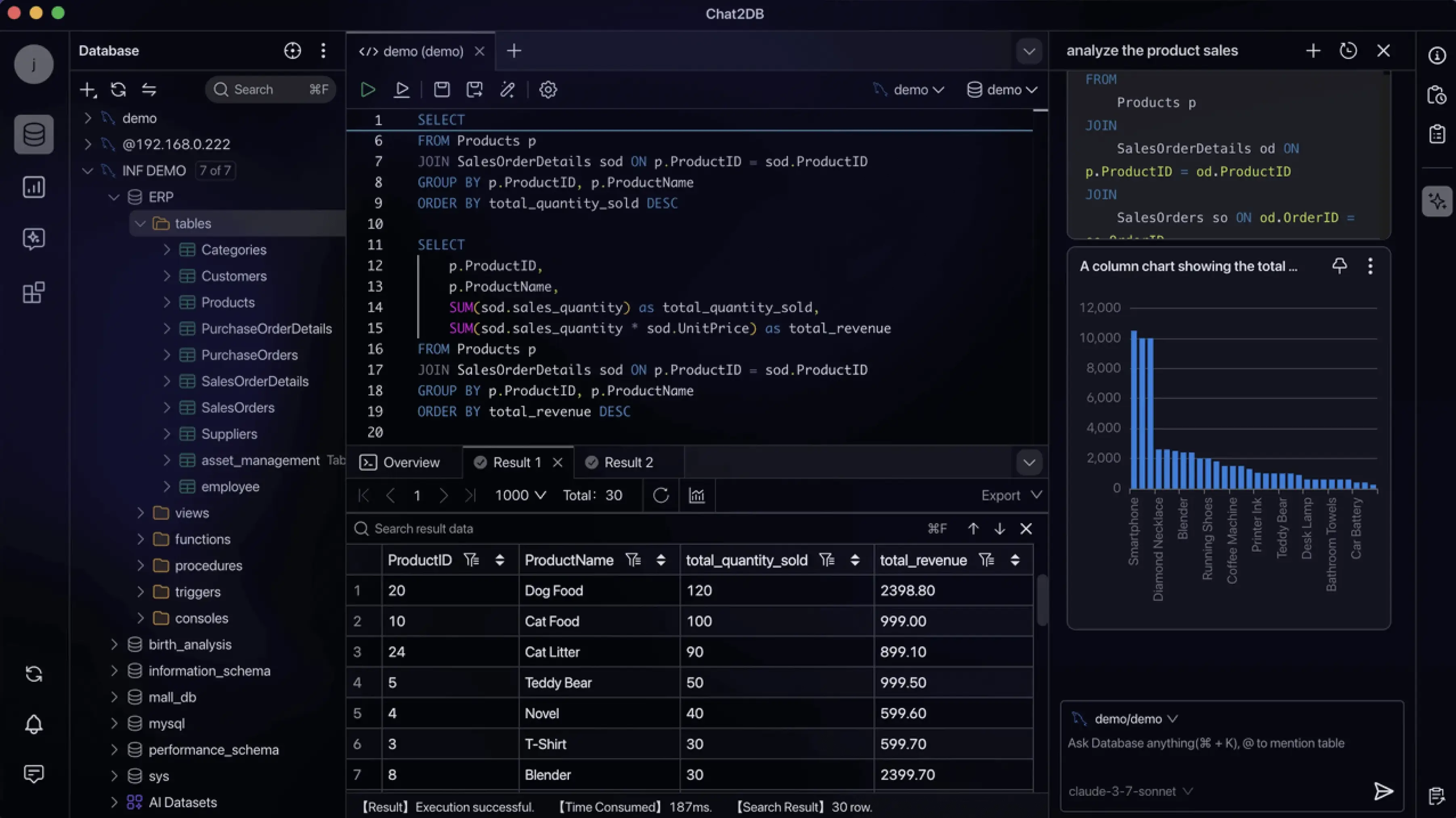](https://cdn.chat2db-ai.com/website/video/first_sceen_en.mp4)
### 产品界面
| Dashboard 与图表 | ER 图 |
| --- | --- |
|  | 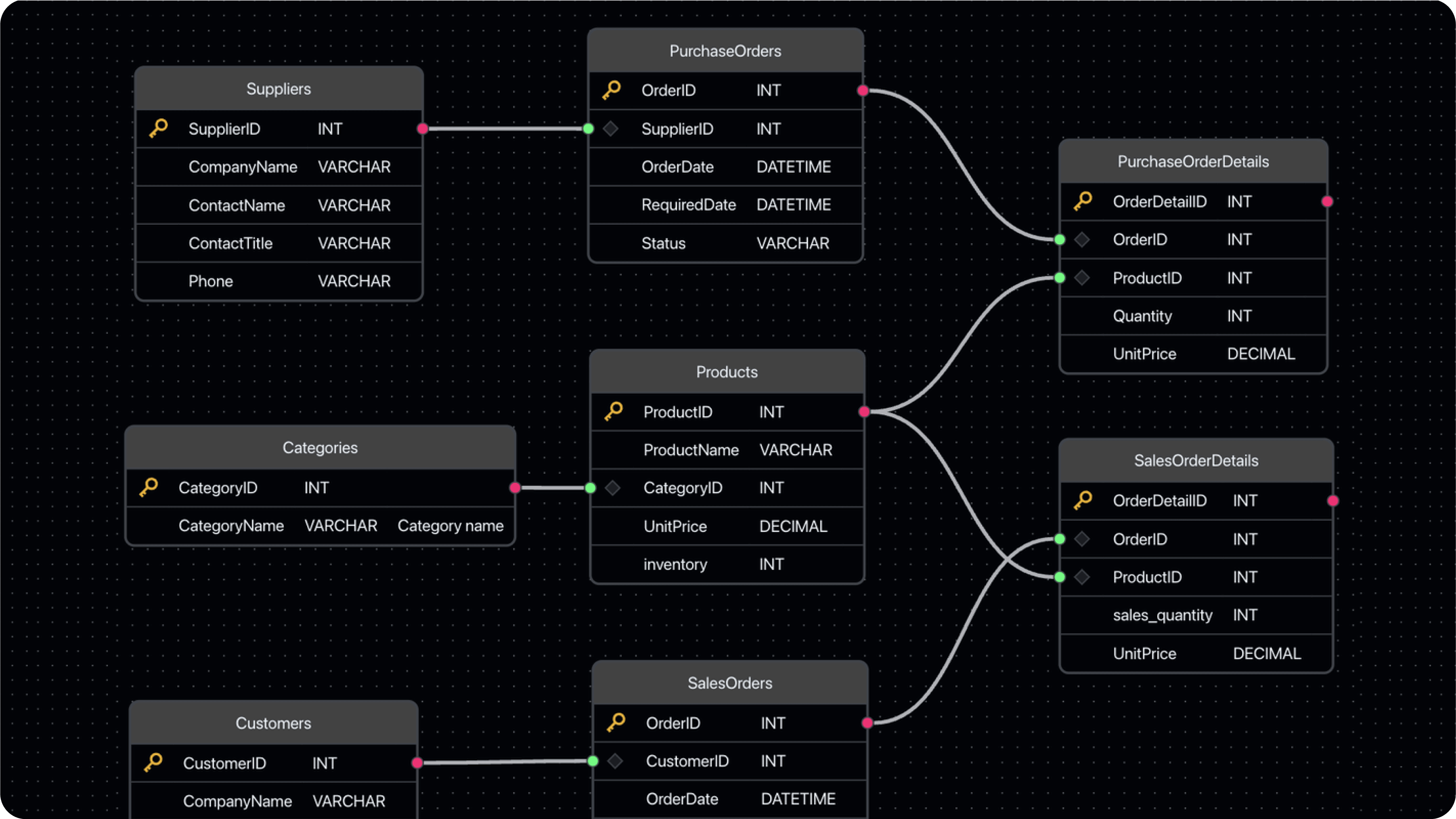 |
| 可视化数据管理 | 数据导入导出 |
| --- | --- |
| 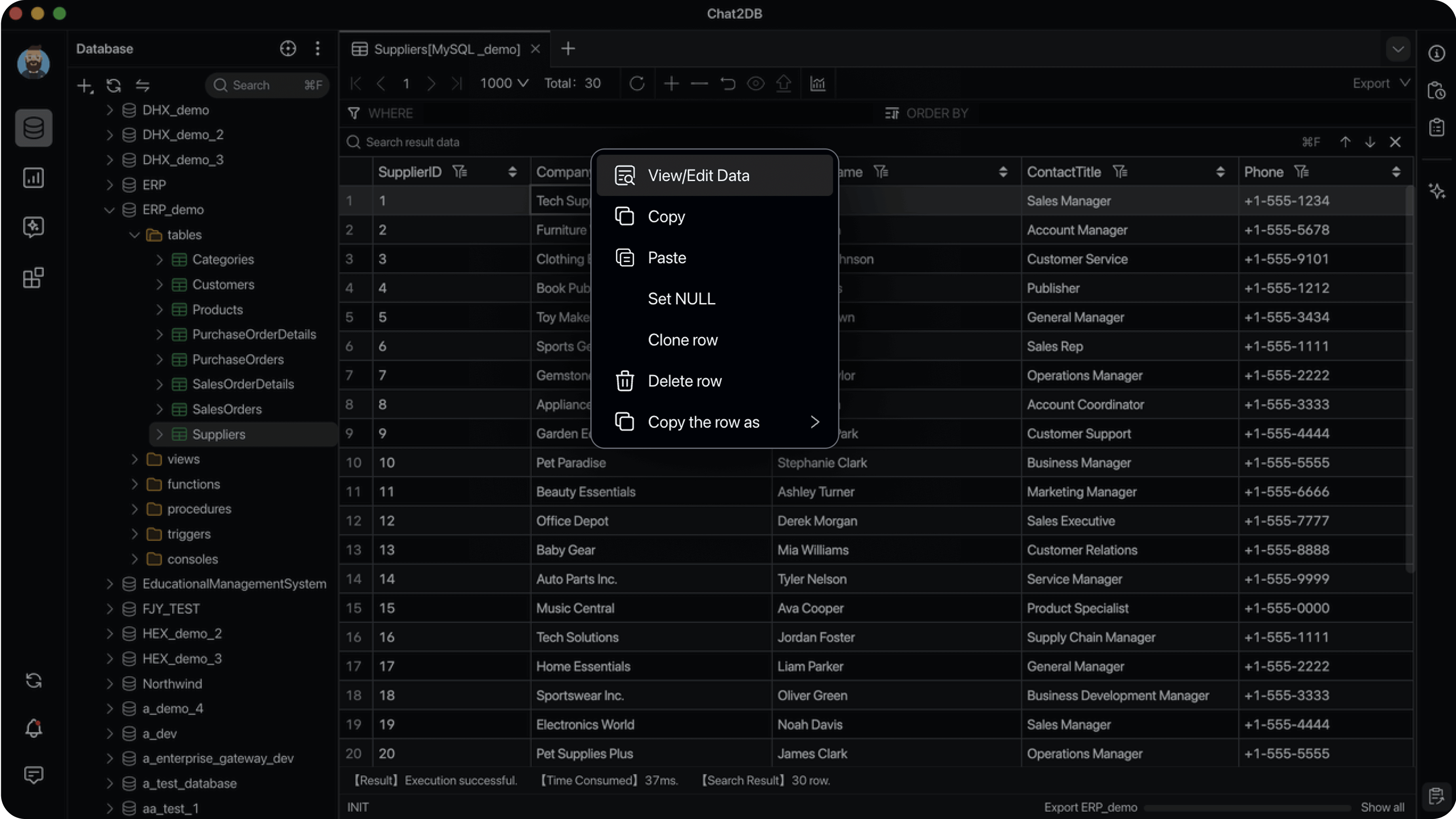 | 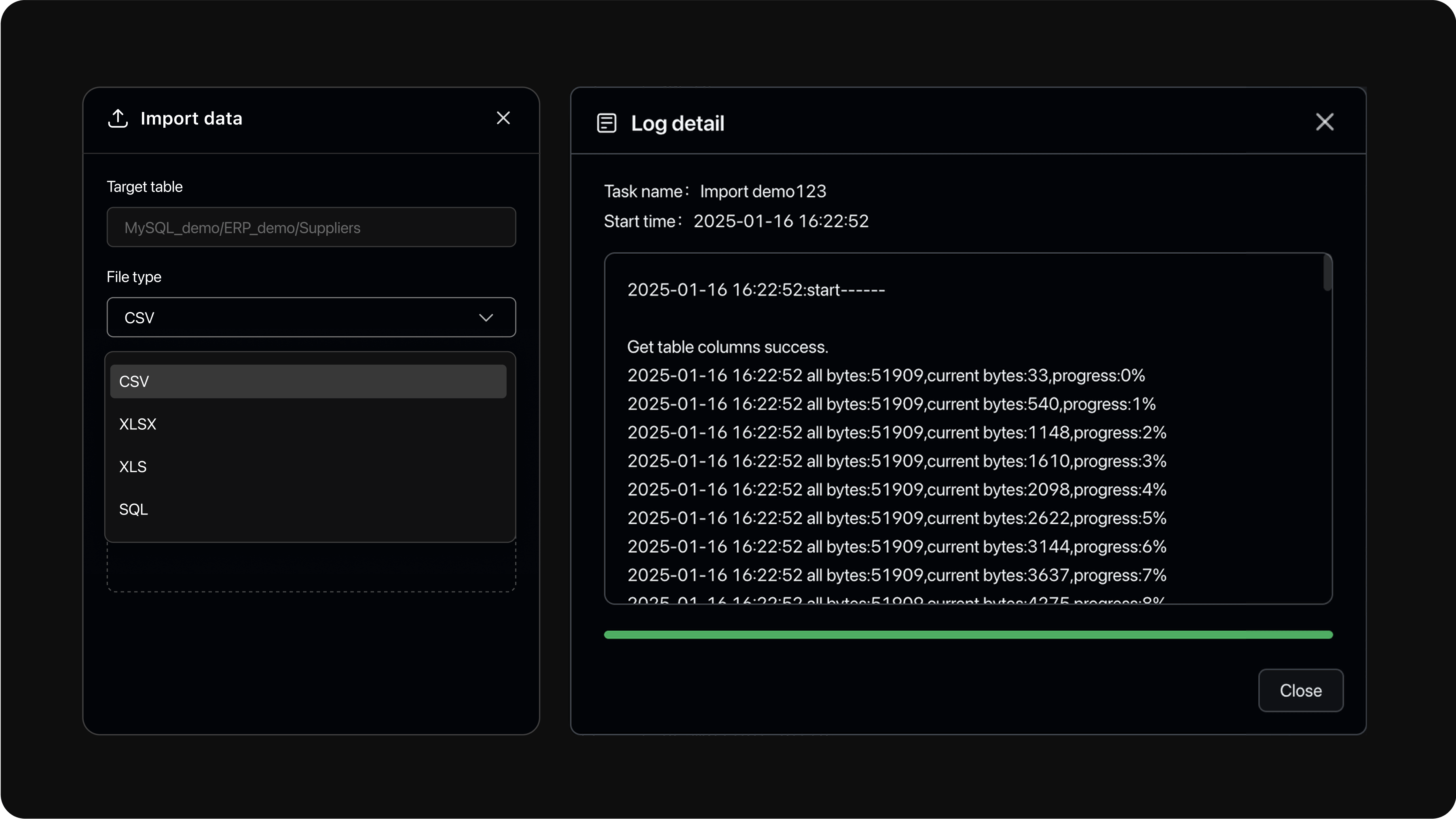 |
## 快速开始
### 方式一:桌面应用
在本仓库本地构建桌面安装包(macOS DMG 可在 Apple Silicon 上构建;Windows MSI 需在 Windows + WiX 环境构建)。安装后即可连接数据库使用,Community 模式无需云账号。
### 方式二:Docker
系统要求:Docker 19.03.0+、Docker Compose 2.0.0+(Compose V2,仅 Compose 方式需要)、CPU 2 核以上、内存 4 GiB 以上。
先创建加密密钥(用途见[加密密钥](#加密密钥)一节),再启动容器:
```bash
# 在仓库目录中首次执行一次;重复执行会复用同一把合法密钥。
git clone git@gitee.com:miuu_note/smartq-db-assistant.git && cd smartq-db-assistant
./script/security/init-community-encryption-key.sh
docker run --detach \
--name chat2db-community \
--restart unless-stopped \
--publish 127.0.0.1:10825:10825 \
--volume "$HOME/.chat2db-community-docker:/root/.chat2db-community" \
--env CHAT2DB_COMMUNITY_ENCRYPTION_KEY_FILE=/run/secrets/chat2db-community-encryption.key \
--volume "$HOME/.config/chat2db-community/encryption.key:/run/secrets/chat2db-community-encryption.key:ro" \
chat2db/chat2db:latest
```
然后在浏览器中访问 `http://localhost:10825`。
也可以使用仓库自带的 Compose 配置:
```bash
./script/security/init-community-encryption-key.sh
docker compose --file docker/docker-compose.yml up --detach
```
注意事项:
- 更新时先拉取新镜像、删除旧容器,再重新执行启动命令。容器重建时必须保留 `~/.config/chat2db-community/encryption.key`。
- `docker run` 示例将应用数据保存在 `$HOME/.chat2db-community-docker`;Compose 配置使用名为 `chat2db-community-data` 的命名卷。两处存储不会自动共享数据。
- 运行时仍使用 Community 兼容路径 `/root/.chat2db-community`,便于与上游目录布局对齐。
## 安全须知
智询数库助手延续 Chat2DB Community 的信任模型:单用户、本机优先,不提供多用户之间的权限边界。HTTP 服务必须绑定到 `127.0.0.1` 或 `::1`,不要暴露给其他用户或不可信网络。
自定义 JDBC Driver 是可执行 Java 代码,只应安装来自可信来源的驱动。导入的配置文件、压缩包、SQL 文件、数据库内容和 AI 响应仍属于不可信数据。完整信任边界和漏洞报告流程请参阅[安全策略](SECURITY.md)。
## 加密密钥
保存的数据源密码和 AI 模型 API Key 使用 AES-256-GCM 加密,每个安装实例使用独立密钥(与 Community 机制相同)。在仓库目录中执行一次以下命令创建密钥(依赖 `openssl`):
```bash
./script/security/init-community-encryption-key.sh
```
密钥会写入 `~/.config/chat2db-community/encryption.key`。**请单独备份该文件,并在升级和容器重建时保留** —— 替换或丢失密钥会导致已保存的数据源密码和 AI 模型 API Key 无法解密。Web/headless 方式启动时缺少合法密钥会直接启动失败;只有 Desktop 模式会自动创建缺失的密钥。
密钥配置参考(自定义路径、解析优先级、校验规则)
密钥必须是合法的 Base64,且解码后恰好为 32 字节。仓库提供的初始化脚本会生成标准带填充格式,即 44 个 Base64 字符并以 `=` 结尾。它是加密密钥材料,不是用户自行输入的普通口令。数据源密码和 AI API Key 使用同一把密钥,但使用不同的认证 AAD,因此一种用途的密文不能作为另一种用途解密。
如需使用自定义路径,应在初始化脚本和启动参数中指定同一路径:
```bash
./script/security/init-community-encryption-key.sh /secure/path/chat2db-community.key
java -Dloader.path=chat2db-community-server/chat2db-community-start/target/lib \
-Dchat2db.runtime.mode=community \
-Dchat2db.mode=WEB \
-Dchat2db.gui=false \
-Dchat2db.network.status=OFFLINE \
-Dchat2db.community.encryption-key-file=/secure/path/chat2db-community.key \
-Dserver.address=127.0.0.1 \
-Dserver.port=10825 \
-jar chat2db-community-server/chat2db-community-start/target/chat2db-community.jar
```
脚本的密钥路径优先级为:位置参数、`CHAT2DB_COMMUNITY_ENCRYPTION_KEY_FILE`、默认路径。会复用合法普通文件,拒绝符号链接和非普通文件,也不会覆盖非法文件。请保证密钥仅对进程属主可读。
密钥配置按以下顺序解析:
1. JVM 参数 `chat2db.community.encryption-key`(Base64 密钥内容)
2. 环境变量 `CHAT2DB_COMMUNITY_ENCRYPTION_KEY`(Base64 密钥内容)
3. JVM 参数 `chat2db.community.encryption-key-file`(密钥文件路径)
4. 环境变量 `CHAT2DB_COMMUNITY_ENCRYPTION_KEY_FILE`(密钥文件路径)
5. 默认文件 `~/.config/chat2db-community/encryption.key`
第一个已配置的值具有权威性。空值、非法 Base64、解码后不是 32 字节,或无效密钥文件都会导致启动失败,而不会回退到下一来源。推荐使用文件方式配置,避免把密钥直接放进进程参数或环境变量。
是否自动创建密钥文件取决于 `chat2db.mode`,而不是 `chat2db.gui`。Community Desktop 模式(`chat2db.runtime.mode=community` 且 `chat2db.mode=DESKTOP`)在未配置内联密钥且文件缺失时会自动创建;任何非 Desktop 模式(含普通 Web/headless 启动)都不会自动创建,必须先提供合法密钥。解析后的密钥在进程生命周期内缓存,变更配置后需要重启应用。
## 从源码构建
### 环境要求
- Java 运行时:Eclipse Temurin 17
- Node.js 18.17.0 或更高版本
- Maven 3.8 或更高版本
### 克隆仓库
```bash
git clone git@gitee.com:miuu_note/smartq-db-assistant.git
cd smartq-db-assistant
```
### 前端
请使用仓库内锁定的 Yarn lockfile。
```bash
cd chat2db-community-client
yarn install --frozen-lockfile
yarn run start:community:hot
```
### 后端
```bash
mvn -B clean package -Dmaven.test.skip=true -Dchat2db.finalName=chat2db-community \
-f chat2db-community-server/pom.xml \
-pl chat2db-community-start -am
./script/security/init-community-encryption-key.sh
java -Dloader.path=chat2db-community-server/chat2db-community-start/target/lib \
-Dchat2db.gui=false \
-Dchat2db.runtime.mode=community \
-Dchat2db.mode=WEB \
-Dchat2db.network.status=OFFLINE \
-Dchat2db.community.encryption-key-file="$HOME/.config/chat2db-community/encryption.key" \
-Dserver.address=127.0.0.1 \
-Dserver.port=10825 \
-Dspring.profiles.active=dev \
-jar chat2db-community-server/chat2db-community-start/target/chat2db-community.jar
```
### 构建本地 Docker 镜像
```bash
./docker/docker-build.sh 5.3.0 chat2db/chat2db:5.3.0
```
## 数据库指南
连接特定数据库的步骤说明:
- [BigQuery](./docs/guides/bigquery.md) —— 通过 Google Cloud 服务账号连接 Google BigQuery。
## 致谢
智询数库助手基于 **[Chat2DB Community](https://github.com/OtterMind/Chat2DB)** 改造而来。
感谢 Chat2DB / [OtterMind](https://ottermind.ai) 团队开源 Community 版本。
上游项目地址:[https://github.com/OtterMind/Chat2DB](https://github.com/OtterMind/Chat2DB)
## 许可证
本仓库继承 Chat2DB Community 的许可条款。Chat2DB Community 5.3.0 及以后版本采用本仓库 [LICENSE](./LICENSE)(基于 Apache License 2.0 并附加条件的源码可用许可)。上游说明中,5.3.0 之前的发布仍适用 Apache License 2.0。 


