# microservices-basics-spring-boot
**Repository Path**: mlc0202/microservices-basics-spring-boot
## Basic Information
- **Project Name**: microservices-basics-spring-boot
- **Description**: Basic architecture framework to create complete microservices using Spring boot and Spring cloud
- **Primary Language**: Unknown
- **License**: Apache-2.0
- **Default Branch**: master
- **Homepage**: None
- **GVP Project**: No
## Statistics
- **Stars**: 0
- **Forks**: 0
- **Created**: 2020-04-02
- **Last Updated**: 2020-12-19
## Categories & Tags
**Categories**: Uncategorized
**Tags**: None
## README
# Spring Boot MicroServices Template
This repository is an example of how to get Microservices going using Spring Boot, Spring Cloud, Spring OAuth 2 and Netflix OSS frameworks.
It also builds on distributed system concepts and tries to provide solutions for common distributed system problem using implementations for circuit breakers, consumer driven contracts etc.
# Table of Content
* [Contributors](#contributors)
* [Application Architecture](#application-architecture)
* [Using the application](#using-application)
* [Running on local m/c](#run_local_mc)
* [Running using docker](#run_docker)
* [Microservices Overview](#microservices-overview)
* [Netflix OSS](#netflix-oss)
* [Spring Boot Overview](#spring-boot-overview)
* [Spring Cloud Overview](#spring-cloud-overview)
* [Spring Cloud Config Overview](#spring-cloud-config-overview)
* [Spring Cloud Netflix Overview](#spring-cloud-netflix-overview)
* [OAuth 2.0 Overview](#oauth-2.0-overview)
* [Spring OAuth 2.0 Overview](#spring-oauth-2.0-overview)
## Contributors
* [Anil Allewar](https://www.linkedin.com/pub/anil-allewar/18/378/393)
## Application Architecture
The application consists of 9 different services
* [config server](config-server/README.md) - setup external configuration
* [webservice-registry](webservice-registry/README.md) - Eureka server
* [auth-server](auth-server/README.md) - Oauth2 authorization server
* [user-webservice](user-webservice/README.md) - User micro-service
* [task-webservice](task-webservice/README.md) - Task micro-service
* [comments-webservice](comments-webservice/README.md) - Comments for task micro-service
* [api-gateway](api-gateway/README.md) - API gateway that proxies all the micro-services
* [web-portal](web-portal/README.md) - Single Page Application that provides the UI
* [zipkin-server](zipkin-server/README.md) - Single Page Application that provides the UI
### Target Architecture

### Application Components

## Using the application
### Running on local m/c
* You can build all the projects by running the `./build-all-projects.sh` on Mac/Linux systems and then going to each individual folder and running the jars using the `java -jar build/libs/basic-.jar` command.
* Please refer to the individual readme files on instructions of how to run the services. For demo, you can run the applications in the same order listed above.
### Running using docker
* [Docker](https://www.docker.com) is an open platform for building, shipping and running distributed applications. Follow steps on the site to install docker based on your operating system.
* On the mac command prompt, navigate to the root folder of the application (spring-boot-microservices) and run the `./docker-image-all-projects.sh` command. This should build all the images and publish them to docker.
* Run the individual images as below
* Config Server
* docker run -d --name config-server -p 8888:8888 anilallewar/config-server:0.0.1
* docker logs -f config-server
* Eureka Server
* docker run -d --name registry-server -p 8761:8761 anilallewar/webservice-registry:0.0.1
* docker logs -f registry-server
* OAuth Server
* docker run -d --name auth-server -p 8899:8899 anilallewar/auth-server:0.0.1
* docker logs -f auth-server
* User Webservice
* docker run -d --name user-webservice anilallewar/user-webservice:0.0.1
* docker logs -f user-web service
* Task Webservice
* docker run -d --name task-webservice anilallewar/task-webservice:0.0.1
* docker logs -f task-webservice
* Comments Webservice
* docker run -d --name comments-webservice anilallewar/comments-webservice:0.0.1
* docker logs -f comments-webservice
* Web Portal
* docker run -d --name web-portal anilallewar/web-portal:0.0.1
* docker logs -f web-portal
* Zuul API Gateway
* docker run -d --name api-gateway -p 8080:8080 anilallewar/api-gateway:0.0.1
* docker logs -f api-gateway
* We also have a [docker-compose](https://docs.docker.com/compose/) file under `docker-orchestration/docker-compose` folder that can be used to start all the containers together using `docker-compose up -d` command on the command prompt. The docker-compose file has been updated to start the containers in the correct order. You can similarly stop the containers using `docker-compose down` command on the command prompt.
* You can also use [Rancher](http://rancher.com/) for orchestrating your containers and managing them. To setup Rancher on your local box and use it to run the containers
* We would run rancher for test using non-persistent storage. In production, you would typically run rancher using external mysql database and in High Availability (HA) configuration.
* Run the `sudo docker run -d --restart=unless-stopped -p 8080:8080 rancher/server:stable` command on the command prompt to start the latest stable rancher server.
* You can now access Rancher at http://:8080/
* You can now add hosts to the Rancher setup and then deploy our services using the docker-compose and rancher-compose files available under `docker-orchestration/rancher` folder. For more details on Rancher and how to run the orchestration, please refer to [Rancher documentation](http://rancher.com/docs/rancher/v1.6/en/).
* Access UI
You should be able to access the web ui from http://localhost:8765/.
* The API gateway would redirect to the OAuth2 login page.
* You can use the following credentials for OAuth2 client access.
* dave / secret
* anil / password
* Once you login and provide grant, The UI application provides use of other services.
The Eureka server is accessible on http://localhost:8761/
* Note:
* If the gradle wrapper doesn't work, then install gradle and run `gradle wrapper --gradle-version 3.5` before using `gradlew`.
* If you need to setup the classpath correctly, then run `./gradlew clean build eclipse` which would setup the `.classpath` accordingly.
## Microservices Overview
There is a growing adoption of Microservices in today's world. Numerous SAAS Companies are moving away from building monolithical products and instead adopting Microservices.
### Focus on Component
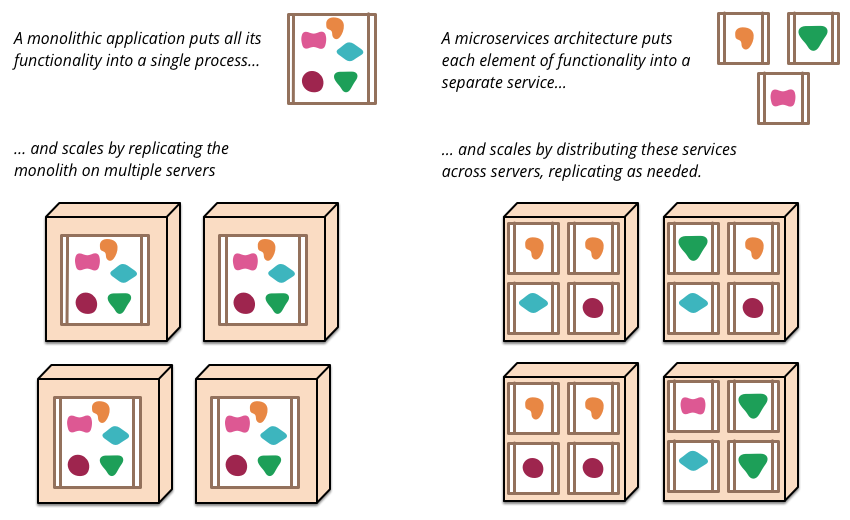
In microservices world, a web service or a microservice is the unit of component. This unit of component delivers a complete Business functionality and could rely on other microservices to fulfill the dependent functionality. These microservices are build separately and deployed separately unlike monoliths in which components can be built separately but are deployed together.
### Focus on Business Capabilities and Running a Product
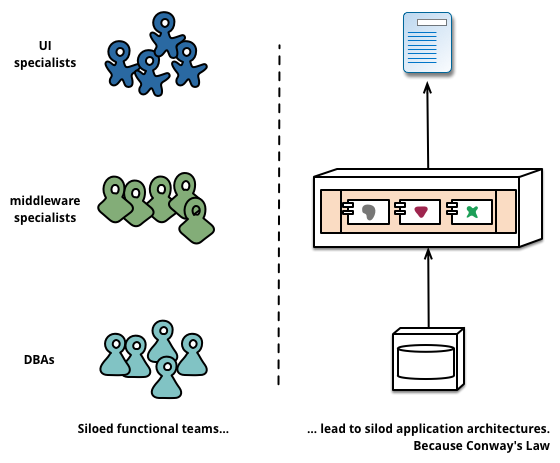
Another key aspect of microservices is that the focus of a team building a component now moves away from just delivering that component to running and maintaining that business functionality given by that component.
### Focus on Decentralized Control and Decentalized Data Management
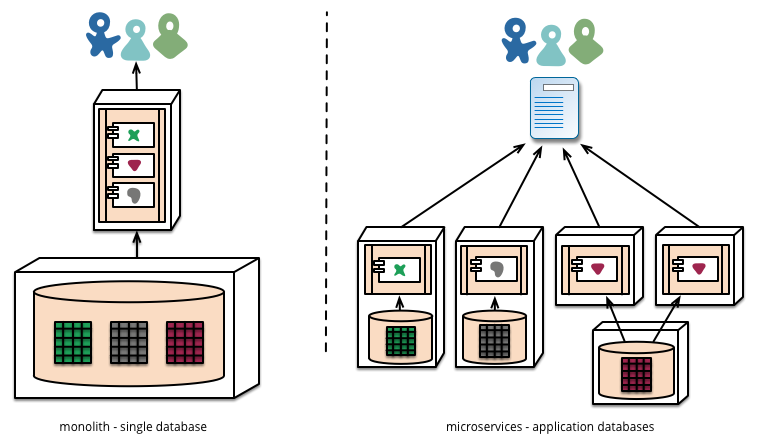
Due to the ability to build components separately and running them separately means, the notion of centralized control (governance) and data management goes away. Traditionally monoliths were built around a set of set architecture, technology and frameworks. The key architects would decide what tech was used and key DBAs would decide which and how many databases are used.
With Microservices, since each component caters to a somewhat complete business functionality, that centralized control by Key Architects and DBAs goes away. Some Components are best built using JEE and RDBMS, for some Real time Data Analytics is the key, they could use Apache Storm and Apache Kafka, for some others R is better fit, for IO Intensive systems may be Node.js and MongoDB works out. Same way User data could now go in NoSQL databases, Transaction data could go in traditional RDBMS, Recommendation systems could use Hive as their Database and so on.
**Decentralized Control**

**Decentalized Data Management**
Disclaimer - While microservices is much talked about these days, make a note Microservices is not a Free lunch. There is an effort and complexity involved to building and running them, but once you do so, the benefits are plentiful.
You can read more about Microservices here - http://martinfowler.com/articles/microservices.html#CharacteristicsOfAMicroserviceArchitecture
Image References from - http://martinfowler.com/articles/microservices.html
## Netflix OSS

Netflix is one of the pioneers behind the Microservices Architecture. Not only have they successfully run Microservices in production, but they have outsourced their battle hardened framework under Netflix Open Source Software Center initiative - http://netflix.github.io/#repo
You will find implementation of numerous of Netflix's Microservices platform pieces here. Here are few for your reference
###  Eureka
Microservices is somewhat like SOA platform, that there are numerous services. Each Service when it comes online registers itself with Service Registry. When some other service wants to communicate with a already registered service, they would ask the Eureka Server the base url for that service. Multiple instances of the same service could register with Eureka, in that case Eureka could help in doing Load Balancing.
###
Eureka
Microservices is somewhat like SOA platform, that there are numerous services. Each Service when it comes online registers itself with Service Registry. When some other service wants to communicate with a already registered service, they would ask the Eureka Server the base url for that service. Multiple instances of the same service could register with Eureka, in that case Eureka could help in doing Load Balancing.
###  Hystrix
A Microservices environment is built to sustain failures of its parts, that is few of its microservices. In order to keep the system going, Netflix introduced a concept of circuit breaker. A Circuit Breaker provides alternative behavior in case certain microservice is gone down. This way the system gracefully switches to fallback behavior until the system recovers, rather than entire system suffering the ripple effects of failed service.
###
Hystrix
A Microservices environment is built to sustain failures of its parts, that is few of its microservices. In order to keep the system going, Netflix introduced a concept of circuit breaker. A Circuit Breaker provides alternative behavior in case certain microservice is gone down. This way the system gracefully switches to fallback behavior until the system recovers, rather than entire system suffering the ripple effects of failed service.
###  Zuul
A Microservice environment needs a gateway. A Gateway is the only entity exposed to the outside world, which allows access to Microservices and does more. A Gateway could do
* API Metering
* Centralized Authentication/Authorization
* Load Balancing
* etc
*
###
Zuul
A Microservice environment needs a gateway. A Gateway is the only entity exposed to the outside world, which allows access to Microservices and does more. A Gateway could do
* API Metering
* Centralized Authentication/Authorization
* Load Balancing
* etc
*
###  Ribbon
 is a Load Balancing Client and is meant to work with Eureka Server. Ribbon talks to Eureka server and relies on it to get base url to one of the instances of microservice in question.
## Spring Boot Overview
Folks who are familiar with Spring frameworks like Spring MVC, know spring is all about Dependency Injection and Configuration Management. While Spring is an excellent framework, it still takes quite some effort to make a Spring MVC project ready for production.
Spring Boot is Spring's approach towards Convention over Configuration. Spring Boot comes with numerous Start Projects, each starter projects provides a set of conventions which ensures you have a opinionated production ready app.
To begin with Spring Boot allows you to write web services with just One or two classes. See the example below
```
build.gradle
gradle dependency --> compile("org.springframework.boot:spring-boot-starter-web")
```
```
Application.java
@SpringBootApplication
public class Application{
public static void main(String[] args){
SpringApplication.run(Application.class, args);
}
}
```
```
UserController.java
@RestController
public class UserController{
@RequestMapping("/")
public User getUser(String id) {
return new User(id,"firstName","lastName");
}
}
```
Build
```
$>./gradlew clean build
say this Generates app.jar
```
Running Application
```
$>java -jar builds/lib/app.jar
```
The idea is to have multiple projects like above, one for each microservice. Look at the following directories in this repo
* https://github.com/rohitghatol/spring-boot-microservices/tree/master/user-webservice
* https://github.com/rohitghatol/spring-boot-microservices/tree/master/task-webservice
You can read in detail about Spring Boot here - https://spring.io/guides/gs/spring-boot/
## Spring Cloud Overview
Spring Cloud provides tools for developers to quickly build some of the common patterns in distributed systems (e.g. configuration management, service discovery, circuit breakers, intelligent routing, micro-proxy, control bus, one-time tokens, global locks, leadership election, distributed sessions, cluster state)
You can read in detail about Spring Cloud here - http://projects.spring.io/spring-cloud/
## Spring Cloud Config Overview
Spring Cloud config provides support for externalizing configuration in distributed systems. With the Config Server you have a central place to manage external properties for applications across all environments.
You can read in detail about Spring Cloud config here - http://cloud.spring.io/spring-cloud-config/
## Spring Cloud Netflix Overview
Spring Cloud Netflix provides Netflix OSS integrations for Spring Boot apps through autoconfiguration and binding to the Spring Environment and other Spring programming model idioms.
You can read in detail about Spring Cloud Netflix here - http://cloud.spring.io/spring-cloud-netflix/
## OAuth 2.0 Overview
OAuth2 is an authorization framework that specifies different ways a third-party application can obtain limited access to determined set of resources.

OAuth defines four roles:
**resource owner:**
An entity capable of granting access to a protected resource. When the resource owner is a person, it is referred to as an end-user.
**resource server:**
The server hosting the protected resources, capable of accepting and responding to protected resource requests using access tokens.
**client:**
An application making protected resource requests on behalf of the resource owner and with its authorization. The term "client" does not imply any particular implementation characteristics (e.g., whether the application executes on a server, a desktop, or other devices).
**authorizationserver:**
The server issuing access tokens to the client after successfully authenticating the resource owner and obtaining authorization.
To get more details of how differnt authorizations work in OAuth2, please refer to the readme at **[auth-server](auth-server/README.md)**
## Spring OAuth2 Overview
Spring provides nice integration between Spring security and OAuth2 providers including the ability to setup your own authorization server. Please see [Spring security with OAuth2](http://projects.spring.io/spring-security-oauth/docs/oauth2.html) for more details.
Ribbon
Ribbon is a Load Balancing Client and is meant to work with Eureka Server. Ribbon talks to Eureka server and relies on it to get base url to one of the instances of microservice in question.
## Spring Boot Overview
Folks who are familiar with Spring frameworks like Spring MVC, know spring is all about Dependency Injection and Configuration Management. While Spring is an excellent framework, it still takes quite some effort to make a Spring MVC project ready for production.
Spring Boot is Spring's approach towards Convention over Configuration. Spring Boot comes with numerous Start Projects, each starter projects provides a set of conventions which ensures you have a opinionated production ready app.
To begin with Spring Boot allows you to write web services with just One or two classes. See the example below
```
build.gradle
gradle dependency --> compile("org.springframework.boot:spring-boot-starter-web")
```
```
Application.java
@SpringBootApplication
public class Application{
public static void main(String[] args){
SpringApplication.run(Application.class, args);
}
}
```
```
UserController.java
@RestController
public class UserController{
@RequestMapping("/")
public User getUser(String id) {
return new User(id,"firstName","lastName");
}
}
```
Build
```
$>./gradlew clean build
say this Generates app.jar
```
Running Application
```
$>java -jar builds/lib/app.jar
```
The idea is to have multiple projects like above, one for each microservice. Look at the following directories in this repo
* https://github.com/rohitghatol/spring-boot-microservices/tree/master/user-webservice
* https://github.com/rohitghatol/spring-boot-microservices/tree/master/task-webservice
You can read in detail about Spring Boot here - https://spring.io/guides/gs/spring-boot/
## Spring Cloud Overview
Spring Cloud provides tools for developers to quickly build some of the common patterns in distributed systems (e.g. configuration management, service discovery, circuit breakers, intelligent routing, micro-proxy, control bus, one-time tokens, global locks, leadership election, distributed sessions, cluster state)
You can read in detail about Spring Cloud here - http://projects.spring.io/spring-cloud/
## Spring Cloud Config Overview
Spring Cloud config provides support for externalizing configuration in distributed systems. With the Config Server you have a central place to manage external properties for applications across all environments.
You can read in detail about Spring Cloud config here - http://cloud.spring.io/spring-cloud-config/
## Spring Cloud Netflix Overview
Spring Cloud Netflix provides Netflix OSS integrations for Spring Boot apps through autoconfiguration and binding to the Spring Environment and other Spring programming model idioms.
You can read in detail about Spring Cloud Netflix here - http://cloud.spring.io/spring-cloud-netflix/
## OAuth 2.0 Overview
OAuth2 is an authorization framework that specifies different ways a third-party application can obtain limited access to determined set of resources.

OAuth defines four roles:
**resource owner:**
An entity capable of granting access to a protected resource. When the resource owner is a person, it is referred to as an end-user.
**resource server:**
The server hosting the protected resources, capable of accepting and responding to protected resource requests using access tokens.
**client:**
An application making protected resource requests on behalf of the resource owner and with its authorization. The term "client" does not imply any particular implementation characteristics (e.g., whether the application executes on a server, a desktop, or other devices).
**authorizationserver:**
The server issuing access tokens to the client after successfully authenticating the resource owner and obtaining authorization.
To get more details of how differnt authorizations work in OAuth2, please refer to the readme at **[auth-server](auth-server/README.md)**
## Spring OAuth2 Overview
Spring provides nice integration between Spring security and OAuth2 providers including the ability to setup your own authorization server. Please see [Spring security with OAuth2](http://projects.spring.io/spring-security-oauth/docs/oauth2.html) for more details.