
将Bilibili缓存视频合并导出为MP4,支持Android、windows(10以上)、linux、mac、ios,支持B站Android客户端缓存,支持B站Windows客户端缓存
Combine and export Bilibili cache files as MP4, support Android, Windows, Linux, Mac, iOS, support Bilibili Android client cache, support Bilibili Windows client cache
## 说明 B站的"学习视频"经常失效/下架,此软件可以将缓存的"学习视频"导出为mp4,方便我们"学习"。将B站缓存视频合并导出为mp4格式,支持Android、windows、linux、mac、ios,本项目采用 [CC BY-NC-SA 4.0](LICENSE.txt) 协议,仅用于学习技术交流,严禁任何形式的商业用途,如有侵权请联系我删除,由此给你带来困惑和不便我深感抱歉。 ## 特性 - [x] 合并(导出)B站缓存(有声音视频,仅音频) - [x] 支持B站Android客户端缓存(国内版、概念版、谷歌版、HD版) - [x] 支持B站Windows客户端缓存 - [x] 支持第三方B站客户端(bilimiao) - [x] 反人类设计 - [x] 卡 卡 卡!!! - [x] 时常崩溃 ## 前言 #### 在开始之前可以给项目一个Star吗?非常感谢,你的支持是我唯一的动力。欢迎Star和Issues! #### 我们需要你的Pr #### 项目地址: [Github地址](https://github.com/molihuan/hlbmerge_flutter) [Gitcode地址](https://gitcode.com/bigmolihuan/hlbmerge_flutter) ## 截图 (如果图片无法显示请前往国内镜像[Gitcode](https://gitcode.com/bigmolihuan/hlbmerge_flutter)) | 平台截图 | |----------------------------------------------------------------------------------------------------------------| | Android | | [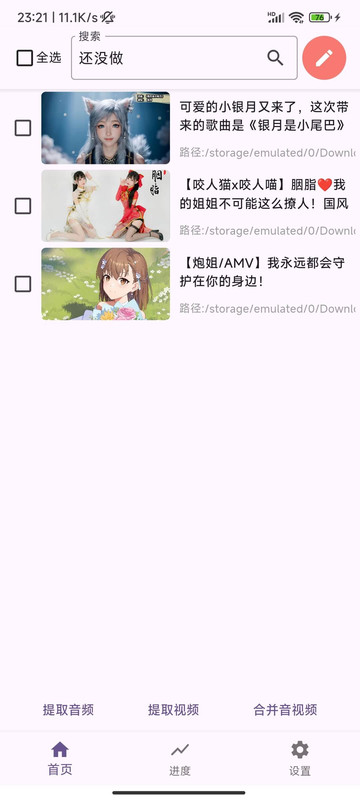](https://postimg.cc/47F8cnPB) | | Windows | | [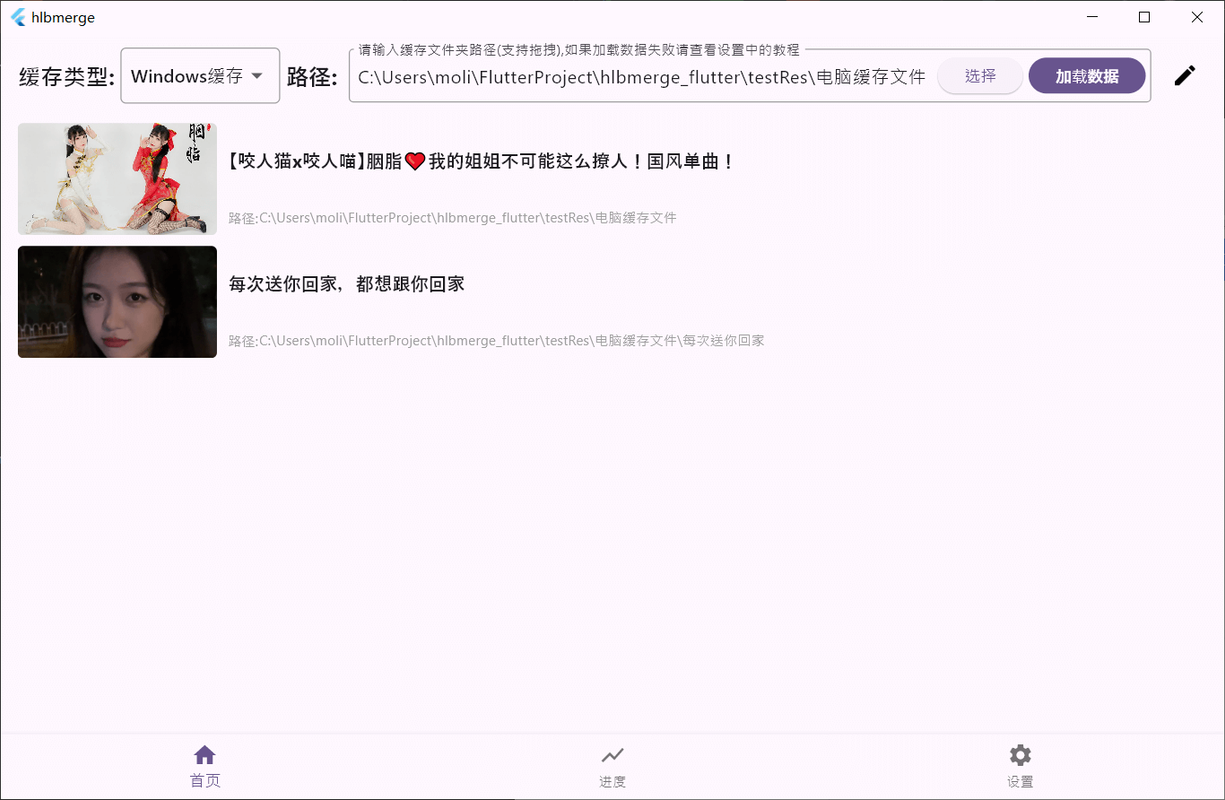](https://postimg.cc/k6hjSDsT) | | Linux | | [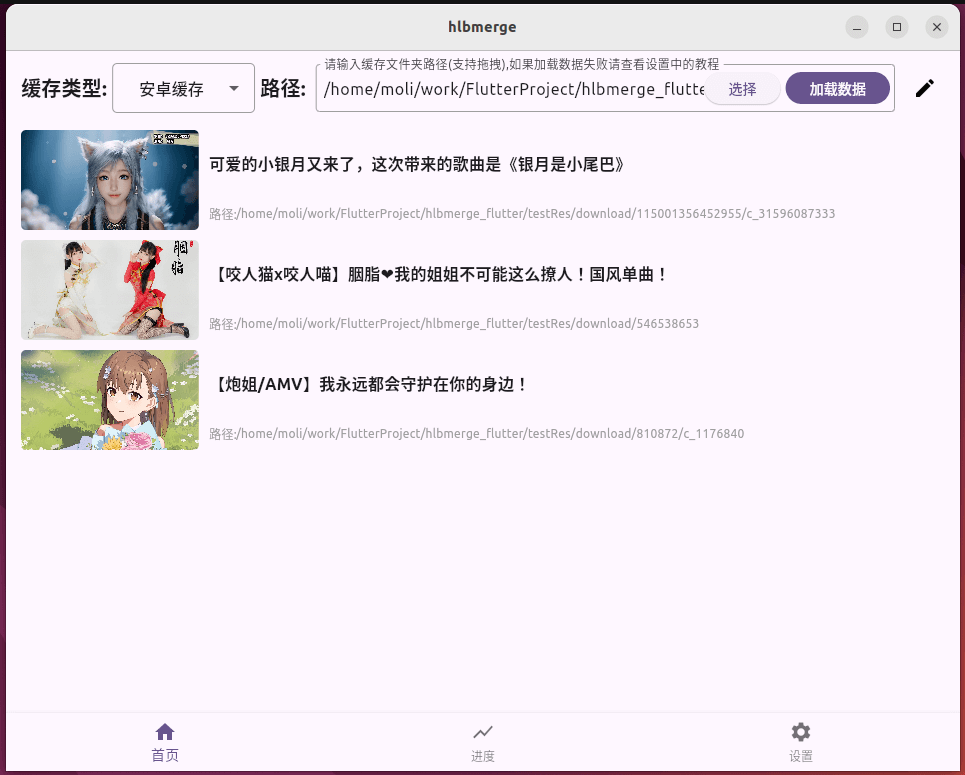](https://postimg.cc/fJk6LQzs) | | ohos | | 待补充 | | Mac | | [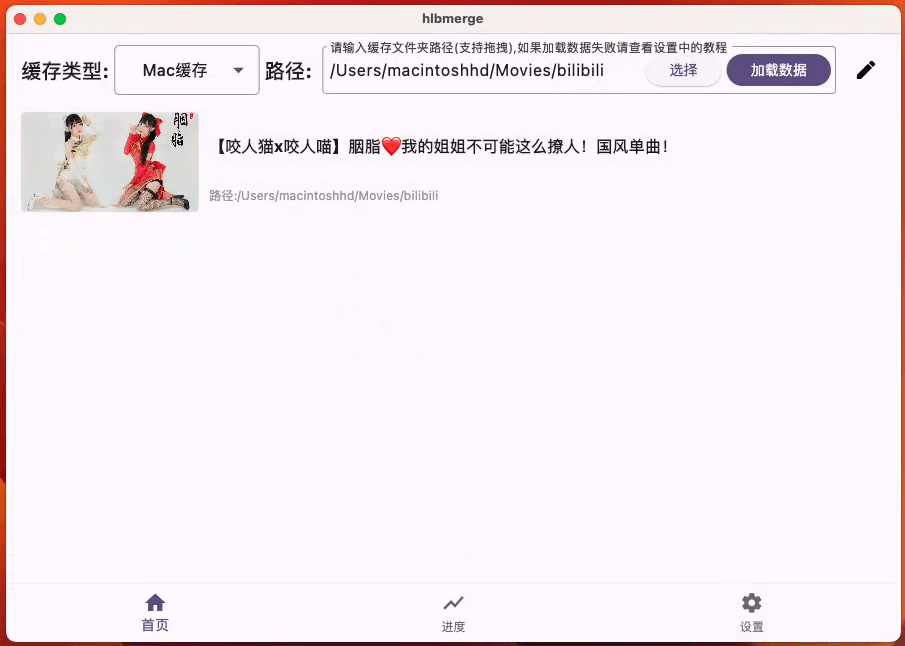](https://postimg.cc/BPDHB2PK) | | ios | | 待补充 | # 注意 ! ! ! - 此软件存放的目录不能有空格或特殊字符 - 读取缓存视频的目录不能有空格或特殊字符 - 输出目录不能有空格或特殊字符 - 视频名称或标题不能有特殊字符(虽然做了兼容处理,但可能无法兼顾到所有的特殊字符) - 它不依赖网络这个不确定的因素,它只依赖本地缓存文件,只要本地有缓存文件,那么它就可以工作(即使视频已经下架),需要和官方APP(手机版/电脑版均可)配合使用,官方APP进行缓存,它操作缓存文件进行合并导出mp4 ## 下载链接:[跳转](https://gitcode.com/bigmolihuan/hlbmerge_flutter/releases) > 为了照顾国内网友,现在releases安装包仅在国内镜像仓库上传,望理解。 ## 使用教程:[跳转](https://github.com/molihuan/hlbmerge_flutter/blob/master/res/tutorial/README.md) ## 软件原理 ### 读取用户B站客户端的本地已缓存文件,从缓存文件中解析出视频的标题,使用ffmpeg将缓存的音频和视频进行合并,生成指定标题的mp4文件。 ## 问题反馈 ##### 因为有你软件才更加完善 请使用模板反馈问题,这样可以帮助开发者快速定位和解决问题,谢谢配合,爱你萌萌哒~^o^~ ##### 反馈模板: 类别:(必填,0、优化建议。1、打开软件就闪退。2、无论什么视频合并都失败或闪退。3、合并个别视频失败或闪退。4、主页空白无法加载哔哩哔哩缓存视频。5、其他问题) 设备信息:(必填) 描述:(必填,越详细越好) 怎样触发bug:(选填) 视频链接:(选填,如果视频已经下架则把本地缓存文件打包压缩发我邮箱) ## 源码编译事项 目前使用的是的鸿蒙flutter3.27.4 常用命令: ```sh # 创建项目 # flutter create --org com.molihuan --platforms=android,ios,web,windows,macos,linux,ohos hlbmerge # windows打包 flutter build windows # macOS打包 flutter build macos # Linux打包(release有问题,没找到原因,希望有linux大佬指点一下) flutter build linux --debug # Android release 包 flutter build apk --release # Android分割 ABI 构建,减小 apk 大小 flutter build apk --release --split-per-abi # 生成图标 flutter pub run flutter_launcher_icons ``` Windows ffmpeg配置,cmake构建时会自动下载ffmpeg,但是没有做文件完整性校验,请保持网络通畅,如果构建失败请尝试flutter clean后重新构建 ```sh ffmpeg version 4.3.1 Copyright (c) 2000-2020 the FFmpeg developers built with gcc 10.2.1 (GCC) 20200726 configuration: --disable-static --enable-shared --enable-gpl --enable-version3 --enable-sdl2 --enable-fontconfig --enable-gnutls --enable-iconv --enable-libass --enable-libdav1d --enable-libbluray --enable-libfreetype --enable-libmp3lame --enable-libopencore-amrnb --enable-libopencore-amrwb --enable-libopenjpeg --enable-libopus --enable-libshine --enable-libsnappy --enable-libsoxr --enable-libsrt --enable-libtheora --enable-libtwolame --enable-libvpx --enable-libwavpack --enable-libwebp --enable-libx264 --enable-libx265 --enable-libxml2 --enable-libzimg --enable-lzma --enable-zlib --enable-gmp --enable-libvidstab --enable-libvmaf --enable-libvorbis --enable-libvo-amrwbenc --enable-libmysofa --enable-libspeex --enable-libxvid --enable-libaom --enable-libgsm --enable-librav1e --disable-w32threads --enable-libmfx --enable-ffnvcodec --enable-cuda-llvm --enable-cuvid --enable-d3d11va --enable-nvenc --enable-nvdec --enable-dxva2 --enable-avisynth --enable-libopenmpt --enable-amf libavutil 56. 51.100 / 56. 51.100 libavcodec 58. 91.100 / 58. 91.100 libavformat 58. 45.100 / 58. 45.100 libavdevice 58. 10.100 / 58. 10.100 libavfilter 7. 85.100 / 7. 85.100 libswscale 5. 7.100 / 5. 7.100 libswresample 3. 7.100 / 3. 7.100 libpostproc 55. 7.100 / 55. 7.100 Hyper fast Audio and Video encoder usage: ffmpeg [options] [[infile options] -i infile]... {[outfile options] outfile} ``` Linux ffmpeg配置,cmake构建时会自动下载ffmpeg,但是没有做文件完整性校验,请保持网络通畅,如果构建失败请尝试flutter clean后重新构建 ```sh ffmpeg version 4.3.1 Copyright (c) 2000-2020 the FFmpeg developers built with gcc 9.3.0 (crosstool-NG 1.24.0.133_b0863d8_dirty) configuration: --prefix=/home/moli/.vmr/versions/ffmpeg_versions/ffmpeg-4.3.1 --cc=/home/conda/feedstock_root/build_artifacts/ffmpeg_1609680890771/_build_env/bin/x86_64-conda-linux-gnu-cc --disable-doc --disable-openssl --enable-avresample --enable-gnutls --enable-gpl --enable-hardcoded-tables --enable-libfreetype --enable-libopenh264 --enable-libx264 --enable-pic --enable-pthreads --enable-shared --enable-static --enable-version3 --enable-zlib --enable-libmp3lame --pkg-config=/home/conda/feedstock_root/build_artifacts/ffmpeg_1609680890771/_build_env/bin/pkg-config libavutil 56. 51.100 / 56. 51.100 libavcodec 58. 91.100 / 58. 91.100 libavformat 58. 45.100 / 58. 45.100 libavdevice 58. 10.100 / 58. 10.100 libavfilter 7. 85.100 / 7. 85.100 libavresample 4. 0. 0 / 4. 0. 0 libswscale 5. 7.100 / 5. 7.100 libswresample 3. 7.100 / 3. 7.100 libpostproc 55. 7.100 / 55. 7.100 Hyper fast Audio and Video encoder ``` ## 特别鸣谢 - https://gitee.com/l2063610646/bilibili-convert - https://www.bilibili.com/video/BV1gv4y1M7yn/ - https://github.com/sk3llo/ffmpeg_kit_flutter - https://github.com/RikkaApps/Shizuku - https://github.com/10miaomiao/bili-down-out - https://zhuanlan.zhihu.com/p/704594199 教程或开源项目以及其依赖项目。 ## 📄许可证 [LICENSE] 本项目采用 [CC BY-NC-SA 4.0](LICENSE.txt) 协议 这意味着: - ❌ 不得移除原作者信息 - ❌ 不得用于商业目的 - ✅ 可以自由使用、修改和分发(发布修改版本则必须开源) - ✅ 必须使用同样的协议([CC BY-NC-SA 4.0](LICENSE.txt))