# planner
**Repository Path**: moyansen/planner
## Basic Information
- **Project Name**: planner
- **Description**: 特性: 完全重新设计的用户界面 新图标 随时随地对任务进行排序 每个项目的进度指标 提高工作效率并按“部门”组织任务 可视化活动并更好地计划日程 改进的提醒系统,现在您可以创建一个
- **Primary Language**: Vala
- **License**: GPL-3.0
- **Default Branch**: master
- **Homepage**: https://www.oschina.net/p/planner
- **GVP Project**: No
## Statistics
- **Stars**: 0
- **Forks**: 2
- **Created**: 2024-05-06
- **Last Updated**: 2024-05-06
## Categories & Tags
**Categories**: Uncategorized
**Tags**: None
## README
[](https://stopthemingmy.app)
[](http://www.gnu.org/licenses/gpl-3.0)

Planify
Never worry about forgetting things again
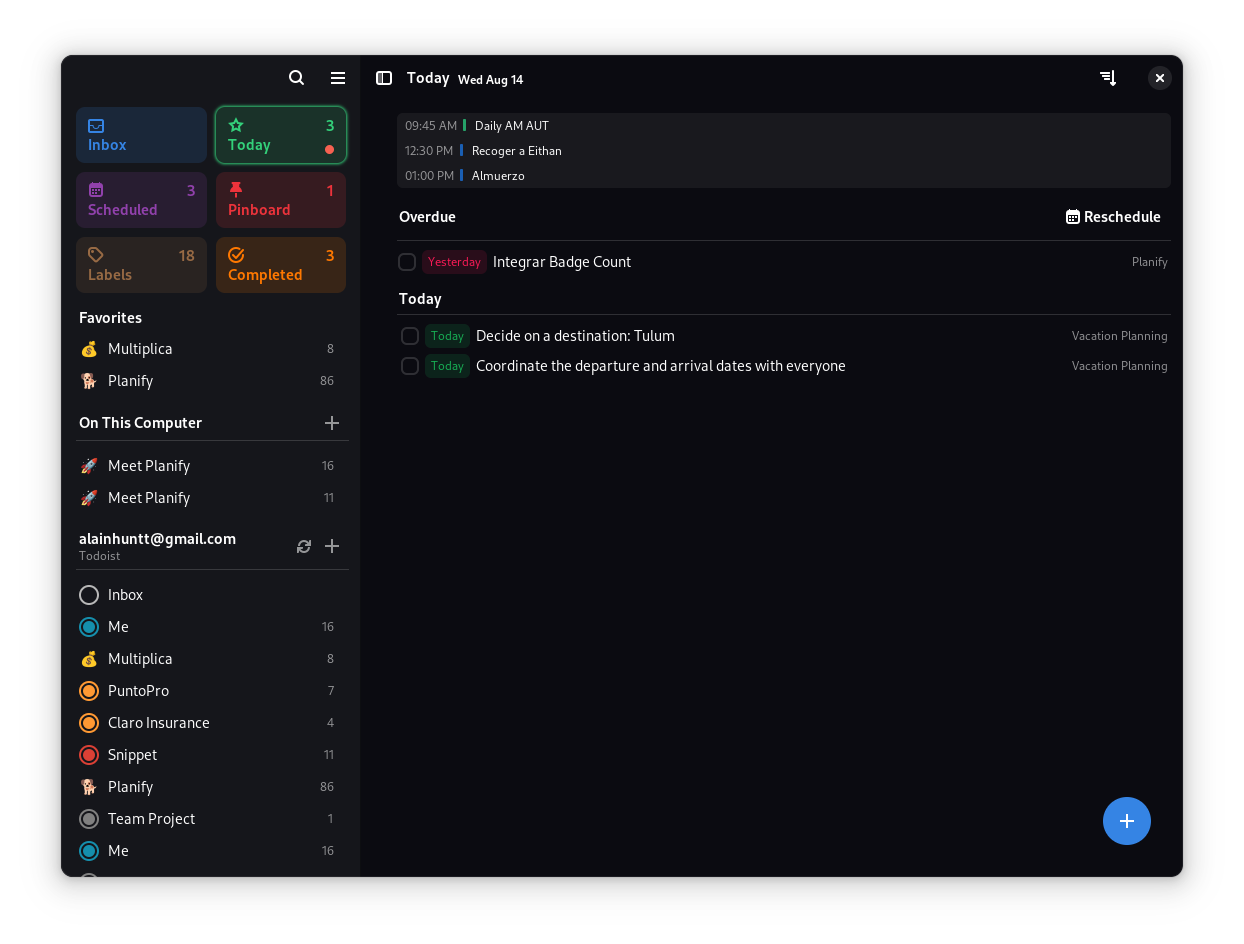
## Planify is here...
- 🚀️ Neat visual style.
- 🤚️ Drag and Order: Sort your tasks wherever you want.
- 💯️ Progress indicator for each project.
- 💪️ Be more productive and organize your tasks by 'Sections'.
- 📅️ Visualize your events and plan your day better.
- ⏲️ Reminder system, you can create one or more reminders, you decide.
- 🌙️ Better integration with the dark theme.
- 🎉️ and much more.
### ☁️ Support for Todoist:
- Synchronize your Projects, Task and Sections thanks to Todoist.
- Support for Todoist offline: Work without an internet connection and when everything is reconnected it will be synchronized.
- Planify not created by, affiliated with, or supported by Doist
### 💎️ Other features:
- ⏲️ Reminders notifications.
- 🔍️ Quick Find.
- 🌙️ Night mode.
- 🔁️ Recurring due dates.
# Install
## Official
### Release

 ## 🛠 Compile
You'll need the following dependencies:
* gtk4
* libadwaita
Run `meson build` to configure the build environment. Change to the build directory and run `ninja` to build
meson build --prefix=/usr
cd build
ninja
To install, use `ninja install`, then execute with `io.github.alainm23.planify`
sudo ninja install
io.github.alainm23.planify
## Code of conduct
Decibels follows the [GNOME Code of Conduct](https://conduct.gnome.org/).
- **Be friendly.** Use welcoming and inclusive language.
- **Be empathetic.** Be respectful of differing viewpoints and experiences.
- **Be respectful.** When we disagree, we do so in a polite and constructive
manner.
- **Be considerate.** Remember that decisions are often a difficult choice
between competing priorities.
- **Be patient and generous.** If someone asks for help it is because they need
it.
- **Try to be concise.** Read the discussion before commenting.
## Support
If you like Planify and you want to support its development, consider supporting via [Patreon](https://www.patreon.com/alainm23), [PayPal](https://www.paypal.me/alainm23) or [Liberapay](https://liberapay.com/Alain)
### Bitcoin
`
bc1qt5v3q9hgtv9uvmld53hr6j0sdlmgalnc5y2kf5uqqextp84ke26seqg2dz
`
### Bitcoin Lightning
`
foulfridge75@walletofsatoshi.com
`
Made with 💗 in Perú
## 🛠 Compile
You'll need the following dependencies:
* gtk4
* libadwaita
Run `meson build` to configure the build environment. Change to the build directory and run `ninja` to build
meson build --prefix=/usr
cd build
ninja
To install, use `ninja install`, then execute with `io.github.alainm23.planify`
sudo ninja install
io.github.alainm23.planify
## Code of conduct
Decibels follows the [GNOME Code of Conduct](https://conduct.gnome.org/).
- **Be friendly.** Use welcoming and inclusive language.
- **Be empathetic.** Be respectful of differing viewpoints and experiences.
- **Be respectful.** When we disagree, we do so in a polite and constructive
manner.
- **Be considerate.** Remember that decisions are often a difficult choice
between competing priorities.
- **Be patient and generous.** If someone asks for help it is because they need
it.
- **Try to be concise.** Read the discussion before commenting.
## Support
If you like Planify and you want to support its development, consider supporting via [Patreon](https://www.patreon.com/alainm23), [PayPal](https://www.paypal.me/alainm23) or [Liberapay](https://liberapay.com/Alain)
### Bitcoin
`
bc1qt5v3q9hgtv9uvmld53hr6j0sdlmgalnc5y2kf5uqqextp84ke26seqg2dz
`
### Bitcoin Lightning
`
foulfridge75@walletofsatoshi.com
`
Made with 💗 in Perú