# ThreatReportExtractor
**Repository Path**: mvpspace/ThreatReportExtractor
## Basic Information
- **Project Name**: ThreatReportExtractor
- **Description**: No description available
- **Primary Language**: Unknown
- **License**: GPL-3.0
- **Default Branch**: main
- **Homepage**: None
- **GVP Project**: No
## Statistics
- **Stars**: 0
- **Forks**: 0
- **Created**: 2024-05-23
- **Last Updated**: 2024-05-23
## Categories & Tags
**Categories**: Uncategorized
**Tags**: None
## README
# **ThreatReportExtractor**
[](https://github.com/jackaduma/ThreatReportExtractor)
[](https://paypal.me/jackaduma?locale.x=zh_XC)
[**中文说明**](./README.zh-CN.md) | [**English**](./README.md)
------
This code is an implementation for paper: [EXTRACTOR: Extracting Attack Behavior from Threat Reports](https://arxiv.org/abs/2104.08618), a nice work on **Threat Report Extracting** in Cyber Threat Intelligence (CTI) .
- [x] Environment
- [x] NLP submodules
- [x] NLP pretrained models
- [x] Dependent libraries
- [x] Usage
- [x] Example
- [x] Demo
- [x] Reference
------
## **EXTRACTOR: Extracting Attack Behavior from Threat Reports**
### [**Paper Page**](https://arxiv.org/abs/2104.08618)
The knowledge on attacks contained in **Cyber Threat Intelligence (CTI)** reports is very important to effectively identify and quickly respond to cyber threats. However, this knowledge is often embedded in large amounts of text, and therefore difficult to use effectively. To address this challenge, we propose a novel approach and tool called EXTRACTOR that allows precise automatic extraction of concise attack behaviors from CTI reports. EXTRACTOR makes no strong assumptions about the text and is capable of extracting attack behaviors as provenance graphs from unstructured text. We evaluate EXTRACTOR using real-world incident reports from various sources as well as reports of DARPA adversarial engagements that involve several attack campaigns on various OS platforms of Windows, Linux, and FreeBSD. Our evaluation results show that EXTRACTOR can extract concise provenance graphs from CTI reports and show that these graphs can successfully be used by cyber-analytics tools in threat-hunting.
------
## **Environment**
this code supports python3; not support python2
### **spacy**
download model for spacy
```
python -m spacy download en_core_web_lg
```
### **nltk**
download nltk when setting param crf is false
```python
import nltk
nltk.download('averaged_perceptron_tagger')
```
------
## **submodules**
```bash
cd $PROJECT_HOME
git submodule init
git submodule update
```
### **allennlp**
download pretrain model for allennlp
```bash
wget -c -t 0 https://s3-us-west-2.amazonaws.com/allennlp/models/srl-model-2018.05.25.tar.gz
mv srl-model-2018.05.25.tar.gz srl-model.tar.gz # in current dir
```
------
## **graphviz**
### installation
Linux:
```
Ubuntu: sudo apt install graphviz
Fedora: sudo yum install graphviz
Debian: sudo apt install graphviz
Redhat/Centos: sudo yum install graphviz # Stable and development rpms for Redhat Enterprise, or CentOS systems* available but are out of date.
```
Mac:
```
sudo port install graphviz
brew install graphviz
```
### graphviz generate image file
```bash
dot xxx.dot -T png -o xxx.png
```
## **Usage**
Run EXTRACTOR with
```
python3 main.py [-h] [--asterisk ASTERISK] [--crf CRF] [--rmdup RMDUP] [--elip ELIP] [--gname GNAME] [--input_file INPUT_FILE]
```
Depending on the usage, each argument helps to provide a different representation of the attack behavior.
`[--asterisk true]` creates abstraction and can be used to replace anything that is not perceived as IOC/system entity into a wild-card. This representation can be used to be searched within the audit-logs.
`[--crf true/false]` allows activating or deactivating of the co-referencing module.
`[--rmdup true/false]` enables removal of duplicate nodes-edge.
`[--elip true/false]` is to choose whether to replace ellipsis subjects using the surrounding subject or not.
`[--input_file path/filename.txt]` is to pass the text file to the application.
`[--gname graph_name]` is to specify the name output graph (two files will be created, e.g., graph.pdf and graph.dot).
## **Example**
```
python3 main.py --asterisk true --crf true --rmdup true --elip true --input_file input.txt --gname mygraph`
```
```
python main.py --asterisk false --crf false --rmdup false --input_file input.txt
```
```
python main.py --asterisk false --crf true --rmdup false --input_file input.txt
```
```
python main.py --asterisk true --crf true --rmdup true --elip true --input_file input.txt --gname mygraph
```
```
python main.py --asterisk true --crf false --rmdup true --elip true --input_file input.txt --gname mygraph
```
------
## **Reference**
1. **EXTRACTOR: Extracting Attack Behavior from Threat Reports**. [Paper](https://arxiv.org/abs/2104.08618)
2. EXTRACTOR. [Code](https://github.com/ksatvat/EXTRACTOR)
3. Passive/Active sentence Transformer. [Code](https://github.com/DanManN/pass2act)
------
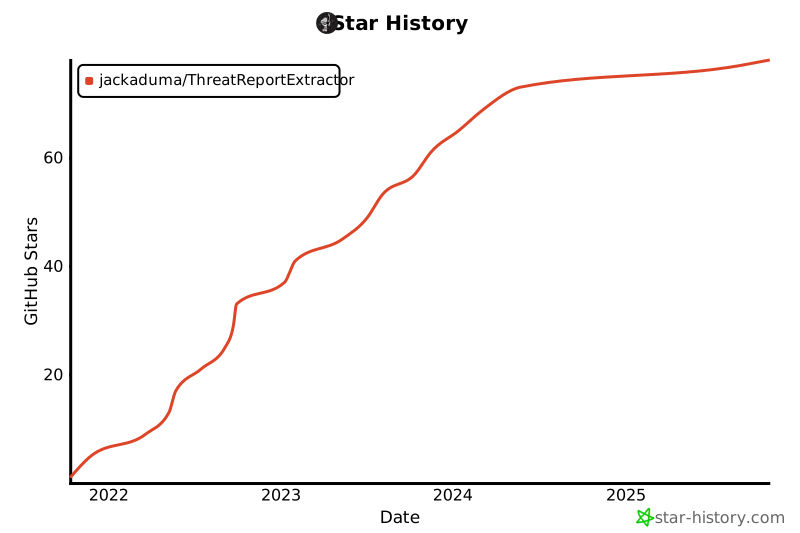
## **Star-History**
------
## Donation
If this project help you reduce time to develop, you can give me a cup of coffee :)
AliPay(支付宝)
WechatPay(微信)
------
## **License**
[GPL-3.0](LICENSE) © Kun
